instrument panel GMC YUKON XL 2007 Owner's Guide
[x] Cancel search | Manufacturer: GMC, Model Year: 2007, Model line: YUKON XL, Model: GMC YUKON XL 2007Pages: 608, PDF Size: 3.01 MB
Page 215 of 608
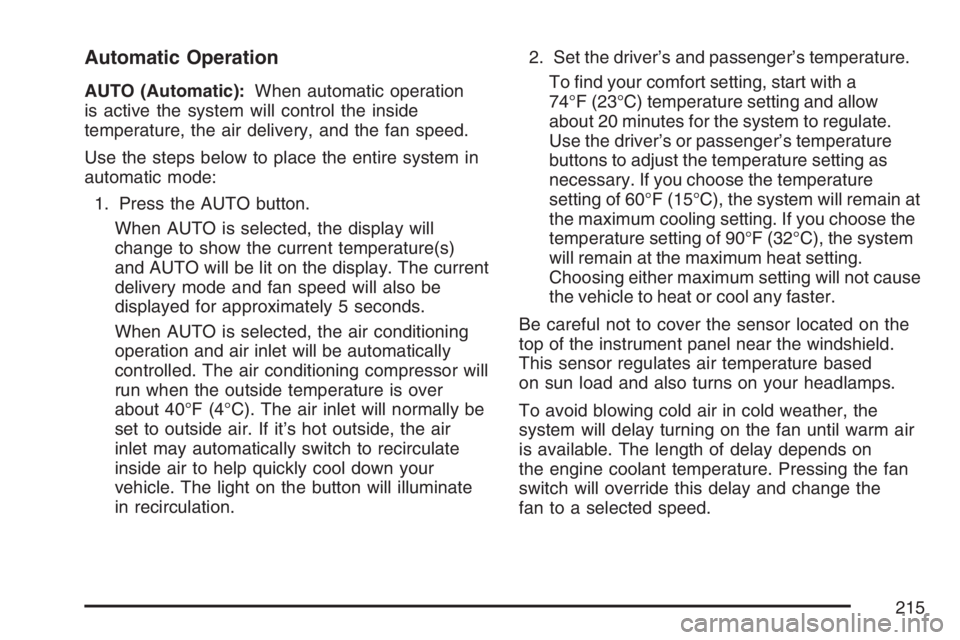
Automatic Operation
AUTO (Automatic):When automatic operation
is active the system will control the inside
temperature, the air delivery, and the fan speed.
Use the steps below to place the entire system in
automatic mode:
1. Press the AUTO button.
When AUTO is selected, the display will
change to show the current temperature(s)
and AUTO will be lit on the display. The current
delivery mode and fan speed will also be
displayed for approximately 5 seconds.
When AUTO is selected, the air conditioning
operation and air inlet will be automatically
controlled. The air conditioning compressor will
run when the outside temperature is over
about 40°F (4°C). The air inlet will normally be
set to outside air. If it’s hot outside, the air
inlet may automatically switch to recirculate
inside air to help quickly cool down your
vehicle. The light on the button will illuminate
in recirculation.2. Set the driver’s and passenger’s temperature.
To nd your comfort setting, start with a
74°F (23°C) temperature setting and allow
about 20 minutes for the system to regulate.
Use the driver’s or passenger’s temperature
buttons to adjust the temperature setting as
necessary. If you choose the temperature
setting of 60°F (15°C), the system will remain at
the maximum cooling setting. If you choose the
temperature setting of 90°F (32°C), the system
will remain at the maximum heat setting.
Choosing either maximum setting will not cause
the vehicle to heat or cool any faster.
Be careful not to cover the sensor located on the
top of the instrument panel near the windshield.
This sensor regulates air temperature based
on sun load and also turns on your headlamps.
To avoid blowing cold air in cold weather, the
system will delay turning on the fan until warm air
is available. The length of delay depends on
the engine coolant temperature. Pressing the fan
switch will override this delay and change the
fan to a selected speed.
215
Page 216 of 608
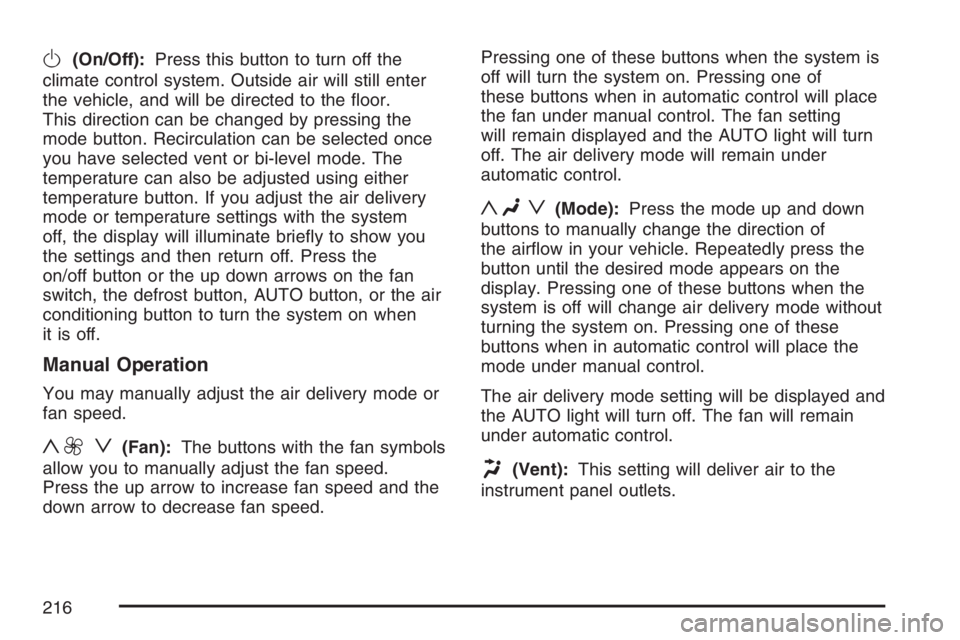
O(On/Off):Press this button to turn off the
climate control system. Outside air will still enter
the vehicle, and will be directed to the oor.
This direction can be changed by pressing the
mode button. Recirculation can be selected once
you have selected vent or bi-level mode. The
temperature can also be adjusted using either
temperature button. If you adjust the air delivery
mode or temperature settings with the system
off, the display will illuminate briey to show you
the settings and then return off. Press the
on/off button or the up down arrows on the fan
switch, the defrost button, AUTO button, or the air
conditioning button to turn the system on when
it is off.
Manual Operation
You may manually adjust the air delivery mode or
fan speed.
y9 z(Fan):The buttons with the fan symbols
allow you to manually adjust the fan speed.
Press the up arrow to increase fan speed and the
down arrow to decrease fan speed.Pressing one of these buttons when the system is
off will turn the system on. Pressing one of
these buttons when in automatic control will place
the fan under manual control. The fan setting
will remain displayed and the AUTO light will turn
off. The air delivery mode will remain under
automatic control.
yNz(Mode):Press the mode up and down
buttons to manually change the direction of
the airow in your vehicle. Repeatedly press the
button until the desired mode appears on the
display. Pressing one of these buttons when the
system is off will change air delivery mode without
turning the system on. Pressing one of these
buttons when in automatic control will place the
mode under manual control.
The air delivery mode setting will be displayed and
the AUTO light will turn off. The fan will remain
under automatic control.
H(Vent):This setting will deliver air to the
instrument panel outlets.
216
Page 217 of 608
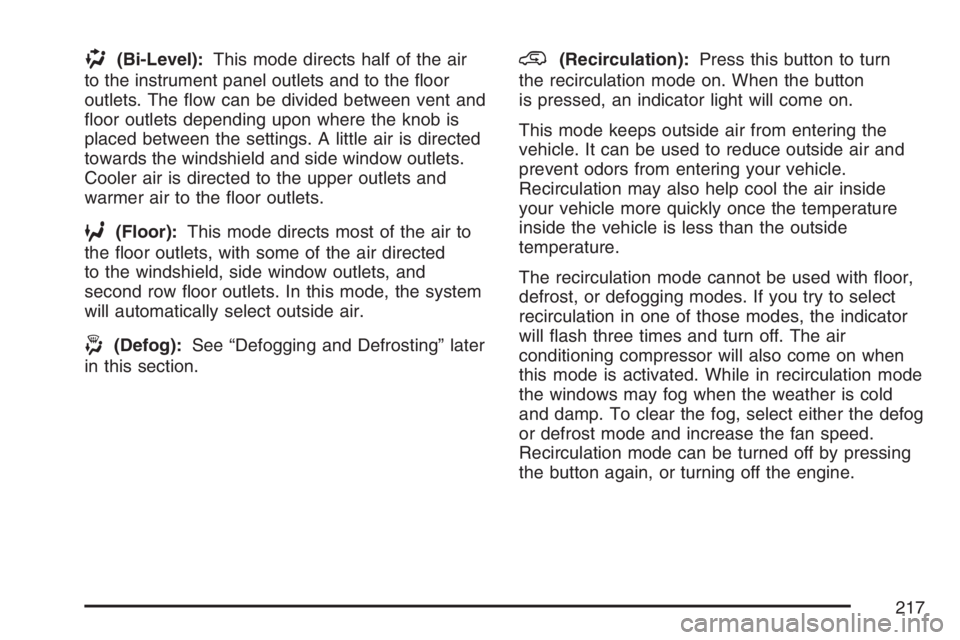
)(Bi-Level):This mode directs half of the air
to the instrument panel outlets and to the oor
outlets. The ow can be divided between vent and
oor outlets depending upon where the knob is
placed between the settings. A little air is directed
towards the windshield and side window outlets.
Cooler air is directed to the upper outlets and
warmer air to the oor outlets.
6(Floor):This mode directs most of the air to
the oor outlets, with some of the air directed
to the windshield, side window outlets, and
second row oor outlets. In this mode, the system
will automatically select outside air.
-(Defog):See “Defogging and Defrosting” later
in this section.
@(Recirculation):Press this button to turn
the recirculation mode on. When the button
is pressed, an indicator light will come on.
This mode keeps outside air from entering the
vehicle. It can be used to reduce outside air and
prevent odors from entering your vehicle.
Recirculation may also help cool the air inside
your vehicle more quickly once the temperature
inside the vehicle is less than the outside
temperature.
The recirculation mode cannot be used with oor,
defrost, or defogging modes. If you try to select
recirculation in one of those modes, the indicator
will ash three times and turn off. The air
conditioning compressor will also come on when
this mode is activated. While in recirculation mode
the windows may fog when the weather is cold
and damp. To clear the fog, select either the defog
or defrost mode and increase the fan speed.
Recirculation mode can be turned off by pressing
the button again, or turning off the engine.
217
Page 220 of 608

Outlet Adjustment
Use the air outlets located in the center and on
the side of your instrument panel to direct
the airow.
Operation Tips
Keep the hood and front air inlets free of ice,
snow, or any other obstruction (such as
leaves). The heater and defroster will work far
better, reducing the chance of fogging the
inside of your windows.
When you enter a vehicle in cold weather,
press the fan up button to the maximum
fan level before driving. This helps clear the
intake ducts of snow and moisture, and
reduces the chance of fogging the inside of
your window.
Keep the air path under the front seats clear
of objects. This helps air to circulate
throughout your vehicle.
Adding outside equipment to the front of your
vehicle, such as hood-air deectors, may affect
the performance of the heating and air
conditioning system. Check with your dealer
before adding equipment to the outside of your
vehicle.
Rear Air Conditioning and Heating
System
If your vehicle has this system, the rear controls
are three knobs located in the headliner.
The system can be controlled from the front
controls as well as the rear controls.
To turn the system on, press the AUX button on
the front climate control system, an indicator will be
lit. Pressing the AUX button the rst time will
turn the rear system on in a mimic mode. In this
mode, the airow in the rear will be approximately
the same direction, temperature, and fan speed
as the front. Pressing the AUX button again
will turn the rear system and the indicator off.
If the rear controls are adjusted, the system will
enter a rear independent mode. Airow in the rear
will then be directed according to the settings of
rear controls. The rear system can be turned off by
pressing the AUX button on the front climate
control system and the indicator will turn off.
220
Page 225 of 608
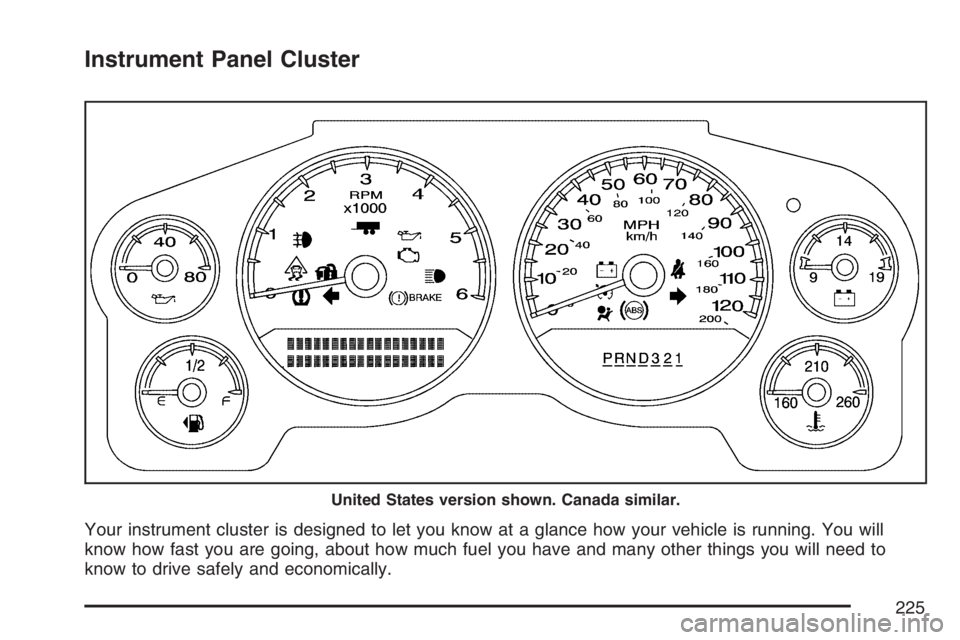
Instrument Panel Cluster
Your instrument cluster is designed to let you know at a glance how your vehicle is running. You will
know how fast you are going, about how much fuel you have and many other things you will need to
know to drive safely and economically.
United States version shown. Canada similar.
225
Page 226 of 608
Speedometer and Odometer
Your speedometer lets you see your speed in both
miles per hour (mph) and kilometers per hour
(km/h). Your odometer shows how far your vehicle
has been driven, in either miles (used in the
United States) or kilometers (used in Canada).
Trip Odometer
The trip odometer can tell you how far your vehicle
has been driven since you last set the trip odometer
to zero.
Press the reset button, located on the instrument
panel cluster next to the trip odometer display,
to toggle between the trip odometer and the
regular odometer. Holding the reset button for
approximately one second while the trip odometer
is displayed will reset it.
To display the odometer reading with the ignition
off, press the reset button.
Tachometer
Your tachometer displays the engine speed in
revolutions per minute (rpm).
Safety Belt Reminder Light
When the key is turned to RUN or START, a chime
will be provided for several seconds to remind
people to buckle their safety belts. The driver safety
belt light will also be provided and stay on for
several seconds, then it will ash for several more.
You should buckle your seat belt.
This chime and light will
be repeated if the driver
remains unbuckled
and the vehicle
is in motion.
If the driver’s belt is buckled, neither the chime nor
the light will come on.
SeePassenger Sensing System on page 100for
more information.
226
Page 227 of 608
Passenger Safety Belt Reminder
Light
Several seconds after the key is turned to RUN or
START, a chime will sound for several seconds
to remind the front passenger to buckle their safety
belt. The passenger safety belt light will also
come on and stay on for several seconds, then it
will ash for several more.
This chime and light will
be repeated if the
passenger remains
unbuckled and
the vehicle is in motion.
If the passenger’s safety belt is buckled, neither
the chime nor the light will come on.
Airbag Readiness Light
There is an airbag readiness light on the
instrument panel, which shows the airbag symbol.
The system checks the airbag’s electrical
system for malfunctions. The light tells you if there
is an electrical problem. The system check
includes the airbag sensors, the airbag modules,
the wiring and the crash sensing and diagnostic
module. For more information on the airbag
system, seeAirbag System on page 90.
This light will come on
when you start your
vehicle, and it will ash
for a few seconds.
Then the light should go
out. This means the
system is ready.
227
Page 244 of 608
Driver Information Center (DIC)
Your vehicle has a Driver Information Center (DIC).
The DIC displays information about your vehicle.
It also displays warning messages if a system
problem is detected.
All messages will appear in the DIC display
located below the tachometer in the instrument
panel cluster.
The DIC comes on when the ignition is on. After a
short delay, the DIC will display the information
that was last displayed before the engine was
turned off.
If your vehicle has DIC buttons, see “DIC
Operation and Displays (With DIC Buttons)” later
in this section andDIC Vehicle Customization
(With DIC Buttons) on page 264for the displays
available.
If your vehicle does not have DIC buttons, see
“DIC Operation and Displays (Without DIC
Buttons)” later in this section for the displays
available.
DIC Operation and Displays
(With DIC Buttons)
If your vehicle has DIC buttons, the information
below explains the operation of this system.
The DIC has different displays which can be
accessed by pressing the DIC buttons located on
the instrument panel, to the right of the steering
wheel.
The DIC displays trip, fuel, and vehicle system
information, and warning messages if a system
problem is detected.
The DIC also allows some features to be
customized. SeeDIC Vehicle Customization (With
DIC Buttons) on page 264for more information.
If your vehicle has DIC buttons, you can also use
the trip odometer reset stem to view some of
the DIC displays. See “DIC Operation and Displays
(Without DIC Buttons)” later in this section.
244
Page 251 of 608
DIC Operation and Displays
(Without DIC Buttons)
If your vehicle does not have DIC buttons, the
information below explains the operation of
this system.
The DIC has different displays which can be
accessed by pressing the trip odometer reset stem
located on the instrument panel cluster. Pressing
the trip odometer reset stem will also turn off,
or acknowledge, DIC messages.
The DIC displays trip and vehicle system
information, and warning messages if a system
problem is detected.
If your vehicle does not have DIC buttons, you can
use the trip odometer reset stem to view the
following displays: odometer, engine hours, trip
odometer, oil life, Tire Pressure Monitor (TPM)
system programming for vehicles with a TPM
system, remote keyless entry transmitter
programming, and display language.
If your vehicle has DIC buttons, you can use the
trip odometer reset stem to view the following
displays: odometer, engine hours, trip odometer,
and display language.
Trip Odometer Reset Stem Menu Items
Odometer
Press the trip odometer reset stem until
ODOMETER displays. This display shows the
distance the vehicle has been driven in either
miles (mi) or kilometers (km).
Engine Hours
To display the ENGINE HOURS, place the ignition
in LOCK or ACCESSORY, then press and hold
the trip odometer reset stem for four seconds while
viewing the ODOMETER. This display shows
the total number of hours the engine has run.
Trip Odometer
Press the trip odometer reset stem until TRIP
displays. This display shows the current distance
traveled in either miles (mi) or kilometers (km)
since the last reset for the trip odometer.
The trip odometer can be reset to zero by pressing
and holding the trip odometer reset stem while
the trip odometer is displayed.
251
Page 254 of 608
Language
This display allows you to select the language in
which the DIC messages will appear. To select
a language, do the following:
1. Press the trip odometer reset stem until
ODOMETER displays.
2. While in the ODOMETER display, press
and hold the trip odometer reset stem for
three seconds until the currently set
language displays.
3. Continue to press and hold the trip odometer
reset stem to scroll through all of the available
languages.
The available languages are ENGLISH
(default), FRANCAIS (French), and ESPANOL
(Spanish).
4. Once the desired language is displayed,
release the trip odometer reset stem to
set your choice.
DIC Warnings and Messages
Messages are displayed on the DIC to notify the
driver that the status of the vehicle has changed
and that some action may be needed by the driver
to correct the condition. Multiple messages may
appear one after another.
Some messages may not require immediate
action, but you can press any of the DIC buttons
on the instrument panel or the trip odometer
reset stem on the instrument panel cluster
to acknowledge that you received the messages
and to clear them from the display.
Some messages cannot be cleared from the DIC
display because they are more urgent. These
messages require action before they can be
cleared. You should take any messages that
appear on the display seriously and remember that
clearing the messages will only make the
messages disappear, not correct the problem.
The following are the possible messages that can
be displayed and some information about them.
254