seat memory GMC YUKON XL 2007 Owners Manual
[x] Cancel search | Manufacturer: GMC, Model Year: 2007, Model line: YUKON XL, Model: GMC YUKON XL 2007Pages: 608, PDF Size: 3.01 MB
Page 7 of 608
Front Seats......................................................9
Manual Seats.................................................9
Power Seats................................................10
Power Lumbar.............................................11
Heated Seats...............................................12
Memory Seat, Mirrors, and Pedals...............13
Reclining Seatbacks.....................................15
Head Restraints...........................................18
Center Seat.................................................19
Rear Seats.....................................................19
Heated Seats...............................................19
60/40 Split Bench Seat (Second Row).........20
Bucket Seats (Second Row).........................26
Third Row Seat............................................33
Safety Belts...................................................38
Safety Belts: They Are for Everyone............38
Questions and Answers About Safety
Belts.........................................................42
How to Wear Safety Belts Properly..............43
Driver Position.............................................44
Shoulder Belt Height Adjustment..................51Safety Belt Use During Pregnancy...............52
Right Front Passenger Position....................52
Center Front Passenger Position..................53
Rear Seat Passengers.................................54
Rear Safety Belt Comfort Guides.................56
Safety Belt Pretensioners.............................60
Safety Belt Extender....................................60
Child Restraints.............................................61
Older Children..............................................61
Infants and Young Children..........................64
Child Restraint Systems...............................68
Where to Put the Restraint...........................72
Lower Anchors and Tethers for
Children (LATCH).....................................73
Securing a Child Restraint in a
Rear Seat Position....................................83
Securing a Child Restraint in the
Center Front Seat Position........................85
Securing a Child Restraint in the
Right Front Seat Position..........................86
Section 1 Seats and Restraint Systems
7
Page 10 of 608
Power Seats
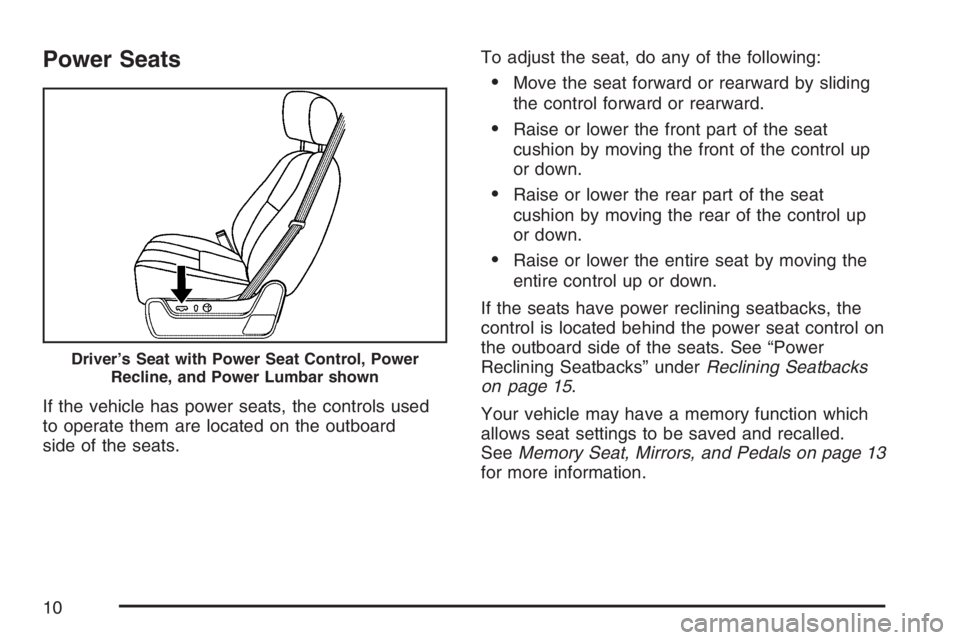
If the vehicle has power seats, the controls used
to operate them are located on the outboard
side of the seats.To adjust the seat, do any of the following:
Move the seat forward or rearward by sliding
the control forward or rearward.
Raise or lower the front part of the seat
cushion by moving the front of the control up
or down.
Raise or lower the rear part of the seat
cushion by moving the rear of the control up
or down.
Raise or lower the entire seat by moving the
entire control up or down.
If the seats have power reclining seatbacks, the
control is located behind the power seat control on
the outboard side of the seats. See “Power
Reclining Seatbacks” underReclining Seatbacks
on page 15.
Your vehicle may have a memory function which
allows seat settings to be saved and recalled.
SeeMemory Seat, Mirrors, and Pedals on page 13
for more information.
Driver’s Seat with Power Seat Control, Power
Recline, and Power Lumbar shown
10
Page 11 of 608
Power Lumbar
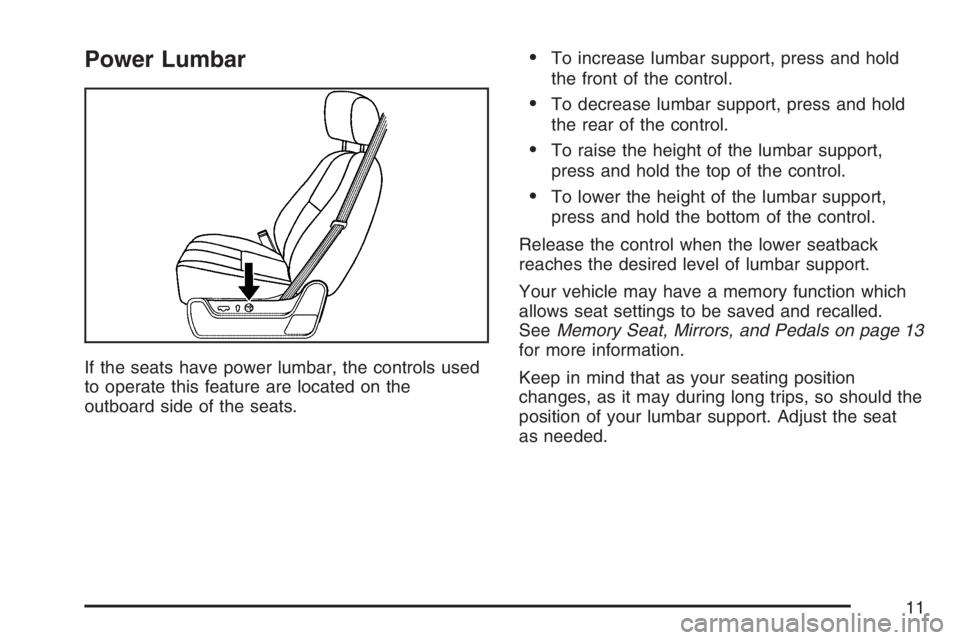
If the seats have power lumbar, the controls used
to operate this feature are located on the
outboard side of the seats.
To increase lumbar support, press and hold
the front of the control.
To decrease lumbar support, press and hold
the rear of the control.
To raise the height of the lumbar support,
press and hold the top of the control.
To lower the height of the lumbar support,
press and hold the bottom of the control.
Release the control when the lower seatback
reaches the desired level of lumbar support.
Your vehicle may have a memory function which
allows seat settings to be saved and recalled.
SeeMemory Seat, Mirrors, and Pedals on page 13
for more information.
Keep in mind that as your seating position
changes, as it may during long trips, so should the
position of your lumbar support. Adjust the seat
as needed.
11
Page 13 of 608
Memory Seat, Mirrors, and Pedals
Your vehicle may have the memory package.
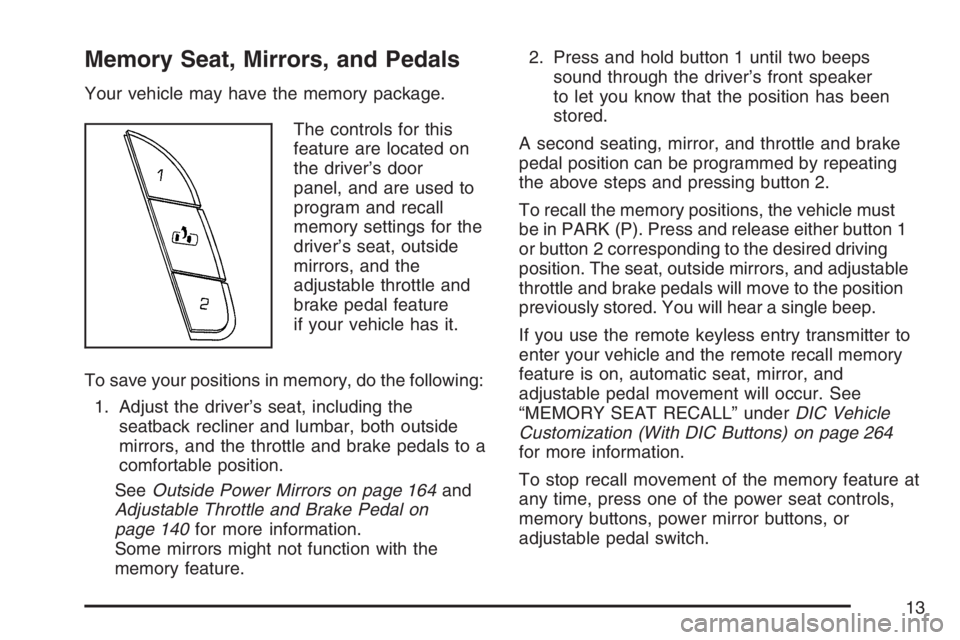
The controls for this
feature are located on
the driver’s door
panel, and are used to
program and recall
memory settings for the
driver’s seat, outside
mirrors, and the
adjustable throttle and
brake pedal feature
if your vehicle has it.
To save your positions in memory, do the following:
1. Adjust the driver’s seat, including the
seatback recliner and lumbar, both outside
mirrors, and the throttle and brake pedals to a
comfortable position.
SeeOutside Power Mirrors on page 164and
Adjustable Throttle and Brake Pedal on
page 140for more information.
Some mirrors might not function with the
memory feature.2. Press and hold button 1 until two beeps
sound through the driver’s front speaker
to let you know that the position has been
stored.
A second seating, mirror, and throttle and brake
pedal position can be programmed by repeating
the above steps and pressing button 2.
To recall the memory positions, the vehicle must
be in PARK (P). Press and release either button 1
or button 2 corresponding to the desired driving
position. The seat, outside mirrors, and adjustable
throttle and brake pedals will move to the position
previously stored. You will hear a single beep.
If you use the remote keyless entry transmitter to
enter your vehicle and the remote recall memory
feature is on, automatic seat, mirror, and
adjustable pedal movement will occur. See
“MEMORY SEAT RECALL” underDIC Vehicle
Customization (With DIC Buttons) on page 264
for more information.
To stop recall movement of the memory feature at
any time, press one of the power seat controls,
memory buttons, power mirror buttons, or
adjustable pedal switch.
13
Page 14 of 608
If something has blocked the driver’s seat and/or
the adjustable pedals while recalling a memory
position, the driver’s seat and/or the adjustable
pedals recall may stop working. If this happens,
press the appropriate control for the area that
is not recalling for two seconds, after the
obstruction is removed. Then try recalling the
memory position again by pressing the appropriate
memory button. If the memory position is still
not recalling, see your GM dealer for service.
Easy Exit Seat
The control for this feature is located on the
driver’s door panel between buttons 1 and 2.
With the vehicle in PARK (P), the exit position can
be recalled by pressing the exit button. You will
hear a single beep. The driver’s seat will
move back.If the easy exit seat feature is on in the Driver
Information Center (DIC), automatic seat
movement will occur when the key is removed
from the ignition. See “EASY EXIT SEAT” under
DIC Vehicle Customization (With DIC Buttons)
on page 264for more information.
Further programming for the memory seat feature
can be done using the DIC. You can select or
not select the following:
The automatic easy exit seat feature
The remote memory seat recall feature
For programming information, seeDIC Vehicle
Customization (With DIC Buttons) on page 264.
14
Page 140 of 608
Adjustable Throttle and Brake Pedal
If your vehicle has this feature, you can change
the position of the throttle and brake pedals.
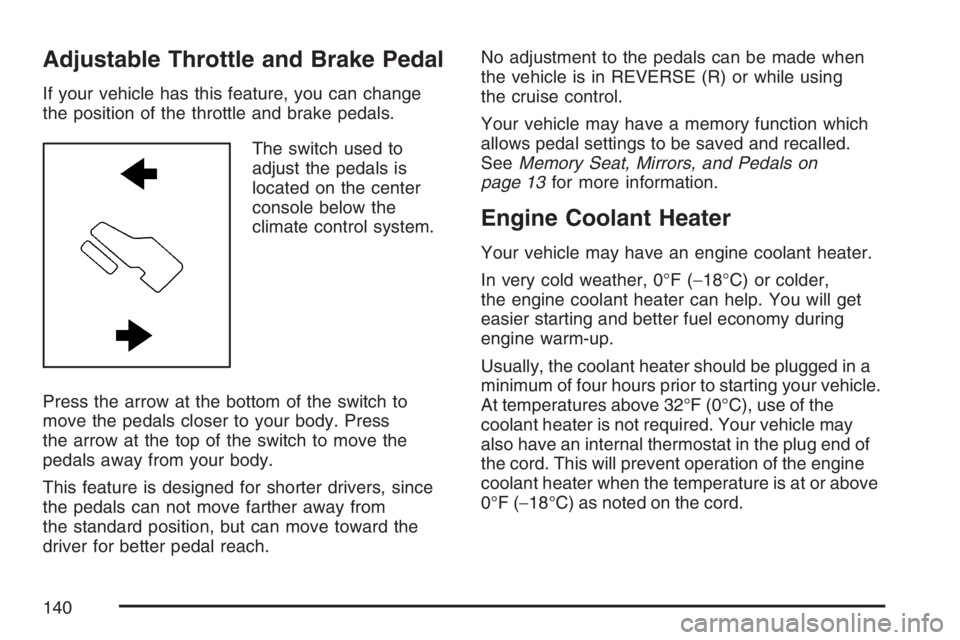
The switch used to
adjust the pedals is
located on the center
console below the
climate control system.
Press the arrow at the bottom of the switch to
move the pedals closer to your body. Press
the arrow at the top of the switch to move the
pedals away from your body.
This feature is designed for shorter drivers, since
the pedals can not move farther away from
the standard position, but can move toward the
driver for better pedal reach.No adjustment to the pedals can be made when
the vehicle is in REVERSE (R) or while using
the cruise control.
Your vehicle may have a memory function which
allows pedal settings to be saved and recalled.
SeeMemory Seat, Mirrors, and Pedals on
page 13for more information.
Engine Coolant Heater
Your vehicle may have an engine coolant heater.
In very cold weather, 0°F (−18°C) or colder,
the engine coolant heater can help. You will get
easier starting and better fuel economy during
engine warm-up.
Usually, the coolant heater should be plugged in a
minimum of four hours prior to starting your vehicle.
At temperatures above 32°F (0°C), use of the
coolant heater is not required. Your vehicle may
also have an internal thermostat in the plug end of
the cord. This will prevent operation of the engine
coolant heater when the temperature is at or above
0°F (−18°C) as noted on the cord.
140
Page 164 of 608
Your vehicle may have outside heated mirrors
which help clear them of condensation, snow, and
ice. When the rear window defogger button is
pressed, the heated mirrors are also turned on.
Only the upper glass of the mirror is heated.
The lower convex part of the mirror is not heated.
Your mirror may also have a turn signal arrow
that will ash in the direction of the turn or
lane change.
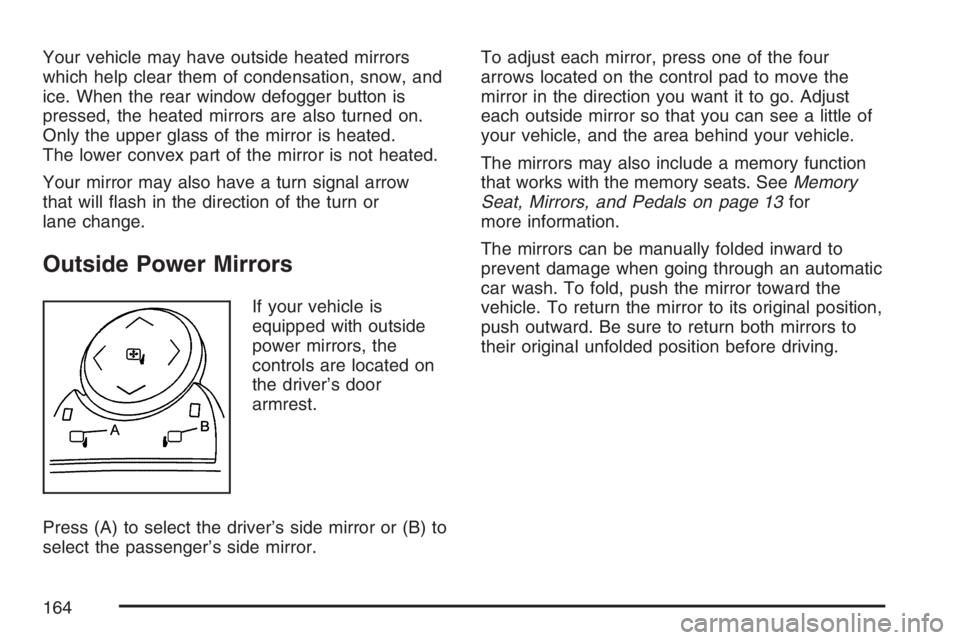
Outside Power Mirrors
If your vehicle is
equipped with outside
power mirrors, the
controls are located on
the driver’s door
armrest.
Press (A) to select the driver’s side mirror or (B) to
select the passenger’s side mirror.To adjust each mirror, press one of the four
arrows located on the control pad to move the
mirror in the direction you want it to go. Adjust
each outside mirror so that you can see a little of
your vehicle, and the area behind your vehicle.
The mirrors may also include a memory function
that works with the memory seats. SeeMemory
Seat, Mirrors, and Pedals on page 13for
more information.
The mirrors can be manually folded inward to
prevent damage when going through an automatic
car wash. To fold, push the mirror toward the
vehicle. To return the mirror to its original position,
push outward. Be sure to return both mirrors to
their original unfolded position before driving.
164
Page 166 of 608
The mirrors may also include ground illumination
lamps in the base of the mirror. These lamps
help you see the area near the base of the front
doors when it is dark out.
Outside Automatic Dimming Mirror
If your vehicle is equipped with this feature,
the driver’s outside mirror will adjust for the glare
of headlamps behind you. This feature is
controlled by the on and off settings found on the
electrochromic inside mirror.
Outside Curb View Assist Mirrors
If your vehicle has the memory package, the
outside mirrors are able to perform the curb view
assist mirror function. This feature may be useful in
allowing the driver to view the curb when parallel
parking. This feature will cause the passenger’s
and/or driver’s mirror to tilt to a preselected position
when the vehicle is in REVERSE (R).
The passenger’s and/or driver’s mirror will return to
its original position when the vehicle is shifted out of
REVERSE (R) and either a thirty second delay has
occurred, the vehicle speed is greater than 8 mph
(12 km/h), or the ignition is turned to off.This feature can be turned on or off through the
Driver Information Center (DIC). SeeDriver
Information Center (DIC) on page 244for more
information.
Outside Convex Mirror
Your passenger’s side mirror may have convex
glass. A convex mirror’s surface is curved so you
can see more from the driver’s seat.
{CAUTION:
A convex mirror can make things (like
other vehicles) look farther away than
they really are. If you cut too sharply into
the right lane, you could hit a vehicle on
your right. Check your inside mirror or
glance over your shoulder before
changing lanes.
166
Page 272 of 608
EASY EXIT SEAT
If your vehicle has this feature, it allows you to
select your preference for the automatic easy exit
seat feature. SeeMemory Seat, Mirrors, and
Pedals on page 13for more information.
Press the customization button until EASY EXIT
SEAT appears on the DIC display. Press the
set/reset button once to access the settings for this
feature. Then press the customization button to
scroll through the following settings:
OFF (default):No automatic seat exit recall
will occur.
ON:The driver’s seat will move back when the
key is removed from the ignition.
The automatic easy exit seat movement will only
occur one time after the key is removed from
the ignition. If the automatic movement has already
occurred, and you put the key back in the
ignition and remove it again, the seat will stay in
the original exit position, unless a memory
recall took place prior to removing the key again.NO CHANGE:No change will be made to this
feature. The current setting will remain.
Choose one of the available settings and press
the set/reset button while it is displayed on the DIC
to select it.
MEMORY SEAT RECALL
If your vehicle has this feature, it allows you to
select your preference for the remote memory seat
recall feature. SeeMemory Seat, Mirrors, and
Pedals on page 13for more information.
Press the customization button until MEMORY
SEAT RECALL appears on the DIC display. Press
the set/reset button once to access the settings
for this feature. Then press the customization
button to scroll through the following settings:
OFF (default):No remote memory seat recall
will occur.
ON:The driver’s seat will automatically move to
the stored driving position when the unlock button
on the remote keyless entry transmitter is pressed.
NO CHANGE:No change will be made to this
feature. The current setting will remain.
Choose one of the available settings and press
the set/reset button while it is displayed on the DIC
to select it.
272
Page 601 of 608
M
Maintenance Schedule
Additional Required Services..................... 557
At Each Fuel Fill....................................... 560
At Least Once a Month............................ 561
At Least Once a Year............................... 562
Introduction............................................... 552
Maintenance Footnotes............................. 558
Maintenance Record................................. 568
Maintenance Requirements....................... 552
Normal Maintenance Replacement Parts..... 566
Owner Checks and Services..................... 560
Recommended Fluids and Lubricants........ 564
Scheduled Maintenance............................ 555
Using........................................................ 553
Your Vehicle and the Environment............ 552
Malfunction Indicator Light............................ 236
Manual Seats................................................... 9
Memory Seat, Mirrors, and Pedals................. 13
Message
DIC Warnings and Messages.................... 254
Mirrors
Automatic Dimming Rearview with
Compass and Temperature Display........ 160
Automatic Dimming Rearview with
OnStar
®, Compass and Temperature
Display.................................................. 157Mirrors (cont.)
Outside Automatic Dimming Mirror............ 166
Outside Convex Mirror.............................. 166
Outside Curb View Assist Mirrors.............. 166
Outside Heated Mirrors............................. 167
Outside Manual Mirrors............................. 163
Outside Power Foldaway Mirrors............... 165
Outside Power Mirrors.............................. 164
Outside Trailer-Tow Mirrors....................... 163
MyGMLink.com............................................. 574
N
Navigation/Radio System,
see Navigation Manual.............................. 321
New Vehicle Break-In................................... 136
Normal Maintenance Replacement Parts...... 566
O
Odometer..................................................... 226
Odometer, Trip............................................. 226
Off-Road Driving........................................... 356
Off-Road Recovery....................................... 353
601