tire pressure GMC YUKON XL 2010 User Guide
[x] Cancel search | Manufacturer: GMC, Model Year: 2010, Model line: YUKON XL, Model: GMC YUKON XL 2010Pages: 614, PDF Size: 4.64 MB
Page 289 of 614
SERVICE STABILITRAK
If your vehicle has StabiliTrak®and this message
displays, it means there may be a problem with the
StabiliTrak system. If you see this message, try to
reset the system. Stop; turn off the engine for at least
15 seconds; then start the engine again. If this message
still comes on, it means there is a problem. You should
see your dealer for service. The vehicle is safe to drive,
however, you do not have the benefit of StabiliTrak, so
reduce your speed and drive accordingly.
SERVICE SUSPENSION SYSTEM
If your vehicle has the Autoride®suspension system,
this message displays when the Autoride suspension
system is not operating properly. Have your vehicle
serviced by your dealer.
SERVICE THEFT DETERRENT SYSTEM
This message displays when there is a problem
with the theft-deterrent system. The vehicle may or
may not restart so you may want to take the vehicle
to your dealer before turning off the engine. See
PASS-Key
®III+ Electronic Immobilizer Operationon
page 3‑25for more information.
SERVICE TIRE MONITOR SYSTEM
On vehicles with the Tire Pressure Monitor System
(TPMS), this message displays if a part on the TPMS is
not working properly. The tire pressure light also flashes
and then remains on during the same ignition cycle.
See Tire Pressure Light
on page 4‑39. Several
conditions may cause this message to appear. See Tire
Pressure Monitor Operation
on page 6‑75for more
information. If the warning comes on and stays on,
there may be a problem with the TPMS. See your
dealer.
SERVICE TRACTION CONTROL
If your vehicle has StabiliTrak, this message
displays when there is a problem with the Traction
Control System (TCS). When this message displays,
the system will not limit wheel spin. Adjust your
driving accordingly. See your dealer for service.
See StabiliTrak
®Systemon page 5‑6for more
information.
4-67
Page 291 of 614
There are several conditions that can cause this
message to appear.
.One condition is overheating, which could occur if
StabiliTrak activates continuously for an extended
period of time.
.The message also displays if the brake system
warning light is on. SeeBrake System Warning
Light on page 4‑36.
.The message could display if the stability system
takes longer than usual to complete its diagnostic
checks due to driving conditions.
.The message displays if an engine or vehicle
related problem has been detected and the vehicle
needs service. See your dealer.
.The message also displays if the vehicle is shifted
into 4LO (Two Speed Transfer Case Only).
The message turns off as soon as the conditions that
caused the message to be displayed are no longer
present.
TIGHTEN GAS CAP
This message may display along with the check engine
light on the instrument panel cluster if the vehicle's fuel
cap is not tightened properly. See Malfunction Indicator
Lamp
on page 4‑39. Reinstall the fuel cap fully.
See Filling the Tankon page 6‑11. The diagnostic
system can determine if the fuel cap has been left off or
improperly installed. A loose or missing fuel cap allows
fuel to evaporate into the atmosphere. A few driving
trips with the cap properly installed should turn this light
and message off.
TIRE LEARNING ACTIVE
On vehicles with the Tire Pressure Monitor System
(TPMS), this message displays when the TPMS is
re-learning the tire positions on your vehicle. The tire
positions must be re-learned after rotating the tires or
after replacing a tire or sensor. See Tire Inspection and
Rotation
on page 6‑78, Tire Pressure Monitor Systemon page 6‑73, and Inflation - Tire Pressureon
page 6‑72for more information.
4-69
Page 292 of 614
TIRE LOW ADD AIR TO TIRE
On vehicles with the Tire Pressure Monitor System
(TPMS), this message displays when the pressure in
one or more of the vehicle's tires needs to be checked.
This message also displays LEFT FRT (left front),
RIGHT FRT (right front), LEFT RR (left rear), or RIGHT
RR (right rear) to indicate the location of the low tire.
The low tire pressure warning light will also come on.
SeeTire Pressure Light
on page 4‑39. You can receive
more than one tire pressure message at a time. To read
the other messages that may have been sent at the
same time, press the set/reset button or the trip
odometer reset stem. If a tire pressure message
appears on the DIC, stop as soon as you can. Have
the tire pressures checked and set to those shown
on the Tire Loading Information label. See Tires
on
page 6‑63, Loading the Vehicleon page 5‑31, and
Inflation - Tire Pressureon page 6‑72. The DIC also
shows the tire pressure values. See “DIC Operation and
Displays (With DIC Buttons)” earlier in this section.
TRACTION CONTROL OFF
If your vehicle has StabiliTrak, this message displays
when the Traction Control System (TCS) is turned off.
Adjust your driving accordingly. See StabiliTrak
®
Systemon page 5‑6for more information.
TRAILER CONNECTED
On vehicles with the Integrated Trailer Brake Control
(ITBC) system, this message displays briefly when a
trailer with electric brakes is first connected to the
vehicle.
This message clears itself after several seconds.
This message also clears if you acknowledge it. After
this message clears, the TRAILER GAIN/OUTPUT
display appears in the DIC.
See“TRAILER GAIN/OUTPUT” underDIC Operation
and Displays (With DIC Buttons)
on page 4‑48or DIC
Operation and Displays (Without DIC Buttons)on
page 4‑55and “Integrated Trailer Brake Control
System” underTowing a Traileron page 5‑49for
more information.
4-70
Page 387 of 614
Hydroplaning
Hydroplaning is dangerous. Water can build up under
your vehicle's tires so they actually ride on the water.
This can happen if the road is wet enough and you are
going fast enough. When your vehicle is hydroplaning,
it has little or no contact with the road.
There is no hard and fast rule about hydroplaning.
The best advice is to slow down when the road is wet.
Other Rainy Weather Tips
Besides slowing down, other wet weather driving tips
include:
.Allow extra following distance.
.Pass with caution.
.Keep windshield wiping equipment in good shape.
.Keep the windshield washer fluid reservoir filled.
.Have good tires with proper tread depth. SeeTireson page 6‑63.
.Turn off cruise control.
Before Leaving on a Long Trip
To prepare your vehicle for a long trip, consider having
it serviced by your dealer before departing.
Things to check on your own include:
.Windshield Washer Fluid:Reservoir full? Windows
clean —inside and outside?
.Wiper Blades: In good shape?
.Fuel, Engine Oil, Other Fluids: All levels checked?
.Lamps:Do they all work and are lenses clean?
.Tires:Are treads good? Are tires inflated to
recommended pressure?
.Weather and Maps: Safe to travel? Have
up-to-date maps?
5-25
Page 394 of 614
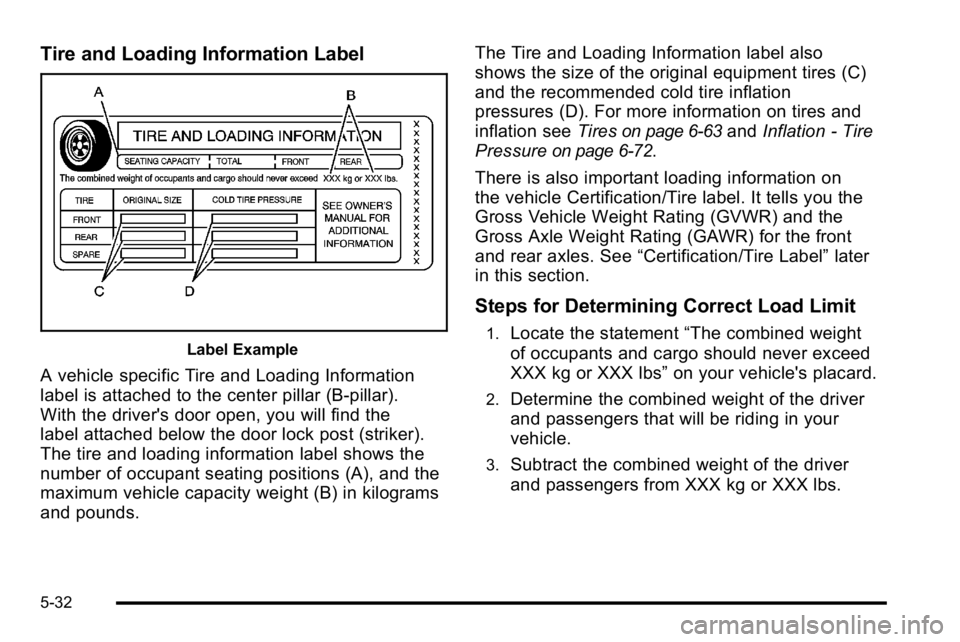
Tire and Loading Information Label
Label Example
A vehicle specific Tire and Loading Information
label is attached to the center pillar (B-pillar).
With the driver's door open, you will find the
label attached below the door lock post (striker).
The tire and loading information label shows the
number of occupant seating positions (A), and the
maximum vehicle capacity weight (B) in kilograms
and pounds.The Tire and Loading Information label also
shows the size of the original equipment tires (C)
and the recommended cold tire inflation
pressures (D). For more information on tires and
inflation see
Tires
on page 6‑63andInflation - Tire
Pressure
on page 6‑72.
There is also important loading information on
the vehicle Certification/Tire label. It tells you the
Gross Vehicle Weight Rating (GVWR) and the
Gross Axle Weight Rating (GAWR) for the front
and rear axles. See “Certification/Tire Label” later
in this section.
Steps for Determining Correct Load Limit
1.Locate the statement “The combined weight
of occupants and cargo should never exceed
XXX kg or XXX lbs” on your vehicle's placard.
2.Determine the combined weight of the driver
and passengers that will be riding in your
vehicle.
3.Subtract the combined weight of the driver
and passengers from XXX kg or XXX lbs.
5-32
Page 397 of 614
Refer to your vehicle's tire and loading information
label for specific information about your
vehicle's capacity weight and seating positions.
The combined weight of the driver, passengers,
and cargo should never exceed your vehicle's
capacity weight.
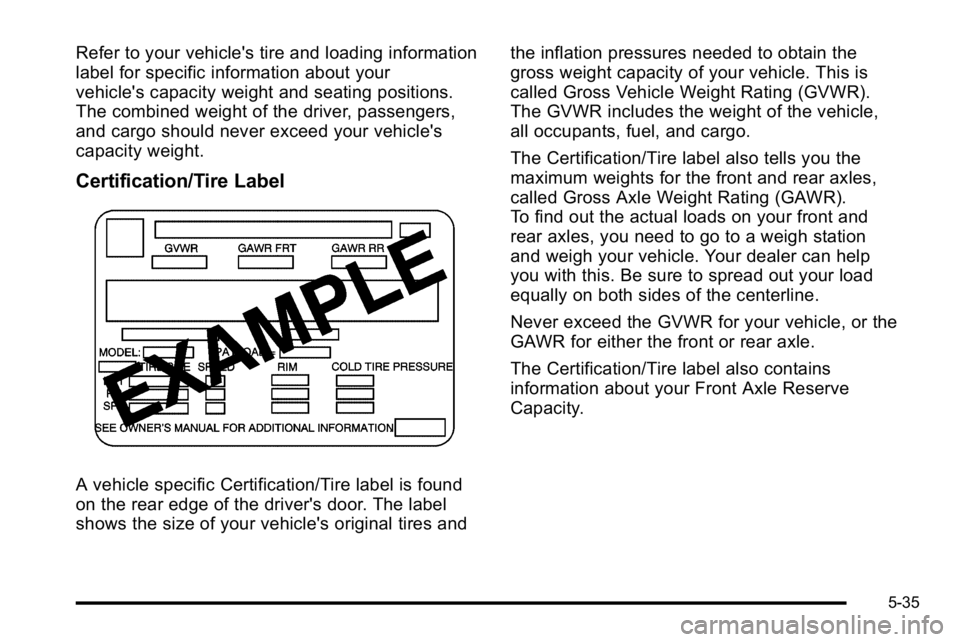
Certification/Tire Label
A vehicle specific Certification/Tire label is found
on the rear edge of the driver's door. The label
shows the size of your vehicle's original tires andthe inflation pressures needed to obtain the
gross weight capacity of your vehicle. This is
called Gross Vehicle Weight Rating (GVWR).
The GVWR includes the weight of the vehicle,
all occupants, fuel, and cargo.
The Certification/Tire label also tells you the
maximum weights for the front and rear axles,
called Gross Axle Weight Rating (GAWR).
To find out the actual loads on your front and
rear axles, you need to go to a weigh station
and weigh your vehicle. Your dealer can help
you with this. Be sure to spread out your load
equally on both sides of the centerline.
Never exceed the GVWR for your vehicle, or the
GAWR for either the front or rear axle.
The Certification/Tire label also contains
information about your Front Axle Reserve
Capacity.
5-35
Page 416 of 614
Do not exceed the maximum allowable tongue weight
for the vehicle. Choose the shortest hitch extension that
will position the hitch ball closest to the vehicle. This will
help reduce the effect of trailer tongue weight on the
rear axle.
Trailering may be limited by the vehicle's ability to carry
tongue weight. Tongue or kingpin weight cannot cause
the vehicle to exceed the GVWR (Gross Vehicle Weight
Rating) or the RGAWR (Rear Gross Axle Weight
Rating). See“Total Weight on the Vehicle's Tires”
later in this section for more information.
After loading the trailer, weigh the trailer and then the
tongue, separately, to see if the weights are proper.
If they are not, adjustments might be made by moving
some items around in the trailer.
Total Weight on the Vehicle's Tires
Be sure the vehicle's tires are inflated to the inflation
pressures found on the Certification label on the drivers
door or see Loading the Vehicle
on page 5‑31for more
information. Make sure not to exceed the GVWR limit
for the vehicle, or the RGAWR, with the tow vehicle and
trailer fully loaded for the trip including the weight of the
trailer tongue. If using a weight distributing hitch, make
sure not to exceed the RGAWR before applying the
weight distribution spring bars.
Weight of the Trailering Combination
It is important that the combination of the tow
vehicle and trailer does not exceed any of its weight
ratings —GCWR, GVWR, RGAWR, Trailer Weight
Rating or Tongue Weight. The only way to be sure it is
not exceeding any of these ratings is to weigh the tow
vehicle and trailer combination, fully loaded for the trip,
getting individual weights for each of these items.
Hitches
The correct hitch equipment helps maintain combination
control. Most small-to-medium trailers can be towed
with a weight carrying hitch which simply features a
coupler latched to the hitch ball. Larger trailers may
require a weight distributing hitch that uses spring bars
to distribute the trailer tongue weight among the two
vehicle and trailer axles. See “Weight of the Trailer
Tongue” earlier in this section for rating limits with
various hitch types.
If a step-bumper hitch will be used, the bumper could
be damaged in sharp turns. Make sure there is ample
room when turning to avoid contact between the trailer
and the bumper.
Consider using sway controls with any trailer. Ask a
trailering professional about sway controls or refer
to the trailer manufacturer's recommendations and
instructions.
5-54
Page 434 of 614
Section 6 Service and Appearance Care
Tires. . . . . . . . . . . . . . . . . . . . . . . . . . . . . . . . . . . . . . . . . . . . . . . 6-63
Tire Sidewall Labeling . . . . . . . . . . . . . . . . . . . . . . . . . 6-64
Tire Terminology and Definitions . . . . . . . . . . . . . . . 6-69
Inflation - Tire Pressure . . . . . . . . . . . . . . . . . . . . . . . . 6-72
Tire Pressure Monitor System . . . . . . . . . . . . . . . . . 6-73
Tire Pressure Monitor Operation . . . . . . . . . . . . . . . 6-75
Tire Inspection and Rotation . . . . . . . . . . . . . . . . . . . 6-78
When It Is Time for New Tires . . . . . . . . . . . . . . . . . 6-79
Buying New Tires . . . . . . . . . . . . . . . . . . . . . . . . . . . . . . 6-80
Different Size Tires and Wheels . . . . . . . . . . . . . . . 6-82
Uniform Tire Quality Grading . . . . . . . . . . . . . . . . . . . 6-82
Wheel Alignment and Tire Balance . . . . . . . . . . . . 6-84
Wheel Replacement . . . . . . . . . . . . . . . . . . . . . . . . . . . 6-85
Tire Chains . . . . . . . . . . . . . . . . . . . . . . . . . . . . . . . . . . . . 6-86
If a Tire Goes Flat . . . . . . . . . . . . . . . . . . . . . . . . . . . . . 6-87
Changing a Flat Tire . . . . . . . . . . . . . . . . . . . . . . . . . . . 6-88
Removing the Spare Tire and Tools . . . . . . . . . . . . 6-89
Removing the Flat Tire and Installing the Spare Tire . . . . . . . . . . . . . . . . . . . . . . . . . . . . . . . . . . . 6-94
Secondary Latch System . . . . . . . . . . . . . . . . . . . . . 6-100
Storing a Flat or Spare Tire and Tools . . . . . . . . 6-103
Spare Tire . . . . . . . . . . . . . . . . . . . . . . . . . . . . . . . . . . . . 6-107 Appearance Care
. . . . . . . . . . . . . . . . . . . . . . . . . . . . . . . . 6-108
Interior Cleaning . . . . . . . . . . . . . . . . . . . . . . . . . . . . . 6-108
Fabric/Carpet . . . . . . . . . . . . . . . . . . . . . . . . . . . . . . . . . 6-109
Leather . . . . . . . . . . . . . . . . . . . . . . . . . . . . . . . . . . . . . . . 6-110
Instrument Panel, Vinyl, and Other Plastic Surfaces . . . . . . . . . . . . . . . . . . . . . . . . . . . . . . . . . . . . 6-111
Care of Safety Belts . . . . . . . . . . . . . . . . . . . . . . . . . . 6-111
Weatherstrips . . . . . . . . . . . . . . . . . . . . . . . . . . . . . . . . . 6-111
Washing Your Vehicle . . . . . . . . . . . . . . . . . . . . . . . . 6-112
Cleaning Exterior Lamps/Lenses . . . . . . . . . . . . . 6-112
Finish Care . . . . . . . . . . . . . . . . . . . . . . . . . . . . . . . . . . . 6-113
Windshield, Backglass, and Wiper Blades . . . . 6-114
Aluminum or Chrome-Plated Wheels and Trim . . . . . . . . . . . . . . . . . . . . . . . . . . . . . . . . . . . . 6-114
Tires . . . . . . . . . . . . . . . . . . . . . . . . . . . . . . . . . . . . . . . . . . 6-115
Sheet Metal Damage . . . . . . . . . . . . . . . . . . . . . . . . . 6-115
Finish Damage . . . . . . . . . . . . . . . . . . . . . . . . . . . . . . . 6-116
Underbody Maintenance . . . . . . . . . . . . . . . . . . . . . . 6-116
Chemical Paint Spotting . . . . . . . . . . . . . . . . . . . . . . 6-116
6-2
Page 495 of 614
Tires
Your new vehicle comes with high-quality tires
made by a leading tire manufacturer. If you ever
have questions about your tire warranty and
where to obtain service, see your vehicle
Warranty booklet for details. For additional
information refer to the tire manufacturer.
{WARNING:
Poorly maintained and improperly used tires
are dangerous.
.Overloading your vehicle's tires can
cause overheating as a result of too
much flexing. You could have an air-out
and a serious accident. SeeLoading the
Vehicle
on page 5‑31.
.Underinflated tires pose the same
danger as overloaded tires. The resulting
accident could cause serious injury.
Check all tires frequently to maintain the
recommended pressure. Tire pressure
(Continued)
WARNING: (Continued)
should be checked when your vehicle's
tires are cold. See Inflation - Tire
Pressure
on page 6‑72.
.Overinflated tires are more likely to be
cut, punctured, or broken by a sudden
impact —such as when you hit a pothole.
Keep tires at the recommended pressure.
.Worn, old tires can cause accidents.
If the tire's tread is badly worn, or if your
vehicle's tires have been damaged,
replace them.
20‐Inch Tires
If your vehicle has the optional 20‐inch
P275/55R20 size tires, they are classified
as touring tires and are designed for on road
use. The low‐profile, wide tread design is not
recommended for off‐road driving. See Off-Road
Driving
on page 5‑12, for additional information.
6-63
Page 497 of 614
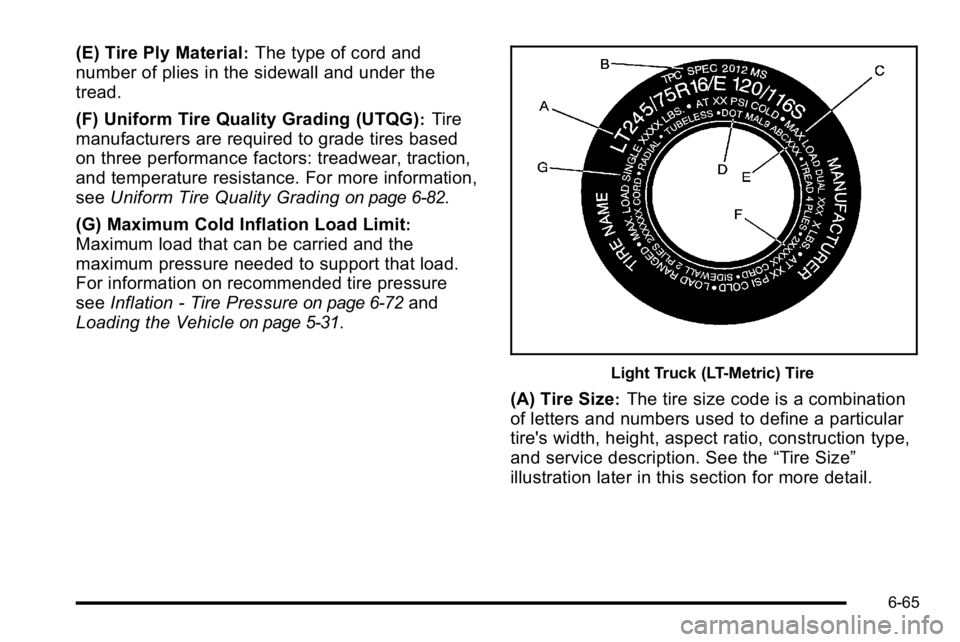
(E) Tire Ply Material:The type of cord and
number of plies in the sidewall and under the
tread.
(F) Uniform Tire Quality Grading (UTQG)
:Tire
manufacturers are required to grade tires based
on three performance factors: treadwear, traction,
and temperature resistance. For more information,
see Uniform Tire Quality Grading
on page 6‑82.
(G) Maximum Cold Inflation Load Limit
:
Maximum load that can be carried and the
maximum pressure needed to support that load.
For information on recommended tire pressure
see Inflation - Tire Pressure
on page 6‑72and
Loading the Vehicle
on page 5‑31.
Light Truck (LT-Metric) Tire
(A) Tire Size:The tire size code is a combination
of letters and numbers used to define a particular
tire's width, height, aspect ratio, construction type,
and service description. See the “Tire Size”
illustration later in this section for more detail.
6-65