manual transmission GMC YUKON XL 2010 Owners Manual
[x] Cancel search | Manufacturer: GMC, Model Year: 2010, Model line: YUKON XL, Model: GMC YUKON XL 2010Pages: 614, PDF Size: 4.64 MB
Page 25 of 614
controls, seeRear Air Conditioning and Heating Systemon page 4‑27andRear Air Conditioning and Heating
System and Electronic Climate Controls on page 4‑28.
Transmission
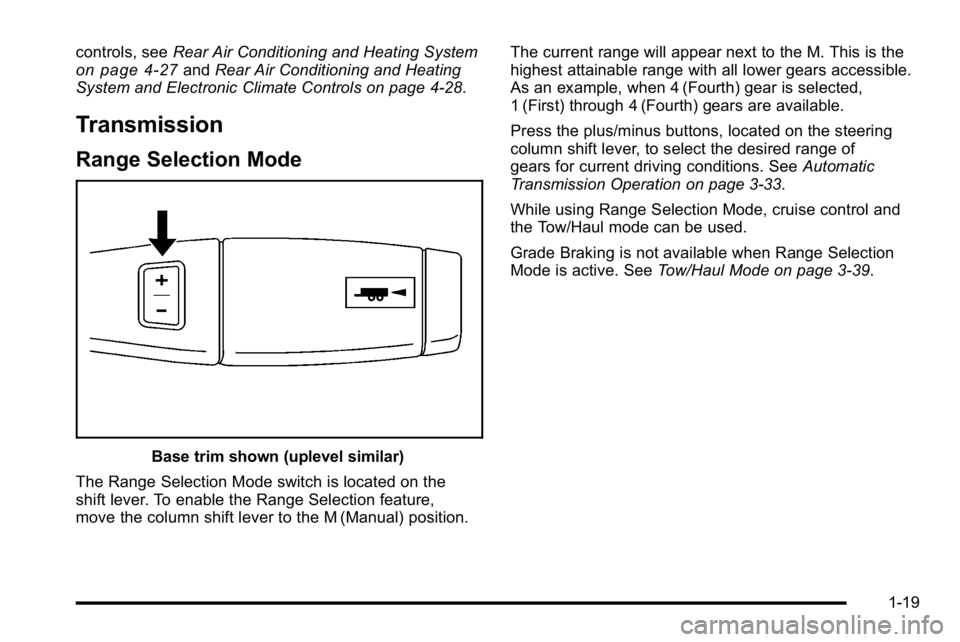
Range Selection Mode
Base trim shown (uplevel similar)
The Range Selection Mode switch is located on the
shift lever. To enable the Range Selection feature,
move the column shift lever to the M (Manual) position. The current range will appear next to the M. This is the
highest attainable range with all lower gears accessible.
As an example, when 4 (Fourth) gear is selected,
1 (First) through 4 (Fourth) gears are available.
Press the plus/minus buttons, located on the steering
column shift lever, to select the desired range of
gears for current driving conditions. See
Automatic
Transmission Operation on page 3‑33.
While using Range Selection Mode, cruise control and
the Tow/Haul mode can be used.
Grade Braking is not available when Range Selection
Mode is active. See Tow/Haul Mode on page 3‑39.
1-19
Page 159 of 614
The power liftgate may be temporarily disabled under
extreme temperatures, or under low battery conditions.
If this occurs, the liftgate can still be operated manually.
If you shift the transmission out of P (Park) while the
power function is in progress, the liftgate power function
will continue to completion. If you shift the transmission
out of P (Park) and accelerate before the power liftgate
latches closed, the liftgate may reverse to the open
position. Cargo could fall out of the vehicle. Always
make sure the power liftgate is closed and latched
before you drive away.
If you power open the liftgate and the liftgate support
struts have lost pressure, the lights will flash and a
chime will sound. The liftgate will stay open temporarily,
then slowly close. See your dealer for service before
using the liftgate.Obstacle Detection Features
If the liftgate encounters an obstacle during a power
open or close cycle, a warning chime will sound and
the liftgate will automatically reverse direction to the full
closed or open position. After removing the obstruction,
the power liftgate operation can be used again. If the
liftgate encounters multiple obstacles on the same
power cycle, the power function will deactivate, and
you must manually open or close the liftgate. The
REAR ACCESS OPEN warning message in the Driver
Information Center (DIC) will indicate that the liftgate is
open. After removing the obstructions, manually open
the liftgate to the full open position or close the liftgate
to the fully closed and latched position. The liftgate will
now resume normal power operation.
Your vehicle has pinch sensors located on the side
edges of the liftgate. If an object is caught between
the liftgate and the body and presses against this
sensor, the liftgate will reverse direction and open fully.
The liftgate will remain open until it is activated again or
closed manually. Do not force the liftgate open or closed
during a power cycle.
3-17
Page 171 of 614
B (ACC/ACCESSORY):This position lets things like
the radio and the windshield wipers operate while the
engine is off. Use this position if the vehicle must be
pushed or towed.
C (ON/RUN): This position can be used to operate the
electrical accessories and to display some instrument
panel cluster warning and indicator lights. The switch
stays in this position when the engine is running.
The transmission is also unlocked in this position
on automatic transmission vehicles.
If you leave the key in the ACC/ACCESSORY or
ON/RUN position with the engine off, the battery could
be drained. You may not be able to start the vehicle if
the battery is allowed to drain for an extended period
of time.
D (START): This is the position that starts the engine.
When the engine starts, release the key. The ignition
switch returns to ON/RUN for driving.
A warning tone will sound when the driver door is
opened, the ignition is in ACC/ACCESSORY or
LOCK/OFF and the key is in the ignition.Retained Accessory Power (RAP)
The following vehicle accessories can be used for up to
10 minutes after the engine is turned off:
.Audio System
.Power Windows
.OnStar®System (if equipped)
.Sunroof (if equipped)
These features work when the key is in ON/RUN
or ACC/ACCESSORY. Once the key is turned from
ON/RUN to LOCK/OFF, the windows and sunroof
continue to work up to 10 minutes until any door
is opened. The radio continues to work for up to
10 minutes or until the driver door is opened.
Starting the Engine
If the vehicle is a Two-mode Hybrid, see the Two-mode
Hybrid manual for more information.
Move the shift lever to P (Park) or N (Neutral).
The engine will not start in any other position. To restart
the engine when the vehicle is are already moving,
use N (Neutral) only.
Notice: Do not try to shift to P (Park) if the
vehicle is moving. If you do, you could damage
the transmission. Shift to P (Park) only when the
vehicle is stopped.
3-29
Page 175 of 614
Active Fuel Management™
Vehicles with V8 engines may have Active Fuel
Management™. This system allows the engine to
operate on either all or half of its cylinders, depending
on the driving conditions.
When less power is required, such as cruising at a
constant vehicle speed, the system will operate in the
half cylinder mode, allowing the vehicle to achieve
better fuel economy. When greater power demands
are required, such as accelerating from a stop, passing,
or merging onto a freeway, the system will maintain
full-cylinder operation.
If the vehicle has an Active Fuel Management™
indicator, seeDIC Operation and Displays (With DIC
Buttons)
on page 4‑48or DIC Operation and Displays
(Without DIC Buttons)on page 4‑55for more
information on using this display .
Automatic Transmission Operation
If the vehicle is a Two-mode Hybrid, see the Two-mode
Hybrid manual for more information.
If the vehicle is has an automatic transmission, it has an
electronic shift position indicator within the instrument
panel cluster. This display comes on when the ignition
key is turned to the ON/RUN position.
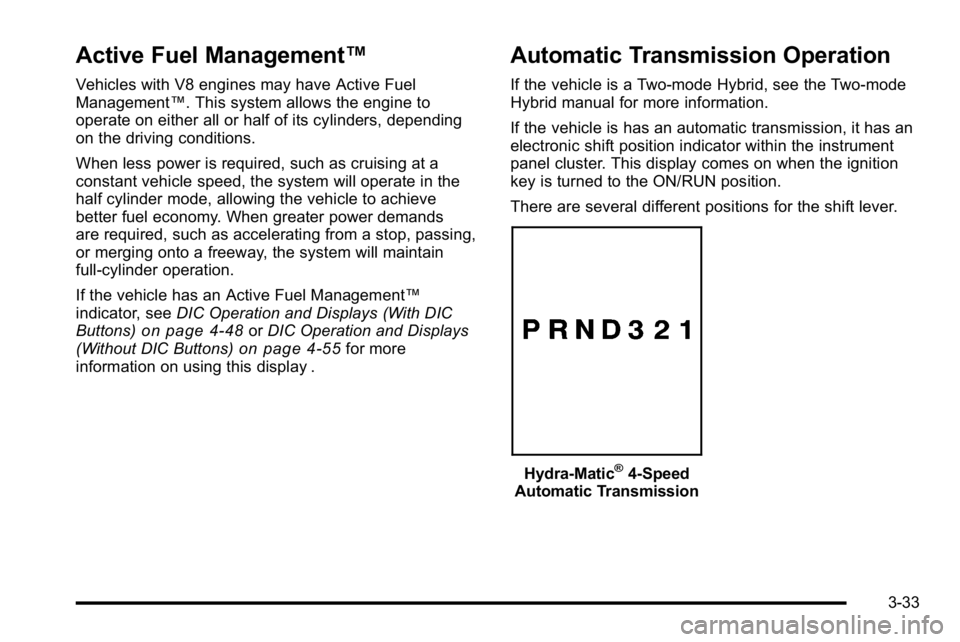
There are several different positions for the shift lever.
Hydra-Matic®4-Speed
Automatic Transmission
3-33
Page 178 of 614
D (Drive):This position is for normal driving. It provides
the best fuel economy. If you need more power for
passing, and you are:
.Going less than about 35 mph (55 km/h), push the
accelerator pedal about halfway down.
.Going about 35 mph (55 km/h) or more, push the
accelerator all the way down.
By doing this, the vehicle shifts down to the next
gear and has more power.
D (Drive) can be used when towing a trailer, carrying a
heavy load, driving on steep hills, or for off-road driving.
You might want to shift the transmission to a lower gear
selection if the transmission shifts too often.
Downshifting the transmission in slippery road
conditions could result in skidding. See Skidding
under Loss of Control on page 5‑11.
The vehicle has a shift stabilization feature that
adjusts the transmission shifting to the current driving
conditions in order to reduce rapid upshifts and
downshifts. This shift stabilization feature is designed
to determine, before making an upshift, if the engine is
able to maintain vehicle speed by analyzing things such
as vehicle speed, throttle position, and vehicle load.
If the shift stabilization feature determines that a current
vehicle speed cannot be maintained, the transmission
does not upshift and instead holds the current gear.
In some cases, this could appear to be a delayed shift,
however the transmission is operating normally. The vehicle's transmission uses adaptive shift controls.
Adaptive shift controls continually compares key shift
parameters to pre-programmed ideal shifts stored in the
transmissions computer. The transmission constantly
makes adjustments to improve vehicle performance
according to how the vehicle is being used, such as
with a heavy load or when the temperature changes.
During this adaptive shift control process, shifting might
feel different as the transmission determines the best
settings.
When temperatures are very cold, the Hydra-Matic
®
6-Speed transmission's gear shifting could be delayed
providing more stable shifts until the engine warms
up. Shifts could be more noticeable with a cold
transmission. This difference in shifting is normal.
M (Manual Mode):
This position is available on vehicles
with the Hydra-Matic
®6-Speed transmission. It lets
drivers select the range of gears appropriate for current
driving conditions. If the vehicle has this feature,
see Range Select Mode (Hydra-Matic
®6-Speed
transmission) later in this section.
3 (Third): This position is also used for normal driving.
It reduces vehicle speed more than D (Drive) without
using the brakes. You might choose 3 (Third) instead
of D (Drive) when driving on hilly, winding roads, when
towing a trailer, so there is less shifting between gears
and when going down a steep hill.
3-36
Page 179 of 614
2 (Second):This position reduces vehicle speed even
more than 3 (Third) without using the brakes. You can
use 2 (Second) on hills. It can help control vehicle
speed as you go down steep mountain roads, but then
you would also want to use the brakes off and on.
If you manually select 2 (Second) in an automatic
transmission, the transmission will start in second gear.
You can use this feature for reducing the speed of the
rear wheels when you are trying to start the vehicle
from a stop on slippery road surfaces.
1 (First): For the Hydra-Matic
®4-Speed transmission
this position reduces vehicle speed even more than
2 (Second) without using the brakes. You can use it
on very steep hills, or in deep snow or mud. If the shift
lever is put in 1 (First) while the vehicle is moving
forward, the transmission does not shift into first gear
until the vehicle is going slowly enough.
For a Hydra-Matic
®6-Speed transmission, this position
reduces vehicle speed without using the brakes. You
can use it for major/severe downgrades and off-road
driving where the vehicle would otherwise accelerate
due to steepness of grade. When you shift to 1 (First) it
provides the lowest gear appropriate to the vehicle's
current road speed and continues to downshift as the
vehicle slows, eventually downshifting to 1 (First) gear.
Notice: Spinning the tires or holding the vehicle in
one place on a hill using only the accelerator pedal
may damage the transmission. The repair will not be covered by the vehicle warranty. If you are stuck, do
not spin the tires. When stopping on a hill, use the
brakes to hold the vehicle in place.
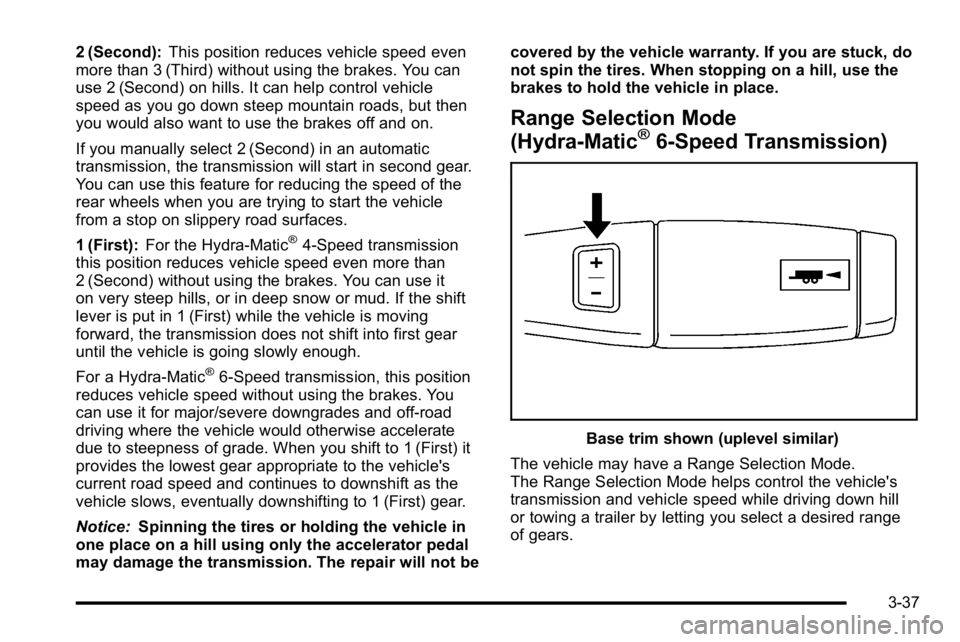
Range Selection Mode
(Hydra-Matic®6-Speed Transmission)
Base trim shown (uplevel similar)
The vehicle may have a Range Selection Mode.
The Range Selection Mode helps control the vehicle's
transmission and vehicle speed while driving down hill
or towing a trailer by letting you select a desired range
of gears.
3-37
Page 180 of 614
To use this feature, do the following:1. Move the shift lever to M (Manual Mode).
2. Press the plus/minus buttons, located on the steering column shift lever, to select the desired
range of gears for the current driving conditions.
When M (Manual Mode) is selected a number displays
next to the M, indicating the current gear.
This number is the highest gear that can be used.
However, the vehicle can automatically shift to lower
gears as it adjusts to driving conditions. This means
that all gears below that number are available. When
5 (Fifth) is selected, 1 (First) through 5 (Fifth) gears are
automatically shifted by the vehicle, but 6 (Sixth) cannot
be used until the plus/minus button located on the
steering column lever is used to change to the gear.
Grade Braking is not available when Range Selection
Mode is active. See Tow/Haul Mode on page 3‑39. While using Range Selection Mode, cruise control and
the Tow/Haul mode can be used.
Notice:
Spinning the tires or holding the vehicle in
one place on a hill using only the accelerator pedal
may damage the transmission. The repair will not be
covered by the vehicle warranty. If you are stuck, do
not spin the tires. When stopping on a hill, use the
brakes to hold the vehicle in place.
Low Traction Mode
If the vehicle has the Hydra-Matic®6-Speed Automatic
Transmission, it has a Low Traction Mode that assists in
vehicle acceleration when road conditions are slippery,
such as with ice or snow. While the vehicle is at a stop,
select the second gear range using Range Selection
Mode. This will limit torque to the wheels after it detects
wheel slip, preventing the tires from spinning.
3-38
Page 233 of 614
When the headlamps are turned on while the vehicle is
on, the headlamps will turn off automatically 10 minutes
after the ignition is turned off. When the headlamps are
turned on while the vehicle is off, the headlamps will
stay on for 10 minutes before automatically turning off
to prevent the battery from being drained. Turn the
headlamp control to off and then back to the headlamp
on position to make the headlamps stay on for an
additional 10 minutes.
Headlamps on Reminder
A reminder chime will sound when the headlamps or
parking lamps are manually turned on and the ignition
is off and a door is open. To disable the chime, turn the
light off.
Daytime Running Lamps (DRL)
Daytime Running Lamps (DRL) can make it easier for
others to see the front of your vehicle during the day.
Fully functional daytime running lamps are required on
all vehicles first sold in Canada.The DRL system comes on when the following
conditions are met:
.The ignition is on.
.The exterior lamps control is in AUTO.
.The engine is running.
.The light sensor determines it is daytime.
When the DRL system is on, only the DRL lamps are
on. The taillamps, sidemarker, instrument panel lights,
and other lamps will not be on.
When it begins to get dark, the automatic headlamp
system switches from DRL to the headlamps.
To turn off the DRL lamps, turn the exterior lamps
control to the OFF position and then release.
For vehicles first sold in Canada, the transmission
must be in the P (Park) position, before the DRL lamps
can be turned off.
4-11
Page 273 of 614
Transmission Temperature
Press the trip/fuel button until TRANS TEMP displays.
This display shows the temperature of the automatic
transmission fluid in either degrees Fahrenheit (°F) or
degrees Celsius (°C).
Instantaneous Economy and Active Fuel
Management™Indicator
If your vehicle has this display, press the trip/fuel button
until INST ECON V8 displays. This display shows the
current fuel economy at a particular moment and will
change frequently as driving conditions change. This
display shows the instantaneous fuel economy in miles
per gallon (mpg) or liters per 100 kilometers (L/100 km).
Unlike average economy, this screen cannot be reset.
An Active Fuel Management indicator will display on the
right side of the DIC, while INST ECON displays on the
left side. Active Fuel Management allows the engine to
operate on either four or eight cylinders, depending on
your driving demands. When Active Fuel Management
is active, V4 will display on the DIC. When Active Fuel
Management is inactive, V8 will display. See Active
Fuel Management™
on page 3‑33for more
information.
Blank Display
This display shows no information.
Vehicle Information Menu Items
T
(Vehicle Information): Press this button to scroll
through the following menu items:
Oil Life
Press the vehicle information button until OIL LIFE
REMAINING displays. This display shows an
estimate of the oil's remaining useful life. If you see
99% OIL LIFE REMAINING on the display, that means
99% of the current oil life remains. The engine oil life
system will alert you to change the oil on a schedule
consistent with your driving conditions.
When the remaining oil life is low, the CHANGE
ENGINE OIL SOON message will appear on the
display. See “CHANGE ENGINE OIL SOON” underDIC
Warnings and Messages
on page 4‑61. You should
change the oil as soon as you can. See Engine Oilon
page 6‑18. In addition to the engine oil life system
monitoring the oil life, additional maintenance is
recommended in the Maintenance Schedule in this
manual. See Scheduled Maintenance
on page 7‑3for more information.
4-51
Page 429 of 614
Leaving After Parking on a Hill
1. Apply and hold the brake pedal.
2. Start the engine
3. Shift into a gear
4. Release the parking brake
5. Let up on the brake pedal.
6. Drive slowly until the trailer is clear of the chocks.
7. Stop and have someone pick up and store thechocks.
Maintenance When Trailer Towing
The vehicle needs service more often when pulling a
trailer. See this manual's Maintenance Schedule or
Index for more information. Things that are especially
important in trailer operation are automatic transmission
fluid, engine oil, axle lubricant, belts, cooling system
and brake system. It is a good idea to inspect these
before and during the trip.
Check periodically to see that all hitch nuts and bolts
are tight.
Trailer Wiring Harness
The vehicle is equipped with the following wiring
harnesses for towing a trailer.
Basic Trailer Wiring
The trailer wiring harness, with a seven-pin connector,
is located at the rear of the vehicle and is tied to the
vehicle's frame. The harness connector can be plugged
into a seven-pin universal heavy-duty trailer connector
available through your dealer.
The seven-wire harness contains the following trailer
circuits:
.Yellow: Left Stop/Turn Signal
.Dark Green: Right Stop/Turn Signal
.Brown: Taillamps
.White: Ground
.Light Green: Back-up Lamps
.Red: Battery Feed*
.Dark Blue: Trailer Brake*
*The fuses for these two circuits are installed in the
underhood electrical center, but the wires are not
connected. They should be connected by your dealer
or a qualified service center.
5-67