service GMC YUKON XL 2014 Workshop Manual
[x] Cancel search | Manufacturer: GMC, Model Year: 2014, Model line: YUKON XL, Model: GMC YUKON XL 2014Pages: 490, PDF Size: 7.49 MB
Page 291 of 490
Black plate (35,1)GMC Yukon/Yukon XL Owner Manual (GMNA-Localizing-U.S./Canada-
6081505) - 2014 - crc - 4/23/13
Driving and Operating 9-35
If the SERVICE 4 WHEEL DRIVE
message stays on, you should take
the vehicle to your dealer for
service. See“SERVICE 4 WHEEL
DRIVE” message under
Transmission Messages on
page 5-42.
Shifting Into Four-Wheel Drive
High or AUTO (Automatic
Four-Wheel Drive)
Turn the knob to the Four-Wheel
Drive High or AUTO position. This
can be done at any speed, except
when shifting from Four-Wheel
Drive Low. The indicator light will
flash while shifting. It will remain on
when the shift is completed.
Shifting Into Two-Wheel
Drive High
Turn the knob to the Two-Wheel
Drive High position. This can be
done at any speed, except when
shifting from Four-Wheel Drive Low.
See “Shifting Out of Four-Wheel
Drive Low” in this section for more
information. Shifting Into Four-Wheel
Drive Low
When Four-Wheel Drive Low is
engaged, vehicle speed should be
kept below 72 km/h (45 mph).
Extended high-speed operation
in 4L may damage or shorten the life
of the drivetrain.
To shift to the Four-Wheel Drive
Low position, the ignition must be in
ON/RUN and the vehicle must be
stopped or moving less than 5 km/h
(3 mph) with the transmission in
N (Neutral). The preferred method
for shifting into Four-Wheel Drive
Low is to have the vehicle moving
1.6 to 3.2 km/h (1 to 2 mph). Turn the
knob to the Four-Wheel Drive Low
position. You must wait for the
Four-Wheel Drive Low indicator light
to stop flashing and remain on
before shifting the transmission
into gear.
Notice:
Shifting the transmission
into gear before the requested
mode indicator light has stopped
flashing could damage the transfer case. To help avoid
damaging the vehicle, always wait
for the mode indicator lights to
stop flashing before shifting the
transmission into gear.
The vehicle may have significant
engagement noise and bump when
shifting between Four-Wheel Drive
Low and Four-Wheel Drive High
ranges or from N (Neutral) while the
engine is running.
If the knob is turned to the
Four-Wheel Drive Low position
when the vehicle is in gear and/or
moving more than 5 km/h (3 mph),
the Four-Wheel Drive Low indicator
light will flash for 30 seconds and
not complete the shift. After
30 seconds the transfer case will
shift to Four-Wheel Drive
High mode. With the vehicle moving
less than 5 km/h (3 mph) and the
transmission in N (Neutral), attempt
the shift again.
Page 294 of 490
Black plate (38,1)GMC Yukon/Yukon XL Owner Manual (GMNA-Localizing-U.S./Canada-
6081505) - 2014 - crc - 4/23/13
9-38 Driving and Operating
While driving on clean dry pavement
and during tight turns, you may
experience a vibration in the
steering system.
Front Axle
The front axle engages and
disengages automatically when you
shift the transfer case. Some delay
for the axle to engage or disengage
is normal.
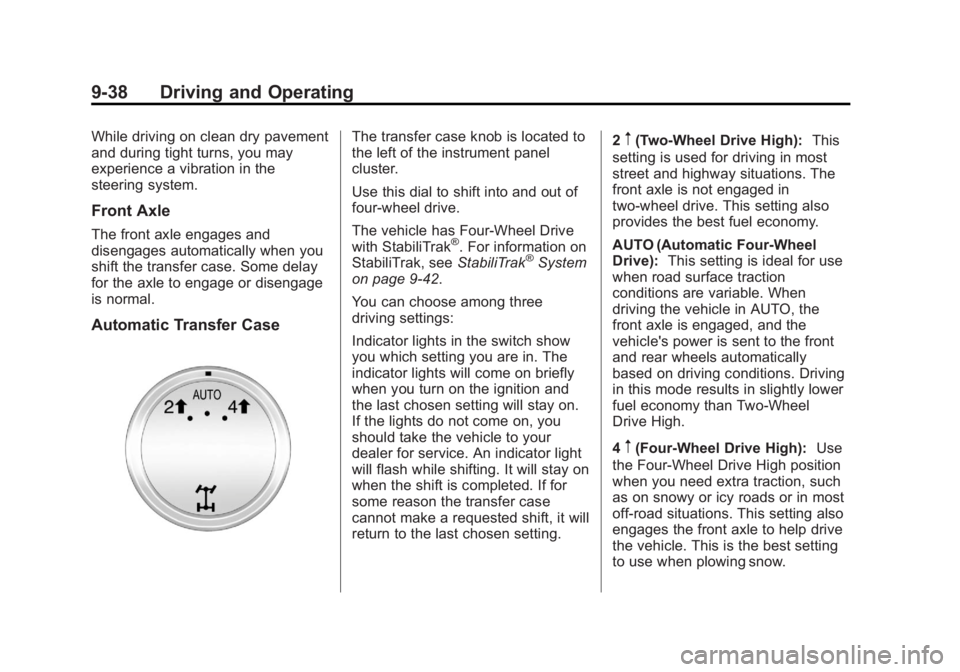
Automatic Transfer Case
The transfer case knob is located to
the left of the instrument panel
cluster.
Use this dial to shift into and out of
four-wheel drive.
The vehicle has Four-Wheel Drive
with StabiliTrak
®. For information on
StabiliTrak, see StabiliTrak®System
on page 9-42.
You can choose among three
driving settings:
Indicator lights in the switch show
you which setting you are in. The
indicator lights will come on briefly
when you turn on the ignition and
the last chosen setting will stay on.
If the lights do not come on, you
should take the vehicle to your
dealer for service. An indicator light
will flash while shifting. It will stay on
when the shift is completed. If for
some reason the transfer case
cannot make a requested shift, it will
return to the last chosen setting. 2
m(Two-Wheel Drive High):
This
setting is used for driving in most
street and highway situations. The
front axle is not engaged in
two-wheel drive. This setting also
provides the best fuel economy.
AUTO (Automatic Four-Wheel
Drive): This setting is ideal for use
when road surface traction
conditions are variable. When
driving the vehicle in AUTO, the
front axle is engaged, and the
vehicle's power is sent to the front
and rear wheels automatically
based on driving conditions. Driving
in this mode results in slightly lower
fuel economy than Two-Wheel
Drive High.
4
m(Four-Wheel Drive High): Use
the Four-Wheel Drive High position
when you need extra traction, such
as on snowy or icy roads or in most
off-road situations. This setting also
engages the front axle to help drive
the vehicle. This is the best setting
to use when plowing snow.
Page 295 of 490
Black plate (39,1)GMC Yukon/Yukon XL Owner Manual (GMNA-Localizing-U.S./Canada-
6081505) - 2014 - crc - 4/23/13
Driving and Operating 9-39
Service Four‐Wheel Drive
If the SERVICE 4 WHEEL DRIVE
message stays on, you should take
the vehicle to your dealer for
service. See“SERVICE 4 WHEEL
DRIVE” message under
Transmission Messages on
page 5-42.
Shifting Into Four-Wheel Drive
High or AUTO (Automatic
Four-Wheel Drive)
Turn the knob to the Four-Wheel
Drive High or AUTO position. This
can be done at any speed. The
indicator light will flash while
shifting. It will remain on when the
shift is completed. Shifting Into Two-Wheel
Drive High
Turn the knob to the Two-Wheel
Drive High position. This can be
done at any speed. The indicator
light will flash while shifting. It will
remain on when the shift is
completed.
Excessively shifting the transfer
case into or out of the different
modes may cause the transfer case
to enter the shift protection mode.
This will protect the transfer case
from possible damage and will only
allow the transfer case to respond to
one shift per 10 seconds. The
transfer case may stay in this mode
for up to three minutes.Brakes
Antilock Brake
System (ABS)
This vehicle has ABS, an advanced
electronic braking system that helps
prevent a braking skid.
When the vehicle begins to drive
away, ABS checks itself.
A momentary motor or clicking noise
might be heard while this test is
going on, and it might even be
noticed that the brake pedal moves
a little. This is normal.
If there is a problem with ABS, this
warning light stays on. See
Antilock
Brake System (ABS) Warning Light
on page 5-22.
Page 298 of 490
Black plate (42,1)GMC Yukon/Yukon XL Owner Manual (GMNA-Localizing-U.S./Canada-
6081505) - 2014 - crc - 4/23/13
9-42 Driving and Operating
Ride Control Systems
StabiliTrak®System
The vehicle has a vehicle stability
enhancement system called
StabiliTrak. It is an advanced
computer-controlled system that
assists the driver with directional
control of the vehicle in difficult
driving conditions.
StabiliTrak activates when the
computer senses a discrepancy
between the intended path and the
direction the vehicle is actually
traveling. StabiliTrak selectively
applies braking pressure at any one
of the vehicle's brakes to assist the
driver with keeping the vehicle on
the intended path.
StabiliTrak is on automatically
whenever the vehicle is started. To
assist with directional control of the
vehicle, the system should always
be left on. Trailer Sway Control
(TSC) is also on automatically whenthe vehicle is started. See
Trailer
Sway Control (TSC) on page 9-76
for more information.
When the vehicle is started and
begins to move, the system
performs several diagnostic checks
to insure there are no problems.
The system may be heard or felt
while it is working. This is normal
and does not mean there is a
problem with the vehicle.
If cruise control is being used when
StabiliTrak activates, the cruise
control automatically disengages.
The cruise control can be
re-engaged when road conditions
allow. See Cruise Control on
page 9-46.
If the system fails to turn on or
activate, the StabiliTrak light along
with a message will be displayed on
the Driver Information Center (DIC).
If a DIC message appears, make
sure the StabiliTrak system has not
been turned off using the Traction
Control System (TCS)/StabiliTrak
button. Then turn the vehicle off, wait 15 seconds, and then turn it
back on again to reset the system.
If any of the messages still appear
on the DIC, the vehicle should be
taken in for service. For more
information on the DIC messages,
see
Ride Control System Messages
on page 5-39.
The StabiliTrak light will flash on the
instrument panel cluster when the
system or the TSC feature is both
on and activated.
The system may be heard or felt
while it is working; this is normal.
Page 300 of 490
Black plate (44,1)GMC Yukon/Yukon XL Owner Manual (GMNA-Localizing-U.S./Canada-
6081505) - 2014 - crc - 4/23/13
9-44 Driving and Operating
The TCS is enabled automatically
when the vehicle is started. It will
activate and the StabiliTrak light will
flash if it senses that any of the
wheels are spinning or beginning to
lose traction while driving. If traction
control is turned off, only the
brake-traction control portion of
traction control will work. The
engine speed management will be
disabled. In this mode, engine
power is not reduced automatically
and the driven wheels can spin
more freely. This can cause the
brake-traction control to activate
constantly.
Notice:If the wheel(s) of one axle
is allowed to spin excessively
while the StabiliTrak
®, ABS, brake
warning lights, and any relevant
DIC messages are displayed, the
transfer case could be damaged.
The repairs would not be covered
by the vehicle warranty. Reduce
engine power and do not spin the
wheel(s) excessively while these
lights and messages are
displayed. The TCS may activate on dry or
rough roads or under conditions
such as heavy acceleration while
turning or abrupt upshifts/downshifts
of the transmission. When this
happens, a reduction in acceleration
may be noticed, or a noise or
vibration may be heard. This is
normal.
If cruise control is being used when
the system activates, the StabiliTrak
light will flash and cruise control will
automatically disengage. Cruise
control may be reengaged when
road conditions allow. See
Cruise
Control on page 9-46.
StabiliTrak may also turn off
automatically if it determines that a
problem exists with the system.
If the problem does not clear itself
after restarting the vehicle, see your
dealer for service.
Vehicles with StabiliTrak have a
Trailer Sway Control (TSC) feature.
See Trailer Sway Control (TSC) on
page 9-76. Vehicles with StabiliTrak have a Hill
Start Assist (HSA) feature. See
Hill
Start Assist (HSA) on page 9-41.
Adding non-dealer accessories can
affect the vehicle's performance.
See Accessories and Modifications
on page 10-3.
Locking Rear Axle
Vehicles with a locking rear axle can
give more traction on snow, mud,
ice, sand, or gravel. It works like a
standard axle most of the time, but
when traction is low, this feature will
allow the rear wheel with the most
traction to move the vehicle.
Continuous Damping
Control (CDC)
This vehicle may have a continuous
damping control system called
Autoride
®or MagneRide™. With
this feature, improved vehicle ride
and handling is provided under a
variety of passenger and loading
conditions.
Page 305 of 490
Black plate (49,1)GMC Yukon/Yukon XL Owner Manual (GMNA-Localizing-U.S./Canada-
6081505) - 2014 - crc - 4/23/13
Driving and Operating 9-49
Turning the System On and Off
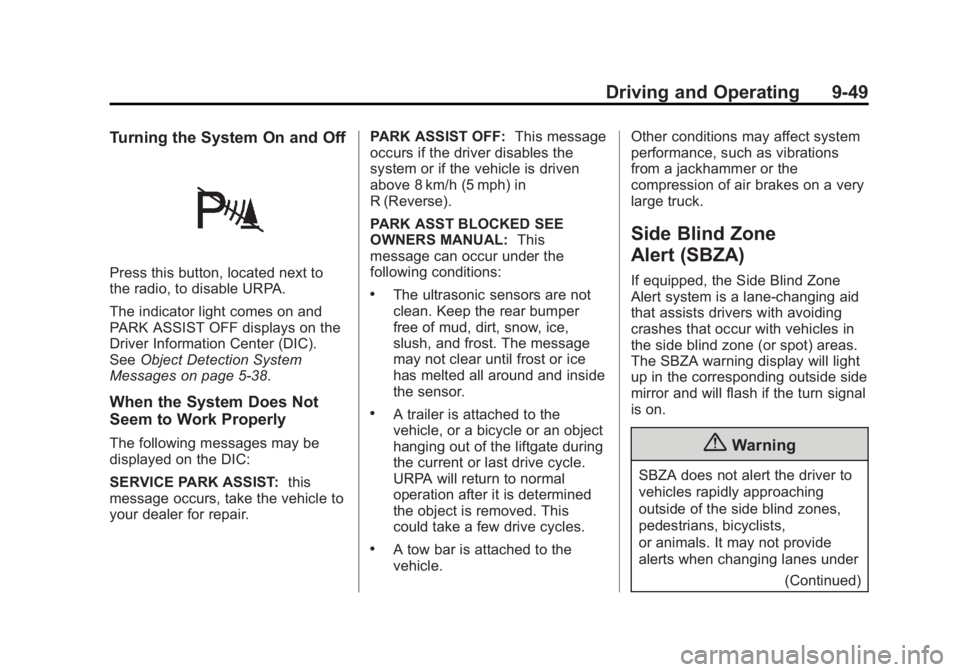
Press this button, located next to
the radio, to disable URPA.
The indicator light comes on and
PARK ASSIST OFF displays on the
Driver Information Center (DIC).
SeeObject Detection System
Messages on page 5-38.
When the System Does Not
Seem to Work Properly
The following messages may be
displayed on the DIC:
SERVICE PARK ASSIST: this
message occurs, take the vehicle to
your dealer for repair. PARK ASSIST OFF:
This message
occurs if the driver disables the
system or if the vehicle is driven
above 8 km/h (5 mph) in
R (Reverse).
PARK ASST BLOCKED SEE
OWNERS MANUAL: This
message can occur under the
following conditions:
.The ultrasonic sensors are not
clean. Keep the rear bumper
free of mud, dirt, snow, ice,
slush, and frost. The message
may not clear until frost or ice
has melted all around and inside
the sensor.
.A trailer is attached to the
vehicle, or a bicycle or an object
hanging out of the liftgate during
the current or last drive cycle.
URPA will return to normal
operation after it is determined
the object is removed. This
could take a few drive cycles.
.A tow bar is attached to the
vehicle. Other conditions may affect system
performance, such as vibrations
from a jackhammer or the
compression of air brakes on a very
large truck.
Side Blind Zone
Alert (SBZA)
If equipped, the Side Blind Zone
Alert system is a lane-changing aid
that assists drivers with avoiding
crashes that occur with vehicles in
the side blind zone (or spot) areas.
The SBZA warning display will light
up in the corresponding outside side
mirror and will flash if the turn signal
is on.
{Warning
SBZA does not alert the driver to
vehicles rapidly approaching
outside of the side blind zones,
pedestrians, bicyclists,
or animals. It may not provide
alerts when changing lanes under
(Continued)
Page 307 of 490
Black plate (51,1)GMC Yukon/Yukon XL Owner Manual (GMNA-Localizing-U.S./Canada-
6081505) - 2014 - crc - 4/23/13
Driving and Operating 9-51
caution while changing lanes when
towing a trailer. SBZA may alert you
to objects attached to the vehicle,
such as a trailer, bicycle, or object
extending out to either side of the
vehicle. This is normal system
operation; the vehicle does not need
service.
SBZA may not always alert the
driver to vehicles in the side blind
zone, especially in wet conditions.
The system does not need to be
serviced. The system may light up
due to guardrails, signs, trees,
shrubs, and other non-moving
objects. This is normal system
operation; the vehicle does not need
service.
SBZA may not operate when the
SBZA sensors in the left or right
corners of the rear bumper are
covered with mud, dirt, snow, ice,
or slush, or in heavy rainstorms. For
cleaning instructions, see "Washing
the Vehicle" underExterior Care on
page 10-86. If the DIC still displays
the SIDE BLIND ZONE SYSTEM
UNAVAILABLE message after cleaning both sides of the vehicle
toward the rear corners of the
vehicle, see your dealer.
If the SBZA displays do not light up
when vehicles are in the blind zone
and the system is clean, the system
may need service. Take the vehicle
to your dealer.
When SBZA is disabled for any
reason other than the driver turning
it off, the Side Blind Zone Alert ON
option will not be available on the
DIC menu.
FCC Information
See
Radio Frequency Statement on
page 13-15.
Rear Vision
Camera (RVC)
If available, the Rear Vision Camera
(RVC) system displays part of the
scene behind the vehicle.
{Warning
The RVC system does not display
children, pedestrians, bicyclists,
animals, or any other object
located outside the camera's field
of view, below the bumper,
or under the vehicle. Perceived
distances may be different from
actual distances. Do not back the
vehicle using only the RVC
screen, during longer, higher
speed backing maneuvers,
or where there could be cross
traffic. Failure to use proper care
before backing may result in
injury, death, or vehicle damage.
Always check behind and around
the vehicle before backing.
Vehicles without Navigation
System
The RVC system displays a view of
the area behind the vehicle. When
the vehicle is on and shifted into
R (Reverse) the video image
Page 311 of 490
Black plate (55,1)GMC Yukon/Yukon XL Owner Manual (GMNA-Localizing-U.S./Canada-
6081505) - 2014 - crc - 4/23/13
Driving and Operating 9-55
The fast flash conditions are
used to protect the video device
from high temperature
conditions. Once conditions
return to normal the device will
reset and the green indicator will
stop flashing.
During any of these fault conditions,
the display will be blank and the
indicator will flash while the vehicle
is in R (Reverse) or until the
conditions return to normal.
Press and hold
zwhen the left
indicator light is flashing to turn off
the video display along with the left
indicator light.
Fuel
Use of the recommended fuel is an
important part of the proper
maintenance of this vehicle. To help
keep the engine clean and maintain
optimum vehicle performance, we
recommend using TOP TIER
Detergent Gasolines. See
www.toptiergas.com for a list of TOP
TIER Detergent Gasolines.
If the vehicle has a yellow fuel cap,
E85 or flex fuel can be used in the
vehicle. See E85 or FlexFuel on
page 9-57.
Recommended Fuel
Use regular unleaded gasoline with
a posted octane rating of 87 or
higher. If the octane rating is less
than 87, an audible knocking noise,
commonly referred to as spark
knock, might be heard when driving.
If this occurs, use a gasoline rated
at 87 octane or higher as soon as
possible. If heavy knocking is heard
when using gasoline rated at
87 octane or higher, the engine
needs service.
Use of Seasonal Fuels
Use summer and winter fuels in the
appropriate season. Driving or
starting could be affected if the
incorrect fuel is used. Drive the
vehicle with the engine running until
the fuel is a half tank or less, then
refuel with the current seasonal fuel.
Prohibited Fuels
Gasolines containing oxygenates,
such as ethers and ethanol, as well
as reformulated gasolines are
available in some cities. If these
Page 312 of 490
Black plate (56,1)GMC Yukon/Yukon XL Owner Manual (GMNA-Localizing-U.S./Canada-
6081505) - 2014 - crc - 4/23/13
9-56 Driving and Operating
gasolines comply with the
previously described specification,
then they are acceptable to use.
However, E85 and other fuels
containing more than 15% ethanol
must be used only in FlexFuel
vehicles.
Notice:Do not use fuel
containing methanol. It can
corrode metal parts in the fuel
system and also damage plastic
and rubber parts. That damage
would not be covered under the
vehicle warranty.
Some gasolines that are not
reformulated for low emissions can
contain an octane-enhancing
additive called
methylcyclopentadienyl manganese
tricarbonyl (MMT). Do not use
gasolines with MMT as they can
reduce spark plug life and affect
emission control system
performance. The malfunction
indicator lamp may turn on. If this
occurs, see your dealer for service.Gasoline Specifications
At a minimum, gasoline should meet
ASTM specification D 4814. Some
gasolines contain an
octane-enhancing additive called
methylcyclopentadienyl manganese
tricarbonyl (MMT). We recommend
against the use of gasolines
containing MMT. See “Prohibited
Fuels" in Recommended Fuel on
page 9-55.
California Fuel
Requirements
If the vehicle is certified to meet
California Emissions Standards, it is
designed to operate on fuels that
meet California specifications. See
the underhood emission control
label. If this fuel is not available in
states adopting California Emissions
Standards, the vehicle will operate
satisfactorily on fuels meeting
federal specifications, but emission
control system performance might
be affected. The malfunction
indicator lamp could turn on and the vehicle may not pass a smog-check
test. See
Malfunction Indicator
Lamp on page 5-19. If this occurs,
return to your authorized dealer for
diagnosis. If it is determined that the
condition is caused by the type of
fuel used, repairs may not be
covered by the vehicle warranty.
Fuels in Foreign
Countries
If planning to drive in countries
outside the U.S. or Canada, the
proper fuel might be hard to find.
Check regional auto club or fuel
retail brand websites for availability
in the country where driving. Never
use leaded gasoline, fuel containing
methanol, or any other fuel not
recommended. Costly repairs
caused by use of improper fuel
would not be covered by the vehicle
warranty.
Page 319 of 490
Black plate (63,1)GMC Yukon/Yukon XL Owner Manual (GMNA-Localizing-U.S./Canada-
6081505) - 2014 - crc - 4/23/13
Driving and Operating 9-63
Maintenance when Trailer
Towing
The vehicle needs service more
often when pulling a trailer. See
Maintenance Schedule on
page 11-2. Things that are
especially important in trailer
operation are automatic
transmission fluid, engine oil, axle
lubricant, belts, cooling system, and
brake system. It is a good idea to
inspect these before and during
the trip.
Check periodically to see that all
hitch nuts and bolts are tight.
Trailer Towing
Do not tow a trailer during break-in.
SeeNew Vehicle Break-In on
page 9-19 for more information.
{Warning
The driver can lose control when
pulling a trailer if the correct
equipment is not used or the
vehicle is not driven properly. For
example, if the trailer is too
heavy, the brakes may not work
well—or even at all. The driver
and passengers could be
seriously injured. The vehicle may
also be damaged; the resulting
repairs would not be covered by
the vehicle warranty. Pull a trailer
only if all the steps in this section
have been followed. Ask your
dealer for advice and information
about towing a trailer with the
vehicle. Notice:
Pulling a trailer
improperly can damage the
vehicle and result in costly
repairs not covered by the vehicle
warranty. To pull a trailer
correctly, follow the advice in this
section and see your dealer for
important information about
towing a trailer with the vehicle.
To identify the trailering capacity of
the vehicle, read the information in
“Weight of the Trailer” that appears
later in this section.
Trailering is different than just
driving the vehicle by itself.
Trailering means changes in
handling, acceleration, braking,
durability and fuel economy.
Successful, safe trailering takes
correct equipment, and it has to be
used properly.