audio GMC YUKON XL DENALI 2005 User Guide
[x] Cancel search | Manufacturer: GMC, Model Year: 2005, Model line: YUKON XL DENALI, Model: GMC YUKON XL DENALI 2005Pages: 62, PDF Size: 1.17 MB
Page 23 of 62
Notify Seasonal Restrict (Restrictions):This feature
noties the driver of seasonal maneuver restrictions.
Touch the On screen button to have a voice prompt
warn of existing seasonal restrictions played at
guidance points. Touch the Off screen button to turn
this feature off.
Estimated Travel Time:This feature displays the
estimated time to travel from your current position to
the destination. Touch the On screen button to have the
estimated travel time displayed with the distance to
destination, or the Off screen button to turn this
feature off.
Enter Speed Change?:This feature allows you to
adjust estimated speeds for Freeway, Main street, or
Residential driving. These speed values are used
to calculate estimated travel time. To change estimated
speeds, touch the Yes screen button. The Change
Speed menu will appear. Touch the arrow screen
buttons under each road type to increase or decrease
the speed. The maximum allowable speed to set is
100 mph (161 km). You may also touch the Default
screen button to choose factory default speed settings
as your choice. When your adjustments are complete,
touch the Back screen button to return to the
Nav Setup menu.Auto Reroute:With this feature on, the navigation
system will automatically recalculate a route if you drive
off course. You may also choose to turn this feature off.
Voice Guide in All Mode:Touch the On screen button
to hear navigation voice prompts while in Audio mode.
You may also touch the Off screen button to turn off the
voice prompts.
Current Street Name:Touch the On screen button to
display the current street name that the vehicle is
traveling on. You may also touch the Off screen button
to turn this feature off.
Exit Information:This feature will display map icons
which can be selected to display the next exit’s
information, including Point of Interest (POI) facilities
such as gas stations, restaurants, and lodging. Touch
the On screen button to display exit information icons, or
touch the Off screen button to cancel the display of
exit information icons.
Map Color (Day):This feature allows you to adjust the
daytime map appearance. Choose between Normal,
Auto, 1, 2, 3, or 4. The numbered settings vary the color
scheme of the map display. The Auto setting will
change the map appearance automatically every three
months. When the desired color setting has been
selected, press the NAV hard key to view the adjusted
map color.
2-13
Page 47 of 62
Navigation Audio System..................................3-2
Rear Seat Entertainment System....................3-14
Section 3 Navigation Audio System
3-1
Page 48 of 62
Navigation Audio System
Notice:Before adding any sound equipment to
your vehicle, like a tape player, CB radio, mobile
telephone, or two-way radio, make sure that it can
be added by checking with your dealer. Also,
check federal rules covering mobile radio and
telephone units. If sound equipment can be added,
it is very important to do it properly. Added
sound equipment may interfere with the operation
of your vehicle’s engine, radio, or other systems,
and even damage them. Your vehicle’s systems may
interfere with the operation of sound equipment
that has been added improperly.
Your vehicle has a feature called Retained Accessory
Power (RAP). With RAP, the audio system can be
played even after the ignition is turned off. See
“Retained Accessory Power (RAP)” in Section 2 of
your vehicle’s owner manual for more information.
The audio system is operated using navigation system
menus. The audio menus are explained in this section.
Playing the Radio
O
(Power/Volume):Press this knob to turn the audio
and navigation systems on and off. Turn the knob to
increase or decrease the volume.
Finding a Station
BAND:Press this hard key to access the BAND screen
and to switch between AM, FM1, FM2, XM1, and
XM2, if equipped.
Tuning Knob:Use the tuning knob on the lower
left corner of the navigation system to choose a
radio station.
wSEEKx:Press the SEEK up or the down arrow to
go to the next or previous station and stay there.
To scan stations, press and hold the SEEK up or down
arrow for two seconds until you hear a beep. The radio
will go to a station, play for a few seconds, then go
on to the next station. Press either SEEK arrow again
to stop scanning.
To scan preset stations, press and hold the SEEK up or
down arrow for more than four seconds. You will hear
two beeps and PSCAN will be displayed, along with
the highlighted preset. The radio will go to one of
the preset stations, play for a few seconds, then go on
to the next preset station. Press either SEEK arrow
again to stop scanning presets.
The radio will only seek and scan stations with a strong
signal that are in the selected band.
3-2
Page 49 of 62
Setting Preset Stations
Up to 30 stations, six AM, six FM1, six FM2, six XM1,
and six XM2, if equipped, can be programmed using the
six screen buttons on the bottom of each band menu.
To set preset stations, do the following:
1. Turn the audio system on.
2. Press the BAND hard key to select AM, FM1, FM2,
XM1, or XM2, if equipped.
3. Locate the desired station using the SEEK hard key
or the tuning knob.
4. Press and hold one of the six preset screen buttons
until you hear a beep. Whenever you press that
screen button while in that band menu, the station
you set will return.
5. Repeat the steps for each preset and source.
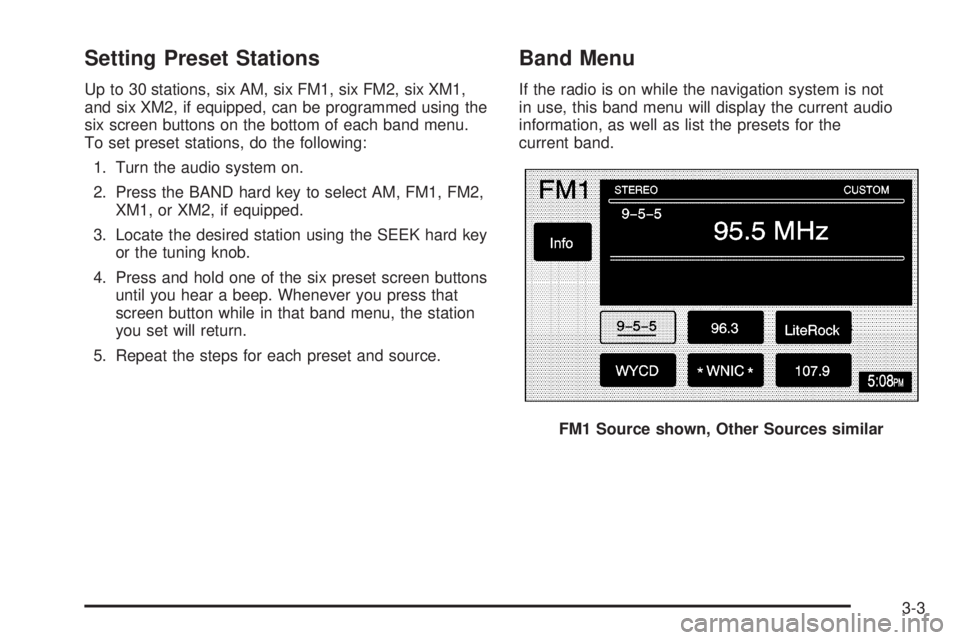
Band Menu
If the radio is on while the navigation system is not
in use, this band menu will display the current audio
information, as well as list the presets for the
current band.
FM1 Source shown, Other Sources similar
3-3
Page 50 of 62
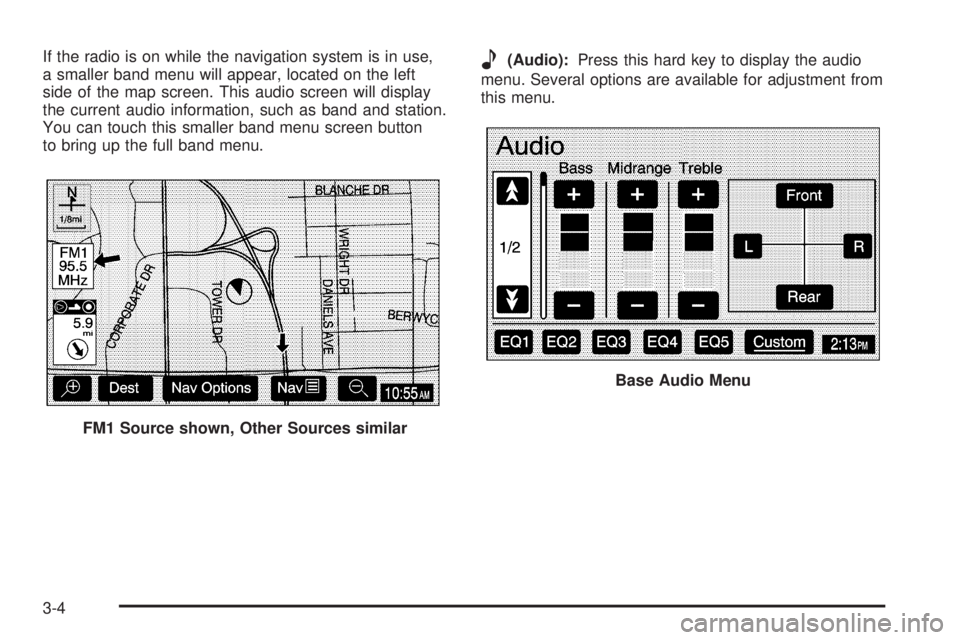
If the radio is on while the navigation system is in use,
a smaller band menu will appear, located on the left
side of the map screen. This audio screen will display
the current audio information, such as band and station.
You can touch this smaller band menu screen button
to bring up the full band menu.e(Audio):Press this hard key to display the audio
menu. Several options are available for adjustment from
this menu.
FM1 Source shown, Other Sources similar
Base Audio Menu
3-4
Page 51 of 62
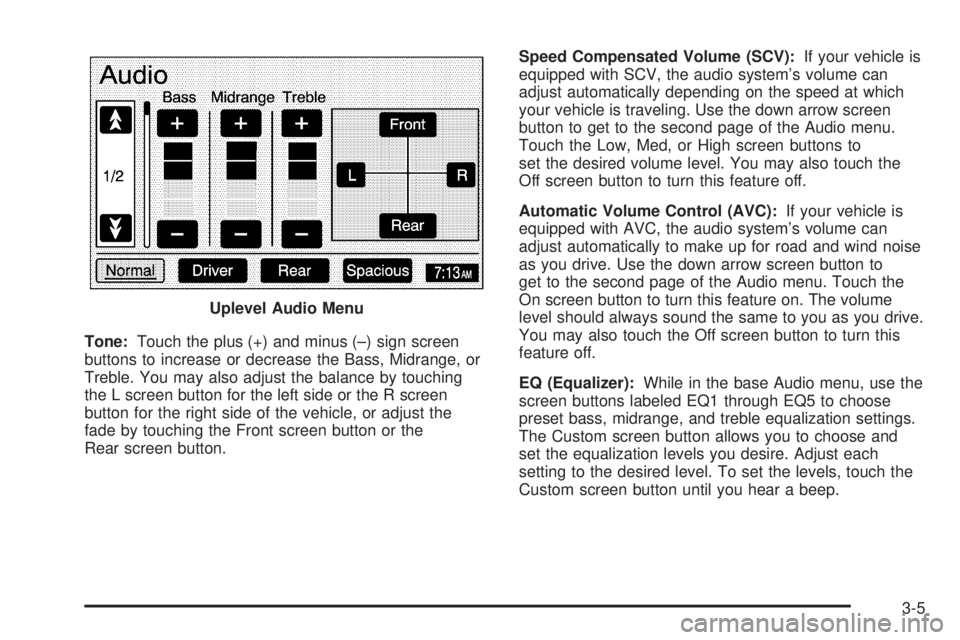
Tone:Touch the plus (+) and minus (–) sign screen
buttons to increase or decrease the Bass, Midrange, or
Treble. You may also adjust the balance by touching
the L screen button for the left side or the R screen
button for the right side of the vehicle, or adjust the
fade by touching the Front screen button or the
Rear screen button.Speed Compensated Volume (SCV):If your vehicle is
equipped with SCV, the audio system’s volume can
adjust automatically depending on the speed at which
your vehicle is traveling. Use the down arrow screen
button to get to the second page of the Audio menu.
Touch the Low, Med, or High screen buttons to
set the desired volume level. You may also touch the
Off screen button to turn this feature off.
Automatic Volume Control (AVC):If your vehicle is
equipped with AVC, the audio system’s volume can
adjust automatically to make up for road and wind noise
as you drive. Use the down arrow screen button to
get to the second page of the Audio menu. Touch the
On screen button to turn this feature on. The volume
level should always sound the same to you as you drive.
You may also touch the Off screen button to turn this
feature off.
EQ (Equalizer):While in the base Audio menu, use the
screen buttons labeled EQ1 through EQ5 to choose
preset bass, midrange, and treble equalization settings.
The Custom screen button allows you to choose and
set the equalization levels you desire. Adjust each
setting to the desired level. To set the levels, touch the
Custom screen button until you hear a beep. Uplevel Audio Menu
3-5
Page 52 of 62
After adjustments are made, press the BAND hard key
to go back to the preset station menu. Now that you
have preset the station and the EQ setting, you can
assign the EQ to the preset station. To do this, touch the
desired preset station screen button until you hear a
beep. The EQ setting will now be assigned to that preset
unless you decide to change it.
If you were at the CD screen before setting an EQ and
you press the CD hard key, you will be returned to
the CD screen, and the EQ will be set to that screen
until you change it.Digital Signal Processing (DSP)
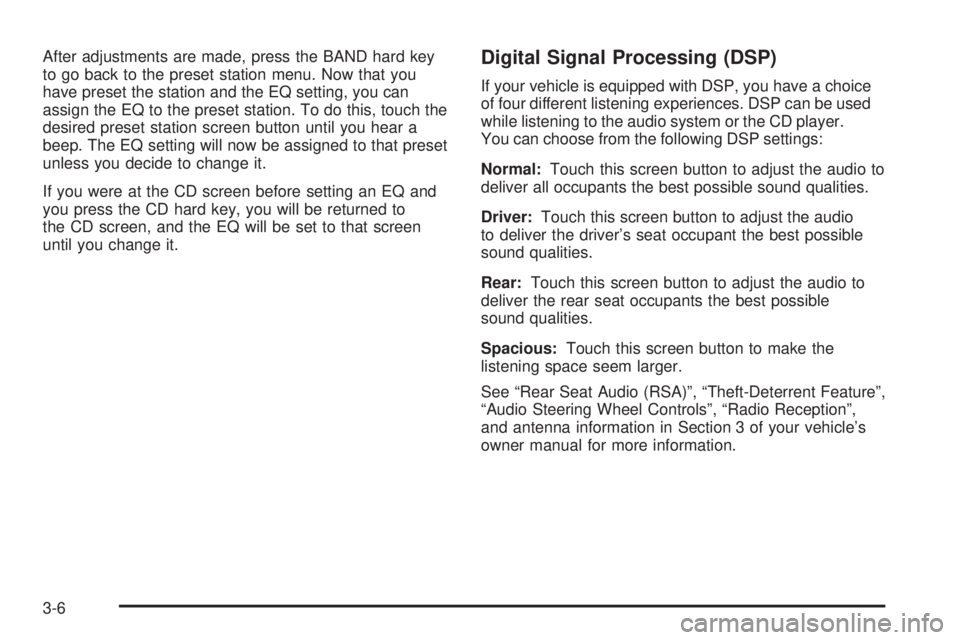
If your vehicle is equipped with DSP, you have a choice
of four different listening experiences. DSP can be used
while listening to the audio system or the CD player.
You can choose from the following DSP settings:
Normal:Touch this screen button to adjust the audio to
deliver all occupants the best possible sound qualities.
Driver:Touch this screen button to adjust the audio
to deliver the driver’s seat occupant the best possible
sound qualities.
Rear:Touch this screen button to adjust the audio to
deliver the rear seat occupants the best possible
sound qualities.
Spacious:Touch this screen button to make the
listening space seem larger.
See “Rear Seat Audio (RSA)”, “Theft-Deterrent Feature”,
“Audio Steering Wheel Controls”, “Radio Reception”,
and antenna information in Section 3 of your vehicle’s
owner manual for more information.
3-6
Page 53 of 62
Radio Data Systems (RDS)
The audio system has a Radio Data System (RDS).
RDS features are available for use only on FM stations
that broadcast RDS info. With RDS, the radio can
do the following:
Display station name
Display messages from radio stations
Display song title and artist name
This system relies on receiving specic information from
these stations and will only work when the information
is available. In rare cases, a radio station may broadcast
incorrect information that will cause the radio features
to work improperly. If this happens, contact the
radio station.
While the radio is tuned to an RDS station, the station
name or call letters will appear on the display instead of
the frequency.
Touch the Info screen button on the band menu to
receive information the selected radio station is
currently broadcasting.
XM™ Satellite Radio Service
XM™ is a satellite radio service that is based in the
48 contiguous United States. XM™ offers 100 coast to
coast channels including music, news, sports, talk,
and children’s programming. XM™ provides digital
quality audio and text information, including song title
and artist name. A service fee is required in order
to receive the XM™ service. For more information,
contact XM™ at www.xmradio.com or call
1-800-852-XMXM (9696).
Press the BAND hard key repeatedly until you reach the
XM™ selection. When XM™ is active, the channel
name and number, song title and artist will be displayed
on the screen.
Touch the XM Info screen button to display additional
XM station information.
3-7
Page 55 of 62
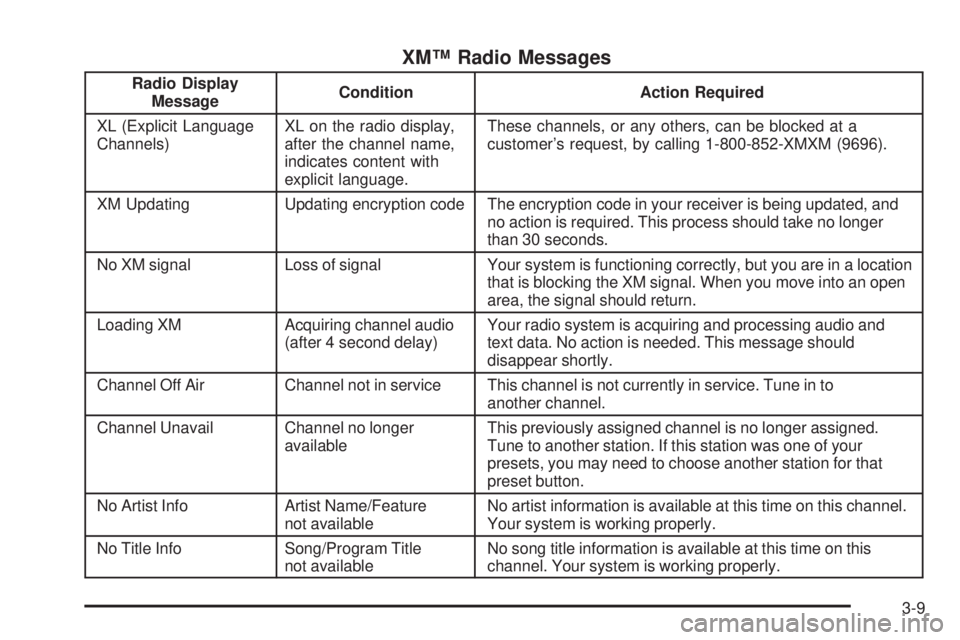
XM™ Radio Messages
Radio Display
MessageCondition Action Required
XL (Explicit Language
Channels)XL on the radio display,
after the channel name,
indicates content with
explicit language.These channels, or any others, can be blocked at a
customer’s request, by calling 1-800-852-XMXM (9696).
XM Updating Updating encryption code The encryption code in your receiver is being updated, and
no action is required. This process should take no longer
than 30 seconds.
No XM signal Loss of signal Your system is functioning correctly, but you are in a location
that is blocking the XM signal. When you move into an open
area, the signal should return.
Loading XM Acquiring channel audio
(after 4 second delay)Your radio system is acquiring and processing audio and
text data. No action is needed. This message should
disappear shortly.
Channel Off Air Channel not in service This channel is not currently in service. Tune in to
another channel.
Channel Unavail Channel no longer
availableThis previously assigned channel is no longer assigned.
Tune to another station. If this station was one of your
presets, you may need to choose another station for that
preset button.
No Artist Info Artist Name/Feature
not availableNo artist information is available at this time on this channel.
Your system is working properly.
No Title Info Song/Program Title
not availableNo song title information is available at this time on this
channel. Your system is working properly.
3-9
Page 57 of 62
Playing a CD
Remove the navigation map DVD from the slot and
return it to its case. Insert a CD partway into the slot,
label side up. The player will pull it in.
There will be a 12 to 15 second delay while the CD is
read, before it begins to play. When the player begins to
read a CD, the Disc Check in Process message will
appear briey to remind you of the delay. When the
map DVD is reinserted and read, the DVD Check
in Process message will appear briey to remind you
of the delay.
While playing a CD in the CD player, the navigation
system is not available. A message will display
if the NAV key is pressed. If your vehicle is equipped
with Rear Seat Entertainment (RSE), you can play
an audio CD while using the navigation system.
SeeRear Seat Entertainment System on page 3-14
for more information.
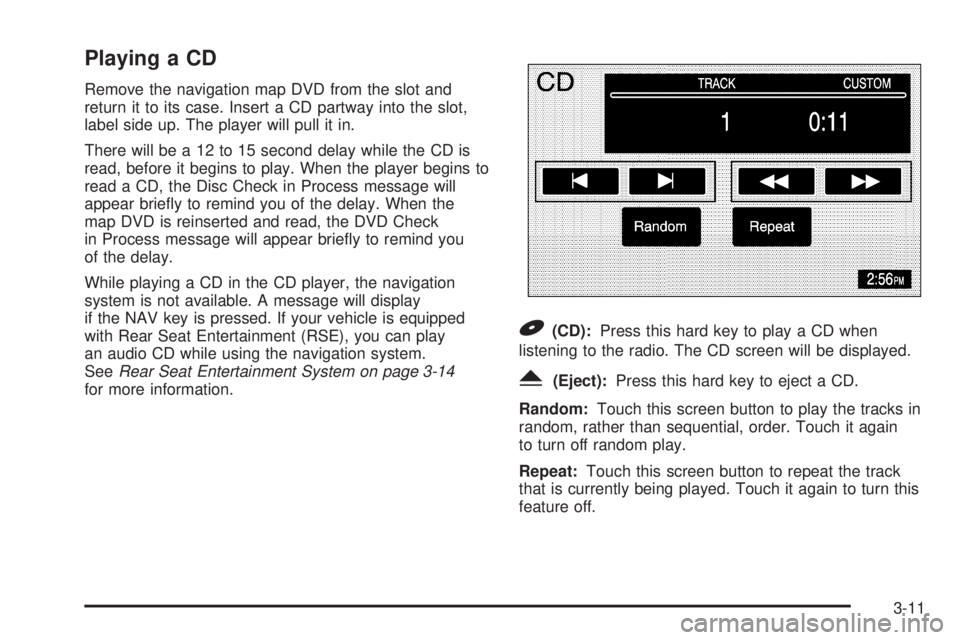
B(CD):Press this hard key to play a CD when
listening to the radio. The CD screen will be displayed.
Y(Eject):Press this hard key to eject a CD.
Random:Touch this screen button to play the tracks in
random, rather than sequential, order. Touch it again
to turn off random play.
Repeat:Touch this screen button to repeat the track
that is currently being played. Touch it again to turn this
feature off.
3-11