navigation GMC YUKON XL DENALI 2005 User Guide
[x] Cancel search | Manufacturer: GMC, Model Year: 2005, Model line: YUKON XL DENALI, Model: GMC YUKON XL DENALI 2005Pages: 62, PDF Size: 1.17 MB
Page 12 of 62
Features and Controls
Using the Navigation System
This section includes the basic information you will need
to know to operate the navigation system.
The main navigation menu displays a number of
options which offer information on a variety of topics.
SeeNavigation Menu on page 2-7for more information.
Use the keys located to the left of the navigation
screen along with the available touch-sensitive screen
buttons on the navigation screen to operate the system.
Once the vehicle is moving, various functions will be
disabled to reduce driver distractions.
Hard Keys
The following hard keys are located to the left of the
navigation screen:
P(Power/Volume Knob):Press the power/volume
knob to turn the audio and navigation systems on
and off. Turn the knob to increase or decrease the
volume to the audio system.
NAV RPT (Navigation Repeat):Press the NAV RPT
key to repeat the current voice guidance navigation
prompt.
NAV (Navigation):If you are in a menu and are not on
the map screen, press the NAV key to view the map
showing current vehicle position.
If a route has not been planned, pressing this key will
display the map screen and the following information:
North or Heading Up symbol
Time
Map scale
2-2
Page 13 of 62
If a route has been planned, pressing this key will
display the map screen and the following information:
Number of miles/kilometers between current
vehicle position and the destination. See “Route
Overview Menu” underDestination on page 2-16
for more information.
Estimated travel time to the destination. See “Route
Overview Menu” underDestination on page 2-16for
more information.
Highlighted route or turn-by-turn instructions.
See “Map Appearance” underNavigation Menu on
page 2-7for more information.
You will nd more information on each feature found on
a map screen later in this manual.
BAND:Press the BAND key to access the BAND
screen and switch between AM, FM1, FM2, XM1, or
XM2, if equipped. See “Finding a Station” under
Navigation Audio System on page 3-2.
xSEEKw:Press the SEEK up or down arrows to
go to the next or previous radio station and stay
there. See “Finding a Station” underNavigation Audio
System on page 3-2.
B(CD):Press the CD key to play a CD. The CD
screen will be displayed. See “Playing a CD” under
Navigation Audio System on page 3-2.
e(Audio):Press the audio key to access the Audio
menu. SeeNavigation Audio System on page 3-2.
CONFIG (Configure):Press the CONFIG key to access
the Congure menu. SeeConfigure Menu on page 2-31
for more information.
Tuning Knob:Turn the tuning knob to go to the next
or previous radio station and stay there. See “Finding a
Station” underNavigation Audio System on page 3-2.
X(Eject):Press the eject key located above the
DVD/CD slot to eject a map DVD or CD.
2-3
Page 14 of 62
Touch-Sensitive Screen Buttons
Touch-sensitive buttons are located on the navigation
screen. When you have successfully selected a
button on the screen, a beep will sound. This feature
can also be turned off. SeeConfigure Menu on
page 2-31for more information. Screen buttons will be
highlighted when available and dim when they are
unavailable. There are also some toggle touch-sensitive
screen buttons that will be light blue when active and
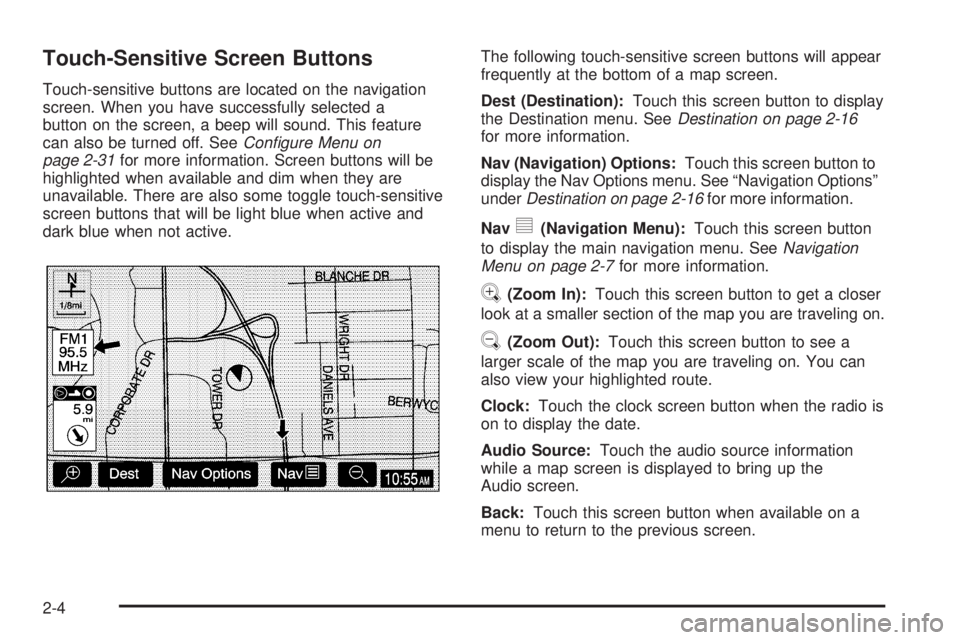
dark blue when not active.The following touch-sensitive screen buttons will appear
frequently at the bottom of a map screen.
Dest (Destination):Touch this screen button to display
the Destination menu. SeeDestination on page 2-16
for more information.
Nav (Navigation) Options:Touch this screen button to
display the Nav Options menu. See “Navigation Options”
underDestination on page 2-16for more information.
Nav
y(Navigation Menu):Touch this screen button
to display the main navigation menu. SeeNavigation
Menu on page 2-7for more information.
V(Zoom In):Touch this screen button to get a closer
look at a smaller section of the map you are traveling on.
U(Zoom Out):Touch this screen button to see a
larger scale of the map you are traveling on. You can
also view your highlighted route.
Clock:Touch the clock screen button when the radio is
on to display the date.
Audio Source:Touch the audio source information
while a map screen is displayed to bring up the
Audio screen.
Back:Touch this screen button when available on a
menu to return to the previous screen.
2-4
Page 15 of 62
Maps
This section includes basic information that you need to
know about the map database.
The maps are stored on a DVD-ROM. The United
States, Hawaii, and Canada are contained on one disc.
The map database includes interstate freeways,
state highways, country roads, and major and
general streets.
Refer to the “Navigation System Map Disc” manual to
view the explanation of map coverage. The map
disc manual will be in your map DVD case when the
vehicle is delivered from the factory.
When your vehicle is delivered from the factory, the
dealer may have installed the map DVD. If the DVD
was not installed in your vehicle when rst purchased,
do the following:
1. Turn the ignition on.
2. Load the map DVD into the slot by inserting it
partway. The system will pull it in.Once the map DVD is inserted correctly, you will have
the following two choices:ENG (English)
FR (French)
You can select the language at this time. See
“Language” underConfigure Menu on page 2-31for
more information. Once a language has been selected,
touch the NEXT screen button to plan a route. The
map will appear showing your current vehicle position.
Map Adjustments and Scales
The system allows you to adjust the scale of view on
the map. The map will scroll automatically based on the
direction you are traveling.
To view a larger or smaller scale of the map, touch
zoom in or zoom out. See “Hard Keys” underUsing the
Navigation System on page 2-2for more information.
The scale of a map can range from 1/32 of a mile
(0.05 km) to 128 miles (206 km).
2-5
Page 16 of 62
Symbols
The following symbols are the most common that
appear on a map screen.
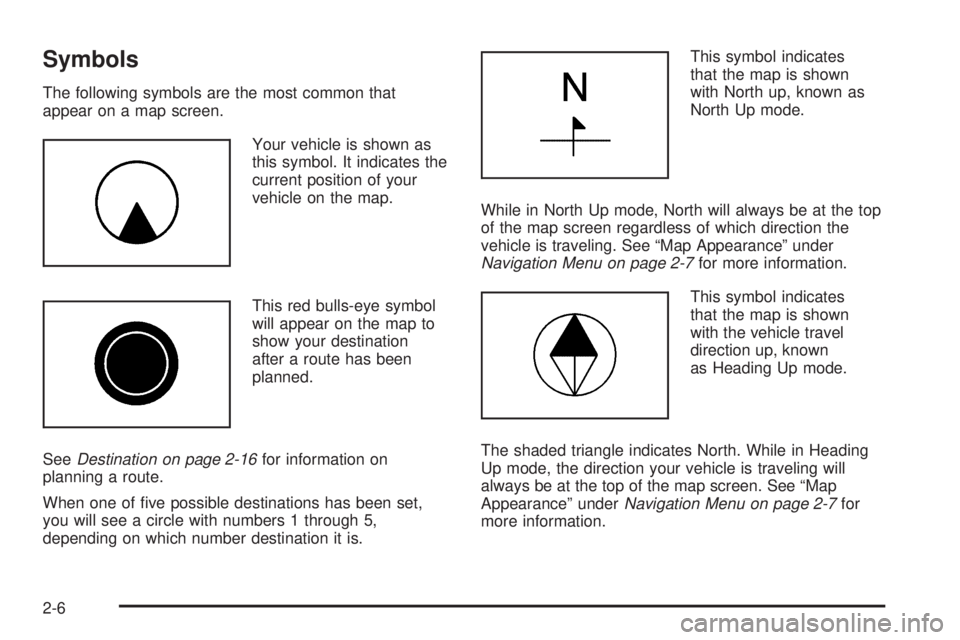
Your vehicle is shown as
this symbol. It indicates the
current position of your
vehicle on the map.
This red bulls-eye symbol
will appear on the map to
show your destination
after a route has been
planned.
SeeDestination on page 2-16for information on
planning a route.
When one of ve possible destinations has been set,
you will see a circle with numbers 1 through 5,
depending on which number destination it is.This symbol indicates
that the map is shown
with North up, known as
North Up mode.
While in North Up mode, North will always be at the top
of the map screen regardless of which direction the
vehicle is traveling. See “Map Appearance” under
Navigation Menu on page 2-7for more information.
This symbol indicates
that the map is shown
with the vehicle travel
direction up, known
as Heading Up mode.
The shaded triangle indicates North. While in Heading
Up mode, the direction your vehicle is traveling will
always be at the top of the map screen. See “Map
Appearance” underNavigation Menu on page 2-7for
more information.
2-6
Page 17 of 62
Navigation Menu
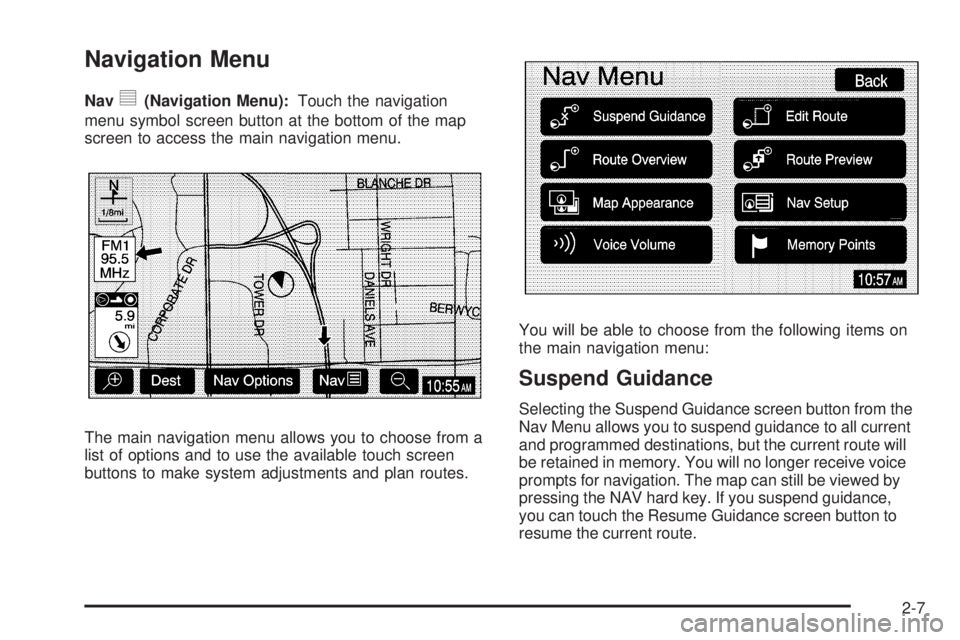
Navy(Navigation Menu):Touch the navigation
menu symbol screen button at the bottom of the map
screen to access the main navigation menu.
The main navigation menu allows you to choose from a
list of options and to use the available touch screen
buttons to make system adjustments and plan routes.You will be able to choose from the following items on
the main navigation menu:
Suspend Guidance
Selecting the Suspend Guidance screen button from the
Nav Menu allows you to suspend guidance to all current
and programmed destinations, but the current route will
be retained in memory. You will no longer receive voice
prompts for navigation. The map can still be viewed by
pressing the NAV hard key. If you suspend guidance,
you can touch the Resume Guidance screen button to
resume the current route.
2-7
Page 22 of 62
To return to previewing the route to the nal destination,
do the following:
1. Touch the Edit screen button.
2. Touch the Next screen button.
3. Touch the OK screen button, then the Back screen
button to return to the Route Preview screen.
Now when you touch the arrow screen buttons to
preview the route, it will trace the route to the nal
destination rather than the route to the next POI.
Use the following arrow screen buttons from the Route
Preview pop-up menu to trace a route:
Iq(Preview to current location):Touch this screen
button to preview the route traveling toward the vehicle’s
current location. Touch this screen button repeatedly to
increase the speed at which the indicator will trace
the route.
rh(Preview to final destination):Touch this screen
button to view the route traveling toward the nal
destination. Touch this screen button repeatedly to
increase the speed at which the indicator will trace
the route.
It(View current location):Touch this screen
button to view the vehicle’s current location along the
current route.
uh(View final destination):Touch this screen button
to view the nal destination along the current route.
Navigation Setup
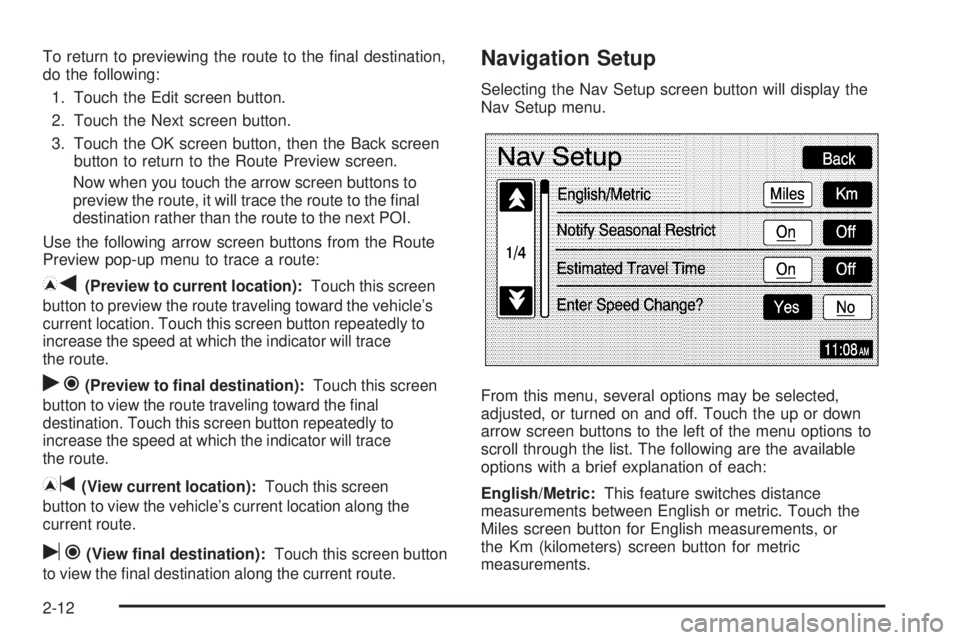
Selecting the Nav Setup screen button will display the
Nav Setup menu.
From this menu, several options may be selected,
adjusted, or turned on and off. Touch the up or down
arrow screen buttons to the left of the menu options to
scroll through the list. The following are the available
options with a brief explanation of each:
English/Metric:This feature switches distance
measurements between English or metric. Touch the
Miles screen button for English measurements, or
the Km (kilometers) screen button for metric
measurements.
2-12
Page 23 of 62
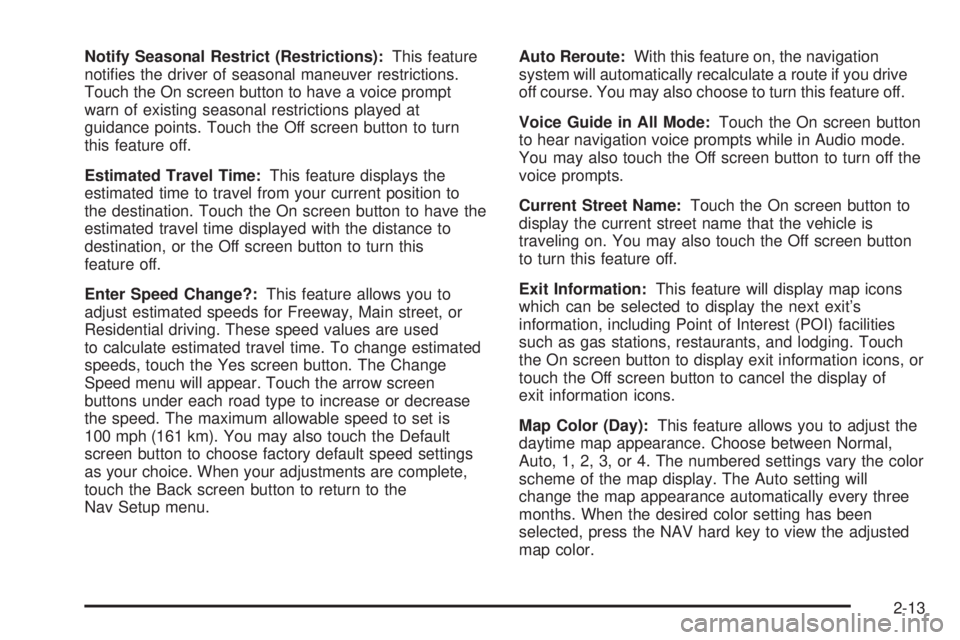
Notify Seasonal Restrict (Restrictions):This feature
noties the driver of seasonal maneuver restrictions.
Touch the On screen button to have a voice prompt
warn of existing seasonal restrictions played at
guidance points. Touch the Off screen button to turn
this feature off.
Estimated Travel Time:This feature displays the
estimated time to travel from your current position to
the destination. Touch the On screen button to have the
estimated travel time displayed with the distance to
destination, or the Off screen button to turn this
feature off.
Enter Speed Change?:This feature allows you to
adjust estimated speeds for Freeway, Main street, or
Residential driving. These speed values are used
to calculate estimated travel time. To change estimated
speeds, touch the Yes screen button. The Change
Speed menu will appear. Touch the arrow screen
buttons under each road type to increase or decrease
the speed. The maximum allowable speed to set is
100 mph (161 km). You may also touch the Default
screen button to choose factory default speed settings
as your choice. When your adjustments are complete,
touch the Back screen button to return to the
Nav Setup menu.Auto Reroute:With this feature on, the navigation
system will automatically recalculate a route if you drive
off course. You may also choose to turn this feature off.
Voice Guide in All Mode:Touch the On screen button
to hear navigation voice prompts while in Audio mode.
You may also touch the Off screen button to turn off the
voice prompts.
Current Street Name:Touch the On screen button to
display the current street name that the vehicle is
traveling on. You may also touch the Off screen button
to turn this feature off.
Exit Information:This feature will display map icons
which can be selected to display the next exit’s
information, including Point of Interest (POI) facilities
such as gas stations, restaurants, and lodging. Touch
the On screen button to display exit information icons, or
touch the Off screen button to cancel the display of
exit information icons.
Map Color (Day):This feature allows you to adjust the
daytime map appearance. Choose between Normal,
Auto, 1, 2, 3, or 4. The numbered settings vary the color
scheme of the map display. The Auto setting will
change the map appearance automatically every three
months. When the desired color setting has been
selected, press the NAV hard key to view the adjusted
map color.
2-13
Page 28 of 62
Alpha-Numeric Keypad
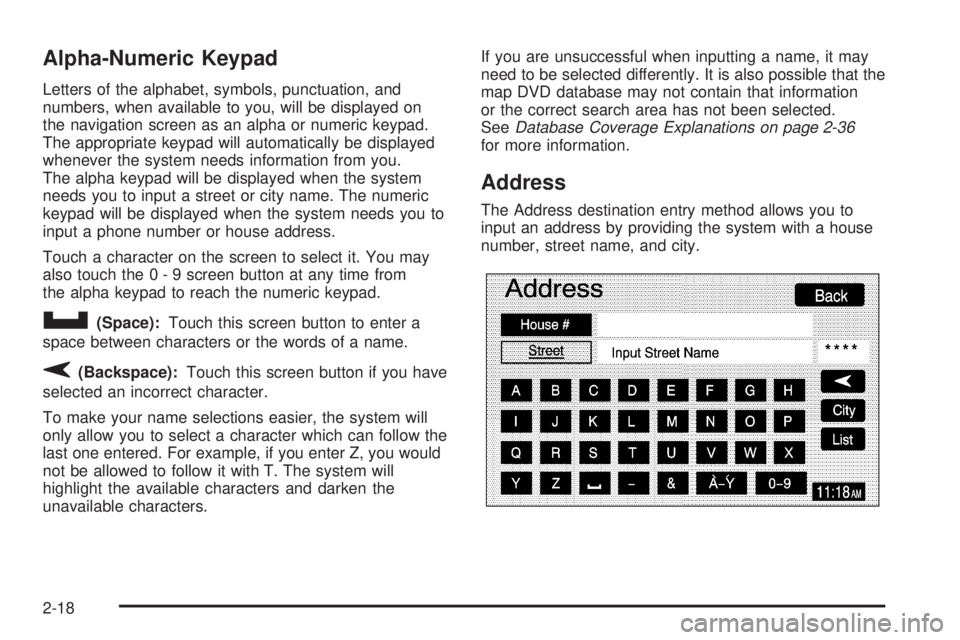
Letters of the alphabet, symbols, punctuation, and
numbers, when available to you, will be displayed on
the navigation screen as an alpha or numeric keypad.
The appropriate keypad will automatically be displayed
whenever the system needs information from you.
The alpha keypad will be displayed when the system
needs you to input a street or city name. The numeric
keypad will be displayed when the system needs you to
input a phone number or house address.
Touch a character on the screen to select it. You may
also touch the 0 - 9 screen button at any time from
the alpha keypad to reach the numeric keypad.
U(Space):Touch this screen button to enter a
space between characters or the words of a name.
V(Backspace):Touch this screen button if you have
selected an incorrect character.
To make your name selections easier, the system will
only allow you to select a character which can follow the
last one entered. For example, if you enter Z, you would
not be allowed to follow it with T. The system will
highlight the available characters and darken the
unavailable characters.If you are unsuccessful when inputting a name, it may
need to be selected differently. It is also possible that the
map DVD database may not contain that information
or the correct search area has not been selected.
SeeDatabase Coverage Explanations on page 2-36
for more information.
Address
The Address destination entry method allows you to
input an address by providing the system with a house
number, street name, and city.
2-18
Page 31 of 62
Memory Points
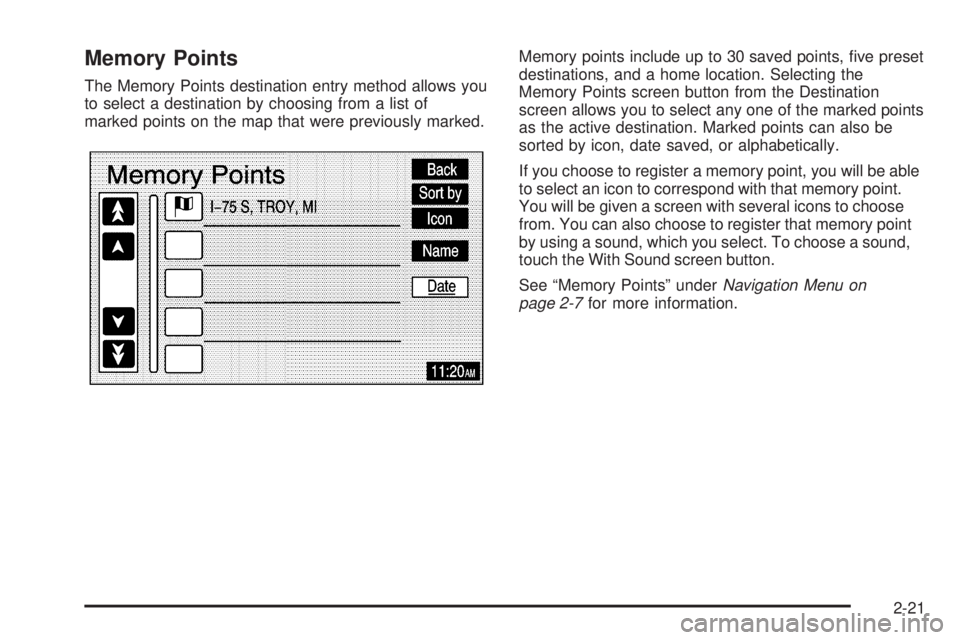
The Memory Points destination entry method allows you
to select a destination by choosing from a list of
marked points on the map that were previously marked.Memory points include up to 30 saved points, ve preset
destinations, and a home location. Selecting the
Memory Points screen button from the Destination
screen allows you to select any one of the marked points
as the active destination. Marked points can also be
sorted by icon, date saved, or alphabetically.
If you choose to register a memory point, you will be able
to select an icon to correspond with that memory point.
You will be given a screen with several icons to choose
from. You can also choose to register that memory point
by using a sound, which you select. To choose a sound,
touch the With Sound screen button.
See “Memory Points” underNavigation Menu on
page 2-7for more information.
2-21