navigation GMC YUKON XL DENALI 2005 Owner's Manual
[x] Cancel search | Manufacturer: GMC, Model Year: 2005, Model line: YUKON XL DENALI, Model: GMC YUKON XL DENALI 2005Pages: 62, PDF Size: 1.17 MB
Page 33 of 62
Map
The Map destination entry method displays the last
location on the map, and the road preference.
Scroll across and touch the map at the location you
would like to set as your destination. Once you
have located the desired destination, touch the Enter
Destination screen button and then the OK screen
button. The route will then be calculated. You may begin
driving to start route guidance or you may touch the
Route screen button and then the Start screen button.
You may also zoom out to view the entire regional map.
See “Touch-Sensitive Screen Buttons” underUsing
the Navigation System on page 2-2for more information.
However, if you zoom out as much as possible and
scroll around the map, some parts of the map will
appear to be missing because they are not readable in
larger scales.
Previous Start Point
The Previous start point destination entry method allows
you to select the last start point as a destination.
Phone Number
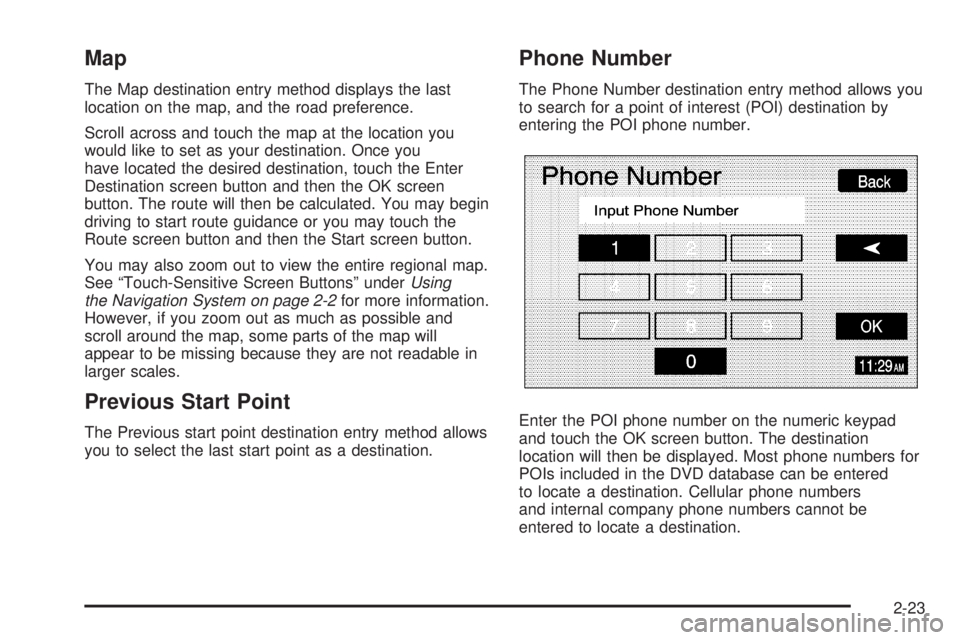
The Phone Number destination entry method allows you
to search for a point of interest (POI) destination by
entering the POI phone number.
Enter the POI phone number on the numeric keypad
and touch the OK screen button. The destination
location will then be displayed. Most phone numbers for
POIs included in the DVD database can be entered
to locate a destination. Cellular phone numbers
and internal company phone numbers cannot be
entered to locate a destination.
2-23
Page 36 of 62
Info (Information):When a POI icon is selected on the
screen, you can touch this screen button to display
the name, address, and telephone number, if available,
for the selected POI. See “Navigation Options” later
in this section for more information on POIs and
their icons.
Route Preference:This option will display the Route
Preference screen. To adjust your route preferences,
touch Change. See “Edit Route” underNavigation Menu
on page 2-7for more information.
Once the desired adjustments from the destination
preview menu are complete, the route overview menu
can be displayed. See “Route Overview Menu” following
in this section for more information.
Once you have entered your destination by touching the
Enter Destination screen button, you can do one of
the following:
Press the NAV hard key to begin route guidance.
Start driving to begin route guidance.
Touch the Route screen button on the map screen
displaying the new destination to make further
changes. See “Route Overview” following in this
section for more information.
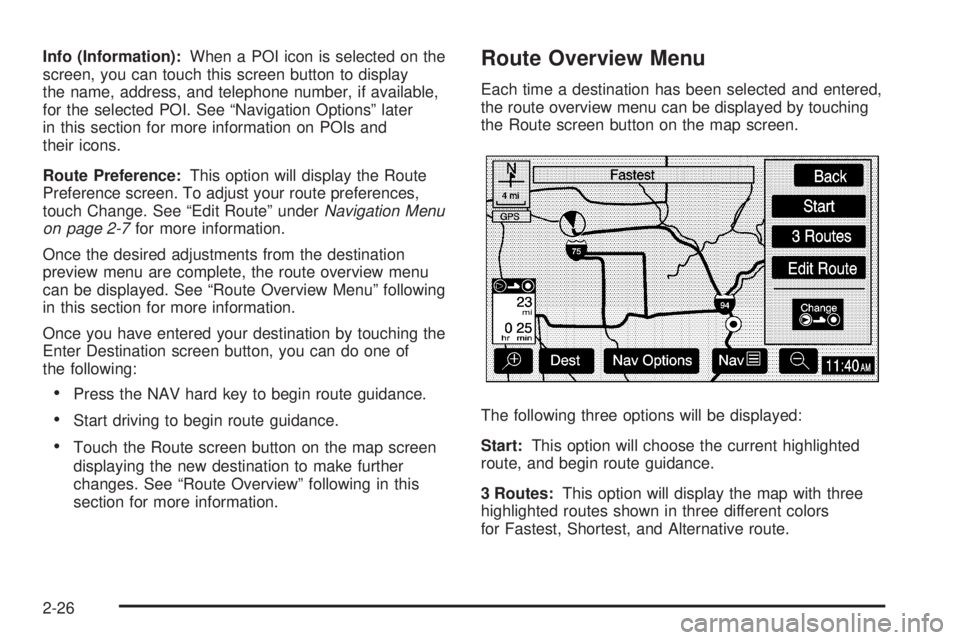
Route Overview Menu
Each time a destination has been selected and entered,
the route overview menu can be displayed by touching
the Route screen button on the map screen.
The following three options will be displayed:
Start:This option will choose the current highlighted
route, and begin route guidance.
3 Routes:This option will display the map with three
highlighted routes shown in three different colors
for Fastest, Shortest, and Alternative route.
2-26
Page 37 of 62
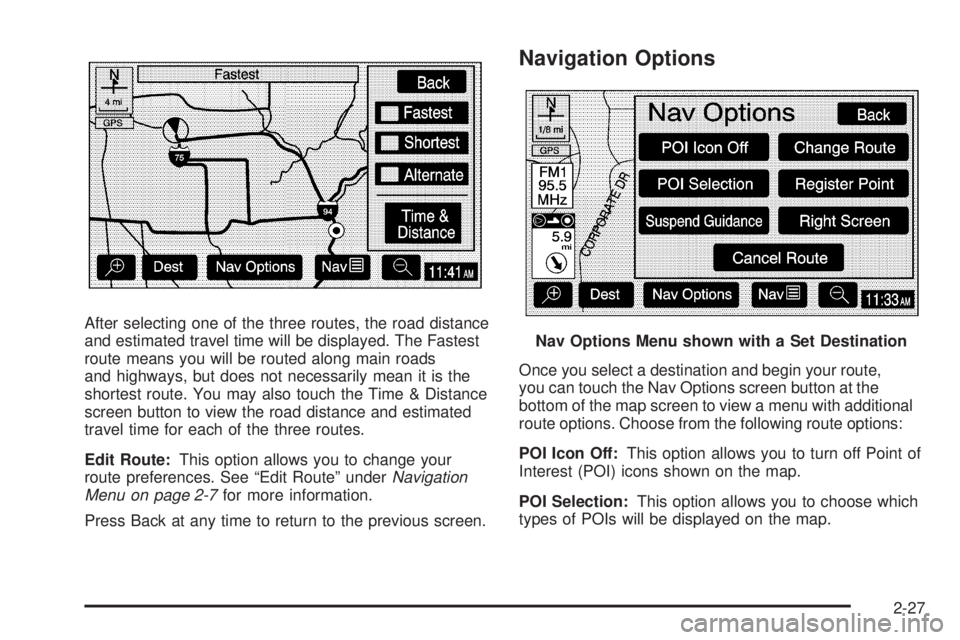
After selecting one of the three routes, the road distance
and estimated travel time will be displayed. The Fastest
route means you will be routed along main roads
and highways, but does not necessarily mean it is the
shortest route. You may also touch the Time & Distance
screen button to view the road distance and estimated
travel time for each of the three routes.
Edit Route:This option allows you to change your
route preferences. See “Edit Route” underNavigation
Menu on page 2-7for more information.
Press Back at any time to return to the previous screen.
Navigation Options
Once you select a destination and begin your route,
you can touch the Nav Options screen button at the
bottom of the map screen to view a menu with additional
route options. Choose from the following route options:
POI Icon Off:This option allows you to turn off Point of
Interest (POI) icons shown on the map.
POI Selection:This option allows you to choose which
types of POIs will be displayed on the map.
Nav Options Menu shown with a Set Destination
2-27
Page 39 of 62
Suspend Guidance:This option allows you to suspend
active route guidance for all current and programmed
destinations. See “Suspend Guidance” underNavigation
Menu on page 2-7for more information.
Cancel Route:This option allows you to cancel the
current, or rst destination. The second programmed
destination will then be used if one is available.
Change Route:This option allows you to change the
route search condition while the vehicle is moving.
The following options may be available:
Detour for 1 mile?: Touch the Yes screen button to
recalculate your route and detour for one mile
around the vehicle’s current position.
Detour for 3 miles?: Touch the Yes screen button to
recalculate your route and detour for three miles
around the vehicle’s current position.
Change to fastest?: Touch the Yes screen button to
recalculate your route to the fastest route.
Change to shortest?: Touch the Yes screen button
to recalculate your route to the shortest route.
Reroute from adjacent road?: Touch the Yes screen
button to recalculate your route from another road
on your route, near the vehicle’s current position.
Register Point:This option allows you to register a
marked point or memory point. See “Memory Points”
underNavigation Menu on page 2-7for more information.
Right Screen:If you currently have a split-screen, this
option allows you to adjust options for the screen to
the right.
2-29
Page 40 of 62
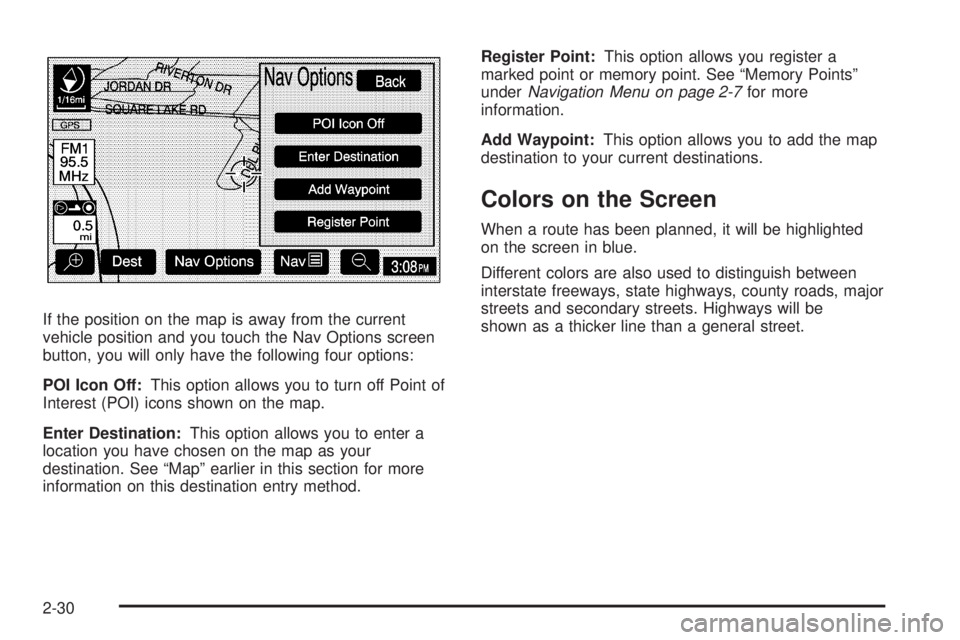
If the position on the map is away from the current
vehicle position and you touch the Nav Options screen
button, you will only have the following four options:
POI Icon Off:This option allows you to turn off Point of
Interest (POI) icons shown on the map.
Enter Destination:This option allows you to enter a
location you have chosen on the map as your
destination. See “Map” earlier in this section for more
information on this destination entry method.Register Point:This option allows you register a
marked point or memory point. See “Memory Points”
underNavigation Menu on page 2-7for more
information.
Add Waypoint:This option allows you to add the map
destination to your current destinations.
Colors on the Screen
When a route has been planned, it will be highlighted
on the screen in blue.
Different colors are also used to distinguish between
interstate freeways, state highways, county roads, major
streets and secondary streets. Highways will be
shown as a thicker line than a general street.
2-30
Page 41 of 62
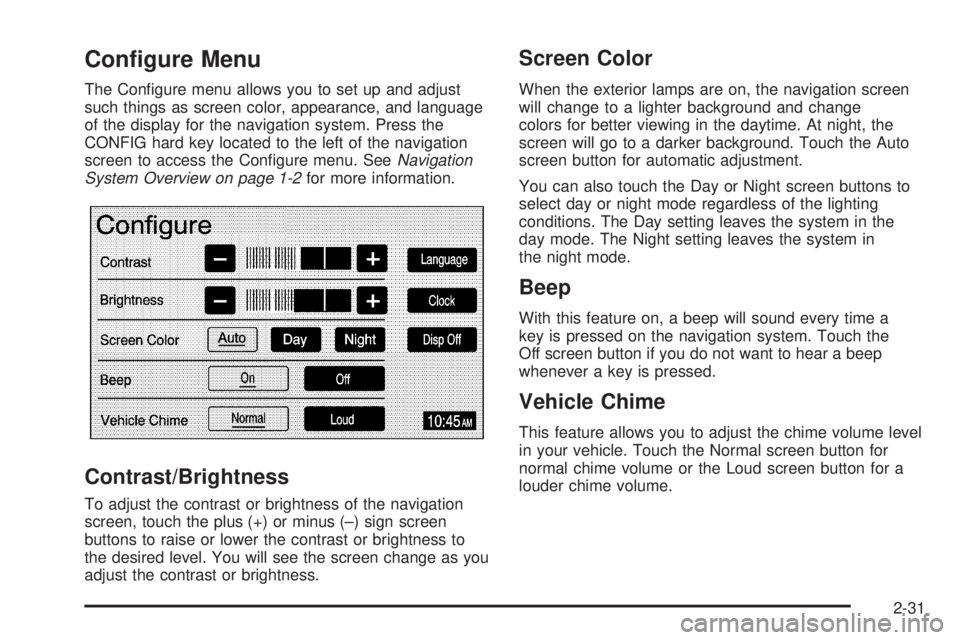
Configure Menu
The Congure menu allows you to set up and adjust
such things as screen color, appearance, and language
of the display for the navigation system. Press the
CONFIG hard key located to the left of the navigation
screen to access the Congure menu. SeeNavigation
System Overview on page 1-2for more information.
Contrast/Brightness
To adjust the contrast or brightness of the navigation
screen, touch the plus (+) or minus (–) sign screen
buttons to raise or lower the contrast or brightness to
the desired level. You will see the screen change as you
adjust the contrast or brightness.
Screen Color
When the exterior lamps are on, the navigation screen
will change to a lighter background and change
colors for better viewing in the daytime. At night, the
screen will go to a darker background. Touch the Auto
screen button for automatic adjustment.
You can also touch the Day or Night screen buttons to
select day or night mode regardless of the lighting
conditions. The Day setting leaves the system in the
day mode. The Night setting leaves the system in
the night mode.
Beep
With this feature on, a beep will sound every time a
key is pressed on the navigation system. Touch the
Off screen button if you do not want to hear a beep
whenever a key is pressed.
Vehicle Chime
This feature allows you to adjust the chime volume level
in your vehicle. Touch the Normal screen button for
normal chime volume or the Loud screen button for a
louder chime volume.
2-31
Page 42 of 62
Language
Your vehicle has been set for the English language,
but you may also select French for all instructional text
and voice prompts. However, names on the map
when using the navigation functions will not change.
If you wish to change the language, the map DVD must
be inserted. Then, do the following:
1. Touch the Language screen button. A caution
will display.
2. Touch the desired language to select it.
3. Touch the NEXT screen button to change the
display back to the map screen.
If the language is changed from English, the menu
screens will not match word-for-word as they appear in
this manual.
If you accidentally select a language you do not
understand, press the CONFIG hard key, then select
the desired language.
Clock
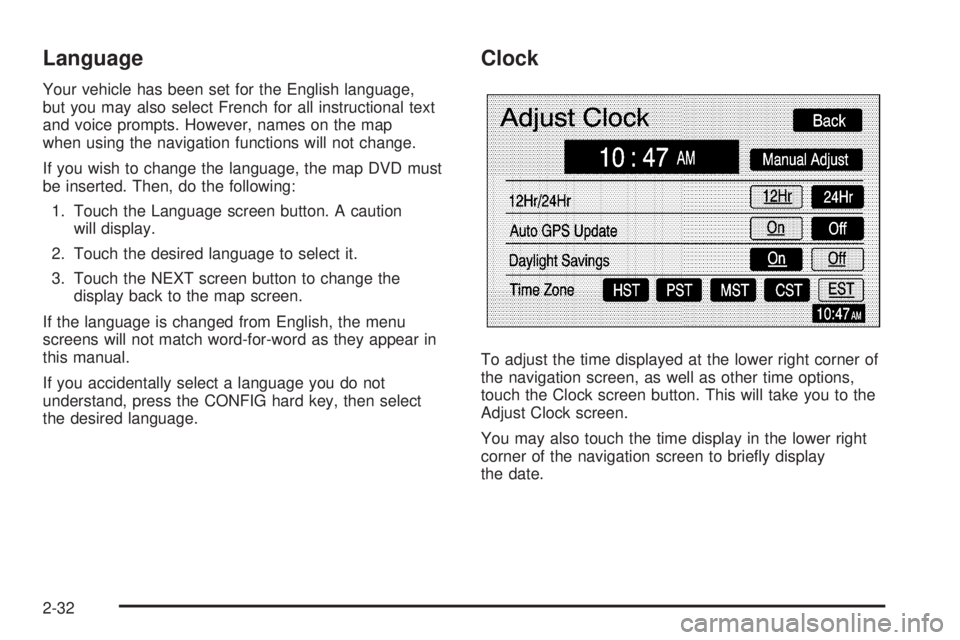
To adjust the time displayed at the lower right corner of
the navigation screen, as well as other time options,
touch the Clock screen button. This will take you to the
Adjust Clock screen.
You may also touch the time display in the lower right
corner of the navigation screen to briey display
the date.
2-32
Page 43 of 62
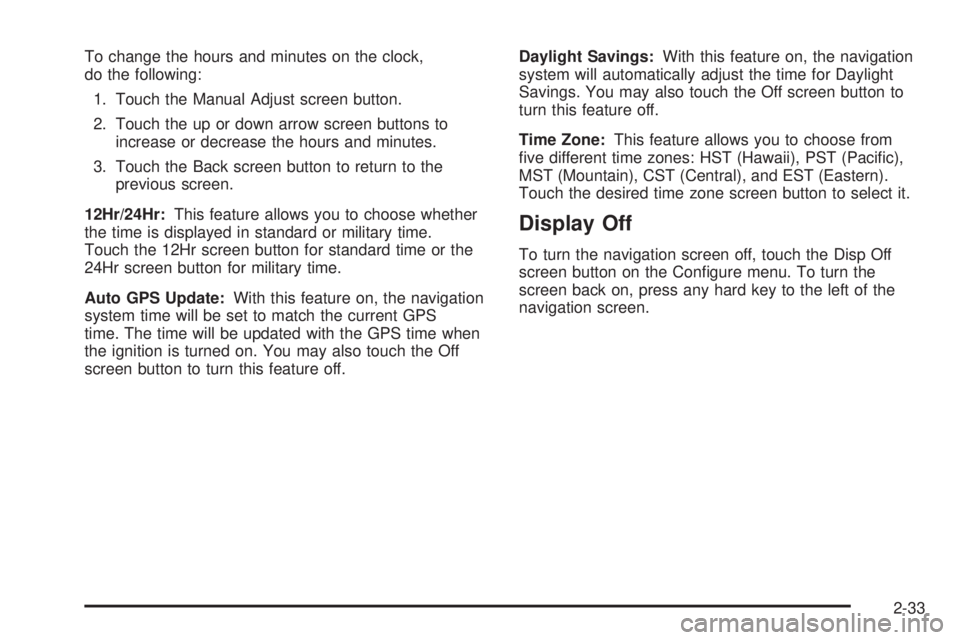
To change the hours and minutes on the clock,
do the following:
1. Touch the Manual Adjust screen button.
2. Touch the up or down arrow screen buttons to
increase or decrease the hours and minutes.
3. Touch the Back screen button to return to the
previous screen.
12Hr/24Hr:This feature allows you to choose whether
the time is displayed in standard or military time.
Touch the 12Hr screen button for standard time or the
24Hr screen button for military time.
Auto GPS Update:With this feature on, the navigation
system time will be set to match the current GPS
time. The time will be updated with the GPS time when
the ignition is turned on. You may also touch the Off
screen button to turn this feature off.Daylight Savings:With this feature on, the navigation
system will automatically adjust the time for Daylight
Savings. You may also touch the Off screen button to
turn this feature off.
Time Zone:This feature allows you to choose from
ve different time zones: HST (Hawaii), PST (Pacic),
MST (Mountain), CST (Central), and EST (Eastern).
Touch the desired time zone screen button to select it.
Display Off
To turn the navigation screen off, touch the Disp Off
screen button on the Congure menu. To turn the
screen back on, press any hard key to the left of the
navigation screen.
2-33
Page 44 of 62
Global Positioning System (GPS)
The navigation system determines the position of your
vehicle by using satellite signals, various vehicle signals
and map data.
The Global Positioning System (GPS) locates the
current position of your vehicle using signals sent by the
United States Department of Defense GPS satellites.
While your vehicle is receiving signals from these
satellites, GPS will not appear on the map screen.
However, at times, other interferences such as
the satellite condition, road conguration, the condition
of the vehicle and/or other circumstances can interfere
with the system’s ability to determine the accurate
position of the vehicle. This is when GPS will appear on
the map screen.The system may not be available or interferences may
occur if any of the following are true:Signals are obstructed by tall buildings, large trucks
or a tunnel.
Metallic objects are located on the dashboard.
Satellites are being repaired or improved.
Aftermarket glass tinting has been applied to the
vehicle’s windshield.
Do not apply aftermarket glass tinting to the vehicle’s
windshield or place metallic objects on the vehicle’s
dashboard. Glass tinting and metallic objects will
interfere with the system’s ability to receive GPS signals
and may cause the system to malfunction.
If you are experiencing a problem, seeVehicle
Positioning on page 2-35andProblems with Route
Guidance on page 2-36for more information.
2-34
Page 46 of 62
Problems with Route Guidance
Inappropriate route guidance may occur under any of
the following conditions:
You have not turned onto the road indicated by
the system.
Route guidance is not available for the next turn.
The route is not changed during automatic rerouting.
Plural names of places are displayed.
You are driving at high speeds, which may cause
the automatic rerouting to operate more slowly.
The route prohibits the entry of a vehicle due to a
regulation by time or season or any other regulation
which may be given.
A route cannot be found.
A road is new, was recently changed or is not listed
on the DVD. The route to the destination may not
be shown. SeeOrdering Map DVDs on page 2-36.
If the System Needs Service
If you are still experiencing difficulty with your navigation
system after reading this information, see your dealer
for assistance.
Ordering Map DVDs
The map DVD in your vehicle is the most up-to-date
information available when your vehicle was purchased.
The map DVD is updated periodically, provided that
the map information has changed. To order a new map
DVD, contact your dealer.
Database Coverage Explanations
Coverage areas vary with respect to the level of map
detail available for any given area. Some areas will
feature greater levels of detail than others. If this
happens, it does not mean there is a problem with the
system. As the map DVD is updated, more detail
may become available for areas which previously had
limited detail. SeeOrdering Map DVDs on page 2-36.
2-36