navigation system GMC YUKON XL DENALI 2005 User Guide
[x] Cancel search | Manufacturer: GMC, Model Year: 2005, Model line: YUKON XL DENALI, Model: GMC YUKON XL DENALI 2005Pages: 62, PDF Size: 1.17 MB
Page 12 of 62
Features and Controls
Using the Navigation System
This section includes the basic information you will need
to know to operate the navigation system.
The main navigation menu displays a number of
options which offer information on a variety of topics.
SeeNavigation Menu on page 2-7for more information.
Use the keys located to the left of the navigation
screen along with the available touch-sensitive screen
buttons on the navigation screen to operate the system.
Once the vehicle is moving, various functions will be
disabled to reduce driver distractions.
Hard Keys
The following hard keys are located to the left of the
navigation screen:
P(Power/Volume Knob):Press the power/volume
knob to turn the audio and navigation systems on
and off. Turn the knob to increase or decrease the
volume to the audio system.
NAV RPT (Navigation Repeat):Press the NAV RPT
key to repeat the current voice guidance navigation
prompt.
NAV (Navigation):If you are in a menu and are not on
the map screen, press the NAV key to view the map
showing current vehicle position.
If a route has not been planned, pressing this key will
display the map screen and the following information:
North or Heading Up symbol
Time
Map scale
2-2
Page 13 of 62
If a route has been planned, pressing this key will
display the map screen and the following information:
Number of miles/kilometers between current
vehicle position and the destination. See “Route
Overview Menu” underDestination on page 2-16
for more information.
Estimated travel time to the destination. See “Route
Overview Menu” underDestination on page 2-16for
more information.
Highlighted route or turn-by-turn instructions.
See “Map Appearance” underNavigation Menu on
page 2-7for more information.
You will nd more information on each feature found on
a map screen later in this manual.
BAND:Press the BAND key to access the BAND
screen and switch between AM, FM1, FM2, XM1, or
XM2, if equipped. See “Finding a Station” under
Navigation Audio System on page 3-2.
xSEEKw:Press the SEEK up or down arrows to
go to the next or previous radio station and stay
there. See “Finding a Station” underNavigation Audio
System on page 3-2.
B(CD):Press the CD key to play a CD. The CD
screen will be displayed. See “Playing a CD” under
Navigation Audio System on page 3-2.
e(Audio):Press the audio key to access the Audio
menu. SeeNavigation Audio System on page 3-2.
CONFIG (Configure):Press the CONFIG key to access
the Congure menu. SeeConfigure Menu on page 2-31
for more information.
Tuning Knob:Turn the tuning knob to go to the next
or previous radio station and stay there. See “Finding a
Station” underNavigation Audio System on page 3-2.
X(Eject):Press the eject key located above the
DVD/CD slot to eject a map DVD or CD.
2-3
Page 15 of 62
Maps
This section includes basic information that you need to
know about the map database.
The maps are stored on a DVD-ROM. The United
States, Hawaii, and Canada are contained on one disc.
The map database includes interstate freeways,
state highways, country roads, and major and
general streets.
Refer to the “Navigation System Map Disc” manual to
view the explanation of map coverage. The map
disc manual will be in your map DVD case when the
vehicle is delivered from the factory.
When your vehicle is delivered from the factory, the
dealer may have installed the map DVD. If the DVD
was not installed in your vehicle when rst purchased,
do the following:
1. Turn the ignition on.
2. Load the map DVD into the slot by inserting it
partway. The system will pull it in.Once the map DVD is inserted correctly, you will have
the following two choices:ENG (English)
FR (French)
You can select the language at this time. See
“Language” underConfigure Menu on page 2-31for
more information. Once a language has been selected,
touch the NEXT screen button to plan a route. The
map will appear showing your current vehicle position.
Map Adjustments and Scales
The system allows you to adjust the scale of view on
the map. The map will scroll automatically based on the
direction you are traveling.
To view a larger or smaller scale of the map, touch
zoom in or zoom out. See “Hard Keys” underUsing the
Navigation System on page 2-2for more information.
The scale of a map can range from 1/32 of a mile
(0.05 km) to 128 miles (206 km).
2-5
Page 17 of 62
Navigation Menu
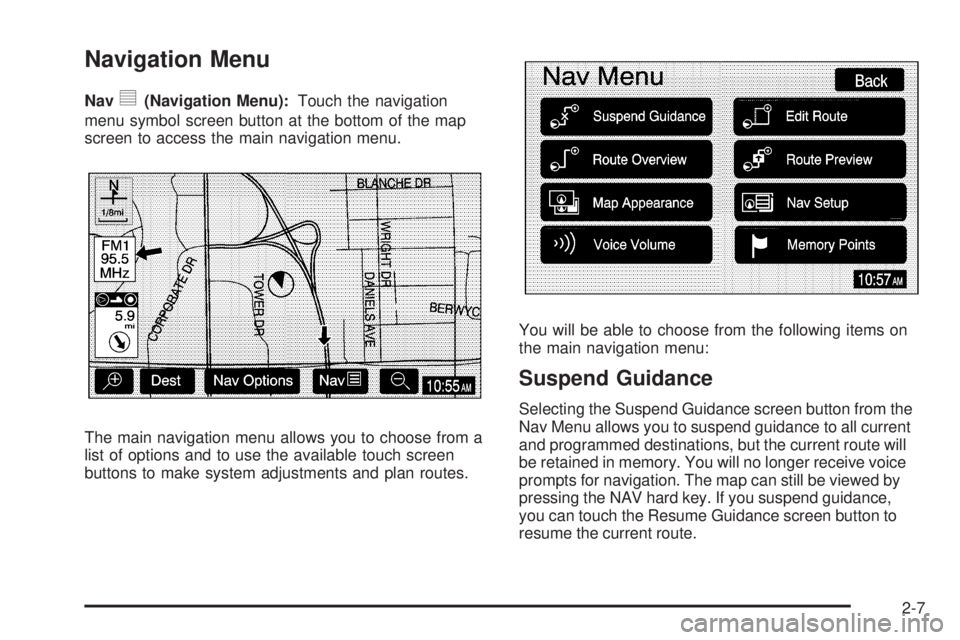
Navy(Navigation Menu):Touch the navigation
menu symbol screen button at the bottom of the map
screen to access the main navigation menu.
The main navigation menu allows you to choose from a
list of options and to use the available touch screen
buttons to make system adjustments and plan routes.You will be able to choose from the following items on
the main navigation menu:
Suspend Guidance
Selecting the Suspend Guidance screen button from the
Nav Menu allows you to suspend guidance to all current
and programmed destinations, but the current route will
be retained in memory. You will no longer receive voice
prompts for navigation. The map can still be viewed by
pressing the NAV hard key. If you suspend guidance,
you can touch the Resume Guidance screen button to
resume the current route.
2-7
Page 23 of 62
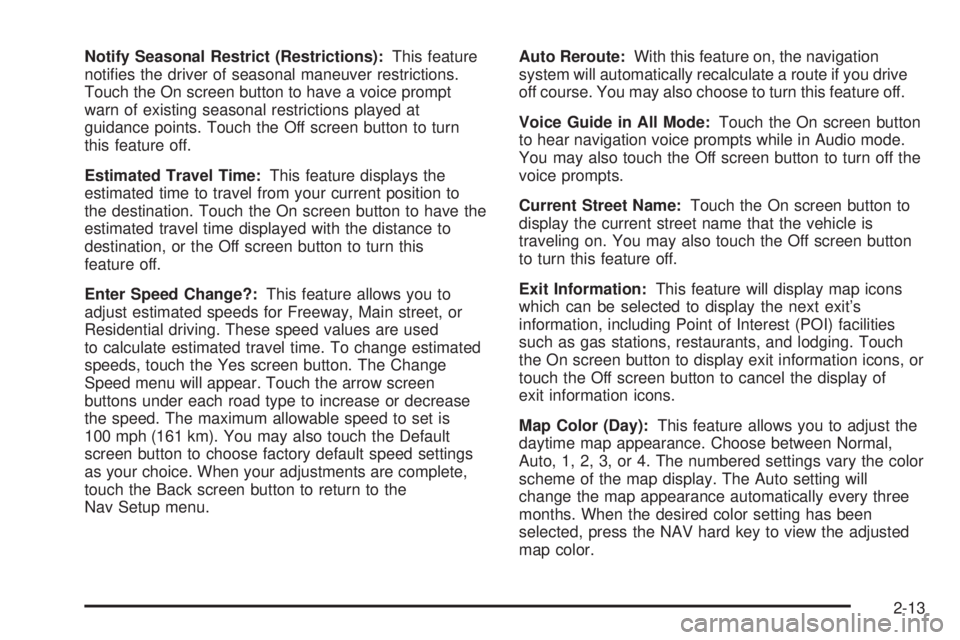
Notify Seasonal Restrict (Restrictions):This feature
noties the driver of seasonal maneuver restrictions.
Touch the On screen button to have a voice prompt
warn of existing seasonal restrictions played at
guidance points. Touch the Off screen button to turn
this feature off.
Estimated Travel Time:This feature displays the
estimated time to travel from your current position to
the destination. Touch the On screen button to have the
estimated travel time displayed with the distance to
destination, or the Off screen button to turn this
feature off.
Enter Speed Change?:This feature allows you to
adjust estimated speeds for Freeway, Main street, or
Residential driving. These speed values are used
to calculate estimated travel time. To change estimated
speeds, touch the Yes screen button. The Change
Speed menu will appear. Touch the arrow screen
buttons under each road type to increase or decrease
the speed. The maximum allowable speed to set is
100 mph (161 km). You may also touch the Default
screen button to choose factory default speed settings
as your choice. When your adjustments are complete,
touch the Back screen button to return to the
Nav Setup menu.Auto Reroute:With this feature on, the navigation
system will automatically recalculate a route if you drive
off course. You may also choose to turn this feature off.
Voice Guide in All Mode:Touch the On screen button
to hear navigation voice prompts while in Audio mode.
You may also touch the Off screen button to turn off the
voice prompts.
Current Street Name:Touch the On screen button to
display the current street name that the vehicle is
traveling on. You may also touch the Off screen button
to turn this feature off.
Exit Information:This feature will display map icons
which can be selected to display the next exit’s
information, including Point of Interest (POI) facilities
such as gas stations, restaurants, and lodging. Touch
the On screen button to display exit information icons, or
touch the Off screen button to cancel the display of
exit information icons.
Map Color (Day):This feature allows you to adjust the
daytime map appearance. Choose between Normal,
Auto, 1, 2, 3, or 4. The numbered settings vary the color
scheme of the map display. The Auto setting will
change the map appearance automatically every three
months. When the desired color setting has been
selected, press the NAV hard key to view the adjusted
map color.
2-13
Page 28 of 62
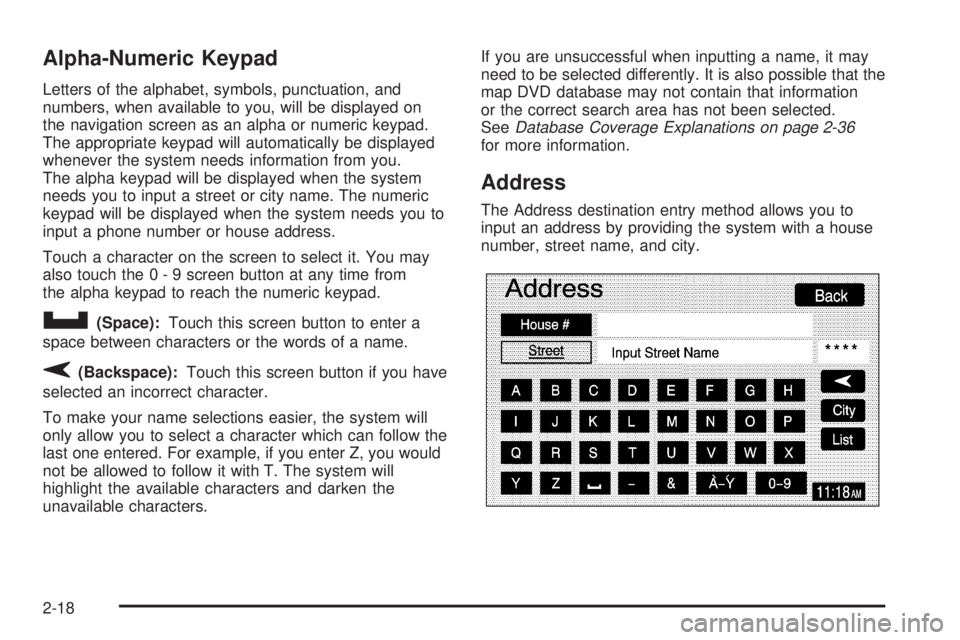
Alpha-Numeric Keypad
Letters of the alphabet, symbols, punctuation, and
numbers, when available to you, will be displayed on
the navigation screen as an alpha or numeric keypad.
The appropriate keypad will automatically be displayed
whenever the system needs information from you.
The alpha keypad will be displayed when the system
needs you to input a street or city name. The numeric
keypad will be displayed when the system needs you to
input a phone number or house address.
Touch a character on the screen to select it. You may
also touch the 0 - 9 screen button at any time from
the alpha keypad to reach the numeric keypad.
U(Space):Touch this screen button to enter a
space between characters or the words of a name.
V(Backspace):Touch this screen button if you have
selected an incorrect character.
To make your name selections easier, the system will
only allow you to select a character which can follow the
last one entered. For example, if you enter Z, you would
not be allowed to follow it with T. The system will
highlight the available characters and darken the
unavailable characters.If you are unsuccessful when inputting a name, it may
need to be selected differently. It is also possible that the
map DVD database may not contain that information
or the correct search area has not been selected.
SeeDatabase Coverage Explanations on page 2-36
for more information.
Address
The Address destination entry method allows you to
input an address by providing the system with a house
number, street name, and city.
2-18
Page 33 of 62
Map
The Map destination entry method displays the last
location on the map, and the road preference.
Scroll across and touch the map at the location you
would like to set as your destination. Once you
have located the desired destination, touch the Enter
Destination screen button and then the OK screen
button. The route will then be calculated. You may begin
driving to start route guidance or you may touch the
Route screen button and then the Start screen button.
You may also zoom out to view the entire regional map.
See “Touch-Sensitive Screen Buttons” underUsing
the Navigation System on page 2-2for more information.
However, if you zoom out as much as possible and
scroll around the map, some parts of the map will
appear to be missing because they are not readable in
larger scales.
Previous Start Point
The Previous start point destination entry method allows
you to select the last start point as a destination.
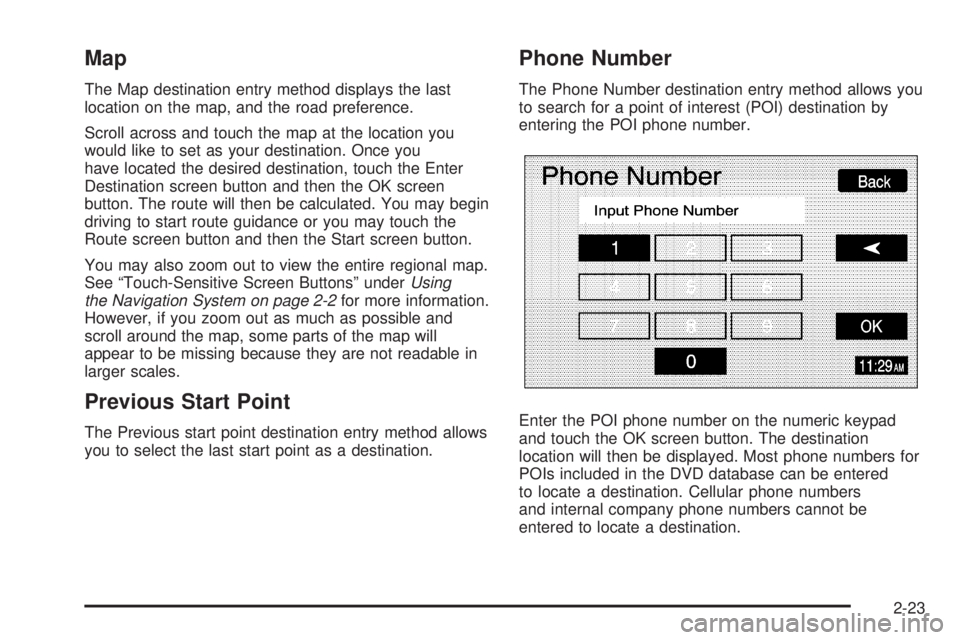
Phone Number
The Phone Number destination entry method allows you
to search for a point of interest (POI) destination by
entering the POI phone number.
Enter the POI phone number on the numeric keypad
and touch the OK screen button. The destination
location will then be displayed. Most phone numbers for
POIs included in the DVD database can be entered
to locate a destination. Cellular phone numbers
and internal company phone numbers cannot be
entered to locate a destination.
2-23
Page 41 of 62
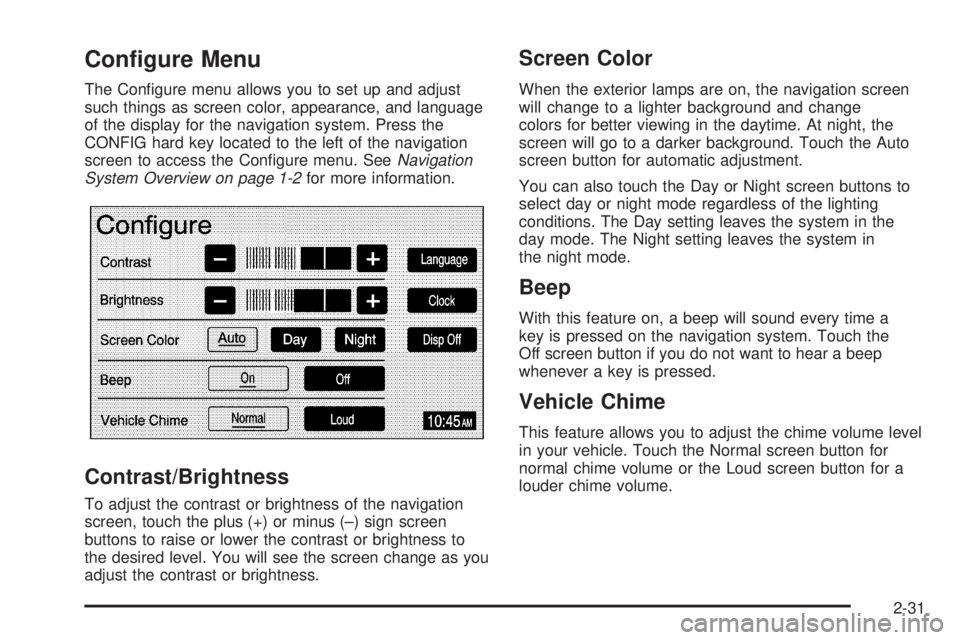
Configure Menu
The Congure menu allows you to set up and adjust
such things as screen color, appearance, and language
of the display for the navigation system. Press the
CONFIG hard key located to the left of the navigation
screen to access the Congure menu. SeeNavigation
System Overview on page 1-2for more information.
Contrast/Brightness
To adjust the contrast or brightness of the navigation
screen, touch the plus (+) or minus (–) sign screen
buttons to raise or lower the contrast or brightness to
the desired level. You will see the screen change as you
adjust the contrast or brightness.
Screen Color
When the exterior lamps are on, the navigation screen
will change to a lighter background and change
colors for better viewing in the daytime. At night, the
screen will go to a darker background. Touch the Auto
screen button for automatic adjustment.
You can also touch the Day or Night screen buttons to
select day or night mode regardless of the lighting
conditions. The Day setting leaves the system in the
day mode. The Night setting leaves the system in
the night mode.
Beep
With this feature on, a beep will sound every time a
key is pressed on the navigation system. Touch the
Off screen button if you do not want to hear a beep
whenever a key is pressed.
Vehicle Chime
This feature allows you to adjust the chime volume level
in your vehicle. Touch the Normal screen button for
normal chime volume or the Loud screen button for a
louder chime volume.
2-31
Page 43 of 62
To change the hours and minutes on the clock,
do the following:
1. Touch the Manual Adjust screen button.
2. Touch the up or down arrow screen buttons to
increase or decrease the hours and minutes.
3. Touch the Back screen button to return to the
previous screen.
12Hr/24Hr:This feature allows you to choose whether
the time is displayed in standard or military time.
Touch the 12Hr screen button for standard time or the
24Hr screen button for military time.
Auto GPS Update:With this feature on, the navigation
system time will be set to match the current GPS
time. The time will be updated with the GPS time when
the ignition is turned on. You may also touch the Off
screen button to turn this feature off.Daylight Savings:With this feature on, the navigation
system will automatically adjust the time for Daylight
Savings. You may also touch the Off screen button to
turn this feature off.
Time Zone:This feature allows you to choose from
ve different time zones: HST (Hawaii), PST (Pacic),
MST (Mountain), CST (Central), and EST (Eastern).
Touch the desired time zone screen button to select it.
Display Off
To turn the navigation screen off, touch the Disp Off
screen button on the Congure menu. To turn the
screen back on, press any hard key to the left of the
navigation screen.
2-33
Page 44 of 62
Global Positioning System (GPS)
The navigation system determines the position of your
vehicle by using satellite signals, various vehicle signals
and map data.
The Global Positioning System (GPS) locates the
current position of your vehicle using signals sent by the
United States Department of Defense GPS satellites.
While your vehicle is receiving signals from these
satellites, GPS will not appear on the map screen.
However, at times, other interferences such as
the satellite condition, road conguration, the condition
of the vehicle and/or other circumstances can interfere
with the system’s ability to determine the accurate
position of the vehicle. This is when GPS will appear on
the map screen.The system may not be available or interferences may
occur if any of the following are true:Signals are obstructed by tall buildings, large trucks
or a tunnel.
Metallic objects are located on the dashboard.
Satellites are being repaired or improved.
Aftermarket glass tinting has been applied to the
vehicle’s windshield.
Do not apply aftermarket glass tinting to the vehicle’s
windshield or place metallic objects on the vehicle’s
dashboard. Glass tinting and metallic objects will
interfere with the system’s ability to receive GPS signals
and may cause the system to malfunction.
If you are experiencing a problem, seeVehicle
Positioning on page 2-35andProblems with Route
Guidance on page 2-36for more information.
2-34