reset GMC YUKON XL DENALI 2005 User Guide
[x] Cancel search | Manufacturer: GMC, Model Year: 2005, Model line: YUKON XL DENALI, Model: GMC YUKON XL DENALI 2005Pages: 62, PDF Size: 1.17 MB
Page 49 of 62
Setting Preset Stations
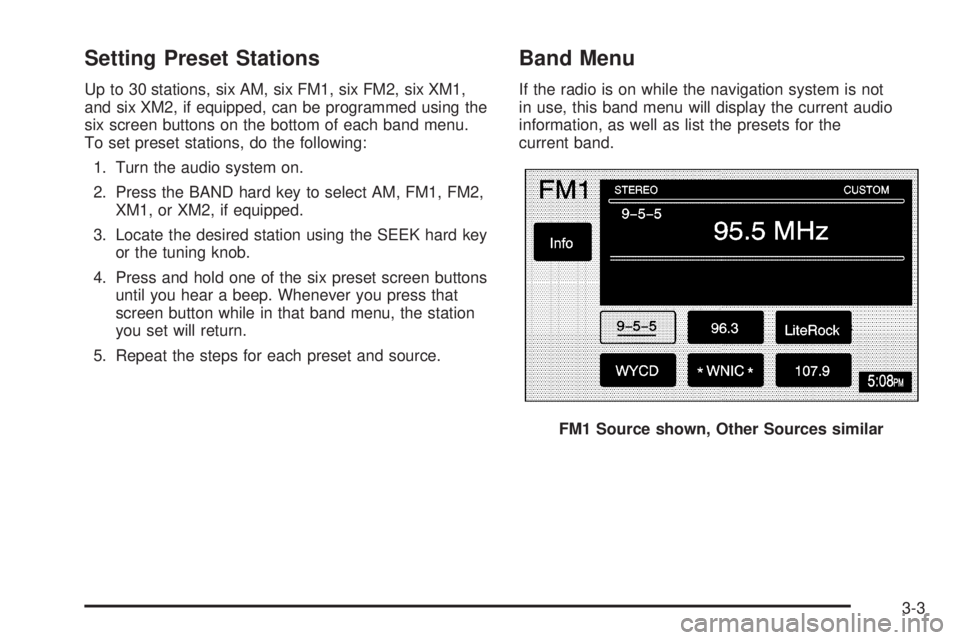
Up to 30 stations, six AM, six FM1, six FM2, six XM1,
and six XM2, if equipped, can be programmed using the
six screen buttons on the bottom of each band menu.
To set preset stations, do the following:
1. Turn the audio system on.
2. Press the BAND hard key to select AM, FM1, FM2,
XM1, or XM2, if equipped.
3. Locate the desired station using the SEEK hard key
or the tuning knob.
4. Press and hold one of the six preset screen buttons
until you hear a beep. Whenever you press that
screen button while in that band menu, the station
you set will return.
5. Repeat the steps for each preset and source.
Band Menu
If the radio is on while the navigation system is not
in use, this band menu will display the current audio
information, as well as list the presets for the
current band.
FM1 Source shown, Other Sources similar
3-3
Page 51 of 62
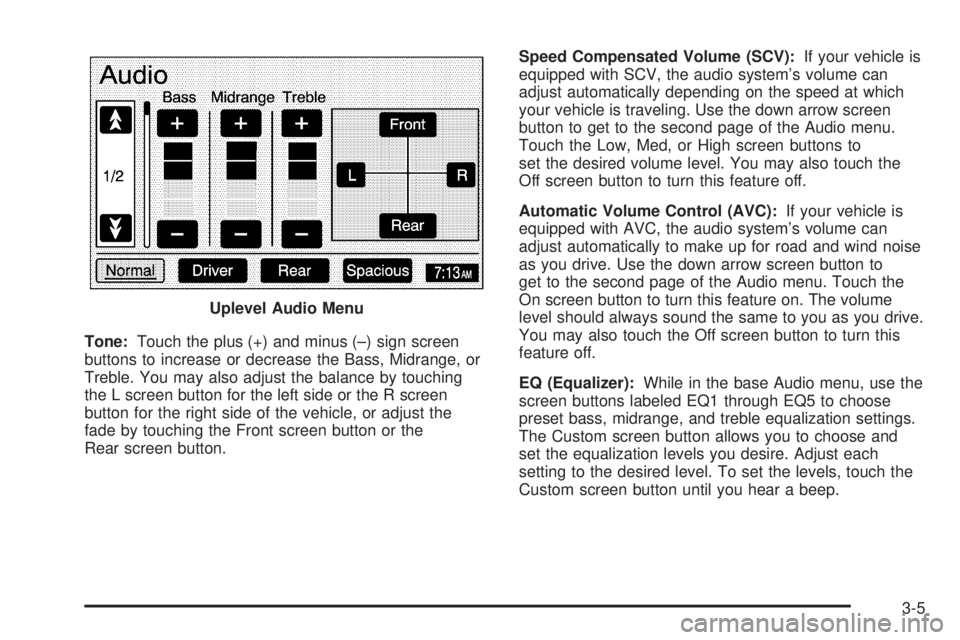
Tone:Touch the plus (+) and minus (–) sign screen
buttons to increase or decrease the Bass, Midrange, or
Treble. You may also adjust the balance by touching
the L screen button for the left side or the R screen
button for the right side of the vehicle, or adjust the
fade by touching the Front screen button or the
Rear screen button.Speed Compensated Volume (SCV):If your vehicle is
equipped with SCV, the audio system’s volume can
adjust automatically depending on the speed at which
your vehicle is traveling. Use the down arrow screen
button to get to the second page of the Audio menu.
Touch the Low, Med, or High screen buttons to
set the desired volume level. You may also touch the
Off screen button to turn this feature off.
Automatic Volume Control (AVC):If your vehicle is
equipped with AVC, the audio system’s volume can
adjust automatically to make up for road and wind noise
as you drive. Use the down arrow screen button to
get to the second page of the Audio menu. Touch the
On screen button to turn this feature on. The volume
level should always sound the same to you as you drive.
You may also touch the Off screen button to turn this
feature off.
EQ (Equalizer):While in the base Audio menu, use the
screen buttons labeled EQ1 through EQ5 to choose
preset bass, midrange, and treble equalization settings.
The Custom screen button allows you to choose and
set the equalization levels you desire. Adjust each
setting to the desired level. To set the levels, touch the
Custom screen button until you hear a beep. Uplevel Audio Menu
3-5
Page 52 of 62
After adjustments are made, press the BAND hard key
to go back to the preset station menu. Now that you
have preset the station and the EQ setting, you can
assign the EQ to the preset station. To do this, touch the
desired preset station screen button until you hear a
beep. The EQ setting will now be assigned to that preset
unless you decide to change it.
If you were at the CD screen before setting an EQ and
you press the CD hard key, you will be returned to
the CD screen, and the EQ will be set to that screen
until you change it.Digital Signal Processing (DSP)
If your vehicle is equipped with DSP, you have a choice
of four different listening experiences. DSP can be used
while listening to the audio system or the CD player.
You can choose from the following DSP settings:
Normal:Touch this screen button to adjust the audio to
deliver all occupants the best possible sound qualities.
Driver:Touch this screen button to adjust the audio
to deliver the driver’s seat occupant the best possible
sound qualities.
Rear:Touch this screen button to adjust the audio to
deliver the rear seat occupants the best possible
sound qualities.
Spacious:Touch this screen button to make the
listening space seem larger.
See “Rear Seat Audio (RSA)”, “Theft-Deterrent Feature”,
“Audio Steering Wheel Controls”, “Radio Reception”,
and antenna information in Section 3 of your vehicle’s
owner manual for more information.
3-6
Page 55 of 62
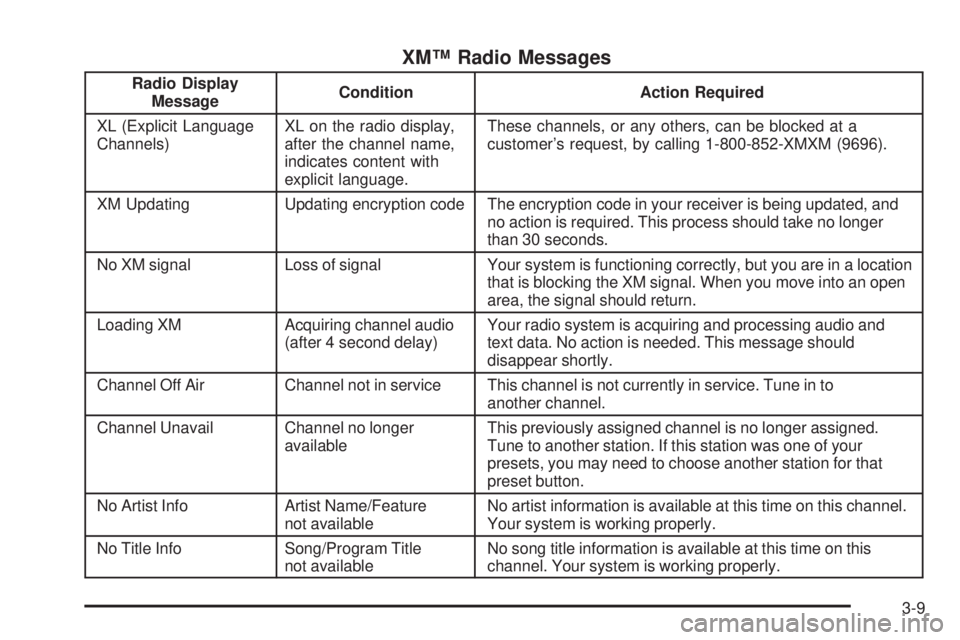
XM™ Radio Messages
Radio Display
MessageCondition Action Required
XL (Explicit Language
Channels)XL on the radio display,
after the channel name,
indicates content with
explicit language.These channels, or any others, can be blocked at a
customer’s request, by calling 1-800-852-XMXM (9696).
XM Updating Updating encryption code The encryption code in your receiver is being updated, and
no action is required. This process should take no longer
than 30 seconds.
No XM signal Loss of signal Your system is functioning correctly, but you are in a location
that is blocking the XM signal. When you move into an open
area, the signal should return.
Loading XM Acquiring channel audio
(after 4 second delay)Your radio system is acquiring and processing audio and
text data. No action is needed. This message should
disappear shortly.
Channel Off Air Channel not in service This channel is not currently in service. Tune in to
another channel.
Channel Unavail Channel no longer
availableThis previously assigned channel is no longer assigned.
Tune to another station. If this station was one of your
presets, you may need to choose another station for that
preset button.
No Artist Info Artist Name/Feature
not availableNo artist information is available at this time on this channel.
Your system is working properly.
No Title Info Song/Program Title
not availableNo song title information is available at this time on this
channel. Your system is working properly.
3-9