display GMC YUKON XL DENALI 2005 Owner's Manual
[x] Cancel search | Manufacturer: GMC, Model Year: 2005, Model line: YUKON XL DENALI, Model: GMC YUKON XL DENALI 2005Pages: 62, PDF Size: 1.17 MB
Page 38 of 62
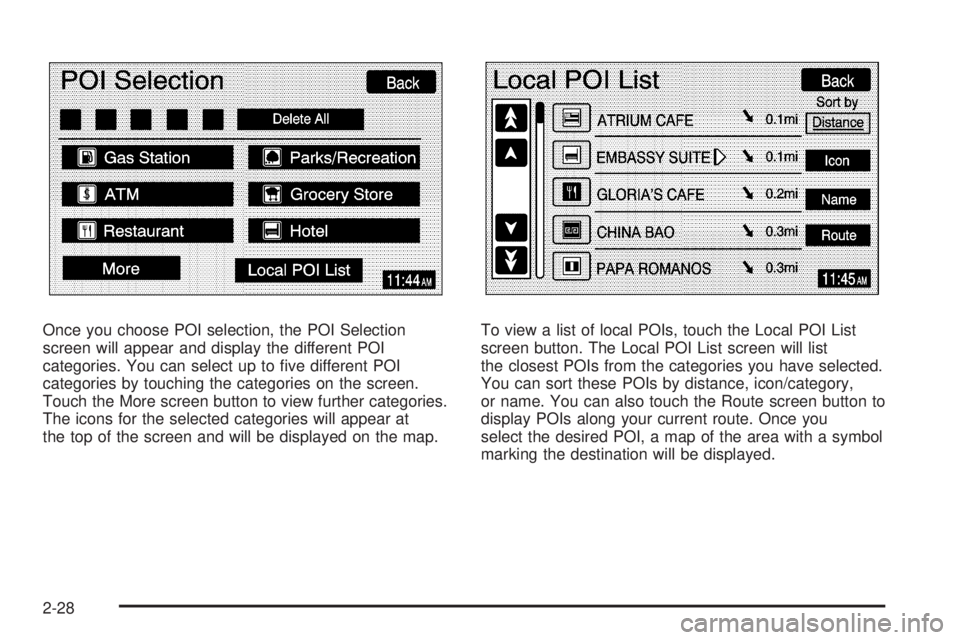
Once you choose POI selection, the POI Selection
screen will appear and display the different POI
categories. You can select up to ve different POI
categories by touching the categories on the screen.
Touch the More screen button to view further categories.
The icons for the selected categories will appear at
the top of the screen and will be displayed on the map.To view a list of local POIs, touch the Local POI List
screen button. The Local POI List screen will list
the closest POIs from the categories you have selected.
You can sort these POIs by distance, icon/category,
or name. You can also touch the Route screen button to
display POIs along your current route. Once you
select the desired POI, a map of the area with a symbol
marking the destination will be displayed.
2-28
Page 41 of 62
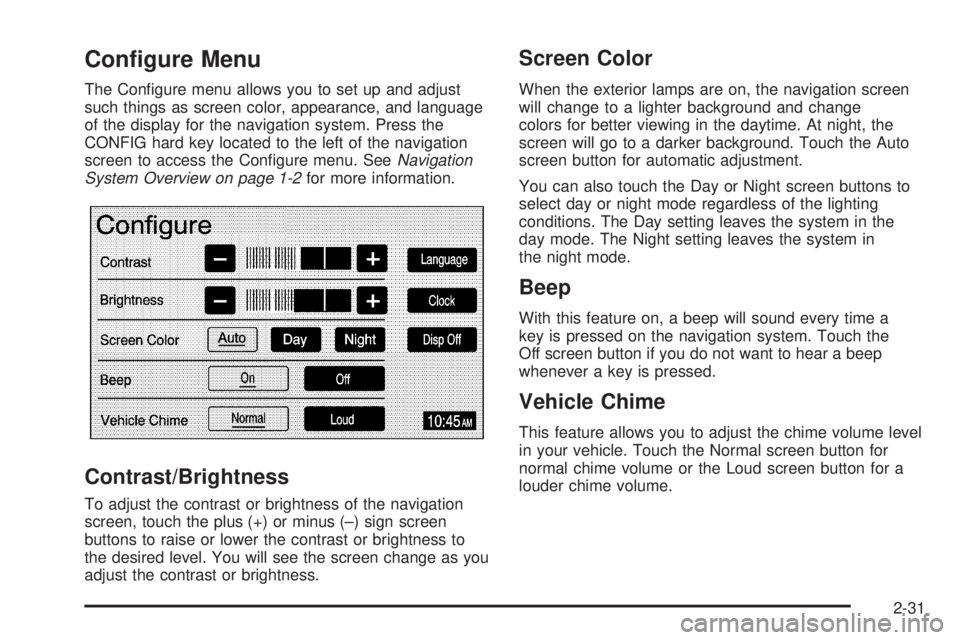
Configure Menu
The Congure menu allows you to set up and adjust
such things as screen color, appearance, and language
of the display for the navigation system. Press the
CONFIG hard key located to the left of the navigation
screen to access the Congure menu. SeeNavigation
System Overview on page 1-2for more information.
Contrast/Brightness
To adjust the contrast or brightness of the navigation
screen, touch the plus (+) or minus (–) sign screen
buttons to raise or lower the contrast or brightness to
the desired level. You will see the screen change as you
adjust the contrast or brightness.
Screen Color
When the exterior lamps are on, the navigation screen
will change to a lighter background and change
colors for better viewing in the daytime. At night, the
screen will go to a darker background. Touch the Auto
screen button for automatic adjustment.
You can also touch the Day or Night screen buttons to
select day or night mode regardless of the lighting
conditions. The Day setting leaves the system in the
day mode. The Night setting leaves the system in
the night mode.
Beep
With this feature on, a beep will sound every time a
key is pressed on the navigation system. Touch the
Off screen button if you do not want to hear a beep
whenever a key is pressed.
Vehicle Chime
This feature allows you to adjust the chime volume level
in your vehicle. Touch the Normal screen button for
normal chime volume or the Loud screen button for a
louder chime volume.
2-31
Page 42 of 62
Language
Your vehicle has been set for the English language,
but you may also select French for all instructional text
and voice prompts. However, names on the map
when using the navigation functions will not change.
If you wish to change the language, the map DVD must
be inserted. Then, do the following:
1. Touch the Language screen button. A caution
will display.
2. Touch the desired language to select it.
3. Touch the NEXT screen button to change the
display back to the map screen.
If the language is changed from English, the menu
screens will not match word-for-word as they appear in
this manual.
If you accidentally select a language you do not
understand, press the CONFIG hard key, then select
the desired language.
Clock
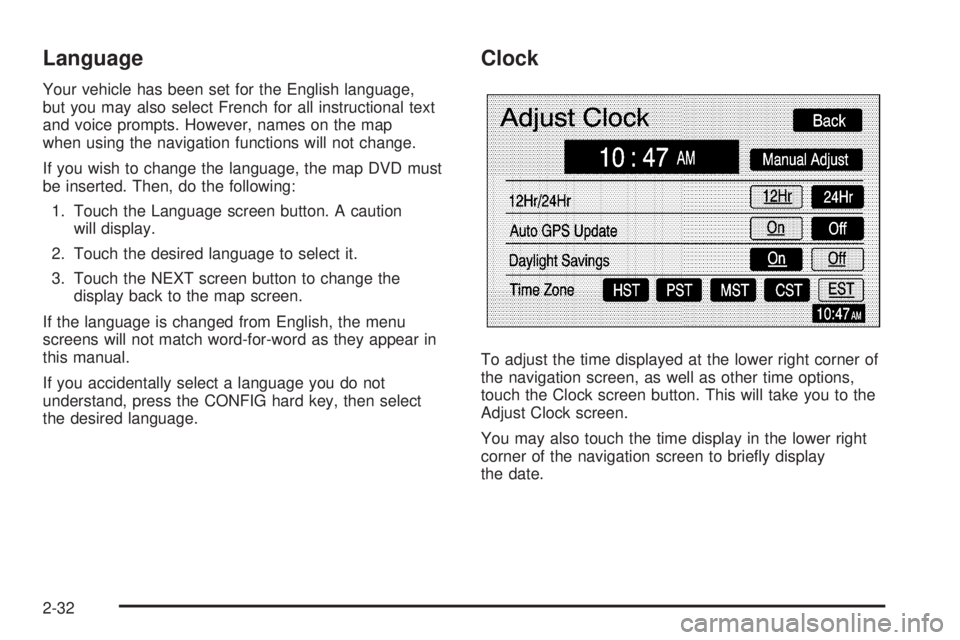
To adjust the time displayed at the lower right corner of
the navigation screen, as well as other time options,
touch the Clock screen button. This will take you to the
Adjust Clock screen.
You may also touch the time display in the lower right
corner of the navigation screen to briey display
the date.
2-32
Page 43 of 62
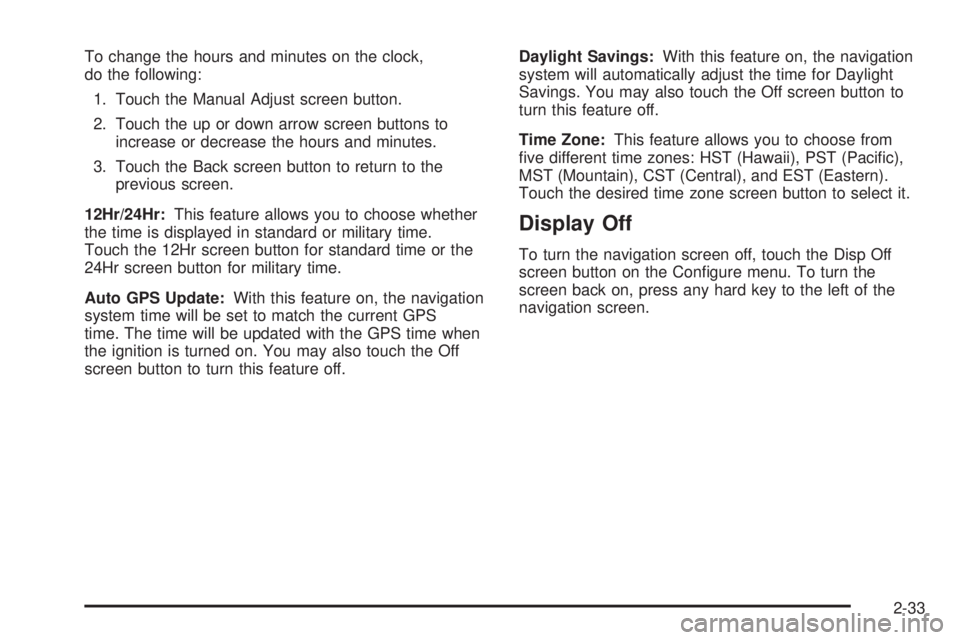
To change the hours and minutes on the clock,
do the following:
1. Touch the Manual Adjust screen button.
2. Touch the up or down arrow screen buttons to
increase or decrease the hours and minutes.
3. Touch the Back screen button to return to the
previous screen.
12Hr/24Hr:This feature allows you to choose whether
the time is displayed in standard or military time.
Touch the 12Hr screen button for standard time or the
24Hr screen button for military time.
Auto GPS Update:With this feature on, the navigation
system time will be set to match the current GPS
time. The time will be updated with the GPS time when
the ignition is turned on. You may also touch the Off
screen button to turn this feature off.Daylight Savings:With this feature on, the navigation
system will automatically adjust the time for Daylight
Savings. You may also touch the Off screen button to
turn this feature off.
Time Zone:This feature allows you to choose from
ve different time zones: HST (Hawaii), PST (Pacic),
MST (Mountain), CST (Central), and EST (Eastern).
Touch the desired time zone screen button to select it.
Display Off
To turn the navigation screen off, touch the Disp Off
screen button on the Congure menu. To turn the
screen back on, press any hard key to the left of the
navigation screen.
2-33
Page 46 of 62
Problems with Route Guidance
Inappropriate route guidance may occur under any of
the following conditions:
You have not turned onto the road indicated by
the system.
Route guidance is not available for the next turn.
The route is not changed during automatic rerouting.
Plural names of places are displayed.
You are driving at high speeds, which may cause
the automatic rerouting to operate more slowly.
The route prohibits the entry of a vehicle due to a
regulation by time or season or any other regulation
which may be given.
A route cannot be found.
A road is new, was recently changed or is not listed
on the DVD. The route to the destination may not
be shown. SeeOrdering Map DVDs on page 2-36.
If the System Needs Service
If you are still experiencing difficulty with your navigation
system after reading this information, see your dealer
for assistance.
Ordering Map DVDs
The map DVD in your vehicle is the most up-to-date
information available when your vehicle was purchased.
The map DVD is updated periodically, provided that
the map information has changed. To order a new map
DVD, contact your dealer.
Database Coverage Explanations
Coverage areas vary with respect to the level of map
detail available for any given area. Some areas will
feature greater levels of detail than others. If this
happens, it does not mean there is a problem with the
system. As the map DVD is updated, more detail
may become available for areas which previously had
limited detail. SeeOrdering Map DVDs on page 2-36.
2-36
Page 48 of 62
Navigation Audio System
Notice:Before adding any sound equipment to
your vehicle, like a tape player, CB radio, mobile
telephone, or two-way radio, make sure that it can
be added by checking with your dealer. Also,
check federal rules covering mobile radio and
telephone units. If sound equipment can be added,
it is very important to do it properly. Added
sound equipment may interfere with the operation
of your vehicle’s engine, radio, or other systems,
and even damage them. Your vehicle’s systems may
interfere with the operation of sound equipment
that has been added improperly.
Your vehicle has a feature called Retained Accessory
Power (RAP). With RAP, the audio system can be
played even after the ignition is turned off. See
“Retained Accessory Power (RAP)” in Section 2 of
your vehicle’s owner manual for more information.
The audio system is operated using navigation system
menus. The audio menus are explained in this section.
Playing the Radio
O
(Power/Volume):Press this knob to turn the audio
and navigation systems on and off. Turn the knob to
increase or decrease the volume.
Finding a Station
BAND:Press this hard key to access the BAND screen
and to switch between AM, FM1, FM2, XM1, and
XM2, if equipped.
Tuning Knob:Use the tuning knob on the lower
left corner of the navigation system to choose a
radio station.
wSEEKx:Press the SEEK up or the down arrow to
go to the next or previous station and stay there.
To scan stations, press and hold the SEEK up or down
arrow for two seconds until you hear a beep. The radio
will go to a station, play for a few seconds, then go
on to the next station. Press either SEEK arrow again
to stop scanning.
To scan preset stations, press and hold the SEEK up or
down arrow for more than four seconds. You will hear
two beeps and PSCAN will be displayed, along with
the highlighted preset. The radio will go to one of
the preset stations, play for a few seconds, then go on
to the next preset station. Press either SEEK arrow
again to stop scanning presets.
The radio will only seek and scan stations with a strong
signal that are in the selected band.
3-2
Page 49 of 62
Setting Preset Stations
Up to 30 stations, six AM, six FM1, six FM2, six XM1,
and six XM2, if equipped, can be programmed using the
six screen buttons on the bottom of each band menu.
To set preset stations, do the following:
1. Turn the audio system on.
2. Press the BAND hard key to select AM, FM1, FM2,
XM1, or XM2, if equipped.
3. Locate the desired station using the SEEK hard key
or the tuning knob.
4. Press and hold one of the six preset screen buttons
until you hear a beep. Whenever you press that
screen button while in that band menu, the station
you set will return.
5. Repeat the steps for each preset and source.
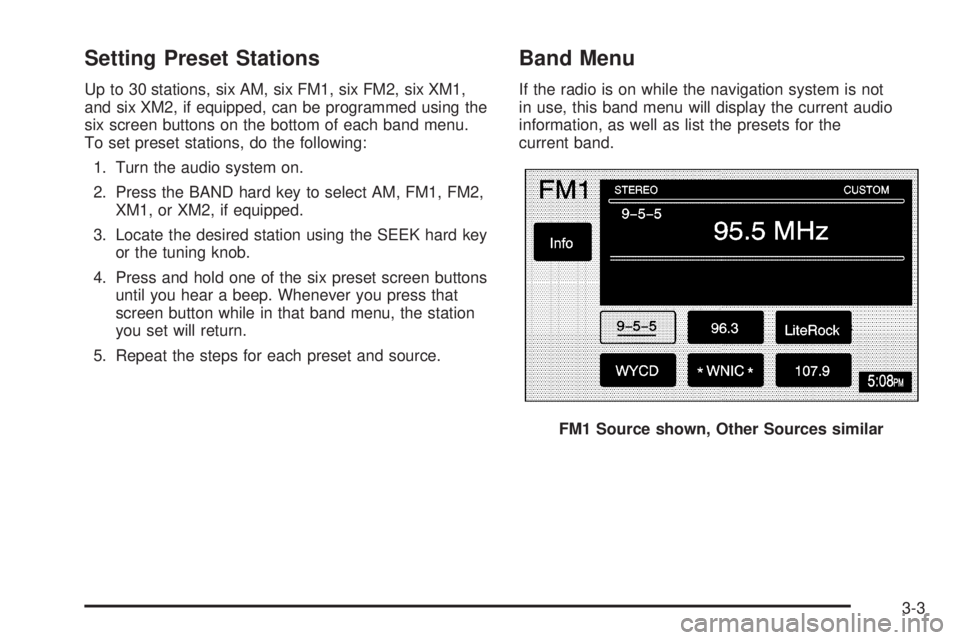
Band Menu
If the radio is on while the navigation system is not
in use, this band menu will display the current audio
information, as well as list the presets for the
current band.
FM1 Source shown, Other Sources similar
3-3
Page 50 of 62
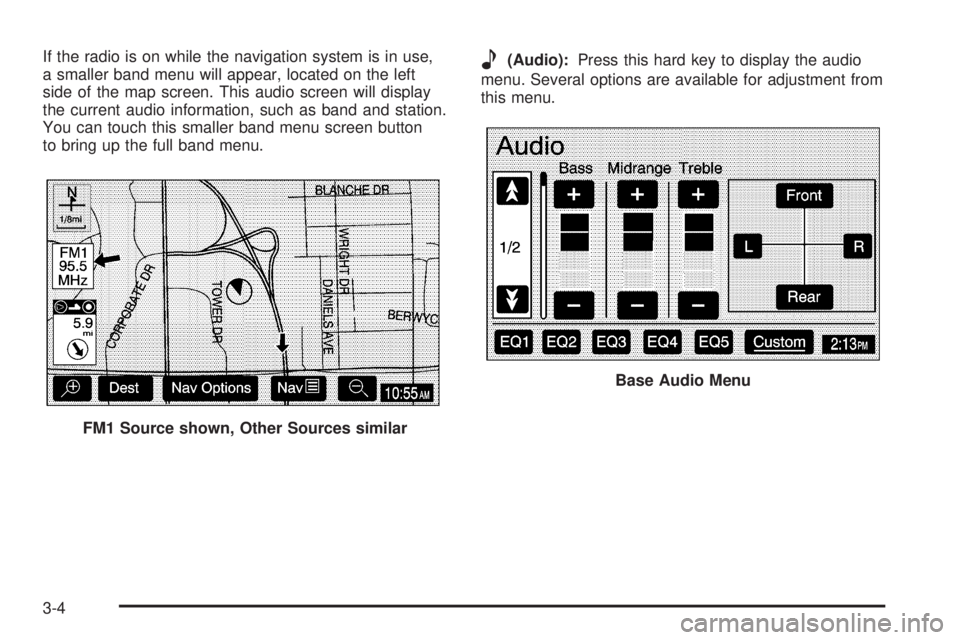
If the radio is on while the navigation system is in use,
a smaller band menu will appear, located on the left
side of the map screen. This audio screen will display
the current audio information, such as band and station.
You can touch this smaller band menu screen button
to bring up the full band menu.e(Audio):Press this hard key to display the audio
menu. Several options are available for adjustment from
this menu.
FM1 Source shown, Other Sources similar
Base Audio Menu
3-4
Page 53 of 62
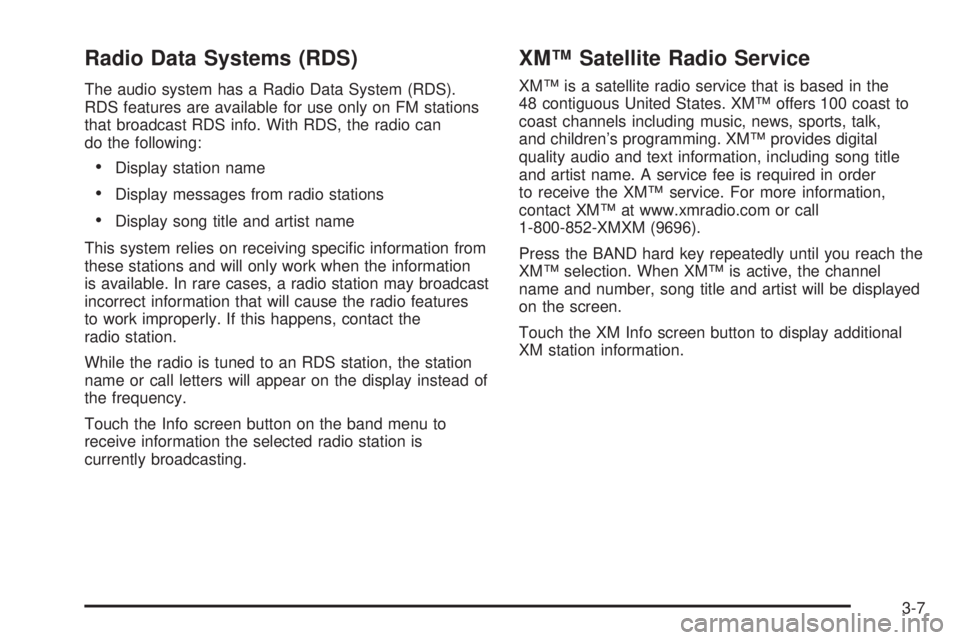
Radio Data Systems (RDS)
The audio system has a Radio Data System (RDS).
RDS features are available for use only on FM stations
that broadcast RDS info. With RDS, the radio can
do the following:
Display station name
Display messages from radio stations
Display song title and artist name
This system relies on receiving specic information from
these stations and will only work when the information
is available. In rare cases, a radio station may broadcast
incorrect information that will cause the radio features
to work improperly. If this happens, contact the
radio station.
While the radio is tuned to an RDS station, the station
name or call letters will appear on the display instead of
the frequency.
Touch the Info screen button on the band menu to
receive information the selected radio station is
currently broadcasting.
XM™ Satellite Radio Service
XM™ is a satellite radio service that is based in the
48 contiguous United States. XM™ offers 100 coast to
coast channels including music, news, sports, talk,
and children’s programming. XM™ provides digital
quality audio and text information, including song title
and artist name. A service fee is required in order
to receive the XM™ service. For more information,
contact XM™ at www.xmradio.com or call
1-800-852-XMXM (9696).
Press the BAND hard key repeatedly until you reach the
XM™ selection. When XM™ is active, the channel
name and number, song title and artist will be displayed
on the screen.
Touch the XM Info screen button to display additional
XM station information.
3-7
Page 55 of 62
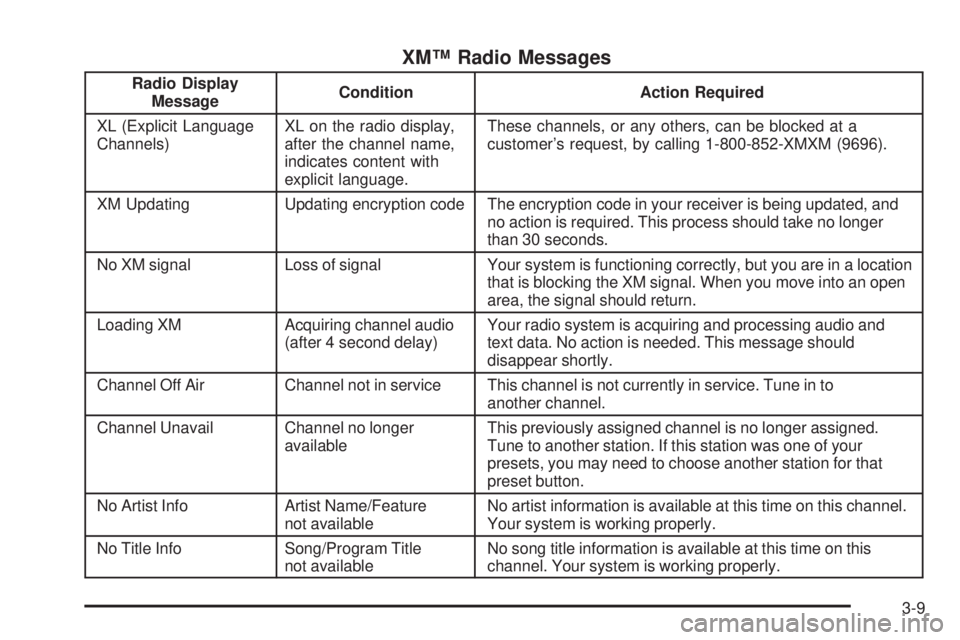
XM™ Radio Messages
Radio Display
MessageCondition Action Required
XL (Explicit Language
Channels)XL on the radio display,
after the channel name,
indicates content with
explicit language.These channels, or any others, can be blocked at a
customer’s request, by calling 1-800-852-XMXM (9696).
XM Updating Updating encryption code The encryption code in your receiver is being updated, and
no action is required. This process should take no longer
than 30 seconds.
No XM signal Loss of signal Your system is functioning correctly, but you are in a location
that is blocking the XM signal. When you move into an open
area, the signal should return.
Loading XM Acquiring channel audio
(after 4 second delay)Your radio system is acquiring and processing audio and
text data. No action is needed. This message should
disappear shortly.
Channel Off Air Channel not in service This channel is not currently in service. Tune in to
another channel.
Channel Unavail Channel no longer
availableThis previously assigned channel is no longer assigned.
Tune to another station. If this station was one of your
presets, you may need to choose another station for that
preset button.
No Artist Info Artist Name/Feature
not availableNo artist information is available at this time on this channel.
Your system is working properly.
No Title Info Song/Program Title
not availableNo song title information is available at this time on this
channel. Your system is working properly.
3-9