display GMC YUKON XL DENALI 2005 Owner's Guide
[x] Cancel search | Manufacturer: GMC, Model Year: 2005, Model line: YUKON XL DENALI, Model: GMC YUKON XL DENALI 2005Pages: 62, PDF Size: 1.17 MB
Page 56 of 62
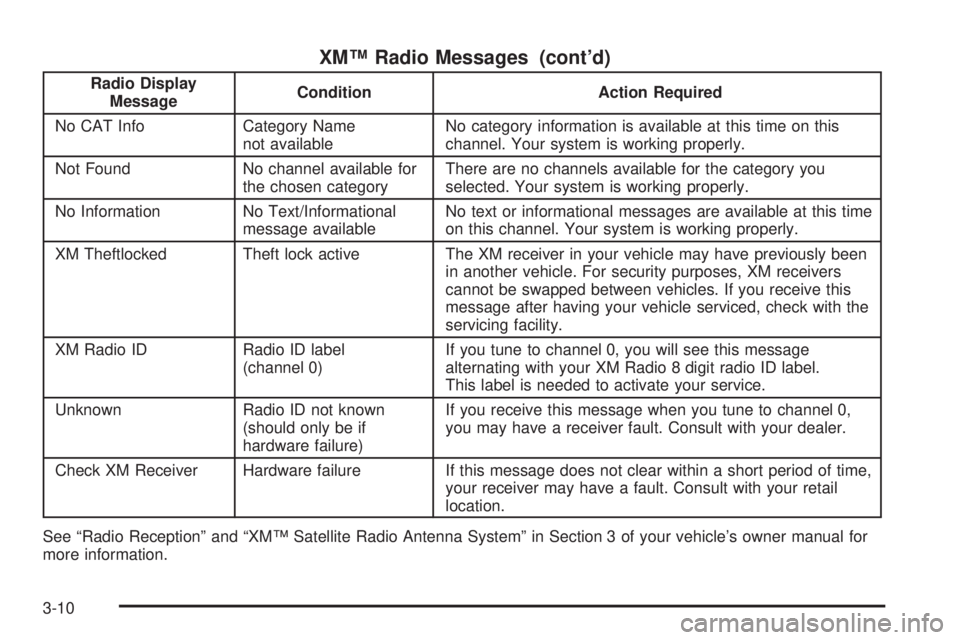
XM™ Radio Messages (cont’d)
Radio Display
MessageCondition Action Required
No CAT Info Category Name
not availableNo category information is available at this time on this
channel. Your system is working properly.
Not Found No channel available for
the chosen categoryThere are no channels available for the category you
selected. Your system is working properly.
No Information No Text/Informational
message availableNo text or informational messages are available at this time
on this channel. Your system is working properly.
XM Theftlocked Theft lock active The XM receiver in your vehicle may have previously been
in another vehicle. For security purposes, XM receivers
cannot be swapped between vehicles. If you receive this
message after having your vehicle serviced, check with the
servicing facility.
XM Radio ID Radio ID label
(channel 0)If you tune to channel 0, you will see this message
alternating with your XM Radio 8 digit radio ID label.
This label is needed to activate your service.
Unknown Radio ID not known
(should only be if
hardware failure)If you receive this message when you tune to channel 0,
you may have a receiver fault. Consult with your dealer.
Check XM Receiver Hardware failure If this message does not clear within a short period of time,
your receiver may have a fault. Consult with your retail
location.
See “Radio Reception” and “XM™ Satellite Radio Antenna System” in Section 3 of your vehicle’s owner manual for
more information.
3-10
Page 57 of 62
Playing a CD
Remove the navigation map DVD from the slot and
return it to its case. Insert a CD partway into the slot,
label side up. The player will pull it in.
There will be a 12 to 15 second delay while the CD is
read, before it begins to play. When the player begins to
read a CD, the Disc Check in Process message will
appear briey to remind you of the delay. When the
map DVD is reinserted and read, the DVD Check
in Process message will appear briey to remind you
of the delay.
While playing a CD in the CD player, the navigation
system is not available. A message will display
if the NAV key is pressed. If your vehicle is equipped
with Rear Seat Entertainment (RSE), you can play
an audio CD while using the navigation system.
SeeRear Seat Entertainment System on page 3-14
for more information.
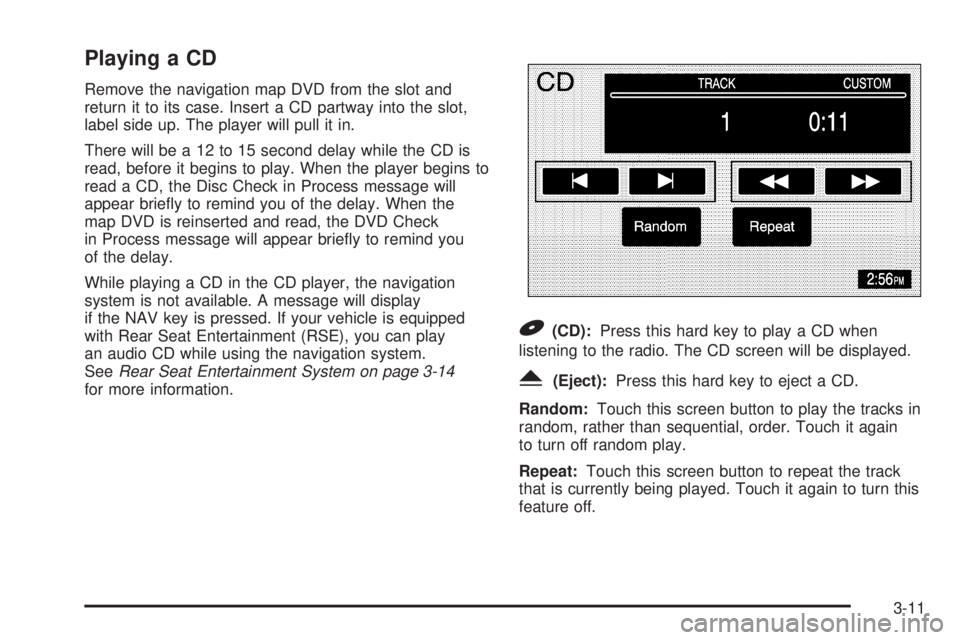
B(CD):Press this hard key to play a CD when
listening to the radio. The CD screen will be displayed.
Y(Eject):Press this hard key to eject a CD.
Random:Touch this screen button to play the tracks in
random, rather than sequential, order. Touch it again
to turn off random play.
Repeat:Touch this screen button to repeat the track
that is currently being played. Touch it again to turn this
feature off.
3-11
Page 58 of 62
[(Forward):Touch this screen button to advance
quickly within a track. As the CD advances, elapsed time
will be displayed to help you nd the correct passage.
Release this screen button to play the passage.
r(Reverse):Touch this screen button to reverse
quickly within a track. As the CD reverses, elapsed time
will be displayed to help you nd the correct passage.
Release this screen button to play the passage.
u(Track Forward):Touch this screen button to
advance to the next track on the CD.
t(Track Reverse):Touch this screen button to return
to the previous track on the CD.
wSEEKx:Within two seconds, press and release
the SEEK up arrow to advance to the next track, or
the down arrow to return to the previous track.
Track Scan:Press and hold one of the SEEK arrows
for two seconds or more to enter CD TRACK SCAN
mode. A chime will sound to alert you that TRACK
SCAN is active, and the rst 10 seconds of each track
on the disc will be played before advancing to the
next track. Press one of the SEEK arrows again to stop
the scan at the track currently being played.
BAND:Press the BAND hard key to switch to the radio
when a CD is playing.
CD Messages
CD ERROR:If this message appears on the screen,
the CD is not being read by the system. The CD could
be dirty, scratched, wet, or upside down. You may
also be driving on a very rough road. When the road
becomes smoother, the CD should play.
NO MUSIC DISC:If this message appears on the
screen, the map DVD is still inserted in the system.
Press eject and return the map DVD to its case, then
insert a CD. The CD should play.
NO DISC:If this message appears on the screen, the
CD slot is empty. Insert a CD. The CD should play.
If a CD is not playing correctly for any other reason, try a
known good CD. If any error occurs repeatedly or if
an error cannot be corrected, contact your dealer. If your
radio displays an error message, write it down and
provide it to your dealer when reporting the problem.
See “Rear Seat Audio (RSA)”, “Care of Your CDs
and DVDs”, and “Care of Your CD and DVD Player”
in Section 3 of your vehicle’s owner manual for
more information.
3-12
Page 59 of 62
Playing a CD with the CD Changer
Your vehicle may be equipped with a CD changer.
See “Radio with Six-Disc CD” in Section 3 of your
vehicle’s owner manual for more information on how to
operate the CD changer.
Random:Touch the Random screen button for less than
two seconds to play the tracks on the current disc in
random, rather than sequential, order. Touch it again to
turn off random play. When Random is touched for more
than two seconds, the player selects D. Random mode.
The system will then select a track from all of the discs
in the magazine and will play them in random order.
To cancel it, touch the Random screen button again.
Repeat:Touch the Repeat screen button to repeat the
track that is currently being played. Touch it again to
turn this feature off.
[(Forward):Touch and hold the forward arrow
screen button to advance quickly within a track. As the
CD advances, elapsed time will be displayed to help
you nd the correct passage.
r(Reverse):Touch and hold the reverse arrow
screen button to reverse quickly within a track. As the
CD reverses, elapsed time will be displayed to help you
nd the correct passage.
Disc
r:Touch this screen button to advance to the
next disc in the changer.
qDisc:Touch this screen button to return to the
previous disc in the changer.
To switch between tracks on a disc, use the SEEK
arrows. Press the up arrow to advance to the next track
on the disc. Press the down arrow to return to the
previous track on the disc.
Track Scan:To use this function, press and hold the
SEEK key for at least two seconds, but less than
four seconds, at which time a single chime will sound to
alert you that the CD changer has entered TRACK
SCAN mode for the current CD. While TRACK SCAN
is active, the rst 10 seconds of each track on the
current disc will be played before advancing to the next.
Press the SEEK key again to stop the scan at the
track currently being played.
Disc Scan:To use this function, press and hold the
SEEK key for at least four seconds, at which time
a double chime will sound to alert you that the CD
changer has entered DISC SCAN mode for the entire
CD magazine. While DISC SCAN is active, the rst
10 seconds of the rst track on each disc will be played
before advancing to the rst track on the next disc.
Press the SEEK key again to stop the scan at the track
and disc currently being played.
BAND:Press this hard key to switch to the radio when
a CD is playing.
3-13