fuse GREAT WALL FLORID 2008 User Guide
[x] Cancel search | Manufacturer: GREAT WALL, Model Year: 2008, Model line: FLORID, Model: GREAT WALL FLORID 2008Pages: 281, PDF Size: 43.97 MB
Page 159 of 281
Downloaded from www.Manualslib.com manuals search engine GWFLORID Maintenance Manual152
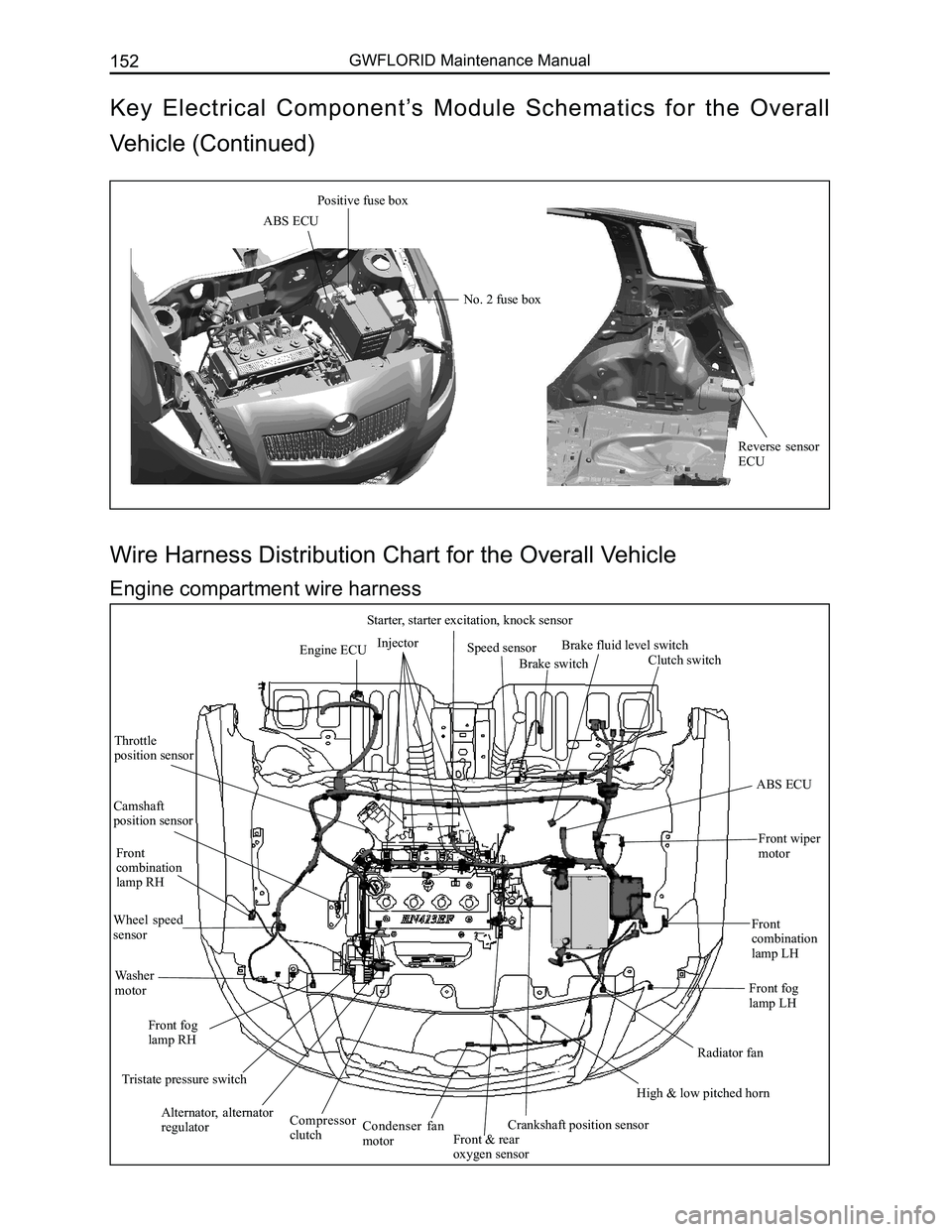
Engine ECUInjector
Starter, starter excitation, knock sensor
Speed sensor
Brake switch
Brake fluid level switch
Clutch switch
ABS ECU
Front wiper
motor
Front combination lamp LH
Front fog lamp LH
Radiator fan
High & low pitched horn
Crankshaft position sensorFront & rear oxygen sensor
Condenser fan motor
Compressor clutch
Alternator, alternator regulator
Tristate pressure switch
Front fog lamp RH
Washer motor
Wheel speed sensor
Front combination lamp RH
Camshaft position sensor
Throttle position sensor
Wire Harness Distribution Chart for the Overall Vehicle
Engine compartment wire harness
ABS ECU
Positive fuse box
No. 2 fuse box
Reverse sensor ECU
Key Electrical Component’s Module Schematics for the Overall
Vehicle (Continued)
Page 163 of 281
Downloaded from www.Manualslib.com manuals search engine GWFLORID Maintenance Manual156
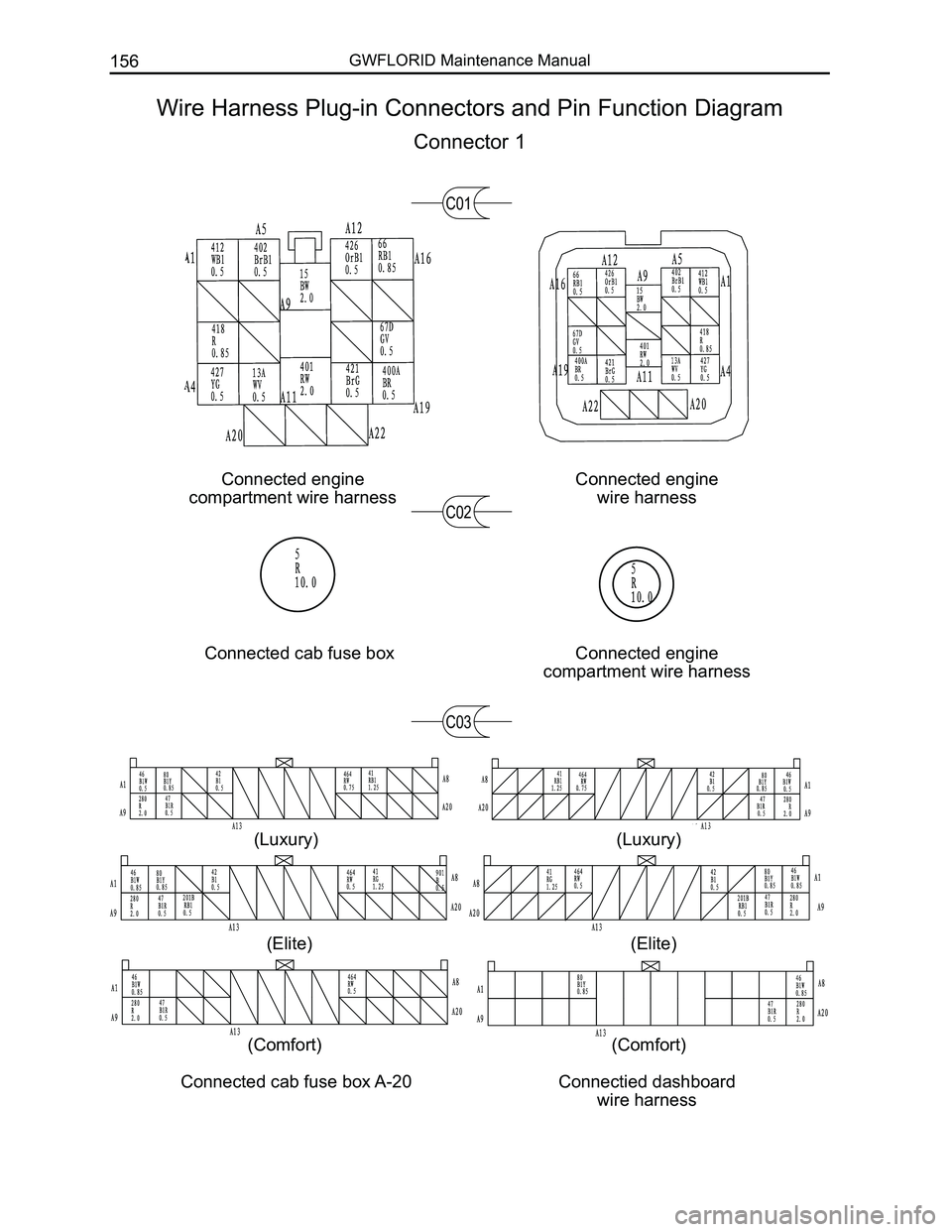
Connected engine
compartment wire harness
Connected engine
wire harness
Connected cab fuse boxConnected engine
compartment wire harness
C01
C02
C03
Wire Harness Plug-in Connectors and Pin Function Diagram
Connector 1
Connected cab fuse box A-20Connectied dashboard
wire harness
(Luxury)
(Elite)
(Comfort)
(Luxury)
(Elite)
(Comfort)
Page 164 of 281
Downloaded from www.Manualslib.com manuals search engine 157Vehicle Body Electronic System
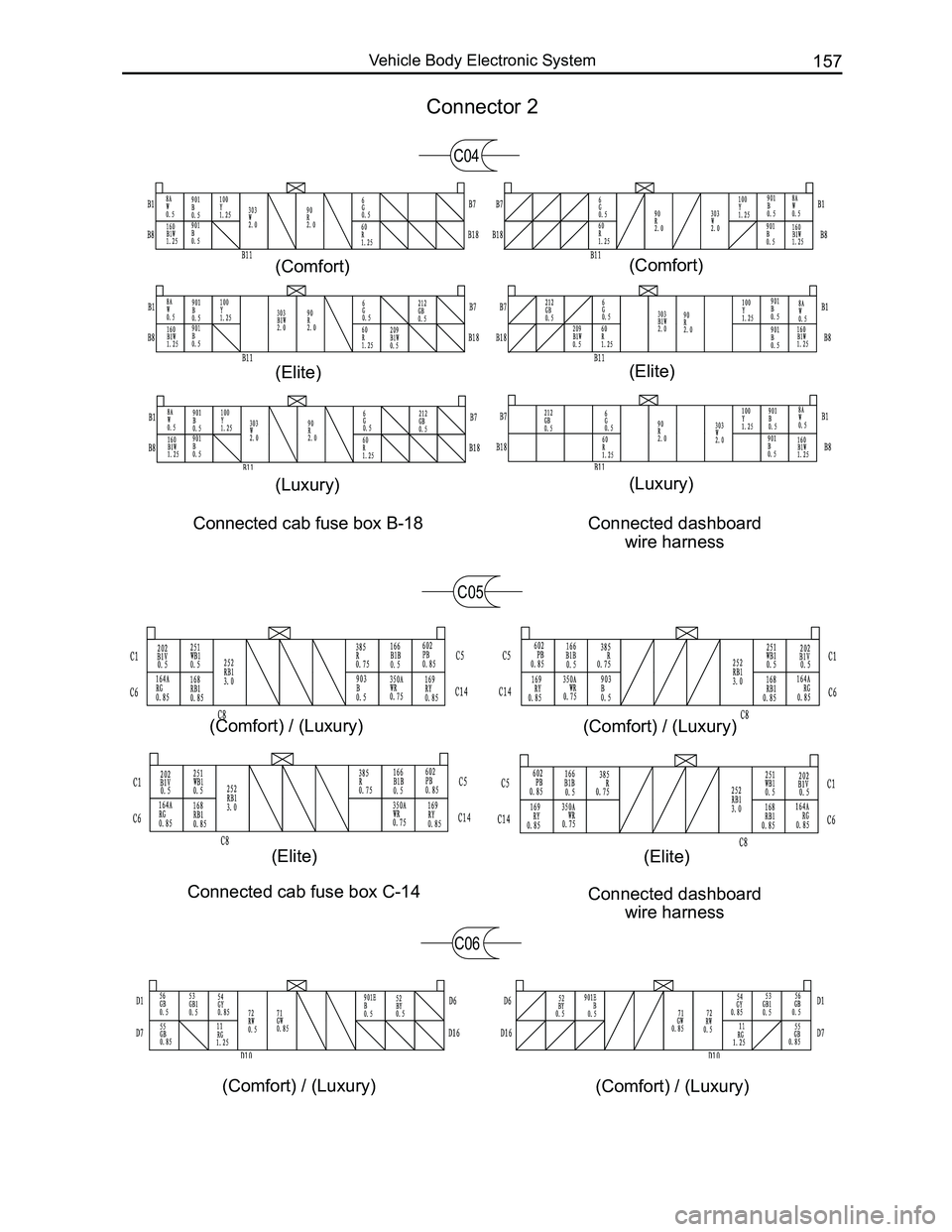
Connected cab fuse box C-14Connected dashboard
wire harness
C05
C06
Connector 2
C04
Connected cab fuse box B-18 Connected dashboard
wire harness
(Luxury)
(Elite)
(Comfort)
(Luxury)
(Elite)
(Comfort)
(Elite)
(Comfort) / (Luxury)
(Elite)
(Comfort) / (Luxury)
(Comfort) / (Luxury)(Comfort) / (Luxury)
Page 165 of 281
Downloaded from www.Manualslib.com manuals search engine GWFLORID Maintenance Manual158
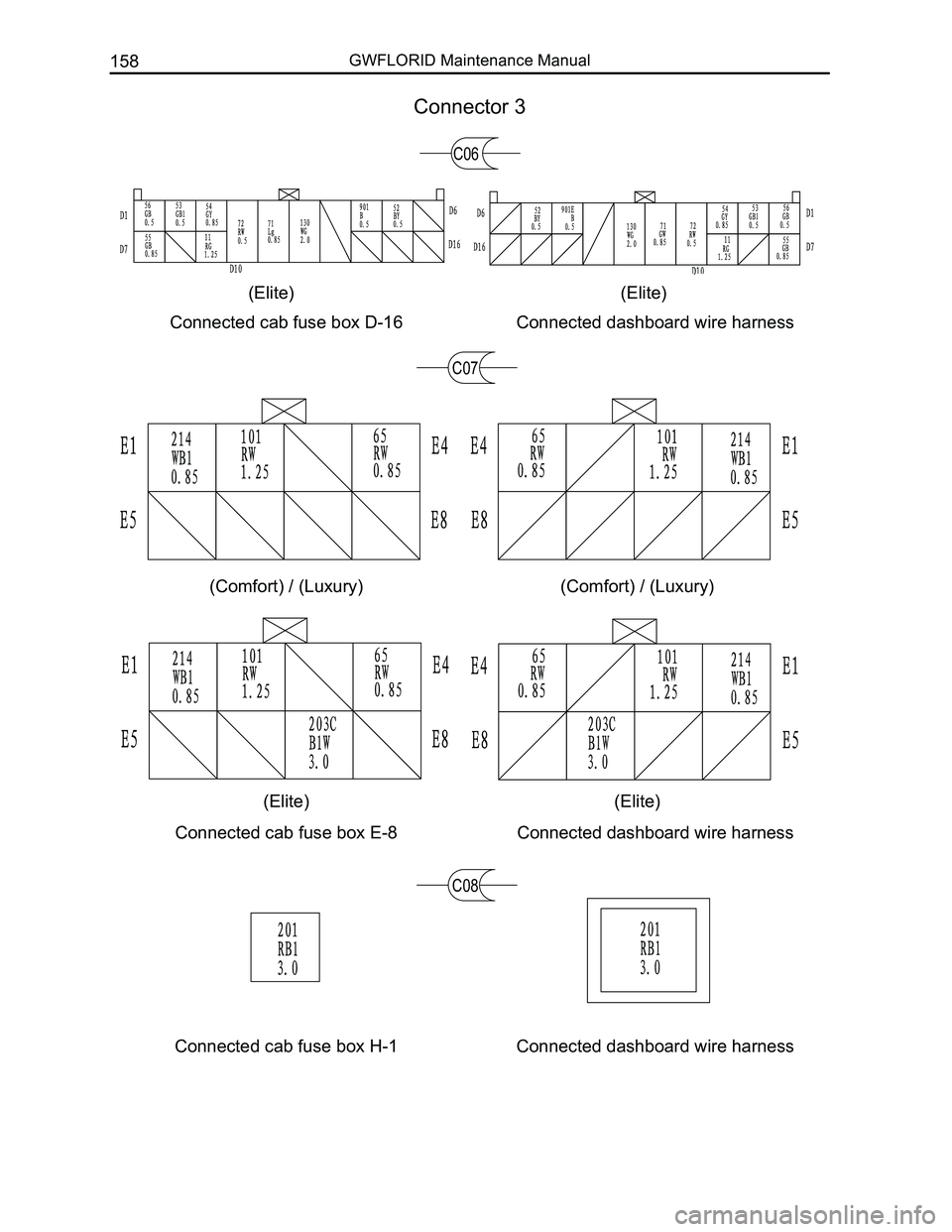
Connected cab fuse box D-16Connected dashboard wire harness
Connector 3
(Elite)(Elite)
C07
Connected dashboard wire harnessConnected cab fuse box E-8
C08
Connected cab fuse box H-1Connected dashboard wire harness
(Comfort) / (Luxury)(Comfort) / (Luxury)
(Elite)(Elite)
C06
Page 200 of 281
Downloaded from www.Manualslib.com manuals search engine 193Electrical Accessories
SymptomsCausesSolutions
Cannot start
Burnt fuseReplace with a new fuse of the same
specification
Vehicle supply battery fuse is burntReplace the vehicle supply battery fuse
Illegal operation and other factorsPress the reset button to reset the system
No sound or sound is too low
The volume of the head unit or the
connected component is too low
Raise the volume of the head unit or the
connected component
Speaker possibly damagedCheck the speaker
The sound balance settings lean to one
side
Adjust the sound balance
Speaker's connection wire touches the
vehicle body
Use insulated conductor to connect the
speaker and use insulating cement to cover
the exposed connections
Disc is not genuineUse a genuine disc
Speaker is incorrectly connectedPlease refer to the "Electrical connection
diagram" to correct the connection
Common faults and solutions
General problems
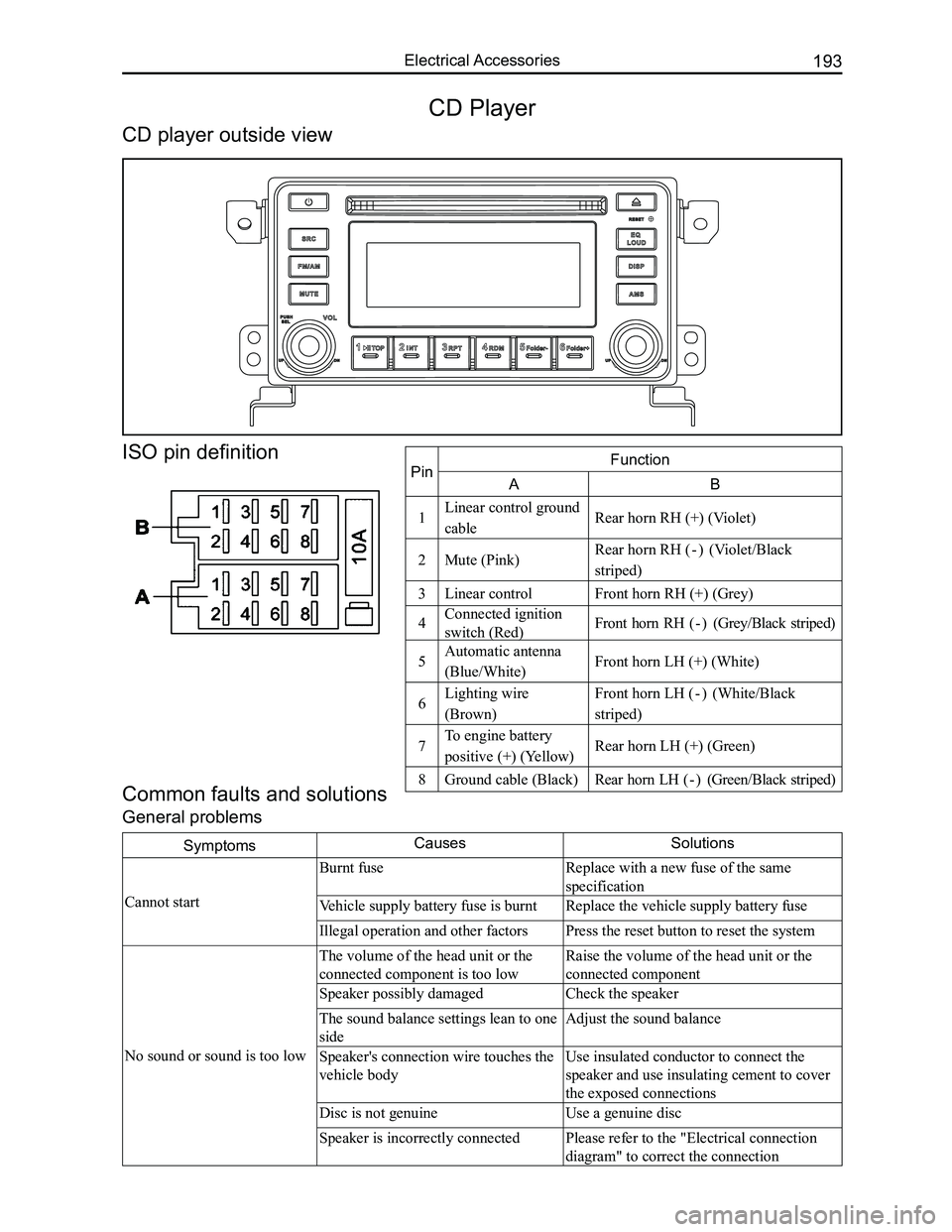
CD Player
CD player outside view
ISO pin definition
PinFunction
AB
1Linear control ground
cableRear horn RH (+) (Violet)
2Mute (Pink)Rear horn RH ( - ) (Violet/Black
striped)
3Linear controlFront horn RH (+) (Grey)
4Connected ignition
switch (Red)Front horn RH ( - ) (Grey/Black striped)
5Automatic antenna
(Blue/White)Front horn LH (+) (White)
6Lighting wire
(Brown)
Front horn LH ( - ) (White/Black
striped)
7To engine battery
positive (+) (Yellow)Rear horn LH (+) (Green)
8Ground cable (Black)Rear horn LH ( - ) (Green/Black striped)
Page 202 of 281
Downloaded from www.Manualslib.com manuals search engine 195Electrical Accessories
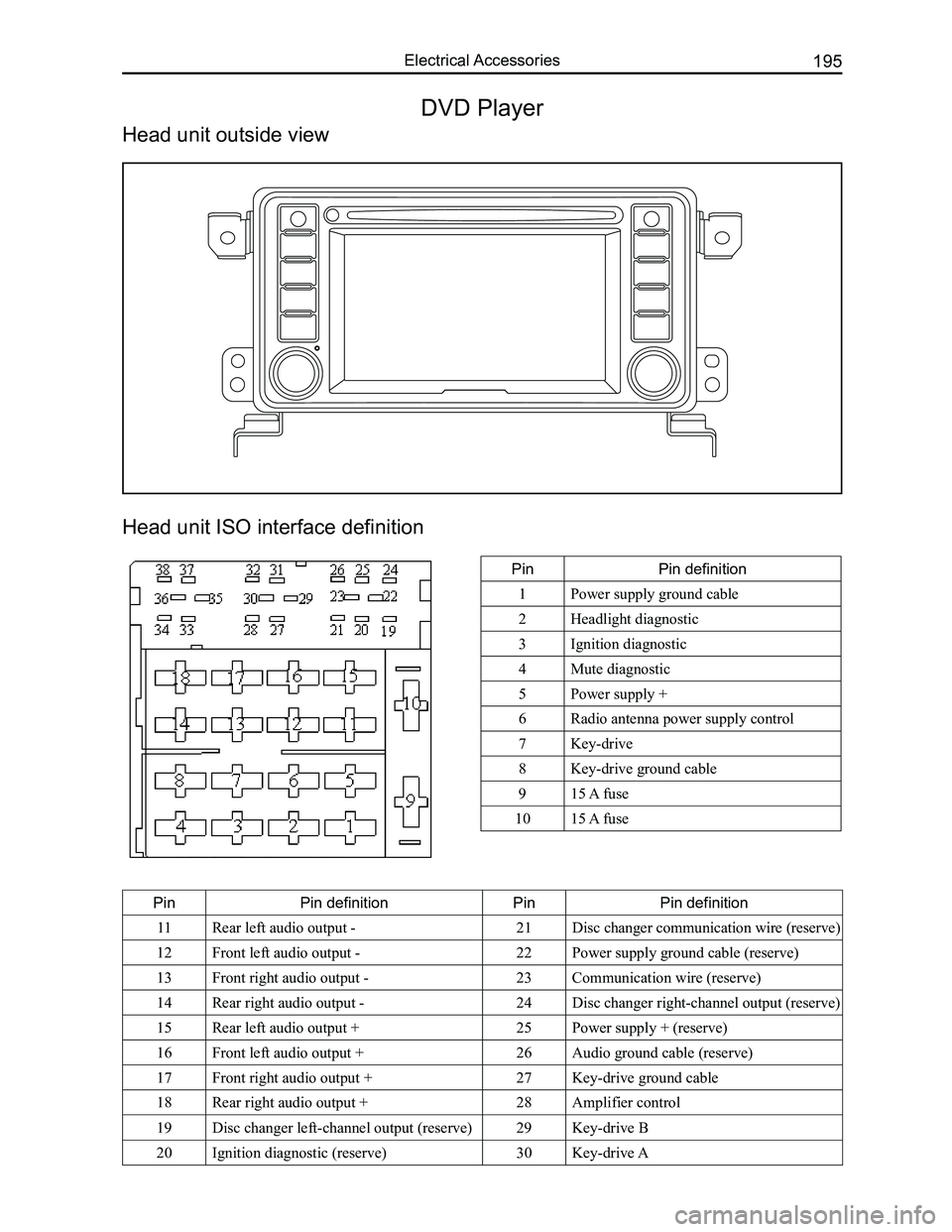
Head unit ISO interface definition
PinPin definition
1Power supply ground cable
2Headlight diagnostic
3Ignition diagnostic
4Mute diagnostic
5Power supply +
6Radio antenna power supply control
7Key-drive
8Key-drive ground cable
915 A fuse
1015 A fuse
PinPin definitionPinPin definition
11Rear left audio output -21Disc changer communication wire (reserve)
12Front left audio output -22Power supply ground cable (reserve)
13Front right audio output -23Communication wire (reserve)
14Rear right audio output -24Disc changer right-channel output (reserve)
15Rear left audio output +25Power supply + (reserve)
16Front left audio output +26Audio ground cable (reserve)
17Front right audio output +27Key-drive ground cable
18Rear right audio output +28Amplifier control
19Disc changer left-channel output (reserve)29Key-drive B
20Ignition diagnostic (reserve)30Key-drive A
DVD Player
Head unit outside view
Page 204 of 281

Downloaded from www.Manualslib.com manuals search engine 197Electrical Accessories
Common faults and solutions
If the following faults occur while using this machine, please refer to \
the troubleshooting guide.
General problems
SymptomsCausesSolutions
Cannot start
Burnt fuseReplace with a new fuse of the same
specification
Vehicle supply battery fuse is burntReplace the vehicle supply battery fuse
Illegal operation and other factorsPress the reset button to reset the system
Remote controller doesn't
work
Remote controller battery is lowReplace the remote controller battery
Remote controller battery is reversely
installedProper battery installation
No sound or sound is too low
The volume of the head unit or the
connected component is too low
Raise the volume of the head unit or the
connected component
Speaker possibly damagedCheck the speaker
The sound balance settings lean to one
sideAdjust the sound balance
Speaker's connection wire touches the
vehicle body
Use insulated conductor to connect the
speaker and use insulating cement to cover
the exposed connections
Disc is not genuineUse a genuine disc
Speaker is incorrectly connectedPlease refer to the "Equipment connection
drawing" to correct the connection
The sound quality is poor or
distorted
Speaker's connection wire touches the
vehicle bodyCheck the speaker's connection wire
"MUTE" wire touches the metal parts of
the vehicle body
Ensure the telephone silence control wire
is insulated from the vehicle body
A connection error between ignition coil
ACC and positive power wire "BATT"
Please refer to the "equipment connection
drawing" to correct the connection
Common display characters and fault meaning
Display characterMalfunctionSolutions
No Disc
Disc is dirtyClean or replace the disc
The read side of the disc is inserted
upside-down
Insert the disc into the player with the
label side up
No disc in the playerInsert the disc
Bad disc
Disc is dirtyClean or replace the disc
The read side of the disc is reversely
inserted
Insert the disc into the player with the
label side up
Unknown disc Player cannot read discPlease use discs supported by this player
Region error The region code of this disc does not
match the region code for this player
Use discs that have a region code identical
to this player's
Page 208 of 281
Downloaded from www.Manualslib.com manuals search engine 201Electrical Accessories
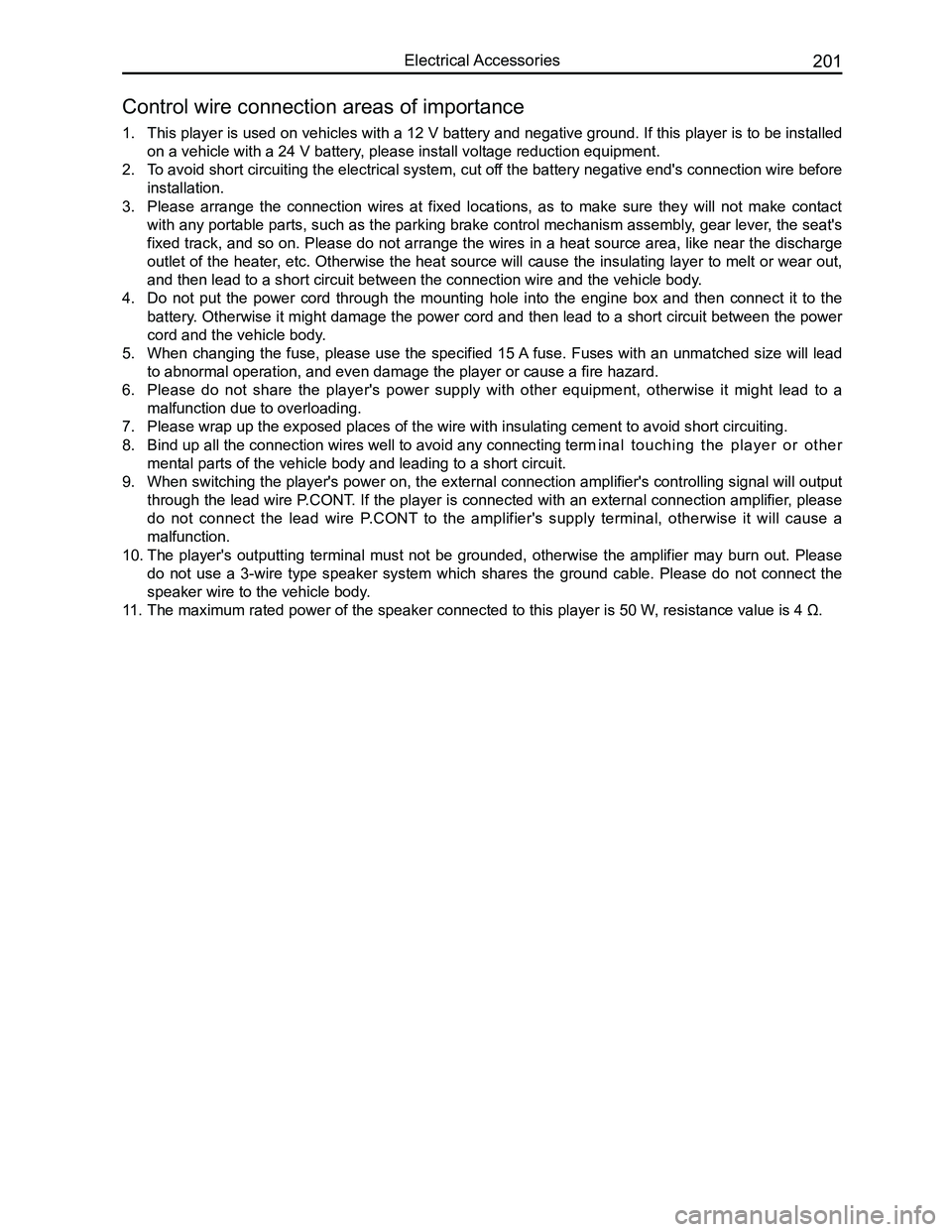
1. This player is used on vehicles with a 12 V battery and negative ground. If this player is to be installed
on a vehicle with a 24 V battery, please install voltage reduction equipment.
2. To avoid short circuiting the electrical system, cut off the battery negative end's connection wire before
installation.
3. Please arrange the connection wires at fixed locations, as to make sure they will not make contact
with any portable parts, such as the parking brake control mechanism assembly, gear lever, the seat's
fixed track, and so on. Please do not arrange the wires in a heat source area, like near the discharge
outlet of the heater, etc. Otherwise the heat source will cause the insulating layer to melt or wear out,
and then lead to a short circuit between the connection wire and the veh\
icle body.
4. Do not put the power cord through the mounting hole into the engine box and then connect it to the
battery. Otherwise it might damage the power cord and then lead to a short circuit between the power
cord and the vehicle body.
5. When changing the fuse, please use the specified 15 A fuse. Fuses with an unmatched size will lead
to abnormal operation, and even damage the player or cause a fire hazard\
.
6. Please do not share the player's power supply with other equipment, otherwise it might lead to a
malfunction due to overloading.
7. Please wrap up the exposed places of the wire with insulating cement to \
avoid short circuiting.
8. Bind up all the connection wires well to avoid any connecting term inal touching the player or other
mental parts of the vehicle body and leading to a short circuit.
9. When switching the player's power on, the external connection amplifier's controlling signal will output
through the lead wire P.CONT. If the player is connected with an external connection amplifier, please
do not connect the lead wire P.CONT to the amplifier's supply terminal, otherwise it will cause a
malfunction.
10. The player's outputting terminal must not be grounded, otherwise the amplifier may burn out. Please
do not use a 3-wire type speaker system which shares the ground cable. Please do not connect the
speaker wire to the vehicle body.
11. The maximum rated power of the speaker connected to this player is 50 W , resistance value is 4 Ω.
Control wire connection areas of importance
Page 211 of 281
Downloaded from www.Manualslib.com manuals search engine GWFLORID Maintenance Manual204
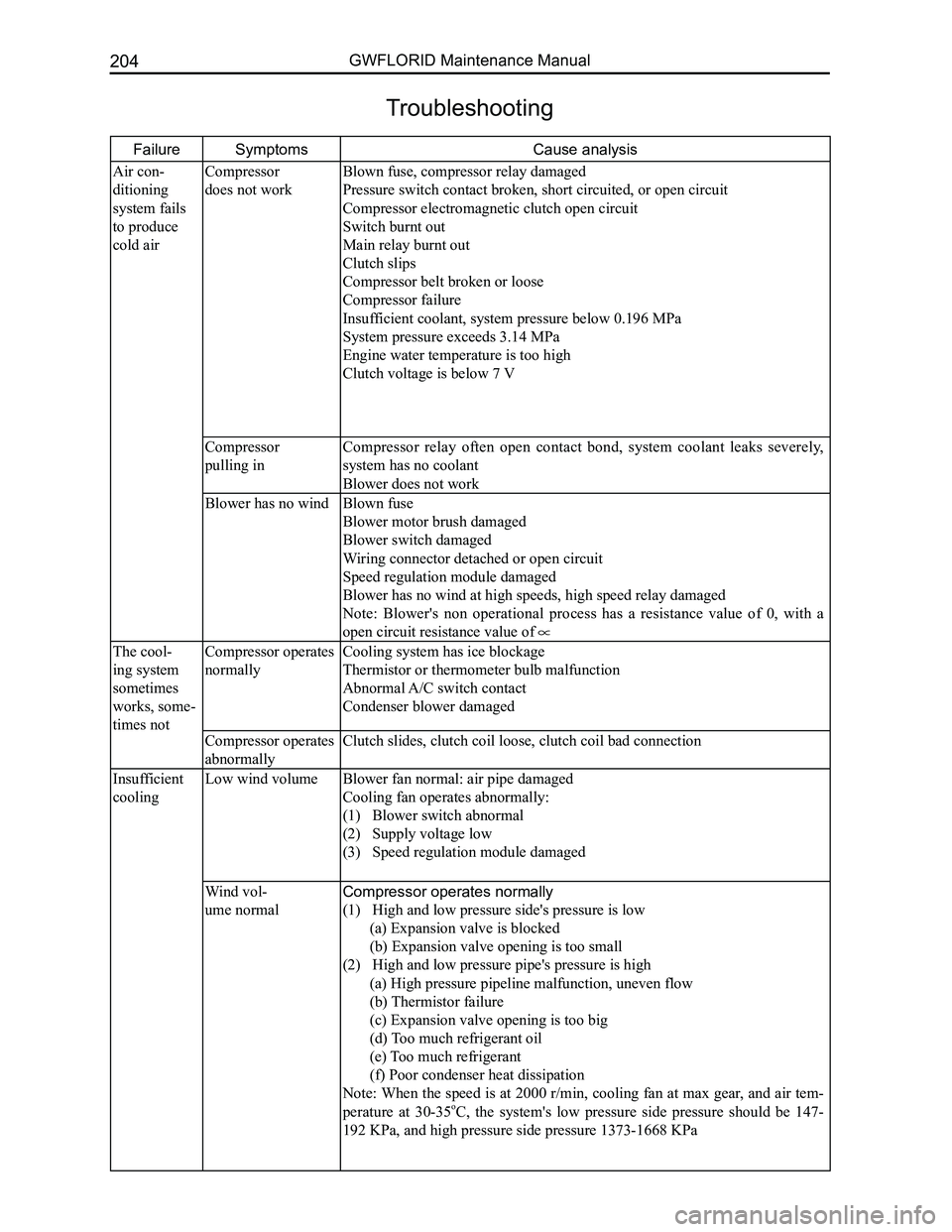
FailureSymptoms Cause analysis
Air con-
ditioning
system fails
to produce
cold air
Compressor
does not work
Blown fuse, compressor relay damaged
Pressure switch contact broken, short circuited, or open circuit
Compressor electromagnetic clutch open circuit
Switch burnt out
Main relay burnt out
Clutch slips
Compressor belt broken or loose
Compressor failure
Insufficient coolant, system pressure below 0.196 MPa
System pressure exceeds 3.14 MPa
Engine water temperature is too high
Clutch voltage is below 7 V
Compressor
pulling in
Compressor relay often open contact bond, system coolant leaks severely,
system has no coolant
Blower does not work
Blower has no windBlown fuse
Blower motor brush damaged
Blower switch damaged
Wiring connector detached or open circuit
Speed regulation module damaged
Blower has no wind at high speeds, high speed relay damaged
Note: Blower's non operational process has a resistance value of 0, with a
open circuit resistance value of
The cool-
ing system
sometimes
works, some-
times not
Compressor operates
normally
Cooling system has ice blockage
Thermistor or thermometer bulb malfunction
Abnormal A/C switch contact
Condenser blower damaged
Compressor operates
abnormally
Clutch slides, clutch coil loose, clutch coil bad connection
Insufficient
cooling
Low wind volume
Blower fan normal: air pipe damaged
Cooling fan operates abnormally:
(1) Blower switch abnormal
(2) Supply voltage low
(3) Speed regulation module damaged
Wind vol-
ume normal
Compressor operates normally
(1) High and low pressure side's pressure is low
(a) Expansion valve is blocked
(b) Expansion valve opening is too small
(2) High and low pressure pipe's pressure is high
(a) High pressure pipeline malfunction, uneven flow
(b) Thermistor failure
(c) Expansion valve opening is too big
(d) Too much refrigerant oil
(e) Too much refrigerant
(f) Poor condenser heat dissipation
Note: When the speed is at 2000 r/min, cooling fan at max gear, and air tem-
perature at 30-35oC, the system's low pressure side pressure should be 147-
192 KPa, and high pressure side pressure 1373-1668 KPa
Troubleshooting
Page 213 of 281
Downloaded from www.Manualslib.com manuals search engine GWFLORID Maintenance Manual206
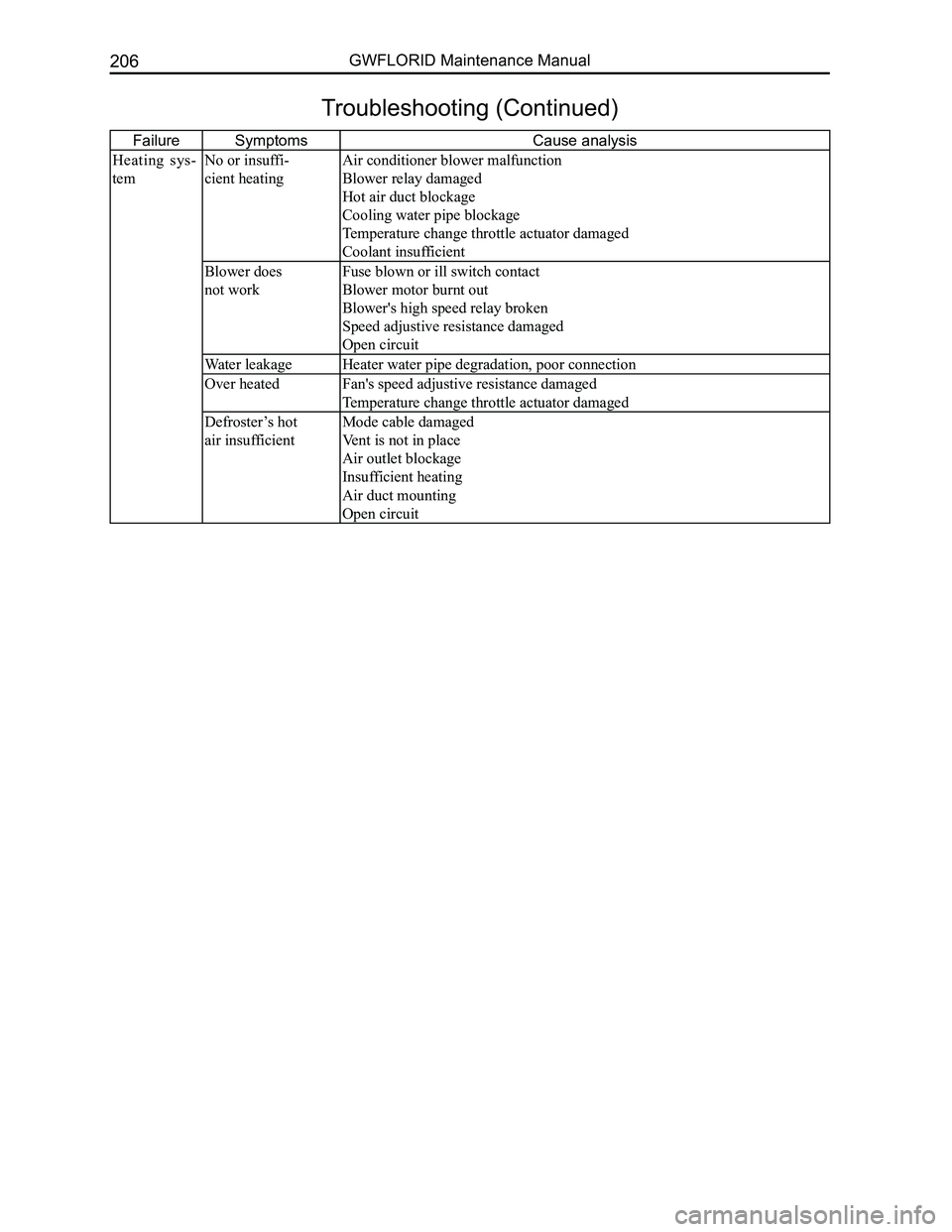
FailureSymptoms Cause analysis
Heating sys-
tem
No or insuffi-
cient heating
Air conditioner blower malfunction
Blower relay damaged
Hot air duct blockage
Cooling water pipe blockage
Temperature change throttle actuator damaged
Coolant insufficient
Blower does
not work
Fuse blown or ill switch contact
Blower motor burnt out
Blower's high speed relay broken
Speed adjustive resistance damaged
Open circuit
Water leakageHeater water pipe degradation, poor connection
Over heatedFan's speed adjustive resistance damaged
Temperature change throttle actuator damaged
Defroster’s hot
air insufficient
Mode cable damaged
Vent is not in place
Air outlet blockage
Insufficient heating
Air duct mounting
Open circuit
Troubleshooting (Continued)