diagram GREAT WALL FLORID 2008 Owner's Manual
[x] Cancel search | Manufacturer: GREAT WALL, Model Year: 2008, Model line: FLORID, Model: GREAT WALL FLORID 2008Pages: 281, PDF Size: 43.97 MB
Page 200 of 281
Downloaded from www.Manualslib.com manuals search engine 193Electrical Accessories
SymptomsCausesSolutions
Cannot start
Burnt fuseReplace with a new fuse of the same
specification
Vehicle supply battery fuse is burntReplace the vehicle supply battery fuse
Illegal operation and other factorsPress the reset button to reset the system
No sound or sound is too low
The volume of the head unit or the
connected component is too low
Raise the volume of the head unit or the
connected component
Speaker possibly damagedCheck the speaker
The sound balance settings lean to one
side
Adjust the sound balance
Speaker's connection wire touches the
vehicle body
Use insulated conductor to connect the
speaker and use insulating cement to cover
the exposed connections
Disc is not genuineUse a genuine disc
Speaker is incorrectly connectedPlease refer to the "Electrical connection
diagram" to correct the connection
Common faults and solutions
General problems
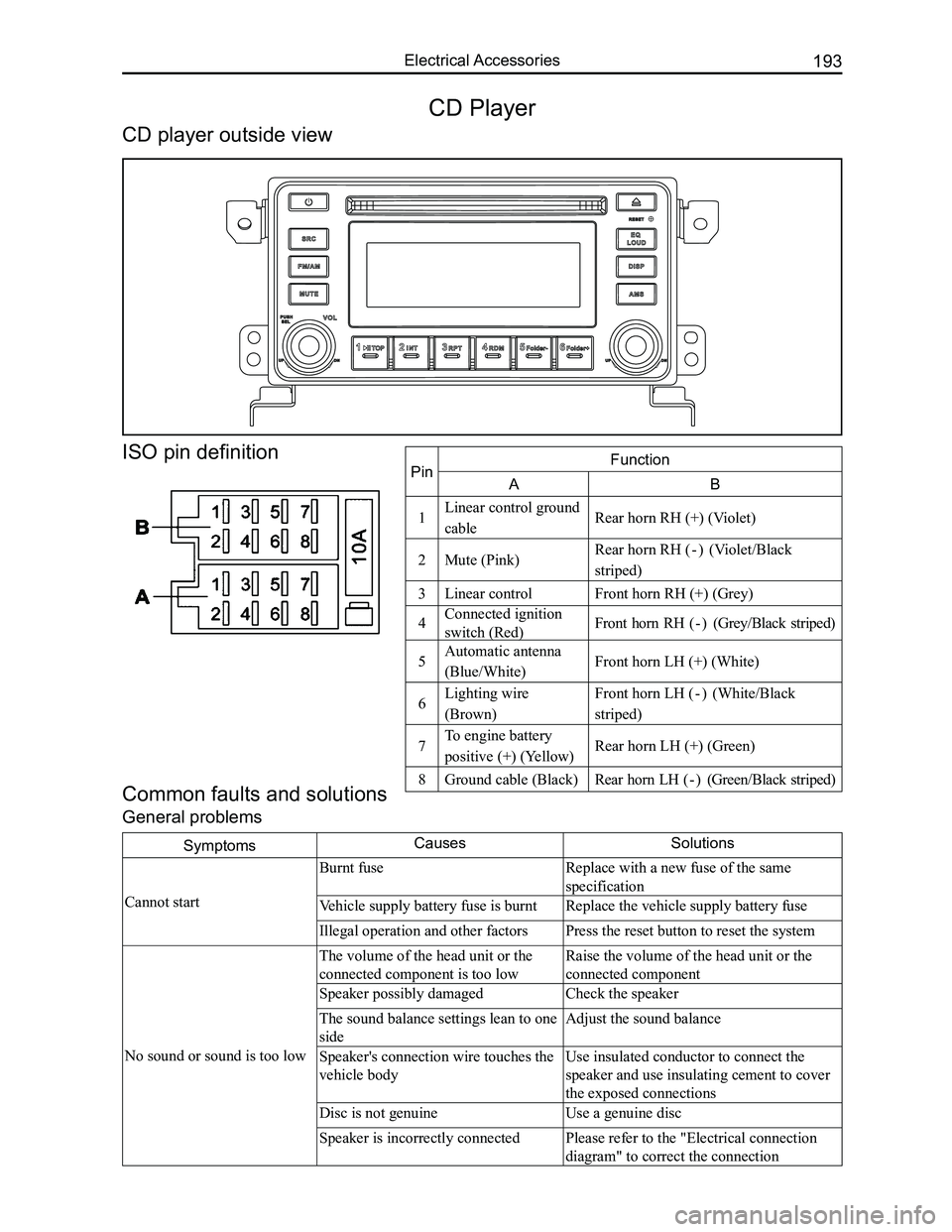
CD Player
CD player outside view
ISO pin definition
PinFunction
AB
1Linear control ground
cableRear horn RH (+) (Violet)
2Mute (Pink)Rear horn RH ( - ) (Violet/Black
striped)
3Linear controlFront horn RH (+) (Grey)
4Connected ignition
switch (Red)Front horn RH ( - ) (Grey/Black striped)
5Automatic antenna
(Blue/White)Front horn LH (+) (White)
6Lighting wire
(Brown)
Front horn LH ( - ) (White/Black
striped)
7To engine battery
positive (+) (Yellow)Rear horn LH (+) (Green)
8Ground cable (Black)Rear horn LH ( - ) (Green/Black striped)
Page 201 of 281
Downloaded from www.Manualslib.com manuals search engine GWFLORID Maintenance Manual194
Display characterMalfunctionSolutions
ERR3Disc is placed upside downEject the disc and reload
ERR4Incompatible disc file or formatCheck the disc format
ERR1
ERR1Disc structure errorEject the disc and replay
Trouble code
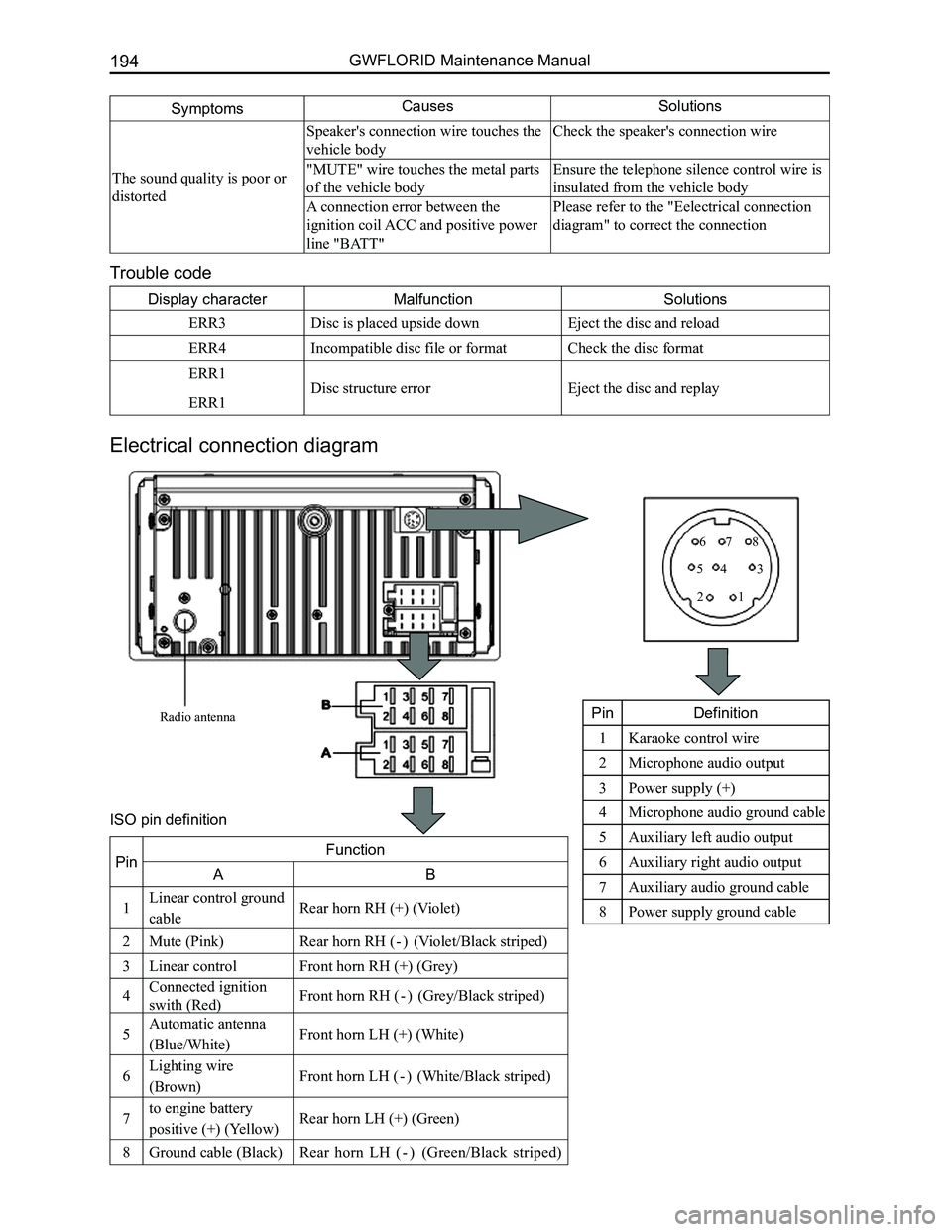
Electrical connection diagram
SymptomsCausesSolutions
The sound quality is poor or
distorted
Speaker's connection wire touches the
vehicle body
Check the speaker's connection wire
"MUTE" wire touches the metal parts
of the vehicle body
Ensure the telephone silence control wire is
insulated from the vehicle body
A connection error between the
ignition coil ACC and positive power
line "BATT"
Please refer to the "Eelectrical connection
diagram" to correct the connection
Radio antenna
12
345
678
PinDefinition
1Karaoke control wire
2Microphone audio output
3Power supply (+)
4Microphone audio ground cable
5Auxiliary left audio output
6Auxiliary right audio output
7Auxiliary audio ground cable
8Power supply ground cable
PinFunction
AB
1Linear control ground
cableRear horn RH (+) (Violet)
2Mute (Pink)Rear horn RH ( - ) (Violet/Black striped)
3Linear controlFront horn RH (+) (Grey)
4Connected ignition
swith (Red)Front horn RH ( - ) (Grey/Black striped)
5Automatic antenna
(Blue/White)Front horn LH (+) (White)
6Lighting wire
(Brown)Front horn LH ( - ) (White/Black striped)
7to engine battery
positive (+) (Yellow)Rear horn LH (+) (Green)
8Ground cable (Black)Rear horn LH ( - ) (Green/Black striped)
ISO pin definition
Page 209 of 281
Downloaded from www.Manualslib.com manuals search engine GWFLORID Maintenance Manual202
Air Conditioning System
Areas of Importance ...........................................................203
Technical Parameters .........................................................203
Troubleshooting ..................................................................204
Air Conditioning System's Structure Diagram and
Fundamentals .....................................................................207
Air Conditioning System Overview .....................................207
Air Conditioning System Terminal Definition .......................208
Compressor ........................................................................\
208
Electromagnetic Clutch.......................................................210
Vacuuming and Charging Refrigerant ................................211
Filling Quantity and Method for Refrigerant Oil ..................212
Daily Maintenance of the Air Conditioning System ............212
Page 214 of 281
Downloaded from www.Manualslib.com manuals search engine 207Air Conditioning System
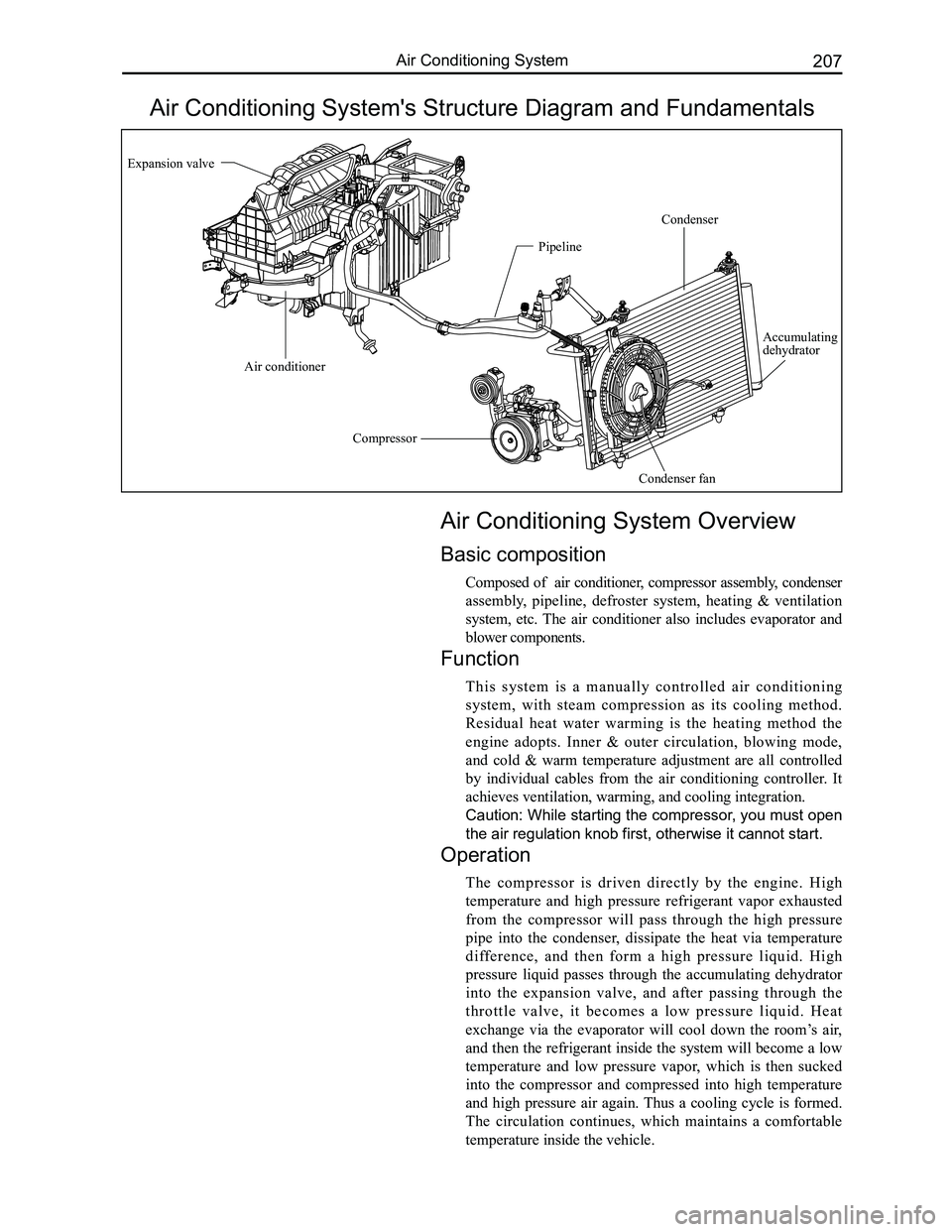
Air Conditioning System's Structure Diagram and Fundamentals
Air Conditioning System Overview
Basic composition
Composed of air conditioner, compressor assembly, condenser
assembly, pipeline, defroster system, heating & ventilation
system, etc. The air conditioner also includes evaporator and
blower components.
Function
This system is a manually controlled air conditioning
system, with steam compression as its cooling method.
Residual heat water warming is the heating method the
engine adopts. Inner & outer circulation, blowing mode,
and cold & warm temperature adjustment are all controlled
by individual cables from the air conditioning controller. It
achieves ventilation, warming, and cooling integration.
Caution: While starting the compressor, you must open
the air regulation knob first, otherwise it cannot start.
Operation
The compressor is driven directly by the engine. High
temperature and high pressure refrigerant vapor exhausted
from the compressor will pass through the high pressure
pipe into the condenser, dissipate the heat via temperature
difference, and then form a high pressure liquid. High
pressure liquid passes through the accumulating dehydrator
into the expansion valve, and after passing through the
throttle valve, it becomes a low pressure liquid. Heat
exchange via the evaporator will cool down the room’s air,
and then the refrigerant inside the system will become a low
temperature and low pressure vapor, which is then sucked
into the compressor and compressed into high temperature
and high pressure air again. Thus a cooling cycle is formed.
The circulation continues, which maintains a comfortable
temperature inside the vehicle.
Expansion valve
Compressor
Condenser fan
Condenser
Pipeline
Air conditioner
Accumulating dehydrator
Page 215 of 281
Downloaded from www.Manualslib.com manuals search engine GWFLORID Maintenance Manual208
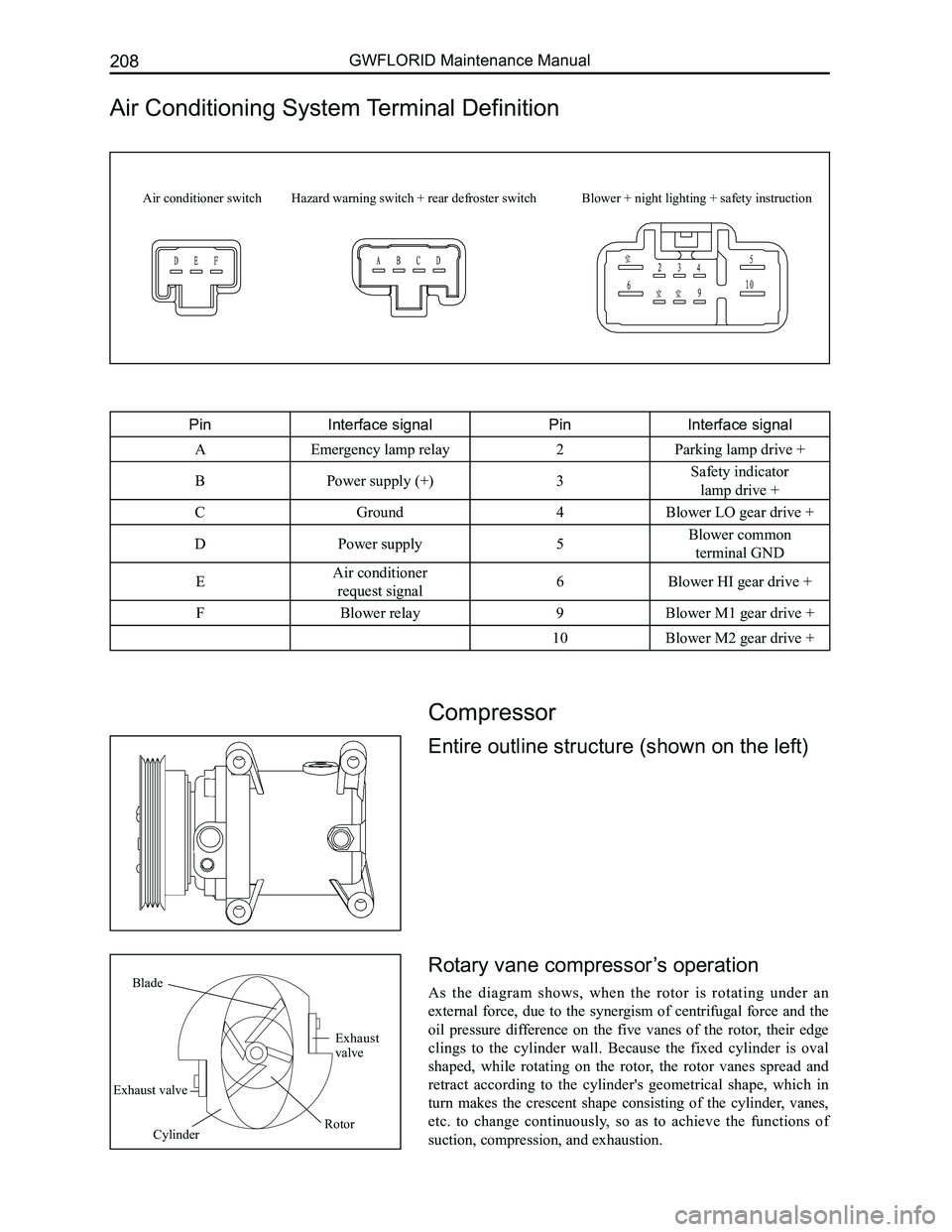
Air Conditioning System Terminal Definition
PinInterface signalPinInterface signal
AEmergency lamp relay2Parking lamp drive +
BPower supply (+)3Safety indicator
lamp drive +
CGround4Blower LO gear drive +
DPower supply5Blower common
terminal GND
EAir conditioner
request signal6Blower HI gear drive +
FBlower relay9Blower M1 gear drive +
10Blower M2 gear drive +
Air conditioner switchHazard warning switch + rear defroster switchBlower + night lighting + safety instruction
Cylinder
Blade
Exhaust valve
Rotor
Exhaust valve
Compressor
Entire outline structure (shown on the left)
Rotary vane compressor’s operation
As the diagram shows, when the rotor is rotating under an
external force, due to the synergism of centrifugal force and the
oil pressure difference on the five vanes of the rotor, their edge
clings to the cylinder wall. Because the fixed cylinder is oval
shaped, while rotating on the rotor, the rotor vanes spread and
retract according to the cylinder's geometrical shape, which in
turn makes the crescent shape consisting of the cylinder, vanes,
etc. to change continuously, so as to achieve the functions of
suction, compression, and exhaustion.
Page 216 of 281
Downloaded from www.Manualslib.com manuals search engine 209Air Conditioning System
Compressor Removal
1. Hoist the vehicle with a jack.
2. Remove the bottom mudguard.
3. Remove the compressor.
Compressor Installation
Before installing, manually rotate the compressor several
circles, allowing each component in the relative motion to be
covered with lubricant.
Clearance between the compressor's auricular branch and
bracket should be less than 0.1 mm. If the clearance is too
big, fill the clearance with a washer.
1. Loosen the engine's adjusting bolt firstly, take down the
engine belt, and then change the compressor belt.
2. Fix the compressor bracket onto the engine body with
the bolts. The bracket must be fastened tightly with suf-
ficient intensity. Fix the compressor bracket onto the
engine with four M10 ×1.25 (Q1461030 FD) bolts and
a tightening torque of 45±5 N·m, and then install the
compressor onto the bracket with a tightening torque of
22±3 N·m.
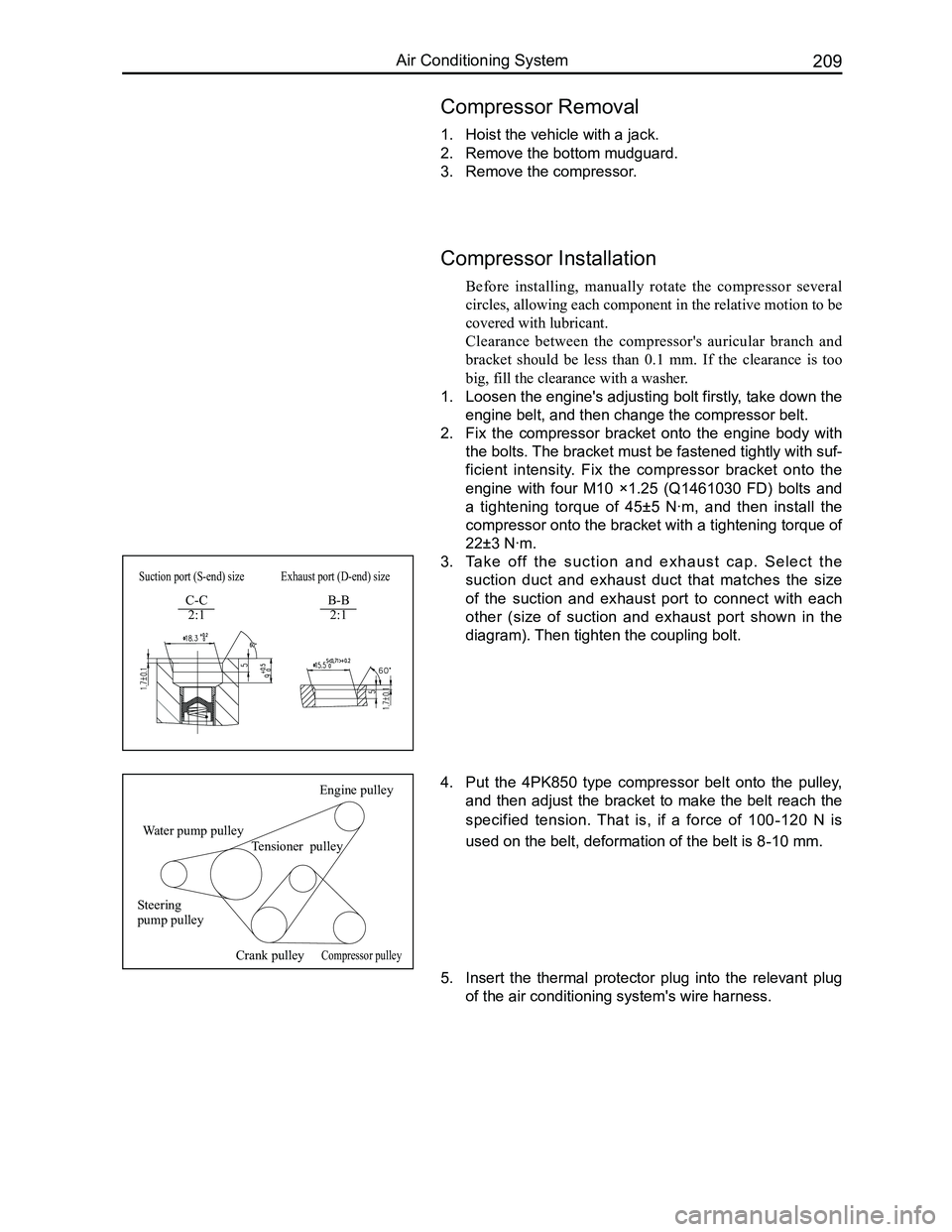
3. Ta k e o ff t h e s u c t i o n a n d e x h a u s t c a p . S e l e c t t h e
suction duct and exhaust duct that matches the size
of the suction and exhaust port to connect with each
other (size of suction and exhaust port shown in the
diagram). Then tighten the coupling bolt.
Water pump pulley
Engine pulley
Tensioner pulley
Steering pump pulley
Crank pulleyCompressor pulley
Suction port (S-end) sizeExhaust port (D-end) size
C-C 2:1B-B 2:1
4. Put the 4PK850 type compressor belt onto the pulley,
and then adjust the bracket to make the belt reach the
specified tension. That is, if a force of 100-120 N is
used on the belt, deformation of the belt is 8-10 mm.
5. Insert the thermal protector plug into the relevant plug
of the air conditioning system's wire harness.
Page 242 of 281
Downloaded from www.Manualslib.com manuals search engine 235Vehicle Body
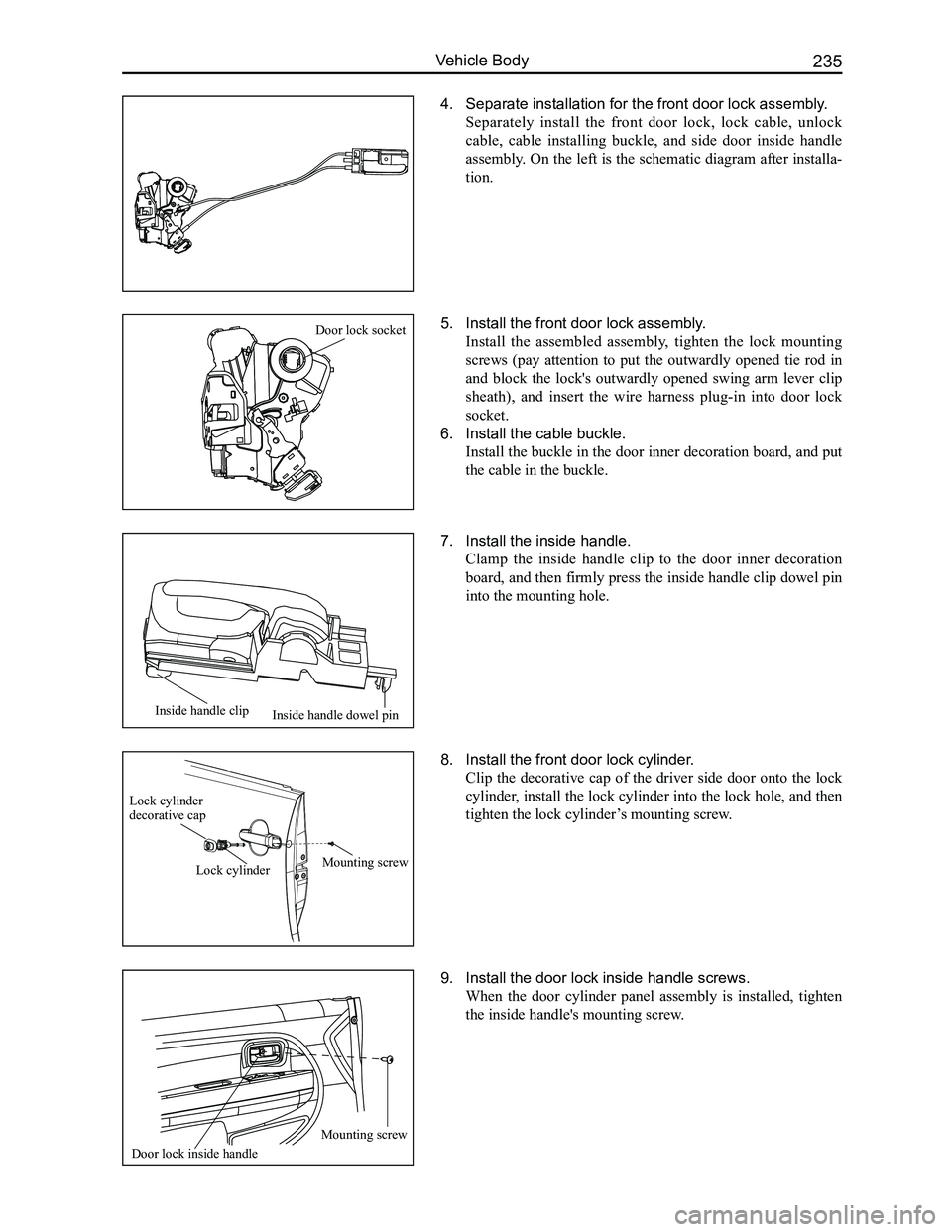
4. Separate installation for the front door lock assembly.
Separately install the front door lock, lock cable, unlock
cable, cable installing buckle, and side door inside handle
assembly. On the left is the schematic diagram after installa-
tion.
7. Install the inside handle.
Clamp the inside handle clip to the door inner decoration
board, and then firmly press the inside handle clip dowel pin
into the mounting hole.
8. Install the front door lock cylinder.
Clip the decorative cap of the driver side door onto the lock
cylinder, install the lock cylinder into the lock hole, and then
tighten the lock cylinder’s mounting screw.
5. Install the front door lock assembly.
Install the assembled assembly, tighten the lock mounting
screws (pay attention to put the outwardly opened tie rod in
and block the lock's outwardly opened swing arm lever clip
sheath), and insert the wire harness plug-in into door lock
socket.
6. Install the cable buckle.
Install the buckle in the door inner decoration board, and put
the cable in the buckle.
9. Install the door lock inside handle screws.
When the door cylinder panel assembly is installed, tighten
the inside handle's mounting screw.
Door lock socket
Inside handle dowel pinInside handle clip
Lock cylinder decorative cap
Lock cylinderMounting screw
Mounting screw
Door lock inside handle
Page 276 of 281
Downloaded from www.Manualslib.com manuals search engine 269Vehicle Body
Fault classificationFault symptomFault diagnosisFault maintenance
Window panel
motion failure
Window panel (sunroof)
cannot open, rise, or close
from its initial position
Check if anything is blocking the guide rail
for window panel movement. Check whether
the mechanism moves smoothly or stiffly.
Check whether the mechanism is broken.
Check whether the guide rail is deformed.
Check whether the motor works normally.
Replace the sunroof guide rail assem-
bly. Replace the motor.
The window panel can-
not close while half-
opened or half-tilted
Diagnosis: Check whether there are oddities
impeding the window panel's movement .
Check whether the wind guard or rear roof
drip channel is arched or deformed.
Clean the objects and close the sun-
roof by force when the jam protection
function is started, then open it again
for operation. Replace the wind guard
and rear roof drip channel.
Sun visor push/pull
fault
Sun visor cannot open
or close normally
Check whether the guide rail for the sun visor
is blocked by oddities. Check whether the sun
visor bracket is broken.
Clean the oddities in the guide rail.
Change the sun visor. Change the sun
visor bracket.
The sun visor cannot open
and close completely
Check whether the front part of sun visor
arches. Check whether the sun visor lever has
been broken off.
Replace the sun visor. Replace the
sun visor lever.
Sunroof leakage fault Sunroof leakageCheck the clearance between the window
panel and the car roof hatch.
Adjust and enlarge the window panel
weatherstrip.
Check whether a build up of sand or dust ex-
ists on the surface of window panel weather-
strip.
Clean the weatherstrip surface and
car roof hatch.
Check the sealing conditions between the
guide rail & front roof drip channel and rear
roof drip channel.
Replace the sunroof guide rail assem-
bly.
Check whether the front roof drip channel
and rear roof drip channel are broken.
Replace the sunroof guide rail assem-
bly or rear roof drip channel.
Abnormal noiseThere is abnormal noise
when closing the sunroof
(1) Check the positioning of the closed win-
dow panel.
(2) Check whether the wind deflector spring is
in the right position.
(3) Check whether the rear roof drip channel's
fixed spring has broken off.
(4) Check whether the wind deflector buffer
rubber block has broken off.
(1) Adjust the window panel's position.
(2) Place the wind deflector spring in
the right position .
(3) Re-install the fixed spring.
(4) Re-install the rubber block.
There is abnormal
noise when the sun-
roof is operating
(1) Check whether the motor is working nor-
mally.
(2) Check whether oddities exist in the guide
rail for mechanism movement .
(3) Check the grease's conditions on the mov-
ing components .
(4) Check whether the moving components
are broken.
(1) Replace the motor.
(2) Clean out any contamination.
(3) Lubricate the components.
(4) Replace the components or the
sunroof guide rail assembly.
Troubleshooting
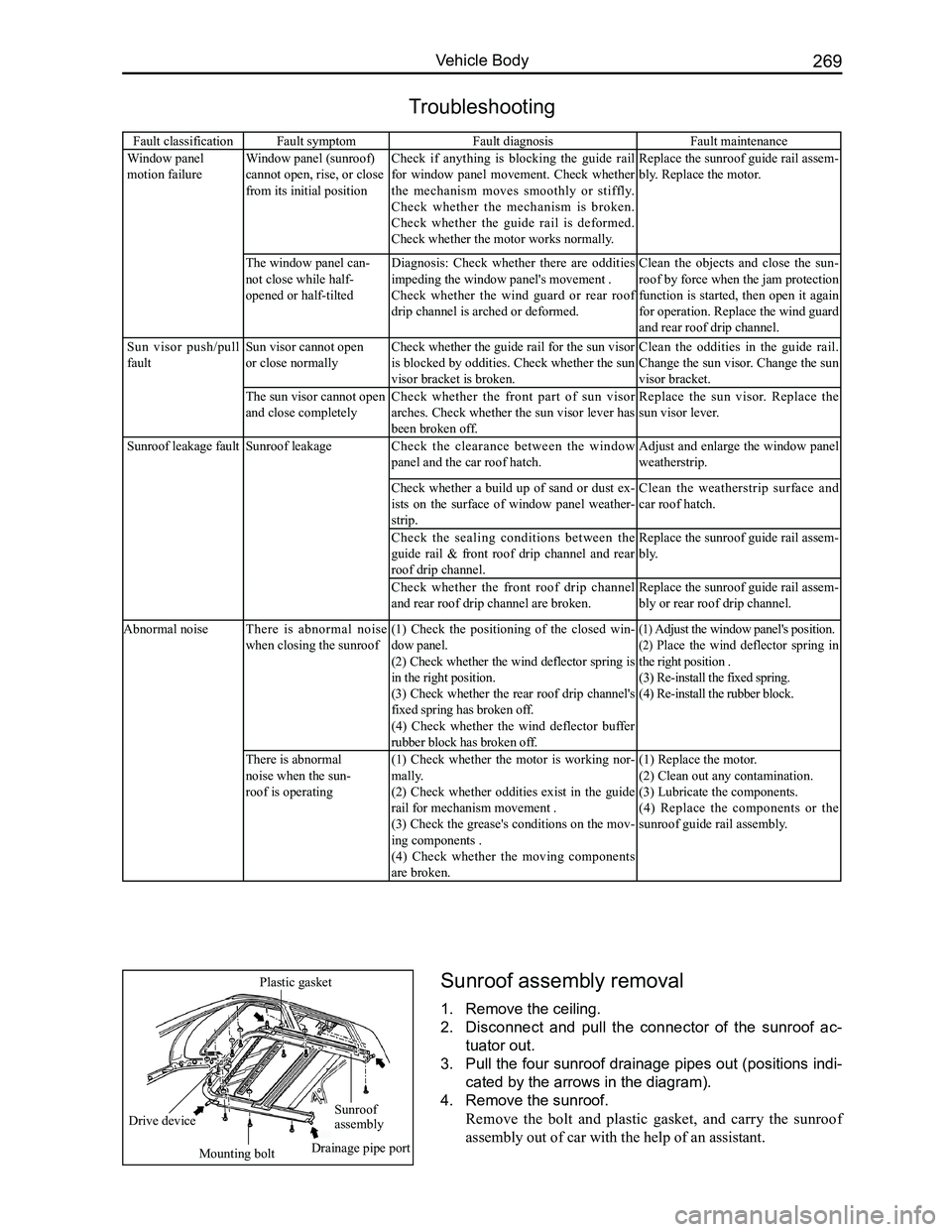
Sunroof assembly removal
1. Remove the ceiling.
2. Disconnect and pull the connector of the sunroof ac-
tuator out.
3. Pull the four sunroof drainage pipes out (positions indi-
cated by the arrows in the diagram).
4. Remove the sunroof.
Remove the bolt and plastic gasket, and carry the sunroof
assembly out of car with the help of an assistant.
Sunroof assembly
Mounting bolt
Drive device
Plastic gasket
Drainage pipe port
Page 280 of 281
Downloaded from www.Manualslib.com manuals search engine 273Vehicle Body
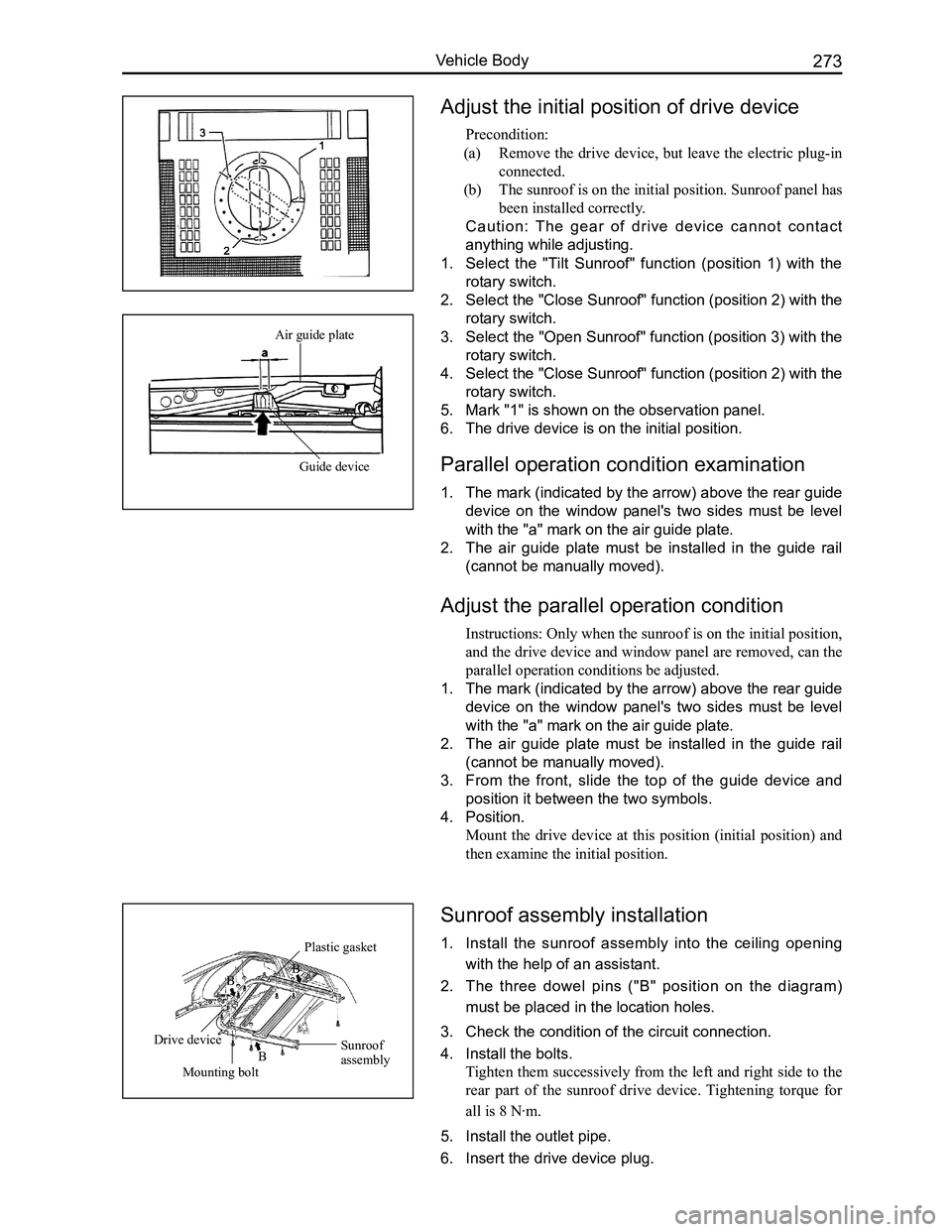
Adjust the initial position of drive device
Precondition:
(a) Remove the drive device, but leave the electric plug-in
connected.
(b) The sunroof is on the initial position. Sunroof panel has
been installed correctly.
Caution: The gear of drive device cannot contact
anything while adjusting.
1. Select the "Tilt Sunroof" function (position 1) with the
rotary switch.
2. Select the "Close Sunroof" function (position 2) with the
rotary switch.
3. Select the "Open Sunroof" function (position 3) with the
rotary switch.
4. Select the "Close Sunroof" function (position 2) with the
rotary switch.
5. Mark "1" is shown on the observation panel.
6. The drive device is on the initial position.
Parallel operation condition examination
1. The mark (indicated by the arrow) above the rear guide
device on the window panel's two sides must be level
with the "a" mark on the air guide plate.
2. The air guide plate must be installed in the guide rail
(cannot be manually moved).
Adjust the parallel operation condition
Instructions: Only when the sunroof is on the initial position,
and the drive device and window panel are removed, can the
parallel operation conditions be adjusted.
1. The mark (indicated by the arrow) above the rear guide
device on the window panel's two sides must be level
with the "a" mark on the air guide plate.
2. The air guide plate must be installed in the guide rail
(cannot be manually moved).
3. From the front, slide the top of the guide device and
position it between the two symbols.
4. Position.
Mount the drive device at this position (initial position) and
then examine the initial position.
Sunroof assembly installation
1. Install the sunroof assembly into the ceiling opening
with the help of an assistant.
2. The three dowel pins ("B" position on the diagram)
must be placed in the location holes.
3. Check the condition of the circuit connection.
4. Install the bolts.
Tighten them successively from the left and right side to the
rear part of the sunroof drive device. Tightening torque for
all is 8 N·m.
5. Install the outlet pipe.
6. Insert the drive device plug.
Air guide plate
Guide device
Sunroof assembly
Plastic gasket
Mounting bolt
Drive device
B
BB