ignition GREAT WALL FLORID 2008 Owner's Manual
[x] Cancel search | Manufacturer: GREAT WALL, Model Year: 2008, Model line: FLORID, Model: GREAT WALL FLORID 2008Pages: 281, PDF Size: 43.97 MB
Page 195 of 281
Downloaded from www.Manualslib.com manuals search engine GWFLORID Maintenance Manual188
not necessarily mean that engine start failure is due to a immobilizer system malfunction. The reasons for start-
ing engine failures are numerous, including factors like fuel, gas, fire, electricity, wires, etc. If the engine cannot
start, first check if the immobilizer system is working normally. This can be judged by looking at the flashing
theft deterrent indicator lamp which is located on the dashboard in front of the driver seat: Insert the key into the
lock cylinder and turn it to the "ON" position. If a legal key is used to start the engine, once the warning lamp is
connected to the ON end and the transponder is confirmed, the LED will remain unlit. Then when the ON end is
disconnected and the key is pulled out, the LED will shine for 0.25 s and darken for 4 s, as to act as a warning.
If an illegal key is used to start up the engine or there is something wrong with the system, the alarm indicator
lamp will shine for 0.25 s and darken for 4 s. If all is normal, then check the other parts of the engine. If abnor-
mal, first perform immobilizer system troubleshooting. A scanner can be used to judge if the immobilizer system
is working normally, but the precondition is that the scanner must be able to establish communication with the
theft deterrent controller.
1. If communication cannot be established, consider the following:
(a) Check whether the battery voltage is higher than 9 V
(b) Check whether the scanner plug is well contacted to the vehicle socket
(c) Use a multimeter to check whether the 7 pin of the OBD-II plug (diagnostic plug) is connected to the theft
deterrent controller's A7 pin
(d) Check whether the power supply of the theft deterrent controller is normal. (Use a multimeter to measure
whether the voltage of the theft deterrent controller's socket A1 pin and A2 pin is higher than 9 V)
(e) Then adopt the substitution method, which is to replace the theft deterrent controller to check if there is
anything wrong with the theft deterrent controller.
• If the failure is related to the theft deterrent controller, change it and initiate re-matching.
• If the failure has nothing to do with the theft deterrent controller, remove the electronic controller which
is connected to the alarm's K wire, such as the ABS controller, engine electrojet controller, airbag ECU
assembly, etc., as to ascertain if the present fault is caused by the wire harness connected with the theft
deterrent controller's K wire.
2. If communication can be established
Connect the scanner to the vehicle diagnostic port. Insert the key into the steering lock, and turn it to the "ON"
position, then select the scanner to check the immobilizer system's trou\
ble code.
3. Security system troubleshooting
Investigate the problem and perform troubleshooting according to the tro\
uble code on the scanner:
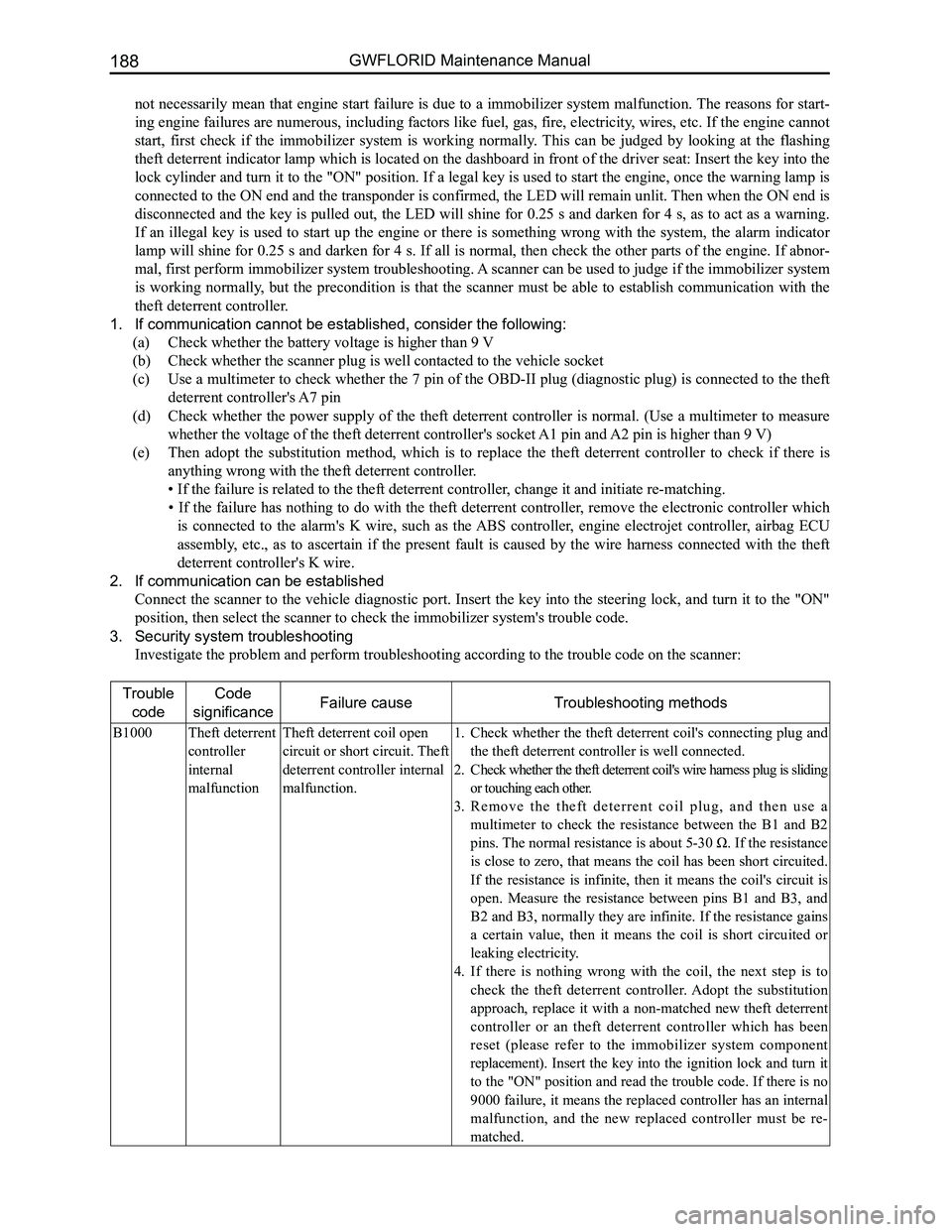
Trouble
code
Code
significanceFailure causeTroubleshooting methods
B1000Theft deterrent
controller
internal
malfunction
Theft deterrent coil open
circuit or short circuit. Theft
deterrent controller internal
malfunction.
Check whether the theft deterrent coil's connecting plug and 1.
the theft deterrent controller is well connected.
Check whether the theft deterrent coil's wire harness plug is sliding 2.
or touching each other.
R e m o v e t h e t h e f t d e t e r r e n t c o i l p l u g , a n d t h e n u s e a 3.
multimeter to check the resistance between the B1 and B2
pins. The normal resistance is about 5-30 Ω. If the resistance
is close to zero, that means the coil has been short circuited.
If the resistance is infinite, then it means the coil's circuit is
open. Measure the resistance between pins B1 and B3, and
B2 and B3, normally they are infinite. If the resistance gains
a certain value, then it means the coil is short circuited or
leaking electricity.
If there is nothing wrong with the coil, the next step is to 4.
check the theft deterrent controller. Adopt the substitution
approach, replace it with a non-matched new theft deterrent
controller or an theft deterrent controller which has been
reset (please refer to the immobilizer system component
replacement). Insert the key into the ignition lock and turn it
to the "ON" position and read the trouble code. If there is no
9000 failure, it means the replaced controller has an internal
malfunction, and the new replaced controller must be re-
matched.
Page 198 of 281
Downloaded from www.Manualslib.com manuals search engine 191Electrical Accessories
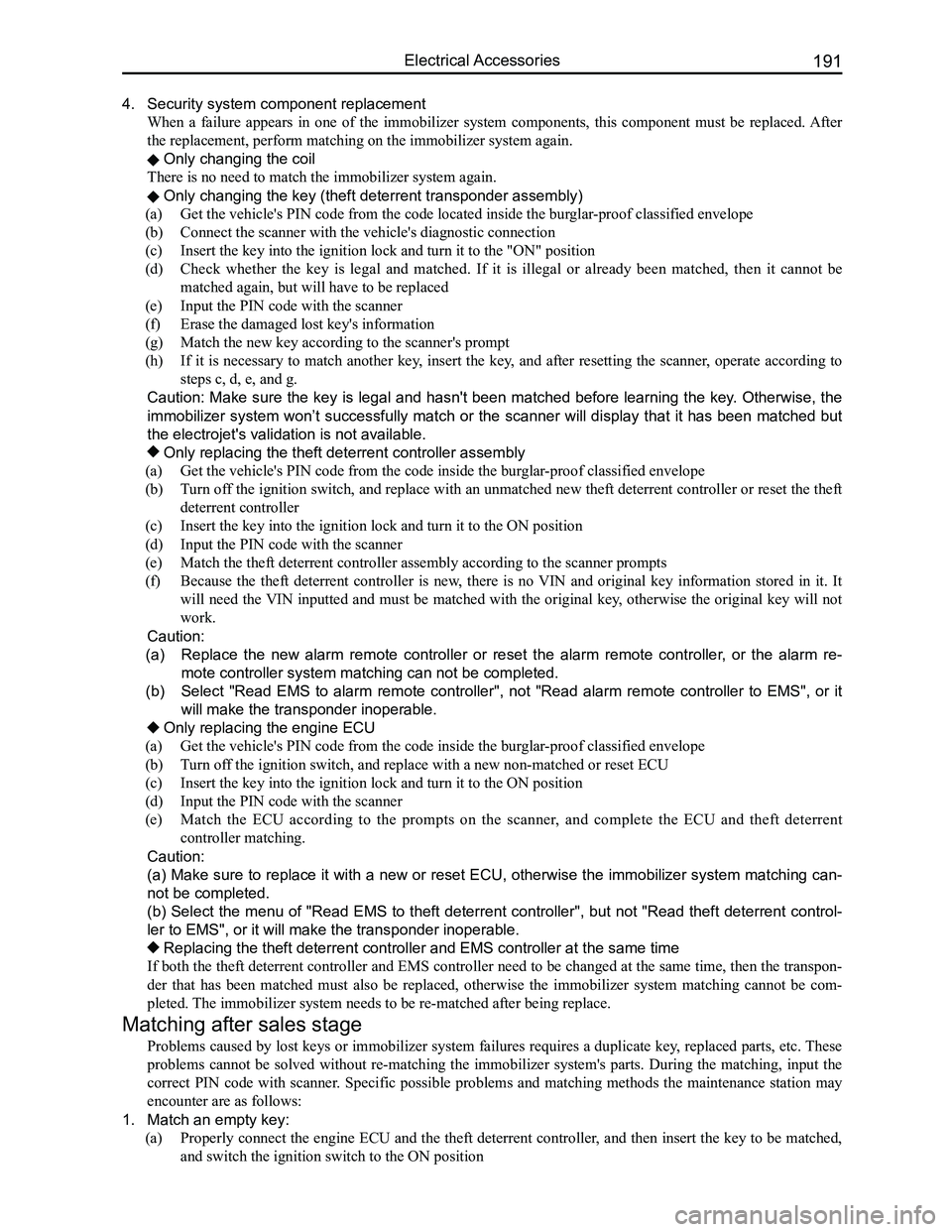
4. Security system component replacement
When a failure appears in one of the immobilizer system components, this component must be replaced. After
the replacement, perform matching on the immobilizer system again.
Only changing the coil
There is no need to match the immobilizer system again.
Only changing the key (theft deterrent transponder assembly)
(a) Get the vehicle's PIN code from the code located inside the burglar-proof classified envelope
(b) Connect the scanner with the vehicle's diagnostic connection
(c) Insert the key into the ignition lock and turn it to the "ON" position
(d) Check whether the key is legal and matched. If it is illegal or already been matched, then it cannot be
matched again, but will have to be replaced
(e) Input the PIN code with the scanner
(f) Erase the damaged lost key's information
(g) Match the new key according to the scanner's prompt
(h) If it is necessary to match another key, insert the key, and after resetting the scanner, operate according to
steps c, d, e, and g.
Caution: Make sure the key is legal and hasn't been matched before learning the key. Otherwise, the
immobilizer system won’t successfully match or the scanner will display that it has been matched but
the electrojet's validation is not available.
Only replacing the theft deterrent controller assembly
(a) Get the vehicle's PIN code from the code inside the burglar-proof classified envelope
(b) Turn off the ignition switch, and replace with an unmatched new theft deterrent controller or reset the theft
deterrent controller
(c) Insert the key into the ignition lock and turn it to the ON position
(d) Input the PIN code with the scanner
(e) Match the theft deterrent controller assembly according to the scanner prompts
(f) Because the theft deterrent controller is new, there is no VIN and original key information stored in it. It
will need the VIN inputted and must be matched with the original key, otherwise the original key will not
work.
Caution:
(a) Replace the new alarm remote controller or reset the alarm remote controller, or the alarm re-
mote controller system matching can not be completed.
(b) Select "Read EMS to alarm remote controller", not "Read alarm remote controller to EMS", or it
will make the transponder inoperable.
Only replacing the engine ECU
(a) Get the vehicle's PIN code from the code inside the burglar-proof classified envelope
(b) Turn off the ignition switch, and replace with a new non-matched or reset ECU
(c) Insert the key into the ignition lock and turn it to the ON position
(d) Input the PIN code with the scanner
(e) Match the ECU according to the prompts on the scanner, and complete the ECU and theft deterrent
controller matching.
Caution:
(a) Make sure to replace it with a new or reset ECU, otherwise the immobilizer system matching can-
not be completed.
(b) Select the menu of "Read EMS to theft deterrent controller", but not "Read theft deterrent control-
ler to EMS", or it will make the transponder inoperable.
Replacing the theft deterrent controller and EMS controller at the same\
time
If both the theft deterrent controller and EMS controller need to be changed at the same time, then the transpon-
der that has been matched must also be replaced, otherwise the immobilizer system matching cannot be com-
pleted. The immobilizer system needs to be re-matched after being replace.
Matching after sales stage
Problems caused by lost keys or immobilizer system failures requires a duplicate key, replaced parts, etc. These
problems cannot be solved without re-matching the immobilizer system's parts. During the matching, input the
correct PIN code with scanner. Specific possible problems and matching methods the maintenance station may
encounter are as follows:
1. Match an empty key:
(a) Properly connect the engine ECU and the theft deterrent controller, and then insert the key to be matched,
and switch the ignition switch to the ON position
Page 199 of 281
Downloaded from www.Manualslib.com manuals search engine GWFLORID Maintenance Manual192
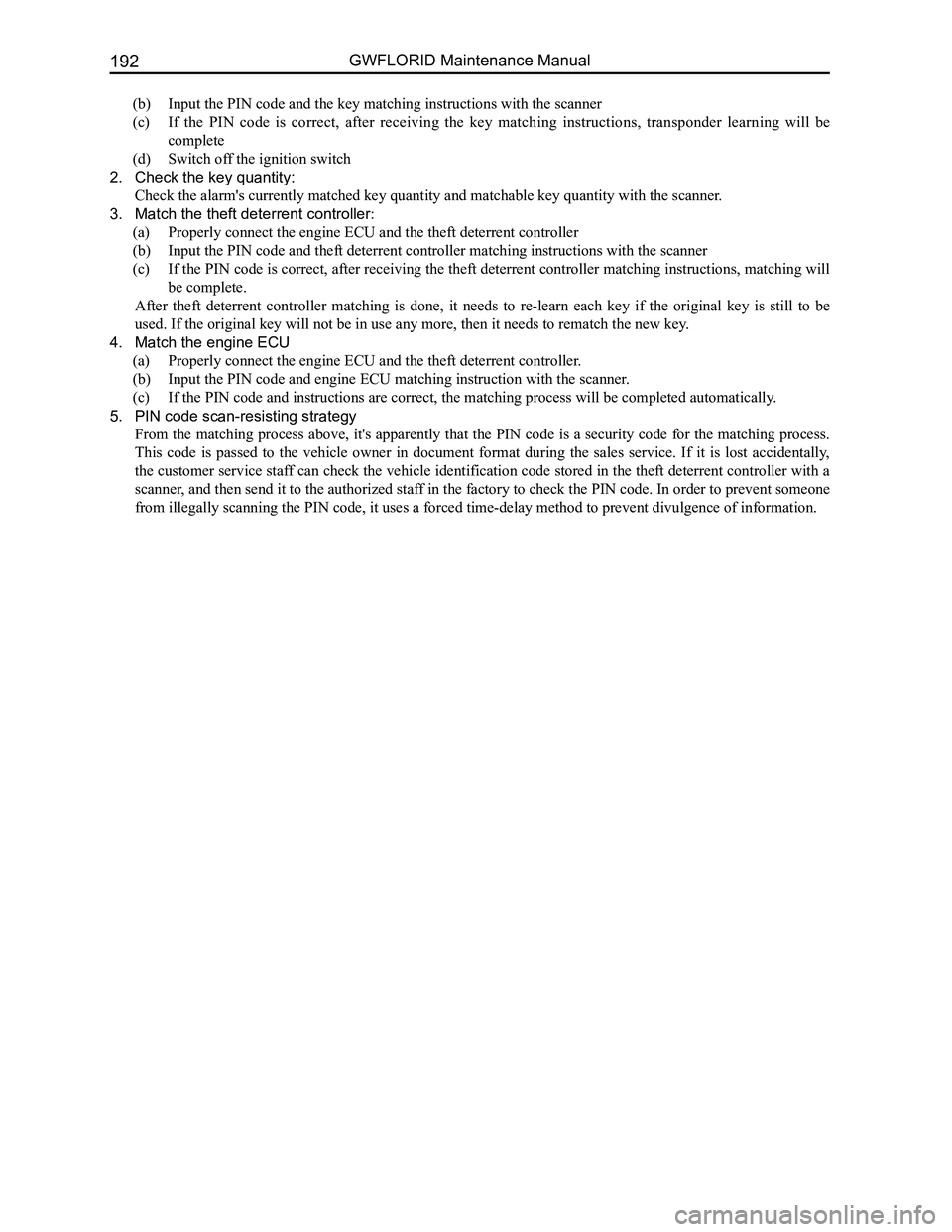
(b) Input the PIN code and the key matching instructions with the scanner
(c) If the PIN code is correct, after receiving the key matching instructions, transponder learning will be
complete
(d) Switch off the ignition switch
2. Check the key quantity:
Check the alarm's currently matched key quantity and matchable key quantity with the scanner .
3. Match the theft deterrent controller:
(a) Properly connect the engine ECU and the theft deterrent controller
(b) Input the PIN code and theft deterrent controller matching instructions with the scanner
(c) If the PIN code is correct, after receiving the theft deterrent controller matching instructions, matching will
be complete.
After theft deterrent controller matching is done, it needs to re-learn each key if the original key is still to be
used. If the original key will not be in use any more, then it needs to \
rematch the new key.
4. Match the engine ECU
(a) Properly connect the engine ECU and the theft deterrent controller.
(b) Input the PIN code and engine ECU matching instruction with the scanner.
(c) If the PIN code and instructions are correct, the matching process will be completed automatically.
5. PIN code scan-resisting strategy
From the matching process above, it's apparently that the PIN code is a security code for the matching process.
This code is passed to the vehicle owner in document format during the sales service. If it is lost accidentally,
the customer service staff can check the vehicle identification code stored in the theft deterrent controller with a
scanner, and then send it to the authorized staff in the factory to check the PIN code. In order to prevent someone
from illegally scanning the PIN code, it uses a forced time-delay method to prevent divulgence of information.
Page 200 of 281
Downloaded from www.Manualslib.com manuals search engine 193Electrical Accessories
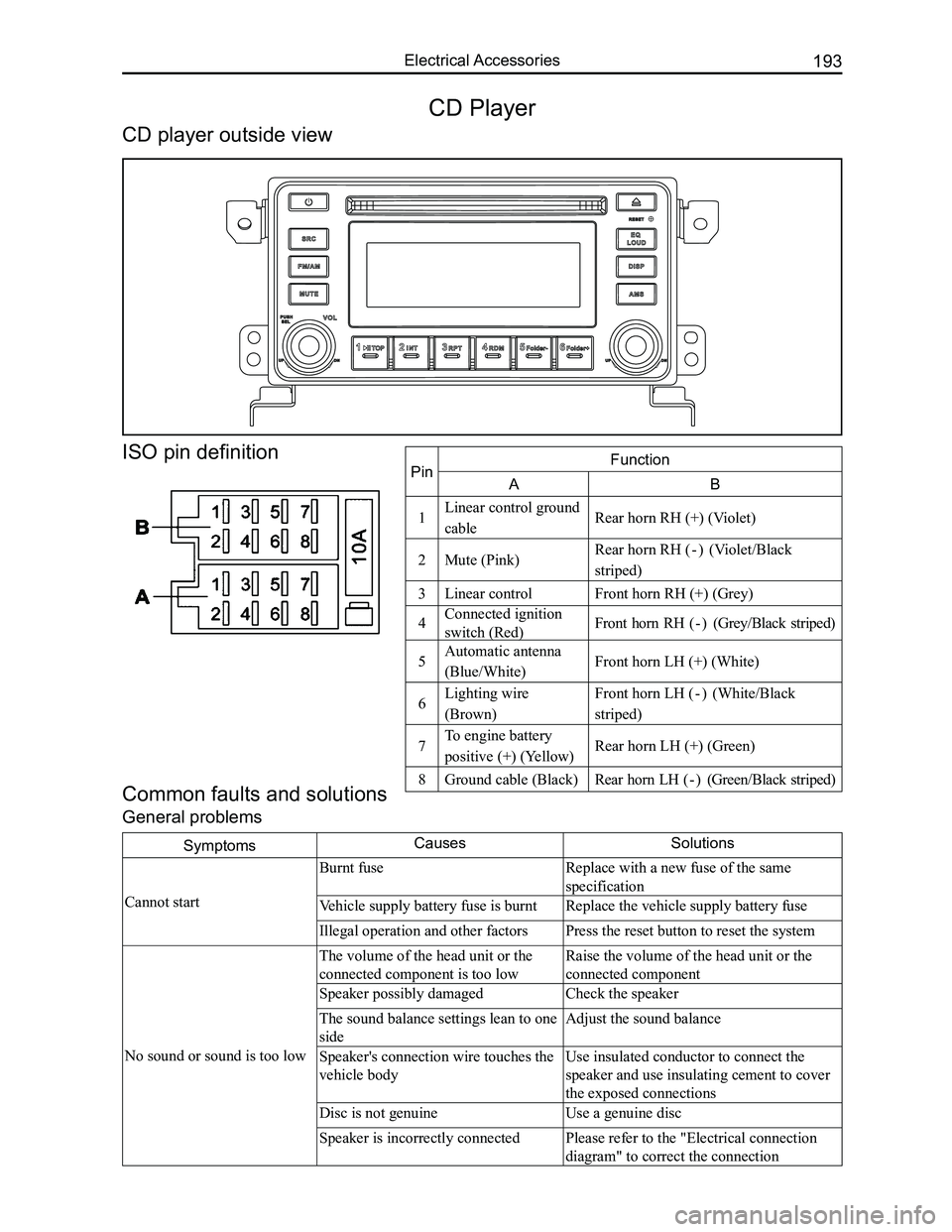
SymptomsCausesSolutions
Cannot start
Burnt fuseReplace with a new fuse of the same
specification
Vehicle supply battery fuse is burntReplace the vehicle supply battery fuse
Illegal operation and other factorsPress the reset button to reset the system
No sound or sound is too low
The volume of the head unit or the
connected component is too low
Raise the volume of the head unit or the
connected component
Speaker possibly damagedCheck the speaker
The sound balance settings lean to one
side
Adjust the sound balance
Speaker's connection wire touches the
vehicle body
Use insulated conductor to connect the
speaker and use insulating cement to cover
the exposed connections
Disc is not genuineUse a genuine disc
Speaker is incorrectly connectedPlease refer to the "Electrical connection
diagram" to correct the connection
Common faults and solutions
General problems
CD Player
CD player outside view
ISO pin definition
PinFunction
AB
1Linear control ground
cableRear horn RH (+) (Violet)
2Mute (Pink)Rear horn RH ( - ) (Violet/Black
striped)
3Linear controlFront horn RH (+) (Grey)
4Connected ignition
switch (Red)Front horn RH ( - ) (Grey/Black striped)
5Automatic antenna
(Blue/White)Front horn LH (+) (White)
6Lighting wire
(Brown)
Front horn LH ( - ) (White/Black
striped)
7To engine battery
positive (+) (Yellow)Rear horn LH (+) (Green)
8Ground cable (Black)Rear horn LH ( - ) (Green/Black striped)
Page 201 of 281
Downloaded from www.Manualslib.com manuals search engine GWFLORID Maintenance Manual194
Display characterMalfunctionSolutions
ERR3Disc is placed upside downEject the disc and reload
ERR4Incompatible disc file or formatCheck the disc format
ERR1
ERR1Disc structure errorEject the disc and replay
Trouble code
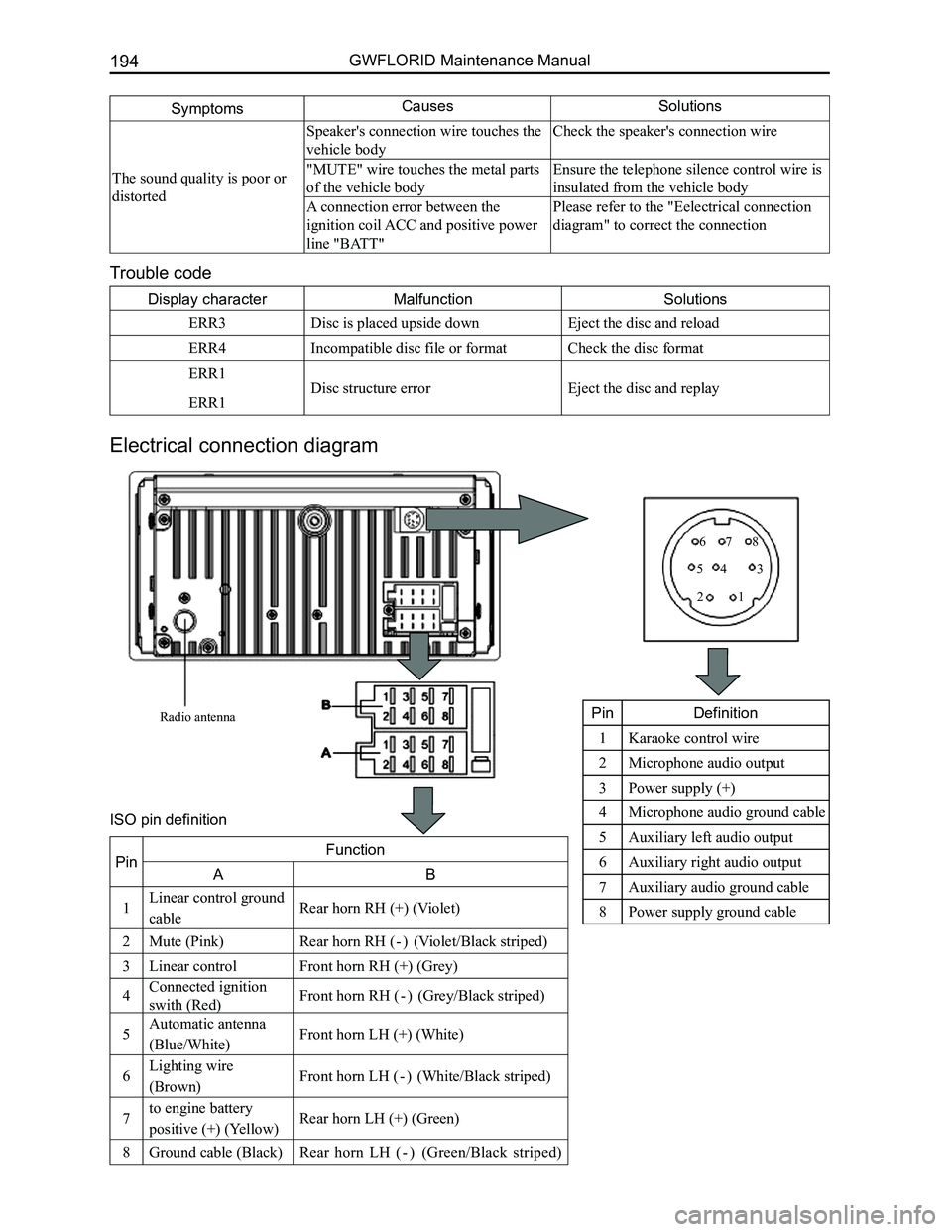
Electrical connection diagram
SymptomsCausesSolutions
The sound quality is poor or
distorted
Speaker's connection wire touches the
vehicle body
Check the speaker's connection wire
"MUTE" wire touches the metal parts
of the vehicle body
Ensure the telephone silence control wire is
insulated from the vehicle body
A connection error between the
ignition coil ACC and positive power
line "BATT"
Please refer to the "Eelectrical connection
diagram" to correct the connection
Radio antenna
12
345
678
PinDefinition
1Karaoke control wire
2Microphone audio output
3Power supply (+)
4Microphone audio ground cable
5Auxiliary left audio output
6Auxiliary right audio output
7Auxiliary audio ground cable
8Power supply ground cable
PinFunction
AB
1Linear control ground
cableRear horn RH (+) (Violet)
2Mute (Pink)Rear horn RH ( - ) (Violet/Black striped)
3Linear controlFront horn RH (+) (Grey)
4Connected ignition
swith (Red)Front horn RH ( - ) (Grey/Black striped)
5Automatic antenna
(Blue/White)Front horn LH (+) (White)
6Lighting wire
(Brown)Front horn LH ( - ) (White/Black striped)
7to engine battery
positive (+) (Yellow)Rear horn LH (+) (Green)
8Ground cable (Black)Rear horn LH ( - ) (Green/Black striped)
ISO pin definition
Page 202 of 281
Downloaded from www.Manualslib.com manuals search engine 195Electrical Accessories
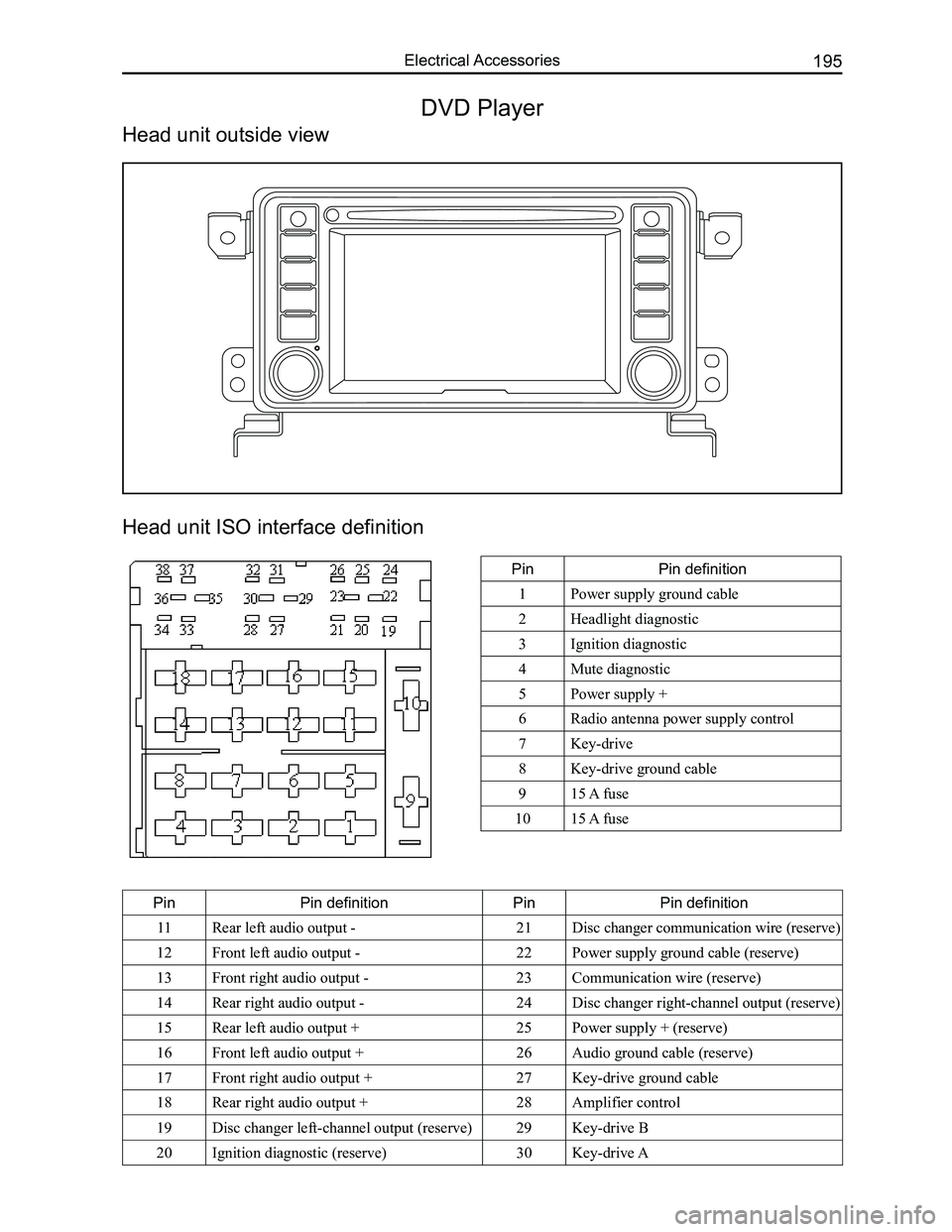
Head unit ISO interface definition
PinPin definition
1Power supply ground cable
2Headlight diagnostic
3Ignition diagnostic
4Mute diagnostic
5Power supply +
6Radio antenna power supply control
7Key-drive
8Key-drive ground cable
915 A fuse
1015 A fuse
PinPin definitionPinPin definition
11Rear left audio output -21Disc changer communication wire (reserve)
12Front left audio output -22Power supply ground cable (reserve)
13Front right audio output -23Communication wire (reserve)
14Rear right audio output -24Disc changer right-channel output (reserve)
15Rear left audio output +25Power supply + (reserve)
16Front left audio output +26Audio ground cable (reserve)
17Front right audio output +27Key-drive ground cable
18Rear right audio output +28Amplifier control
19Disc changer left-channel output (reserve)29Key-drive B
20Ignition diagnostic (reserve)30Key-drive A
DVD Player
Head unit outside view
Page 203 of 281
Downloaded from www.Manualslib.com manuals search engine GWFLORID Maintenance Manual196
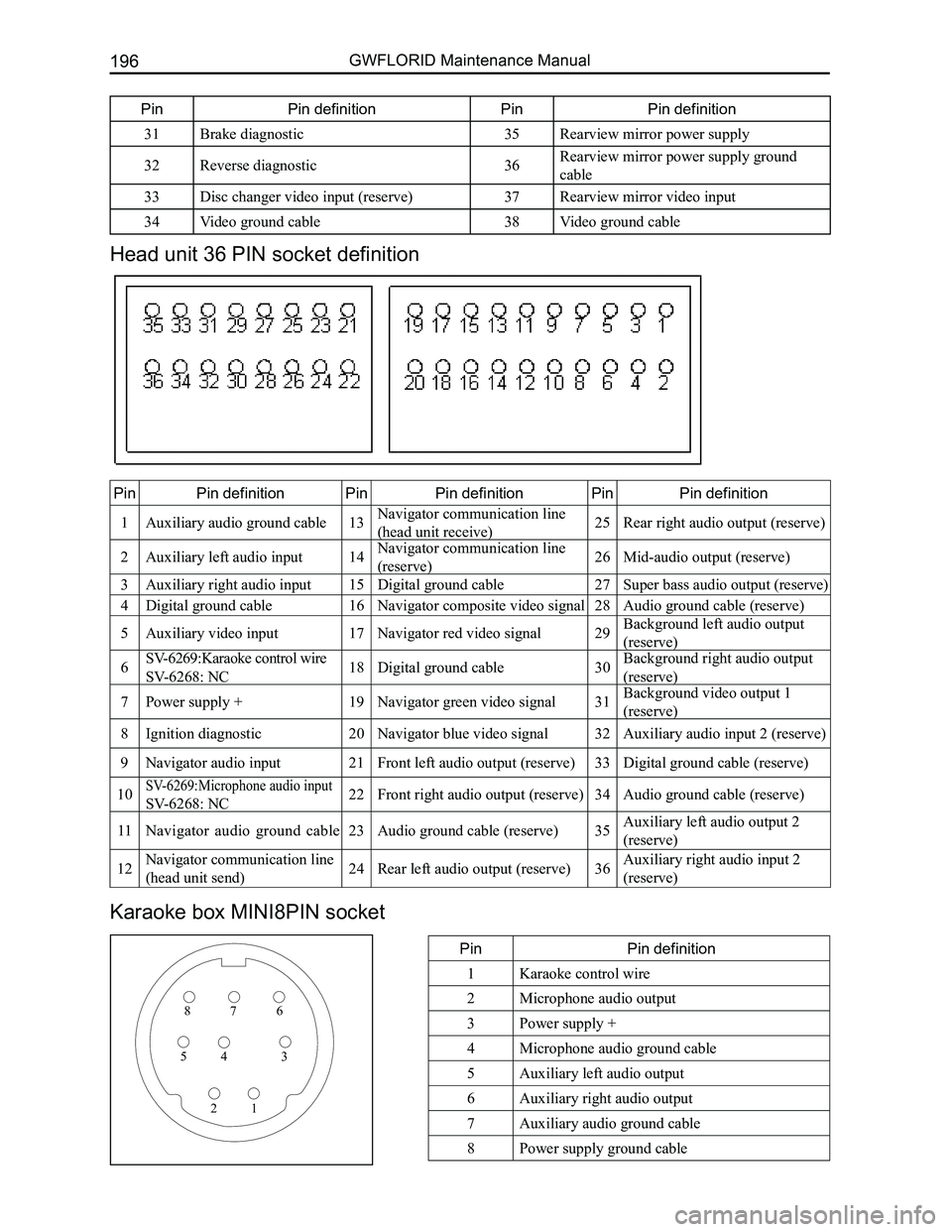
Head unit 36 PIN socket definition
PinPin definitionPinPin definitionPinPin definition
1Auxiliary audio ground cable13Navigator communication line
(head unit receive)25Rear right audio output (reserve)
2Auxiliary left audio input14Navigator communication line
(reserve)26Mid-audio output (reserve)
3Auxiliary right audio input15Digital ground cable27Super bass audio output (reserve)
4Digital ground cable16Navigator composite video signal28Audio ground cable (reserve)
5Auxiliary video input17Navigator red video signal29Background left audio output
(reserve)
6SV-6269:Karaoke control wire
SV-6268: NC18Digital ground cable30Background right audio output
(reserve)
7Power supply +19Navigator green video signal31Background video output 1
(reserve)
8Ignition diagnostic20Navigator blue video signal32Auxiliary audio input 2 (reserve)
9Navigator audio input21Front left audio output (reserve)33Digital ground cable (reserve)
10SV-6269:Microphone audio input
SV-6268: NC22Front right audio output (reserve)34Audio ground cable (reserve)
11Navigator audio ground cable23Audio ground cable (reserve)35Auxiliary left audio output 2
(reserve)
12Navigator communication line
(head unit send)24Rear left audio output (reserve)36Auxiliary right audio input 2
(reserve)
Karaoke box MINI8PIN socket
PinPin definition
1Karaoke control wire
2Microphone audio output
3Power supply +
4Microphone audio ground cable
5Auxiliary left audio output
6Auxiliary right audio output
7Auxiliary audio ground cable
8Power supply ground cable
876
345
21
PinPin definitionPinPin definition
31Brake diagnostic35Rearview mirror power supply
32Reverse diagnostic36Rearview mirror power supply ground
cable
33Disc changer video input (reserve)37Rearview mirror video input
34Video ground cable38Video ground cable
Page 204 of 281

Downloaded from www.Manualslib.com manuals search engine 197Electrical Accessories
Common faults and solutions
If the following faults occur while using this machine, please refer to \
the troubleshooting guide.
General problems
SymptomsCausesSolutions
Cannot start
Burnt fuseReplace with a new fuse of the same
specification
Vehicle supply battery fuse is burntReplace the vehicle supply battery fuse
Illegal operation and other factorsPress the reset button to reset the system
Remote controller doesn't
work
Remote controller battery is lowReplace the remote controller battery
Remote controller battery is reversely
installedProper battery installation
No sound or sound is too low
The volume of the head unit or the
connected component is too low
Raise the volume of the head unit or the
connected component
Speaker possibly damagedCheck the speaker
The sound balance settings lean to one
sideAdjust the sound balance
Speaker's connection wire touches the
vehicle body
Use insulated conductor to connect the
speaker and use insulating cement to cover
the exposed connections
Disc is not genuineUse a genuine disc
Speaker is incorrectly connectedPlease refer to the "Equipment connection
drawing" to correct the connection
The sound quality is poor or
distorted
Speaker's connection wire touches the
vehicle bodyCheck the speaker's connection wire
"MUTE" wire touches the metal parts of
the vehicle body
Ensure the telephone silence control wire
is insulated from the vehicle body
A connection error between ignition coil
ACC and positive power wire "BATT"
Please refer to the "equipment connection
drawing" to correct the connection
Common display characters and fault meaning
Display characterMalfunctionSolutions
No Disc
Disc is dirtyClean or replace the disc
The read side of the disc is inserted
upside-down
Insert the disc into the player with the
label side up
No disc in the playerInsert the disc
Bad disc
Disc is dirtyClean or replace the disc
The read side of the disc is reversely
inserted
Insert the disc into the player with the
label side up
Unknown disc Player cannot read discPlease use discs supported by this player
Region error The region code of this disc does not
match the region code for this player
Use discs that have a region code identical
to this player's
Page 223 of 281
Downloaded from www.Manualslib.com manuals search engine GWFLORID Maintenance Manual216
SRS airbag warning lamp inspection
1. When the ignition switch is set to the ON position, check if the SRS warning lamp remains on for 6-7 s.
2. If the SRS warning lamp shuts off after 6-7 s, this is normal.
3. Except for the items listed above, diagnostic inspection is still needed\
.
System diagnosis
Airbag ECU will initiate a series of diagnostic test cycles to check if the airbag system functions are ready for
use. This diagnostic test can guard against the restraint system's faulty execution and at the same time guarantee
prompt execution in a collision. If a malfunction appears, airbag ECU will store the appropriate trouble code and
light up the warning lamp to point out the malfunction, as to make maint\
enance more convenient.
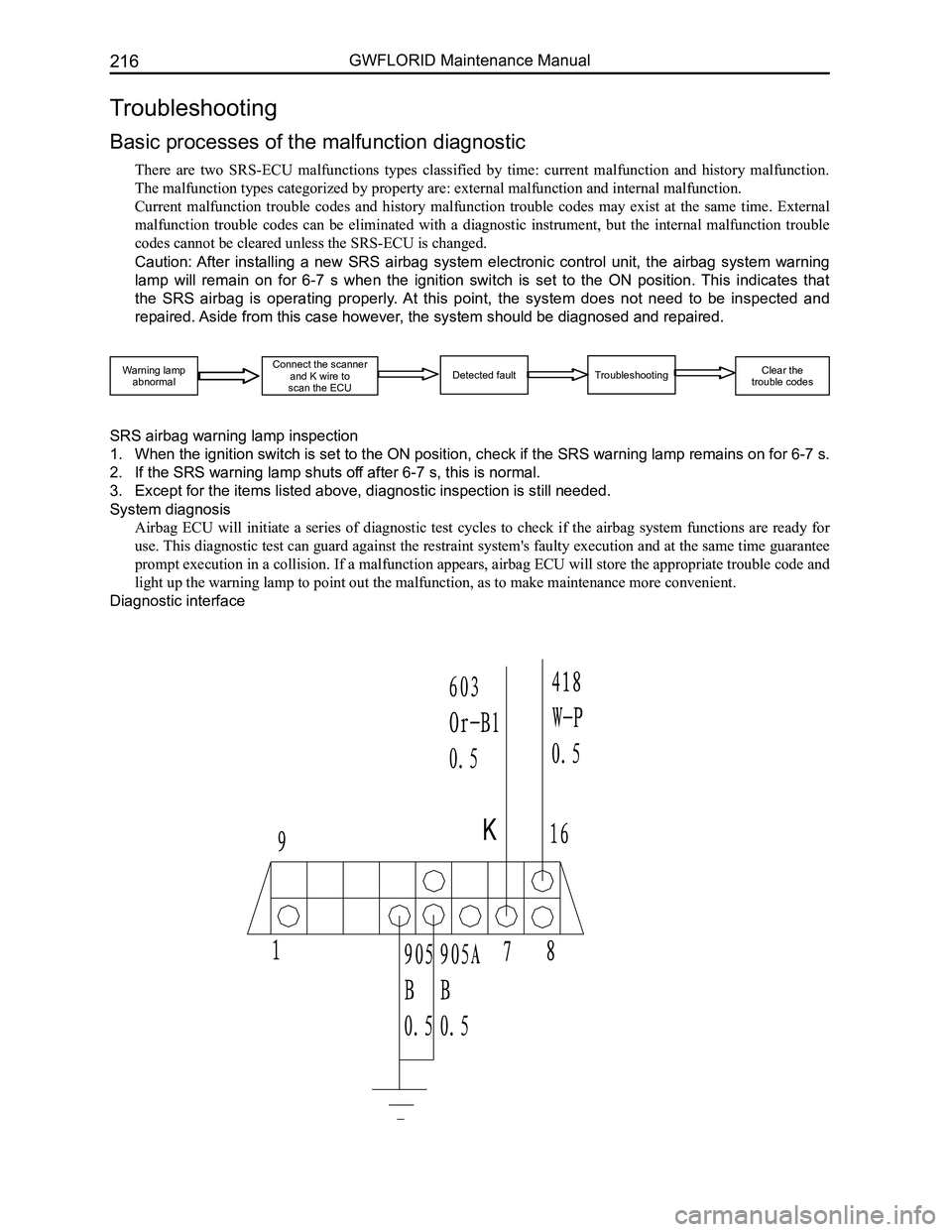
Diagnostic interface
Troubleshooting
Basic processes of the malfunction diagnostic
There are two SRS-ECU malfunctions types classified by time: current malfunction and history malfunction.
The malfunction types categorized by property are: external malfunction \
and internal malfunction.
Current malfunction trouble codes and history malfunction trouble codes may exist at the same time. External
malfunction trouble codes can be eliminated with a diagnostic instrument, but the internal malfunction trouble
codes cannot be cleared unless the SRS-ECU is changed.
Caution: After installing a new SRS airbag system electronic control unit, the airbag system warning
lamp will remain on for 6-7 s when the ignition switch is set to the ON position. This indicates that
the SRS airbag is operating properly. At this point, the system does not need to be inspected and
repaired. Aside from this case however, the system should be diagnosed and repaired.
Warning lampabnormal
Connect the scannerand K wire to scan the ECUDetected faultTroubleshooting Clear the trouble codes
Page 224 of 281
Downloaded from www.Manualslib.com manuals search engine 217Airbags
Malfunction judgment
1. Malfunction record (trouble code storage)
After the ECU performs the diagnostic test cycle in order to verify a malfunction, the SRS-ECU will store the
relevant code, the initial detection time, the final detection time, and the number of times it occurred in the
EEPROM.
The SRS-ECU can store 16 codes at most.
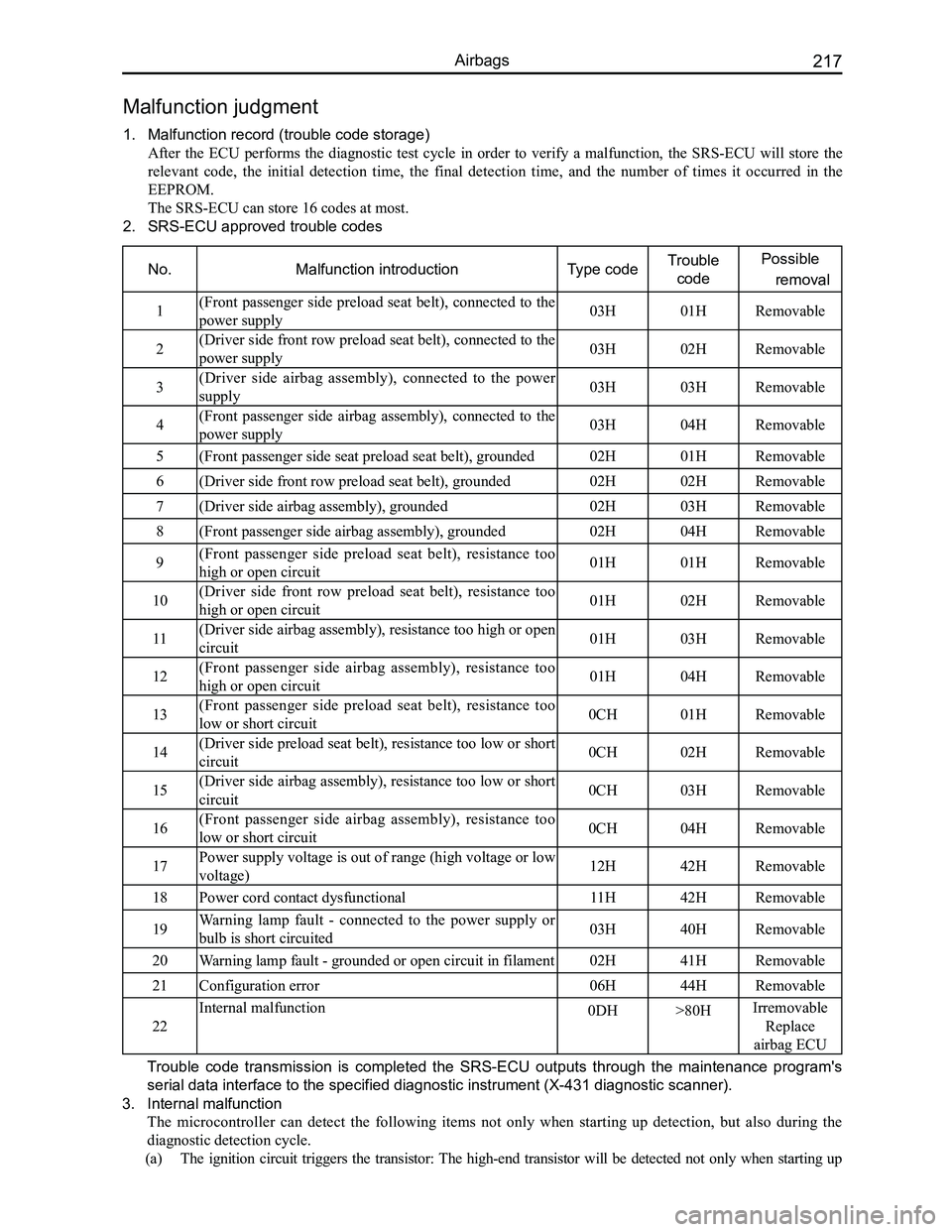
2. SRS-ECU approved trouble codes
No.Malfunction introductionType codeTrouble
code
Possible
removal
1(Front passenger side preload seat belt), connected to the
power supply03H01HRemovable
2(Driver side front row preload seat belt), connected to the
power supply03H02HRemovable
3(Driver side airbag assembly), connected to the power
supply03H03HRemovable
4(Front passenger side airbag assembly), connected to the
power supply03H04HRemovable
5(Front passenger side seat preload seat belt), grounded02H01HRemovable
6(Driver side front row preload seat belt), grounded02H02HRemovable
7(Driver side airbag assembly), grounded02H03HRemovable
8(Front passenger side airbag assembly), grounded02H04HRemovable
9(Front passenger side preload seat belt), resistance too
high or open circuit01H01HRemovable
10(Driver side front row preload seat belt), resistance too
high or open circuit01H02HRemovable
11(Driver side airbag assembly), resistance too high or open
circuit01H03HRemovable
12(Front passenger side airbag assembly), resistance too
high or open circuit01H04HRemovable
13(Front passenger side preload seat belt), resistance too
low or short circuit0CH01HRemovable
14(Driver side preload seat belt), resistance too low or short
circuit0CH02HRemovable
15(Driver side airbag assembly), resistance too low or short
circuit0CH03HRemovable
16(Front passenger side airbag assembly), resistance too
low or short circuit0CH04HRemovable
17Power supply voltage is out of range (high voltage or low
voltage)12H42HRemovable
18Power cord contact dysfunctional11H42HRemovable
19Warning lamp fault - connected to the power supply or
bulb is short circuited03H40HRemovable
20Warning lamp fault - grounded or open circuit in filament02H41HRemovable
21Configuration error06H44HRemovable
22
Internal malfunction0DH>80HIrremovable
Replace
airbag ECU
Trouble code transmission is completed the SRS-ECU outputs through the maintenance program's
serial data interface to the specified diagnostic instrument (X-431 dia\
gnostic scanner).
3. Internal malfunction
The microcontroller can detect the following items not only when starting up detection, but also during the
diagnostic detection cycle.
(a) The ignition circuit triggers the transistor: The high-end transistor will be detected not only when starting up