clutch GREAT WALL FLORID 2008 Owner's Guide
[x] Cancel search | Manufacturer: GREAT WALL, Model Year: 2008, Model line: FLORID, Model: GREAT WALL FLORID 2008Pages: 281, PDF Size: 43.97 MB
Page 211 of 281
Downloaded from www.Manualslib.com manuals search engine GWFLORID Maintenance Manual204
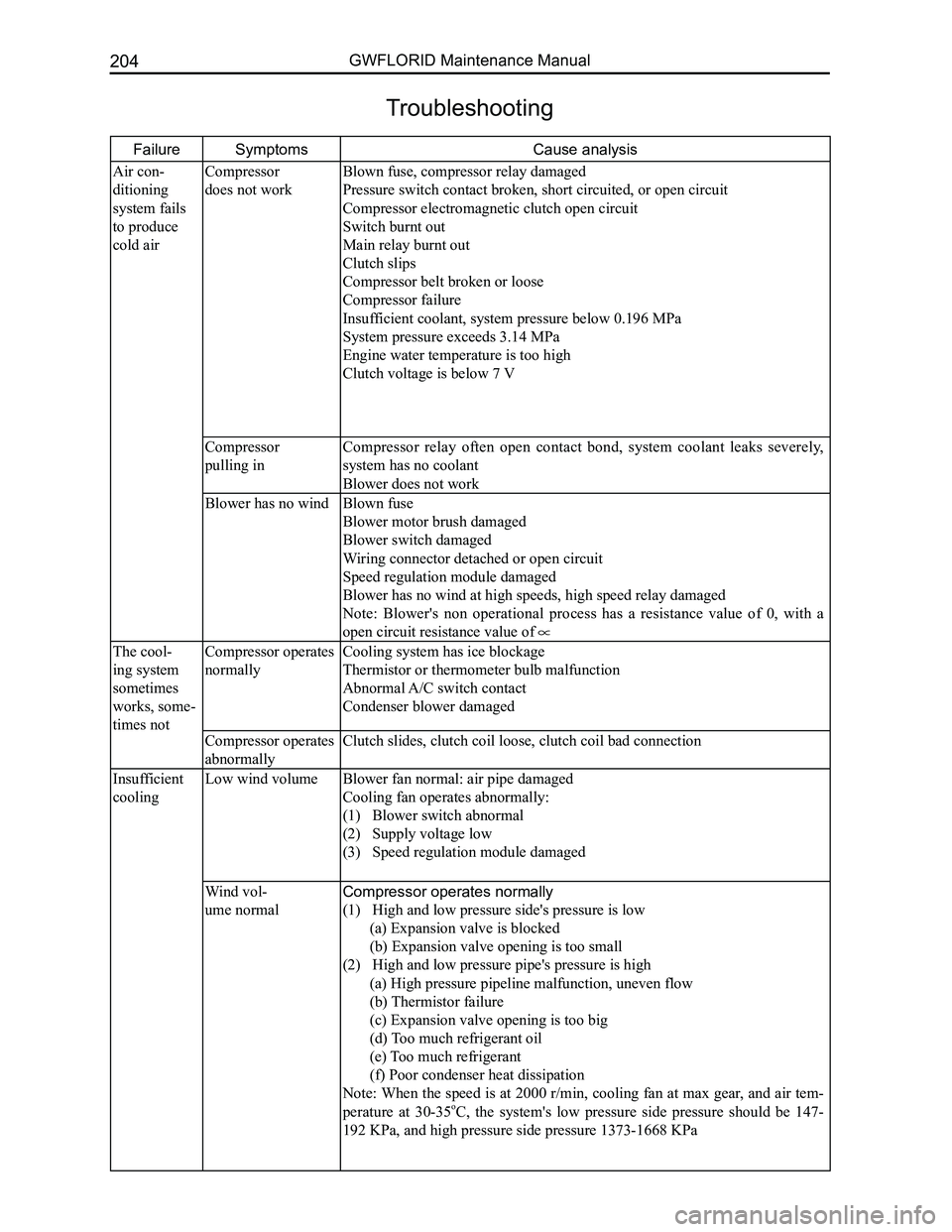
FailureSymptoms Cause analysis
Air con-
ditioning
system fails
to produce
cold air
Compressor
does not work
Blown fuse, compressor relay damaged
Pressure switch contact broken, short circuited, or open circuit
Compressor electromagnetic clutch open circuit
Switch burnt out
Main relay burnt out
Clutch slips
Compressor belt broken or loose
Compressor failure
Insufficient coolant, system pressure below 0.196 MPa
System pressure exceeds 3.14 MPa
Engine water temperature is too high
Clutch voltage is below 7 V
Compressor
pulling in
Compressor relay often open contact bond, system coolant leaks severely,
system has no coolant
Blower does not work
Blower has no windBlown fuse
Blower motor brush damaged
Blower switch damaged
Wiring connector detached or open circuit
Speed regulation module damaged
Blower has no wind at high speeds, high speed relay damaged
Note: Blower's non operational process has a resistance value of 0, with a
open circuit resistance value of
The cool-
ing system
sometimes
works, some-
times not
Compressor operates
normally
Cooling system has ice blockage
Thermistor or thermometer bulb malfunction
Abnormal A/C switch contact
Condenser blower damaged
Compressor operates
abnormally
Clutch slides, clutch coil loose, clutch coil bad connection
Insufficient
cooling
Low wind volume
Blower fan normal: air pipe damaged
Cooling fan operates abnormally:
(1) Blower switch abnormal
(2) Supply voltage low
(3) Speed regulation module damaged
Wind vol-
ume normal
Compressor operates normally
(1) High and low pressure side's pressure is low
(a) Expansion valve is blocked
(b) Expansion valve opening is too small
(2) High and low pressure pipe's pressure is high
(a) High pressure pipeline malfunction, uneven flow
(b) Thermistor failure
(c) Expansion valve opening is too big
(d) Too much refrigerant oil
(e) Too much refrigerant
(f) Poor condenser heat dissipation
Note: When the speed is at 2000 r/min, cooling fan at max gear, and air tem-
perature at 30-35oC, the system's low pressure side pressure should be 147-
192 KPa, and high pressure side pressure 1373-1668 KPa
Troubleshooting
Page 212 of 281
Downloaded from www.Manualslib.com manuals search engine 205Air Conditioning System
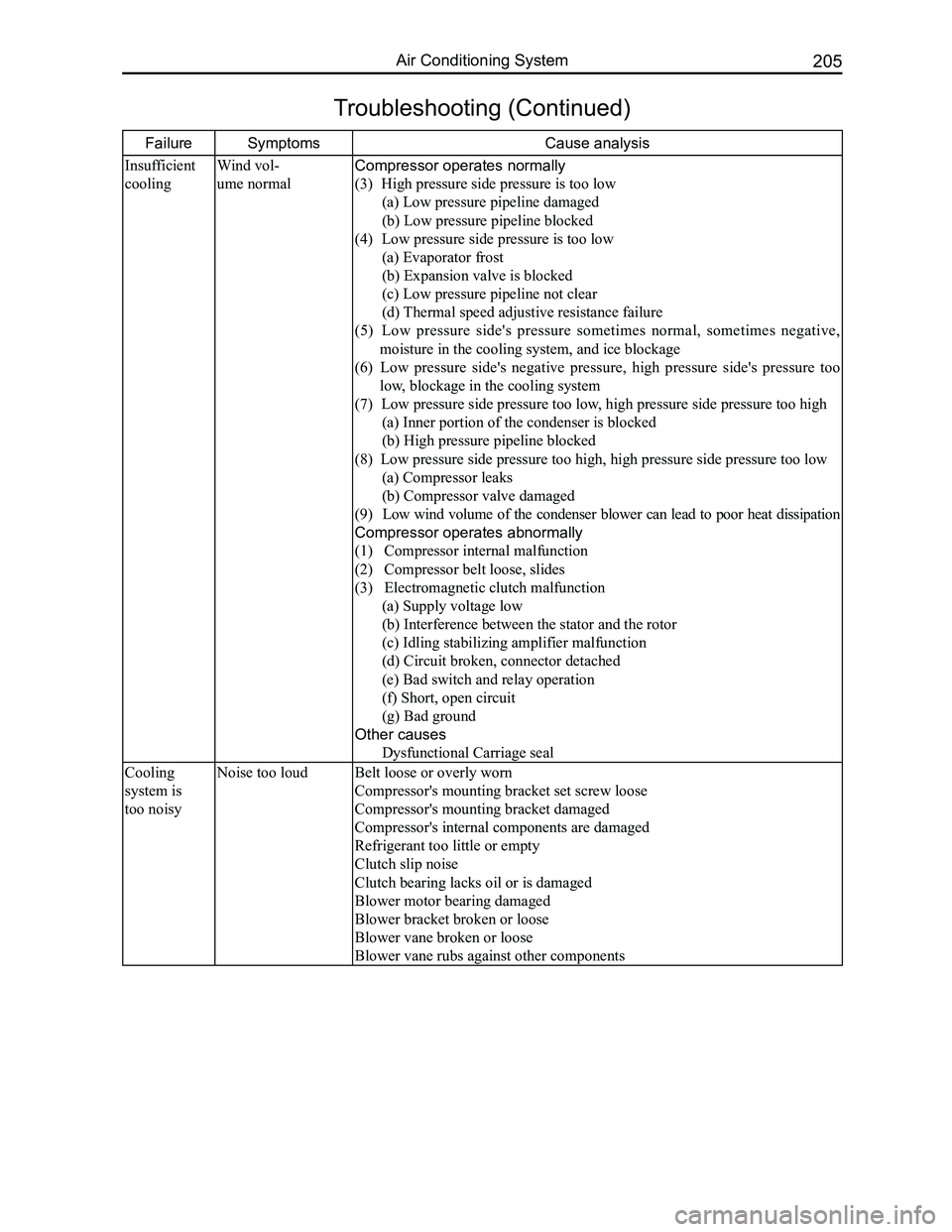
FailureSymptoms Cause analysis
Insufficient
cooling
Wind vol-
ume normal
Compressor operates normally
(3) High pressure side pressure is too low
(a) Low pressure pipeline damaged
(b) Low pressure pipeline blocked
(4) Low pressure side pressure is too low
(a) Evaporator frost
(b) Expansion valve is blocked
(c) Low pressure pipeline not clear
(d) Thermal speed adjustive resistance failure
(5) Low pressure side's pressure sometimes normal, sometimes negative,
moisture in the cooling system, and ice blockage
(6) Low pressure side's negative pressure, high pressure side's pressure too
low, blockage in the cooling system
(7) Low pressure side pressure too low, high pressure side pressure too high
(a) Inner portion of the condenser is blocked
(b) High pressure pipeline blocked
(8) Low pressure side pressure too high, high pressure side pressure \
too low
(a) Compressor leaks
(b) Compressor valve damaged
(9) Low wind volume of the condenser blower can lead to poor heat dissipation
Compressor operates abnormally
(1) Compressor internal malfunction
(2) Compressor belt loose, slides
(3) Electromagnetic clutch malfunction
(a) Supply voltage low
(b) Interference between the stator and the rotor
(c) Idling stabilizing amplifier malfunction
(d) Circuit broken, connector detached
(e) Bad switch and relay operation
(f) Short, open circuit
(g) Bad ground
Other causes
Dysfunctional Carriage seal
Cooling
system is
too noisy
Noise too loudBelt loose or overly worn
Compressor's mounting bracket set screw loose
Compressor's mounting bracket damaged
Compressor's internal components are damaged
Refrigerant too little or empty
Clutch slip noise
Clutch bearing lacks oil or is damaged
Blower motor bearing damaged
Blower bracket broken or loose
Blower vane broken or loose
Blower vane rubs against other components
Troubleshooting (Continued)
Page 217 of 281
Downloaded from www.Manualslib.com manuals search engine GWFLORID Maintenance Manual210
Electromagnetic Clutch
Clutch composition
Electromagnetic clutch consists of an armature, a solenoid,
and a pulley.
Areas of importance during clutch usage
B e c a u s e t h e j o i n t o f t h e e l e c t r o m a g n e t i c c l u t c h
operates under high speeds, separation-joint marks on
the pulley and armature are completely normal, and do
not harm clutch usage.
The clutch's operating voltage must be consistent with
the specified voltage rating. Too high or too low will
affect its normal usage.
The clearance between the coil and the pulley is
very important. If too big, the effect of the magnetic
field reduces. If too small, the high speed pulley rubs
against the fixed coil, causing the clutch to burn.
The clearance between the armature and the pulley
is also very important. If too big, it leads to insufficient
clutch pull-in force. If too small, it may cause armature
damage.
Clutch removal
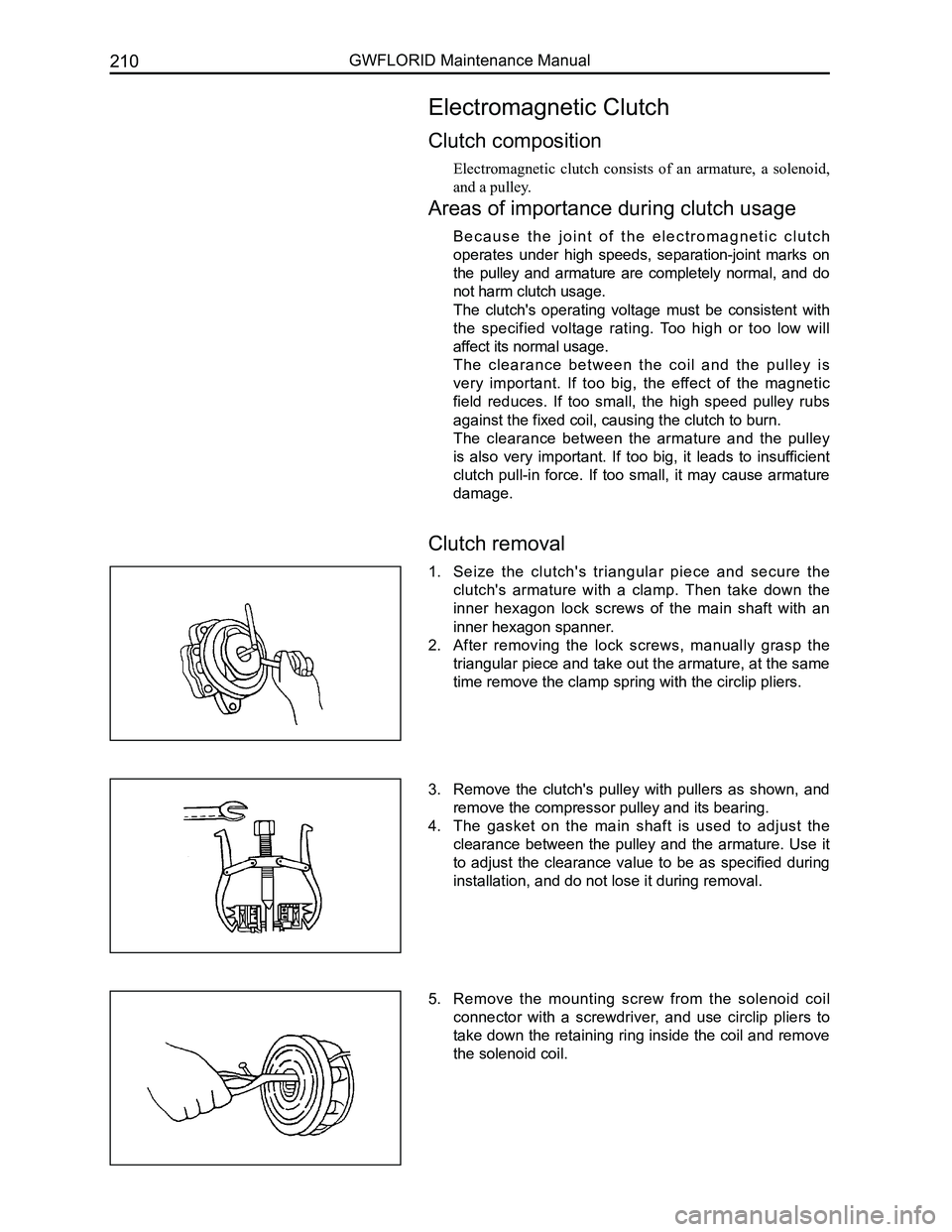
1. Seize the clutch's triangular piece and secure the
clutch's armature with a clamp. Then take down the
inner hexagon lock screws of the main shaft with an
inner hexagon spanner.
2. After removing the lock screws, manually grasp the
triangular piece and take out the armature, at the same
time remove the clamp spring with the circlip pliers.
3. Remove the clutch's pulley with pullers as shown, and
remove the compressor pulley and its bearing.
4. The gasket on the main shaft is used to adjust the
clearance between the pulley and the armature. Use it
to adjust the clearance value to be as specified during
installation, and do not lose it during removal.
5. Remove the mounting screw from the solenoid coil
connector with a screwdriver, and use circlip pliers to
take down the retaining ring inside the coil and remove
the solenoid coil.
Page 218 of 281
Downloaded from www.Manualslib.com manuals search engine 211Air Conditioning System
Clutch Installation
1. Install the solenoid coil at the place pressing up against the head cover's end surface and pay atten-
tion to insert the dowel pin of the solenoid coil into the bottom hole of the head cover. Put the retaining
ring into the groove with circlip pliers, and press the solenoid coil's connecting wire onto the pressing
line plate on the head cover with a SST.
2. Put the compressor on a specially designed fixture or platform, with its head cover facing upwards.
Press the pulley into the head cover shaft, and put the pulley bearing's retaining ring into the groove
with circlip pliers.
3. Install the armature onto the main shaft's spline and seize the clutch's triangular piece with a clamp.
Then tighten the inner hexagon lock screws and washers with a torque wrench. Screw torque should
be between 150-180 N·m. After installation is done, make sure to check if the clutch's pulley and
armature are able to operate freely, and also check the clearance between the pulley and armature,
which should be 0.3-0.6 mm.
Vacuuming and Charging Refrigerant
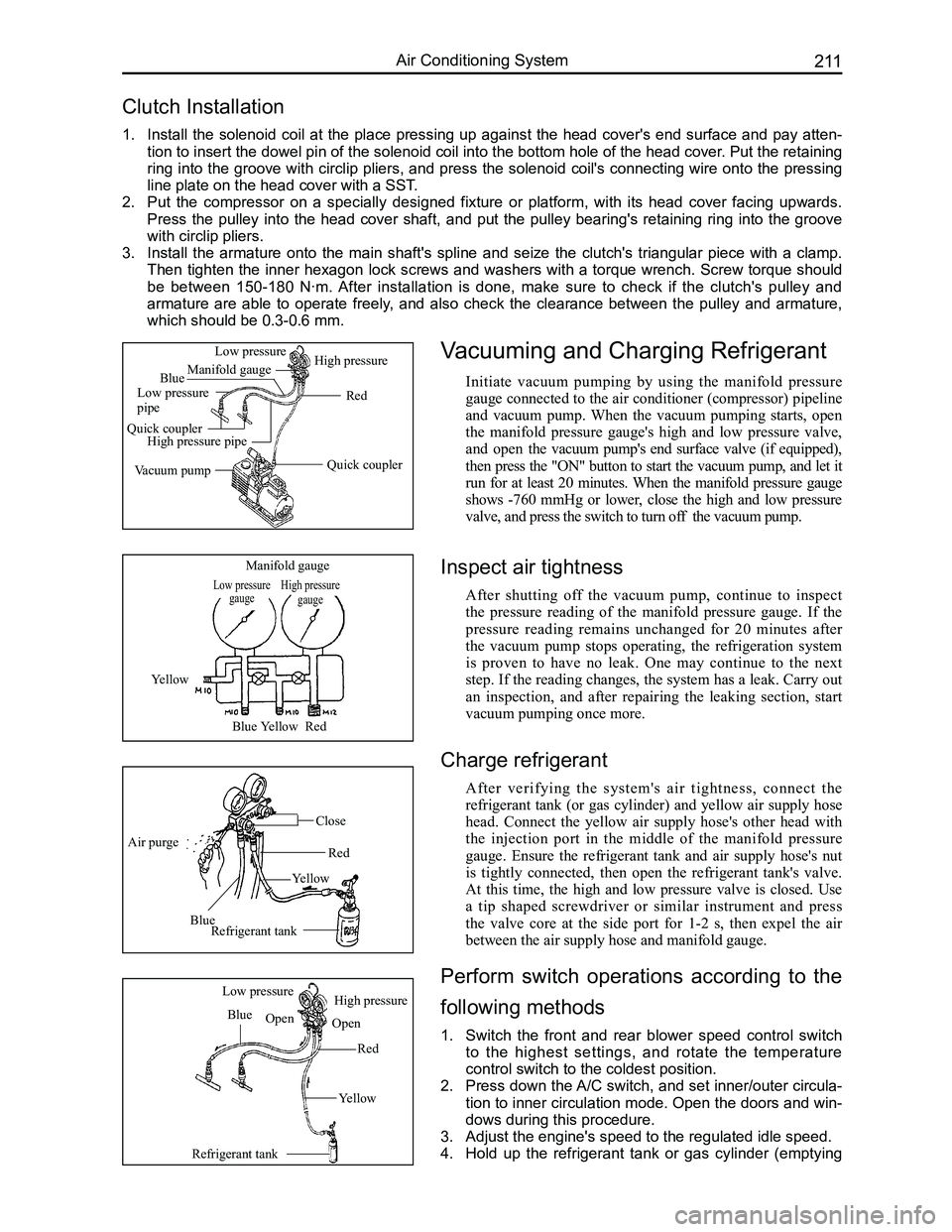
Initiate vacuum pumping by using the manifold pressure
gauge connected to the air conditioner (compressor) pipeline
and vacuum pump. When the vacuum pumping starts, open
the manifold pressure gauge's high and low pressure valve,
and open the vacuum pump's end surface valve (if equipped),
then press the "ON" button to start the vacuum pump, and let it
run for at least 20 minutes. When the manifold pressure gauge
shows -760 mmHg or lower, close the high and low pressure
valve, and press the switch to turn off the vacuum pump.
Low pressure gaugeHigh pressure gauge
Manifold gauge
Yellow
BlueYellowRed
Air purge
Blue
Yellow
Red
Close
Refrigerant tank
Refrigerant tank
Blue
Red
Yellow
Low pressureHigh pressure
OpenOpen
Quick coupler
Red
Manifold gauge
Low pressure pipe
Quick couplerHigh pressure pipe
Vacuum pump
Low pressureHigh pressure
Blue
Inspect air tightness
After shutting off the vacuum pump, continue to inspect
the pressure reading of the manifold pressure gauge. If the
pressure reading remains unchanged for 20 minutes after
the vacuum pump stops operating, the refrigeration system
is proven to have no leak. One may continue to the next
step. If the reading changes, the system has a leak. Carry out
an inspection, and after repairing the leaking section, start
vacuum pumping once more.
Charge refrigerant
After verifying the system's air tightness, connect the
refrigerant tank (or gas cylinder) and yellow air supply hose
head. Connect the yellow air supply hose's other head with
the injection port in the middle of the manifold pressure
gauge. Ensure the refrigerant tank and air supply hose's nut
is tightly connected, then open the refrigerant tank's valve.
At this time, the high and low pressure valve is closed. Use
a tip shaped screwdriver or similar instrument and press
the valve core at the side port for 1-2 s, then expel the air
between the air supply hose and manifold gauge.
Perform switch operations according to the
following methods
1. Switch the front and rear blower speed control switch
to the highest settings, and rotate the temperature
control switch to the coldest position.
2. Press down the A/C switch, and set inner/outer circula-
tion to inner circulation mode. Open the doors and win-
dows during this procedure.
3. Adjust the engine's speed to the regulated idle speed.
4. Hold up the refrigerant tank or gas cylinder (emptying