ad blue GREAT WALL FLORID 2008 Service Manual
[x] Cancel search | Manufacturer: GREAT WALL, Model Year: 2008, Model line: FLORID, Model: GREAT WALL FLORID 2008Pages: 281, PDF Size: 43.97 MB
Page 23 of 281
Downloaded from www.Manualslib.com manuals search engine GWFLORID Maintenance Manual16
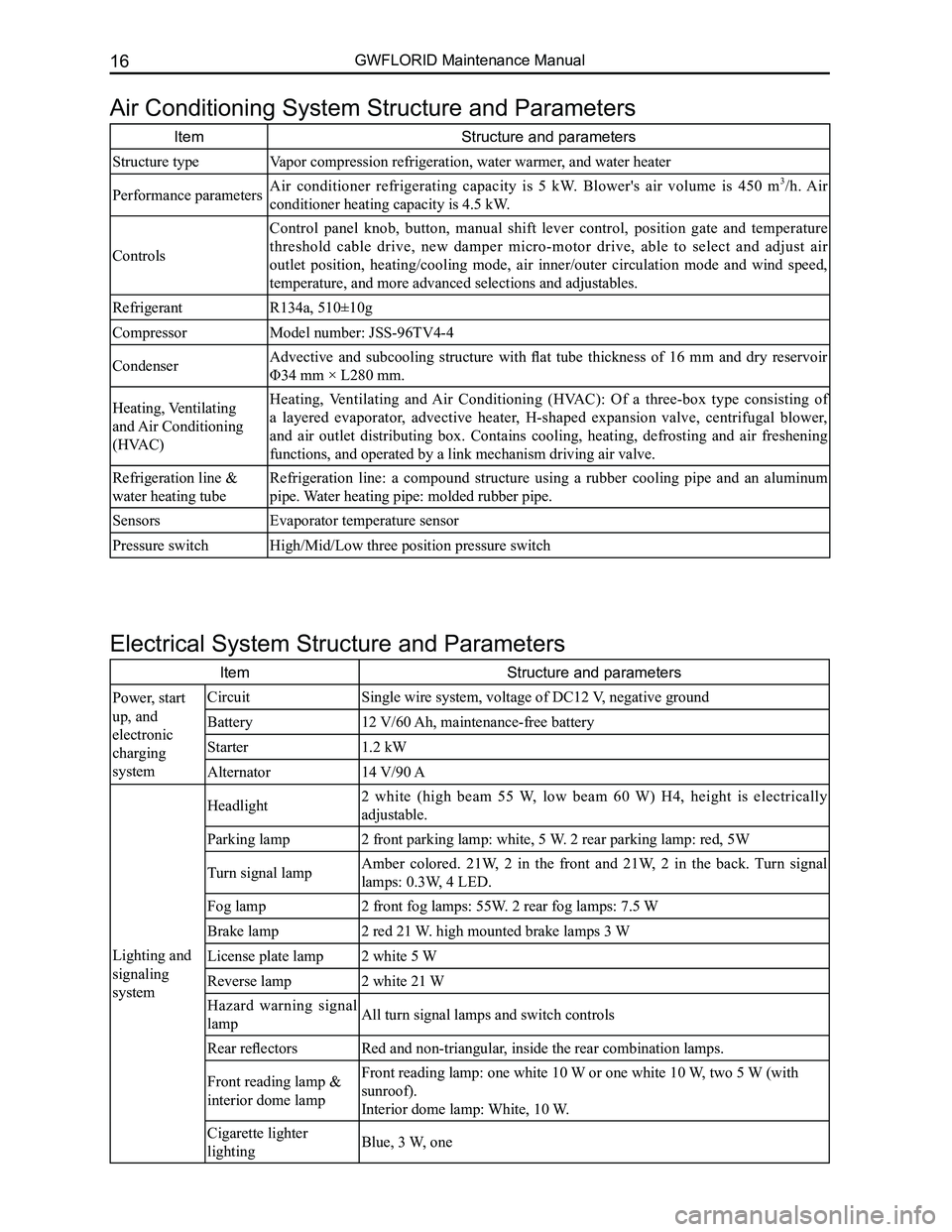
Air Conditioning System Structure and Parameters
ItemStructure and parameters
Structure typeVapor compression refrigeration, water warmer, and water heater
Performance parametersAir conditioner refrigerating capacity is 5 kW. Blower's air volume is 450 m3/h. Air
conditioner heating capacity is 4.5 kW.
Controls
Control panel knob, button, manual shift lever control, position gate and temperature
threshold cable drive, new damper micro-motor drive, able to select and adjust air
outlet position, heating/cooling mode, air inner/outer circulation mode and wind speed,
temperature, and more advanced selections and adjustables.
RefrigerantR134a, 510±10g
CompressorModel number: JSS-96TV4-4
CondenserAdvective and subcooling structure with flat tube thickness of 16 mm and dry reservoir
Φ34 mm × L280 mm.
Heating, Ventilating
and Air Conditioning
(HVAC)
Heating, Ventilating and Air Conditioning (HVAC): Of a three-box type consisting of
a layered evaporator, advective heater, H-shaped expansion valve, centrifugal blower,
and air outlet distributing box. Contains cooling, heating, defrosting and air freshening
functions, and operated by a link mechanism driving air valve.
Refrigeration line &
water heating tube
Refrigeration line: a compound structure using a rubber cooling pipe and an aluminum
pipe. Water heating pipe: molded rubber pipe.
SensorsEvaporator temperature sensor
Pressure switchHigh/Mid/Low three position pressure switch
Electrical System Structure and Parameters
ItemStructure and parameters
Power, start
up, and
electronic
charging
system
CircuitSingle wire system, voltage of DC12 V, negative ground
Battery12 V/60 Ah, maintenance-free battery
Starter1.2 kW
Alternator14 V/90 A
Lighting and
signaling
system
Headlight2 white (high beam 55 W, low beam 60 W) H4, height is electrically
adjustable.
Parking lamp2 front parking lamp: white, 5 W. 2 rear parking lamp: red, 5W
Turn signal lampAmber colored. 21W, 2 in the front and 21W, 2 in the back. Turn signal
lamps: 0.3W, 4 LED.
Fog lamp2 front fog lamps: 55W. 2 rear fog lamps: 7.5 W
Brake lamp2 red 21 W. high mounted brake lamps 3 W
License plate lamp2 white 5 W
Reverse lamp2 white 21 W
Hazard warning signal
lampAll turn signal lamps and switch controls
Rear reflectorsRed and non-triangular, inside the rear combination lamps.
Front reading lamp &
interior dome lamp
Front reading lamp: one white 10 W or one white 10 W, two 5 W (with
sunroof).
Interior dome lamp: White, 10 W.
Cigarette lighter
lightingBlue, 3 W, one
Page 150 of 281
Downloaded from www.Manualslib.com manuals search engine 143Vehicle Body Electronic System
Basic Information on the Electrical System
Electrical system schematics reading instructions
1. Configuration introduction
The GWFLORID comes in three configurations: comfort, luxury and elite. The wire harness has two types of
configurations: One is a non jam protection comfort model, which is a combination of both comfort and luxury
type, the other type is called elite. These two configurations are universally used in most of this manual. The
parts that are only available for the non jam protection comfort type have been marked in this manual, please
pay attention to these sections while performing maintenance.
2. Fuse box and power supply introduction
The fuse box located inside the left side of the dashboard is No. 1 Fuse Box, the other one inside the left side of
the engine compartment is No. 2 Fuse Box.
• 30 represents a power cord for normal power, which is from the battery positive fuse box-60 A.
• 30a represents a power cord for normal power, which is from the battery positive fuse box-120 A.
• 30b represents a power cord for normal power, which is from the battery positive fuse box-120 A.
• 15 represents a power cord for small capacity electronics. When the ignition switch is at the "ON" position,
power is supplied by relay IG.
• 15a represents a power cord for small capacity electronics. When the ignition switch is at the "ON"
position, power is directly supplied by ignition switch IG1.
• 15b represents a power cord for small capacity electronics. When the ignition switch is at the "ON"
position, power is directly supplied by ignition switch IG2.
• X represents a power cord for small capacity electronics. When the ignition switch is at the "ACC"
position, power is supplied by relay ACC.
4. Wire's color and sectional area (mm2)
B-BlackW-WhiteR-RedBl-BlueBr-BrownY-Yellow
G-GreenP-PinkOr-OrangeV-VioletLg-Light greenGr-Gray
Mark the solid-colored wires with the letters in the above table. Double-colored wires' first letter is the primary
color, second letter is the secondary color.
For example:
Solid-colored wire: Red, marked as R.
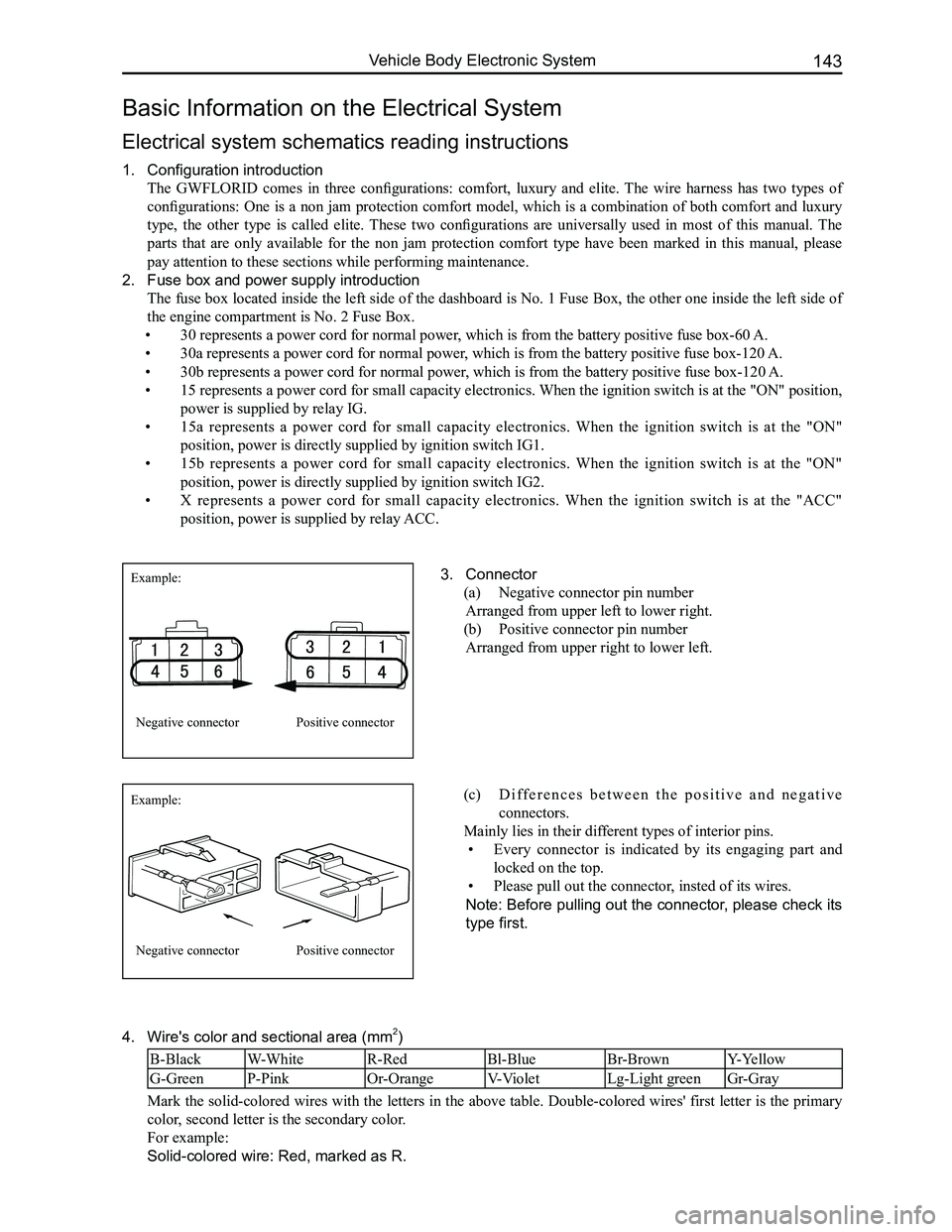
3. Connector
(a) Negative connector pin number
Arranged from upper left to lower right.
(b) Positive connector pin number
Arranged from upper right to lower left.
Example:
Example:
Negative connector
Negative connector
Positive connector
Positive connector
(c) D i f f e r e n c e s b e t w e e n t h e p o s i t i v e a n d n e g a t i v e
connectors.
Mainly lies in their different types of interior pins.
• Every connector is indicated by its engaging part and
locked on the top.
• Please pull out the connector, insted of its wires.
Note: Before pulling out the connector, please check its
type first.
Page 151 of 281

Downloaded from www.Manualslib.com manuals search engine GWFLORID Maintenance Manual144
Double-colored wire: Primary color is Red, secondary color is Blue, mark\
ed as RBl.
0.5BrGr means Brown wire with a Gray fine wire, and sectional area is 0.\
5 mm2.
Areas of importance in circuit maintenance
1. Before operating any electronic devices, and when tools or maintenance devices may easily make
contact with an uncovered electronic terminal, please make sure to turn the ignition switch to the LOCK
position, and then disconnect the battery's negative cable to avoid injury or vehicle damage. When the
ignition switch is on the ON position, please do not disconnect the battery's connecting wire or take out
the power's fuse, regardless if the engine is running or not.Otherwise it would seriously damage the
ECU and related microelectronic devices such as sensors.
2. When changing the fuse, please make sure that the new fuse possesses the proper current rating,
and is not above or below this rating.
3. When repairing the wire harnesses of the airbag and pretensioner, only specified contact points,
plugs, and wires are allowed to be used.
4. Before repairing the wire harness, make sure to eliminate any factor that might cause damage,
for example, the edge of a vehicle body part is too sharp, or the used electronics are damaged or
corroded.
5. Shielded wire should not be repaired, it must be replaced entirely once it is damaged.
6. Unless it is specified during the test, please do not use an analog multimeter to test the ECU and
sensor, instead use a high-impedance digital multimeter (internal resistance should be ≥10 kΩ) or a
vehicle multimeter for inspection.
7. When inspecting the connector with a digital multimeter, take the waterproof rubber cover off the
connector, and tightly insert the test pen along the connecting terminal. Don't use too much force, as
to avoid cracking the connector.
Circuit inspection steps
The principle of troubleshooting is to confirm the "possible cause". Once the possible cause is confirmed, the
components that need to be inspected are limited to the components that are related to the possible cause. The
confirmed possible cause should be based on theory and be supported by facts, but not just by intuition. If
one tries to solve the problem but does not adopt the proper troubleshooting steps, it may make the problem
worse. Then the possible cause not only can't be confirmed, but also maintenance can't be performed properly.
Troubleshooting should adhere to the four steps below:
1. Observe the symptoms carefully, inspect if there is anything else abnormal, and record it.
2. While confirming the possible causes, study the circuit diagram carefully, and regard it as a whole
system in order to understand the circuit. Thorough knowledge of switches, relays, and other
electronic components is obligatory for proper analysis.
3. Inspect and eliminate the problems one by one until the cause is found.
4. After the malfunction is fixed, make sure to check if the inspected system is working properly, and also
check if the maintenance may have caused any new problems.
Compres-
sor relay
Reserve
Sunroof (Elite) Lamplet
Reserve
Reserve
Reserve
Reserve Door and window Reserve Blower
Lamplet
relay Flasher relay Blower high
speed relay (Elite) Door and
window relay (Comfort, Luxury) Blower relay
Reserve
Front fog lamp
Combination
meter
Interior
lighting
central
door lock
brake lamp
CD player
Reserve
Reserve
Reserve
Cigarette
lighter
Rearview
mirror
Front wiper
Charge
Airbag
Reserve
Reverse lamp Rear fog lamp
Rear wiper
Defroster Compressor
ACC relay
IG relayRear wiper
relay Defroster
relay
Front fog
lamp relay Rear fog
lamp relay
Warning lamp
Turn signal lamp
Cab No.1 fuse box
Fuse Box
Page 200 of 281
Downloaded from www.Manualslib.com manuals search engine 193Electrical Accessories
SymptomsCausesSolutions
Cannot start
Burnt fuseReplace with a new fuse of the same
specification
Vehicle supply battery fuse is burntReplace the vehicle supply battery fuse
Illegal operation and other factorsPress the reset button to reset the system
No sound or sound is too low
The volume of the head unit or the
connected component is too low
Raise the volume of the head unit or the
connected component
Speaker possibly damagedCheck the speaker
The sound balance settings lean to one
side
Adjust the sound balance
Speaker's connection wire touches the
vehicle body
Use insulated conductor to connect the
speaker and use insulating cement to cover
the exposed connections
Disc is not genuineUse a genuine disc
Speaker is incorrectly connectedPlease refer to the "Electrical connection
diagram" to correct the connection
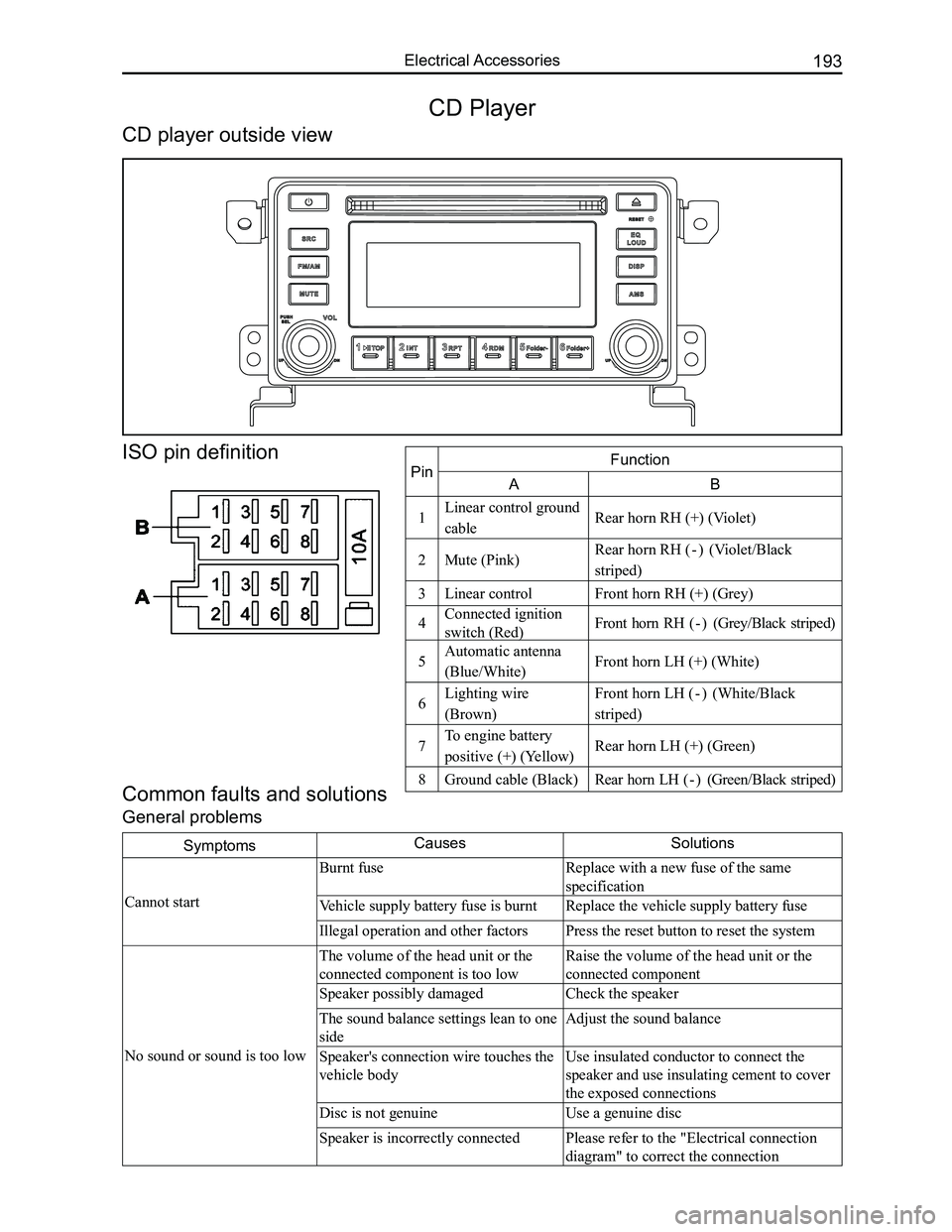
Common faults and solutions
General problems
CD Player
CD player outside view
ISO pin definition
PinFunction
AB
1Linear control ground
cableRear horn RH (+) (Violet)
2Mute (Pink)Rear horn RH ( - ) (Violet/Black
striped)
3Linear controlFront horn RH (+) (Grey)
4Connected ignition
switch (Red)Front horn RH ( - ) (Grey/Black striped)
5Automatic antenna
(Blue/White)Front horn LH (+) (White)
6Lighting wire
(Brown)
Front horn LH ( - ) (White/Black
striped)
7To engine battery
positive (+) (Yellow)Rear horn LH (+) (Green)
8Ground cable (Black)Rear horn LH ( - ) (Green/Black striped)
Page 201 of 281
Downloaded from www.Manualslib.com manuals search engine GWFLORID Maintenance Manual194
Display characterMalfunctionSolutions
ERR3Disc is placed upside downEject the disc and reload
ERR4Incompatible disc file or formatCheck the disc format
ERR1
ERR1Disc structure errorEject the disc and replay
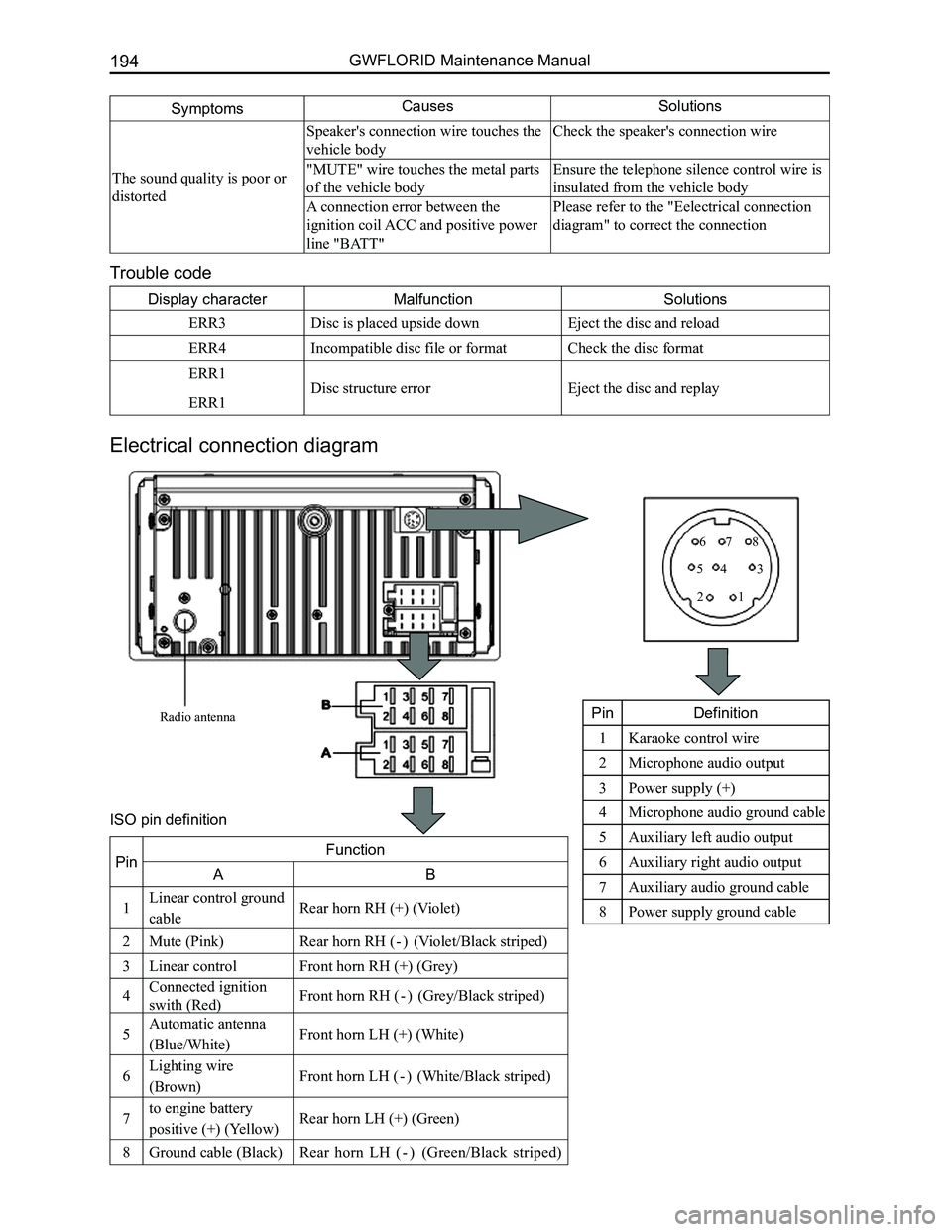
Trouble code
Electrical connection diagram
SymptomsCausesSolutions
The sound quality is poor or
distorted
Speaker's connection wire touches the
vehicle body
Check the speaker's connection wire
"MUTE" wire touches the metal parts
of the vehicle body
Ensure the telephone silence control wire is
insulated from the vehicle body
A connection error between the
ignition coil ACC and positive power
line "BATT"
Please refer to the "Eelectrical connection
diagram" to correct the connection
Radio antenna
12
345
678
PinDefinition
1Karaoke control wire
2Microphone audio output
3Power supply (+)
4Microphone audio ground cable
5Auxiliary left audio output
6Auxiliary right audio output
7Auxiliary audio ground cable
8Power supply ground cable
PinFunction
AB
1Linear control ground
cableRear horn RH (+) (Violet)
2Mute (Pink)Rear horn RH ( - ) (Violet/Black striped)
3Linear controlFront horn RH (+) (Grey)
4Connected ignition
swith (Red)Front horn RH ( - ) (Grey/Black striped)
5Automatic antenna
(Blue/White)Front horn LH (+) (White)
6Lighting wire
(Brown)Front horn LH ( - ) (White/Black striped)
7to engine battery
positive (+) (Yellow)Rear horn LH (+) (Green)
8Ground cable (Black)Rear horn LH ( - ) (Green/Black striped)
ISO pin definition
Page 203 of 281
Downloaded from www.Manualslib.com manuals search engine GWFLORID Maintenance Manual196
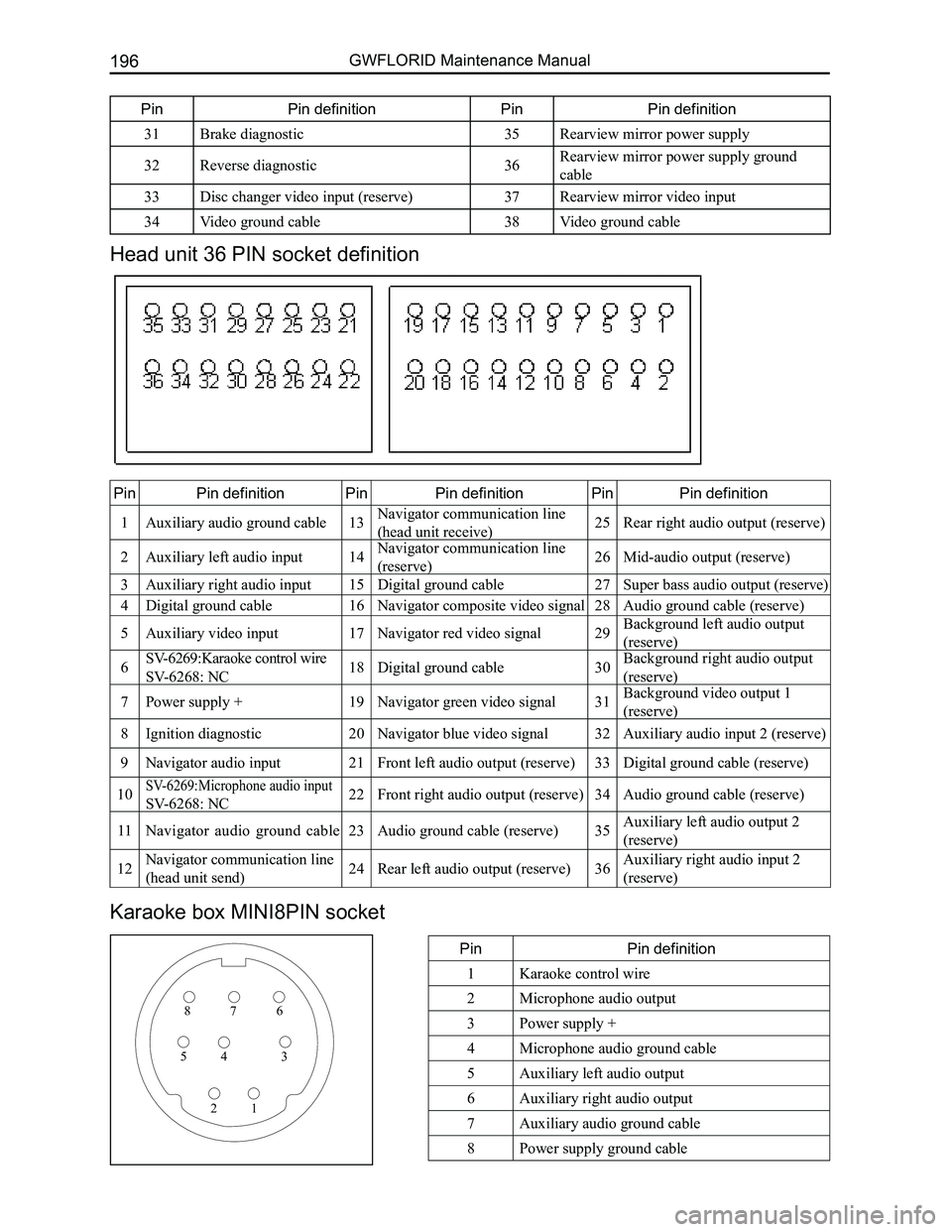
Head unit 36 PIN socket definition
PinPin definitionPinPin definitionPinPin definition
1Auxiliary audio ground cable13Navigator communication line
(head unit receive)25Rear right audio output (reserve)
2Auxiliary left audio input14Navigator communication line
(reserve)26Mid-audio output (reserve)
3Auxiliary right audio input15Digital ground cable27Super bass audio output (reserve)
4Digital ground cable16Navigator composite video signal28Audio ground cable (reserve)
5Auxiliary video input17Navigator red video signal29Background left audio output
(reserve)
6SV-6269:Karaoke control wire
SV-6268: NC18Digital ground cable30Background right audio output
(reserve)
7Power supply +19Navigator green video signal31Background video output 1
(reserve)
8Ignition diagnostic20Navigator blue video signal32Auxiliary audio input 2 (reserve)
9Navigator audio input21Front left audio output (reserve)33Digital ground cable (reserve)
10SV-6269:Microphone audio input
SV-6268: NC22Front right audio output (reserve)34Audio ground cable (reserve)
11Navigator audio ground cable23Audio ground cable (reserve)35Auxiliary left audio output 2
(reserve)
12Navigator communication line
(head unit send)24Rear left audio output (reserve)36Auxiliary right audio input 2
(reserve)
Karaoke box MINI8PIN socket
PinPin definition
1Karaoke control wire
2Microphone audio output
3Power supply +
4Microphone audio ground cable
5Auxiliary left audio output
6Auxiliary right audio output
7Auxiliary audio ground cable
8Power supply ground cable
876
345
21
PinPin definitionPinPin definition
31Brake diagnostic35Rearview mirror power supply
32Reverse diagnostic36Rearview mirror power supply ground
cable
33Disc changer video input (reserve)37Rearview mirror video input
34Video ground cable38Video ground cable
Page 207 of 281
Downloaded from www.Manualslib.com manuals search engine GWFLORID Maintenance Manual200
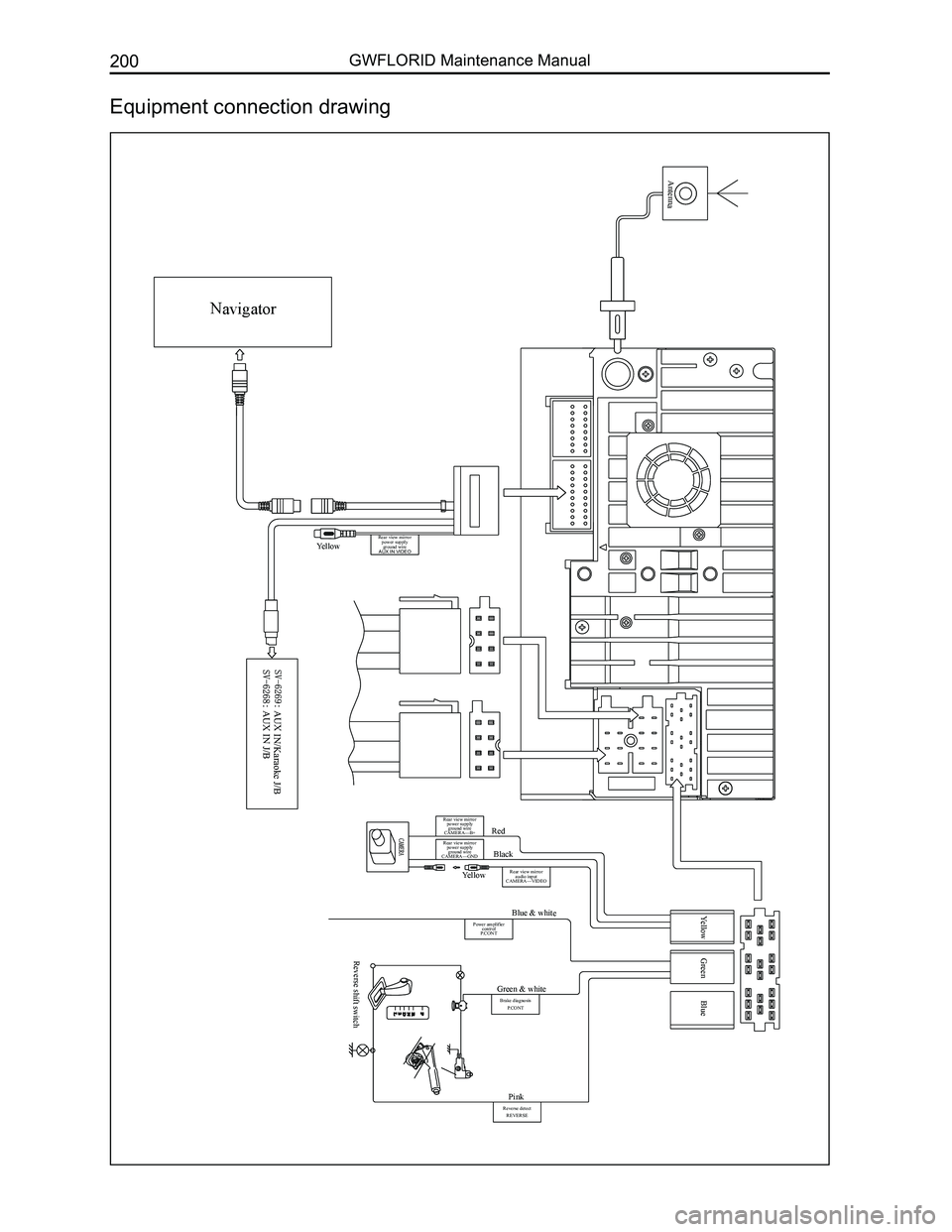
Equipment connection drawing
Navigator
Antenna
Yellow
AUX IN/Karaoke J/B AUX IN J/B
Red
Black
Yellow Green BlueBlue & white
Green & white
Pink
Reverse shift switch
Yellow
Rear view mirror power supply ground wire
CAMERA—B+
Rear view mirror power supply ground wire
CAMERA—GND
Rear view mirror audio input
CAMERA—VIDEO
Power amplifier control
P.CONT
Brake diagnosis
P.CONT
Reverse detectREVERSE
Rear view mirror power supply ground wire
AUX IN VIDEO
Page 218 of 281
Downloaded from www.Manualslib.com manuals search engine 211Air Conditioning System
Clutch Installation
1. Install the solenoid coil at the place pressing up against the head cover's end surface and pay atten-
tion to insert the dowel pin of the solenoid coil into the bottom hole of the head cover. Put the retaining
ring into the groove with circlip pliers, and press the solenoid coil's connecting wire onto the pressing
line plate on the head cover with a SST.
2. Put the compressor on a specially designed fixture or platform, with its head cover facing upwards.
Press the pulley into the head cover shaft, and put the pulley bearing's retaining ring into the groove
with circlip pliers.
3. Install the armature onto the main shaft's spline and seize the clutch's triangular piece with a clamp.
Then tighten the inner hexagon lock screws and washers with a torque wrench. Screw torque should
be between 150-180 N·m. After installation is done, make sure to check if the clutch's pulley and
armature are able to operate freely, and also check the clearance between the pulley and armature,
which should be 0.3-0.6 mm.
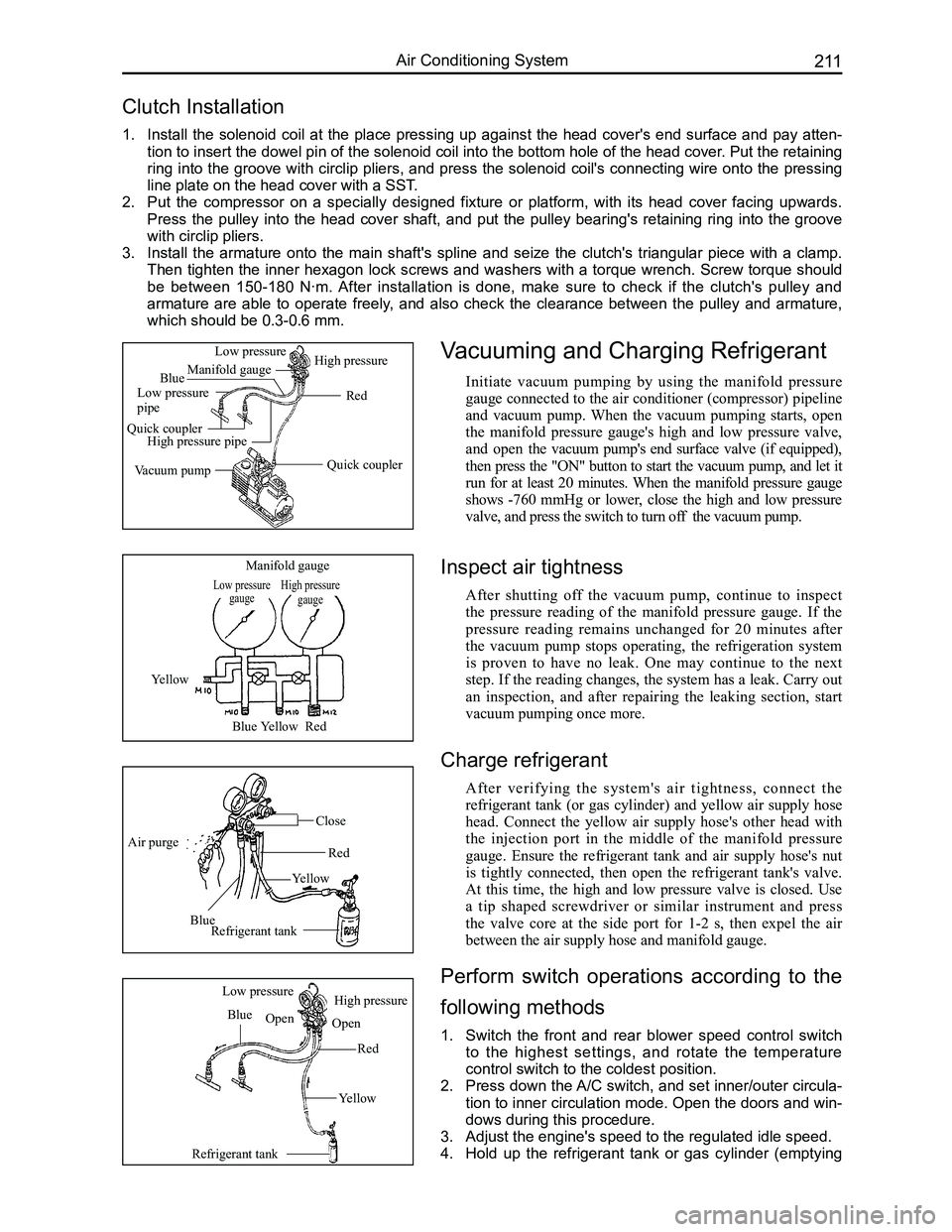
Vacuuming and Charging Refrigerant
Initiate vacuum pumping by using the manifold pressure
gauge connected to the air conditioner (compressor) pipeline
and vacuum pump. When the vacuum pumping starts, open
the manifold pressure gauge's high and low pressure valve,
and open the vacuum pump's end surface valve (if equipped),
then press the "ON" button to start the vacuum pump, and let it
run for at least 20 minutes. When the manifold pressure gauge
shows -760 mmHg or lower, close the high and low pressure
valve, and press the switch to turn off the vacuum pump.
Low pressure gaugeHigh pressure gauge
Manifold gauge
Yellow
BlueYellowRed
Air purge
Blue
Yellow
Red
Close
Refrigerant tank
Refrigerant tank
Blue
Red
Yellow
Low pressureHigh pressure
OpenOpen
Quick coupler
Red
Manifold gauge
Low pressure pipe
Quick couplerHigh pressure pipe
Vacuum pump
Low pressureHigh pressure
Blue
Inspect air tightness
After shutting off the vacuum pump, continue to inspect
the pressure reading of the manifold pressure gauge. If the
pressure reading remains unchanged for 20 minutes after
the vacuum pump stops operating, the refrigeration system
is proven to have no leak. One may continue to the next
step. If the reading changes, the system has a leak. Carry out
an inspection, and after repairing the leaking section, start
vacuum pumping once more.
Charge refrigerant
After verifying the system's air tightness, connect the
refrigerant tank (or gas cylinder) and yellow air supply hose
head. Connect the yellow air supply hose's other head with
the injection port in the middle of the manifold pressure
gauge. Ensure the refrigerant tank and air supply hose's nut
is tightly connected, then open the refrigerant tank's valve.
At this time, the high and low pressure valve is closed. Use
a tip shaped screwdriver or similar instrument and press
the valve core at the side port for 1-2 s, then expel the air
between the air supply hose and manifold gauge.
Perform switch operations according to the
following methods
1. Switch the front and rear blower speed control switch
to the highest settings, and rotate the temperature
control switch to the coldest position.
2. Press down the A/C switch, and set inner/outer circula-
tion to inner circulation mode. Open the doors and win-
dows during this procedure.
3. Adjust the engine's speed to the regulated idle speed.
4. Hold up the refrigerant tank or gas cylinder (emptying