ad blue HONDA ACCORD 2012 8.G Navigation Manual
[x] Cancel search | Manufacturer: HONDA, Model Year: 2012, Model line: ACCORD, Model: HONDA ACCORD 2012 8.GPages: 156, PDF Size: 7.2 MB
Page 135 of 156
Navigation System135
Accord 2D4D_KA 31TA5840
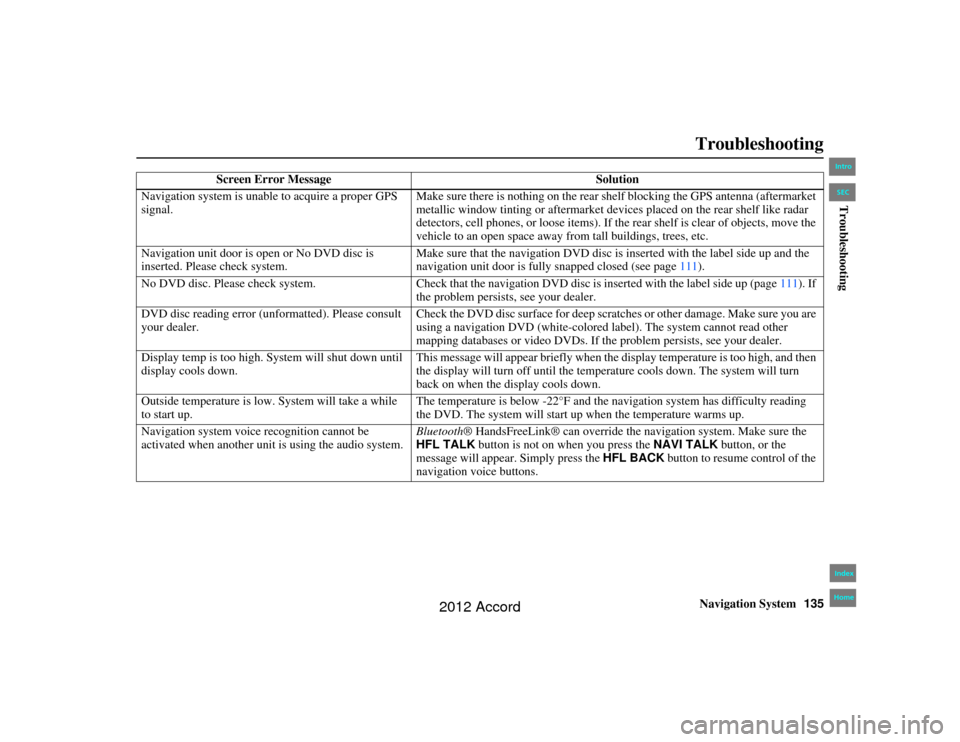
Troubleshooting
Screen Error Message Solution
Navigation system is unable to acquire a proper GPS
signal. Make sure there is nothing on the rear sh
elf blocking the GPS antenna (aftermarket
metallic window tinting or aftermarket devices placed on the rear shelf like radar
detectors, cell phones, or loose items). If th e rear shelf is clear of objects, move the
vehicle to an open space away fr om tall buildings, trees, etc.
Navigation unit door is op en or No DVD disc is
inserted. Please check system. Make sure that the navigation DVD disc is inserted with the label side up and the
navigation unit door is fully snapped closed (see page
111).
No DVD disc. Please check system. Check that the navigation DVD disc is inserted with the label side up (page 111). If
the problem persists, see your dealer.
DVD disc reading error (u nformatted). Please consult
your dealer. Check the DVD disc surface for deep scratc
hes or other damage. Make sure you are
using a navigation DVD (white-colored label). The system cannot read other
mapping databases or video DVDs. If th e problem persists, see your dealer.
Display temp is too high. System will shut down until
display cools down. This message will appear briefly when the display temperature is too high, and then
the display will turn off until the temper
ature cools down. The system will turn
back on when the display cools down.
Outside temperature is low. System will take a while
to start up. The temperature is below -22°F and the na
vigation system has difficulty reading
the DVD. The system will start up when the temperature warms up.
Navigation system voice recognition cannot be
activated when another unit is using the audio system. Bluetooth
® HandsFreeLink® can override the navigation system. Make sure the
HFL TALK button is not on when you press the NAVI TALK button, or the
message will appear. Simply press the HFL BACK button to resume control of the
navigation voice buttons.
00_Accord 2D 4D_KA.book 135 ページ 2011年7月21日 木曜日 午後1時59分
IntroIndex
HomeSECTroubleshooting
2012 Accord
Page 137 of 156
Navigation System137
Accord 2D4D_KA 31TA5840
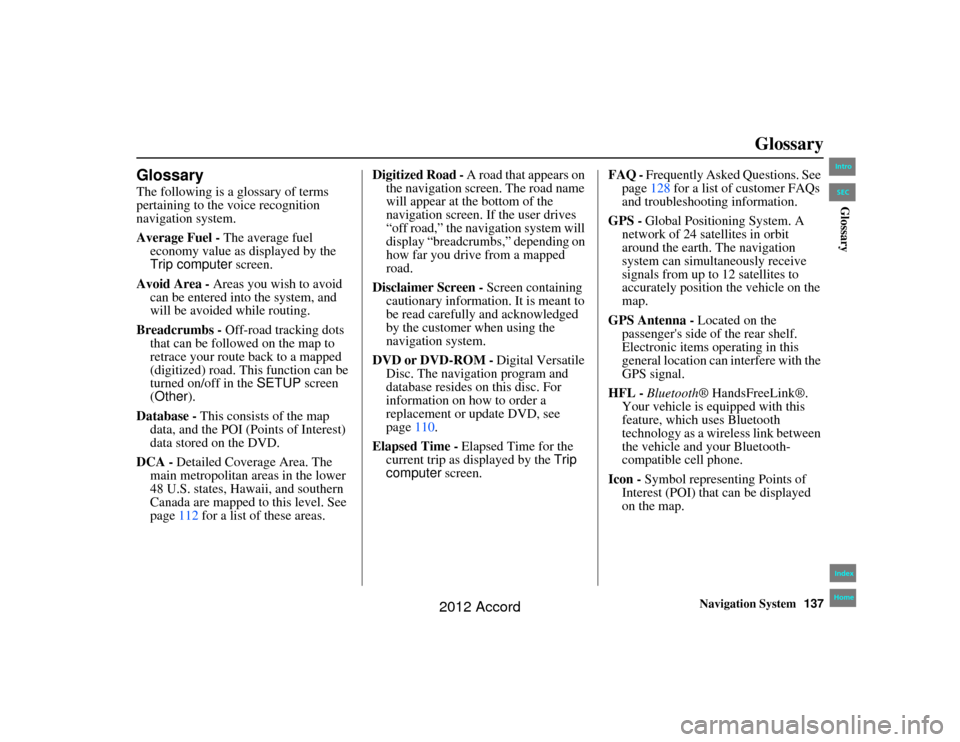
Glossary
GlossaryThe following is a glossary of terms
pertaining to the voice recognition
navigation system.
Average Fuel - The average fuel
economy value as displayed by the
Trip computer screen.
Avoid Area - Areas you wish to avoid can be entered into the system, and
will be avoided while routing.
Breadcrumbs - Off-road tracking dots
that can be followed on the map to
retrace your route back to a mapped
(digitized) road. This function can be
turned on/off in the SETUP screen
(Other ).
Database - This consists of the map
data, and the POI (Points of Interest)
data stored on the DVD.
DCA - Detailed Coverage Area. The
main metropolitan areas in the lower
48 U.S. states, Hawaii, and southern
Canada are mapped to this level. See
page 112 for a list of these areas. Digitized Road -
A road that appears on
the navigation screen. The road name
will appear at the bottom of the
navigation screen. If the user drives
“off road,” the navigation system will
display “breadcrumbs,” depending on
how far you drive from a mapped
road.
Disclaimer Screen - Screen containing
cautionary information. It is meant to
be read carefully and acknowledged
by the customer when using the
navigation system.
DVD or DVD-ROM - Digital Versatile
Disc. The navigation program and
database resides on this disc. For
information on how to order a
replacement or update DVD, see
page 110.
Elapsed Time - Elapsed Time for the
current trip as displayed by the Trip
computer screen. FAQ -
Frequently Asked Questions. See
page 128 for a list of customer FAQs
and troubleshooting information.
GPS - Global Positioning System. A
network of 24 satellites in orbit
around the earth. The navigation
system can simultaneously receive
signals from up to 12 satellites to
accurately position the vehicle on the
map.
GPS Antenna - Located on the
passenger's side of the rear shelf.
Electronic items operating in this
general location can interfere with the
GPS signal.
HFL - Bluetooth ® HandsFreeLink®.
Your vehicle is equipped with this
feature, which uses Bluetooth
technology as a wireless link between
the vehicle and your Bluetooth-
compatible cell phone.
Icon - Symbol representing Points of
Interest (POI) that can be displayed
on the map.00_Accord 2D 4D_KA.book 137 ページ 2011年7月21日 木曜日 午後1時59分
IntroIndex
HomeSECGlossary
2012 Accord
Page 151 of 156
Navigation System151
Accord 2D4D_KA 31TA5840
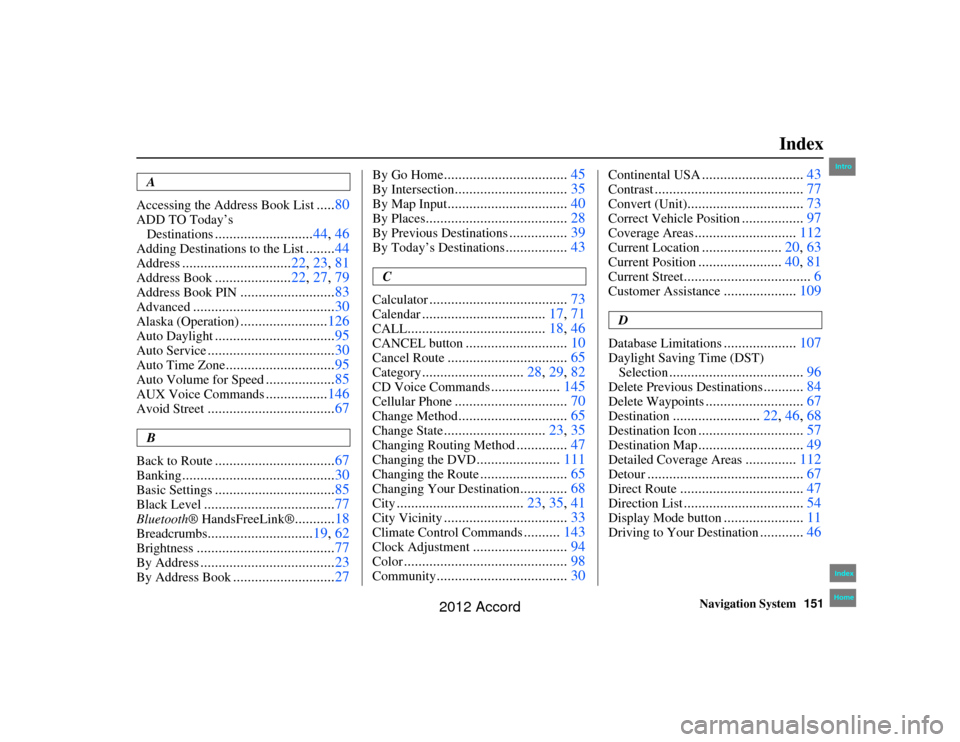
Index
A
Accessing the Address Book List
..... 80
ADD TO Today’s
Destinations
........................... 44, 46
Adding Destinatio ns to the List
........44
Address
.............................. 22, 23, 81
Address Book
.....................22, 27, 79
Address Book PIN
.......................... 83
Advanced
....................................... 30
Alaska (Operation)
........................126
Auto Daylight
................................. 95
Auto Service
................................... 30
Auto Time Zone
..............................95
Auto Volume for Speed
...................85
AUX Voice Commands
.................146
Avoid Street
................................... 67
B
Back to Route
................................. 67
Banking
.......................................... 30
Basic Settings
.................................85
Black Level
.................................... 77
Bluetooth® HandsFreeLink®
...........18
Breadcrumbs
............................. 19, 62
Brightness
...................................... 77
By Address
.....................................23
By Address Book
............................27
By Go Home
.................................. 45
By Intersection
...............................35
By Map Input
................................. 40
By Places
....................................... 28
By Previous Destinations
................39
By Today’s Destinations
................. 43
C
Calculator
...................................... 73
Calendar
..................................17, 71
CALL
...................................... 18, 46
CANCEL button
............................10
Cancel Route
................................. 65
Category
............................28, 29, 82
CD Voice Commands
...................145
Cellular Phone
............................... 70
Change Method
..............................65
Change State
............................23, 35
Changing Routing Method
..............47
Changing the DVD
....................... 111
Changing the Route
........................ 65
Changing Your Destination
.............68
City
................................... 23, 35, 41
City Vicinity
..................................33
Climate Control Commands
..........143
Clock Adjustment
.......................... 94
Color
............................................. 98
Community
....................................30
Continental USA
............................43
Contrast
......................................... 77
Convert (Unit)
................................73
Correct Vehicle Position
.................97
Coverage Areas
............................ 112
Current Location
......................20, 63
Current Position
....................... 40, 81
Current Street
................................... 6
Customer Assistance
....................109
D
Database Limitations
.................... 107
Daylight Saving Time (DST)
Selection
..................................... 96
Delete Previous Destinations
...........84
Delete Waypoints
........................... 67
Destination
........................22, 46, 68
Destination Icon
............................. 57
Destination Map
.............................49
Detailed Coverage Areas
..............112
Detour
........................................... 67
Direct Route
..................................47
Direction List
.................................54
Display Mode button
......................11
Driving to Your Destination
............46
00_Accord 2D 4D_KA.book 151 ページ 2011年7月21日 木曜日 午後1時59分
IntroIndex
Home
2012 Accord