light HONDA ACCORD 2013 9.G Owners Manual
[x] Cancel search | Manufacturer: HONDA, Model Year: 2013, Model line: ACCORD, Model: HONDA ACCORD 2013 9.GPages: 595, PDF Size: 20.67 MB
Page 516 of 595
Continued
51 5
uu Replacing Light Bulbs uFog Light Bulbs
*
Maintenance
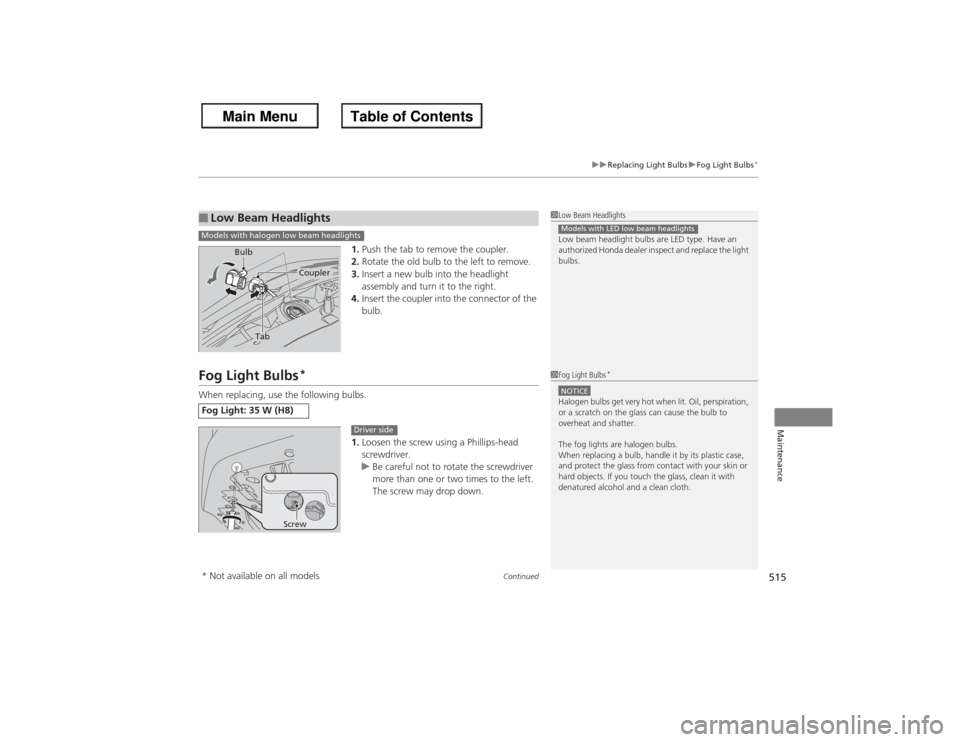
1. Push the tab to remove the coupler.
2. Rotate the old bulb to the left to remove.
3. Insert a new bulb into the headlight
assembly and turn it to the right.
4. Insert the coupler into the connector of the
bulb.
Fog Light Bulbs
*
When replacing, use the following bulbs.
1.Loosen the screw using a Phillips-head
screwdriver.
u Be careful not to rotate the screwdriver
more than one or two times to the left.
The screw may drop down.■Low Beam Headlights
1Low Beam Headlights
Low beam headlight bulbs are LED type. Have an
authorized Honda dealer inspect and replace the light
bulbs.Models with LED low beam headlights
Models with halogen low beam headlights
Tab
Coupler
Bulb
Fog Light: 35 W (H8)
1
Fog Light Bulbs
*
NOTICEHalogen bulbs get very hot when lit. Oil, perspiration,
or a scratch on the glass can cause the bulb to
overheat and shatter.
The fog lights are halogen bulbs.
When replacing a bulb, handle it by its plastic case,
and protect the glass from contact with your skin or
hard objects. If you touch the glass, clean it with
denatured alcohol and a clean cloth.
Screw
Driver side
* Not available on all models
Page 517 of 595
51 6
uu Replacing Light Bulbs uFog Light Bulbs
*
Maintenance
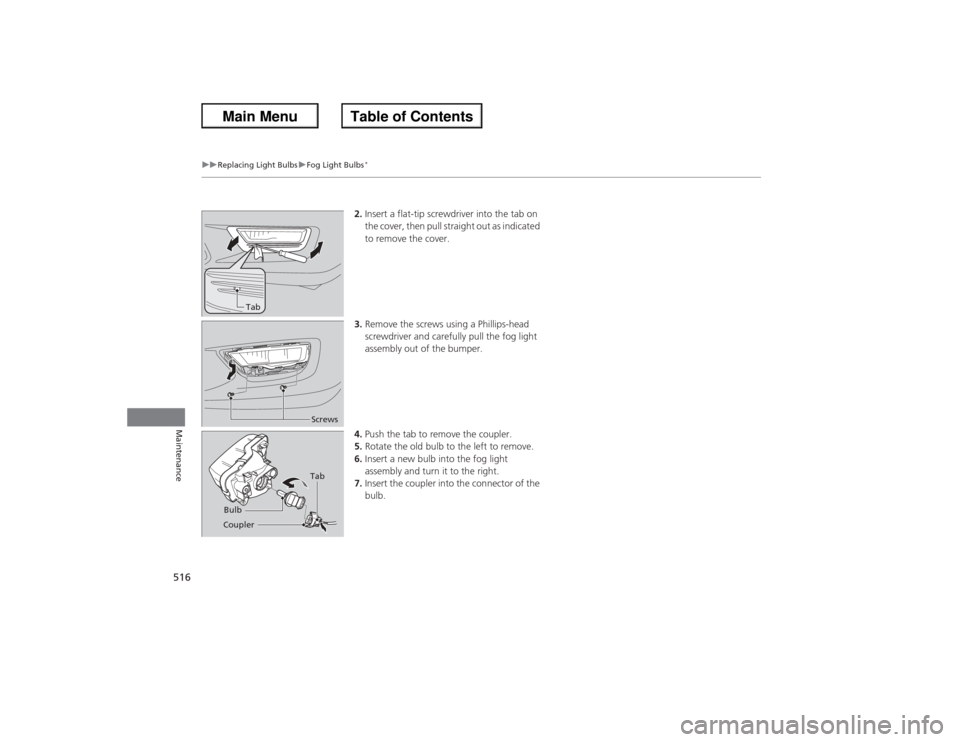
2. Insert a flat-tip screwdriver into the tab on
the cover, then pull straight out as indicated
to remove the cover.
3. Remove the screws using a Phillips-head
screwdriver and carefully pull the fog light
assembly out of the bumper.
4. Push the tab to remove the coupler.
5. Rotate the old bulb to the left to remove.
6. Insert a new bulb into the fog light
assembly and turn it to the right.
7. Insert the coupler into the connector of the
bulb.
Tab
ScrewsTab
Coupler Bulb
Page 518 of 595
51 7
uu Replacing Light Bulbs uFog Light Bulbs
*
Maintenance
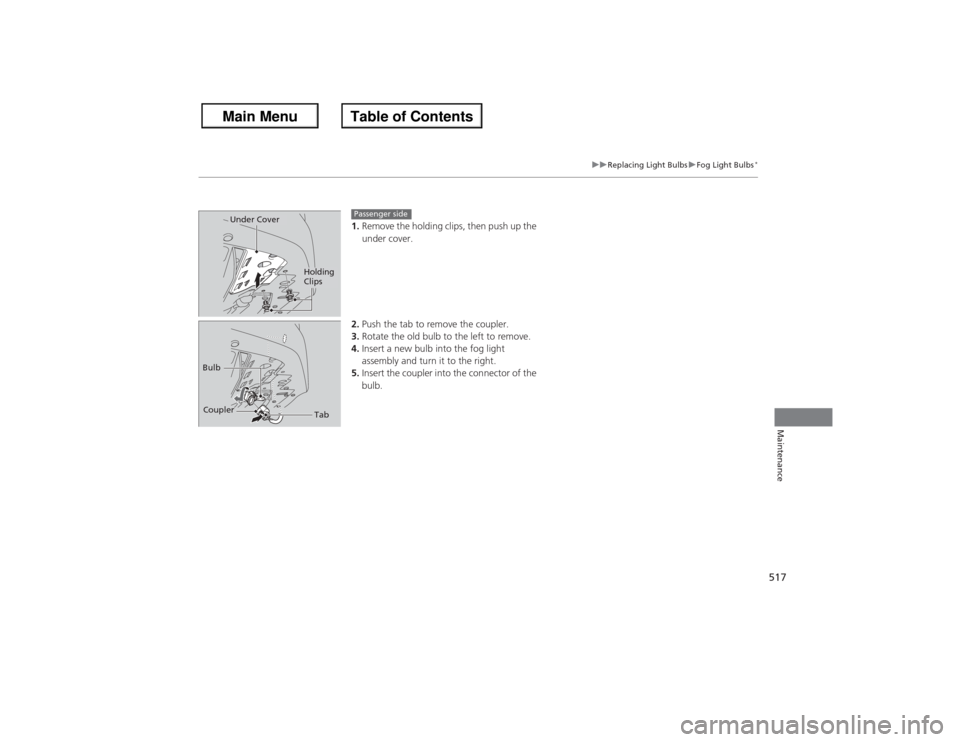
1. Remove the holding clips, then push up the
under cover.
2. Push the tab to remove the coupler.
3. Rotate the old bulb to the left to remove.
4. Insert a new bulb into the fog light
assembly and turn it to the right.
5. Insert the coupler into the connector of the
bulb.
Holding
Clips
Under Cover
Passenger side
Tab
Coupler
Bulb
Page 519 of 595
51 8
uu Replacing Light Bulbs uFront Turn Signal/Side Marker Light Bulbs
Maintenance
Front Turn Signal/Side Marker Light BulbsWhen replacing, use the following bulbs.
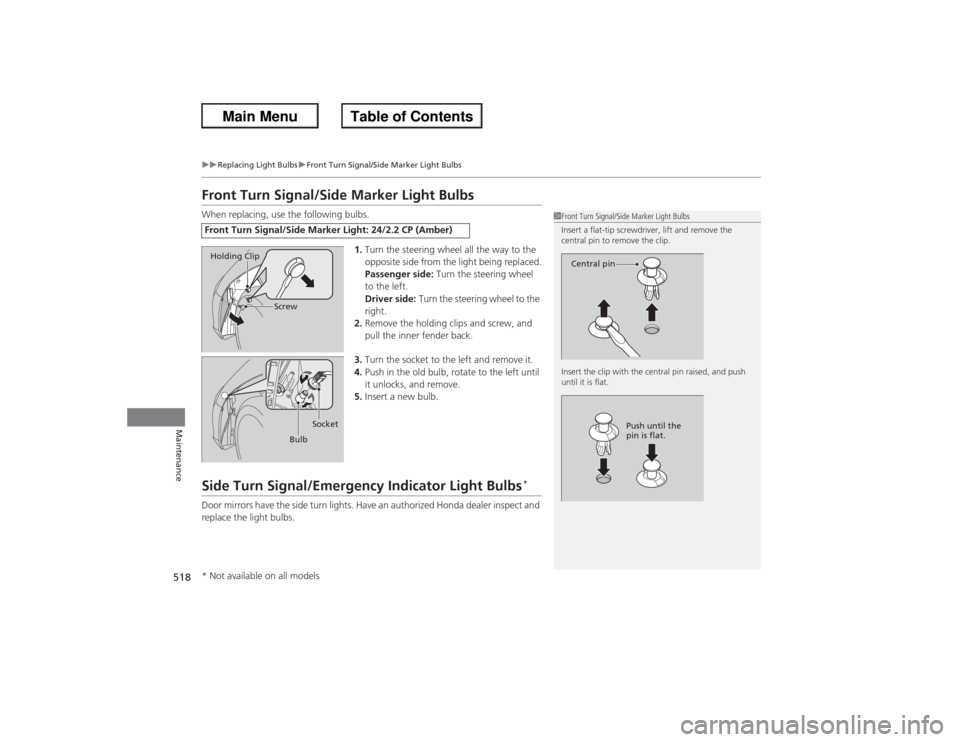
1.Turn the steering wheel all the way to the
opposite side from the light being replaced.
Passenger side: Turn the steering wheel
to the left.
Driver side: Turn the steering wheel to the
right.
2. Remove the holding clips and screw, and
pull the inner fender back.
3. Turn the socket to the left and remove it.
4. Push in the old bulb, rotate to the left until
it unlocks, and remove.
5. Insert a new bulb.Side Turn Signal/Emergency Indicator Light Bulbs
*
Door mirrors have the side turn lights. Have an authorized Honda dealer inspect and
replace the light bulbs.Front Turn Signal/Side Marker Light: 24/2.2 CP (Amber)
1Front Turn Signal/Side Marker Light Bulbs
Insert a flat-tip screwdriver, lift and remove the
central pin to remove the clip.
Insert the clip with the central pin raised, and push
until it is flat.
Central pin
Push until the
pin is flat.
Holding Clip
Screw
BulbSocket
* Not available on all models
Page 520 of 595
51 9
uu Replacing Light Bulbs uParking/Daytime Running Light Bulbs
Maintenance
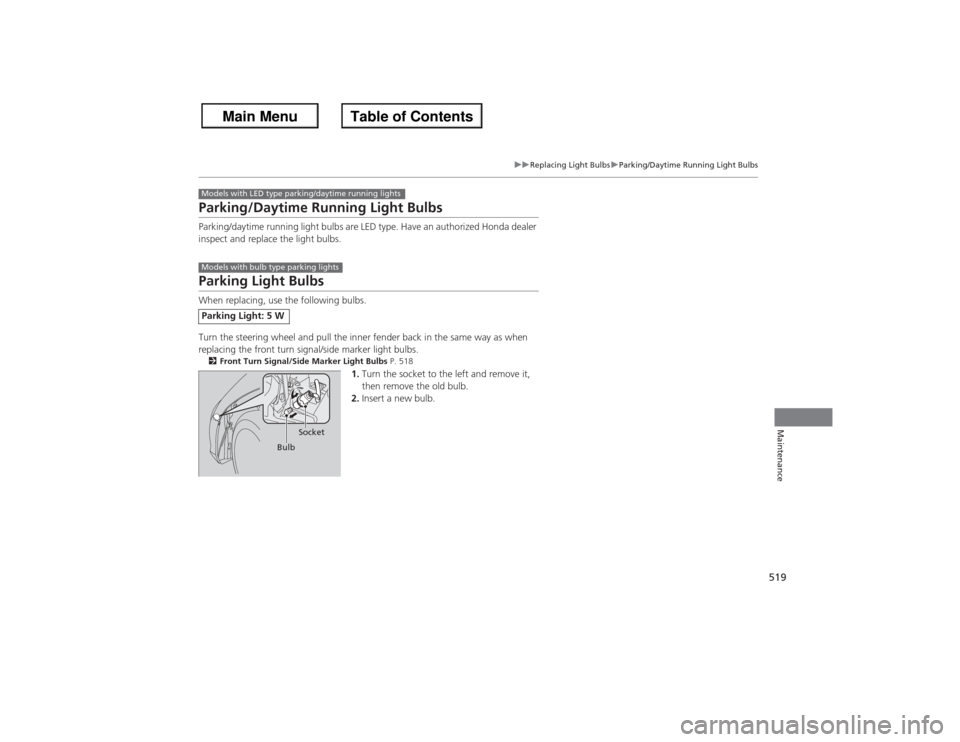
Parking/Daytime Runnin g Light BulbsParking/daytime running light bulbs are LED type. Have an authorized Honda dealer
inspect and replace the light bulbs.Parking Light BulbsWhen replacing, use the following bulbs.
Turn the steering wheel and pull the inner fender back in the same way as when
replacing the front turn signal/side marker light bulbs.2Front Turn Signal/Side Marker Light Bulbs P. 518
1.Turn the socket to the left and remove it,
then remove the old bulb.
2. Insert a new bulb.
Parking Light: 5 WModels with LED type parking/daytime running lightsModels with bulb type parking lights
Bulb Socket
Page 521 of 595
52 0
uu Replacing Light Bulbs uBrake/Taillight and Rear Turn Signal Light/Rear Side Marker Light Bulbs
Maintenance
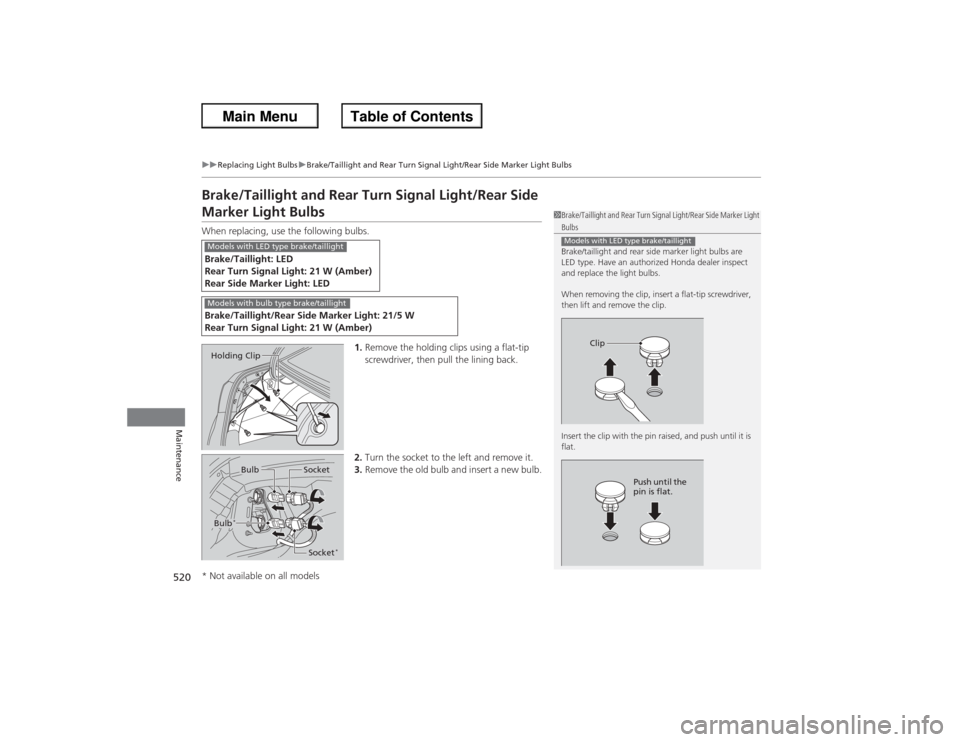
Brake/Taillight and Rear Turn Signal Light/Rear Side Marker Light BulbsWhen replacing, use the following bulbs.
1.Remove the holding clips using a flat-tip
screwdriver, then pull the lining back.
2. Turn the socket to the left and remove it.
3. Remove the old bulb and insert a new bulb.Brake/Taillight: LED
Rear Turn Signal Light: 21 W (Amber)
Rear Side Marker Light: LEDBrake/Taillight/Rear Side Marker Light: 21/5 W
Rear Turn Signal Light: 21 W (Amber)
1Brake/Taillight and Rear Turn Signal Light/Rear Side Marker Light Bulbs
Brake/taillight and rear side marker light bulbs are
LED type. Have an authoriz ed Honda dealer inspect
and replace the light bulbs.
When removing the clip, insert a flat-tip screwdriver,
then lift and remove the clip.
Insert the clip with the pin raised, and push until it is
flat.Models with LED type brake/taillight
Clip
Push until the
pin is flat.
Models with LED type brake/taillightModels with bulb type brake/taillightHolding Clip
Bulb
Socket
Bulb
*
Socket
*
* Not available on all models
Page 522 of 595
521
uu Replacing Light Bulbs uTaillight and Back-Up Light Bulbs
Maintenance
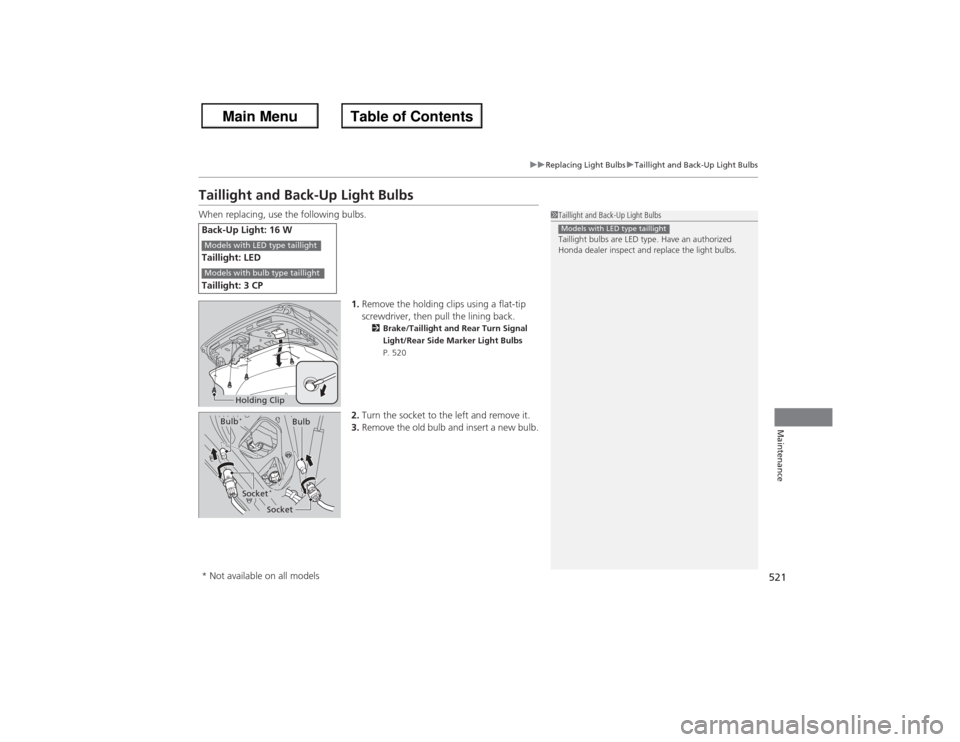
Taillight and Back-Up Light BulbsWhen replacing, use the following bulbs.
1.Remove the holding clips using a flat-tip
screwdriver, then pull the lining back.
2 Brake/Taillight and Rear Turn Signal
Light/Rear Side Marker Light Bulbs
P. 520
2. Turn the socket to the left and remove it.
3. Remove the old bulb and insert a new bulb.
Back-Up Light: 16 W
Taillight: LED
Taillight: 3 CP
1Taillight and Back-Up Light Bulbs
Taillight bulbs are LED type. Have an authorized
Honda dealer inspect and replace the light bulbs.Models with LED type taillight
Models with LED type taillightModels with bulb type taillight
Holding Clip
Bulb
Socket
Bulb
*Socket
*
* Not available on all models
Page 523 of 595
522
uu Replacing Light Bulbs uRear License Plate Light Bulbs
Maintenance
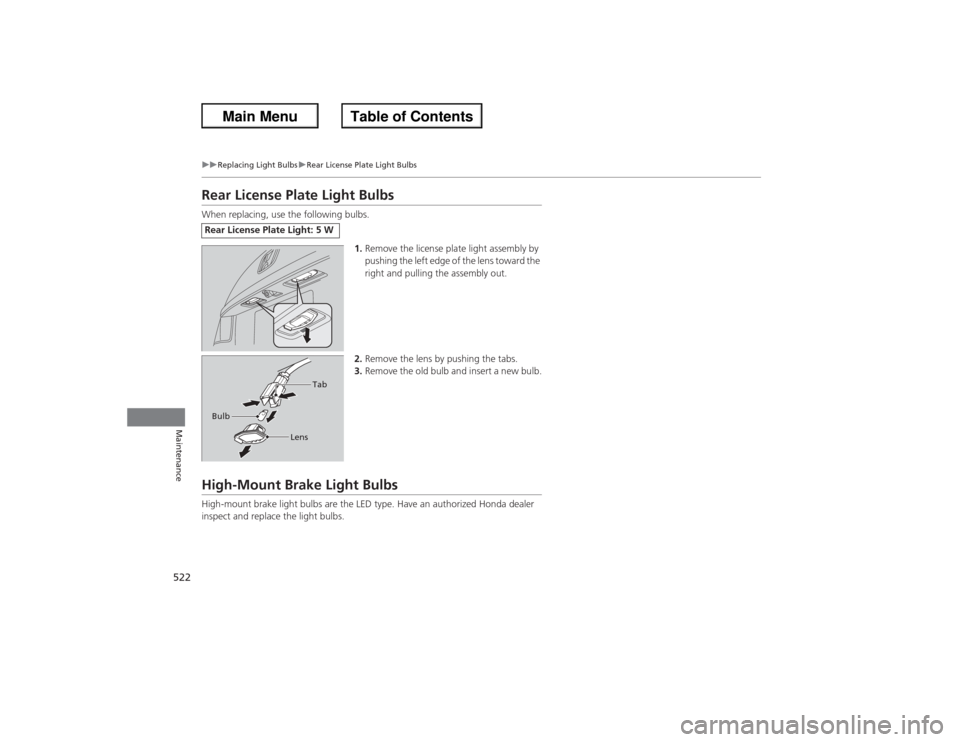
Rear License Plate Light BulbsWhen replacing, use the following bulbs.
1.Remove the license plate light assembly by
pushing the left edge of the lens toward the
right and pulling the assembly out.
2. Remove the lens by pushing the tabs.
3. Remove the old bulb and insert a new bulb.High-Mount Brake Light BulbsHigh-mount brake light bulbs are the LED type. Have an authorized Honda dealer
inspect and replace the light bulbs.Rear License Plate Light: 5 W Bulb
Tab
Lens
Page 546 of 595
545
Continued
Handling the Unexpected
If a Tire Goes FlatChanging a Flat TireIf a tire goes flat while driving, grasp the steering wheel firmly, and brake gradually
to reduce speed. Then, stop in a safe place. Replace the flat tire with a compact
spare tire. Go to a dealer as soon as possible to have the full-size tire repaired or
replaced.
1.Park the vehicle on firm, level, and non-slippery surface and apply the parking
brake.
2. Move the shift lever to
(P.
2. Move the shift lever to (R.
3. Turn on the hazard warning lights and turn the ignition switch to LOCK
(0*1.
*1: Models with the smart entry system have an ENGINE START/STOP button instead of an
ignition switch.
1 Changing a Flat Tire
Periodically check the tire pressure of the compact
spare. It should be set to the specified pressure.
Specified Pressure: 60 psi (420 kPa, 4.2 kgf/cm
2)
When driving with the compact spare tire, keep the
vehicle speed under 50 mp h (80 km/h). Replace with
a full-size tire as soon as possible.
The compact spare tire and wheel in your vehicle are
specifically for this model.
Do not use them with another vehicle.
Do not use another type of compact spare tire or
wheel with your vehicle.
Do not mount tire chains on a compact spare tire.
If a chain-mounted front tire goes flat, remove one of
the full-size rear tires and replace it with the compact
spare tire. Remove the flat front tire and replace it
with the full size tire that was removed from the rear.
Mount the tire chains on the front tire.
Automatic transmission/CVT modelsManual transmission modelsAll models
Page 552 of 595
551Handling the Unexpected
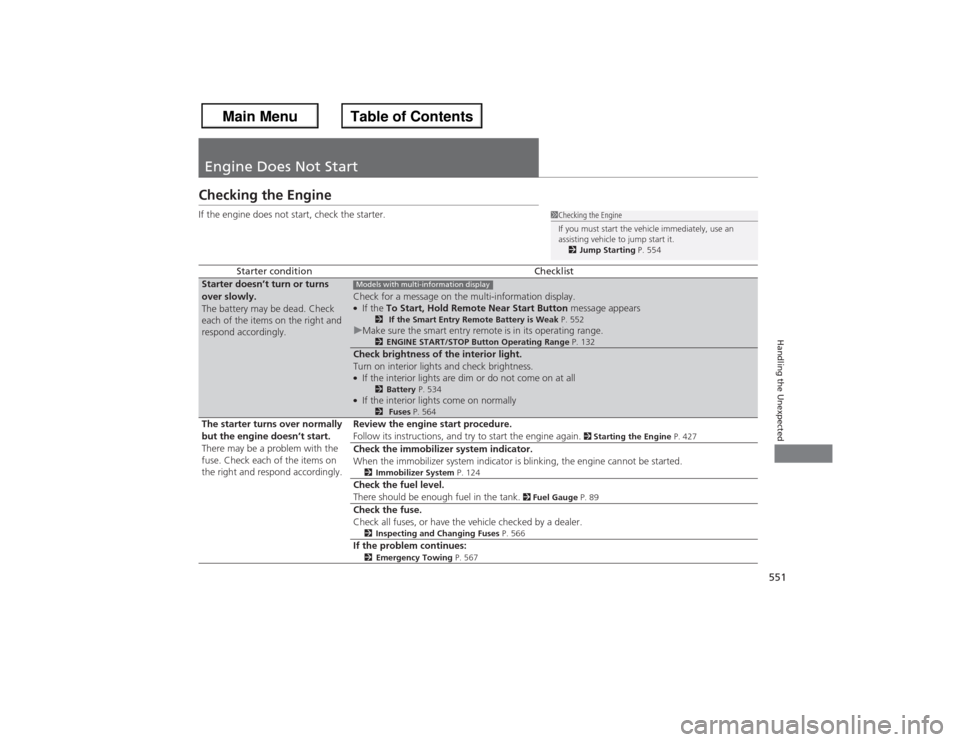
Engine Does Not StartChecking the EngineIf the engine does not start, check the starter.
Starter condition
Checklist
Starter doesn’t turn or turns
over slowly.
The battery may be dead. Check
each of the items on the right and
respond accordingly.
Check for a message on the multi-information display.●If the To Start, Hold Remote Near Start Button message appears
2 If the Smart Entry Remote Battery is Weak P. 552
uMake sure the smart entry remote is in its operating range.
2 ENGINE START/STOP Button Operating Range P. 132
Check brightness of the interior light.
Turn on interior lights and check brightness.●If the interior lights are dim or do not come on at all
2Battery P. 534
●If the interior lights come on normally
2 Fuses P. 564
The starter turns over normally
but the engine doesn’t start.
There may be a problem with the
fuse. Check each of the items on
the right and respond accordingly. Review the engine start procedure.
Follow its instructions, and try to start the engine again.
2
Starting the Engine P. 427
Check the immobilizer system indicator.
When the immobilizer system indicator is blinking, the engine cannot be started.2Immobilizer System P. 124Check the fuel level.
There should be enough fuel in the tank.
2 Fuel Gauge P. 89
Check the fuse.
Check all fuses, or have the vehicle checked by a dealer.2Inspecting and Changing Fuses P. 566If the problem continues:2Emergency Towing P. 567
1Checking the Engine
If you must start the vehicle immediately, use an
assisting vehicle to jump start it.
2 Jump Starting P. 554
Models with multi-information display