change time HONDA ACCORD 2013 9.G User Guide
[x] Cancel search | Manufacturer: HONDA, Model Year: 2013, Model line: ACCORD, Model: HONDA ACCORD 2013 9.GPages: 595, PDF Size: 20.67 MB
Page 102 of 595
101
uuGauges and Displays uMulti-Information Display
*
Continued
Instrument Panel
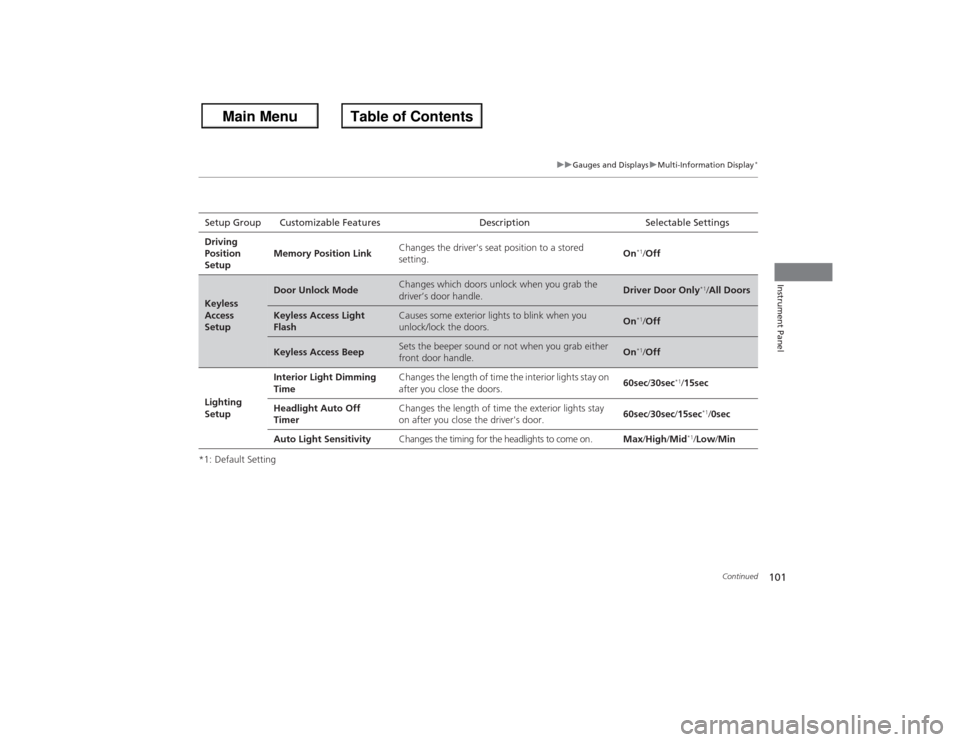
*1: Default SettingSetup Group Customizable Features Description Selectable Settings
Driving
Position
Setup Memory Position Link
Changes the driver's seat position to a stored
setting. On
*1/
Off
Keyless
Access
Setup
Door Unlock Mode
Changes which doors unlock when you grab the
driver’s door handle.
Driver Door Only
*1/All Doors
Keyless Access Light
Flash
Causes some exterior lights to blink when you
unlock/lock the doors.
On
*1/Off
Keyless Access Beep
Sets the beeper sound or not when you grab either
front door handle.
On
*1/Off
Lighting
Setup Interior Light Dimming
Time
Changes the length of time the interior lights stay on
after you close the doors.
60sec
/30sec
*1/15sec
Headlight Auto Off
Timer Changes the length of time the exterior lights stay
on after you close the driver's door.
60sec
/30sec /15sec
*1/0sec
Auto Light Sensitivity Changes the timing for the headlights to come on. Max/High /Mid
*1/Low/ Min
Page 103 of 595
102
uuGauges and Displays uMulti-Information Display
*
Instrument Panel
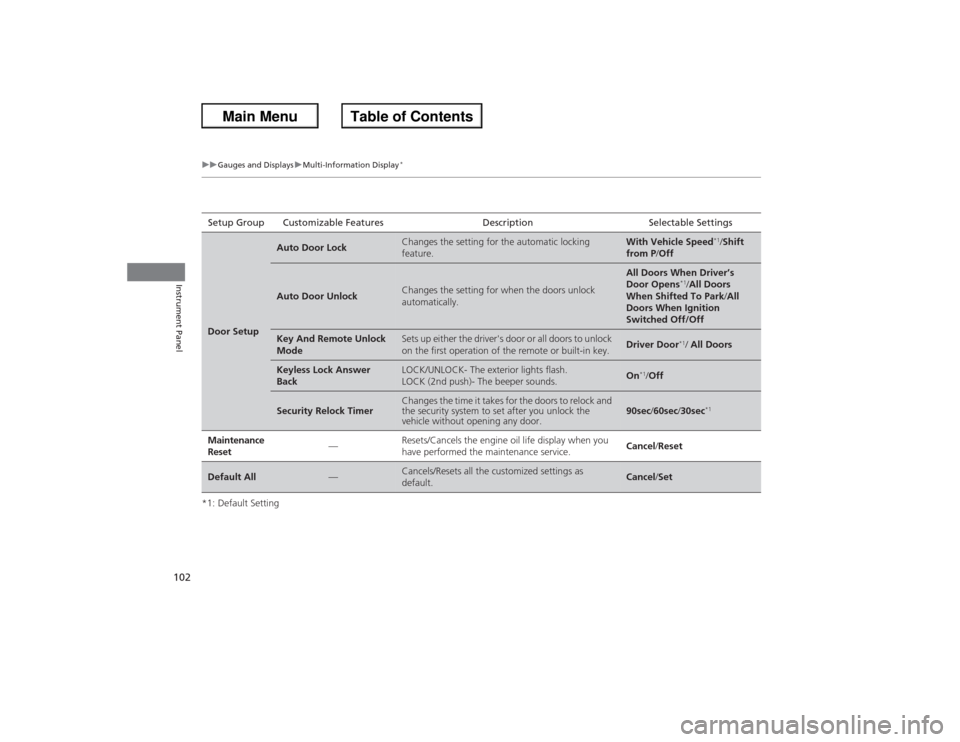
*1: Default SettingSetup Group Customizable Features
Description Selectable SettingsDoor Setup
Auto Door Lock
Changes the setting for the automatic locking
feature.
With Vehicle Speed
*1/Shift
from P /Off
Auto Door Unlock
Changes the setting for when the doors unlock
automatically.
All Doors When Driver’s
Door Opens
*1/All Doors
When Shifted To Park /All
Doors When Ignition
Switched Off/Off
Key And Remote Unlock
Mode
Sets up either the driver's door or all doors to unlock
on the first operation of the remote or built-in key.
Driver Door
*1/ All Doors
Keyless Lock Answer
Back
LOCK/UNLOCK- The exterior lights flash.
LOCK (2nd push)- The beeper sounds.
On
*1/Off
Security Relock Timer
Changes the time it takes for the doors to relock and
the security system to set after you unlock the
vehicle without opening any door.
90sec /60sec /30sec
*1
Maintenance
Reset
—
Resets/Cancels the engine oil life display when you
have performed the maintenance service.
Cancel/ Reset
Default All
—
Cancels/Resets all the customized settings as
default.
Cancel/Set
Page 107 of 595
106Controls
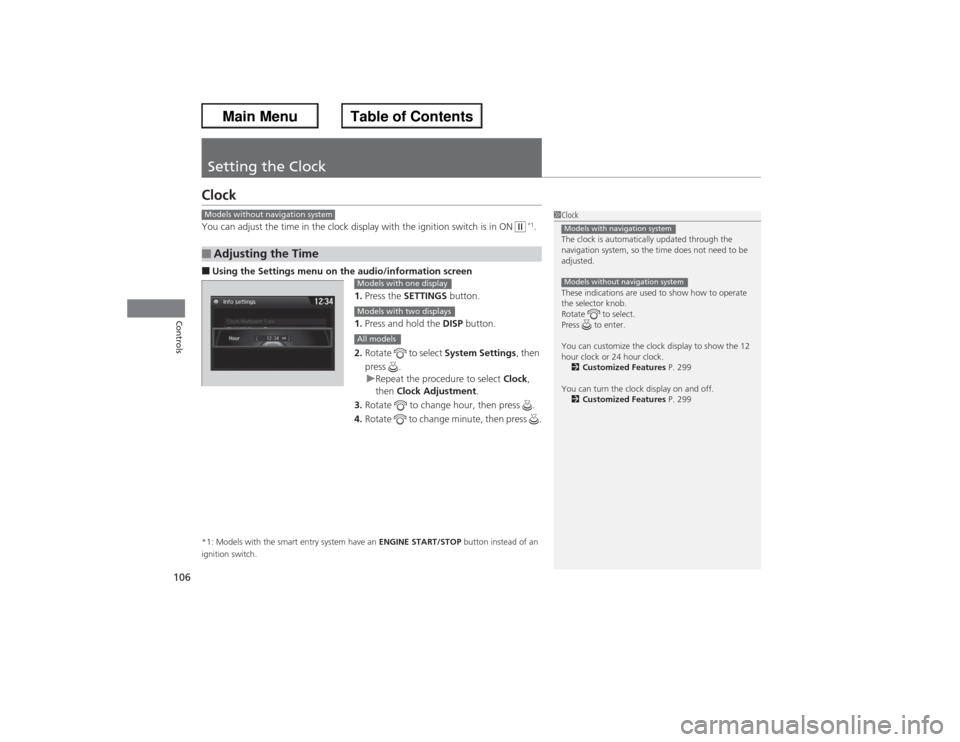
Setting the ClockClockYou can adjust the time in the clock display with the ignition switch is in ON
w *1.
■Using the Settings menu on the audio/information screen
1.Press the SETTINGS button.
1. Press and hold the DISP button.
2. Rotate to select System Settings, then
press . u Repeat the procedure to select Clock,
then Clock Adjustment .
3. Rotate to change hour, then press .
4. Rotate to change minute, then press .*1: Models with the smart entry system have an ENGINE START/STOP button instead of an
ignition switch.■Adjusting the Time
1 Clock
The clock is automatically updated through the
navigation system, so the time does not need to be
adjusted.
These indications are used to show how to operate
the selector knob.
Rotate to select.
Press to enter.
You can customize the clock display to show the 12
hour clock or 24 hour clock.
2 Customized Features P. 299
You can turn the clock display on and off. 2 Customized Features P. 299Models with navigation systemModels without navigation system
Models without navigation system
Models with one displayModels with two displaysAll models
Page 112 of 595
111
uuLocking and Unlocking the Doors uLocking/Unlocking the Doors from the Outside
Continued
Controls
Locking/Unlocking the Doors from the Outside
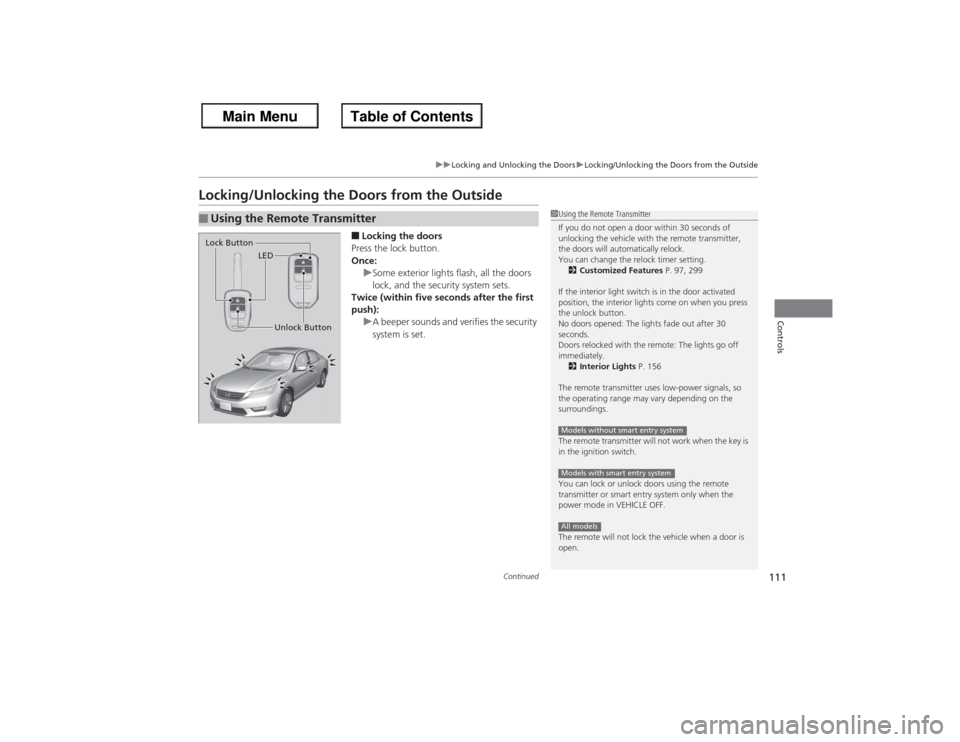
■Locking the doors
Press the lock button.
Once: uSome exterior lights flash, all the doors
lock, and the security system sets.
Twice (within five seconds after the first
push): uA beeper sounds and verifies the security
system is set.
■Using the Remote Transmitter
1Using the Remote Transmitter
If you do not open a door within 30 seconds of
unlocking the vehicle with the remote transmitter,
the doors will automatically relock.
You can change the relock timer setting.
2 Customized Features P. 97, 299
If the interior light switch is in the door activated
position, the interior lights come on when you press
the unlock button.
No doors opened: The lights fade out after 30
seconds.
Doors relocked with the remote: The lights go off
immediately. 2 Interior Lights P. 156
The remote transmitter uses low-power signals, so
the operating range may vary depending on the
surroundings.
The remote transmitter will not work when the key is
in the ignition switch.
You can lock or unlock doors using the remote
transmitter or smart entry system only when the
power mode in VEHICLE OFF.
The remote will not lock the vehicle when a door is
open.Models without smart entry systemModels with smart entry systemAll models
LED
Unlock Button
Lock Button
Page 126 of 595
Continued
125
uuSecurity System uSecurity System Alarm
Controls
■Setting the security system alarm
The security system alarm automatically sets when the following conditions have
been met:
• The ignition switch is in LOCK
(0*1, and the key has been removed from the
ignition switch.
• The hood and trunk are closed.
• All doors are locked from outside with the key, the remote transmitter, or smart
entry system.
■When the security system alarm sets
The security system alarm indicator in the instrument panel blinks. When the
blinking interval changes after about 15 seconds, the security system is set.■To cancel the security system alarm
The security system alarm is canceled when the vehicle is unlocked using the key,
remote transmitter, smart entry system or the ignition switch is turned to ON
(w*1.
The security system indicator goes off at the same time.
*1: Models with the smart entry system have an ENGINE START/STOP button instead of an
ignition switch.
1 Security System Alarm
Do not set the security system alarm when someone
is in the vehicle or a window is open. The system can
accidentally activate when:•Unlocking the door with the lock tab.•Opening the trunk with the trunk release or the
emergency trunk opener.
If the battery goes dead after you have set the
security system alarm, the security alarm may go off
once the battery is recharged or replaced.
If this occurs, deactivate the security system alarm by
unlocking a door using the key or remote transmitter.
Do not attempt to alter this system or add another
device to it.
Page 137 of 595
136
uuOperating the Switches Around the Steering Wheel uTurn Signals
Controls
Turn Signals
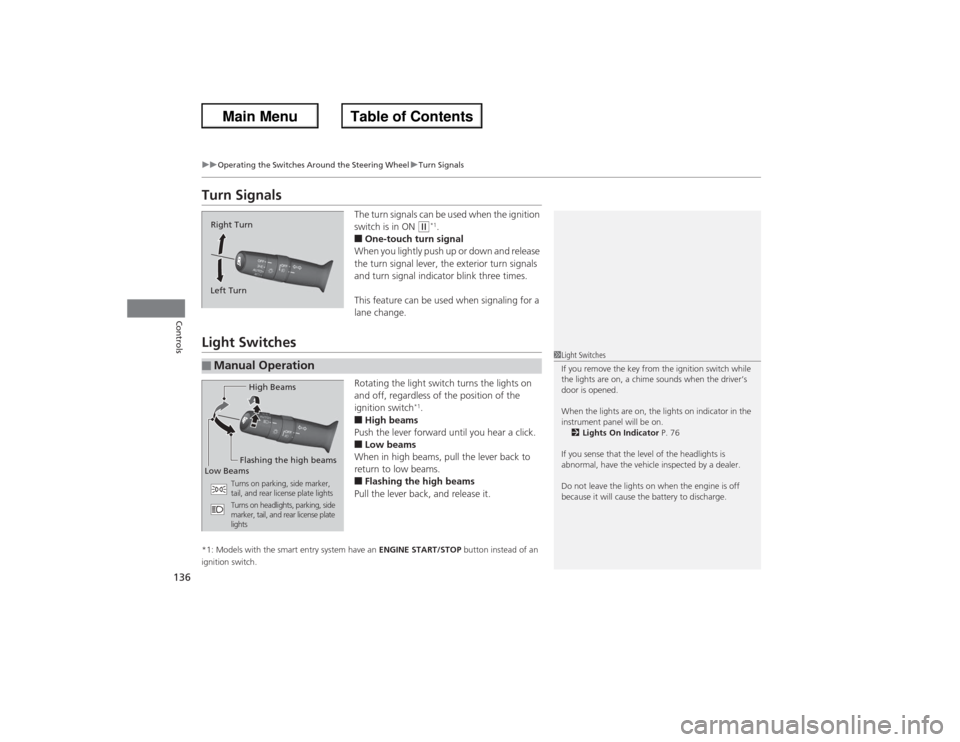
The turn signals can be used when the ignition
switch is in ON
(w*1.
■One-touch turn signal
When you lightly push up or down and release
the turn signal lever, the exterior turn signals
and turn signal indicator blink three times.
This feature can be used when signaling for a
lane change.
Light Switches
Rotating the light switch turns the lights on
and off, regardless of the position of the
ignition switch
*1.
■High beams
Push the lever forward until you hear a click.■Low beams
When in high beams, pull the lever back to
return to low beams.■Flashing the high beams
Pull the lever back, and release it.
*1: Models with the smart entry system have an ENGINE START/STOP button instead of an
ignition switch.Right Turn
Left Turn■Manual Operation
1 Light Switches
If you remove the key from the ignition switch while
the lights are on, a chime sounds when the driver’s
door is opened.
When the lights are on, the lights on indicator in the
instrument panel will be on.
2 Lights On Indicator P. 76
If you sense that the level of the headlights is
abnormal, have the vehicle inspected by a dealer.
Do not leave the lights on when the engine is off
because it will cause the battery to discharge.
High Beams
Flashing the high beams
Low Beams
Turns on parking, side marker,
tail, and rear license plate lights
Turns on headlights, parking, side
marker, tail, and rear license plate
lights
Page 139 of 595
uuOperating the Switches Around the Steering Wheel uFog Lights
*
138Controls
The headlights automatically come on when the wipers are used several times within
a certain intervals with the headlight switch in AUTO.
The headlights automatically go off a few minutes later if the wipers are stopped.
The headlights, all other exterior lights, and the instrument panel lights turn off
within 15 seconds after you remove the key
*1 and close the driver's door.
u You can change the headlight auto off timer setting.
2 Customized Features P. 97, 299
If you turn the ignition switch to LOCK
(0*1 with the headlight switch on, but do
not open the door, the lights turn off after 10 minutes (three minutes, if the switch
is in the AUTO position).
The lights turn on again when you unlock or open the driver's door. If you unlock
the door, but do not open it within 15 seconds, the lights go off. If you open the
driver's door, you will hear a lights on reminder chime.
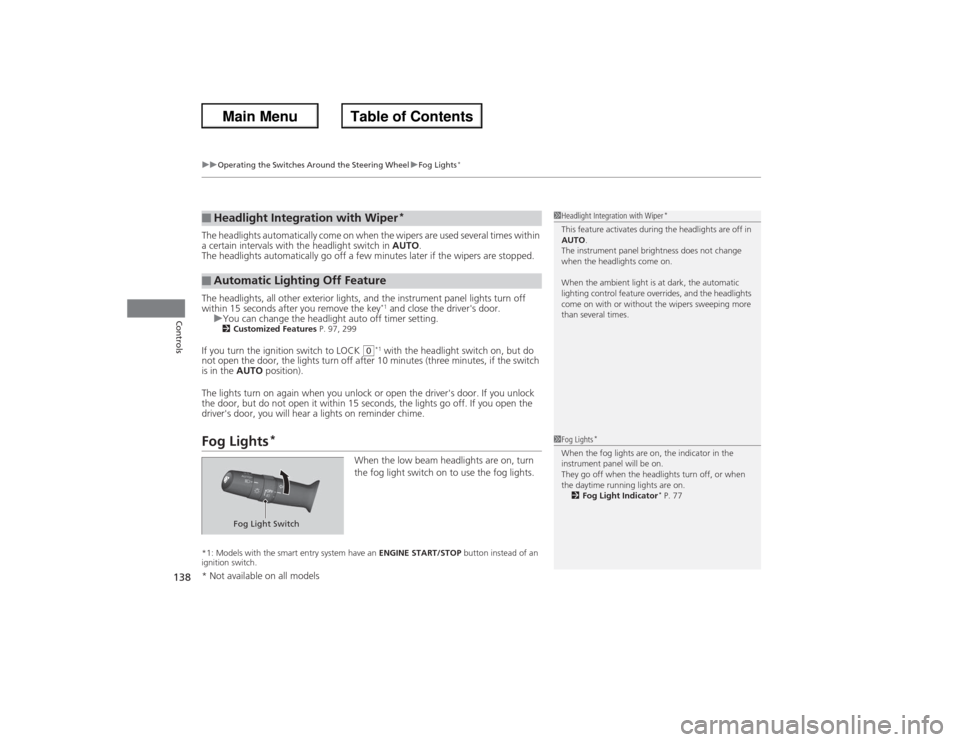
Fog Lights
*
When the low beam headlights are on, turn
the fog light switch on to use the fog lights.
*1: Models with the smart entry system have an ENGINE START/STOP button instead of an
ignition switch.■Headlight Integration with Wiper
*
■Automatic Lighting Off Feature
1 Headlight Integration with Wiper
*
This feature activates during the headlights are off in
AUTO .
The instrument panel brightness does not change
when the headlights come on.
When the ambient light is at dark, the automatic
lighting control feature overrides, and the headlights
come on with or without the wipers sweeping more
than several times.1 Fog Lights
*
When the fog lights are on, the indicator in the
instrument panel will be on.
They go off when the headlights turn off, or when
the daytime running lights are on.
2 Fog Light Indicator
* P. 77
Fog Light Switch
* Not available on all models
Page 141 of 595
140
uuOperating the Switches Around the Steering Wheel uWipers and Washers
Controls
Wipers and Washers
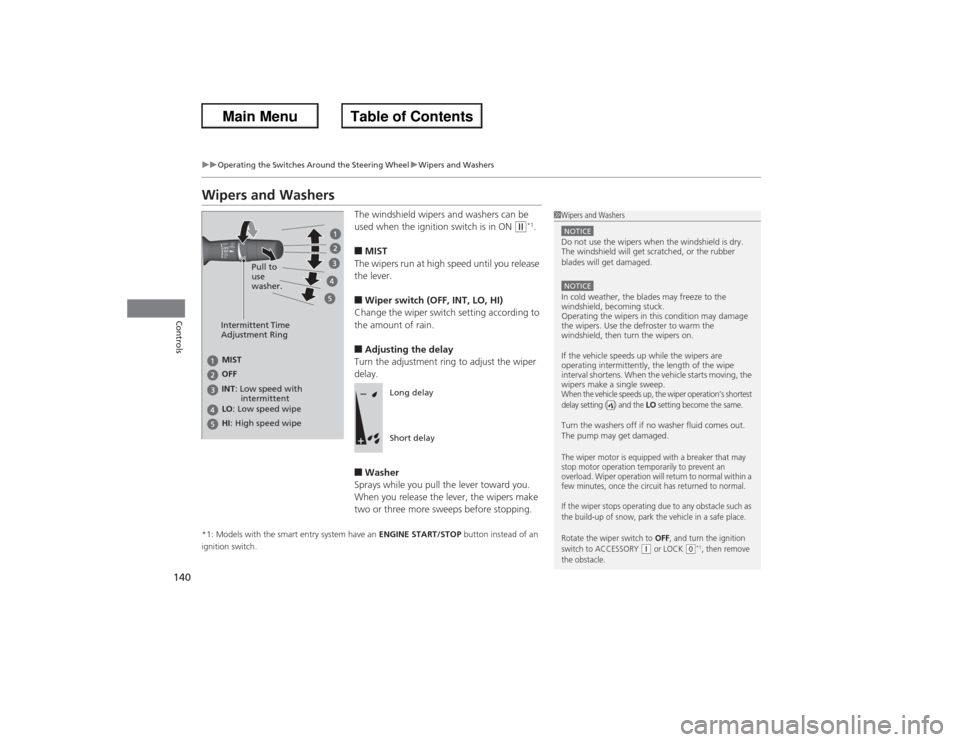
The windshield wipers and washers can be
used when the ignition switch is in ON
(w*1.
■MIST
The wipers run at high speed until you release
the lever.■Wiper switch (OFF, INT, LO, HI)
Change the wiper switch setting according to
the amount of rain.■Adjusting the delay
Turn the adjustment ring to adjust the wiper
delay.■Washer
Sprays while you pull the lever toward you.
When you release the lever, the wipers make
two or three more sweeps before stopping.
*1: Models with the smart entry system have an ENGINE START/STOP button instead of an
ignition switch.
1 Wipers and WashersNOTICEDo not use the wipers when the windshield is dry.
The windshield will get scratched, or the rubber
blades will get damaged.NOTICEIn cold weather, the blades may freeze to the
windshield, becoming stuck.
Operating the wipers in this condition may damage
the wipers. Use the defroster to warm the
windshield, then turn the wipers on.
If the vehicle speeds up while the wipers are
operating intermittently, the length of the wipe
interval shortens. When the vehicle starts moving, the
wipers make a single sweep.When the vehicle speeds up, the wiper operation’s shortest
delay setting ( ) and the
LO setting become the same.
Turn the washers off if no washer fluid comes out.
The pump may get damaged.The wiper motor is equipped with a breaker that may
stop motor operation temporarily to prevent an
overload. Wiper operation will return to normal within a
few minutes, once the circuit has returned to normal.
If the wiper stops operating due to any obstacle such as
the build-up of snow, park the vehicle in a safe place.
Rotate the wiper switch to
OFF
, and turn the ignition
switch to ACCESSORY
(q or LOCK
(0*1, then remove
the obstacle.
Intermittent Time
Adjustment Ring
MIST
INT : Low speed with
intermittent OFF
LO : Low speed wipe
HI : High speed wipe Pull to
use
washer.
Long delay
Short delay
Page 157 of 595
156Controls
Interior Lights/Interior Convenience ItemsInterior Lights
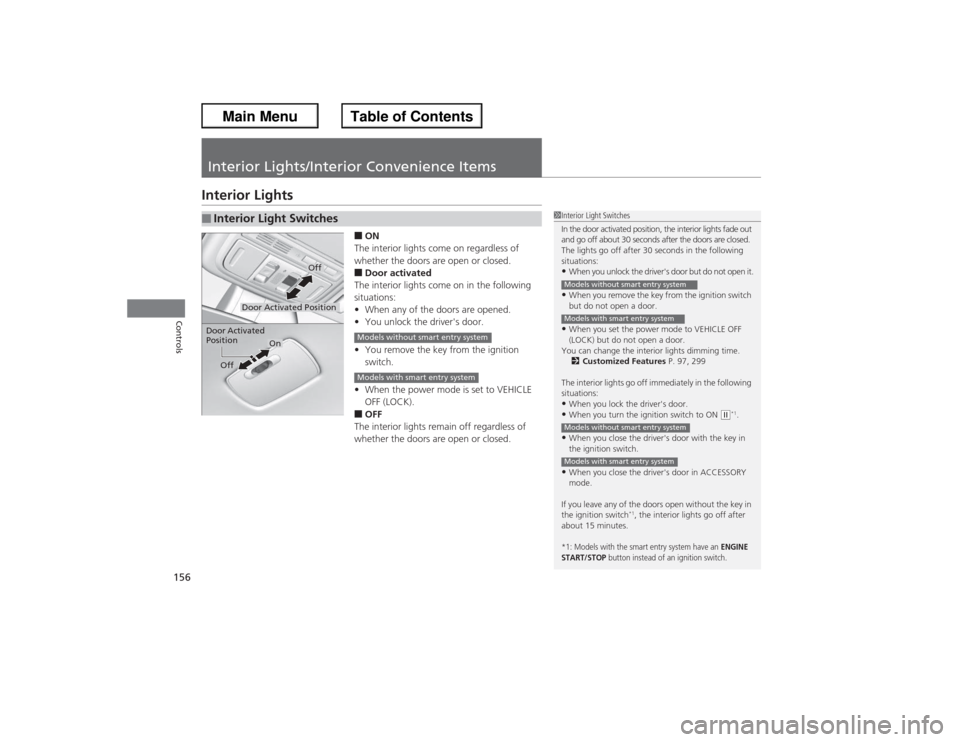
■ON
The interior lights come on regardless of
whether the doors are open or closed.■Door activated
The interior lights come on in the following
situations:
• When any of the doors are opened.
• You unlock the driver's door.
• You remove the key from the ignition
switch.
• When the power mode is set to VEHICLE
OFF (LOCK).■OFF
The interior lights remain off regardless of
whether the doors are open or closed.
■Interior Light Switches
1 Interior Light Switches
In the door activated position, the interior lights fade out
and go off about 30 seconds after the doors are closed.
The lights go off after 30 seconds in the following
situations:•When you unlock the driver's door but do not open it.•When you remove the key from the ignition switch
but do not open a door.•When you set the power mode to VEHICLE OFF
(LOCK) but do not open a door.
You can change the interior lights dimming time. 2 Customized Features P. 97, 299
The interior lights go off immediately in the following
situations:•When you lock the driver's door.•When you turn the ignition switch to ON
(w*1.
•When you close the driver's door with the key in
the ignition switch.•When you close the driver's door in ACCESSORY
mode.
If you leave any of the doors open without the key in
the ignition switch
*1, the interior lights go off after
about 15 minutes.
*1: Models with the smart entry system have an
ENGINE
START/STOP
button instead of an ignition switch.
Models without smart entry systemModels with smart entry systemModels without smart entry systemModels with smart entry system
Door Activated Position
Off
Door Activated
Position
On
Off
Models without smart entry systemModels with smart entry system
Page 181 of 595
180Features
Audio System Basic OperationTo use the audio system function, the ignition switch must be in ACCESSORY
(q or
ON
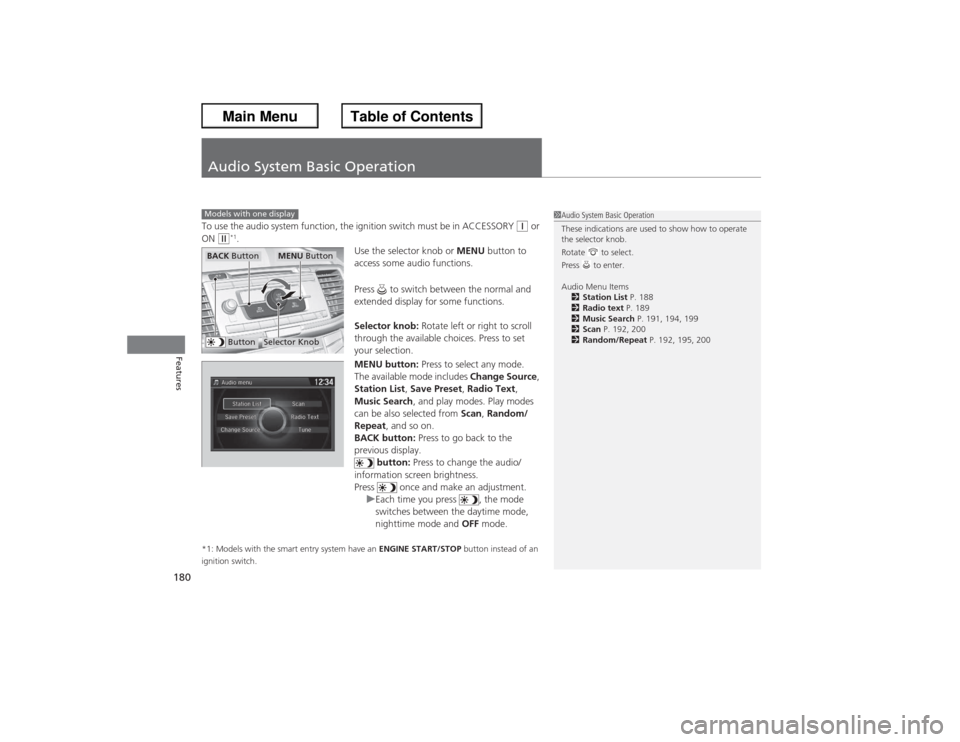
(w*1. Use the selector knob or MENU button to
access some audio functions.
Press to switch between the normal and
extended display for some functions.
Selector knob: Rotate left or right to scroll
through the available choices. Press to set
your selection.
MENU button: Press to select any mode.
The available mode includes Change Source ,
Station List, Save Preset, Radio Text,
Music Search , and play modes. Play modes
can be also selected from Scan, Random/
Repeat , and so on.
BACK button: Press to go back to the
previous display. button: Press to change the audio/
information screen brightness.
Press once and make an adjustment. uEach time you press , the mode
switches between the daytime mode,
nighttime mode and OFF mode.
*1: Models with the smart entry system have an ENGINE START/STOP button instead of an
ignition switch.Models with one display
1 Audio System Basic Operation
These indications are used to show how to operate
the selector knob.
Rotate to select.
Press to enter.
Audio Menu Items
2 Station List P. 188
2 Radio text P. 189
2 Music Search P. 191, 194, 199
2 Scan P. 192, 200
2 Random/Repeat P. 192, 195, 200
Button
Selector Knob
MENU Button
BACK Button