eps HONDA ACCORD 2013 9.G User Guide
[x] Cancel search | Manufacturer: HONDA, Model Year: 2013, Model line: ACCORD, Model: HONDA ACCORD 2013 9.GPages: 595, PDF Size: 20.67 MB
Page 471 of 595
uuWhen Driving uTPMS (Tire Pressure Monitoring System)
470Driving
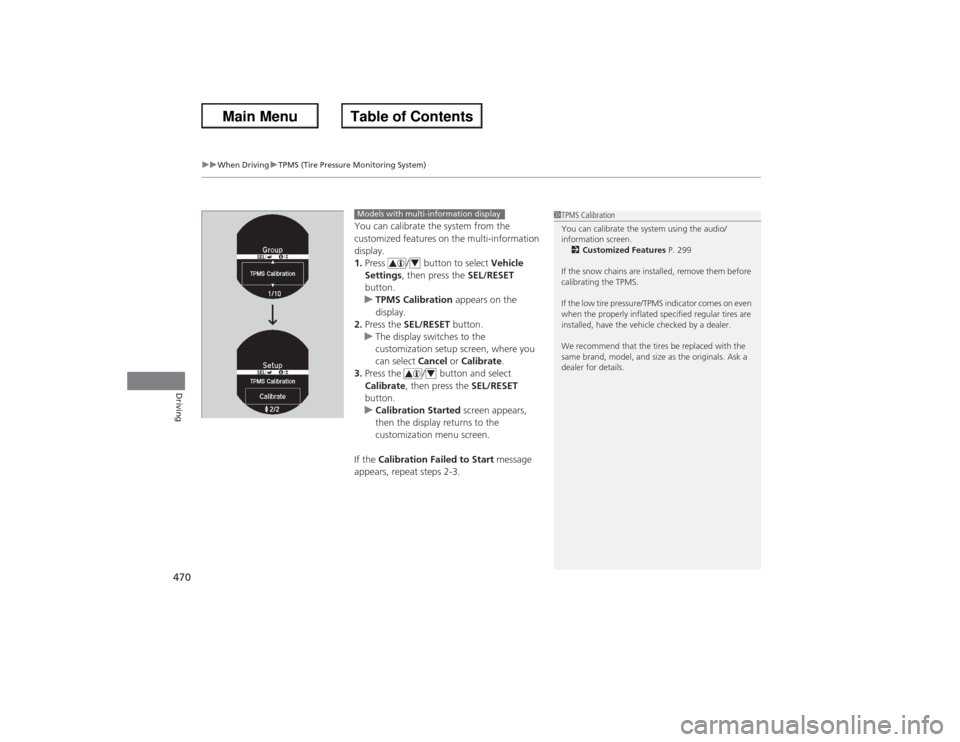
You can calibrate the system from the
customized features on the multi-information
display.
1. Press / button to select Vehicle
Settings , then press the SEL/RESET
button.
u TPMS Calibration appears on the
display.
2. Press the SEL/RESET button.
u The display switches to the
customization setup screen, where you
can select Cancel or Calibrate .
3. Press the / button and select
Calibrate , then press the SEL/RESET
button.
u Calibration Started screen appears,
then the display returns to the
customization menu screen.
If the Calibration Failed to Start message
appears, repeat steps 2-3.
1 TPMS Calibration
You can calibrate the system using the audio/
information screen.
2 Customized Features P. 299
If the snow chains are installed, remove them before
calibrating the TPMS.
If the low tire pressure/TPMS indicator comes on even
when the properly inflated specified regular tires are
installed, have the vehicle checked by a dealer.
We recommend that the tires be replaced with the
same brand, model, and size as the originals. Ask a
dealer for details.
Models with multi-information display
4
4
Page 482 of 595
481
uu Refueling uHow to Refuel
Driving
How to Refuel
1. Stop your vehicle with the service station
pump on the left side of the vehicle in the
rear.
2. Turn off the engine.
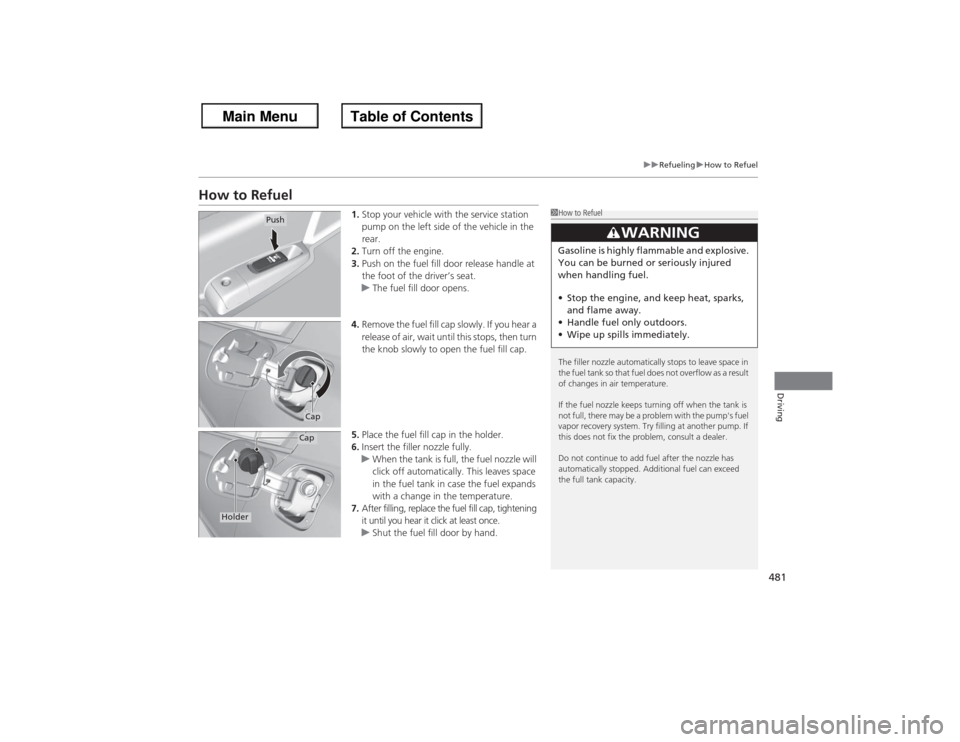
3. Push on the fuel fill door release handle at
the foot of the driver’s seat.
u The fuel fill door opens.
4. Remove the fuel fill cap slowly. If you hear a
release of air, wait until this stops, then turn
the knob slowly to open the fuel fill cap.
5. Place the fuel fill cap in the holder.
6. Insert the filler nozzle fully.
u When the tank is full, the fuel nozzle will
click off automatically. This leaves space
in the fuel tank in case the fuel expands
with a change in the temperature.
7. After filling, replace the fuel fill cap, tightening
it until you hear it click at least once.
u Shut the fuel fill door by hand.
1How to Refuel
The filler nozzle automatically stops to leave space in
the fuel tank so that fuel does not overflow as a result
of changes in air temperature.
If the fuel nozzle keeps turning off when the tank is
not full, there may be a problem with the pump's fuel
vapor recovery system. Try filling at another pump. If
this does not fix the problem, consult a dealer.
Do not continue to add fuel after the nozzle has
automatically stopped. Additional fuel can exceed
the full tank capacity.
3
WARNING
Gasoline is highly flammable and explosive.
You can be burned or seriously injured
when handling fuel.
• Stop the engine, and keep heat, sparks,
and flame away.
• Handle fuel only outdoors.
• Wipe up spills immediately.
Push
CapCap
Holder
Page 544 of 595
543
Handling the Unexpected
This chapter explains how to hand le unexpected troubles.
Tools
Types of Tools .................................. 544
If a Tire Goes Flat
Changing a Flat Tire ......................... 545
Engine Does Not Start Checking the Engine ........................ 551If the Smart Entry Remote Battery is Weak ..........................................552Emergency Engine Stop ................... 553
Jump Starting .................................... 554
Shift Lever Does Not Move .............. 557Overheating
How to Handle Overheating............. 558
Indicator, Coming On/Blinking
If the Low Oil Pressure Indicator Comes On ............................................. 560If the Charging System Indicator Comes
On ................................................. 560
If the Malfunction Indicator Lamp Comes
On or Blinks ................................... 561If the Brake System Indicator (Red) Comes On .................................. 562If the EPS System Indicator Comes On .. 562
If the Low Tire Pressure/TPMS Indicator
Comes On or Blinks ....................... 563
Fuses
Fuse Locations ................................. 564
Inspecting and Changing Fuses ........ 566
Emergency Towing ........................... 567
Page 563 of 595
562
uu Indicator, Coming On/BlinkinguIf the Brake System Indicator (Red) Comes On
Handling the Unexpected
If the Brake System Indicator (Red) Comes On
■Reasons for the indicator to come on
• The brake fluid is low.
• There is a malfunction in the brake system.■What to do when the indicato r comes on while driving
Press the brake pedal lightly to check pedal pressure.
• If normal, check the brake fluid level the next time you stop.
• If abnormal, take immediate action. If necessary, downshift the
transmission to slow the ve hicle using engine braking.
If the EPS System Indicator Comes On
■Reasons for the indicator to come on
• Comes on when there is a problem with the EPS system.
• If you depress the accelerator pedal repeatedly to increase the engine
speed while the engine is idling, the indicator comes on, and
sometimes the steering wheel becomes harder to operate.■What to do when th e indicator comes on
Stop the vehicle in a safe place and restart the engine.
If the indicator comes on and stays on, immediately have your vehicle
inspected by a dealer.
1 If the Brake System Indicator (Red) Comes On
Have your vehicle repaired immediately.
It is dangerous to drive with low brake fluid. If there
is no resistance from the brake pedal, stop
immediately in a safe place. If necessary downshift
the gears.
If the brake system indicator and ABS indicator come
on simultaneously, the electronic brake distribution
system is not working. This can result in vehicle
instability under sudden braking.
Have your vehicle inspected by a dealer immediately.
U.S.
Canada
1 If the EPS System Indicator Comes OnNOTICEIf you repeatedly turn the steering wheel at an
extremely low speed, or hold the steering wheel on
the full left or right position for a while, the system
heats up. The system goes into a protective mode,
and limits its performance. The steering wheel
becomes harder and harder to operate. Once the
system cools down, EPS is restored. Repeated
operation under these conditions can eventually
damage the system.
Page 565 of 595
564Handling the Unexpected
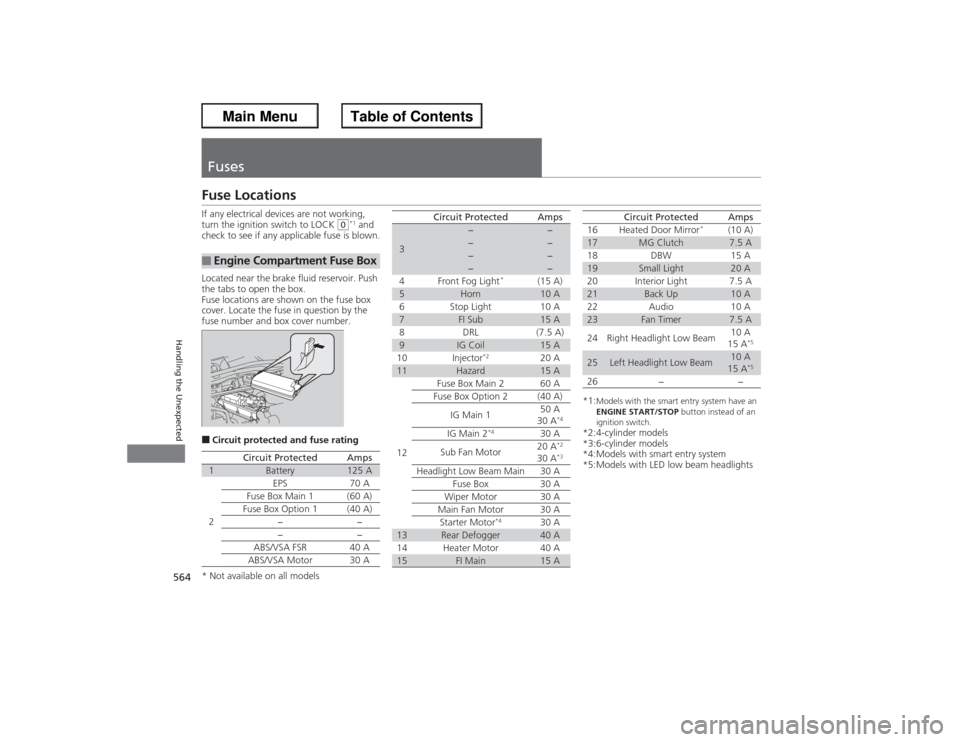
FusesFuse LocationsIf any electrical devices are not working,
turn the ignition switch to LOCK
(0*1 and
check to see if any applicable fuse is blown.
Located near the brake fluid reservoir. Push
the tabs to open the box.
Fuse locations are shown on the fuse box
cover. Locate the fuse in question by the
fuse number and box cover number.
■Circuit protected and fuse rating■Engine Compartment Fuse Box
Circuit Protected
Amps
1
Battery
125 A
2
EPS
70 A
Fuse Box Main 1 (60 A)
Fuse Box Option 1
(40 A)
−−
−
−
ABS/VSA FSR 40 A
ABS/VSA Motor 30 A
3
−
−
−
−
−
−
−
−
4 Front Fog Light
*
(15 A)
5
Horn
10 A
6 Stop Light 10 A
7
FI Sub
15 A
8 DRL (7.5 A)
9
IG Coil
15 A
10 Injector
*2
20 A
11
Hazard
15 A
12 Fuse Box Main 2 60 A
Fuse Box Option 2 (40 A)
IG Main 1 50 A
30 A
*4
IG Main 2
*4
30 A
Sub Fan Motor 20 A
*2
30 A
*3
Headlight Low Beam Main 30 A
Fuse Box 30 A
Wiper Motor 30 A
Main Fan Motor 30 A Starter Motor
*4
30 A
13
Rear Defogger
40 A
14 Heater Motor 40 A
15
FI Main
15 A
Circuit Protected
Amps
*1:
Models with the smart entry system have an
ENGINE START/STOP button instead of an
ignition switch.
*2:4-cylinder models
*3:6-cylinder models
*4:Models with smart entry system
*5:Models with LED low beam headlights 16 Heated Door Mirror
*
(10 A)
17
MG Clutch
7.5 A
18 DBW 15 A
19
Small Light
20 A
20 Interior Light 7.5 A
21
Back Up
10 A
22 Audio 10 A
23
Fan Timer
7.5 A
24 Right Headlight Low Beam 10 A
15 A
*5
25
Left Headlight Low Beam
10 A
15 A
*5
26 − −
Circuit Protected
Amps
* Not available on all models
Page 589 of 595
588Index
Customer Service Information................. 582
Customized Features .......................... 97, 299DDaytime Running Lights ........................... 139
Dead Battery ............................................. 554
Defrosting the Windshield and Windows .................................. 168, 170
Devices that Emit Radio Waves ................ 575
Dimming Headlights ............................................... 136
Rearview Mirror ....................................... 146
Dipstick (Engine Oil) ................................. 502
Directional Signals (Turn Signal) .............. 136
Display Button .......................... 181, 207, 239
Door Mirrors ............................................. 147
Doors ......................................................... 108
Auto Door Locking .................................. 119
Auto Door Unlocking ............................... 119
Door and Trunk Open Indicator ........... 31, 74
Keys ........................................................ 108
Locking/Unlocking the Doors from the Inside ...................................... 116
Locking/Unlocking the Doors
from the Outside ................................... 111
Lockout Prevention System ...................... 115
DOT Tire Quality Grading ........................ 528
Driving ....................................................... 417
ACC (Adaptive Cruise Control) ................ 450
Automatic Transmission (CVT) ................. 434 Braking ................................................... 473
Cruise Control ......................................... 447
Shifting Gear ................................... 441, 443
Shifting Position .............................. 435, 437
Starting the Engine.......................... 427, 429
Driving Position Memory System ............ 143
Dust and Pollen Filter ............................... 537
EEco Assist System.......................................... 7
ECON Button ............................................ 446
Elapsed Time ............................................... 95
Electric Power Steering (EPS) System Indicator............................................ 74, 562
Electronic Stability Control (ESC) ............. 465
Emergency ................................................ 567
Emergency Trunk Opener ........................ 123
Emissions Testing (Readiness Codes) ....... 577
Engine ....................................................... 574
Coolant ................................................... 507
Jump Starting .......................................... 554
Oil ........................................................... 501
Starting ........................................... 427, 429
Switch Buzzer.......................................... 131
Engine Coolant ......................................... 507
Adding to the Radiator ............................ 508
Adding to the Reserve Tank..................... 507
Overheating ............................................ 558
Temperature Gauge .................................. 89 Engine Oil
................................................. 501
Adding ................................................... 504
Checking ................................................ 502
Displaying Oil Life ........................... 489, 493
Low Oil Pressure Indicator ................. 69, 560
Recommended Engine Oil ....................... 501
ENGINE START/STOP Button .................... 132
EPS (Electric Power Steering)
System ............................................... 74, 562
Exhaust Gas Hazard (Carbon Monoxide) .................................. 64
Expanded View Driver’s Mirror ............... 147
Exterior Care (Cleaning) .......................... 540
Exterior Mirrors ........................................ 147
FFeatures.................................................... 173
Filters
Dust and Pollen....................................... 537
Oil .......................................................... 505
Flat Tire ..................................................... 545
Floor Mats ................................................ 539
Fluids Automatic Transmission .......................... 510
Brake/Clutch ........................................... 511
Continuously Variable Transmission (CVT) .................................................... 509
Engine Coolant ....................................... 507
Manual Transmission .............................. 509
Windshield Washer ................................. 512
Page 591 of 595
590Index
Illumination ControlKnob ....................................................... 141
Immobilizer System .................................. 124
Indicator .................................................... 77
Indicators ..................................................... 68
ABS (Anti-lock Brake System) ..................... 72
Adaptive Cruise Control (ACC) .................. 80
Brake System (Amber)................................ 68
Brake System (Red) .................................... 68
Charging System ............................... 69, 560
CRUISE CONTROL .............................. 80, 448
CRUISE MAIN .................................... 80, 447
Door and Trunk Open ................................ 74
ECON Mode ...................................... 80, 446
EPS (Electric Power Steering) System ............................................. 74, 562
Fog Light ................................................... 77
Forward Collision Warning (FCW) .............. 78
High Beam................................................. 76
Immobilizer System .................................... 77
Lane Departure Warning (LDW) ................. 79
Light Control ............................................. 81
Lights On ................................................... 76
Low Fuel .................................................... 72
Low Oil Pressure ................................ 69, 560
Low Tire Pressure/TPMS .. ........... 75, 469, 471
Maintenance Minder ......................... 80, 489
Malfunction Indicator Lamp ............... 69, 561
Parking Brake and Brake System ........ 68, 562
Seat Belt Reminder .............................. 33, 71
Security System Alarm ............................... 77 Smart Entry System ................................... 81
Starter System ........................................... 81
Supplemental Restraint System ............ 49, 72
System Message ........................................ 76
Transmission ............................................. 71
Turn Signal and Hazard Warning ............... 76
VSA ® (Vehicle Stability Assist)
System ............................................ 73, 465
VSA ® OFF .......................................... 73, 466
Washer Level ............................................. 80
Information .............................................. 569
Information Display ................................... 90
Instant Fuel Economy ........................... 91, 96
Instrument Panel ........................................ 67
Brightness Control................................... 141
Interface Dial ............................................ 236
Interior Lights ........................................... 156
Interior Rearview Mirror .......................... 146
JJack (Wheel Nut Wrench) ........................ 548
Jump Starting ........................................... 554KKey Number Tag ....................................... 109
Keyless Lockout Prevention ..................... 115
Keys ........................................................... 108
Lockout Prevention.................................. 115
Master Keys ............................................ 108 Number Tag............................................ 109
Rear Door Won’t Open ........................... 118
Remote Transmitter ................................ 111
Types and Functions................................ 108
Valet Key ........................................ 109, 122
Won’t Turn ............................................... 22
Kickdown (Automatic Transmission/CVT) .............. 434
LLane Departure Warning (LDW) ............. 462
LaneWatchTM .......................................... 467
Language (HFL) ................................ 341, 377
LATCH (Child Seats) ................................... 57
Lights ................................................ 136, 513
Automatic............................................... 137
Bulb Replacement ................................... 513
Daytime Running Lights ... ....................... 139
Fog Lights ............................................... 138
High Beam Indicator ................................. 76
Interior.................................................... 156
Light Switches......................................... 136
Lights On Indicator.................................... 76
Turn Signals ............................................ 136
Load Limits ............................................... 421
Locking/Unlocking ................................... 108
Auto Door Locking/Unlocking ................. 119
Childproof Door Locks ............................ 118
From Inside ............................................. 116
From Outside .......................................... 111