clock HONDA ACCORD 2013 9.G Owner's Manual
[x] Cancel search | Manufacturer: HONDA, Model Year: 2013, Model line: ACCORD, Model: HONDA ACCORD 2013 9.GPages: 595, PDF Size: 20.67 MB
Page 305 of 595
304
uuCustomized Features u
Features
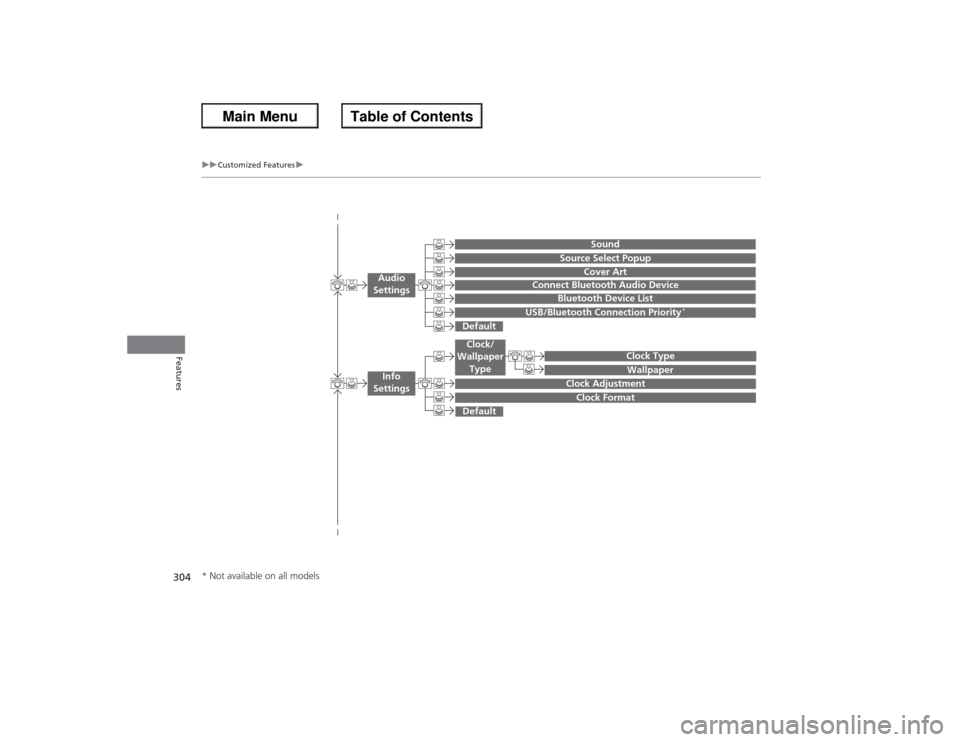
Wallpaper
Source Select Popup
Clock Type
Sound
Default
Cover Art
Connect Bluetooth Audio Device
Bluetooth Device List
USB/Bluetooth Connection Priority
*
Default
Clock AdjustmentClock Format
Audio
Settings
Clock/
Wallpaper Type
Info
Settings
* Not available on all models
Page 309 of 595
308
uuCustomized Features u
Features
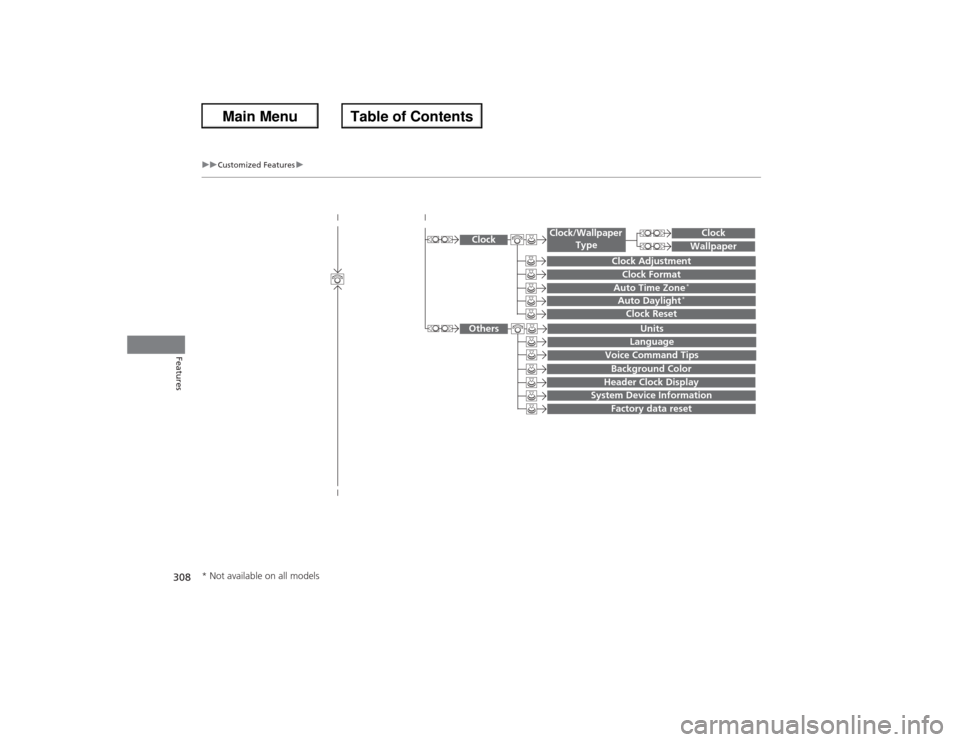
System Device Information
Factory data reset
Background ColorHeader Clock Display
Clock Reset
Auto Time Zone
*
Auto Daylight
*
Clock
Clock AdjustmentClock Format
Clock
UnitsLanguage
Voice Command Tips
Others
Wallpaper
Clock/Wallpaper
Type
* Not available on all models
Page 313 of 595
312
uuCustomized Features u
Features
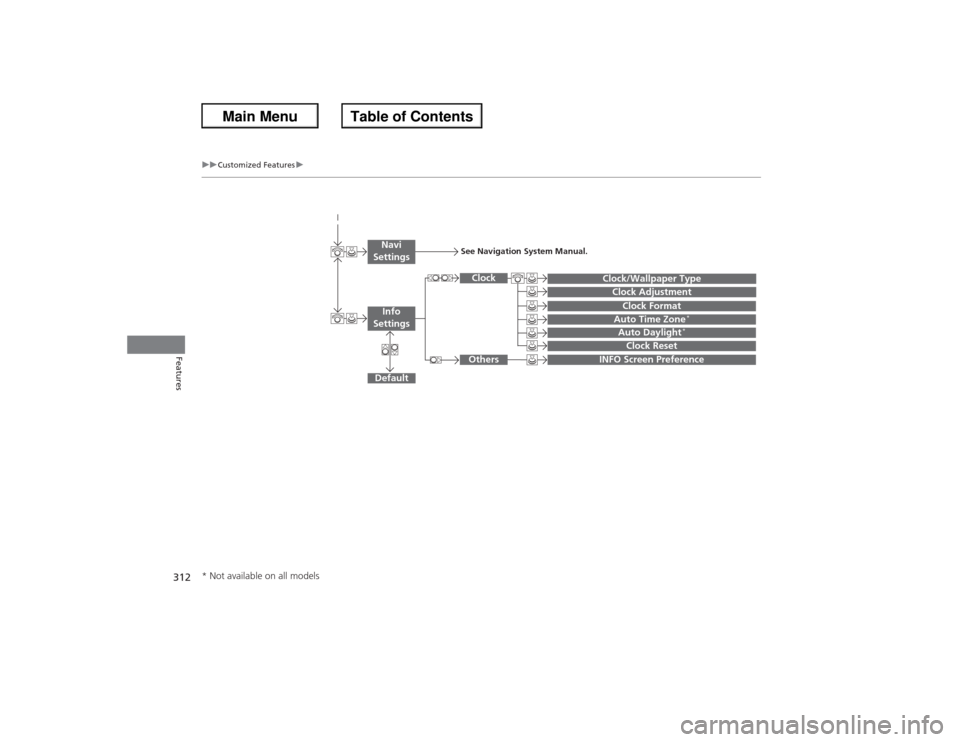
Auto Daylight
*
Clock Reset
INFO Screen Preference
Clock FormatAuto Time Zone
*
Clock/Wallpaper TypeClock Adjustment
Clock
Default
Others
Info
SettingsNavi
Settings
See Navigation System Manual.
* Not available on all models
Page 315 of 595
314
uuCustomized Features u
Features
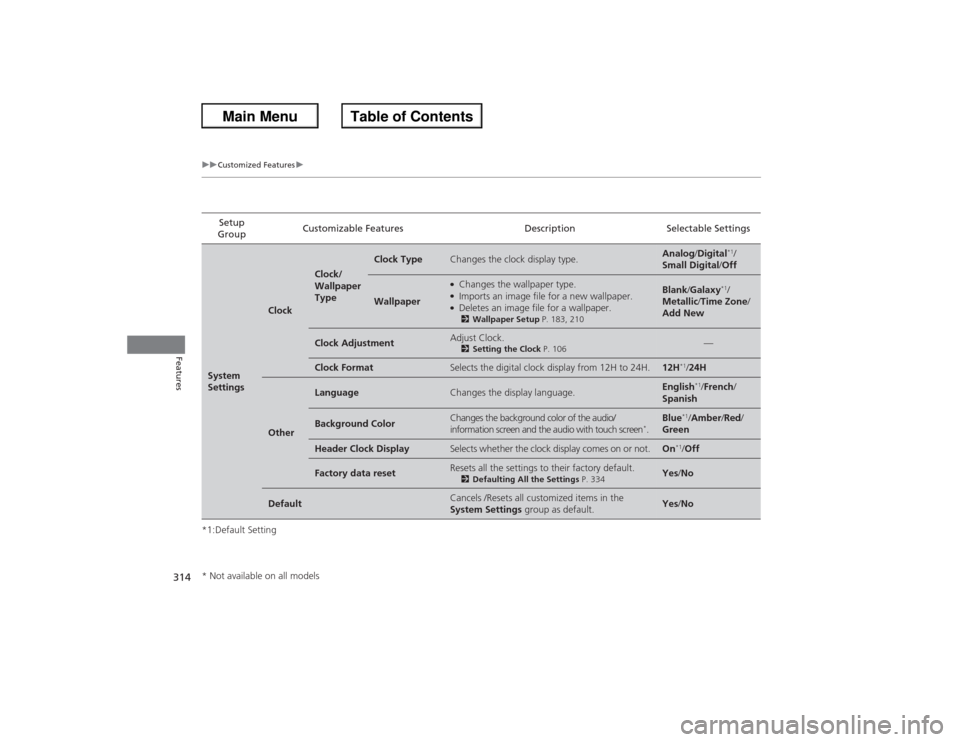
*1:Default SettingSetup
Group Customizable Features Description Selectable SettingsSystem
Settings
Clock
Clock/
Wallpaper
Type
Clock Type
Changes the clock display type.
Analog
/Digital
*1/
Small Digital /Off
Wallpaper
●Changes the wallpaper type.●Imports an image file for a new wallpaper.●Deletes an image file for a wallpaper.2 Wallpaper Setup P. 183, 210
Blank/Galaxy
*1/
Metallic /Time Zone /
Add New
Clock Adjustment
Adjust Clock.2 Setting the Clock P. 106
—
Clock Format
Selects the digital clock display from 12H to 24H.
12H
*1/24H
Other
Language
Changes the display language.
English
*1/French /
Spanish
Background Color
Changes the background color of the audio/
information screen and the audio with touch screen
*.
Blue
*1/ Amber /Red /
Green
Header Clock Display
Selects whether the clock display comes on or not.
On
*1/ Off
Factory data reset
Resets all the settings to their factory default.2 Defaulting All the Settings P. 334
Yes/No
Default
Cancels /Resets all customized items in the
System Settings group as default.
Yes/No
* Not available on all models
Page 320 of 595
319
uuCustomized Features u
Continued
Features
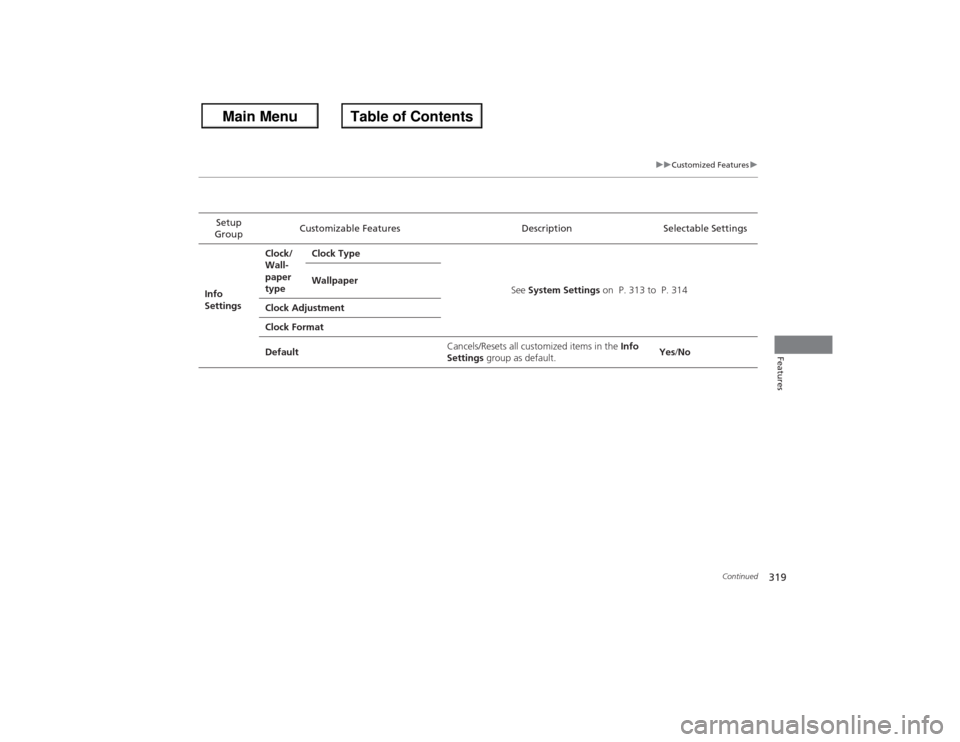
Setup
Group Customizable Features Description Selectable Settings
Info
Settings Clock/
Wall-
paper
type
Clock Type
See System Settings on P. 313 to P. 314
Wallpaper
Clock Adjustment
Clock Format
Default Cancels/Resets all customized items in the
Info
Settings group as default. Yes
/No
Page 325 of 595
324
uuCustomized Features u
Features
*1:Default SettingSetup
Group Customizable Features Description Selectable SettingsSystem
Settings
Voice
Recog.
Volume
Changes the volume of the voice prompt.
—
Voice Prompt
Turns the voice prompt on and off.
On
*1/
Off
Song by Voice
Turns the Song By Voice
TM on and off.
2 Song By Voice
TM (SBV) P. 277
On
*1/Off
Song by Phonetic
Modification
Modifies a voice command for music stored in
the HDD or an iPod ®.2 Phonetic Modification P. 279
—
Phonebook Phonetic
Modification
Modifies a voice command for the phonebook.2Phonebook Phonetic Modification P. 397
—
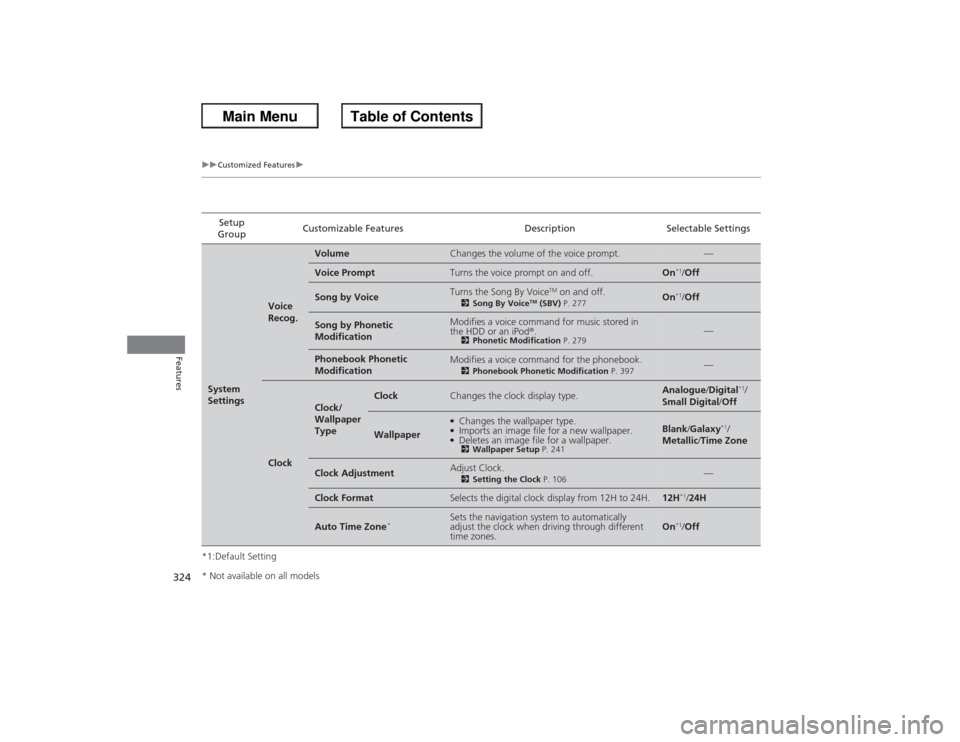
Clock
Clock/
Wallpaper
Type
Clock
Changes the clock display type.
Analogue/Digital
*1/
Small Digital /Off
Wallpaper
●Changes the wallpaper type.●Imports an image file for a new wallpaper.●Deletes an image file for a wallpaper.2 Wallpaper Setup P. 241
Blank/Galaxy
*1/
Metallic /Time Zone
Clock Adjustment
Adjust Clock.2 Setting the Clock P. 106
—
Clock Format
Selects the digital clock display from 12H to 24H.
12H
*1/24H
Auto Time Zone
*
Sets the navigation system to automatically
adjust the clock when driving through different
time zones.
On
*1/Off
* Not available on all models
Page 326 of 595
325
uuCustomized Features u
Continued
Features
*1:Default SettingSetup
Group Customizable Features Description Selectable SettingsSystem
Settings
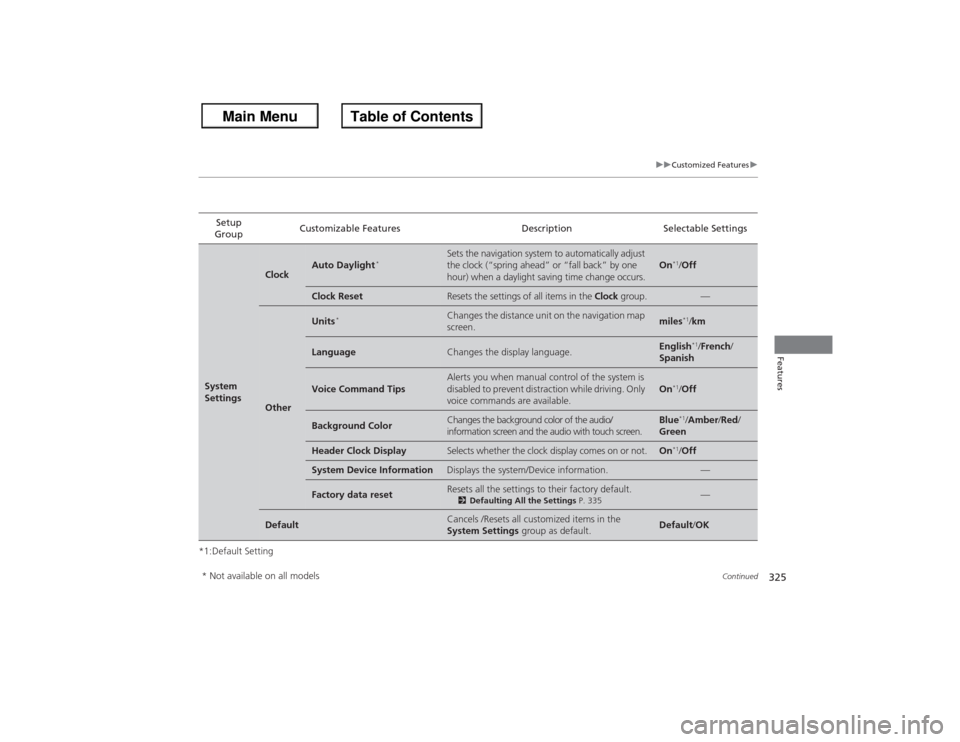
Clock
Auto Daylight
*
Sets the navigation system to automatically adjust
the clock (“spring ahead” or “fall back” by one
hour) when a daylight saving time change occurs.
On
*1/
Off
Clock Reset
Resets the settings of all items in the Clock group.
—
Other
Units
*
Changes the distance unit on the navigation map
screen.
miles
*1/km
Language
Changes the display language.
English
*1/French /
Spanish
Voice Command Tips
Alerts you when manual control of the system is
disabled to prevent distraction while driving. Only
voice commands are available.
On
*1/ Off
Background Color
Changes the background color of the audio/
information screen and the audio with touch screen.
Blue
*1/Amber /Red /
Green
Header Clock Display
Selects whether the clock display comes on or not.
On
*1/ Off
System Device Information
Displays the system/Device information.
—
Factory data reset
Resets all the settings to their factory default.2 Defaulting All the Settings P. 335
—
Default
Cancels /Resets all customized items in the
System Settings group as default.
Default/OK
* Not available on all models
Page 334 of 595
333
uuCustomized Features u
Features
*1:Default SettingSetup
Group Customizable Features Description Selectable Settings
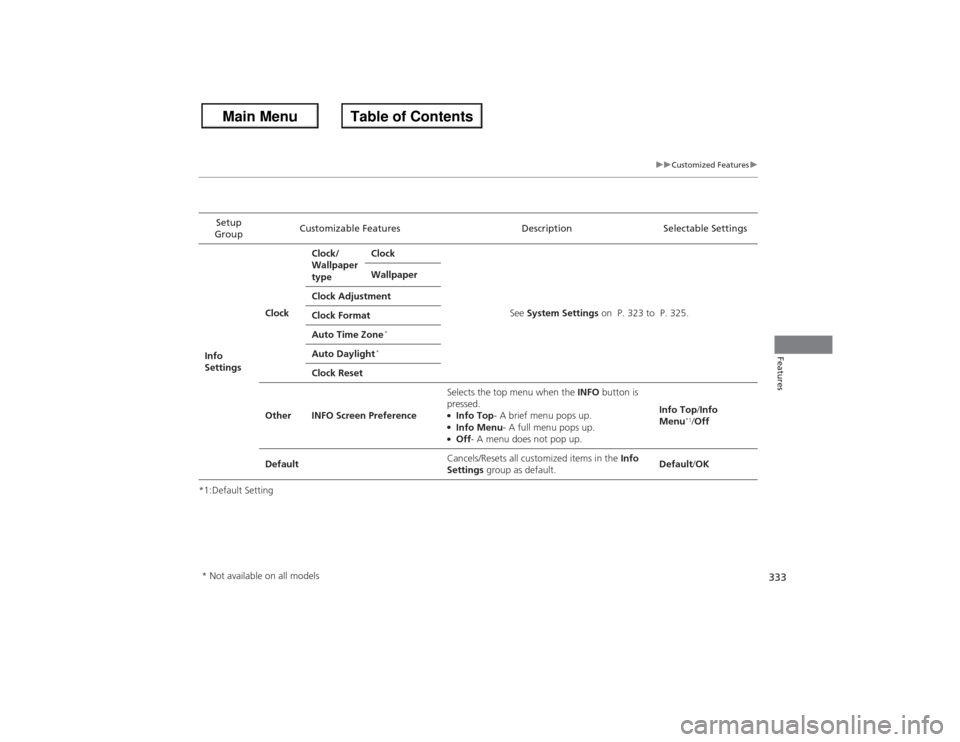
Info
Settings ClockClock/
Wallpaper
type
Clock
See System Settings on P. 323 to P. 325.
Wallpaper
Clock Adjustment
Clock Format
Auto Time Zone
*
Auto Daylight
*
Clock Reset
Other INFO Screen Preference Selects the top menu when the
INFO button is
pressed.
●Info Top - A brief menu pops up.●Info Menu- A full menu pops up.●Off- A menu does not pop up. Info Top
/Info
Menu
*1/ Off
Default Cancels/Resets all customized items in the
Info
Settings group as default. Default
/OK
* Not available on all models
Page 509 of 595
uuMaintenance Under the Hood uEngine Coolant
508Maintenance
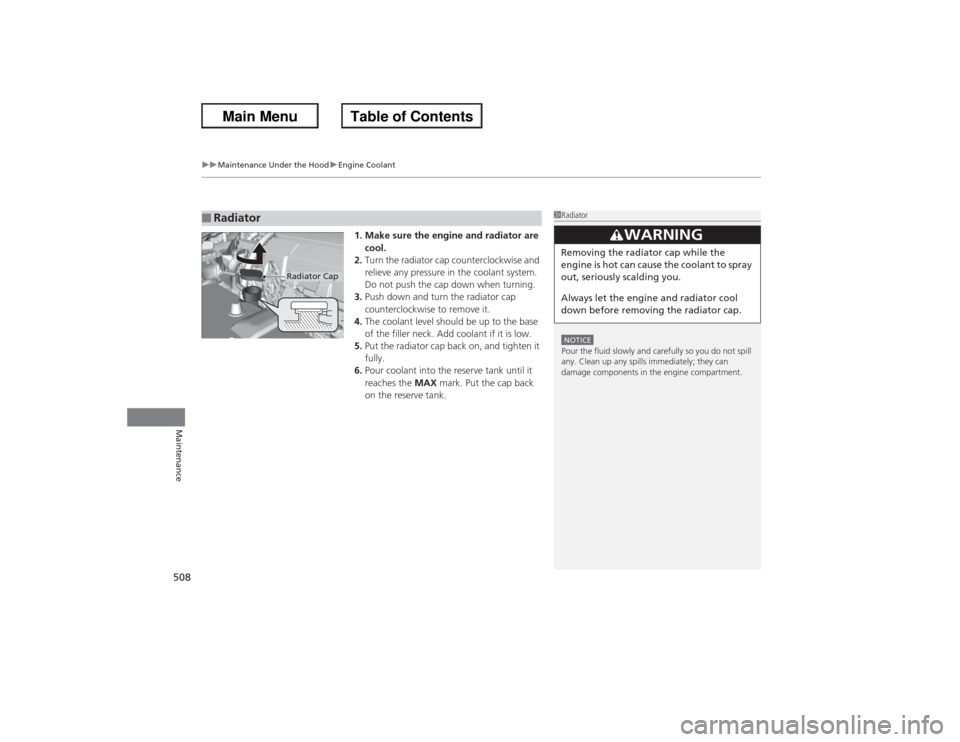
1. Make sure the engine and radiator are
cool.
2. Turn the radiator cap counterclockwise and
relieve any pressure in the coolant system.
Do not push the cap down when turning.
3. Push down and turn the radiator cap
counterclockwise to remove it.
4. The coolant level should be up to the base
of the filler neck. Add coolant if it is low.
5. Put the radiator cap back on, and tighten it
fully.
6. Pour coolant into the reserve tank until it
reaches the MAX mark. Put the cap back
on the reserve tank.
■Radiator
1 RadiatorNOTICEPour the fluid slowly and carefully so you do not spill
any. Clean up any spills immediately; they can
damage components in the engine compartment.
3
WARNING
Removing the radiator cap while the
engine is hot can cause the coolant to spray
out, seriously scalding you.
Always let the engine and radiator cool
down before removing the radiator cap.
Radiator Cap
Page 535 of 595
53 4Maintenance
BatteryChecking the Battery
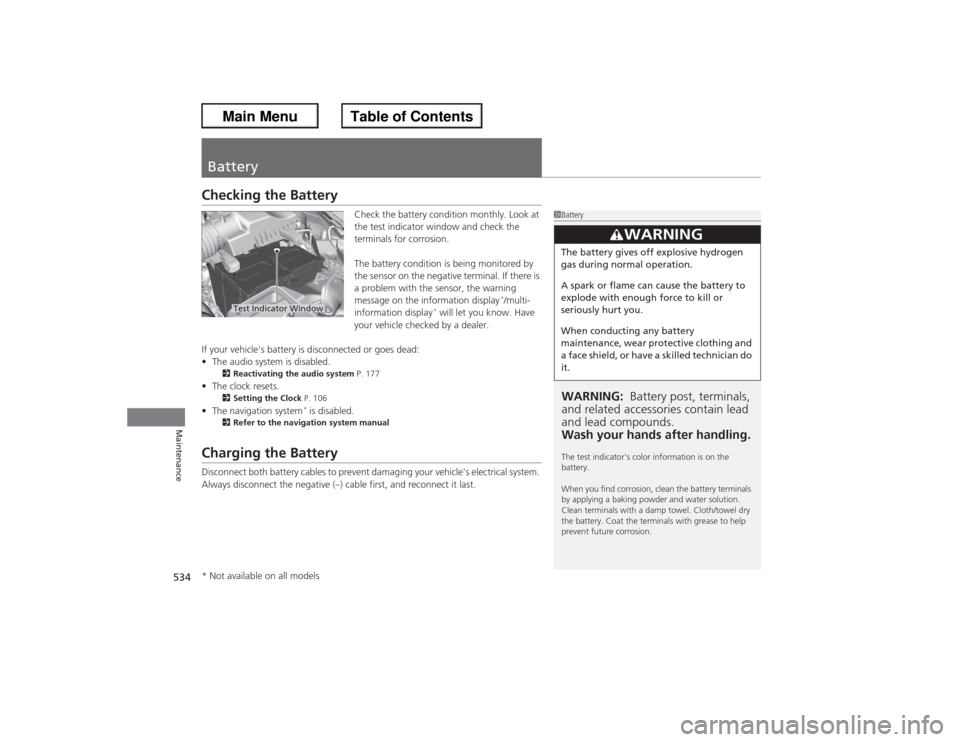
Check the battery condition monthly. Look at
the test indicator window and check the
terminals for corrosion.
The battery condition is being monitored by
the sensor on the negative terminal. If there is
a problem with the sensor, the warning
message on the information display
*/multi-
information display
* will let you know. Have
your vehicle checked by a dealer.
If your vehicle's battery is disconnected or goes dead:
• The audio system is disabled.
2 Reactivating the audio system P. 177
•The clock resets.
2 Setting the Clock P. 106
•The navigation system
* is disabled.
2 Refer to the navigation system manual
Charging the BatteryDisconnect both battery cables to prevent damaging your vehicle's electrical system.
Always disconnect the negative (–) cable first, and reconnect it last.
1BatteryWARNING: Battery post, terminals,
and related accessories contain lead
and lead compounds.
Wash your hands after handling.The test indicator's color information is on the
battery.
When you find corrosion, clean the battery terminals
by applying a baking powder and water solution.
Clean terminals with a damp towel. Cloth/towel dry
the battery. Coat the terminals with grease to help
prevent future corrosion.
3
WARNING
The battery gives off explosive hydrogen
gas during normal operation.
A spark or flame can cause the battery to
explode with enough force to kill or
seriously hurt you.
When conducting any battery
maintenance, wear protective clothing and
a face shield, or have a skilled technician do
it.
Test Indicator Window
* Not available on all models