warning HONDA ACCORD 2013 9.G Workshop Manual
[x] Cancel search | Manufacturer: HONDA, Model Year: 2013, Model line: ACCORD, Model: HONDA ACCORD 2013 9.GPages: 595, PDF Size: 20.67 MB
Page 451 of 595
450
uuWhen Driving uACC (Adaptive Cruise Control)
*
Driving
ACC (Adaptive Cruise Control)
*
Maintains a constant vehicle speed and a safe distance between your vehicle and the
vehicle ahead of you without having to keep your foot on the brake pedal or
accelerator.
1ACC (Adaptive Cruise Control)
*
Important Safety Reminder
As with any system, there are limits to ACC.
Inappropriate use of ACC can result in a serious
accident. Use the brake pedal whenever necessary,
and always keep a safe distance between your vehicle
and other vehicles.
The radar sensor for ACC is shared with FCW
(Forward Collision Warning).
2 Forward Collision Warning (FCW)
* P. 458
3
WARNING
Improper use of ACC can lead to a crash.
Use ACC only when traveling on open
highways in good weather.
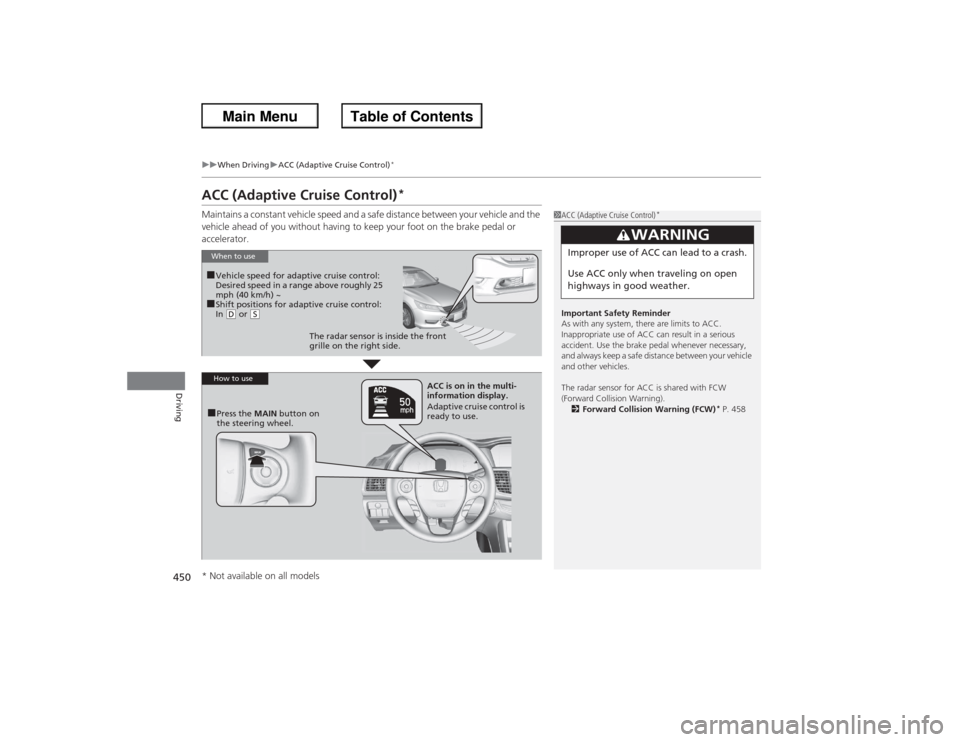
When to use■Vehicle speed for adaptive cruise control:
Desired speed in a range above roughly 25
mph (40 km/h) ~■Shift positions for adaptive cruise control:
In (D or
(S
The radar sensor is inside the front
grille on the right side.
How to use■Press the MAIN button on
the steering wheel. ACC is on in the multi-
information display.
Adaptive cruise control is
ready to use.
* Not available on all models
Page 459 of 595
458
uuWhen Driving uForward Collision Warning (FCW)
*
Driving
Forward Collision Warning (FCW)
*
Alerts you when it detects the possibility of your vehicle colliding with the vehicle in
front of yours.
If the system determines a collision is possible, it gives both visual and audible alerts,
including a heads-up warning th at flashes on the windshield.
u Take appropriate action to prevent a collision (apply the brakes, change lanes,
etc.).■How the system works
The system may give warnings of potential collisions when your vehicle speed is
above 10 mph (15 km/h).
1 Forward Collision Warning (FCW)
*
Important Safety Reminder
FCW cannot detect all objects ahead and may not
detect a given object; accuracy of the system will vary
based on weather, speed and other factors. FCW
does not include a braking function. It is always your
responsibility to safely operate the vehicle and avoid
collisions.
You can change the Forward Collision Warning
Distance setting or turn the system on and off.
2 Customized Features P. 97, 299
For the FCW system to work properly:•Always keep the radar sensor cover clean.•Never use chemical solvents or polishing
compounds to clean the sensor cover. Instead,
clean it with water and a mild detergent.•Do not put anything on the radar sensor cover.
See a dealer if the radar sensor gets damaged or
requires repair.
The camera is shared with Lane Departure Warning
(LDW). 2 LDW Camera P. 463Models with multi-information displayModels with information display
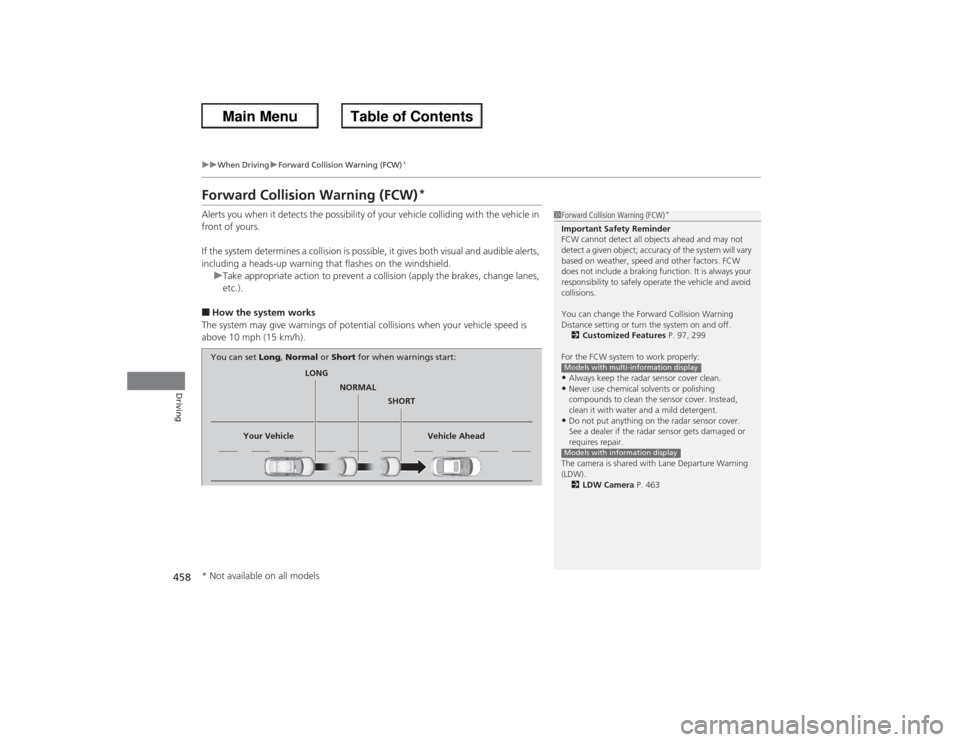
LONG
NORMAL SHORT
Your Vehicle Vehicle Ahead
You can set
Long, Normal or Short for when warnings start:
* Not available on all models
Page 460 of 595
Continued
459
uuWhen Driving uForward Collision Warning (FCW)
*
Driving
1Forward Collision Warning (FCW)
*
Never apply a film or attach any objects to the
windshield that could obstruct the FCW camera's
field of vision.
Scratches, nicks, and other damage to the windshield
within the FCW camera's field of vision can cause the
system to operate abnormally. If this occurs, we
recommend that you replace the windshield with a
genuine Honda replacement windshield. Making
even minor repairs within the camera's field of vision
or installing an aftermarket replacement windshield
may also cause the system to operate abnormally.
After replacing the windshield, have a dealer
recalibrate the camera. Proper calibration of the FCW
camera is necessary for the system to operate
properly.Models with information display1How the system works
The heads-up warning uses a lens located at the front
end of the dashboard.
Do not cover the lens or spill any liquid on it.
Lens
*2
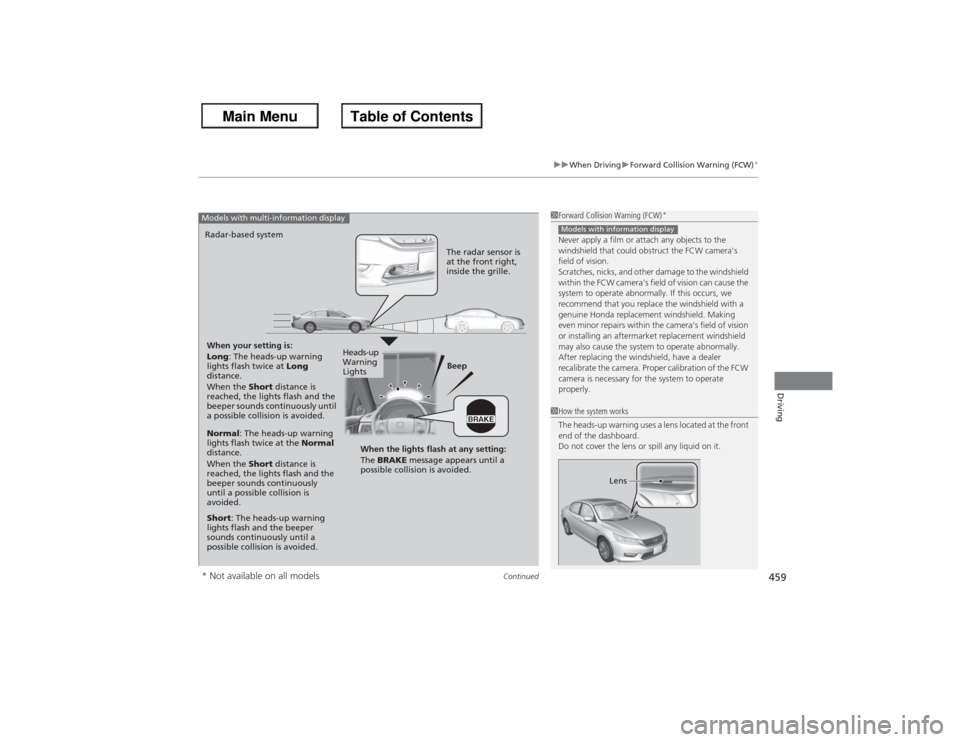
When your setting is:
Long : The heads-up warning
lights flash twice at Long
distance.
When the Short distance is
reached, the lights flash and the
beeper sounds continuously until
a possible collision is avoided. Beep
Radar-based systemModels with multi-information display
The radar sensor is
at the front right,
inside the grille.
Normal
: The heads-up warning
lights flash twice at the Normal
distance.
When the Short distance is
reached, the lights flash and the
beeper sounds continuously
until a possible collision is
avoided.
Short : The heads-up warning
lights flash and the beeper
sounds continuously until a
possible collision is avoided. When the lights flash at any setting:
The
BRAKE message appears until a
possible collision is avoided.
Heads-up
Warning
Lights
* Not available on all models
Page 461 of 595
uuWhen Driving uForward Collision Warning (FCW)
*
460Driving
■Automatic shutoff
FCW may automatically shut itself off and the FCW indicator comes and stays on when:
• The temperature inside the system is high.
• The windshield is blocked by dirt, mud, leaves, wet snow, etc.
• You drive off-road or on a mountain road, or curved and winding road for an
extended period.
• You drive in bad weather (rain, fog, snow, etc.).
• The radar sensor cover is blocked by dirt, mud, leaves, wet snow, etc.
• An abnormal tire condition is detected (wrong tire size, flat tire, etc.).
Once the conditions that caused FCW to shut off improve or are addressed (e.g.,
cleaning), the system comes back on.
1 Automatic shutoff
To help reduce the likelihood that high interior
temperatures will cause the camera system to shut
off, when parking, find a shady area or face the front
of the vehicle away from the sun. Also, do not use a
reflective sun shade that can concentrate heat on the
camera.
If the CAMERA HOT message appears:•Use the climate control system to cool down the
interior and, if necessary, the defroster mode when
windows are fogged.•Start driving the vehicle to lower the windshield
temperature, which cools down the area around
the FCW system.Models with information display
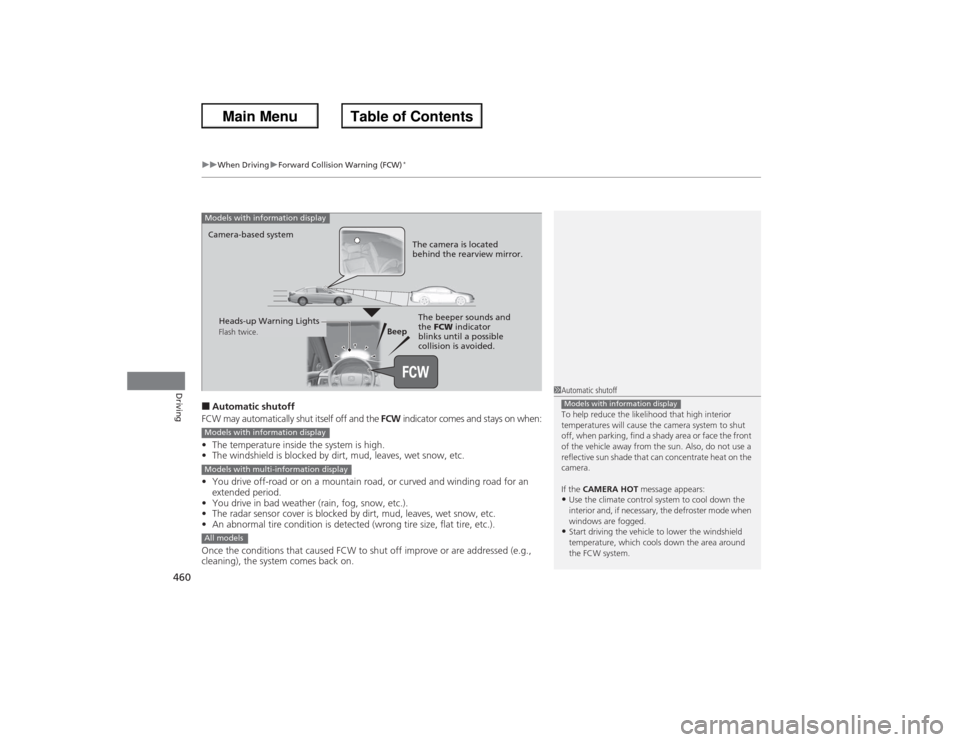
Beep
Camera-based system
Models with information display
The camera is located
behind the rearview mirror.The beeper sounds and
the
FCW indicator
blinks until a possible
collision is avoided.
Heads-up Warning LightsFlash twice.
Models with information displayModels with multi-information displayAll models
Page 462 of 595
461
uuWhen Driving uForward Collision Warning (FCW)
*
Driving
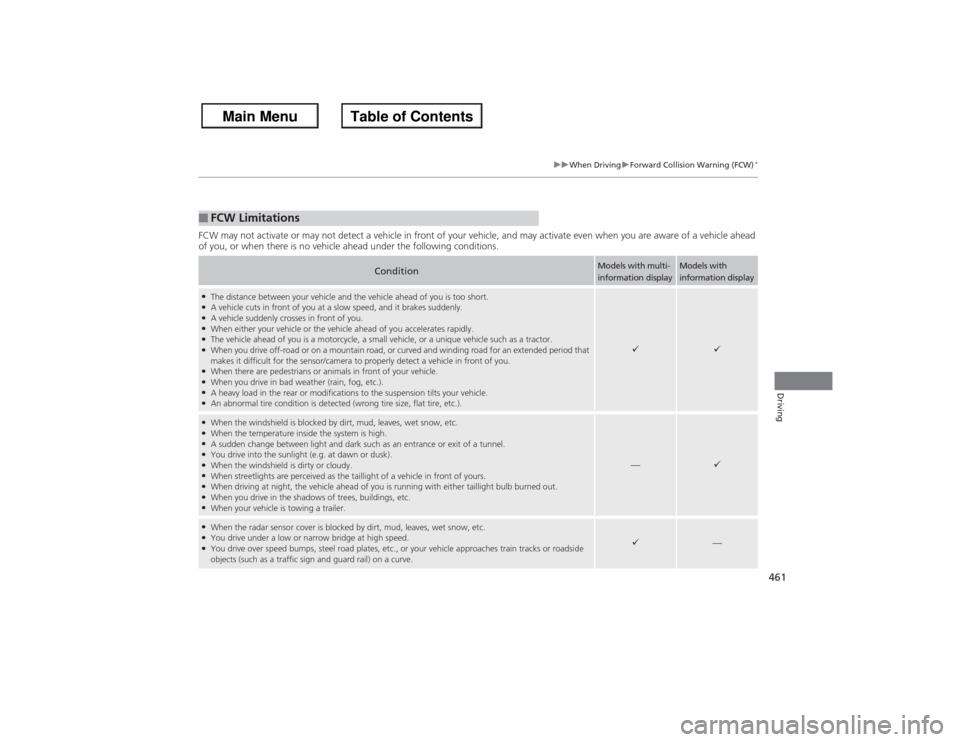
FCW may not activate or may not detect a vehicle in front of your vehicle, and may activate even when you are aware of a vehicl e ahead
of you, or when there is no vehicle ahead under the following conditions.■FCW Limitations
Condition
Models with multi-
information display
Models with
information display
●The distance between your vehicle and the vehicle ahead of you is too short.●A vehicle cuts in front of you at a slow speed, and it brakes suddenly.●A vehicle suddenly crosses in front of you.●When either your vehicle or the vehicle ahead of you accelerates rapidly.●The vehicle ahead of you is a motorcycle, a small vehicle, or a unique vehicle such as a tractor.●When you drive off-road or on a mountain road, or curved and winding road for an extended period that
makes it difficult for the sensor/camera to properly detect a vehicle in front of you.●When there are pedestrians or animals in front of your vehicle.●When you drive in bad weather (rain, fog, etc.).●A heavy load in the rear or modifications to the suspension tilts your vehicle.●An abnormal tire condition is detected (wrong tire size, flat tire, etc.).
9
9
●When the windshield is blocked by dirt, mud, leaves, wet snow, etc.●When the temperature inside the system is high.●A sudden change between light and dark such as an entrance or exit of a tunnel.●You drive into the sunlight (e.g. at dawn or dusk).●When the windshield is dirty or cloudy.●When streetlights are perceived as the taillight of a vehicle in front of yours.●When driving at night, the vehicle ahead of you is running with either taillight bulb burned out.●When you drive in the shadows of trees, buildings, etc.●When your vehicle is towing a trailer.
—
9
●When the radar sensor cover is blocked by dirt, mud, leaves, wet snow, etc.●You drive under a low or narrow bridge at high speed.●You drive over speed bumps, steel road plates, etc ., or your vehicle approaches train tracks or roadside
objects (such as a traffic sign and guard rail) on a curve.
9
—
Page 463 of 595
462
uuWhen Driving uLane Departure Warning (LDW)
*
Driving
Lane Departure Warning (LDW)
*
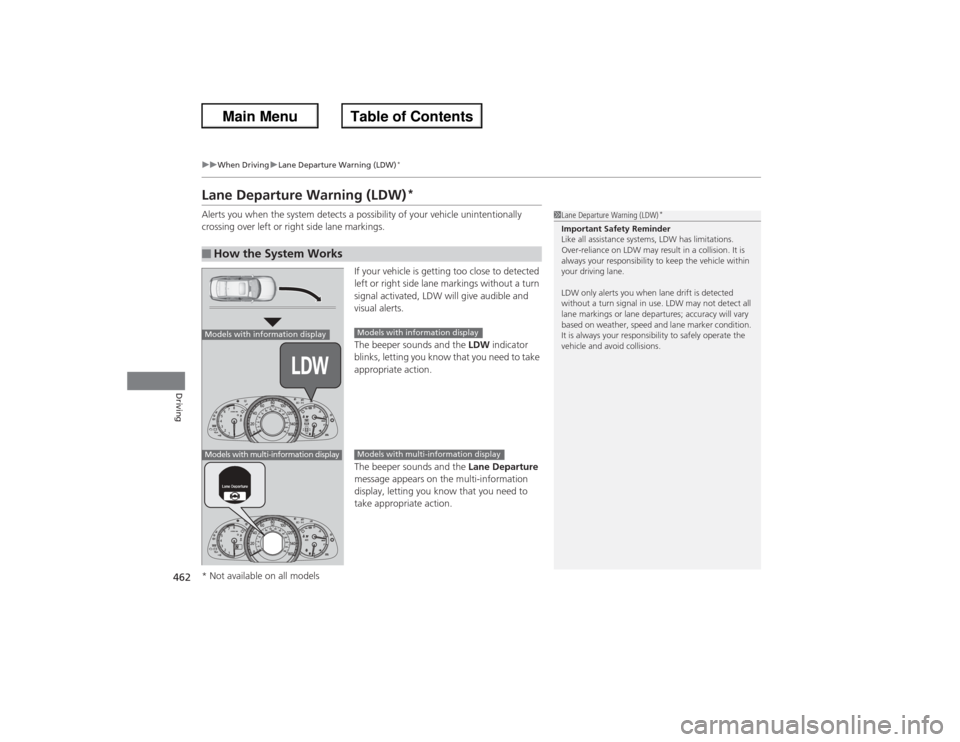
Alerts you when the system detects a possibility of your vehicle unintentionally
crossing over left or right side lane markings.
If your vehicle is getting too close to detected
left or right side lane markings without a turn
signal activated, LDW will give audible and
visual alerts.
The beeper sounds and the LDW indicator
blinks, letting you know that you need to take
appropriate action.
The beeper sounds and the Lane Departure
message appears on the multi-information
display, letting you know that you need to
take appropriate action.■How the System Works
1 Lane Departure Warning (LDW)
*
Important Safety Reminder
Like all assistance systems, LDW has limitations.
Over-reliance on LDW may result in a collision. It is
always your responsibility to keep the vehicle within
your driving lane.
LDW only alerts you when lane drift is detected
without a turn signal in use. LDW may not detect all
lane markings or lane departures; accuracy will vary
based on weather, speed and lane marker condition.
It is always your responsibility to safely operate the
vehicle and avoid collisions.
Models with information displayModels with multi-information display
Models with information displayModels with multi-information display
* Not available on all models
Page 464 of 595
Continued
463
uuWhen Driving uLane Departure Warning (LDW)
*
Driving
The system begins to search for lane markings when all the following conditions are met:
• The vehicle is traveling between at 40-90 mph (64-145 km/h).
• The vehicle is on a straight or slightly curved road.
• The turn signals are off.
• The brake pedal is not pressed.
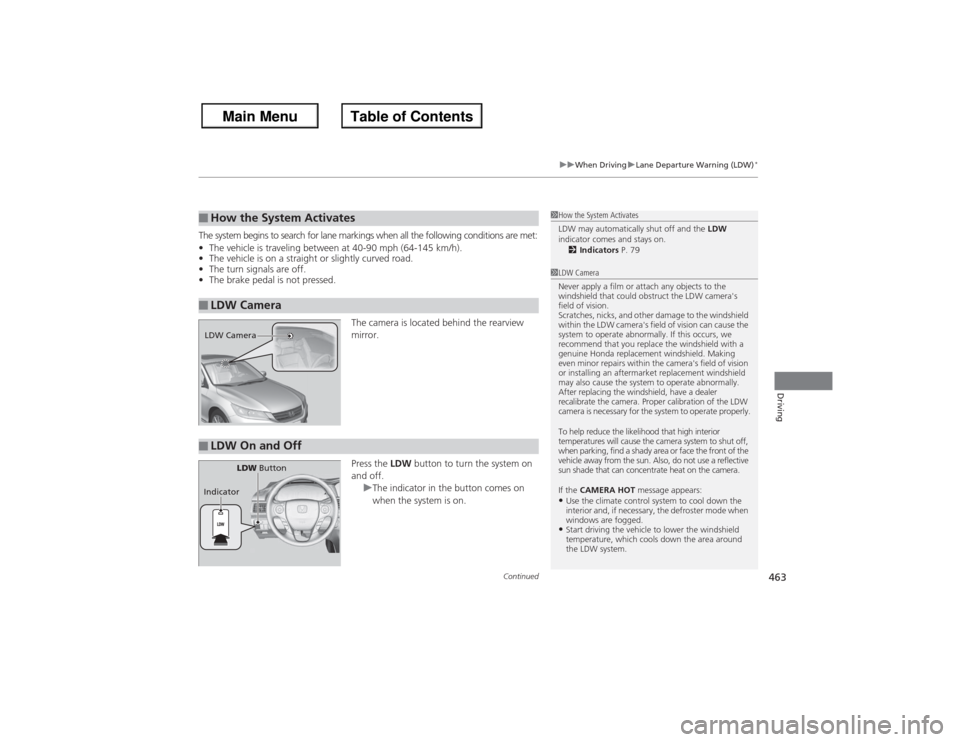
The camera is located behind the rearview
mirror.
Press the LDW button to turn the system on
and off. uThe indicator in the button comes on
when the system is on.■How the System Activates■LDW Camera
1How the System Activates
LDW may automatically shut off and the LDW
indicator comes and stays on. 2 Indicators P. 791LDW Camera
Never apply a film or attach any objects to the
windshield that could obstruct the LDW camera's
field of vision.
Scratches, nicks, and other damage to the windshield
within the LDW camera's field of vision can cause the
system to operate abnormally. If this occurs, we
recommend that you replace the windshield with a
genuine Honda replacement windshield. Making
even minor repairs within the camera's field of vision
or installing an aftermarket replacement windshield
may also cause the system to operate abnormally.
After replacing the windshield, have a dealer
recalibrate the camera. Proper calibration of the LDW
camera is necessary for the system to operate properly.
To help reduce the likelihood that high interior
temperatures will cause the camera system to shut off,
when parking, find a shady area or face the front of the
vehicle away from the sun. Also, do not use a reflective
sun shade that can concentrate heat on the camera.
If the CAMERA HOT message appears:•Use the climate control system to cool down the
interior and, if necessary, the defroster mode when
windows are fogged.•Start driving the vehicle to lower the windshield
temperature, which cools down the area around
the LDW system.
LDW Camera■LDW On and Off
LDW Button
Indicator
Page 465 of 595
464
uuWhen Driving uLane Departure Warning (LDW)
*
Driving
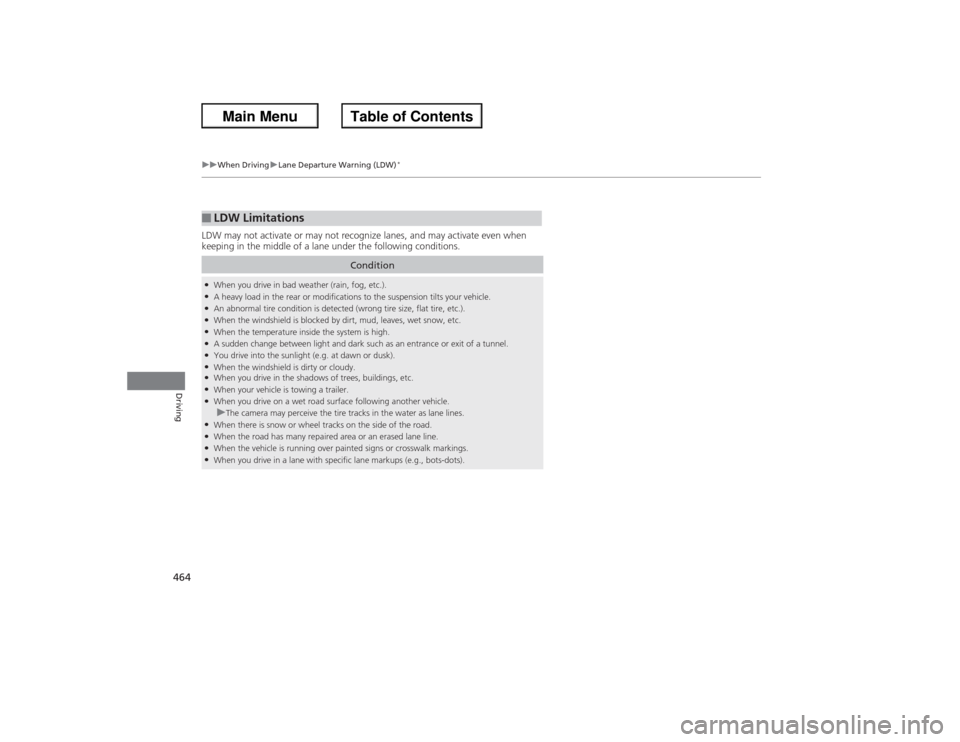
LDW may not activate or may not recognize lanes, and may activate even when
keeping in the middle of a lane under the following conditions.■LDW Limitations
Condition
●When you drive in bad weather (rain, fog, etc.).●A heavy load in the rear or modifications to the suspension tilts your vehicle.●An abnormal tire condition is detected (wrong tire size, flat tire, etc.).●When the windshield is blocked by dirt, mud, leaves, wet snow, etc.●When the temperature inside the system is high.●A sudden change between light and dark such as an entrance or exit of a tunnel.●You drive into the sunlight (e.g. at dawn or dusk).●When the windshield is dirty or cloudy.●When you drive in the shadows of trees, buildings, etc.●When your vehicle is towing a trailer.●When you drive on a wet road surface following another vehicle.uThe camera may perceive the tire tracks in the water as lane lines.
●When there is snow or wheel tracks on the side of the road.●When the road has many repaired area or an erased lane line.●When the vehicle is running over painted signs or crosswalk markings.●When you drive in a lane with specific lane markups (e.g., bots-dots).
Page 468 of 595
467
uuWhen Driving uLaneWatch
TM*
Continued
Driving
LaneWatch
TM
*
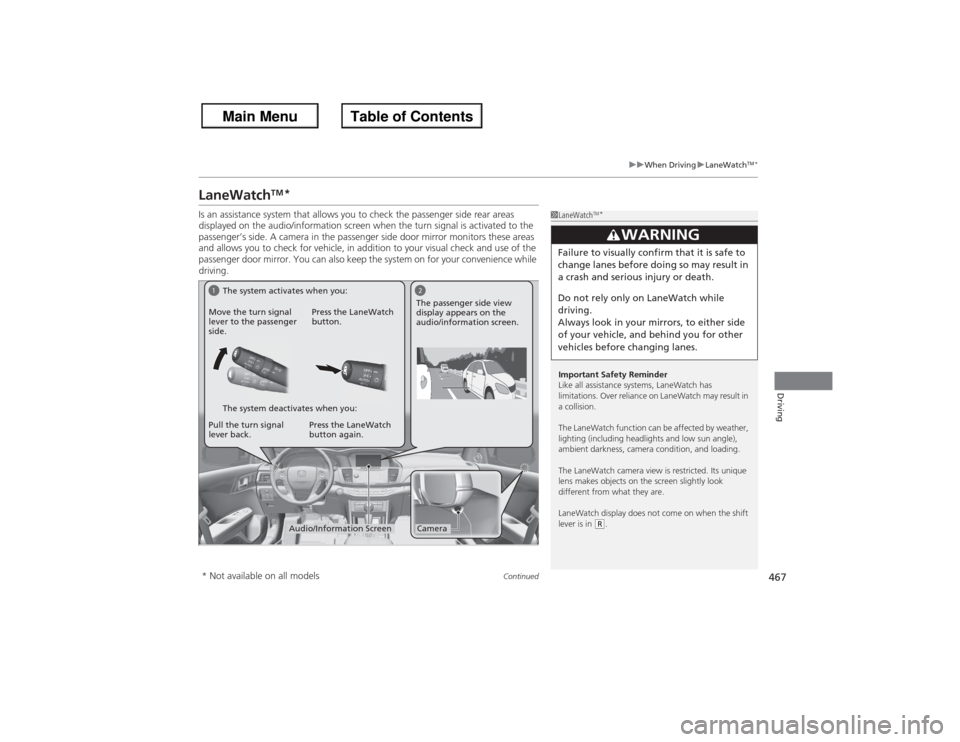
Is an assistance system that allows you to check the passenger side rear areas
displayed on the audio/information screen when the turn signal is activated to the
passenger’s side. A camera in the passenger side door mirror monitors these areas
and allows you to chec k for vehicle, in addition to your visual check and use of the
passenger door mirror. You can also keep the system on for your convenience while
driving.
1 LaneWatch
TM*
Important Safety Reminder
Like all assistance systems, LaneWatch has
limitations. Over reliance on LaneWatch may result in
a collision.
The LaneWatch function can be affected by weather,
lighting (including headlights and low sun angle),
ambient darkness, camera condition, and loading.
The LaneWatch camera view is restricted. Its unique
lens makes objects on the screen slightly look
different from what they are.
LaneWatch display does not come on when the shift
lever is in
(R.3
WARNING
Failure to visually confirm that it is safe to
change lanes before do ing so may result in
a crash and serious injury or death.
Do not rely only on LaneWatch while
driving.
Always look in your mirrors, to either side
of your vehicle, and behind you for other
vehicles before changing lanes.
1
2Camera
Audio/Information Screen
Move the turn signal
lever to the passenger
side.
Press the LaneWatch
button.
Pull the turn signal
lever back. Press the LaneWatch
button again. The passenger side view
display appears on the
audio/information screen.
The system activates when you:
The system deactivates when you:
* Not available on all models
Page 474 of 595
473
Continued
Driving
BrakingBrake SystemUse the parking brake to keep the vehicle stationary when parking.
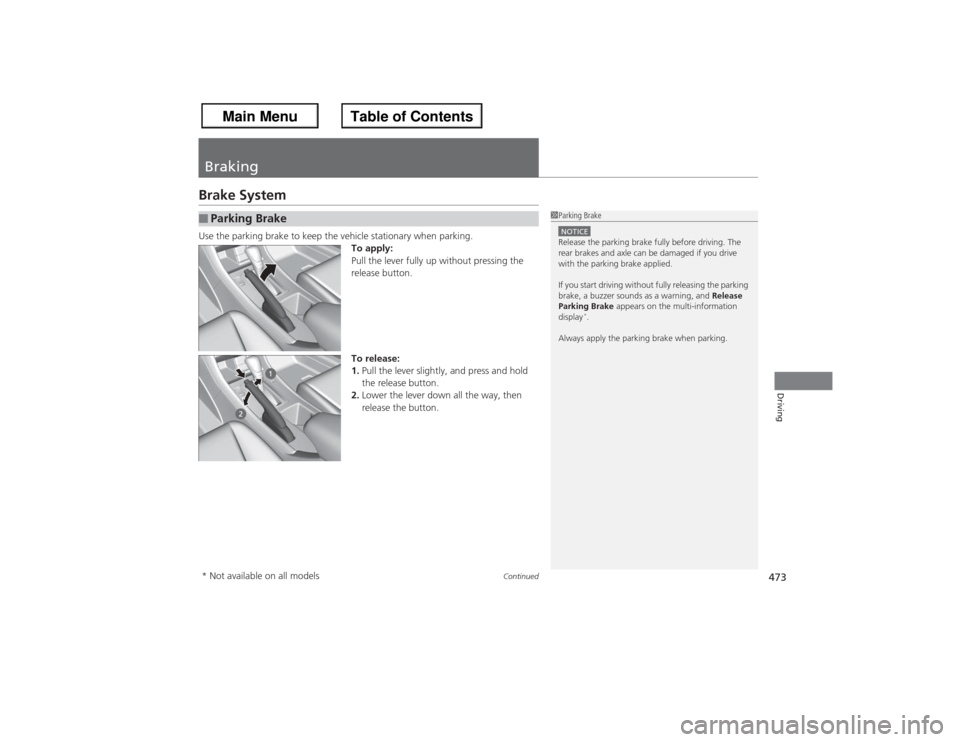
To apply:
Pull the lever fully up without pressing the
release button.
To release:
1.Pull the lever slightly, and press and hold
the release button.
2. Lower the lever down all the way, then
release the button.■Parking Brake
1Parking BrakeNOTICERelease the parking brake fully before driving. The
rear brakes and axle can be damaged if you drive
with the parking brake applied.
If you start driving without fully releasing the parking
brake, a buzzer sounds as a warning, and Release
Parking Brake appears on the multi-information
display
*.
Always apply the parking brake when parking.
* Not available on all models