ground HONDA ACCORD 2013 9.G Owners Manual
[x] Cancel search | Manufacturer: HONDA, Model Year: 2013, Model line: ACCORD, Model: HONDA ACCORD 2013 9.GPages: 595, PDF Size: 20.67 MB
Page 187 of 595
186
uuAudio System Basic Operation uDisplay Setup
Features
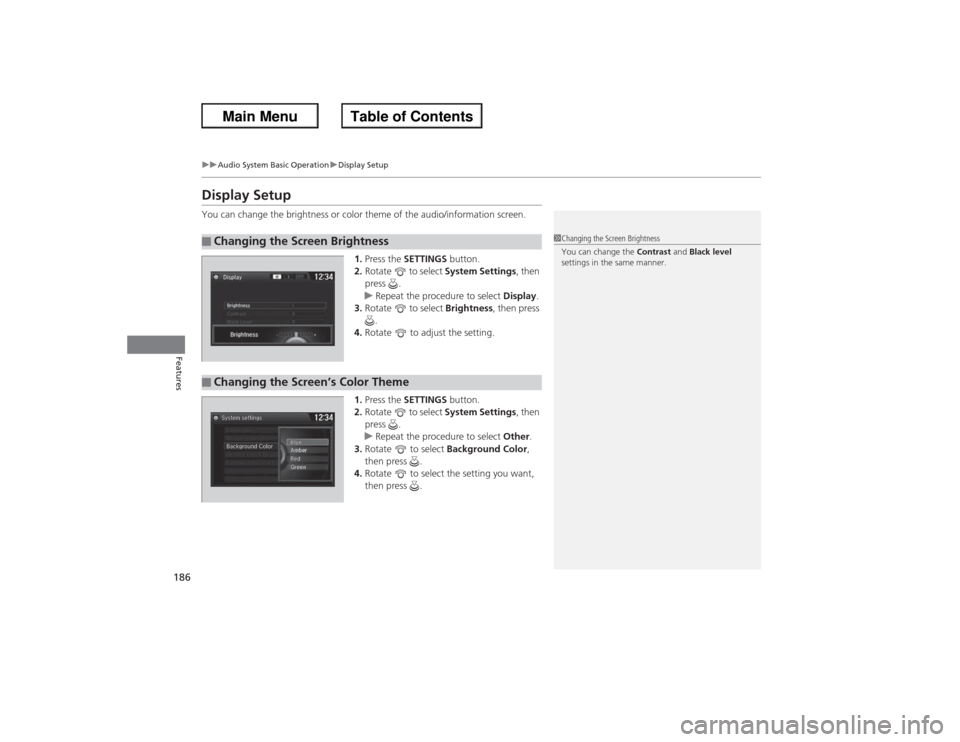
Display SetupYou can change the brightness or color theme of the audio/information screen.
1.Press the SETTINGS button.
2. Rotate to select System Settings, then
press .
u Repeat the procedure to select Display.
3. Rotate to select Brightness, then press
.
4. Rotate to adjust the setting.
1. Press the SETTINGS button.
2. Rotate to select System Settings, then
press .
u Repeat the procedure to select Other.
3. Rotate to select Background Color,
then press .
4. Rotate to select the setting you want,
then press .■Changing the Screen Brightness
1Changing the Screen Brightness
You can change the Contrast and Black level
settings in the same manner.
■Changing the Screen’s Color Theme
Page 214 of 595
213
uuAudio System Basic Operation uDisplay Setup
Features
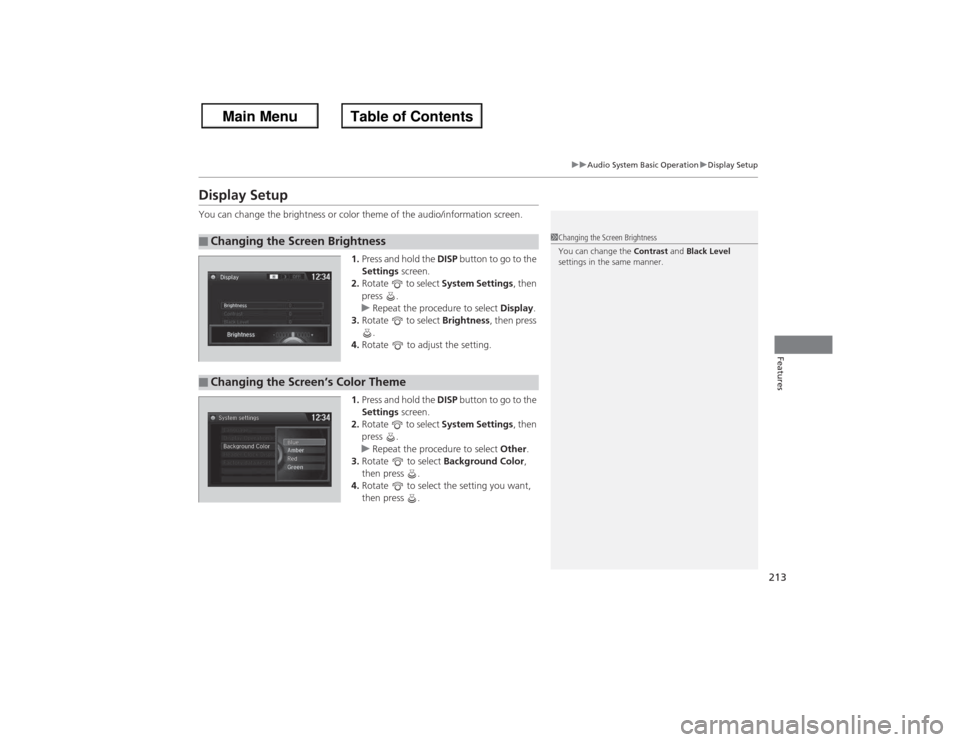
Display SetupYou can change the brightness or color theme of the audio/information screen.
1.Press and hold the DISP button to go to the
Settings screen.
2. Rotate to select System Settings, then
press .
u Repeat the procedure to select Display.
3. Rotate to select Brightness , then press
.
4. Rotate to adjust the setting.
1. Press and hold the DISP button to go to the
Settings screen.
2. Rotate to select System Settings, then
press .
u Repeat the procedure to select Other.
3. Rotate to select Background Color,
then press .
4. Rotate to select the setting you want,
then press .■Changing the Screen Brightness
1Changing the Screen Brightness
You can change the Contrast and Black Level
settings in the same manner.
■Changing the Screen’s Color Theme
Page 245 of 595
244
uuAudio System Basic Operation uDisplay Setup
Features
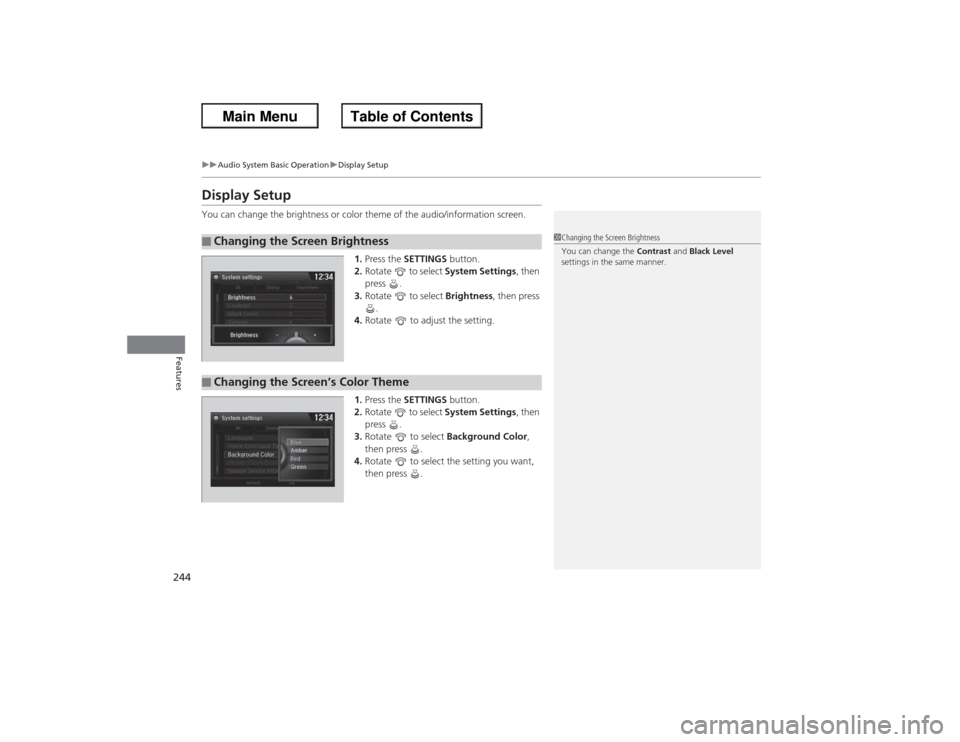
Display SetupYou can change the brightness or color theme of the audio/information screen.
1.Press the SETTINGS button.
2. Rotate to select System Settings, then
press .
3. Rotate to select Brightness, then press
.
4. Rotate to adjust the setting.
1. Press the SETTINGS button.
2. Rotate to select System Settings, then
press .
3. Rotate to select Background Color,
then press .
4. Rotate to select the setting you want,
then press .■Changing the Screen Brightness
1Changing the Screen Brightness
You can change the Contrast and Black Level
settings in the same manner.
■Changing the Screen’s Color Theme
Page 246 of 595
245
uuAudio System Basic Operation uVoice Control Operation
Continued
Features
Voice Control OperationYour vehicle has a voice control system that allows hands-free operation of most of
the navigation system functions.
The voice control system uses the (Talk) and (hang-up/back) buttons on the
steering wheel and a microphone near the map lights on the ceiling.
To achieve optimum voice recognition when using the navigation voice control
system:
• Make sure the correct screen is displayed for the voice command that you are
using.
• Close the windows and moonroof.
• Adjust the dashboard and side vents so air does not blow onto the microphone
on the ceiling.
• Speak clearly in a clear, natural speaking voice without pausing between words.
• Reduce any background noise if possible. The system may misinterpret your
command if more than one person is speaking at the same time.
• Refer to the Voice Help feature.
2 Refer to the navigation System Manual
■Voice Recognition
1Voice Control Operation
When you press the button, a helpful prompt asks
what you would like to do. Press and release the
button again to bypass this prompt and give a
command.1Voice Recognition
The voice control system can only be used from the
driver’s seat because the microphone unit removes
noises from the front passenger’s side.
Page 303 of 595
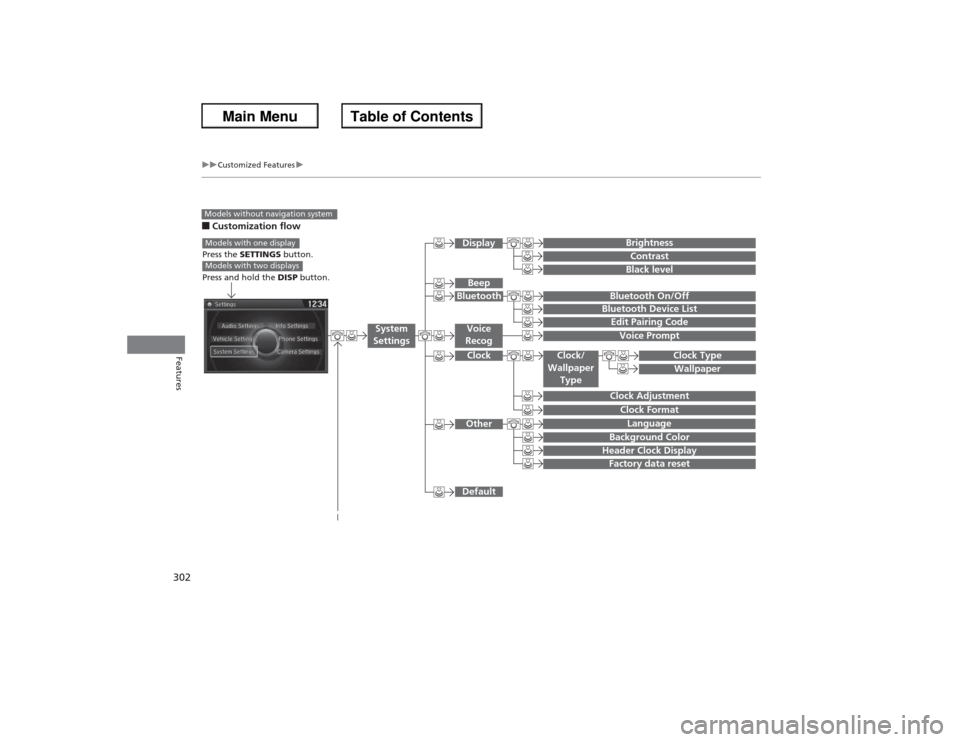
302
uuCustomized Features u
Features
■Customization flowModels without navigation system
Clock FormatBackground ColorHeader Clock DisplayFactory data resetClock Adjustment
Press the SETTINGS button.
Press and hold the DISP button.Models with one displayModels with two displays
Language
Default
Edit Pairing CodeBluetooth On/OffBluetooth Device List
Voice PromptBrightnessContrastBlack level
Beep
Clock/
Wallpaper Type
Clock TypeWallpaper
System
Settings
Voice
RecogBluetoothDisplayClockOther
Page 309 of 595
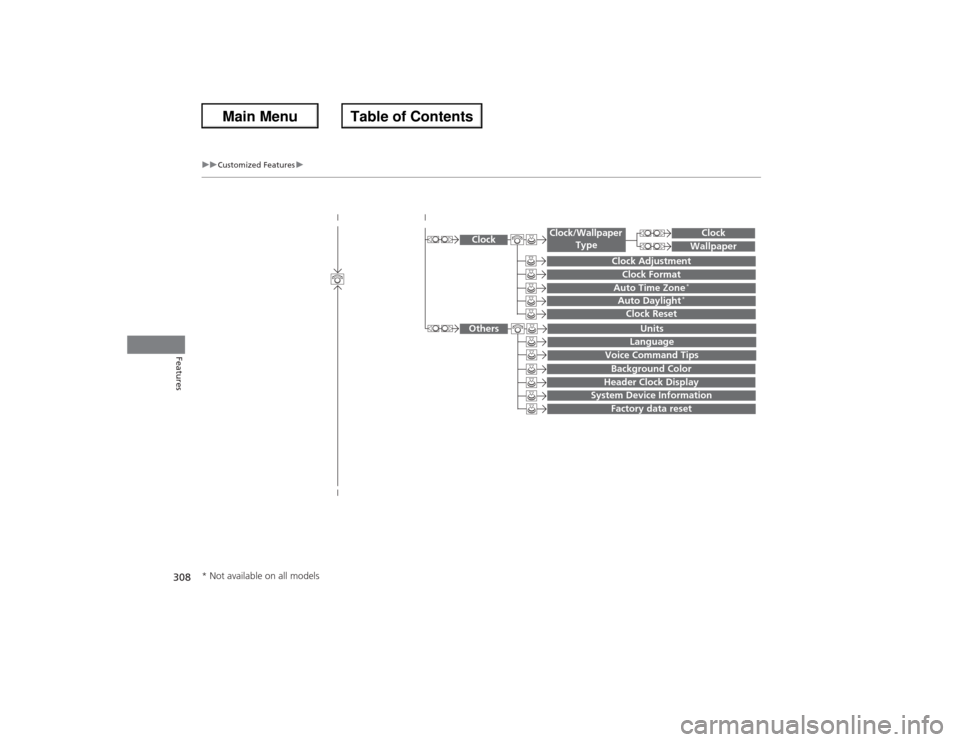
308
uuCustomized Features u
Features
System Device Information
Factory data reset
Background ColorHeader Clock Display
Clock Reset
Auto Time Zone
*
Auto Daylight
*
Clock
Clock AdjustmentClock Format
Clock
UnitsLanguage
Voice Command Tips
Others
Wallpaper
Clock/Wallpaper
Type
* Not available on all models
Page 315 of 595
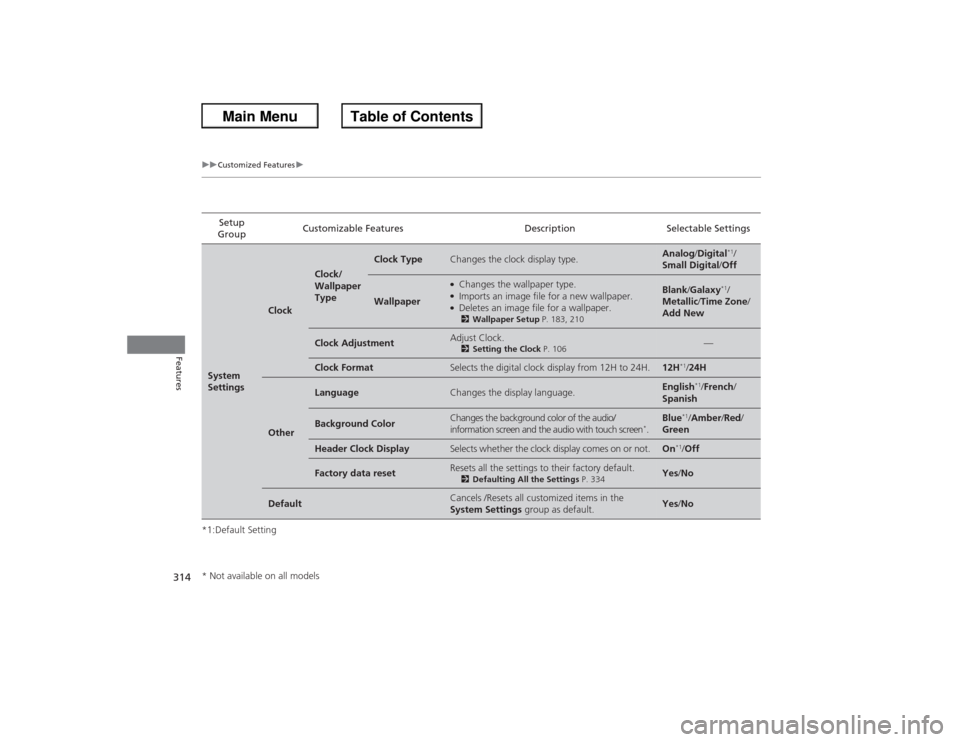
314
uuCustomized Features u
Features
*1:Default SettingSetup
Group Customizable Features Description Selectable SettingsSystem
Settings
Clock
Clock/
Wallpaper
Type
Clock Type
Changes the clock display type.
Analog
/Digital
*1/
Small Digital /Off
Wallpaper
●Changes the wallpaper type.●Imports an image file for a new wallpaper.●Deletes an image file for a wallpaper.2 Wallpaper Setup P. 183, 210
Blank/Galaxy
*1/
Metallic /Time Zone /
Add New
Clock Adjustment
Adjust Clock.2 Setting the Clock P. 106
—
Clock Format
Selects the digital clock display from 12H to 24H.
12H
*1/24H
Other
Language
Changes the display language.
English
*1/French /
Spanish
Background Color
Changes the background color of the audio/
information screen and the audio with touch screen
*.
Blue
*1/ Amber /Red /
Green
Header Clock Display
Selects whether the clock display comes on or not.
On
*1/ Off
Factory data reset
Resets all the settings to their factory default.2 Defaulting All the Settings P. 334
Yes/No
Default
Cancels /Resets all customized items in the
System Settings group as default.
Yes/No
* Not available on all models
Page 326 of 595
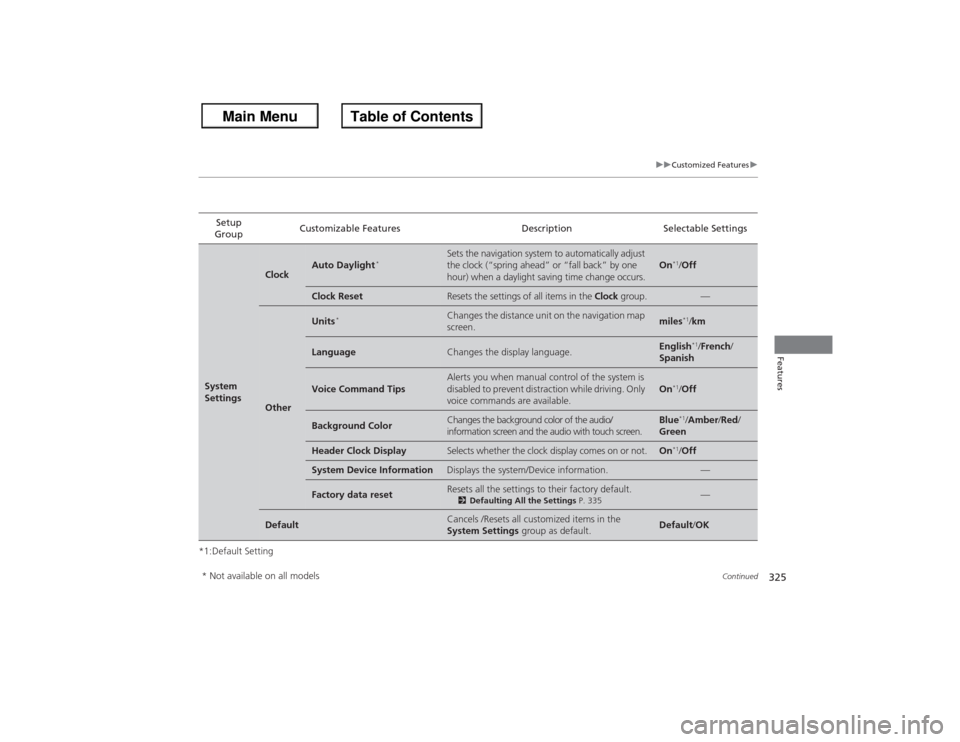
325
uuCustomized Features u
Continued
Features
*1:Default SettingSetup
Group Customizable Features Description Selectable SettingsSystem
Settings
Clock
Auto Daylight
*
Sets the navigation system to automatically adjust
the clock (“spring ahead” or “fall back” by one
hour) when a daylight saving time change occurs.
On
*1/
Off
Clock Reset
Resets the settings of all items in the Clock group.
—
Other
Units
*
Changes the distance unit on the navigation map
screen.
miles
*1/km
Language
Changes the display language.
English
*1/French /
Spanish
Voice Command Tips
Alerts you when manual control of the system is
disabled to prevent distraction while driving. Only
voice commands are available.
On
*1/ Off
Background Color
Changes the background color of the audio/
information screen and the audio with touch screen.
Blue
*1/Amber /Red /
Green
Header Clock Display
Selects whether the clock display comes on or not.
On
*1/ Off
System Device Information
Displays the system/Device information.
—
Factory data reset
Resets all the settings to their factory default.2 Defaulting All the Settings P. 335
—
Default
Cancels /Resets all customized items in the
System Settings group as default.
Default/OK
* Not available on all models
Page 425 of 595
uuTowing a Trailer uTowing Preparation
424Driving
Towing equipment varies by the size of your trailer, how much load you are towing,
and where you are towing.■Hitches
The hitch must be of an approved type and properly bolted to the underbody.■Safety chains
Always use safety chains when you tow a trailer. Leave enough slack to allow the
trailer to turn corners easily, but do not allow the chains to drag on the ground.■Trailer brakes
There are two common types of trailer brakes: surge and electric. Surge brakes are
common for boat trailers, since the brakes will get wet. If you choose electric brakes,
be sure they are electronically actuated. Do not attempt to attach trailer brakes to
your vehicle's hydraulic system, as it will lower braking effectiveness and create a
potential hazard.■Additional towing equipment
Many states and provinces/territories require special outside mirrors when towing a trailer. Even if mirrors are not required in your locale, you should install special
mirrors if visibility is restricted in any way.■Trailer light
Trailer lights and equipment must comply with federal, state, province/territory, and
local regulations. Check with your local trailer sales or rental agency for the
requirements in the area where you plan to tow.■Towing Equipment and Accessories
1 Towing Equipment and Accessories
Make sure that all equipment is properly installed and
maintained, and that it meets federal, state, province/
territory, and local regulations.
Consult your trailer sales or rental agency if any other
items are recommended or required for your towing
situation.
The lighting and wiring of trailers can vary by type
and brand. If a connector is required, it should only
be installed by a qualified technician.
Page 487 of 595
486Maintenance
Before Performing MaintenanceInspection and MaintenanceFor your safety, perform all listed inspections and maintenance to keep your vehicle
in good condition. If you become aware of any abnormality (noise, smell, insufficient
brake fluid, oil residue on the ground, etc.), have your vehicle inspected by a dealer.
(Note, however, that service at a dealer is not mandatory to keep your warranties in
effect.) Refer to the separate maintenance booklet for detailed maintenance and
inspection information.■Daily inspections
Perform inspections before long distance trips, when washing the vehicle, or when refueling.■Periodic inspections
• Check the brake fluid level monthly.2 Brake/Clutch Fluid P. 511
•Check the tire pressure monthly. Examine the tread for wear and foreign objects.
2 Checking and Maintaining Tires P. 525
•Check the operation of the exterior lights monthly.
2 Replacing Light Bulbs P. 513
•Check the condition of the wiper blades at least every six months.
2 Checking and Maintaining Wiper Blades P. 523
■Types of Inspection and Maintenance
1Inspection and Maintenance
Maintenance, replacement, or repair of
emissions control devices and systems may be
done by any automotive repair establishment or
individuals using parts that are “certified” to
EPA standards.
According to state and federal regulations, failure to
perform maintenance on the maintenance main
items marked with # will not void your emissions
warranties. However, all maintenance services should
be performed in accordance with the intervals
indicated by the information display
*/multi-
information display
*.
2 Maintenance Service Items P. 491, 495
If you want to perform complex maintenance tasks
that require more skills and tools, you can purchase a
subscription to the Service Express website at
www.techinfo.honda.com .
2 Authorized Manuals P. 581
If you want to perform maintenance yourself, make
sure that you have the necessary tools and skills first.
After performing maintenance, update the records in
the separate maintenance booklet.
U.S. models
* Not available on all models