power steering HONDA ACCORD 2013 9.G Owners Manual
[x] Cancel search | Manufacturer: HONDA, Model Year: 2013, Model line: ACCORD, Model: HONDA ACCORD 2013 9.GPages: 595, PDF Size: 20.67 MB
Page 10 of 595
9Quick Reference Guide
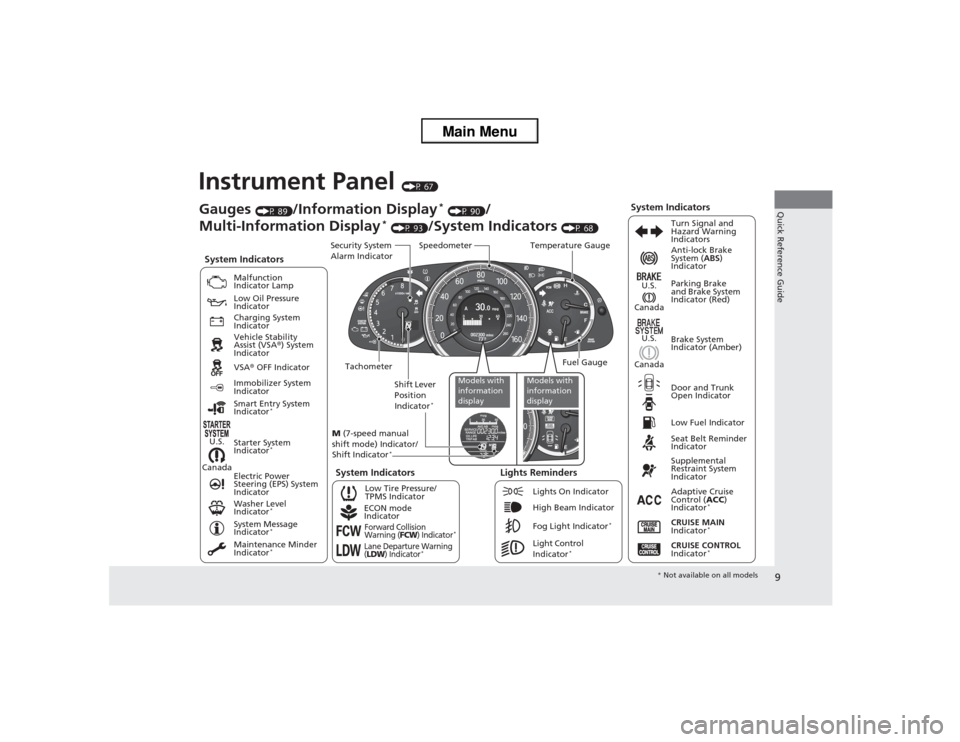
Instrument Panel
(P 67)
CanadaU.S.
Low Fuel IndicatorAnti-lock Brake
System (
ABS)
Indicator
Parking Brake
and Brake System
Indicator (Red)
Canada U.S.
Washer Level
Indicator
*
System Indicators
Malfunction
Indicator Lamp
Low Oil Pressure
Indicator
Charging System
Indicator
Vehicle Stability
Assist (VSA ®) System
Indicator
VSA ® OFF Indicator
Low Tire Pressure/
TPMS Indicator
Electric Power
Steering (EPS) System
Indicator
Lights Reminders
Lights On Indicator
High Beam Indicator
Fog Light Indicator
*
Immobilizer System
Indicator
Seat Belt Reminder
Indicator
System Indicators
CRUISE CONTROL
Indicator
*
Adaptive Cruise
Control ( ACC)
Indicator
*
CRUISE MAIN
Indicator
*
Tachometer Speedometer
Fuel Gauge
Security System
Alarm Indicator
Shift Lever
Position
Indicator
*
Gauges
(P 89)
/Information Display
* (P 90)
/
Multi-Information Display
* (P 93)
/System Indicators
(P 68) Turn Signal and
Hazard Warning
Indicators
System Indicators
Temperature Gauge
M (7-speed manual
shift mode) Indicator/
Shift Indicator
*
Maintenance Minder
Indicator
*
Smart Entry System
Indicator
*
Starter System
Indicator
*
System Message
Indicator
*
ECON mode
IndicatorForward Collision
Warning (
FCW
) Indicator
*
Lane Departure Warning
(LDW
) Indicator
*
Light Control
Indicator
*
Door and Trunk
Open Indicator Brake System
Indicator (Amber)
Supplemental
Restraint System
Indicator
Canada U.S.
Models with
information
display
Models with
information
display
*
Not available on all models
Page 12 of 595
11Quick Reference Guide
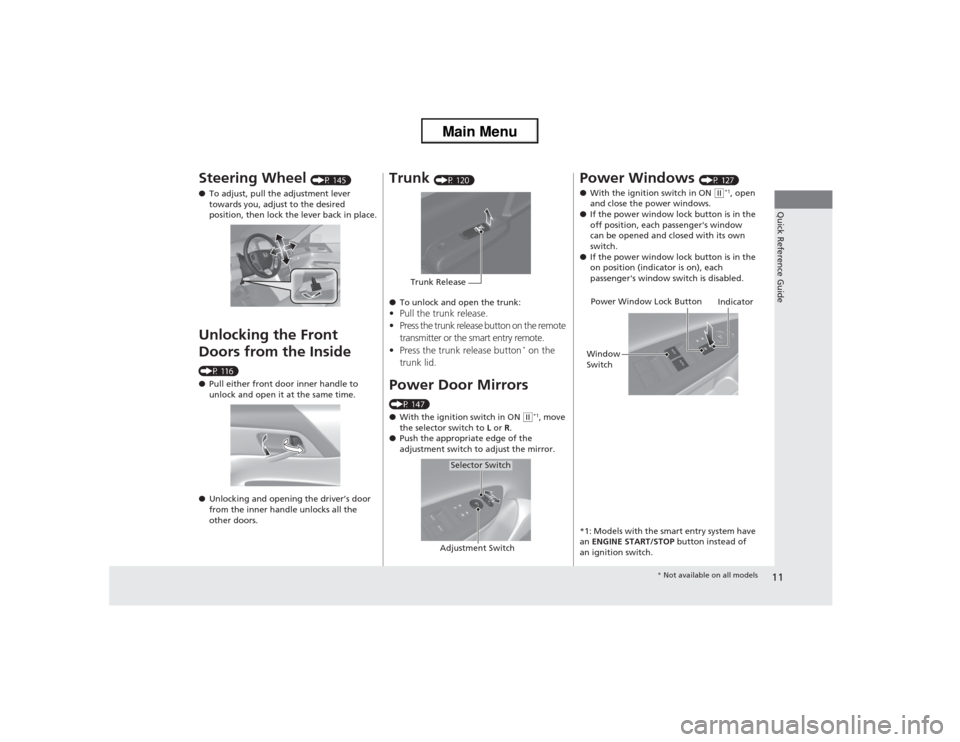
Steering Wheel
(P 145)
● To adjust, pull the adjustment lever
towards you, adjust to the desired
position, then lock the lever back in place.
Unlocking the Front
Doors from the Inside (P 116)
●Pull either front door inner handle to
unlock and open it at the same time.
● Unlocking and opening the driver’s door
from the inner handle unlocks all the
other doors.
Trunk
(P 120)
● To unlock and open the trunk:
•Pull the trunk release.
• Press the trunk release button on the remote
transmitter or the smart entry remote.
• Press the trunk release button
* on the
trunk lid.
Power Door Mirrors(P 147)
● With the ignition switch in ON
(w*1, move
the selector switch to L or R.
● Push the appropriate edge of the
adjustment switch to adjust the mirror.
Trunk Release
Selector Switch
Adjustment Switch
Power Windows
(P 127)
● With the ignition switch in ON
(w*1, open
and close the power windows.
● If the power window lock button is in the
off position, each passenger's window
can be opened and closed with its own
switch.
● If the power window lock button is in the
on position (indicator is on), each
passenger's window switch is disabled.
*1: Models with the smart entry system have
an ENGINE START/STOP button instead of
an ignition switch.
Power Window Lock Button
Window
Switch Indicator
*
Not available on all models
Page 75 of 595
74
uuIndicators u
Instrument Panel
*1:Models with the smart entry system have an ENGINE START/STOP button instead of an ignition switch.Indicator
Name
On/Blinking
Explanation
Message
*
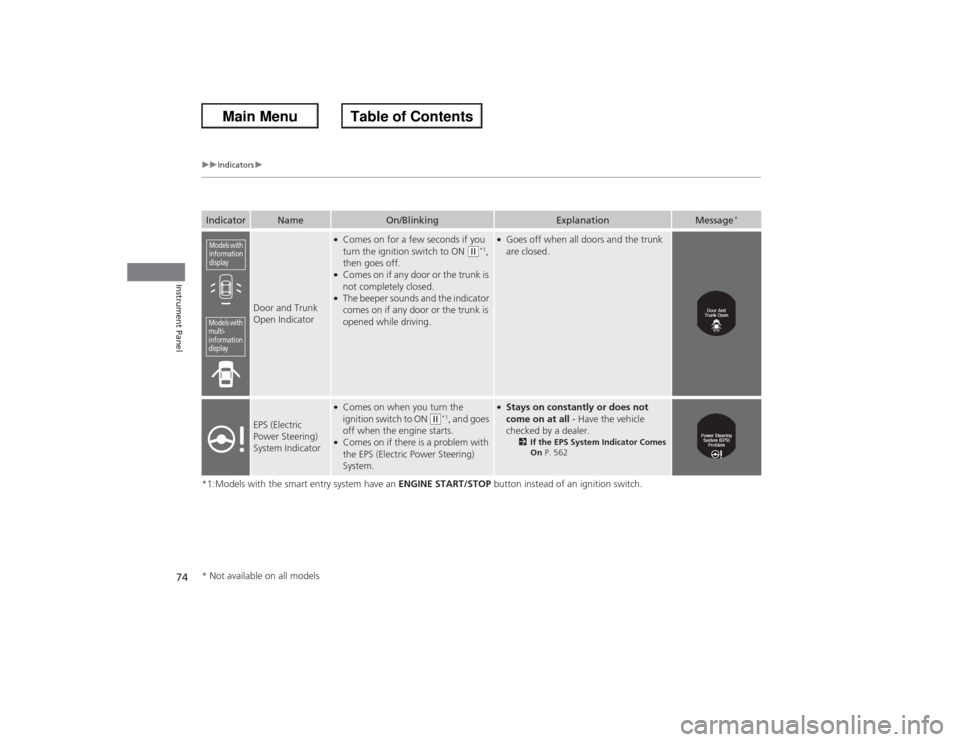
Door and Trunk
Open Indicator
●Comes on for a few seconds if you
turn the ignition switch to ON
(w*1,
then goes off.
●Comes on if any door or the trunk is
not completely closed.●The beeper sounds and the indicator
comes on if any door or the trunk is
opened while driving.
●Goes off when all doors and the trunk
are closed.
EPS (Electric
Power Steering)
System Indicator
●Comes on when you turn the
ignition switch to ON
(w*1, and goes
off when the engine starts.
●Comes on if there is a problem with
the EPS (Electric Power Steering)
System.
●Stays on constantly or does not
come on at all - Have the vehicle
checked by a dealer.
2 If the EPS System Indicator Comes
On P. 562
Models with
information
displayModels with
multi-
information
display* Not available on all models
Page 84 of 595
83
uuIndicators uInformation Display Warning and Information Messages
*
Instrument Panel
Message
Condition
Explanation
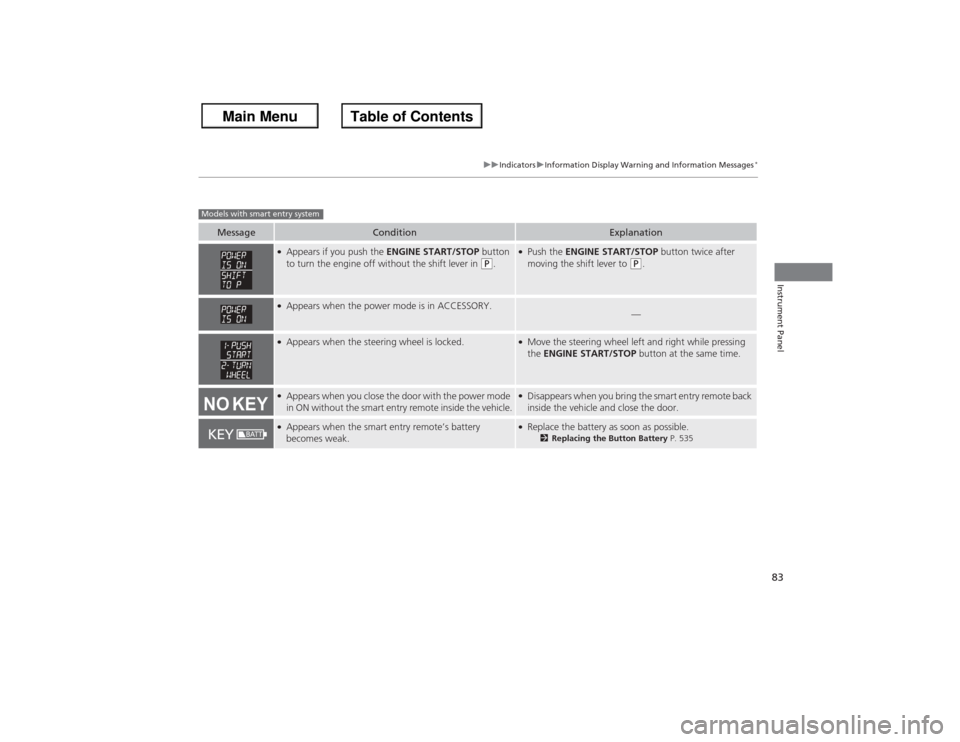
●Appears if you push the ENGINE START/STOP button
to turn the engine off without the shift lever in
(P.
●Push the ENGINE START/STOP button twice after
moving the shift lever to
(P.
●Appears when the power mode is in ACCESSORY.
—
●Appears when the steering wheel is locked.
●Move the steering wheel left and right while pressing
the ENGINE START/STOP button at the same time.
●Appears when you close the door with the power mode
in ON without the smart entry remote inside the vehicle.
●Disappears when you bring the smart entry remote back
inside the vehicle and close the door.
●Appears when the smart entry remote’s battery
becomes weak.
●Replace the battery as soon as possible.
2Replacing the Button Battery P. 535
Models with smart entry system
Page 106 of 595
105
Controls
This chapter explains how to operate the various controls necessary for driving.
Setting the Clock.............................. 106
Locking and Unlocking the Doors Key Types and Functions .................. 108Low Smart Entry Remote Signal Strength
*....................................110
Locking/Unlocking the Doors from the
Inside ............................................. 116
Childproof Door Locks . .................... 118
Auto Door Locking/Unlocking .......... 119
Opening and Closing the Trunk ....... 120
Security System Immobilizer System .......................... 124
Security System Alarm ...................... 124Opening and Closing the Windows ..... 127
Opening and Closing the Moonroof
*.. 130
Operating the Switches Around the Steering WheelIgnition Switch
*............................... 131
ENGINE START/STOP Button
*........... 132
Ignition Switch and Power Mode Comparison ................................... 135
Turn Signals ..................................... 136
Light Switches.................................. 136
Fog Lights
*...................................... 138
Daytime Running Lights ................... 139
Wipers and Washers ........................ 140
Brightness Control ........................... 141
Rear Defogger/Heated Door Mirror
*
Button ........................................... 142 Driving Position Memory System
*.... 143
Adjusting the Steering Wheel .......... 145
Adjusting the Mirrors Interior Rearview Mirror ................... 146
Power Door Mirrors ......................... 147
Adjusting the Seats .......................... 148
Interior Lights/Interior Convenience
Items ................................................ 156
Heating and Cooling
*
Using Vents, Heating and A/C.......... 166
Climate Control System
*
Using Automatic Climate Control .... 169
Synchronized Mode ......................... 171
Automatic Climate Control Sensors ... 172
* Not available on all models
Page 133 of 595
132
uuOperating the Switches Around the Steering Wheel uENGINE START/STOP Button
*
Controls
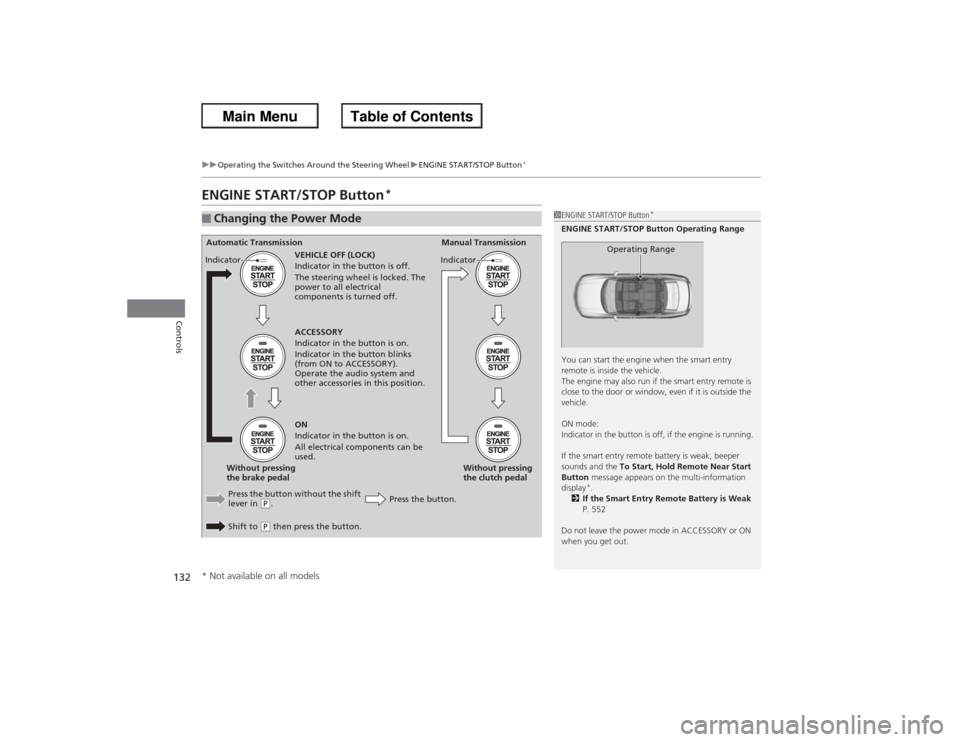
ENGINE START/STOP Button
*
■Changing the Power Mode
1ENGINE START/STOP Button
*
ENGINE START/STOP Button Operating Range
You can start the engine when the smart entry
remote is inside the vehicle.
The engine may also run if the smart entry remote is
close to the door or window, even if it is outside the
vehicle.
ON mode:
Indicator in the button is off, if the engine is running.
If the smart entry remote battery is weak, beeper
sounds and the To Start, Hold Remote Near Start
Button message appears on the multi-information
display
*.
2 If the Smart Entry Remote Battery is Weak
P. 552
Do not leave the power mode in ACCESSORY or ON
when you get out.
Operating Range
Automatic Transmission Manual Transmission
VEHICLE OFF (LOCK)
Indicator in the button is off.
The steering wheel is locked. The
power to all electrical
components is turned off.
Press the button without the shift
lever in
(P.
Shift to (P then press the button. Press the button.Without pressing
the clutch pedal
Without pressing
the brake pedal ACCESSORY
Indicator in the button is on.
Indicator in the button blinks
(from ON to ACCESSORY).
Operate the audio system and
other accessories in this position.
ON
Indicator in the button is on.
All electrical components can be
used.
Indicator
Indicator
* Not available on all models
Page 134 of 595
133
uuOperating the Switches Around the Steering Wheel uENGINE START/STOP Button
*
Continued
Controls
If you leave the vehicle for 30 to 60 minutes with the shift lever in
(P*1 and the
power mode in ACCESSORY, the vehicle automatically goes into the mode similar to
VEHICLE OFF (LOCK) to avoid the battery drain.
When in this mode:
The steering wheel does not lock.
You cannot lock or unlock doors with the remote transmitter or the smart entry
system.
Press the ENGINE START/STOP button to switch the mode to VEHICLE OFF (LOCK).
*1: Automatic transmission/CVT models■Automatic Power Off
Page 135 of 595
uuOperating the Switches Around the Steering Wheel uENGINE START/STOP Button
*
134Controls
If you open the driver’s door when the power mode is set to ACCESSORY, a warning
buzzer sounds.
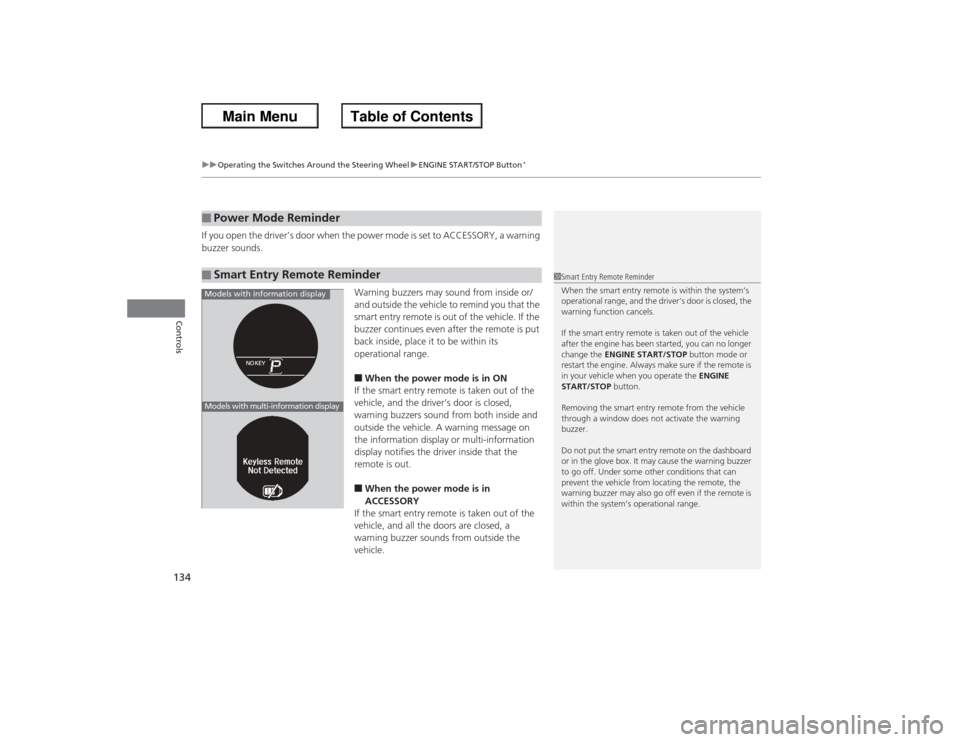
Warning buzzers may sound from inside or/
and outside the vehicle to remind you that the
smart entry remote is out of the vehicle. If the
buzzer continues even after the remote is put
back inside, place it to be within its
operational range.
■When the power mode is in ON
If the smart entry remote is taken out of the
vehicle, and the driver’s door is closed,
warning buzzers sound from both inside and
outside the vehicle. A warning message on
the information display or multi-information
display notifies the driver inside that the
remote is out.■When the power mode is in
ACCESSORY
If the smart entry remote is taken out of the
vehicle, and all the doors are closed, a
warning buzzer sounds from outside the
vehicle.
■Power Mode Reminder■Smart Entry Remote Reminder
1 Smart Entry Remote Reminder
When the smart entry remote is within the system’s
operational range, and the driver’s door is closed, the
warning function cancels.
If the smart entry remote is taken out of the vehicle
after the engine has been started, you can no longer
change the ENGINE START/STOP button mode or
restart the engine. Always make sure if the remote is
in your vehicle when you operate the ENGINE
START/STOP button.
Removing the smart entry remote from the vehicle
through a window does not activate the warning
buzzer.
Do not put the smart entry remote on the dashboard
or in the glove box. It may cause the warning buzzer
to go off. Under some other conditions that can
prevent the vehicle from locating the remote, the
warning buzzer may also go off even if the remote is
within the system’s operational range.
Models with information displayModels with multi-information display
Page 136 of 595
135
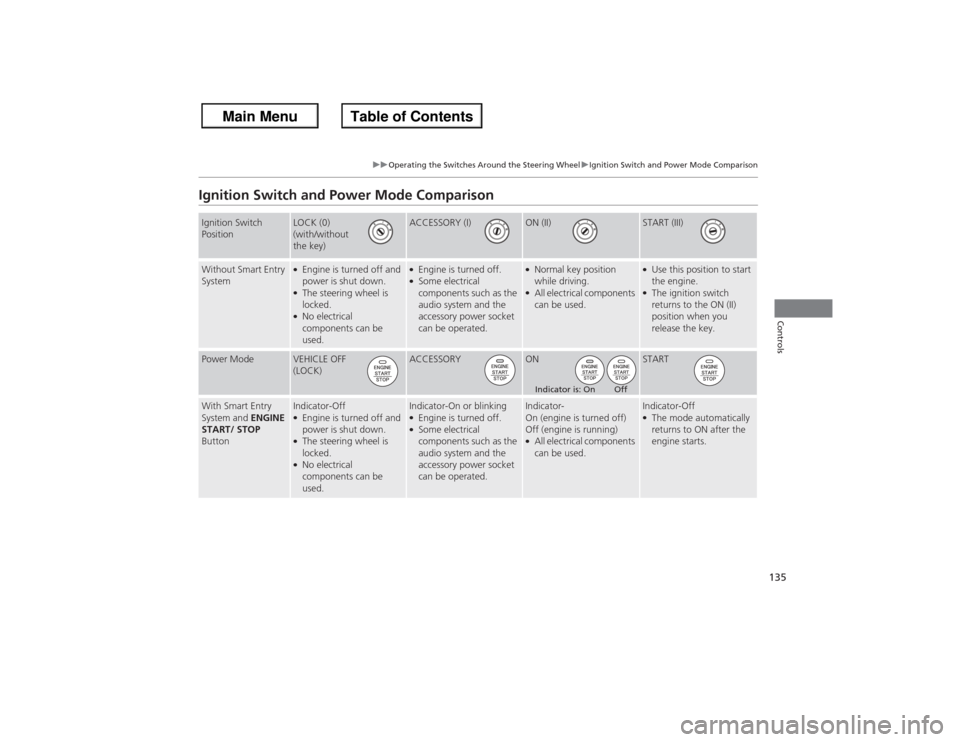
uuOperating the Switches Around the Steering Wheel uIgnition Switch and Power Mode Comparison
Controls
Ignition Switch and Power Mode ComparisonIgnition Switch
Position
LOCK (0)
(with/without
the key)
ACCESSORY (I)
ON (II)
START (III)
Without Smart Entry
System
●Engine is turned off and
power is shut down.●The steering wheel is
locked.●No electrical
components can be
used.
●Engine is turned off.●Some electrical
components such as the
audio system and the
accessory power socket
can be operated.
●Normal key position
while driving.●All electrical components
can be used.
●Use this position to start
the engine.●The ignition switch
returns to the ON (II)
position when you
release the key.
Power Mode
VEHICLE OFF
(LOCK)
ACCESSORY
ON
START
With Smart Entry
System and ENGINE
START/ STOP
Button
Indicator-Off●Engine is turned off and
power is shut down.●The steering wheel is
locked.●No electrical
components can be
used.
Indicator-On or blinking●Engine is turned off.●Some electrical
components such as the
audio system and the
accessory power socket
can be operated.
Indicator-
On (engine is turned off)
Off (engine is running)●All electrical components
can be used.
Indicator-Off●The mode automatically
returns to ON after the
engine starts.
Indicator is: On Off
Page 140 of 595
139
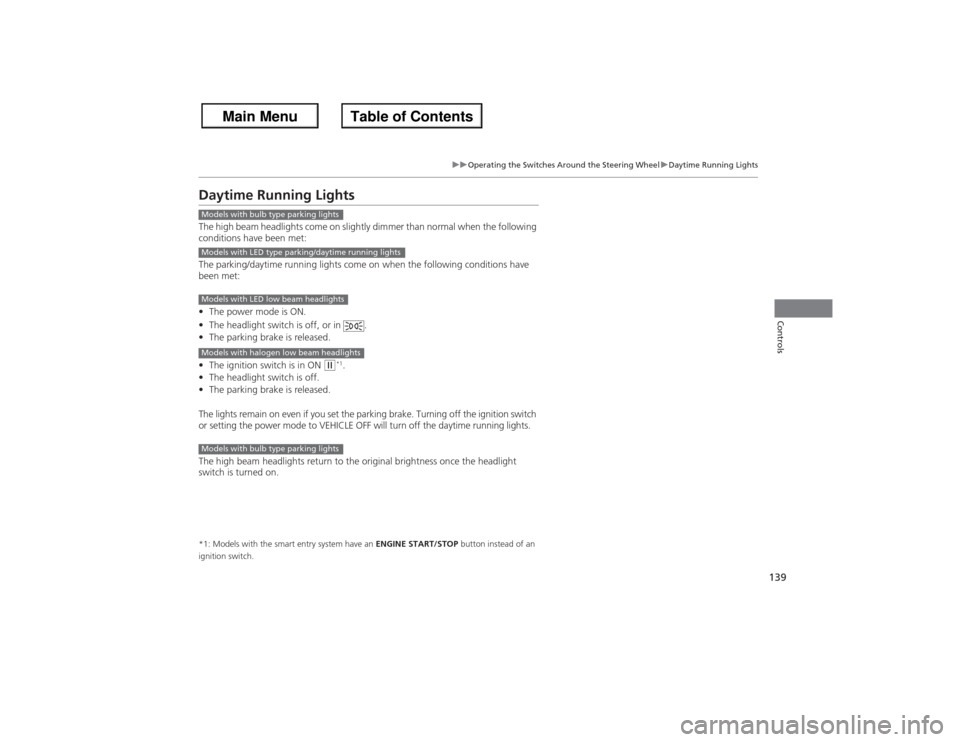
uuOperating the Switches Around the Steering Wheel uDaytime Running Lights
Controls
Daytime Running LightsThe high beam headlights come on slightly dimmer than normal when the following
conditions have been met:
The parking/daytime running lights come on when the following conditions have
been met:
• The power mode is ON.
• The headlight switch is off, or in .
• The parking brake is released.
• The ignition switch is in ON
(w*1.
• The headlight switch is off.
• The parking brake is released.
The lights remain on even if you set the parking brake. Turning off the ignition switch
or setting the power mode to VEHICLE OFF will turn off the daytime running lights.
The high beam headlights return to the original brightness once the headlight
switch is turned on.
*1: Models with the smart entry system have an ENGINE START/STOP button instead of an
ignition switch.Models with bulb type parking lightsModels with LED type parking/daytime running lightsModels with LED low beam headlightsModels with halogen low beam headlightsModels with bulb type parking lights