D3 blinking HONDA ACCORD 2014 9.G User Guide
[x] Cancel search | Manufacturer: HONDA, Model Year: 2014, Model line: ACCORD, Model: HONDA ACCORD 2014 9.GPages: 595
Page 78 of 595
77
uuIndicators u
Continued
Instrument Panel
*1:Models with the smart entry system have an ENGINE START/STOP button instead of an ignition switch.Indicator
Name
On/Blinking
Explanation
Message
*
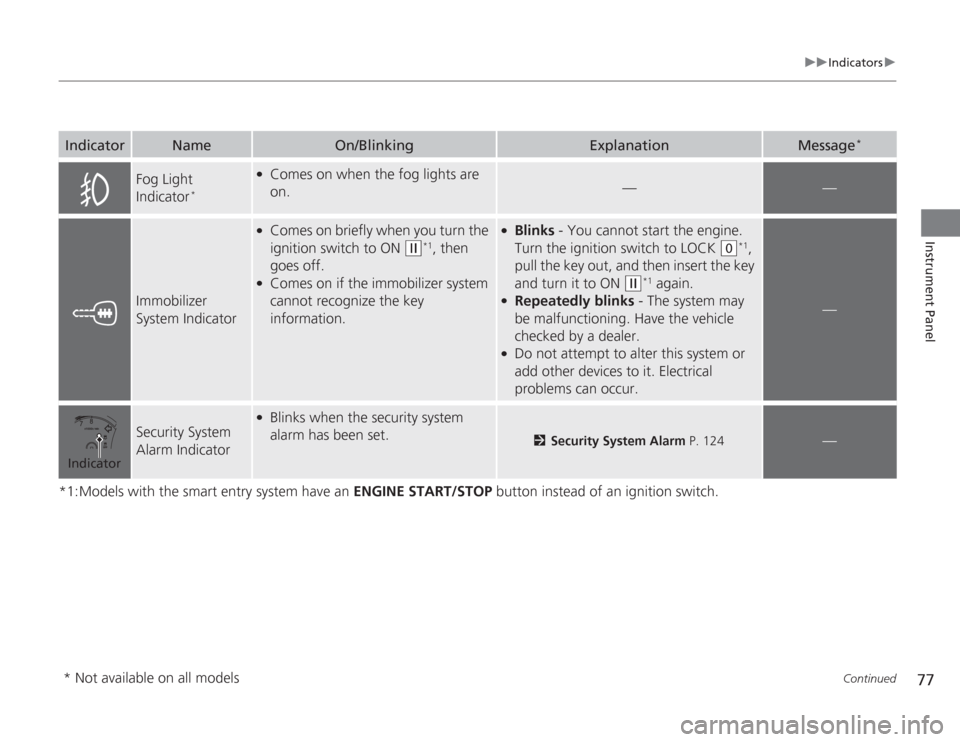
Fog Light
Indicator
*
●
Comes on when the fog lights are
on.
—
—
Immobilizer
System Indicator
●
Comes on briefly when you turn the
ignition switch to ON
(w
*1, then
goes off.
●
Comes on if the immobilizer system
cannot recognize the key
information.
●
Blinks - You cannot start the engine.
Turn the ignition switch to LOCK
(0
*1,
pull the key out, and then insert the key
and turn it to ON
(w
*1 again.
●
Repeatedly blinks - The system may
be malfunctioning. Have the vehicle
checked by a dealer.
●
Do not attempt to alter this system or
add other devices to it. Electrical
problems can occur.
—
Security System
Alarm Indicator
●
Blinks when the security system
alarm has been set.
2 Security System Alarm P. 124
—
Indicator* Not available on all models
Page 79 of 595
78
uuIndicators u
Instrument Panel
*1:Models with the smart entry system have an ENGINE START/STOP button instead of an ignition switch.
*2:On the left: Models with information display On the right: Models with multi-information displayIndicator
Name
On/Blinking
Explanation
Message
*2
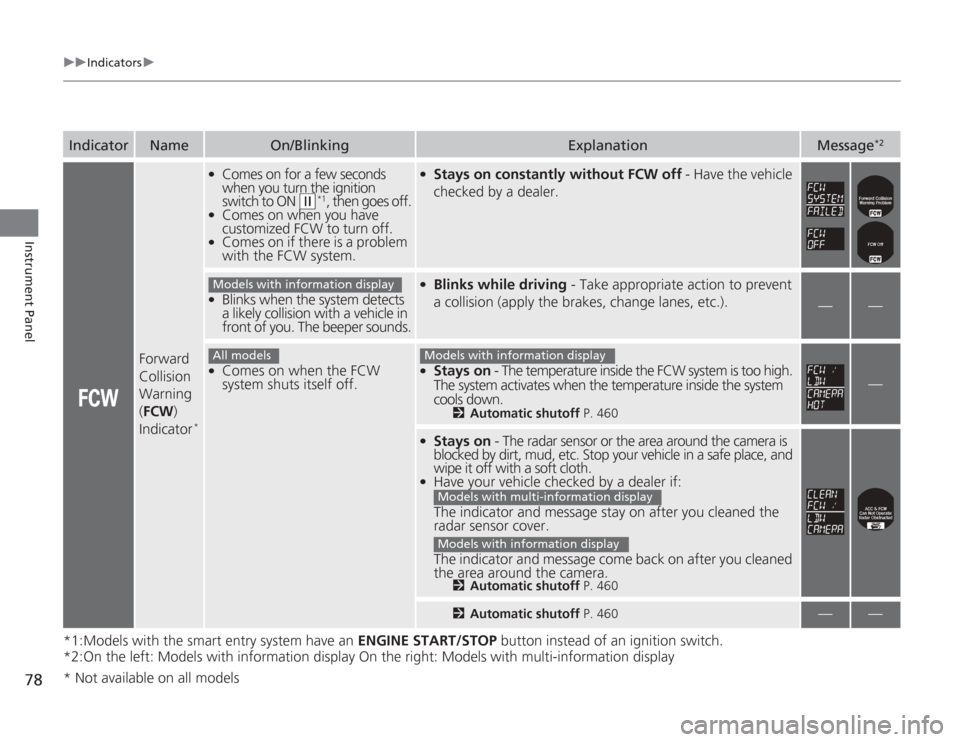
Forward
Collision
Warning
( FCW )
Indicator
*
●
Comes on for a few seconds
when you turn the ignition
switch to ON
(w
*1, then goes off.
●
Comes on when you have
customized FCW to turn off.
●
Comes on if there is a problem
with the FCW system.
●
Stays on constantly without FCW off - Have the vehicle
checked by a dealer.
●
Blinks when the system detects
a likely collision with a vehicle in
front of you. The beeper sounds.
●
Blinks while driving - Take appropriate action to prevent
a collision (apply the brakes, change lanes, etc.).
—
—
●
Comes on when the FCW
system shuts itself off.
●
Stays on - The temperature inside the FCW system is too high.
The system activates when the temperature inside the system
cools down.
2 Automatic shutoff P. 460
—
●
Stays on - The radar sensor or the area around the camera is
blocked by dirt, mud, etc. Stop your vehicle in a safe place, and
wipe it off with a soft cloth.
●
Have your vehicle checked by a dealer if:
The indicator and message stay on after you cleaned the
radar sensor cover.
The indicator and message come back on after you cleaned
the area around the camera.
2 Automatic shutoff P. 4602Automatic shutoff P. 460
—
—
Models with information displayAll models
Models with information display
Models with multi-information displayModels with information display
* Not available on all models
Page 80 of 595
79
uuIndicators u
Continued
Instrument Panel
*1:Models with the smart entry system have an ENGINE START/STOP button instead of an ignition switch.
*2:On the left: Models with information display
On the right: Models with multi-information displayIndicator
Name
On/Blinking
Explanation
Message
*2
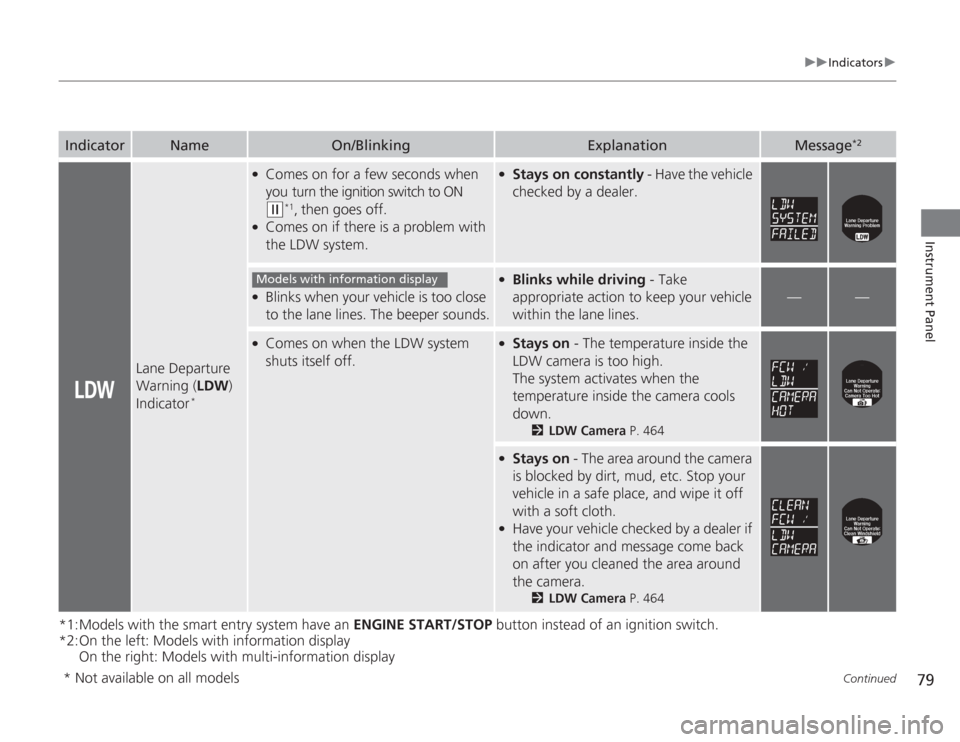
Lane Departure
Warning ( LDW)
Indicator
*
●
Comes on for a few seconds when
you turn the ignition switch to ON (w
*1, then goes off.
●
Comes on if there is a problem with
the LDW system.
●
Stays on constantly - Have the vehicle
checked by a dealer.
●
Blinks when your vehicle is too close
to the lane lines. The beeper sounds.
●
Blinks while driving - Take
appropriate action to keep your vehicle
within the lane lines.
—
—
●
Comes on when the LDW system
shuts itself off.
●
Stays on - The temperature inside the
LDW camera is too high.
The system activates when the
temperature inside the camera cools
down.
2 LDW Camera P. 464
●
Stays on - The area around the camera
is blocked by dirt, mud, etc. Stop your
vehicle in a safe place, and wipe it off
with a soft cloth.
●
Have your vehicle checked by a dealer if
the indicator and message come back
on after you cleaned the area around
the camera.
2 LDW Camera P. 464
Models with information display
* Not available on all models
Page 81 of 595
80
uuIndicators u
Instrument Panel
*1:Models with the smart entry system have an ENGINE START/STOP button instead of an ignition switch.Indicator
Name
On/Blinking
Explanation
Message
*
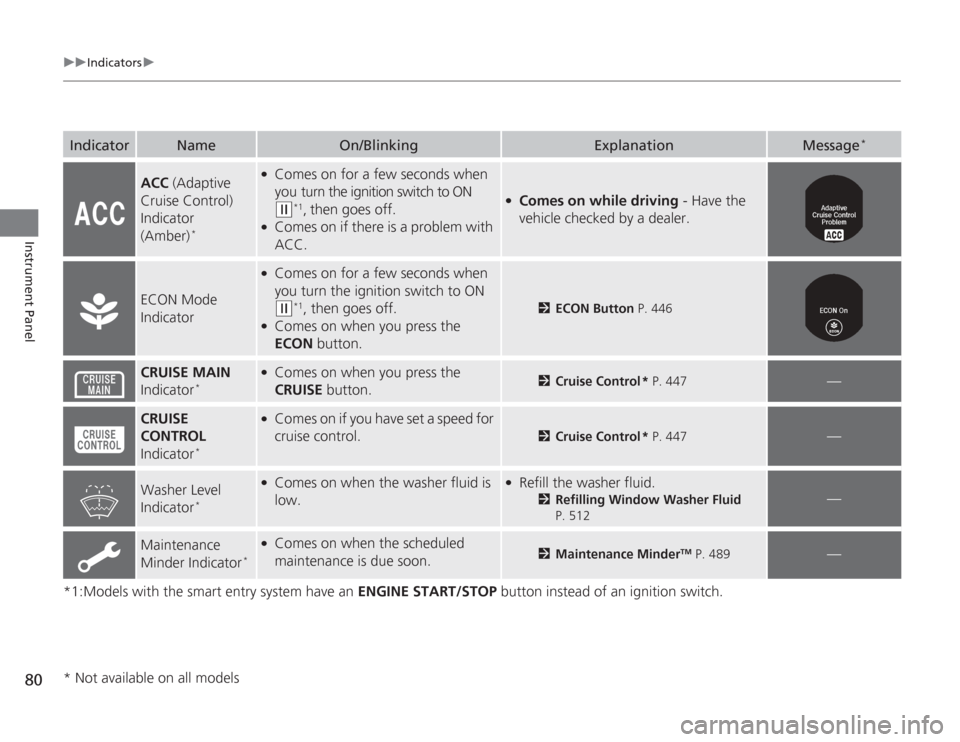
ACC (Adaptive
Cruise Control)
Indicator
(Amber)
*
●
Comes on for a few seconds when
you turn the ignition switch to ON (w
*1, then goes off.
●
Comes on if there is a problem with
ACC.
●
Comes on while driving - Have the
vehicle checked by a dealer.
ECON Mode
Indicator
●
Comes on for a few seconds when
you turn the ignition switch to ON (w
*1, then goes off.
●
Comes on when you press the
ECON button.
2ECON Button P. 446
CRUISE MAIN
Indicator
*
●
Comes on when you press the
CRUISE button.
2Cruise Control * P. 447
—
CRUISE
CONTROL
Indicator
*
●
Comes on if you have set a speed for
cruise control.
2 Cruise Control * P. 447
—
Washer Level
Indicator
*
●
Comes on when the washer fluid is
low.
●
Refill the washer fluid.
2Refilling Window Washer Fluid
P. 512
—
Maintenance
Minder Indicator
*
●
Comes on when the scheduled
maintenance is due soon.
2 Maintenance Minder
TM P. 489
—
* Not available on all models
Page 82 of 595
81
uuIndicators u
Instrument Panel
*1:Models with the smart entry system have an ENGINE START/STOP button instead of an ignition switch.Indicator
Name
On/Blinking
Explanation
Message
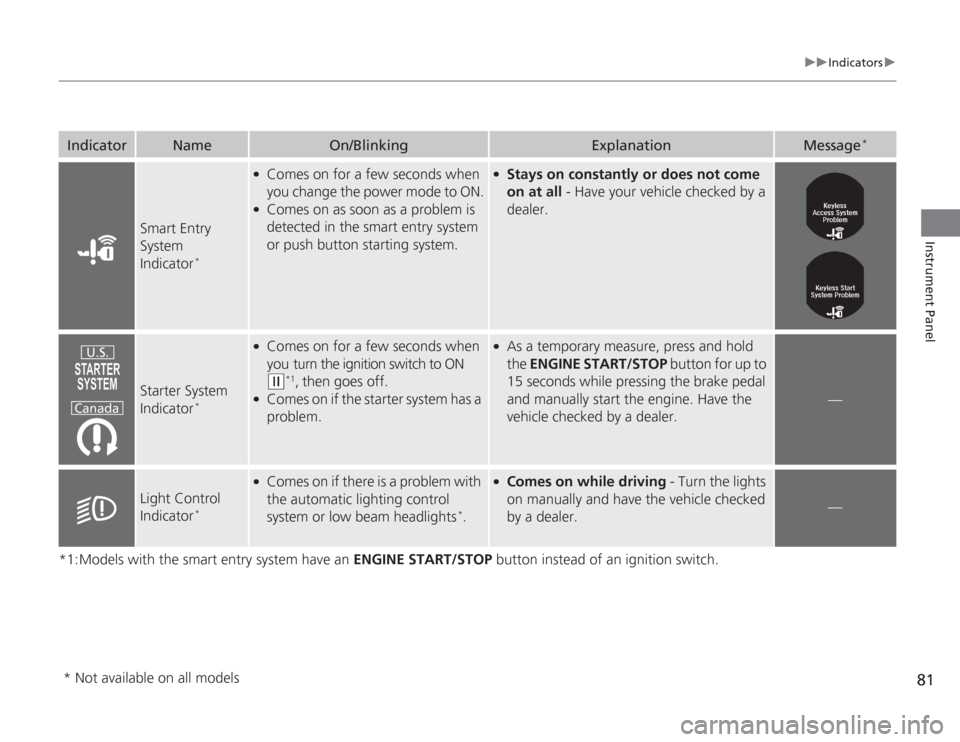
*
Smart Entry
System
Indicator
*
●
Comes on for a few seconds when
you change the power mode to ON.
●
Comes on as soon as a problem is
detected in the smart entry system
or push button starting system.
●
Stays on constantly or does not come
on at all - Have your vehicle checked by a
dealer.
Starter System
Indicator
*
●
Comes on for a few seconds when
you turn the ignition switch to ON (w
*1, then goes off.
●
Comes on if the starter system has a
problem.
●
As a temporary measure, press and hold
the ENGINE START/STOP button for up to
15 seconds while pressing the brake pedal
and manually start the engine. Have the
vehicle checked by a dealer.
—
Light Control
Indicator
*
●
Comes on if there is a problem with
the automatic lighting control
system or low beam headlights
*.
●
Comes on while driving - Turn the lights
on manually and have the vehicle checked
by a dealer.
—
U.S.
Canada
* Not available on all models
Page 126 of 595
Continued
125
uuSecurity System uSecurity System Alarm
Controls
■
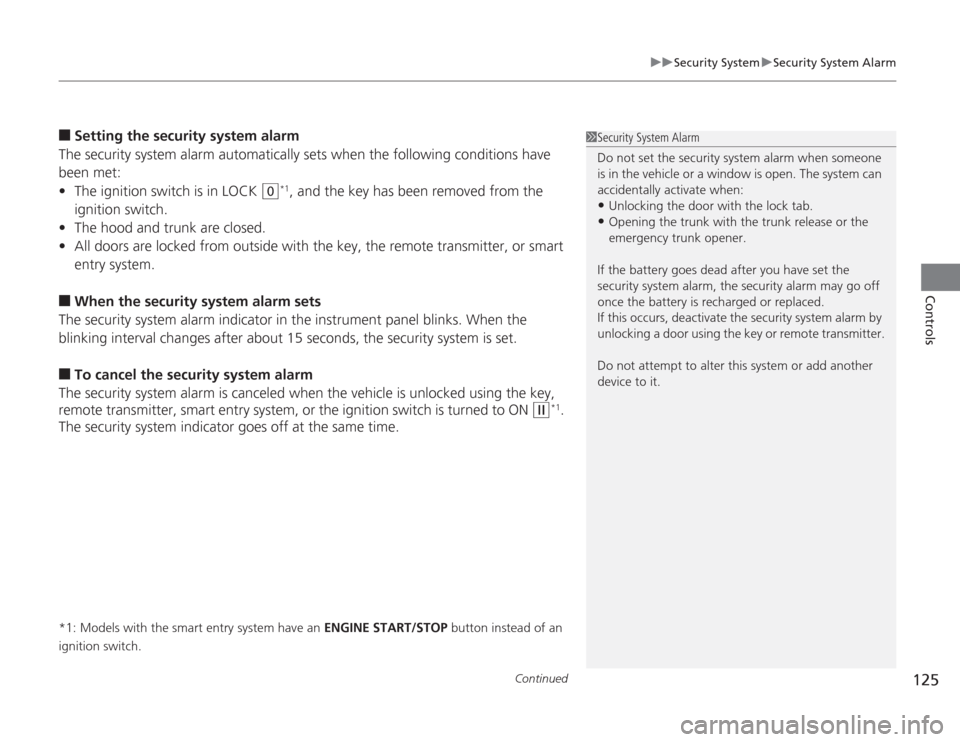
Setting the security system alarm
The security system alarm automatically sets when the following conditions have
been met:
• The ignition switch is in LOCK
(0
*1, and the key has been removed from the
ignition switch.
• The hood and trunk are closed.
• All doors are locked from outside with the key, the remote transmitter, or smart
entry system.
■
When the security system alarm sets
The security system alarm indicator in the instrument panel blinks. When the
blinking interval changes after about 15 seconds, the security system is set.
■
To cancel the security system alarm
The security system alarm is canceled when the vehicle is unlocked using the key,
remote transmitter, smart entry system, or the ignition switch is turned to ON
(w
*1.
The security system indicator goes off at the same time.
*1: Models with the smart entry system have an ENGINE START/STOP button instead of an
ignition switch.
1 Security System Alarm
Do not set the security system alarm when someone
is in the vehicle or a window is open. The system can
accidentally activate when:•Unlocking the door with the lock tab.•Opening the trunk with the trunk release or the
emergency trunk opener.
If the battery goes dead after you have set the
security system alarm, the security alarm may go off
once the battery is recharged or replaced.
If this occurs, deactivate the security system alarm by
unlocking a door using the key or remote transmitter.
Do not attempt to alter this system or add another
device to it.
Page 136 of 595
135
uuOperating the Switches Around the Steering Wheel uIgnition Switch and Power Mode Comparison
Controls
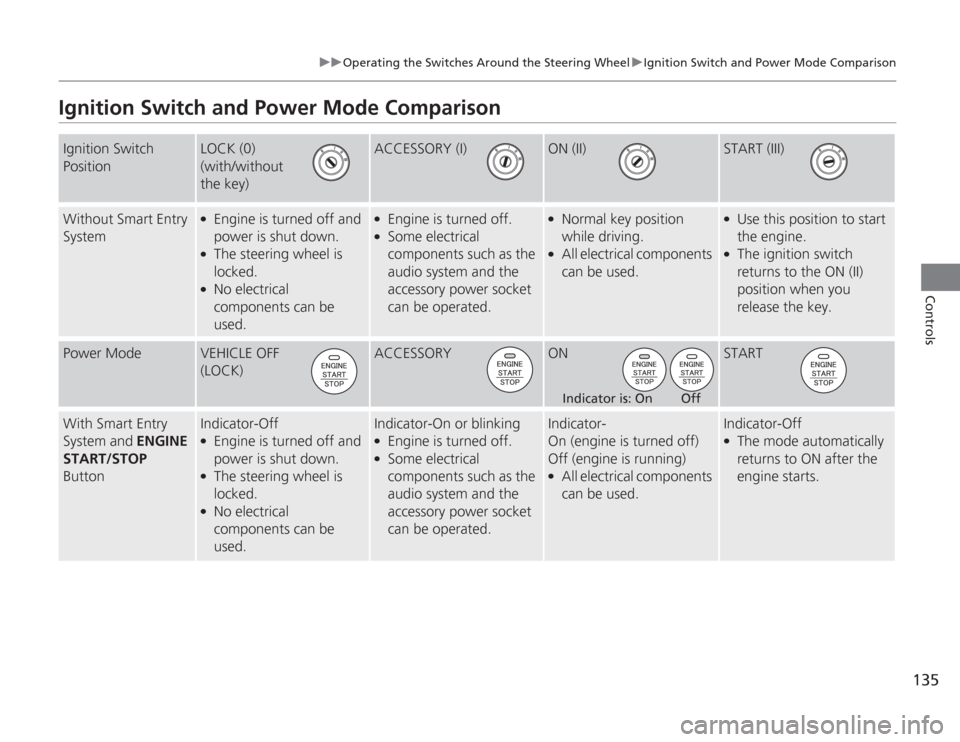
Ignition Switch and Power Mode ComparisonIgnition Switch
Position
LOCK (0)
(with/without
the key)
ACCESSORY (I)
ON (II)
START (III)
Without Smart Entry
System
●
Engine is turned off and
power is shut down.
●
The steering wheel is
locked.
●
No electrical
components can be
used.
●
Engine is turned off.
●
Some electrical
components such as the
audio system and the
accessory power socket
can be operated.
●
Normal key position
while driving.
●
All electrical components
can be used.
●
Use this position to start
the engine.
●
The ignition switch
returns to the ON (II)
position when you
release the key.
Power Mode
VEHICLE OFF
(LOCK)
ACCESSORY
ON
START
With Smart Entry
System and ENGINE
START/STOP
Button
Indicator-Off●
Engine is turned off and
power is shut down.
●
The steering wheel is
locked.
●
No electrical
components can be
used.
Indicator-On or blinking●
Engine is turned off.
●
Some electrical
components such as the
audio system and the
accessory power socket
can be operated.
Indicator-
On (engine is turned off)
Off (engine is running)●
All electrical components
can be used.
Indicator-Off●
The mode automatically
returns to ON after the
engine starts.
Indicator is: On Off
Page 441 of 595
uuWhen Driving uShifting
440Driving
■
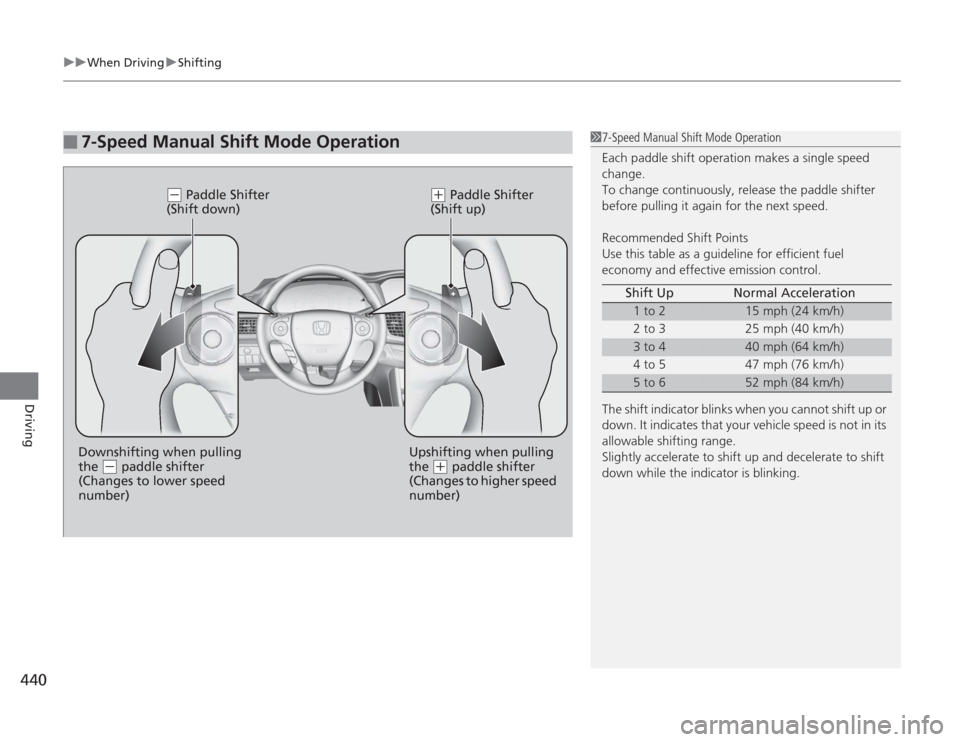
7-Speed Manual Shift Mode Operation
17-Speed Manual Shift Mode Operation
Each paddle shift operation makes a single speed
change.
To change continuously, release the paddle shifter
before pulling it again for the next speed.
Recommended Shift Points
Use this table as a guideline for efficient fuel
economy and effective emission control.
The shift indicator blinks when you cannot shift up or
down. It indicates that your vehicle speed is not in its
allowable shifting range.
Slightly accelerate to shift up and decelerate to shift
down while the indicator is blinking. Shift Up Normal Acceleration
1 to 2
15 mph (24 km/h)
2 to 3 25 mph (40 km/h)
3 to 4
40 mph (64 km/h)
4 to 5 47 mph (76 km/h)
5 to 6
52 mph (84 km/h)
(-
Paddle Shifter
(Shift down)
( +
Paddle Shifter
(Shift up)
Downshifting when pulling
the
( -
paddle shifter
(Changes to lower speed
number) Upshifting when pulling
the
(
+
paddle shifter
(Changes to higher speed
number)
Page 544 of 595

543
Handling the Unexpected
This chapter explains how to handle unexpected troubles.
Tools
Types of Tools .................................. 544
If a Tire Goes Flat Changing a Flat Tire ......................... 545
Engine Does Not Start Checking the Engine ........................ 551
If the Smart Entry Remote Battery is Weak .......................................... 552Emergency Engine Stop ................... 553
Jump Starting .................................... 554
Shift Lever Does Not Move .............. 557Overheating
How to Handle Overheating............. 558
Indicator, Coming On/Blinking
If the Low Oil Pressure Indicator Comes On ............................................. 560If the Charging System Indicator Comes
On ................................................. 560
If the Malfunction Indicator Lamp Comes On or Blinks ................................... 561If the Brake System Indicator (Red) Comes On .................................. 562
If the Electric Power Steering (EPS) System
Indicator Comes On............................ 562If the Low Tire Pressure/TPMS Indicator Comes On or Blinks ....................... 563
Fuses Fuse Locations ................................. 564
Inspecting and Changing Fuses ........ 566
Emergency Towing ........................... 567
Page 551 of 595
uuIf a Tire Goes Flat uChanging a Flat Tire
550Handling the Unexpected
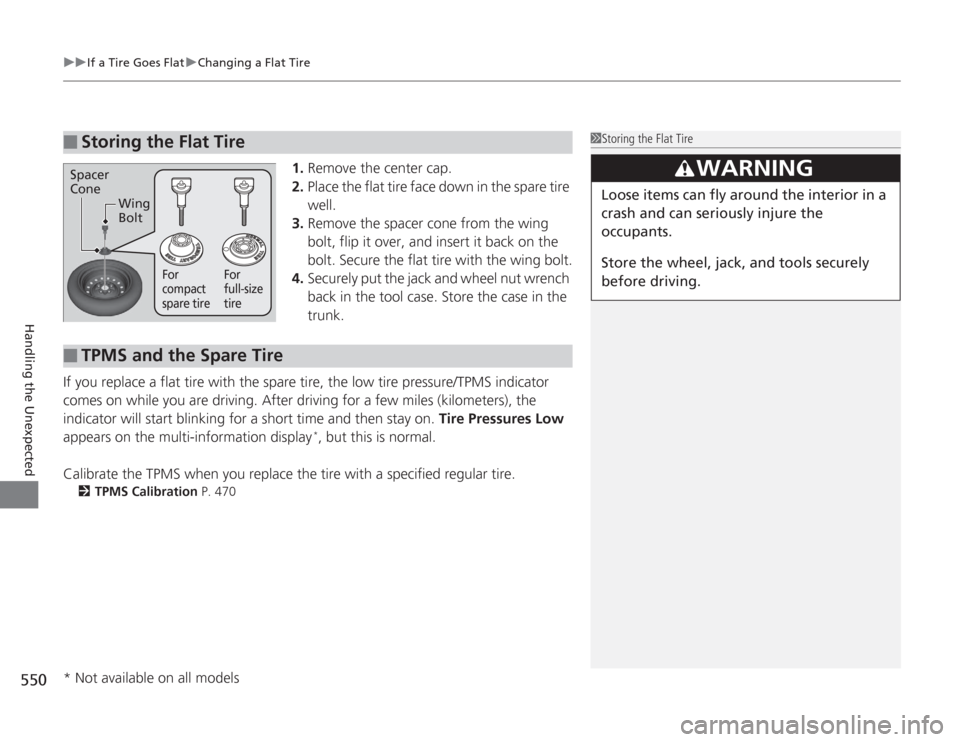
1. Remove the center cap.
2. Place the flat tire face down in the spare tire
well.
3. Remove the spacer cone from the wing
bolt, flip it over, and insert it back on the
bolt. Secure the flat tire with the wing bolt.
4. Securely put the jack and wheel nut wrench
back in the tool case. Store the case in the
trunk.
If you replace a flat tire with the spare tire, the low tire pressure/TPMS indicator
comes on while you are driving. After driving for a few miles (kilometers), the
indicator will start blinking for a short time and then stay on. Tire Pressures Low
appears on the multi-information display
*, but this is normal.
Calibrate the TPMS when you replace the tire with a specified regular tire.
2 TPMS Calibration P. 470
■
Storing the Flat Tire
1Storing the Flat Tire
3
WARNING
Loose items can fly around the interior in a
crash and can seriously injure the
occupants.
Store the wheel, jack, and tools securely
before driving.
Spacer
Cone
Wing
Bolt
For
compact
spare tire For
full-size
tire
■
TPMS and the Spare Tire
* Not available on all models