check engine HONDA ACCORD 2014 9.G User Guide
[x] Cancel search | Manufacturer: HONDA, Model Year: 2014, Model line: ACCORD, Model: HONDA ACCORD 2014 9.GPages: 595
Page 74 of 595
73
uuIndicators u
Continued
Instrument Panel
*1:Models with the smart entry system have an ENGINE START/STOP button instead of an ignition switch.Indicator
Name
On/Blinking
Explanation
Message
*
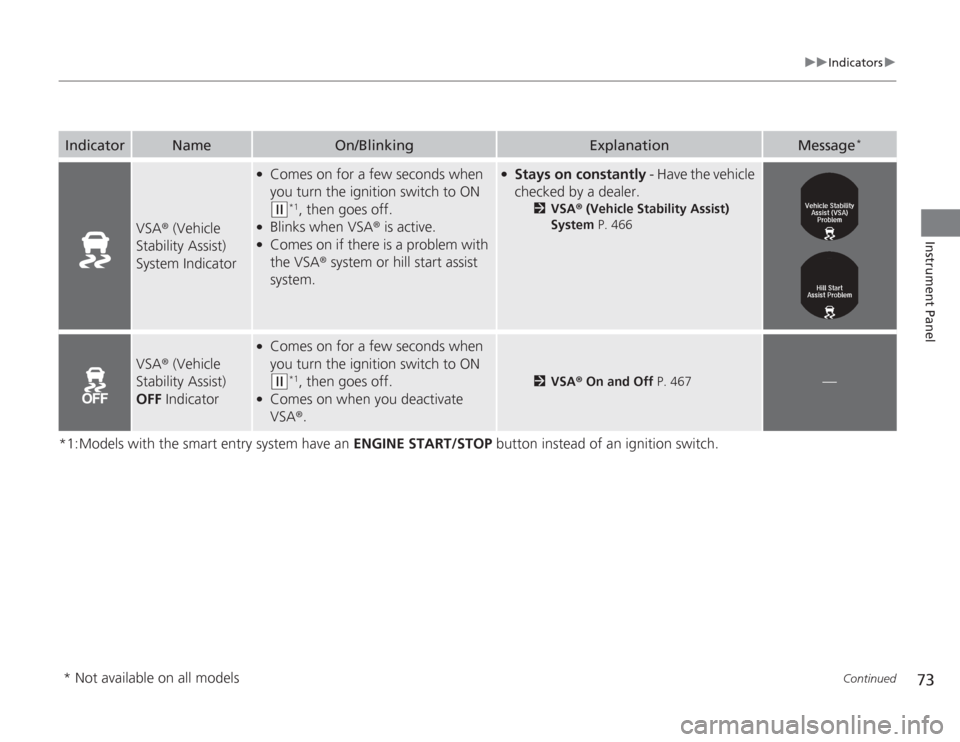
VSA® (Vehicle
Stability Assist)
System Indicator
●
Comes on for a few seconds when
you turn the ignition switch to ON (w
*1, then goes off.
●
Blinks when VSA ® is active.
●
Comes on if there is a problem with
the VSA® system or hill start assist
system.
●
Stays on constantly - Have the vehicle
checked by a dealer.
2VSA ® (Vehicle Stability Assist)
System P. 466
VSA® (Vehicle
Stability Assist)
OFF Indicator
●
Comes on for a few seconds when
you turn the ignition switch to ON (w
*1, then goes off.
●
Comes on when you deactivate
VSA®.
2VSA ® On and Off P. 467
—
* Not available on all models
Page 75 of 595
74
uuIndicators u
Instrument Panel
*1:Models with the smart entry system have an ENGINE START/STOP button instead of an ignition switch.Indicator
Name
On/Blinking
Explanation
Message
*
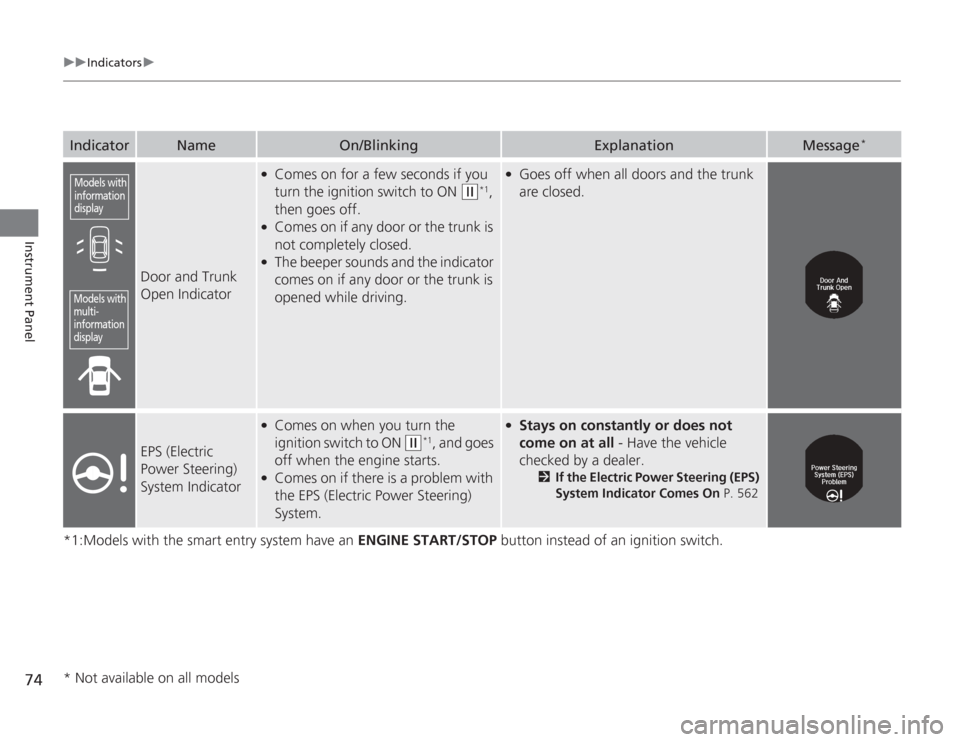
Door and Trunk
Open Indicator
●
Comes on for a few seconds if you
turn the ignition switch to ON
(w
*1,
then goes off.
●
Comes on if any door or the trunk is
not completely closed.
●
The beeper sounds and the indicator
comes on if any door or the trunk is
opened while driving.
●
Goes off when all doors and the trunk
are closed.
EPS (Electric
Power Steering)
System Indicator
●
Comes on when you turn the
ignition switch to ON
(w
*1, and goes
off when the engine starts.
●
Comes on if there is a problem with
the EPS (Electric Power Steering)
System.
●
Stays on constantly or does not
come on at all - Have the vehicle
checked by a dealer.
2 If the Electric Power Steering (EPS)
System Indicator Comes On P. 562
Models with
information
displayModels with
multi-
information
display* Not available on all models
Page 76 of 595
75
uuIndicators u
Continued
Instrument Panel
*1:Models with the smart entry system have an ENGINE START/STOP button instead of an ignition switch.Indicator
Name
On/Blinking
Explanation
Message
*
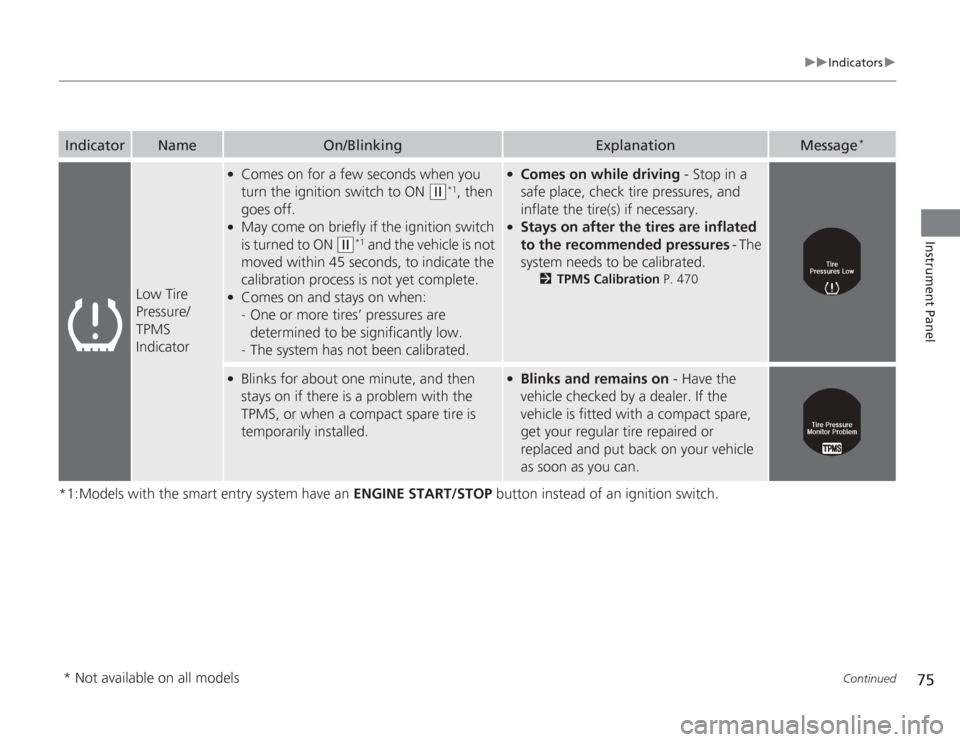
Low Tire
Pressure/
TPMS
Indicator
●
Comes on for a few seconds when you
turn the ignition switch to ON
(w
*1, then
goes off.
●
May come on briefly if the ignition switch
is turned to ON
(w
*1 and the vehicle is not
moved within 45 seconds, to indicate the
calibration process is not yet complete.
●
Comes on and stays on when:
- One or more tires’ pressures are
determined to be significantly low.
- The system has not been calibrated.
●
Comes on while driving - Stop in a
safe place, check tire pressures, and
inflate the tire(s) if necessary.
●
Stays on after the tires are inflated
to the recommended pressures - The
system needs to be calibrated.
2 TPMS Calibration P. 470
●
Blinks for about one minute, and then
stays on if there is a problem with the
TPMS, or when a compact spare tire is
temporarily installed.
●
Blinks and remains on - Have the
vehicle checked by a dealer. If the
vehicle is fitted with a compact spare,
get your regular tire repaired or
replaced and put back on your vehicle
as soon as you can.
* Not available on all models
Page 78 of 595
77
uuIndicators u
Continued
Instrument Panel
*1:Models with the smart entry system have an ENGINE START/STOP button instead of an ignition switch.Indicator
Name
On/Blinking
Explanation
Message
*
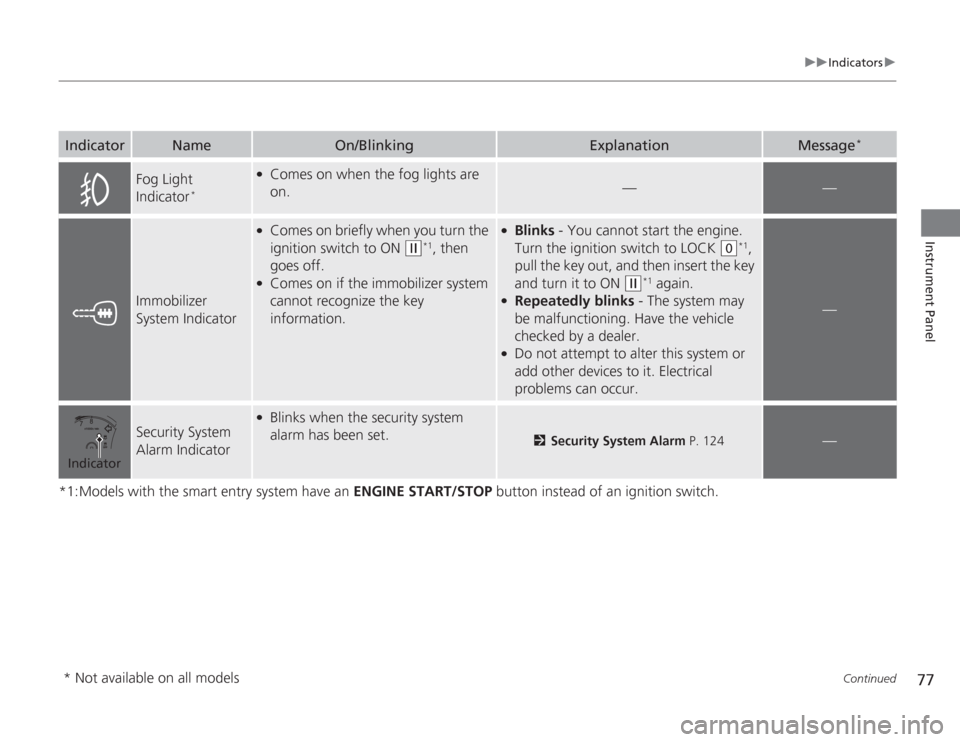
Fog Light
Indicator
*
●
Comes on when the fog lights are
on.
—
—
Immobilizer
System Indicator
●
Comes on briefly when you turn the
ignition switch to ON
(w
*1, then
goes off.
●
Comes on if the immobilizer system
cannot recognize the key
information.
●
Blinks - You cannot start the engine.
Turn the ignition switch to LOCK
(0
*1,
pull the key out, and then insert the key
and turn it to ON
(w
*1 again.
●
Repeatedly blinks - The system may
be malfunctioning. Have the vehicle
checked by a dealer.
●
Do not attempt to alter this system or
add other devices to it. Electrical
problems can occur.
—
Security System
Alarm Indicator
●
Blinks when the security system
alarm has been set.
2 Security System Alarm P. 124
—
Indicator* Not available on all models
Page 79 of 595
78
uuIndicators u
Instrument Panel
*1:Models with the smart entry system have an ENGINE START/STOP button instead of an ignition switch.
*2:On the left: Models with information display On the right: Models with multi-information displayIndicator
Name
On/Blinking
Explanation
Message
*2
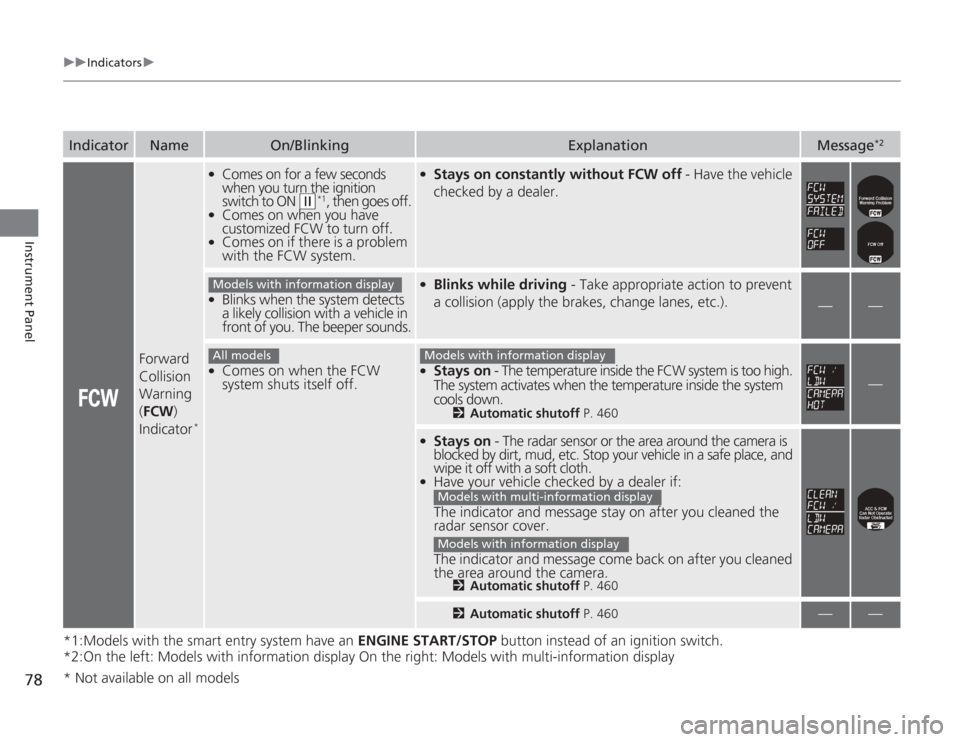
Forward
Collision
Warning
( FCW )
Indicator
*
●
Comes on for a few seconds
when you turn the ignition
switch to ON
(w
*1, then goes off.
●
Comes on when you have
customized FCW to turn off.
●
Comes on if there is a problem
with the FCW system.
●
Stays on constantly without FCW off - Have the vehicle
checked by a dealer.
●
Blinks when the system detects
a likely collision with a vehicle in
front of you. The beeper sounds.
●
Blinks while driving - Take appropriate action to prevent
a collision (apply the brakes, change lanes, etc.).
—
—
●
Comes on when the FCW
system shuts itself off.
●
Stays on - The temperature inside the FCW system is too high.
The system activates when the temperature inside the system
cools down.
2 Automatic shutoff P. 460
—
●
Stays on - The radar sensor or the area around the camera is
blocked by dirt, mud, etc. Stop your vehicle in a safe place, and
wipe it off with a soft cloth.
●
Have your vehicle checked by a dealer if:
The indicator and message stay on after you cleaned the
radar sensor cover.
The indicator and message come back on after you cleaned
the area around the camera.
2 Automatic shutoff P. 4602Automatic shutoff P. 460
—
—
Models with information displayAll models
Models with information display
Models with multi-information displayModels with information display
* Not available on all models
Page 80 of 595
79
uuIndicators u
Continued
Instrument Panel
*1:Models with the smart entry system have an ENGINE START/STOP button instead of an ignition switch.
*2:On the left: Models with information display
On the right: Models with multi-information displayIndicator
Name
On/Blinking
Explanation
Message
*2
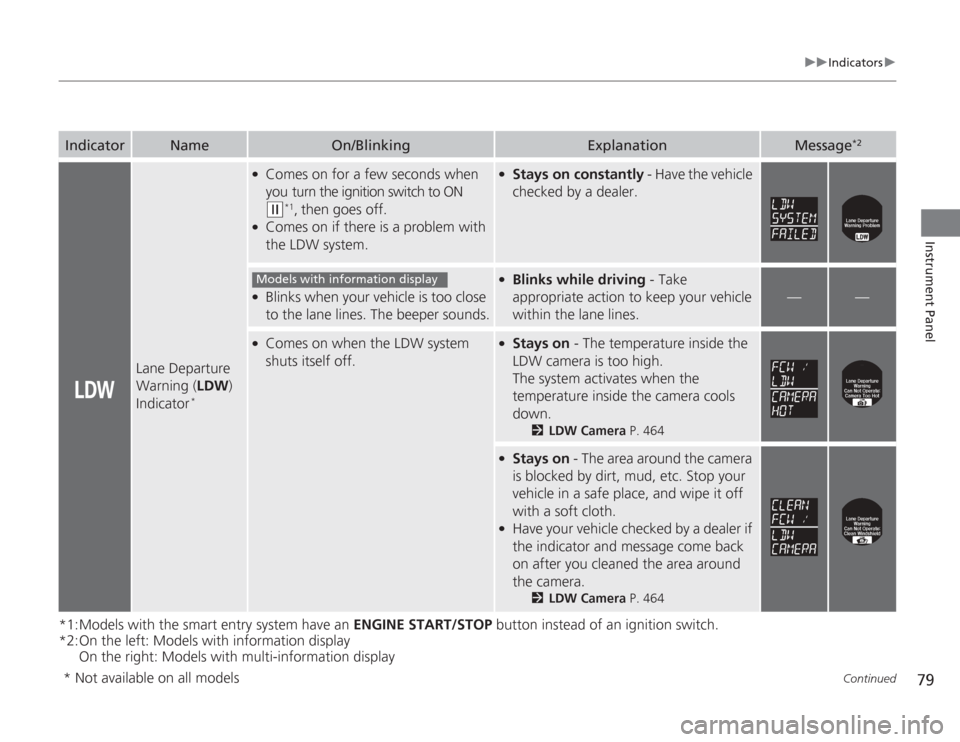
Lane Departure
Warning ( LDW)
Indicator
*
●
Comes on for a few seconds when
you turn the ignition switch to ON (w
*1, then goes off.
●
Comes on if there is a problem with
the LDW system.
●
Stays on constantly - Have the vehicle
checked by a dealer.
●
Blinks when your vehicle is too close
to the lane lines. The beeper sounds.
●
Blinks while driving - Take
appropriate action to keep your vehicle
within the lane lines.
—
—
●
Comes on when the LDW system
shuts itself off.
●
Stays on - The temperature inside the
LDW camera is too high.
The system activates when the
temperature inside the camera cools
down.
2 LDW Camera P. 464
●
Stays on - The area around the camera
is blocked by dirt, mud, etc. Stop your
vehicle in a safe place, and wipe it off
with a soft cloth.
●
Have your vehicle checked by a dealer if
the indicator and message come back
on after you cleaned the area around
the camera.
2 LDW Camera P. 464
Models with information display
* Not available on all models
Page 81 of 595
80
uuIndicators u
Instrument Panel
*1:Models with the smart entry system have an ENGINE START/STOP button instead of an ignition switch.Indicator
Name
On/Blinking
Explanation
Message
*
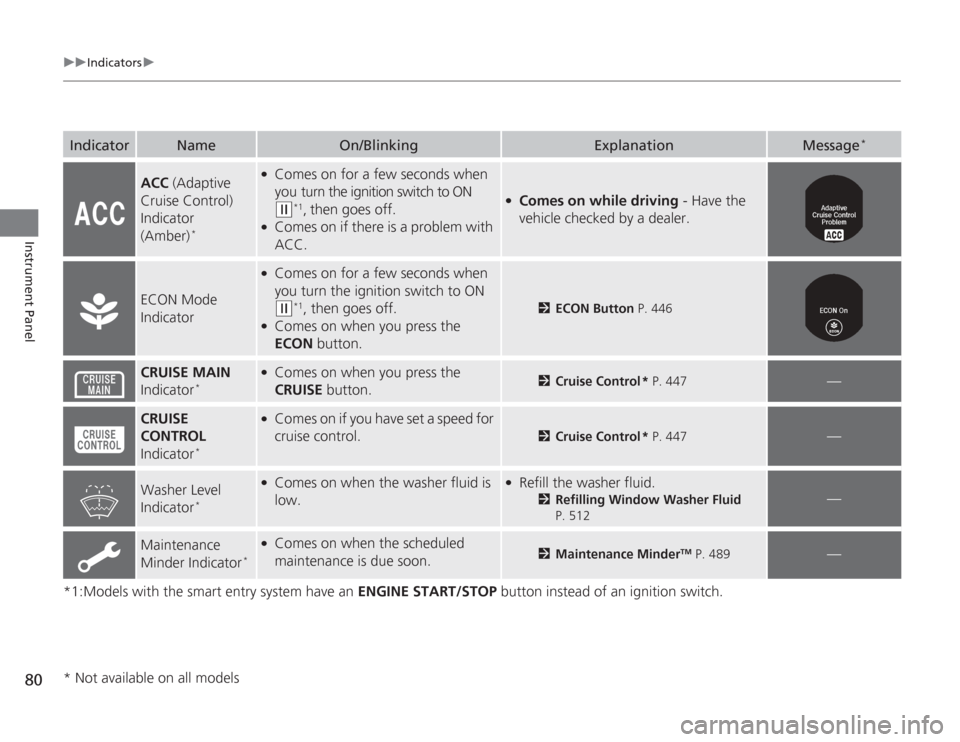
ACC (Adaptive
Cruise Control)
Indicator
(Amber)
*
●
Comes on for a few seconds when
you turn the ignition switch to ON (w
*1, then goes off.
●
Comes on if there is a problem with
ACC.
●
Comes on while driving - Have the
vehicle checked by a dealer.
ECON Mode
Indicator
●
Comes on for a few seconds when
you turn the ignition switch to ON (w
*1, then goes off.
●
Comes on when you press the
ECON button.
2ECON Button P. 446
CRUISE MAIN
Indicator
*
●
Comes on when you press the
CRUISE button.
2Cruise Control * P. 447
—
CRUISE
CONTROL
Indicator
*
●
Comes on if you have set a speed for
cruise control.
2 Cruise Control * P. 447
—
Washer Level
Indicator
*
●
Comes on when the washer fluid is
low.
●
Refill the washer fluid.
2Refilling Window Washer Fluid
P. 512
—
Maintenance
Minder Indicator
*
●
Comes on when the scheduled
maintenance is due soon.
2 Maintenance Minder
TM P. 489
—
* Not available on all models
Page 82 of 595
81
uuIndicators u
Instrument Panel
*1:Models with the smart entry system have an ENGINE START/STOP button instead of an ignition switch.Indicator
Name
On/Blinking
Explanation
Message
*
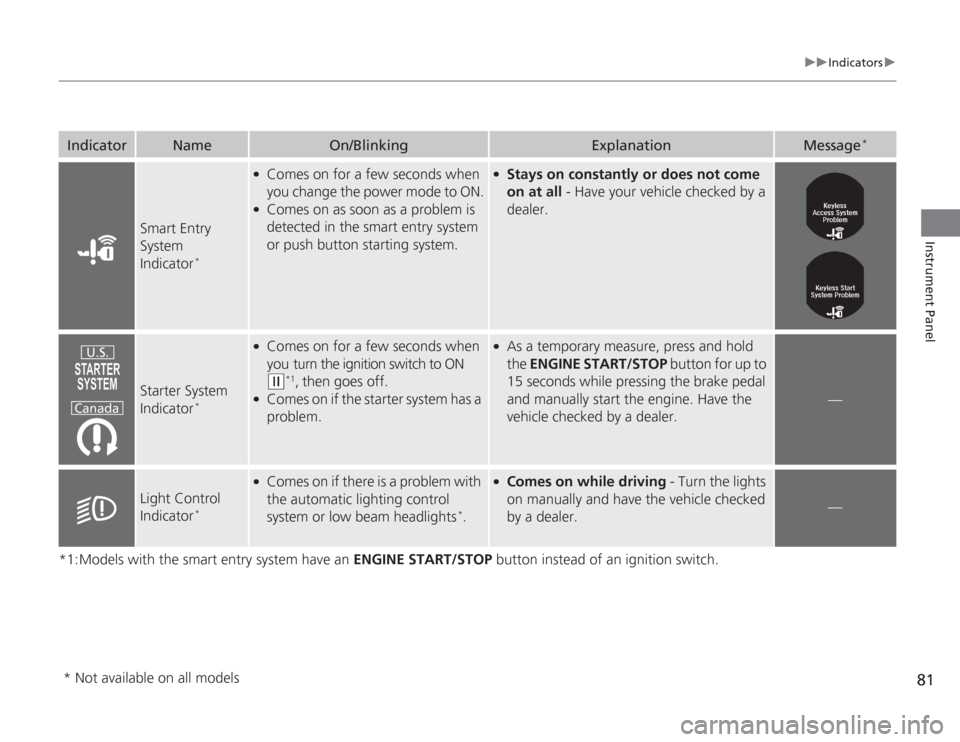
Smart Entry
System
Indicator
*
●
Comes on for a few seconds when
you change the power mode to ON.
●
Comes on as soon as a problem is
detected in the smart entry system
or push button starting system.
●
Stays on constantly or does not come
on at all - Have your vehicle checked by a
dealer.
Starter System
Indicator
*
●
Comes on for a few seconds when
you turn the ignition switch to ON (w
*1, then goes off.
●
Comes on if the starter system has a
problem.
●
As a temporary measure, press and hold
the ENGINE START/STOP button for up to
15 seconds while pressing the brake pedal
and manually start the engine. Have the
vehicle checked by a dealer.
—
Light Control
Indicator
*
●
Comes on if there is a problem with
the automatic lighting control
system or low beam headlights
*.
●
Comes on while driving - Turn the lights
on manually and have the vehicle checked
by a dealer.
—
U.S.
Canada
* Not available on all models
Page 85 of 595
84
uuIndicators uMulti-Information Display Warn ing and Information Messages
*
Instrument Panel
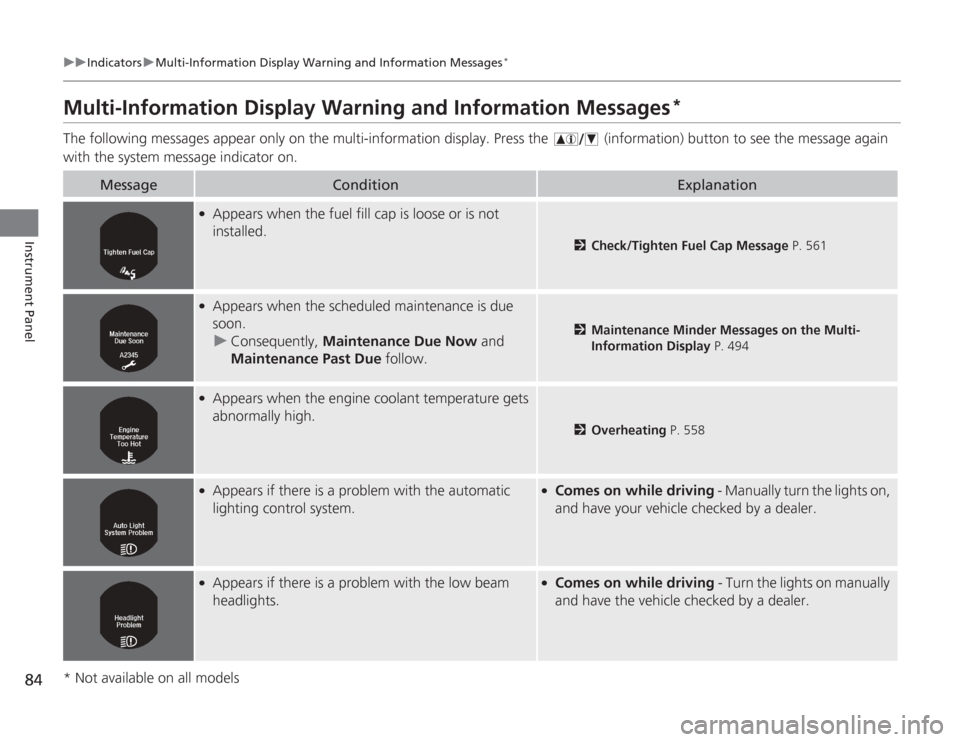
Multi-Information Display Warning and Information Messages
*
The following messages appear only on the multi-information display. Pres s the (information) button to see the message again
with the system message indicator on.
Message
Condition
Explanation
●
Appears when the fuel fill cap is loose or is not
installed.
2 Check/Tighten Fuel Cap Message P. 561
●
Appears when the scheduled maintenance is due
soon.
u Consequently, Maintenance Due Now and
Maintenance Past Due follow.
2Maintenance Minder Messages on the Multi-
Information Display P. 494
●
Appears when the engine coolant temperature gets
abnormally high.
2Overheating P. 558
●
Appears if there is a problem with the automatic
lighting control system.
●
Comes on while driving - Manually turn the lights on,
and have your vehicle checked by a dealer.
●
Appears if there is a problem with the low beam
headlights.
●
Comes on while driving - Turn the lights on manually
and have the vehicle checked by a dealer.
* Not available on all models
Page 88 of 595
87
uuIndicators uMulti-Information Display Wa rning and Information Messages
*
Continued
Instrument Panel
Message
Condition
Explanation
●
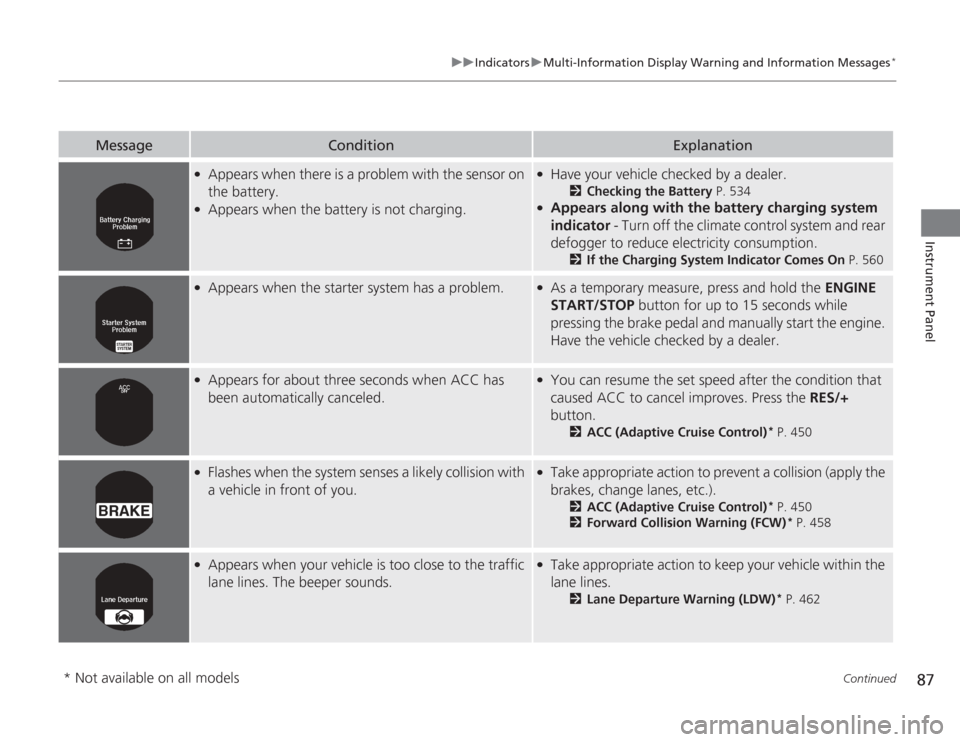
Appears when there is a problem with the sensor on
the battery.
●
Appears when the battery is not charging.
●
Have your vehicle checked by a dealer.
2Checking the Battery P. 534
●
Appears along with the battery charging system
indicator - Turn off the climate control system and rear
defogger to reduce electricity consumption.
2 If the Charging System Indicator Comes On P. 560
●
Appears when the starter system has a problem.
●
As a temporary measure, press and hold the ENGINE
START/STOP button for up to 15 seconds while
pressing the brake pedal and manually start the engine.
Have the vehicle checked by a dealer.
●
Appears for about three seconds when ACC has
been automatically canceled.
●
You can resume the set speed after the condition that
caused ACC to cancel improves. Press the RES/+
button.
2 ACC (Adaptive Cruise Control)
* P. 450
●
Flashes when the system senses a likely collision with
a vehicle in front of you.
●
Take appropriate action to prevent a collision (apply the
brakes, change lanes, etc.).
2ACC (Adaptive Cruise Control)
* P. 450
2 Forward Collision Warning (FCW)
* P. 458
●
Appears when your vehicle is too close to the traffic
lane lines. The beeper sounds.
●
Take appropriate action to keep your vehicle within the
lane lines.
2Lane Departure Warning (LDW)
* P. 462
* Not available on all models