Few HONDA ACCORD 2014 9.G Owner's Manual
[x] Cancel search | Manufacturer: HONDA, Model Year: 2014, Model line: ACCORD, Model: HONDA ACCORD 2014 9.GPages: 595
Page 211 of 595
uuAudio System Basic Operation uAudio/Information Screen
210Features
You can change, store, and delete the wallpaper on the audio/information screen.■
Import wallpaper
You can import up to three images, one at a time, for wallpaper from a USB flash
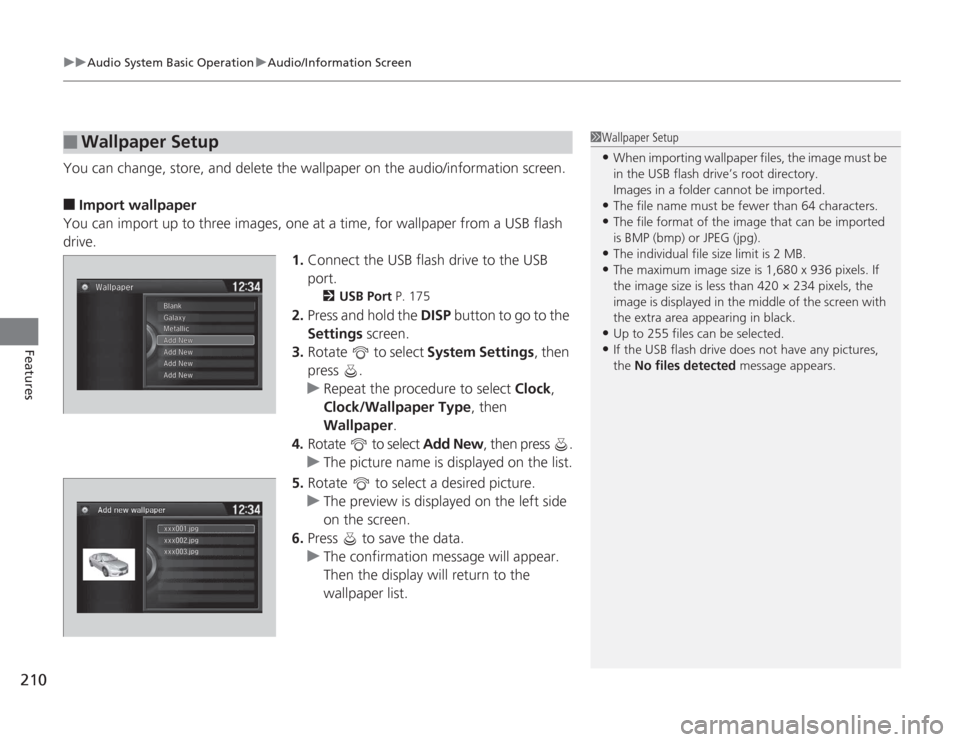
drive. 1.Connect the USB flash drive to the USB
port.
2 USB Port P. 175
2.Press and hold the DISP button to go to the
Settings screen.
3. Rotate to select System Settings, then
press .
u Repeat the procedure to select Clock,
Clock/Wallpaper Type , then
Wallpaper .
4. Rotate to select Add New , then press .
u The picture name is displayed on the list.
5. Rotate to select a desired picture.
u The preview is displayed on the left side
on the screen.
6. Press to save the data.
u The confirmation message will appear.
Then the display will return to the
wallpaper list.
■
Wallpaper Setup
1Wallpaper Setup•When importing wallpaper files, the image must be
in the USB flash drive’s root directory.
Images in a folder cannot be imported.•The file name must be fewer than 64 characters.•The file format of the image that can be imported
is BMP (bmp) or JPEG (jpg).•The individual file size limit is 2 MB.•The maximum image size is 1,680 x 936 pixels. If
the image size is less than 420 × 234 pixels, the
image is displayed in the middle of the screen with
the extra area appearing in black.•Up to 255 files can be selected.•If the USB flash drive does not have any pictures,
the No files detected message appears.
Page 242 of 595
Continued
241
uuAudio System Basic Operation uAudio/Information Screen
Features
You can change, store, and delete the wallpaper on the audio/information screen.■
Import wallpaper
You can import up to three images, one at a time, for wallpaper from a USB flash
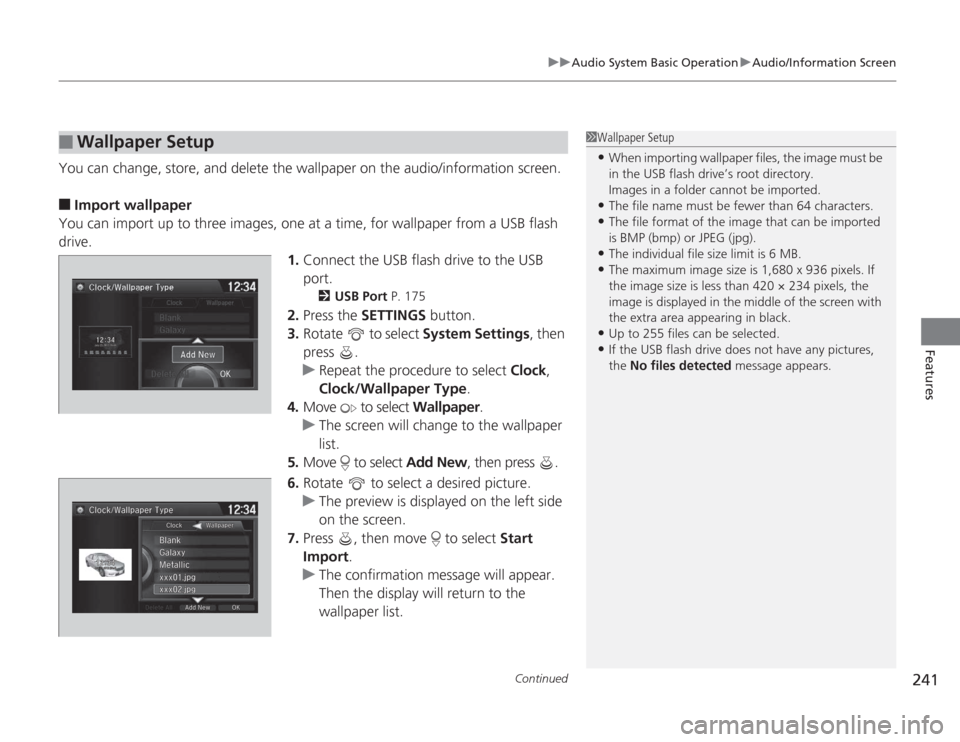
drive. 1.Connect the USB flash drive to the USB
port.
2 USB Port P. 175
2.Press the SETTINGS button.
3. Rotate to select System Settings, then
press .
u Repeat the procedure to select Clock,
Clock/Wallpaper Type .
4. Move to select Wallpaper.
u The screen will change to the wallpaper
list.
5. Move to select Add New, then press .
6. Rotate to select a desired picture.
u The preview is displayed on the left side
on the screen.
7. Press , then move to select Start
Import.
u The confirmation message will appear.
Then the display will return to the
wallpaper list.
■
Wallpaper Setup
1Wallpaper Setup•When importing wallpaper files, the image must be
in the USB flash drive’s root directory.
Images in a folder cannot be imported.•The file name must be fewer than 64 characters.•The file format of the image that can be imported
is BMP (bmp) or JPEG (jpg).•The individual file size limit is 6 MB.•The maximum image size is 1,680 x 936 pixels. If
the image size is less than 420 × 234 pixels, the
image is displayed in the middle of the screen with
the extra area appearing in black.•Up to 255 files can be selected.•If the USB flash drive does not have any pictures,
the No files detected message appears.
Page 309 of 595
308
uuCustomized Features u
Features
*1:Default SettingSetup
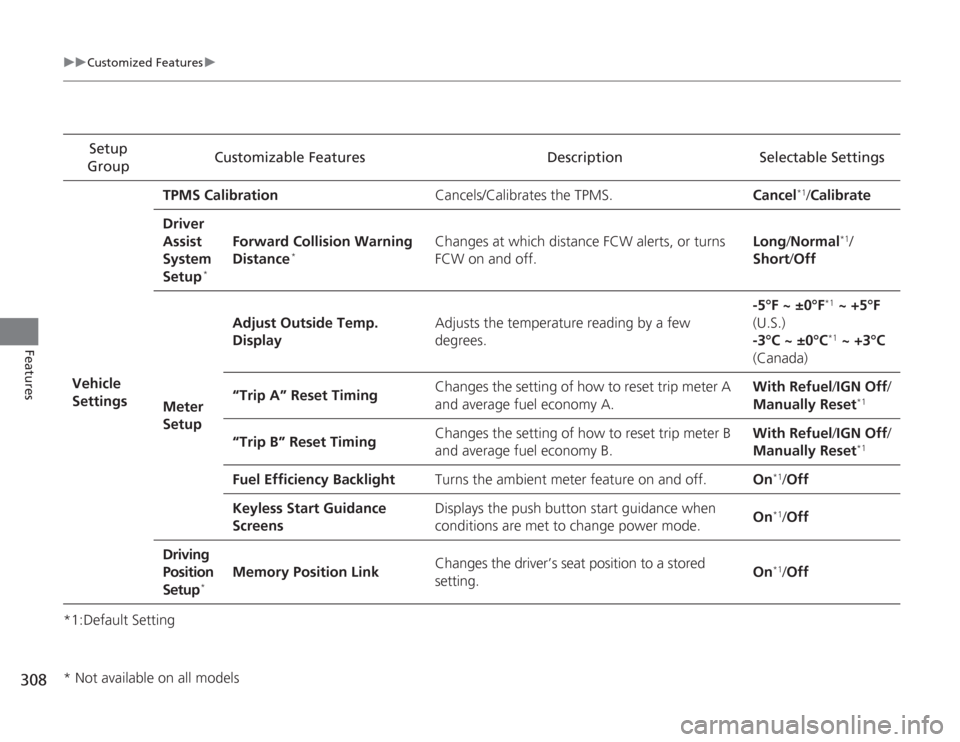
Group Customizable Features Description Selectable Settings
Vehicle
Settings TPMS Calibration
Cancels/Calibrates the TPMS. Cancel
*1/Calibrate
Driver
Assist
System
Setup
*
Forward Collision Warning
Distance
*
Changes at which distance FCW alerts, or turns
FCW on and off. Long
/Normal
*1/
Short /Off
Meter
Setup Adjust Outside Temp.
Display
Adjusts the temperature reading by a few
degrees. -5°F ~ ±0°F
*1
~ +5°F
(U.S.)
-3°C ~ ±0°C*1 ~ +3°C
(Canada)
“Trip A” Reset Timing Changes the setting of how to reset trip meter A
and average fuel economy A. With Refuel
/IGN Off /
Manually Reset
*1
“Trip B” Reset Timing Changes the setting of how to reset trip meter B
and average fuel economy B. With Refuel
/IGN Off /
Manually Reset
*1
Fuel Efficiency Backlight Turns the ambient meter feature on and off. On
*1/Off
Keyless Start Guidance
Screens Displays the push button start guidance when
conditions are met to change power mode.
On*1/
Off
Driving
Position
Setup
*
Memory Position Link Changes the driver’s seat position to a stored
setting. On
*1/
Off
* Not available on all models
Page 327 of 595
326
uuCustomized Features u
Features
*1:Default SettingSetup
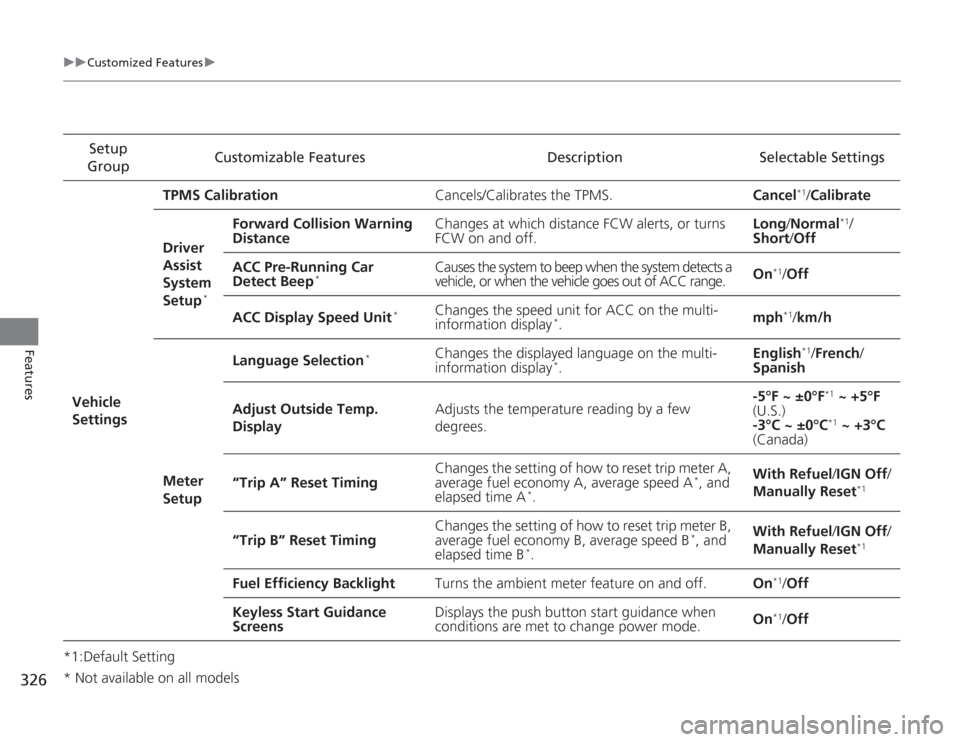
Group Customizable Features Description Selectable Settings
Vehicle
Settings TPMS Calibration
Cancels/Calibrates the TPMS. Cancel
*1/Calibrate
Driver
Assist
System
Setup
*
Forward Collision Warning
Distance Changes at which distance FCW alerts, or turns
FCW on and off. Long
/Normal
*1/
Short /Off
ACC Pre-Running Car
Detect Beep
*
Causes the system to beep when the system detects a
vehicle, or when the vehicle goes out of ACC range. On
*1/
Off
ACC Display Speed Unit
*
Changes the speed unit for ACC on the multi-
information display
*. mph
*1/
km/h
Meter
Setup Language Selection
*
Changes the displayed language on the multi-
information display
*.
English
*1/
French /
Spanish
Adjust Outside Temp.
Display Adjusts the temperature reading by a few
degrees. -5°F ~ ±0°F
*1
~ +5°F
(U.S.)
-3°C ~ ±0°C*1 ~ +3°C
(Canada)
“Trip A” Reset Timing Changes the setting of how to reset trip meter A,
average fuel economy A, average speed A
*, and
elapsed time A
*. With Refuel
/IGN Off /
Manually Reset
*1
“Trip B” Reset Timing Changes the setting of how to reset trip meter B,
average fuel economy B, average speed B
*, and
elapsed time B
*. With Refuel
/IGN Off /
Manually Reset
*1
Fuel Efficiency Backlight Turns the ambient meter feature on and off. On
*1/Off
Keyless Start Guidance
Screens Displays the push button start guidance when
conditions are met to change power mode.
On*1/
Off
* Not available on all models
Page 440 of 595
Continued
439
uuWhen Driving uShifting
Driving
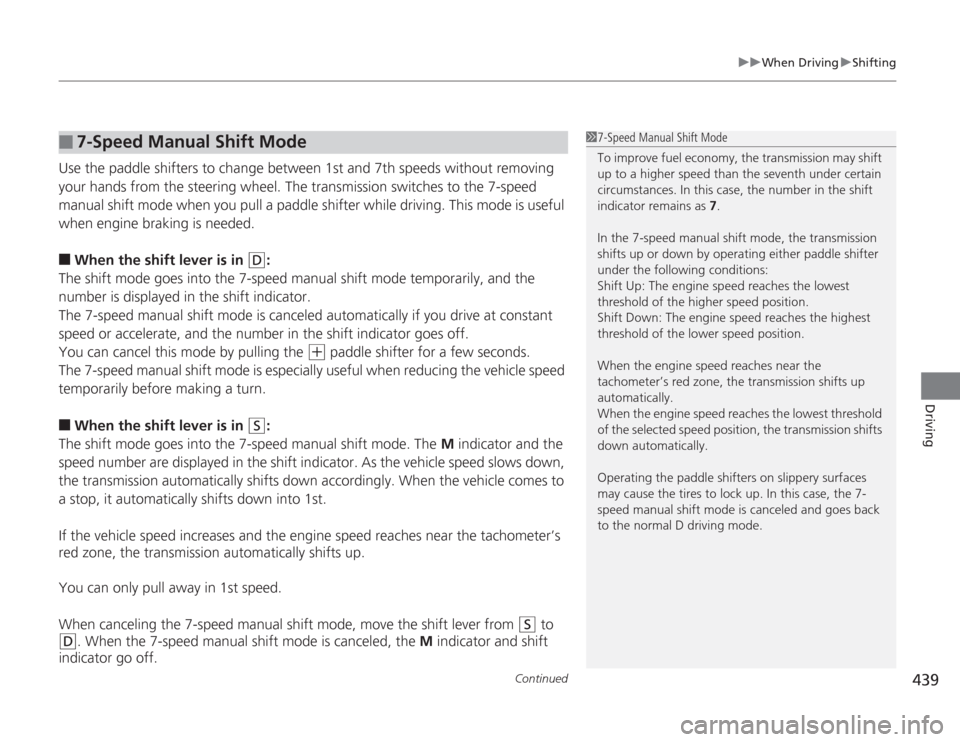
Use the paddle shifters to change between 1st and 7th speeds without removing
your hands from the steering wheel. The transmission switches to the 7-speed
manual shift mode when you pull a paddle shifter while driving. This mode is useful
when engine braking is needed.■
When the shift lever is in
(D
:
The shift mode goes into the 7-speed manual shift mode temporarily, and the
number is displayed in the shift indicator.
The 7-speed manual shift mode is canceled automatically if you drive at constant
speed or accelerate, and the number in the shift indicator goes off.
You can cancel this mode by pulling the
(+
paddle shifter for a few seconds.
The 7-speed manual shift mode is especially useful when reducing the vehicle speed
temporarily before making a turn.
■
When the shift lever is in
(S
:
The shift mode goes into the 7-speed manual shift mode. The M indicator and the
speed number are displayed in the shift indicator. As the vehicle speed slows down,
the transmission automatically shifts down accordingly. When the vehicle comes to
a stop, it automatically shifts down into 1st.
If the vehicle speed increases and the engine speed reaches near the tachometer’s
red zone, the transmission automatically shifts up.
You can only pull away in 1st speed.
When canceling the 7-speed manual shift mode, move the shift lever from
(S
to
(D
. When the 7-speed manual shift mode is canceled, the M indicator and shift
indicator go off.
■
7-Speed Manual Shift Mode
1 7-Speed Manual Shift Mode
To improve fuel economy, the transmission may shift
up to a higher speed than the seventh under certain
circumstances. In this case, the number in the shift
indicator remains as 7.
In the 7-speed manual shift mode, the transmission
shifts up or down by operating either paddle shifter
under the following conditions:
Shift Up: The engine speed reaches the lowest
threshold of the higher speed position.
Shift Down: The engine speed reaches the highest
threshold of the lower speed position.
When the engine speed reaches near the
tachometer’s red zone, the transmission shifts up
automatically.
When the engine speed reaches the lowest threshold
of the selected speed position, the transmission shifts
down automatically.
Operating the paddle shifters on slippery surfaces
may cause the tires to lock up. In this case, the 7-
speed manual shift mode is canceled and goes back
to the normal D driving mode.
Page 444 of 595
443
uuWhen Driving uShifting
Continued
Driving
ShiftingFully depress the clutch pedal to operate the shift lever and change gears, then
slowly release the pedal.
Depress the clutch pedal, and pause for a few seconds before shifting into
(R
, or
shift into one of the forward gears for a moment. This stops the gears so they do not
“grind.”
■
Shift Lever Operation
Manual transmission models
1 Shifting
NOTICEDo not shift to
(R
before the vehicle comes to a
complete stop.
Shifting to
( R
before stopping can damage the
transmission.
NOTICEBefore downshifting, make sure the engine will not
go into the tachometer's red zone. Should this occur,
it can severely damage your engine.
There is a metallic part on the shift lever. If you leave
the vehicle park ed outside for a long time on a hot
day, be careful before moving the shift lever. Because
of heat, the shift lever ma y be extremely hot. If the
outside temperature is low, the shift lever may feel
cold.
Page 507 of 595
uuMaintenance Under the Hood uChanging the Engine Oil and Oil Filter
506Maintenance
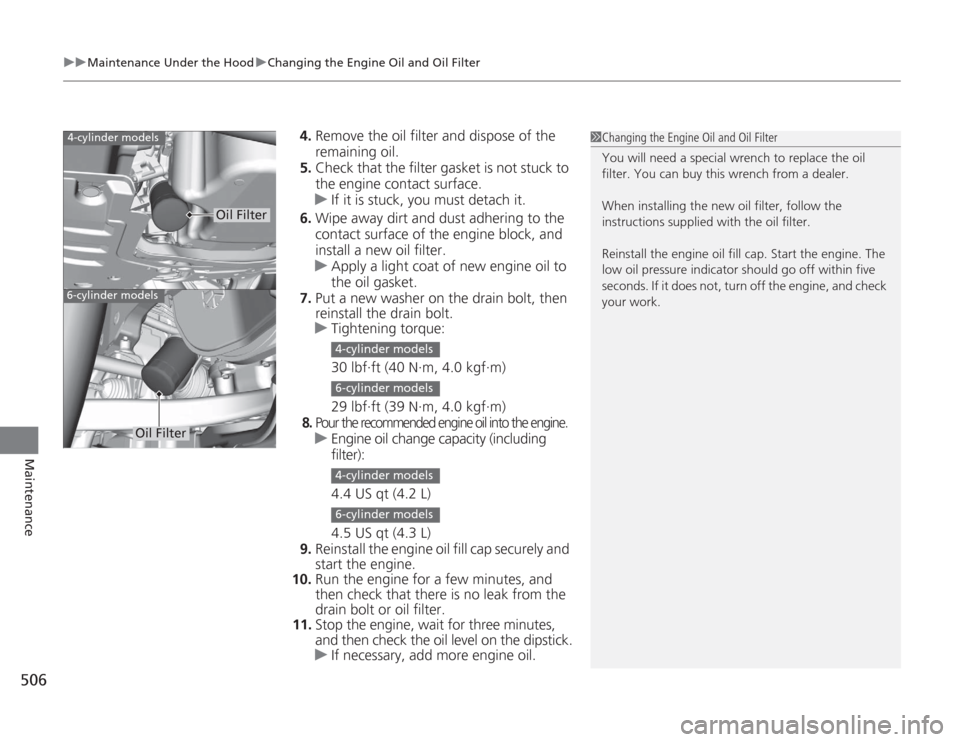
4. Remove the oil filter and dispose of the
remaining oil.
5. Check that the filter gasket is not stuck to
the engine contact surface.
u If it is stuck, you must detach it.
6. Wipe away dirt and dust adhering to the
contact surface of the engine block, and
install a new oil filter.
u Apply a light coat of new engine oil to
the oil gasket.
7. Put a new washer on the drain bolt, then
reinstall the drain bolt.
u Tightening torque:
30 lbf∙ft (40 N∙m, 4.0 kgf∙m)
29 lbf∙ft (39 N∙m, 4.0 kgf∙m)8.
Pour the recommended engine oil into the engine.uEngine oil change capacity (including
filter):
4.4 US qt (4.2 L)
4.5 US qt (4.3 L)
9. Reinstall the engine oil fill cap securely and
start the engine.
10. Run the engine for a few minutes, and
then check that there is no leak from the
drain bolt or oil filter.
11. Stop the engine, wait for three minutes,
and then check the oil level on the dipstick.
u If necessary, add more engine oil.
1Changing the Engine Oil and Oil Filter
You will need a special wrench to replace the oil
filter. You can buy this wrench from a dealer.
When installing the new oil filter, follow the
instructions supplied with the oil filter.
Reinstall the engine oil fill cap. Start the engine. The
low oil pressure indicator should go off within five
seconds. If it does not, turn off the engine, and check
your work.
4-cylinder models6-cylinder models
Oil Filter
Oil Filter
4-cylinder models6-cylinder models4-cylinder models6-cylinder models
Page 551 of 595
uuIf a Tire Goes Flat uChanging a Flat Tire
550Handling the Unexpected
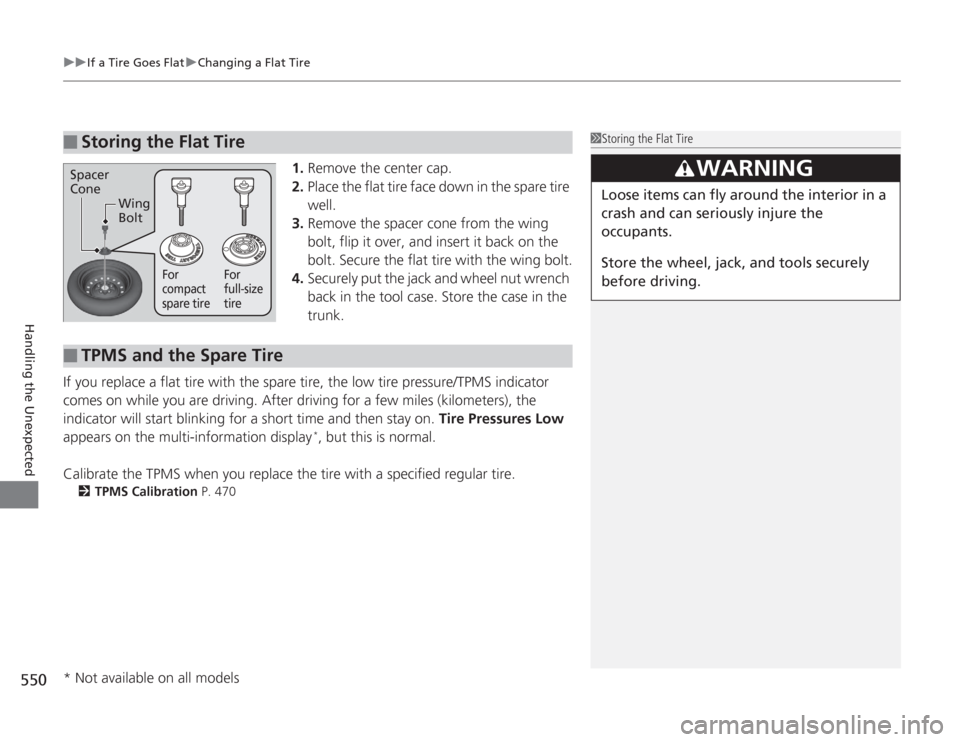
1. Remove the center cap.
2. Place the flat tire face down in the spare tire
well.
3. Remove the spacer cone from the wing
bolt, flip it over, and insert it back on the
bolt. Secure the flat tire with the wing bolt.
4. Securely put the jack and wheel nut wrench
back in the tool case. Store the case in the
trunk.
If you replace a flat tire with the spare tire, the low tire pressure/TPMS indicator
comes on while you are driving. After driving for a few miles (kilometers), the
indicator will start blinking for a short time and then stay on. Tire Pressures Low
appears on the multi-information display
*, but this is normal.
Calibrate the TPMS when you replace the tire with a specified regular tire.
2 TPMS Calibration P. 470
■
Storing the Flat Tire
1Storing the Flat Tire
3
WARNING
Loose items can fly around the interior in a
crash and can seriously injure the
occupants.
Store the wheel, jack, and tools securely
before driving.
Spacer
Cone
Wing
Bolt
For
compact
spare tire For
full-size
tire
■
TPMS and the Spare Tire
* Not available on all models
Page 564 of 595
563
uuIndicator, Coming On/Blinking uIf the Low Tire Pressure/TPMS Indicator Comes On or Blinks
Handling the Unexpected
If the Low Tire Pressure/TPMS Indicator Comes On or Blinks
■
Reasons for the indicator to come on or blink
A tire pressure is significantly low, or the TPMS has not been calibrated.
If there is a problem with the TPMS or the compact spare tire is installed,
the indicator blinks for about one minute, and then stays on.
■
What to do when the indicator comes on
Drive carefully and avoid abrupt cornering and hard braking.
Stop your vehicle in a safe place. Check the tire pressure and adjust the
pressure to the specified level. The specified tire pressure is on a label on
the driver side doorjamb.
u Calibrate the TPMS after the tire pressure is adjusted.
■
What to do when the indicator blinks, then remains on
Have the tire inspected by a dealer as soon as possible. If the compact
spare tire causes the indicator to blink, change the tire to a full-size tire.
The indicator goes off after driving for a few miles (kilometers). u Calibrate the TPMS after a full-size tire is reinstalled.
1If the Low Tire Pressure/TPMS Indicator Comes On or Blinks
NOTICEDriving on an extremely underinflated tire can cause
it to overheat. An overheated tire can fail. Always
inflate your tires to the prescribed level.