stop start HONDA ACCORD 2014 9.G Owner's Manual
[x] Cancel search | Manufacturer: HONDA, Model Year: 2014, Model line: ACCORD, Model: HONDA ACCORD 2014 9.GPages: 595
Page 82 of 595
81
uuIndicators u
Instrument Panel
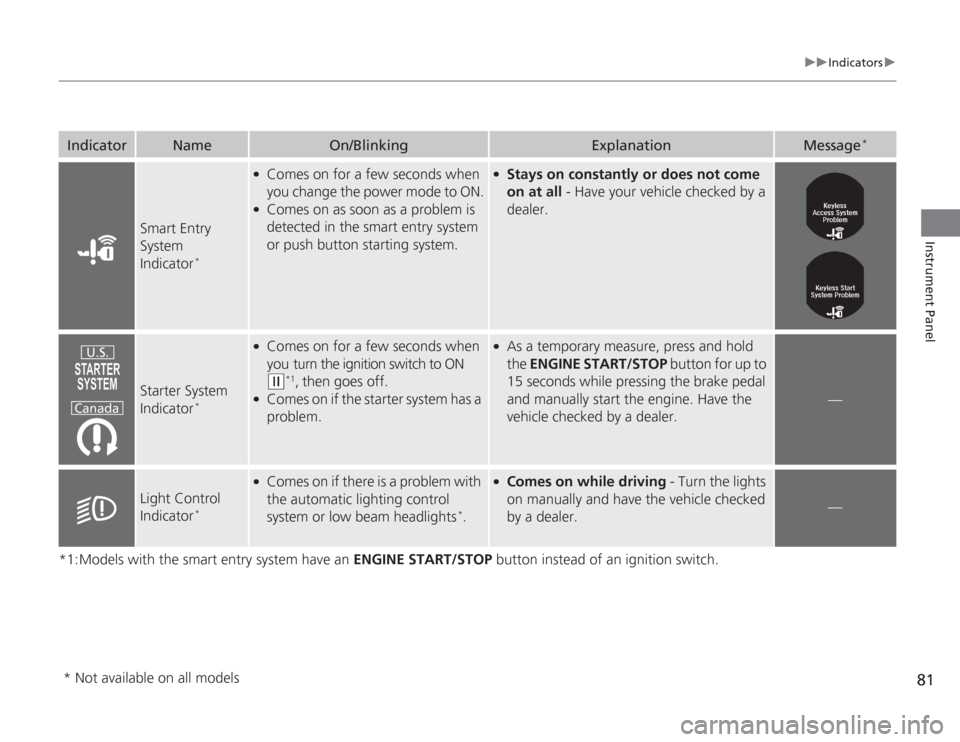
*1:Models with the smart entry system have an ENGINE START/STOP button instead of an ignition switch.Indicator
Name
On/Blinking
Explanation
Message
*
Smart Entry
System
Indicator
*
●
Comes on for a few seconds when
you change the power mode to ON.
●
Comes on as soon as a problem is
detected in the smart entry system
or push button starting system.
●
Stays on constantly or does not come
on at all - Have your vehicle checked by a
dealer.
Starter System
Indicator
*
●
Comes on for a few seconds when
you turn the ignition switch to ON (w
*1, then goes off.
●
Comes on if the starter system has a
problem.
●
As a temporary measure, press and hold
the ENGINE START/STOP button for up to
15 seconds while pressing the brake pedal
and manually start the engine. Have the
vehicle checked by a dealer.
—
Light Control
Indicator
*
●
Comes on if there is a problem with
the automatic lighting control
system or low beam headlights
*.
●
Comes on while driving - Turn the lights
on manually and have the vehicle checked
by a dealer.
—
U.S.
Canada
* Not available on all models
Page 84 of 595
83
uuIndicators uInformation Display Warning and Information Messages
*
Instrument Panel
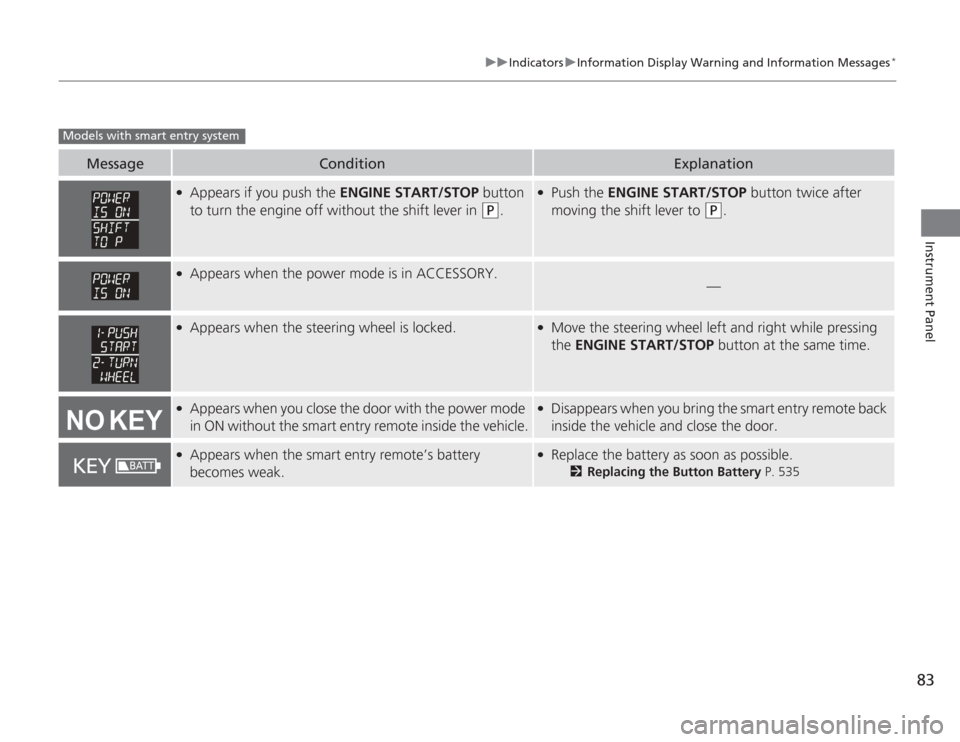
Message
Condition
Explanation
●
Appears if you push the ENGINE START/STOP button
to turn the engine off without the shift lever in
(P
.
●
Push the ENGINE START/STOP button twice after
moving the shift lever to
(P
.
●
Appears when the power mode is in ACCESSORY.
—
●
Appears when the steering wheel is locked.
●
Move the steering wheel left and right while pressing
the ENGINE START/STOP button at the same time.
●
Appears when you close the door with the power mode
in ON without the smart entry remote inside the vehicle.
●
Disappears when you bring the smart entry remote back
inside the vehicle and close the door.
●
Appears when the smart entry remote’s battery
becomes weak.
●
Replace the battery as soon as possible.
2Replacing the Button Battery P. 535
Models with smart entry system
Page 86 of 595
85
uuIndicators uMulti-Information Display Wa rning and Information Messages
*
Continued
Instrument Panel
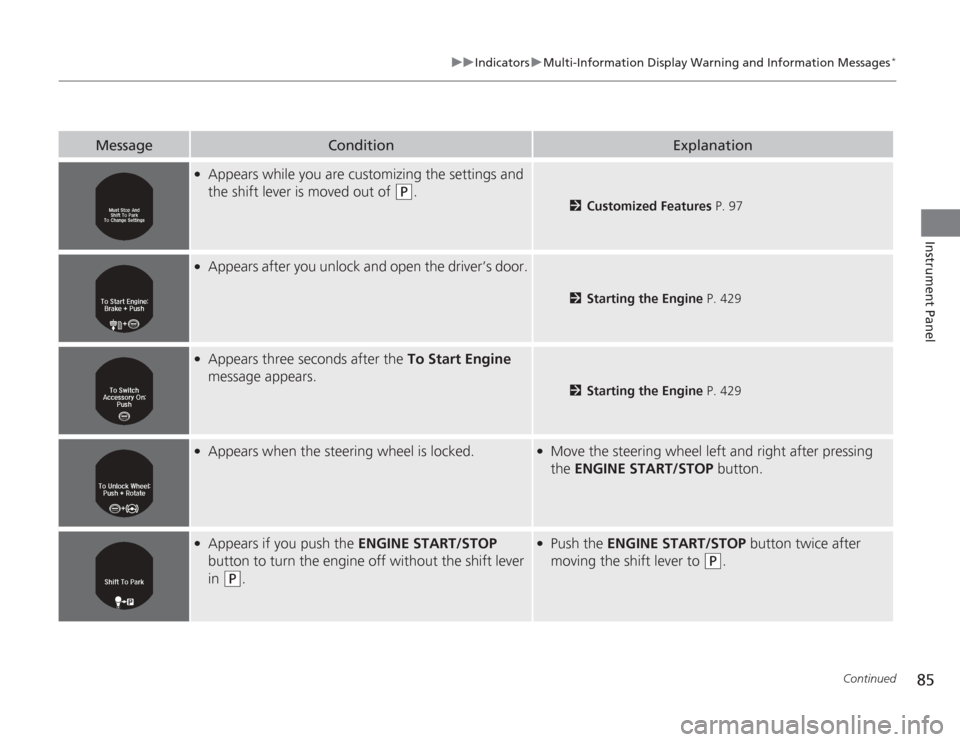
Message
Condition
Explanation
●
Appears while you are customizing the settings and
the shift lever is moved out of
(P
.
2Customized Features P. 97
●
Appears after you unlock and open the driver’s door.
2Starting the Engine P. 429
●
Appears three seconds after the To Start Engine
message appears.
2 Starting the Engine P. 429
●
Appears when the steering wheel is locked.
●
Move the steering wheel left and right after pressing
the ENGINE START/STOP button.
●
Appears if you push the ENGINE START/STOP
button to turn the engine off without the shift lever
in
(P
.
●
Push the ENGINE START/STOP button twice after
moving the shift lever to
(P
.
Page 87 of 595
86
uuIndicators uMulti-Information Display Warn ing and Information Messages
*
Instrument Panel
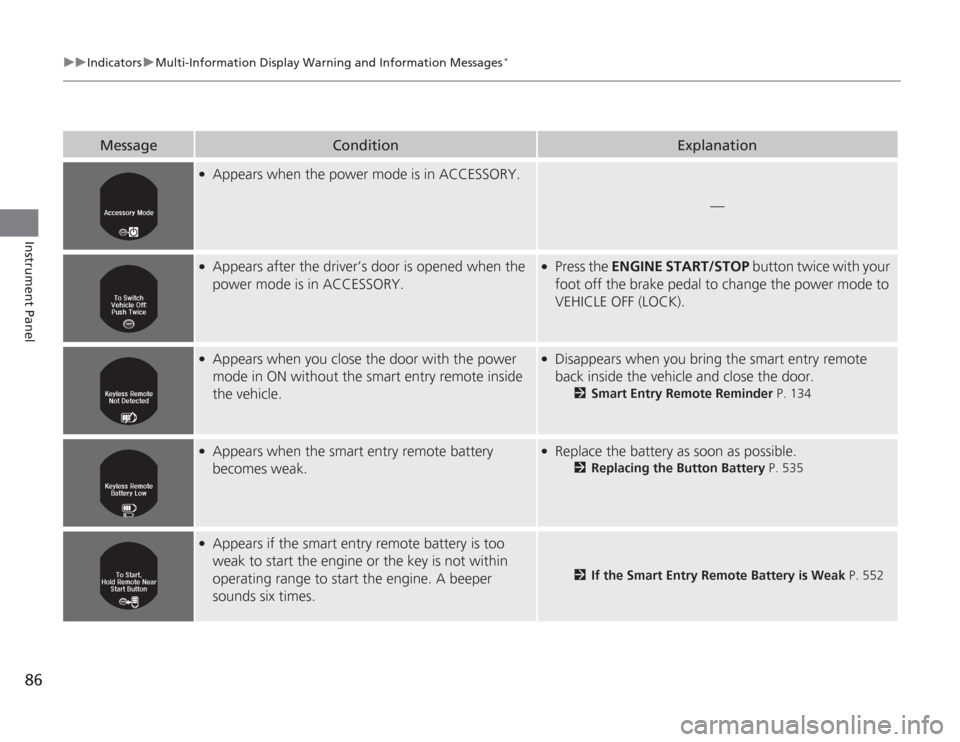
Message
Condition
Explanation
●
Appears when the power mode is in ACCESSORY.
—
●
Appears after the driver’s door is opened when the
power mode is in ACCESSORY.
●
Press the ENGINE START/STOP button twice with your
foot off the brake pedal to change the power mode to
VEHICLE OFF (LOCK).
●
Appears when you close the door with the power
mode in ON without the smart entry remote inside
the vehicle.
●
Disappears when you bring the smart entry remote
back inside the vehicle and close the door.
2 Smart Entry Remote Reminder P. 134
●
Appears when the smart entry remote battery
becomes weak.
●
Replace the battery as soon as possible.
2Replacing the Button Battery P. 535
●
Appears if the smart entry remote battery is too
weak to start the engine or the key is not within
operating range to start the engine. A beeper
sounds six times.
2If the Smart Entry Remote Battery is Weak P. 552
Page 88 of 595
87
uuIndicators uMulti-Information Display Wa rning and Information Messages
*
Continued
Instrument Panel
Message
Condition
Explanation
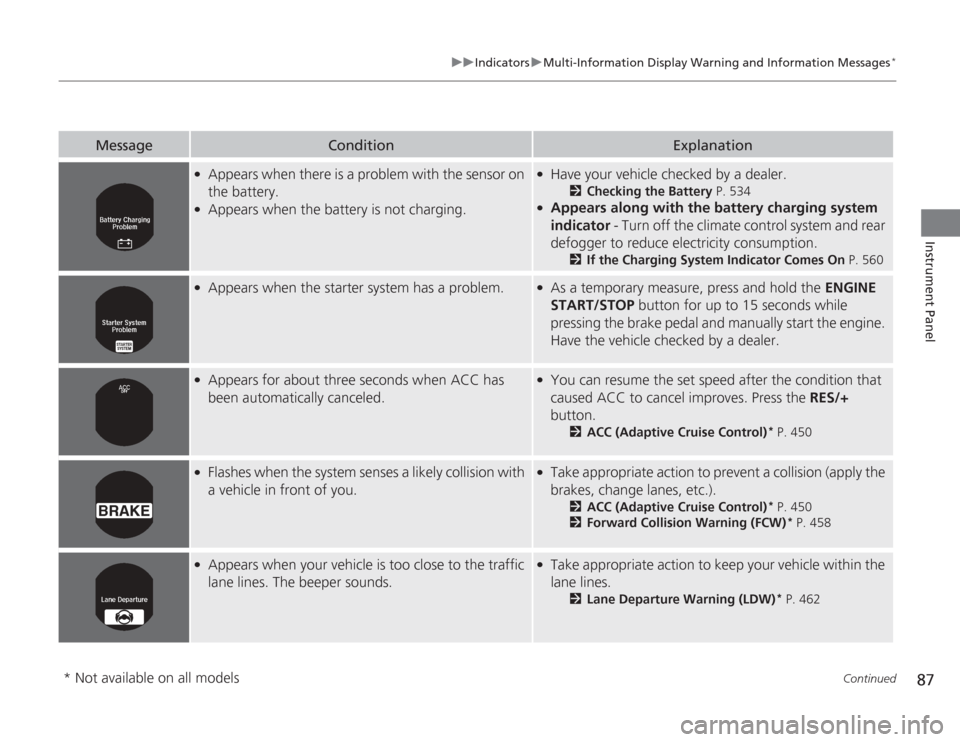
●
Appears when there is a problem with the sensor on
the battery.
●
Appears when the battery is not charging.
●
Have your vehicle checked by a dealer.
2Checking the Battery P. 534
●
Appears along with the battery charging system
indicator - Turn off the climate control system and rear
defogger to reduce electricity consumption.
2 If the Charging System Indicator Comes On P. 560
●
Appears when the starter system has a problem.
●
As a temporary measure, press and hold the ENGINE
START/STOP button for up to 15 seconds while
pressing the brake pedal and manually start the engine.
Have the vehicle checked by a dealer.
●
Appears for about three seconds when ACC has
been automatically canceled.
●
You can resume the set speed after the condition that
caused ACC to cancel improves. Press the RES/+
button.
2 ACC (Adaptive Cruise Control)
* P. 450
●
Flashes when the system senses a likely collision with
a vehicle in front of you.
●
Take appropriate action to prevent a collision (apply the
brakes, change lanes, etc.).
2ACC (Adaptive Cruise Control)
* P. 450
2 Forward Collision Warning (FCW)
* P. 458
●
Appears when your vehicle is too close to the traffic
lane lines. The beeper sounds.
●
Take appropriate action to keep your vehicle within the
lane lines.
2Lane Departure Warning (LDW)
* P. 462
* Not available on all models
Page 90 of 595
89Instrument Panel
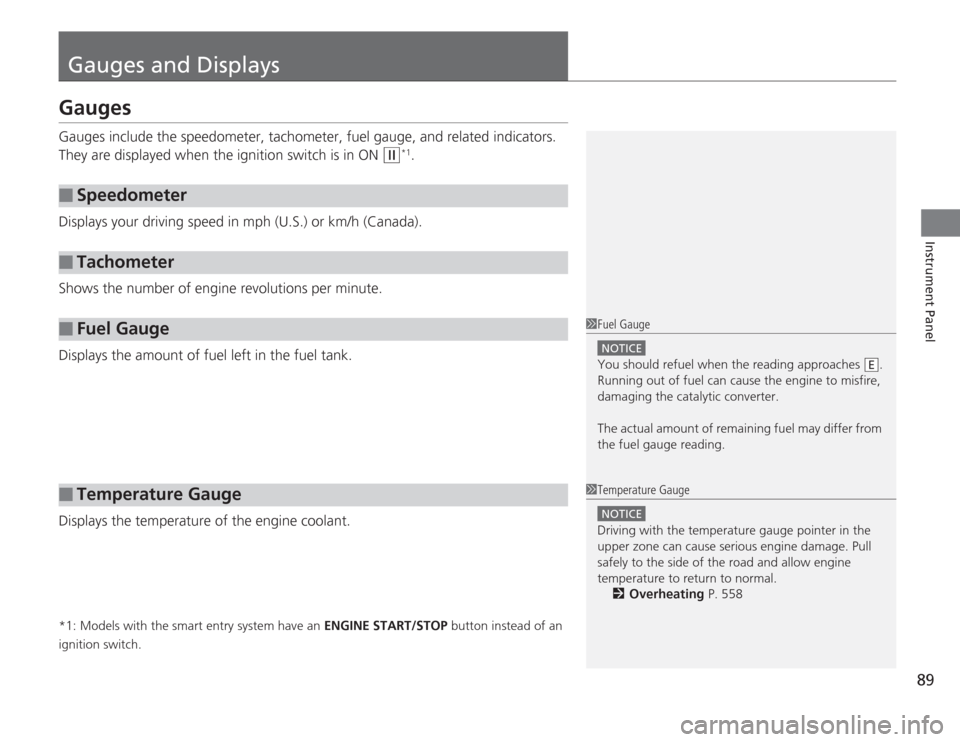
Gauges and DisplaysGaugesGauges include the speedometer, tachometer, fuel gauge, and related indicators.
They are displayed when the ignition switch is in ON
(w
*1.
Displays your driving speed in mph (U.S.) or km/h (Canada).
Shows the number of engine revolutions per minute.
Displays the amount of fuel left in the fuel tank.
Displays the temperature of the engine coolant.
*1: Models with the smart entry system have an ENGINE START/STOP button instead of an
ignition switch.■
Speedometer
■
Tachometer
■
Fuel Gauge
■
Temperature Gauge
1 Fuel Gauge
NOTICEYou should refuel when the reading approaches .
Running out of fuel can cause the engine to misfire,
damaging the catalytic converter.
The actual amount of remaining fuel may differ from
the fuel gauge reading.
E
1Temperature Gauge
NOTICEDriving with the temperature gauge pointer in the
upper zone can cause serious engine damage. Pull
safely to the side of the road and allow engine
temperature to return to normal.
2 Overheating P. 558
Page 93 of 595
uuGauges and Displays uInformation Display
*
92Instrument Panel
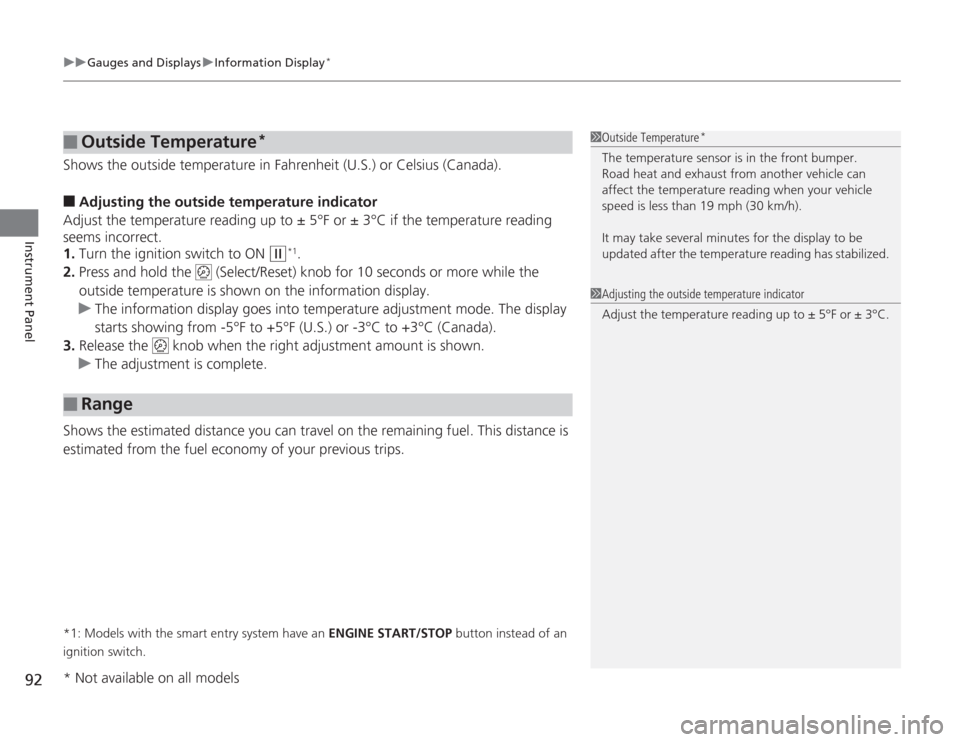
Shows the outside temperature in Fahrenheit (U.S.) or Celsius (Canada).■
Adjusting the outside temperature indicator
Adjust the temperature reading up to ± 5°F or ± 3°C if the temperature reading
seems incorrect.
1. Turn the ignition switch to ON
(w
*1.
2. Press and hold the (Select/Reset) knob for 10 seconds or more while the
outside temperature is shown on the information display.
u The information display goes into temperature adjustment mode. The display
starts showing from -5°F to +5°F (U.S.) or -3°C to +3°C (Canada).
3. Release the knob when the righ t adjustment amount is shown.
u The adjustment is complete.
Shows the estimated distance you can travel on the remaining fuel. This distance is
estimated from the fuel economy of your previous trips.
*1: Models with the smart entry system have an ENGINE START/STOP button instead of an
ignition switch.■
Outside Temperature
*
■
Range
1 Outside Temperature
*
The temperature sensor is in the front bumper.
Road heat and exhaust from another vehicle can
affect the temperature reading when your vehicle
speed is less than 19 mph (30 km/h).
It may take several mi nutes for the display to be
updated after the temperature reading has stabilized.1 Adjusting the outside temperature indicator
Adjust the temp erature reading up to ± 5°F or ± 3°C.
* Not available on all models
Page 106 of 595
105
Controls
This chapter explains how to operate the various controls necessary for driving.
Clock.................................................. 106
Locking and Unlocking the Doors
Key Types and Functions .................. 108
Low Smart Entry Remote Signal Strength
*.................................... 110
Locking/Unlocking the Doors from the
Inside ............................................. 116
Childproof Door Locks ..................... 118
Auto Door Locking/Unlocking .......... 119
Opening and Closing the Trunk....... 120
Security System
Immobilizer System .......................... 124
Security System Alarm ...................... 124
Opening and Closing the Windows ..... 127
Opening and Closing the Moonroof
*.. 130
Operating the Switches Around the Steering Wheel
Ignition Switch
*............................... 131
ENGINE START/STOP Button
*........... 132
Ignition Switch and Power Mode
Comparison ................................... 135
Turn Signals ..................................... 136
Light Switches.................................. 136
Fog Lights
*...................................... 138
Daytime Running Lights ................... 139
Wipers and Washers ........................ 140
Brightness Control ........................... 141
Rear Defogger/Heated Door Mirror
*
Button ........................................... 142 Driving Position Memory System
*.... 143
Adjusting the Steering Wheel .......... 145
Adjusting the Mirrors Interior Rearview Mirror ................... 146
Power Door Mirrors ......................... 147
Adjusting the Seats .......................... 148
Interior Lights/Interior Convenience Items ................................................ 156
Heating and Cooling
*
Using Vents, Heating and A/C.......... 166
Climate Control System
*
Using Automatic Climate Control .... 169
Synchronized Mode ......................... 171
Automatic Climate Control Sensors ... 172
* Not available on all models
Page 107 of 595
106Controls
ClockAdjusting the ClockYou can adjust the time in the clock display with the ignition switch is in ON
(w
*1.
■
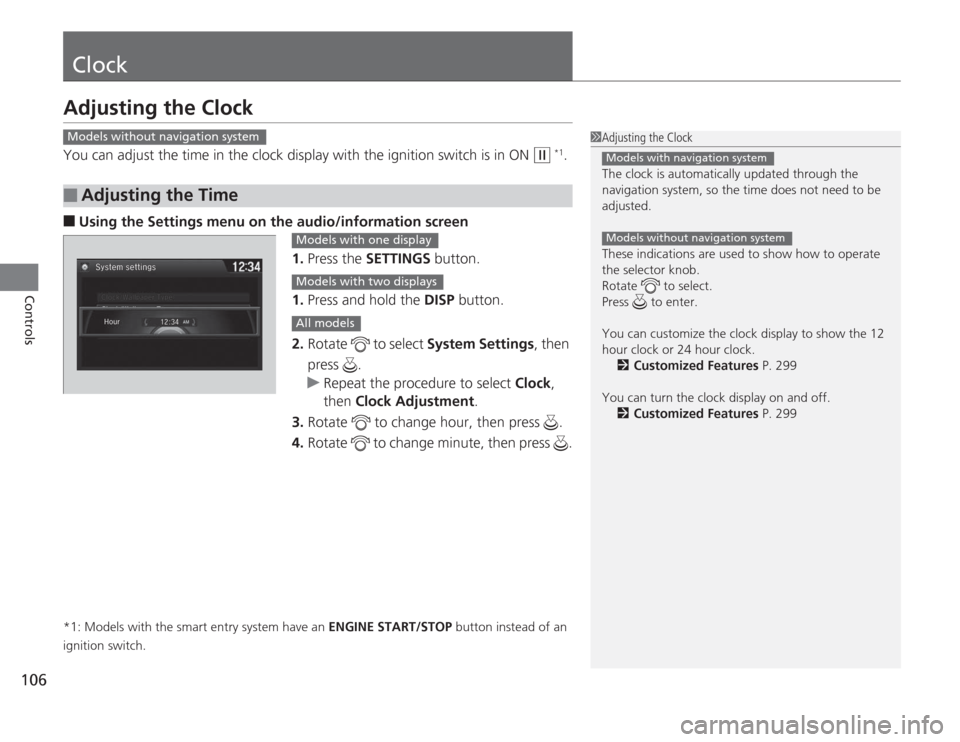
Using the Settings menu on the audio /information screen
1. Press the SETTINGS button.
1. Press and hold the DISP button.
2. Rotate to select System Settings, then
press .
u Repeat the procedure to select Clock,
then Clock Adjustment .
3. Rotate to change hour, then press .
4. Rotate to change minute, then press .
*1: Models with the smart entry system have an ENGINE START/STOP button instead of an
ignition switch.■
Adjusting the Time
1 Adjusting the Clock
The clock is automatically updated through the
navigation system, so the time does not need to be
adjusted.
These indications are used to show how to operate
the selector knob.
Rotate to select.
Press to enter.
You can customize the clock display to show the 12
hour clock or 24 hour clock.
2 Customized Features P. 299
You can turn the clock display on and off. 2 Customized Features P. 299
Models with navigation systemModels without navigation system
Models without navigation system
Models with one displayModels with two displaysAll models
Page 109 of 595
108Controls
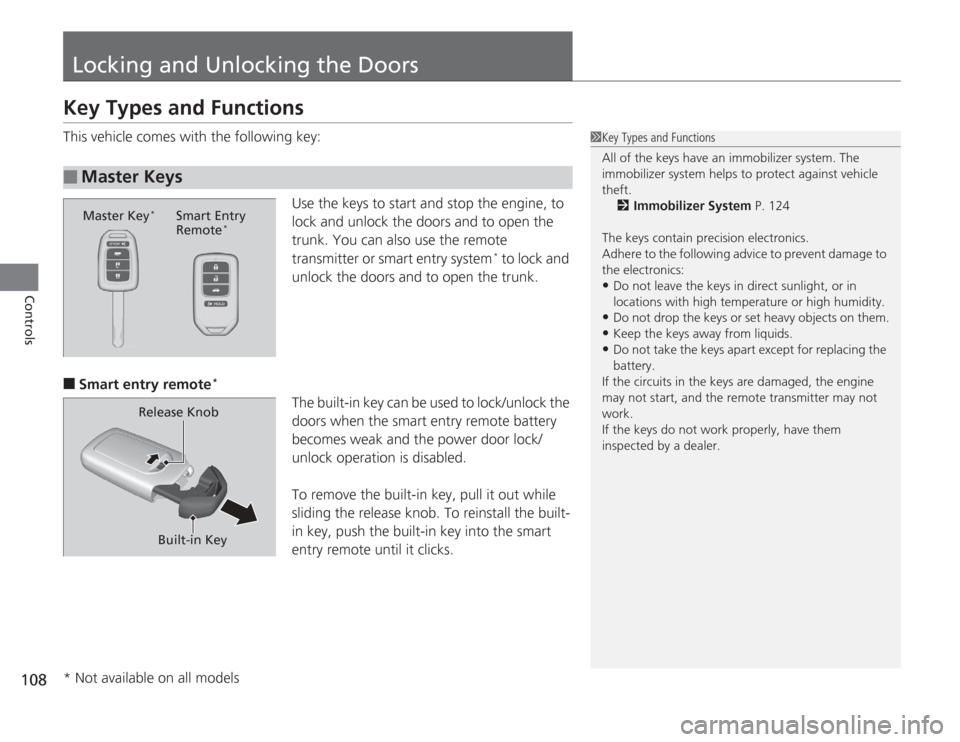
Locking and Unlocking the DoorsKey Types and FunctionsThis vehicle comes with the following key:Use the keys to start and stop the engine, to
lock and unlock the doors and to open the
trunk. You can also use the remote
transmitter or smart entry system
* to lock and
unlock the doors and to open the trunk.
■
Smart entry remote
*
The built-in key can be used to lock/unlock the
doors when the smart entry remote battery
becomes weak and the power door lock/
unlock operation is disabled.
To remove the built-in key, pull it out while
sliding the release knob. To reinstall the built-
in key, push the built-in key into the smart
entry remote until it clicks.
■
Master Keys
1 Key Types and Functions
All of the keys have an immobilizer system. The
immobilizer system helps to protect against vehicle
theft.
2 Immobilizer System P. 124
The keys contain precision electronics.
Adhere to the following advice to prevent damage to
the electronics:•Do not leave the keys in direct sunlight, or in
locations with high temperature or high humidity.•Do not drop the keys or set heavy objects on them.•Keep the keys away from liquids.•Do not take the keys apa rt except for replacing the
battery.
If the circuits in the keys are damaged, the engine
may not start, and the re mote transmitter may not
work.
If the keys do not work properly, have them
inspected by a dealer.
Master Key
*
Smart Entry
Remote
*
Built-in Key
Release Knob
* Not available on all models