reset HONDA ACCORD 2014 9.G Workshop Manual
[x] Cancel search | Manufacturer: HONDA, Model Year: 2014, Model line: ACCORD, Model: HONDA ACCORD 2014 9.GPages: 595
Page 315 of 595
314
uuCustomized Features u
Features
*1:Default Setting
*2:Models with one display
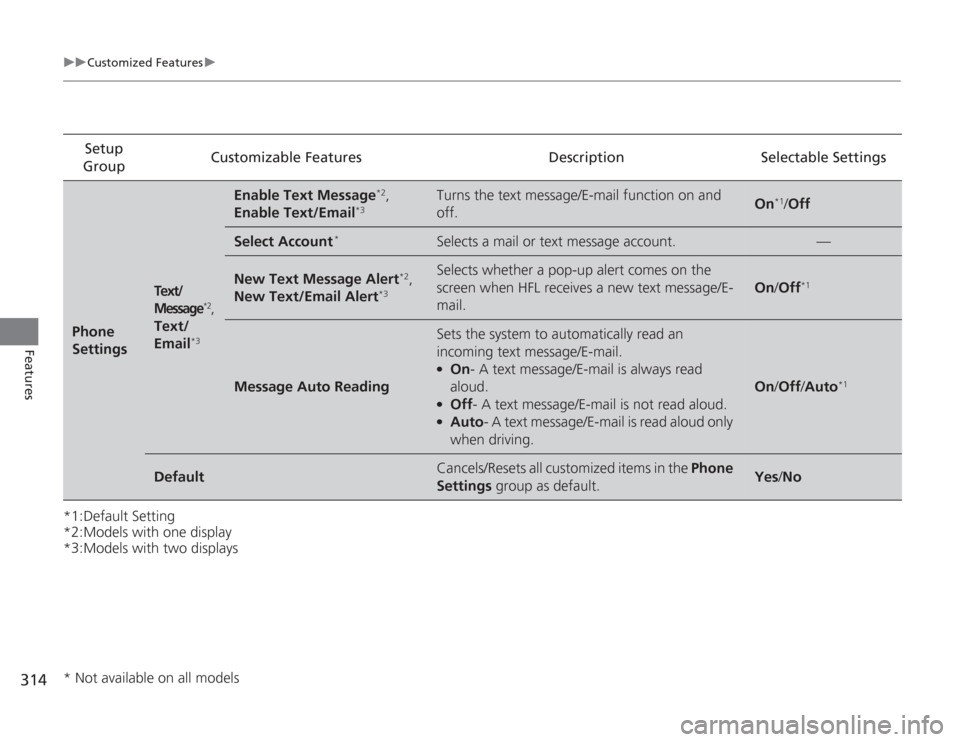
*3:Models with two displaysSetup
Group Customizable Features Description Selectable SettingsPhone
Settings
Text/
Message
*2,
Text/
Email
*3
Enable Text Message
*2,
Enable Text/Email
*3
Turns the text message/E-mail function on and
off.
On
*1/ Off
Select Account
*
Selects a mail or text message account.
—
New Text Message Alert
*2,
New Text/Email Alert
*3
Selects whether a pop-up alert comes on the
screen when HFL receives a new text message/E-
mail.
On /Off
*1
Message Auto Reading
Sets the system to automatically read an
incoming text message/E-mail.●
On - A text message/E-mail is always read
aloud.
●
Off - A text message/E-mail is not read aloud.
●
Auto - A text message/E-mail is read aloud only
when driving.
On /Off /Auto
*1
Default
Cancels/Resets all customized items in the Phone
Settings group as default.
Yes/No
* Not available on all models
Page 316 of 595
315
uuCustomized Features u
Continued
Features
*1:Default Setting
*2:Models with two displaysSetup
Group Customizable Features Description Selectable Settings
Camera
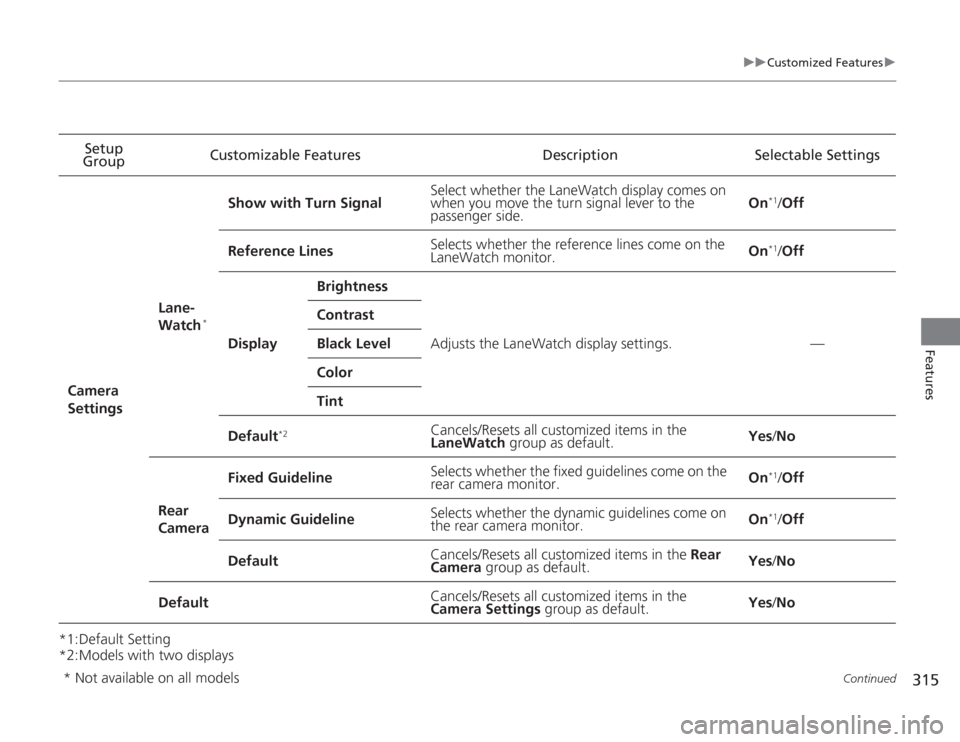
Settings Lane-
Watch
*
Show with Turn Signal
Select whether the LaneWatch display comes on
when you move the turn signal lever to the
passenger side. On
*1/
Off
Reference Lines Selects whether the reference lines come on the
LaneWatch monitor. On*1/
Off
Display Brightness
Adjusts the LaneWatch display settings. —
Contrast
Black Level
Color
Tint
Default
*2
Cancels/Resets all customized items in the
LaneWatch group as default. Yes
/No
Rear
Camera Fixed Guideline
Selects whether the fixed guidelines come on the
rear camera monitor.
On
*1/
Off
Dynamic Guideline Selects whether the dynamic guidelines come on
the rear camera monitor. On*1/
Off
Default Cancels/Resets all customized items in the
Rear
Camera group as default. Yes
/No
Default Cancels/Resets all customized items in the
Camera Settings
group as default. Yes
/No
* Not available on all models
Page 319 of 595
318
uuCustomized Features u
Features
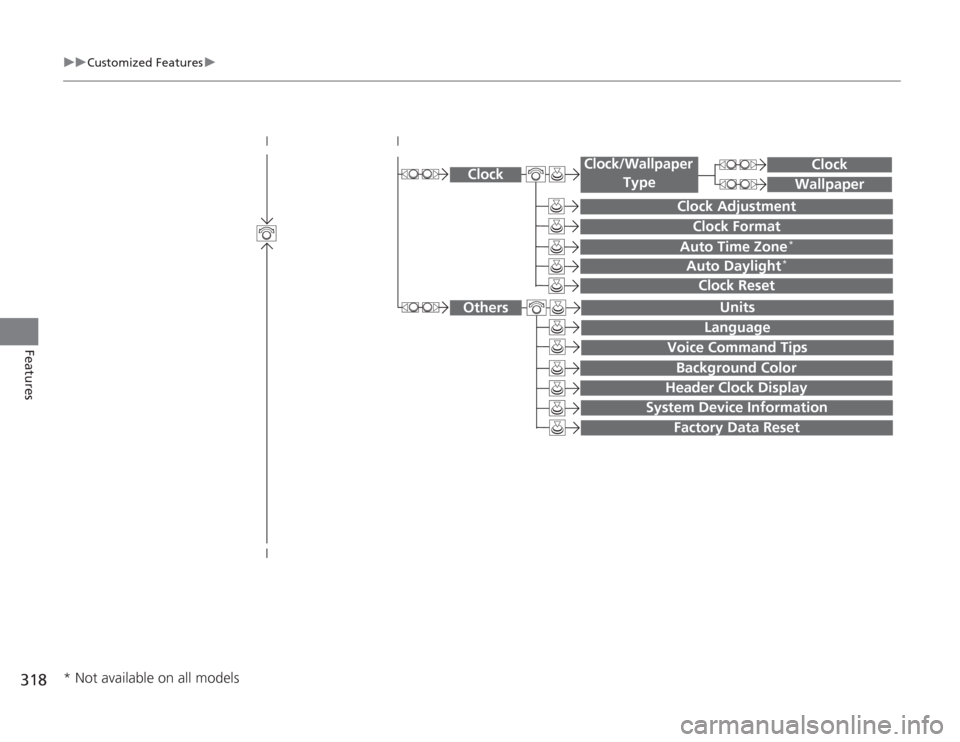
System Device Information
Factory Data Reset
Background ColorHeader Clock Display
Clock Reset
Auto Time Zone
*
Auto Daylight
*
Clock
Clock Adjustment
Clock Format
Clock
Units
Language
Voice Command Tips
Others
Wallpaper
Clock/Wallpaper
Type
* Not available on all models
Page 320 of 595
319
uuCustomized Features u
Continued
Features
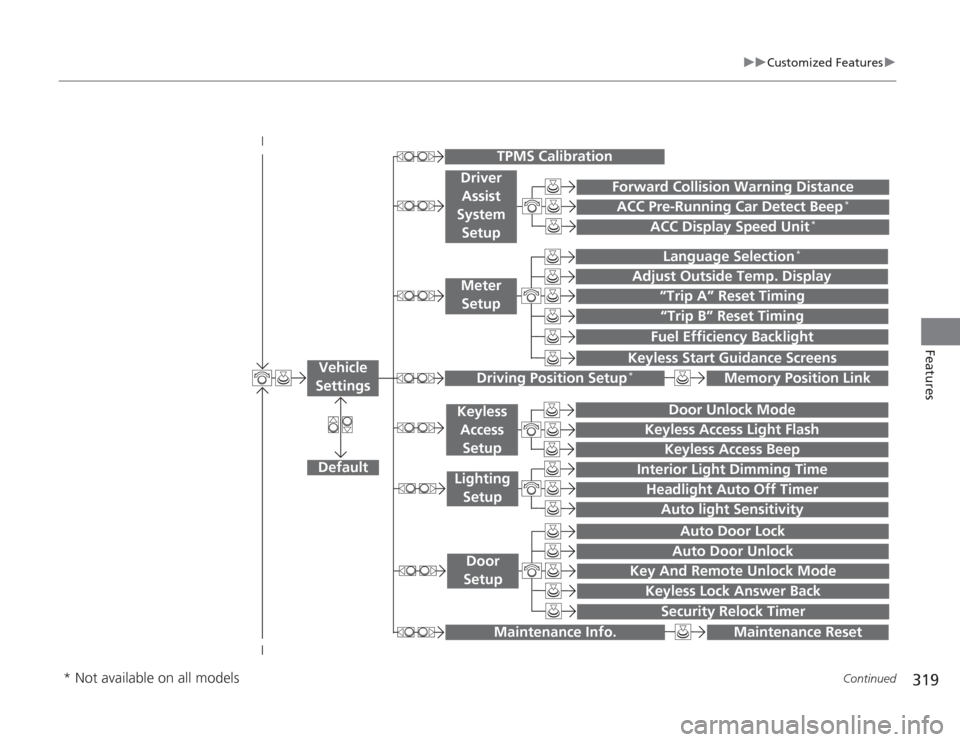
“Trip A” Reset Timing“Trip B” Reset TimingFuel Efficiency Backlight
Language Selection
*
Adjust Outside Temp. Display
Forward Collision Warning DistanceACC Pre-Running Car Detect Beep
*
ACC Display Speed Unit
*
Keyless Start Guidance Screens
Default
Memory Position Link
Door Unlock Mode
Keyless Access Light Flash
Interior Light Dimming TimeHeadlight Auto Off Timer
Auto light Sensitivity
Key And Remote Unlock Mode
Keyless Lock Answer Back
Security Relock Timer
Auto Door LockAuto Door Unlock
Maintenance Reset
TPMS Calibration
Vehicle
Settings
Meter SetupDriver Assist
System
Setup
Driving Position Setup
*
Keyless Access
SetupLighting SetupDoor
Setup
Maintenance Info.
Keyless Access Beep
* Not available on all models
Page 323 of 595
322
uuCustomized Features u
Features
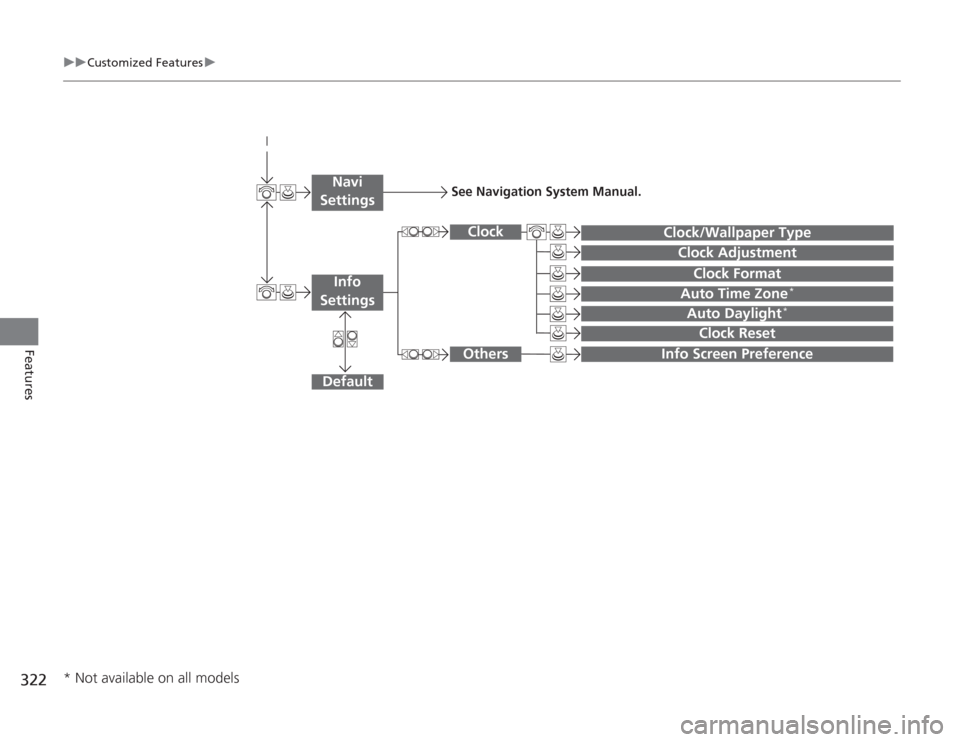
Auto Daylight
*
Clock Reset
Info Screen Preference
Clock Format
Auto Time Zone
*
Clock/Wallpaper Type
Clock Adjustment
Clock
Default
Others
Info
SettingsNavi
Settings
See Navigation System Manual.
* Not available on all models
Page 326 of 595
325
uuCustomized Features u
Continued
Features
*1:Default SettingSetup
Group Customizable Features Description Selectable SettingsSystem
Settings
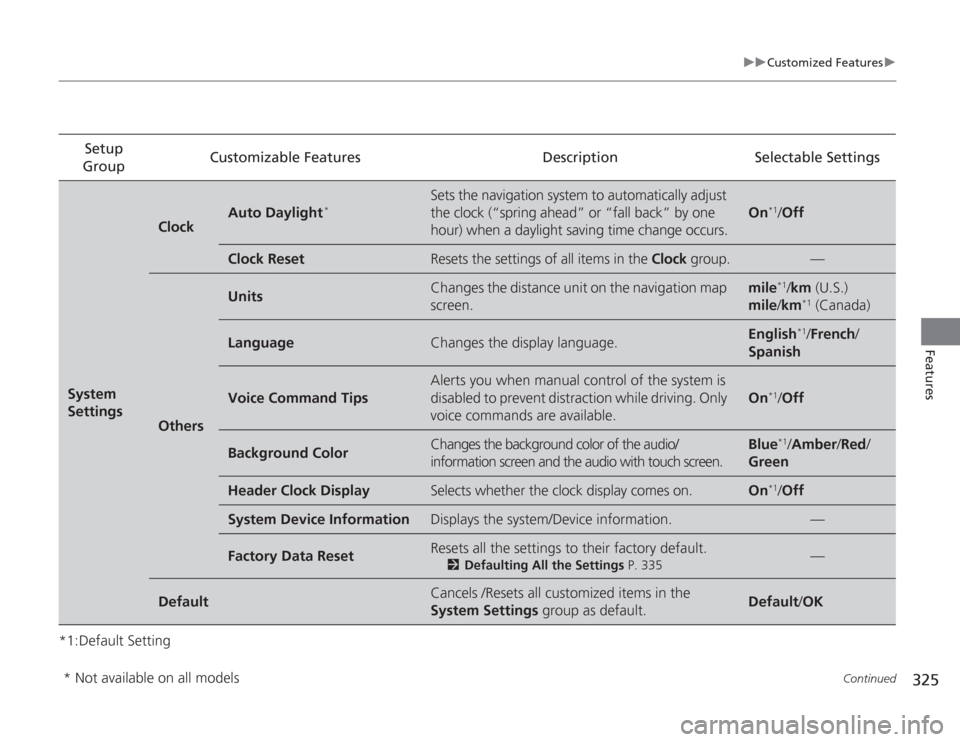
Clock
Auto Daylight
*
Sets the navigation system to automatically adjust
the clock (“spring ahead” or “fall back” by one
hour) when a daylight saving time change occurs.
On
*1/
Off
Clock Reset
Resets the settings of all items in the Clock group.
—
Others
Units
Changes the distance unit on the navigation map
screen.
mile
*1/km (U.S.)
mile /km
*1 (Canada)
Language
Changes the display language.
English
*1/ French /
Spanish
Voice Command Tips
Alerts you when manual control of the system is
disabled to prevent distraction while driving. Only
voice commands are available.
On
*1/ Off
Background Color
Changes the background color of the audio/
information screen and the audio with touch screen.
Blue
*1/Amber /Red /
Green
Header Clock Display
Selects whether the clock display comes on.
On
*1/ Off
System Device Information
Displays the system/Device information.
—
Factory Data Reset
Resets all the settings to their factory default.
2 Defaulting All the Settings P. 335
—
Default
Cancels /Resets all customized items in the
System Settings group as default.
Default/OK
* Not available on all models
Page 327 of 595
326
uuCustomized Features u
Features
*1:Default SettingSetup
Group Customizable Features Description Selectable Settings
Vehicle
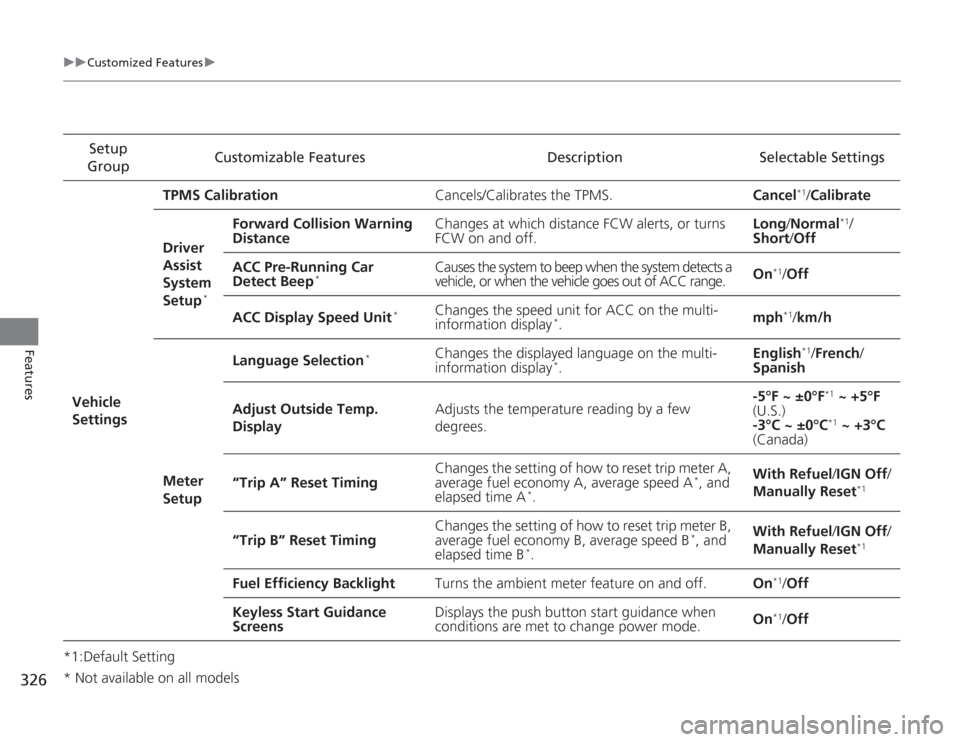
Settings TPMS Calibration
Cancels/Calibrates the TPMS. Cancel
*1/Calibrate
Driver
Assist
System
Setup
*
Forward Collision Warning
Distance Changes at which distance FCW alerts, or turns
FCW on and off. Long
/Normal
*1/
Short /Off
ACC Pre-Running Car
Detect Beep
*
Causes the system to beep when the system detects a
vehicle, or when the vehicle goes out of ACC range. On
*1/
Off
ACC Display Speed Unit
*
Changes the speed unit for ACC on the multi-
information display
*. mph
*1/
km/h
Meter
Setup Language Selection
*
Changes the displayed language on the multi-
information display
*.
English
*1/
French /
Spanish
Adjust Outside Temp.
Display Adjusts the temperature reading by a few
degrees. -5°F ~ ±0°F
*1
~ +5°F
(U.S.)
-3°C ~ ±0°C*1 ~ +3°C
(Canada)
“Trip A” Reset Timing Changes the setting of how to reset trip meter A,
average fuel economy A, average speed A
*, and
elapsed time A
*. With Refuel
/IGN Off /
Manually Reset
*1
“Trip B” Reset Timing Changes the setting of how to reset trip meter B,
average fuel economy B, average speed B
*, and
elapsed time B
*. With Refuel
/IGN Off /
Manually Reset
*1
Fuel Efficiency Backlight Turns the ambient meter feature on and off. On
*1/Off
Keyless Start Guidance
Screens Displays the push button start guidance when
conditions are met to change power mode.
On*1/
Off
* Not available on all models
Page 329 of 595
328
uuCustomized Features u
Features
*1:Default SettingSetup
Group Customizable Features Description Selectable Settings
Vehicle
Settings Door
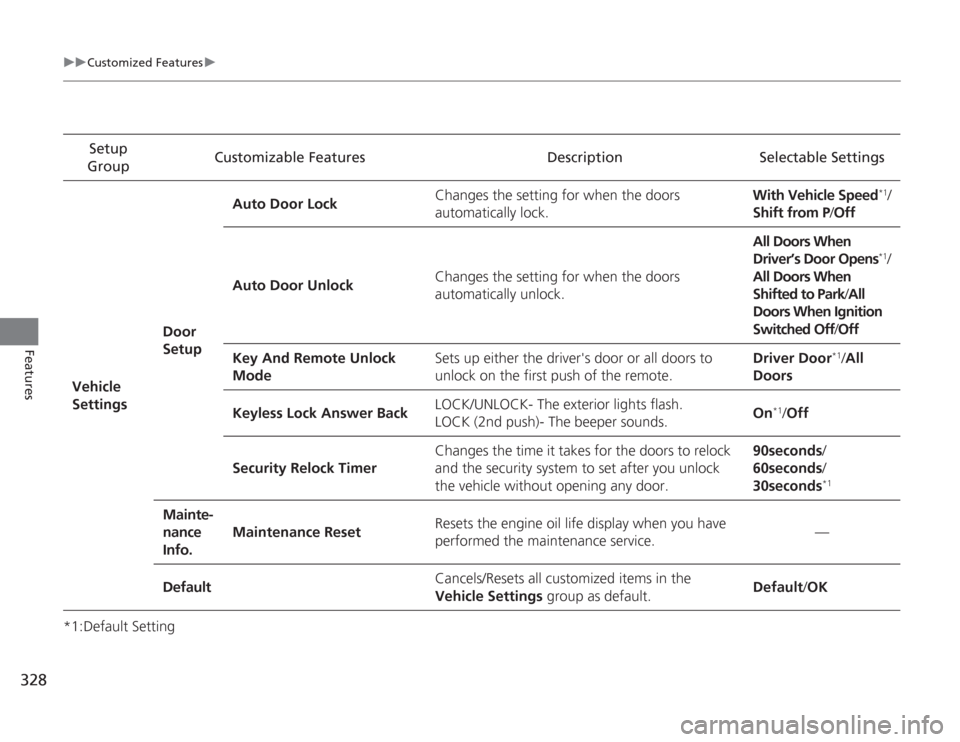
SetupAuto Door Lock
Changes the setting for when the doors
automatically lock. With Vehicle Speed
*1/
Shift from P/ Off
Auto Door Unlock Changes the setting for when the doors
automatically unlock. All Doors When
Driver’s Door Opens*1/
All Doors When
Shifted to Park /All
Doors When Ignition
Switched Off /Off
Key And Remote Unlock
Mode Sets up either the driver's door or all doors to
unlock on the first push of the remote. Driver Door
*1/
All
Doors
Keyless Lock Answer Back LOCK/UNLOCK- The exterior lights flash.
LOCK (2nd push)- The beeper sounds.
On
*1/
Off
Security Relock Timer Changes the time it takes for the doors to relock
and the security system to set after you unlock
the vehicle without opening any door. 90seconds/
60seconds/
30seconds
*1
Mainte-
nance
Info.
Maintenance Reset
Resets the engine oil life display when you have
performed the maintenance service. —
Default Cancels/Resets all customized items in the
Vehicle Settings
group as default. Default
/OK
Page 330 of 595
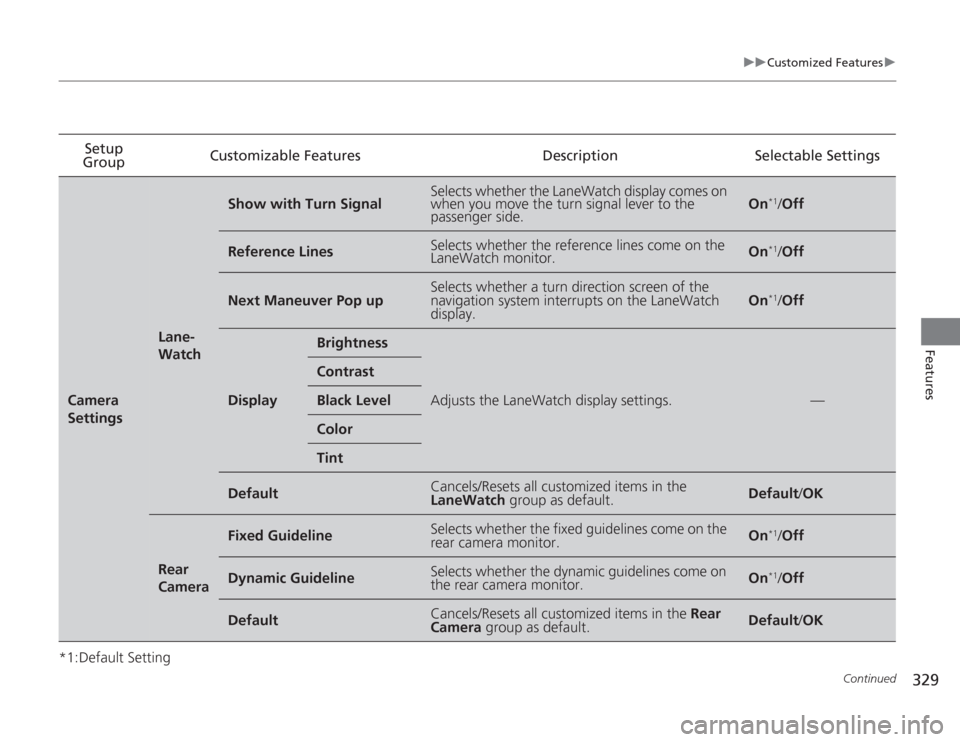
329
uuCustomized Features u
Continued
Features
*1:Default SettingSetup
Group Customizable Features
DescriptionSelectable SettingsCamera
Settings
Lane-
Watch
Show with Turn Signal
Selects whether the LaneWatch display comes on
when you move the turn signal lever to the
passenger side.
On
*1/Off
Reference Lines
Selects whether the reference lines come on the
LaneWatch monitor.
On
*1/Off
Next Maneuver Pop up
Selects whether a turn direction screen of the
navigation system interrupts on the LaneWatch
display.
On
*1/Off
Display
Brightness
Adjusts the LaneWatch display settings.
—
ContrastBlack LevelColorTint
Default
Cancels/Resets all customized items in the
LaneWatch group as default.
Default/OK
Rear
Camera
Fixed Guideline
Selects whether the fixed guidelines come on the
rear camera monitor.
On
*1/Off
Dynamic Guideline
Selects whether the dynamic guidelines come on
the rear camera monitor.
On
*1/Off
Default
Cancels/Resets all customized items in the Rear
Camera group as default.
Default /OK
Page 332 of 595
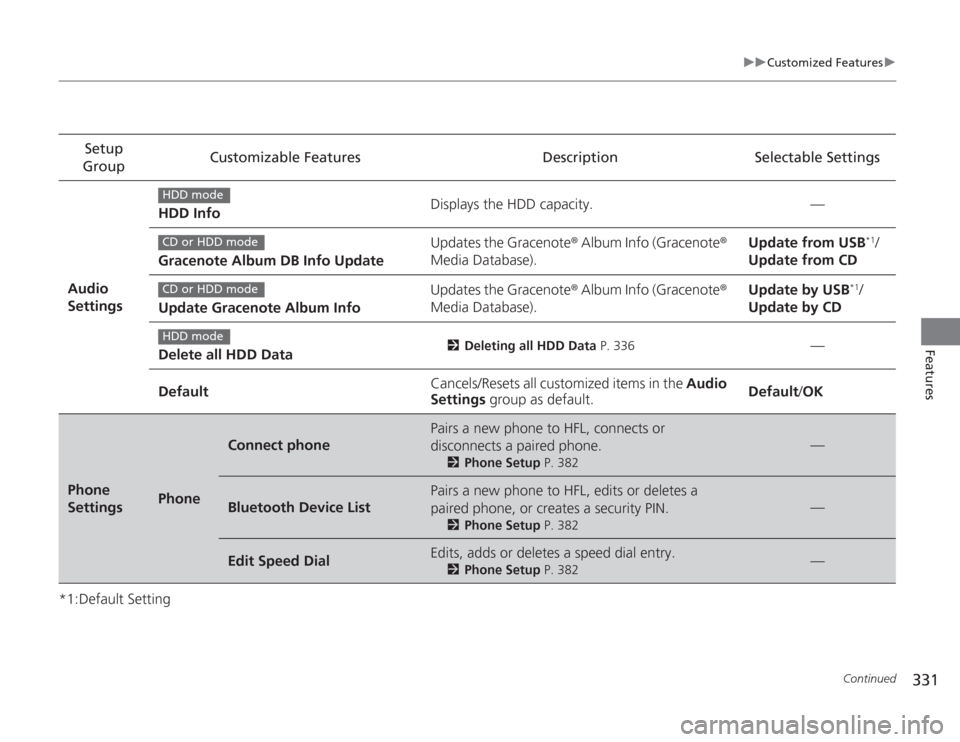
331
uuCustomized Features u
Continued
Features
*1:Default SettingSetup
Group Customizable Features Description Selectable Settings
Audio
Settings HDD Info
Displays the HDD capacity. —
Gracenote Album DB Info Update Updates the Gracenote
® Album Info (Gracenote ®
Media Database). Update from USB
*1/
Update from CD
Update Gracenote Album Info Updates the Gracenote
® Album Info (Gracenote ®
Media Database). Update by USB
*1/
Update by CD
Delete all HDD Data
2 Deleting all HDD Data P. 336
—
Default Cancels/Resets all customized items in the
Audio
Settings group as default. Default
/OK
Phone
Settings
Phone
Connect phone
Pairs a new phone to HFL, connects or
disconnects a paired phone.
2 Phone Setup P. 382
—
Bluetooth Device List
Pairs a new phone to HFL, edits or deletes a
paired phone, or creates a security PIN.
2Phone Setup P. 382
—
Edit Speed Dial
Edits, adds or deletes a speed dial entry.
2Phone Setup P. 382
—
HDD modeCD or HDD modeCD or HDD modeHDD mode