CVT HONDA ACCORD 2014 9.G Owners Manual
[x] Cancel search | Manufacturer: HONDA, Model Year: 2014, Model line: ACCORD, Model: HONDA ACCORD 2014 9.GPages: 595
Page 5 of 595
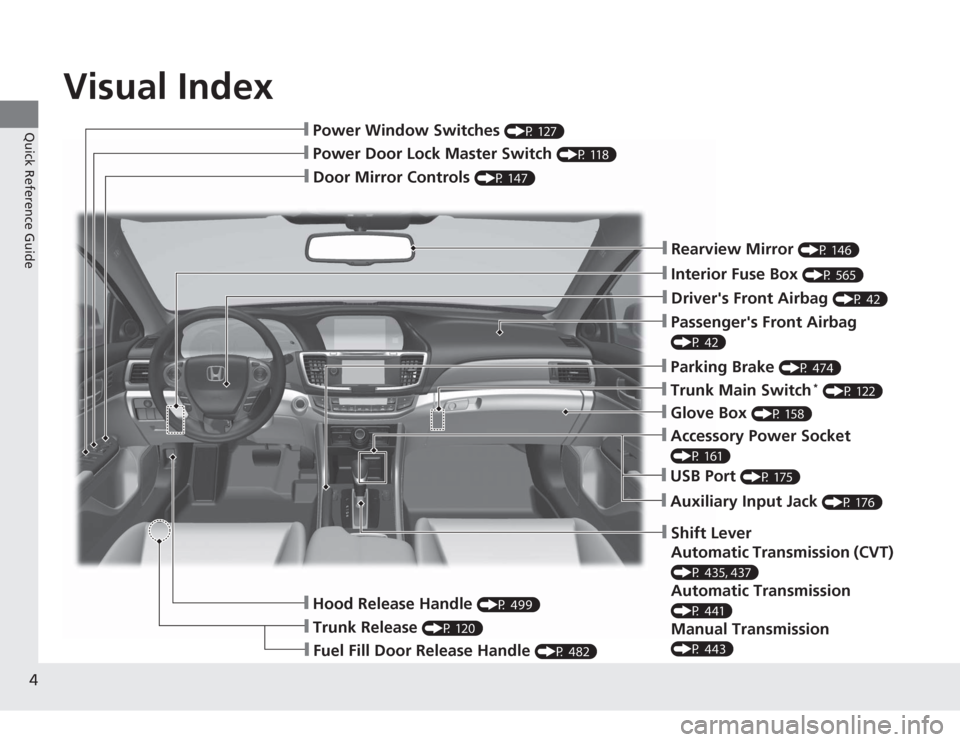
Visual Index
4Quick Reference Guide
❙Door Mirror Controls
(P 147)
❙Passenger's Front Airbag (P 42)❙Parking Brake
(P 474)
❙Glove Box
(P 158)
❙Rearview Mirror
(P 146)
❙Hood Release Handle
(P 499)
❙Power Door Lock Master Switch
(P 118)
❙Power Window Switches
(P 127)
❙Interior Fuse Box
(P 565)
❙Driver's Front Airbag
(P 42)
❙Trunk Main Switch
* (P 122)
❙Fuel Fill Door Release Handle
(P 482)
❙Trunk Release
(P 120)
❙Shift Lever
Automatic Transmission (CVT) (P 435, 437)Automatic Transmission (P 441)Manual Transmission (P 443)❙USB Port
(P 175)
❙Auxiliary Input Jack
(P 176)
❙Accessory Power Socket (P 161)
Page 18 of 595
17Quick Reference Guide
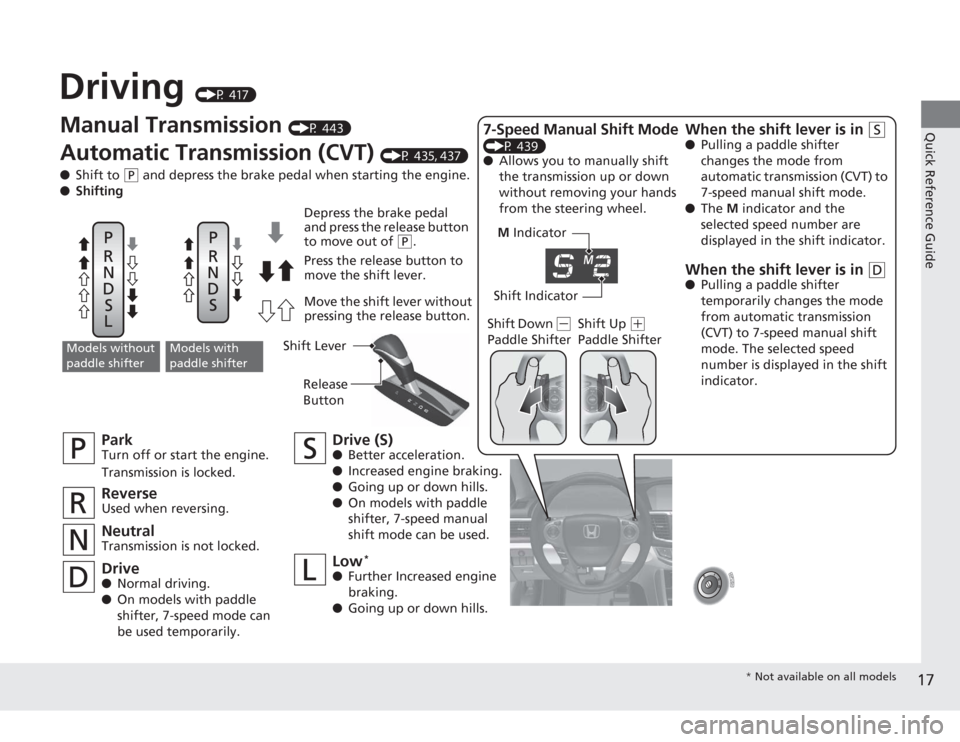
Driving
(P 417)
M Indicator
Shift Indicator
Manual Transmission
(P 443)
Automatic Transmission (CVT)
(P 435, 437)
● Shift to
(P
and depress the brake pedal when starting the engine.
● Shifting
ParkTurn off or start the engine.
Transmission is locked.NeutralTransmission is not locked.
Drive (S)●Better acceleration.
● Increased engine braking.
● Going up or down hills.
● On models with paddle
shifter, 7-speed manual
shift mode can be used.
Models without
paddle shifter
Models with
paddle shifter
Depress the brake pedal
and press the release button
to move out of
(P
.
Press the release button to
move the shift lever.
Move the shift lever without
pressing the release button.
ReverseUsed when reversing.Drive● Normal driving.
● On models with paddle
shifter, 7-speed mode can
be used temporarily.
Low
*
●Further Increased engine
braking.
● Going up or down hills. Shift Down
(
-
Paddle Shifter Shift Up
(
+
Paddle Shifter
7-Speed Manual Shift Mode (P 439)
● Allows you to manually shift
the transmission up or down
without removing your hands
from the steering wheel.
When the shift lever is in
(S
●Pulling a paddle shifter
changes the mode from
automatic transmission (CVT) to
7-speed manual shift mode.
● The M indicator and the
selected speed number are
displayed in the shift indicator.When the shift lever is in
(D
● Pulling a paddle shifter
temporarily changes the mode
from automatic transmission
(CVT) to 7-speed manual shift
mode. The selected speed
number is displayed in the shift
indicator.
Shift Lever
Release
Button
* Not available on all models
Page 132 of 595
131
Controls
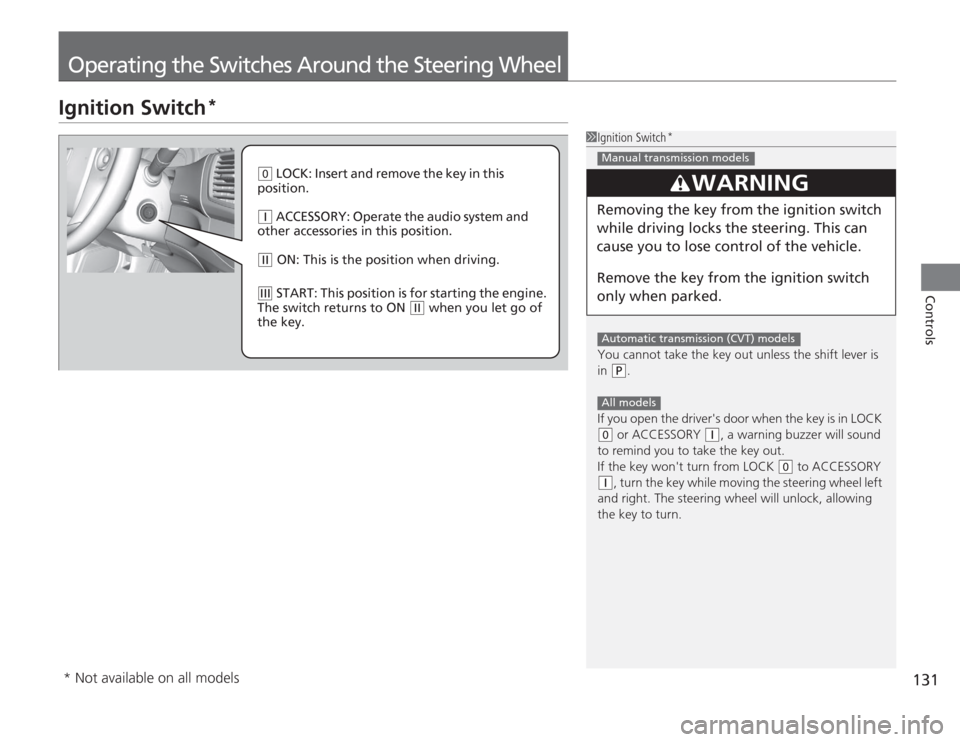
Operating the Switches Around the Steering WheelIgnition Switch
*
1Ignition Switch
*
You cannot take the key out unless the shift lever is
in
(P
.
If you open the driver's door when the key is in LOCK
( 0
or ACCESSORY
(q
, a warning buzzer will sound
to remind you to take the key out.
If the key won't turn from LOCK
( 0
to ACCESSORY
(q
, turn the key while moving the steering wheel left
and right. The steering wheel will unlock, allowing
the key to turn.
3
WARNING
Removing the key from the ignition switch
while driving locks the steering. This can
cause you to lose control of the vehicle.
Remove the key from the ignition switch
only when parked.Manual transmission modelsAutomatic transmission (CVT) modelsAll models
( 0
LOCK: Insert and remove the key in this
position.
( q
ACCESSORY: Operate the audio system and
other accessories in this position.
( w
ON: This is the position when driving.
(e
START: This position is for starting the engine.
The switch returns to ON
( w
when you let go of
the key.
* Not available on all models
Page 134 of 595
133
uuOperating the Switches Around the Steering Wheel uENGINE START/STOP Button
*
Continued
Controls
If you leave the vehicle for 30 to 60 minutes with the shift lever in
(P
*1 and the
power mode in ACCESSORY, the vehicle automatically goes into the mode similar to
VEHICLE OFF (LOCK) to avoid the battery drain.
When in this mode:
The steering wheel does not lock.
You cannot lock or unlo ck doors with the remote transmitter or the smart entry
system.
Press the ENGINE START/STOP button twice to switch the mode to VEHICLE OFF
(LOCK).
*1: Automatic transmission/CVT models■
Automatic Power Off
Page 145 of 595
uuOperating the Switches Around the Steering Wheel uDriving Position Memory System
*
144Controls
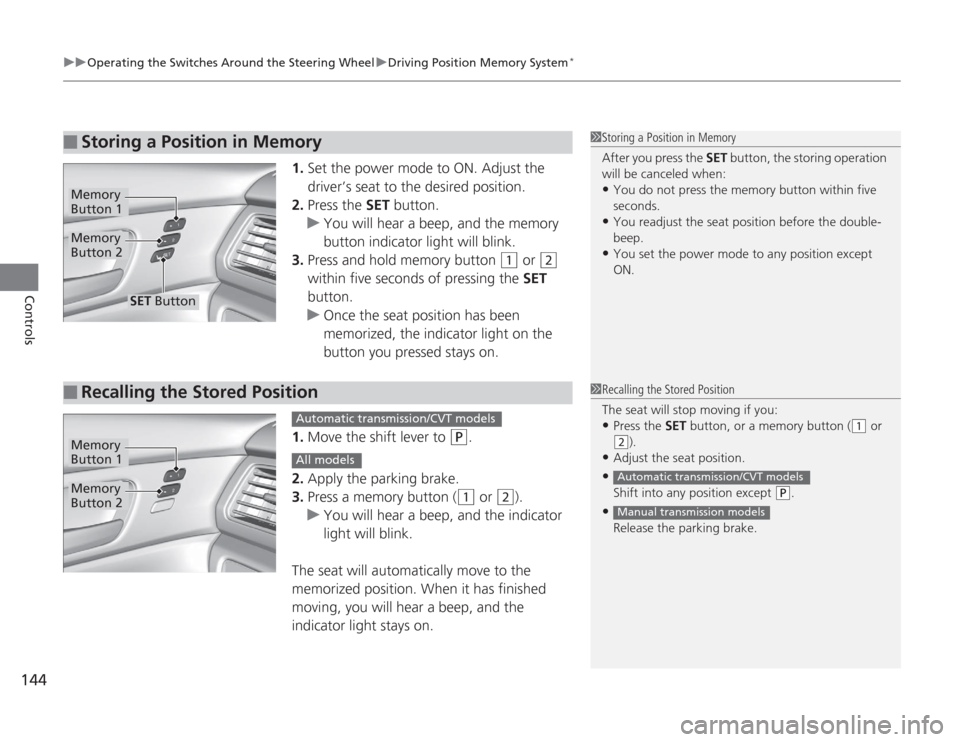
1. Set the power mode to ON. Adjust the
driver’s seat to the desired position.
2. Press the SET button.
u You will hear a beep, and the memory
button indicator light will blink.
3. Press and hold memory button
(1
or
(2
within five seconds of pressing the SET
button.
u Once the seat position has been
memorized, the indicator light on the
button you pressed stays on.
1. Move the shift lever to
(P
.
2. Apply the parking brake.
3. Press a memory button ((1
or
(2
).
u You will hear a beep, and the indicator
light will blink.
The seat will automatically move to the
memorized position. When it has finished
moving, you will hear a beep, and the
indicator light stays on.
■
Storing a Position in Memory
1 Storing a Position in Memory
After you press the SET button, the storing operation
will be canceled when: •You do not press the memory button within five
seconds.•You readjust the seat position before the double-
beep.•You set the power mode to any position except
ON.
Memory
Button 1Memory
Button 2
SET Button
■
Recalling the Stored Position
1 Recalling the Stored Position
The seat will stop moving if you: •Press the SET button, or a memory button (
(1
or
(2
).
•Adjust the seat position.•Shift into any position except
( P
.
•Release the parking brake.Automatic transmission/CVT modelsManual transmission models
Memory
Button 1Memory
Button 2
Automatic transmission/CVT modelsAll models
Page 300 of 595
299
Continued
Features
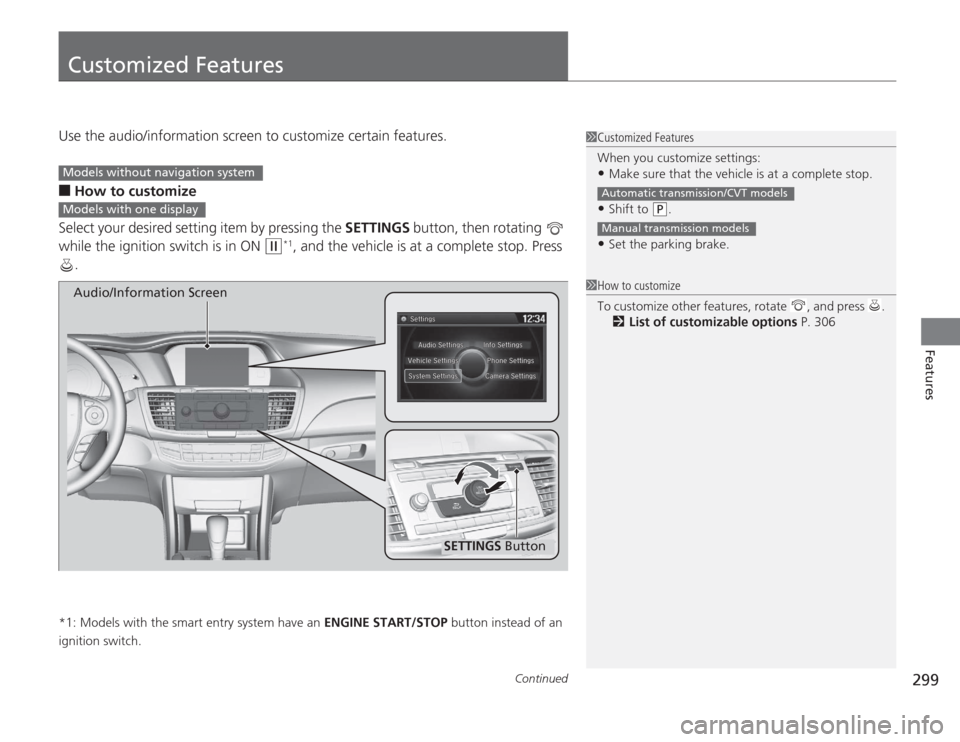
Customized FeaturesUse the audio/information screen to customize certain features.■
How to customize
Select your desired setting item by pressing the SETTINGS button, then rotating
while the ignition switch is in ON
(w
*1, and the vehicle is at a complete stop. Press
.
*1: Models with the smart entry system have an ENGINE START/STOP button instead of an
ignition switch.
1 Customized Features
When you customize settings:•Make sure that the vehicle is at a complete stop.•Shift to
(P
.
•Set the parking brake.Automatic transmission/CVT modelsManual transmission models
1 How to customize
To customize other features, rotate , and press .
2 List of customizable options P. 306
Models without navigation systemModels with one display
SETTINGS Button
Audio/Information Screen
Page 311 of 595
310
uuCustomized Features u
Features
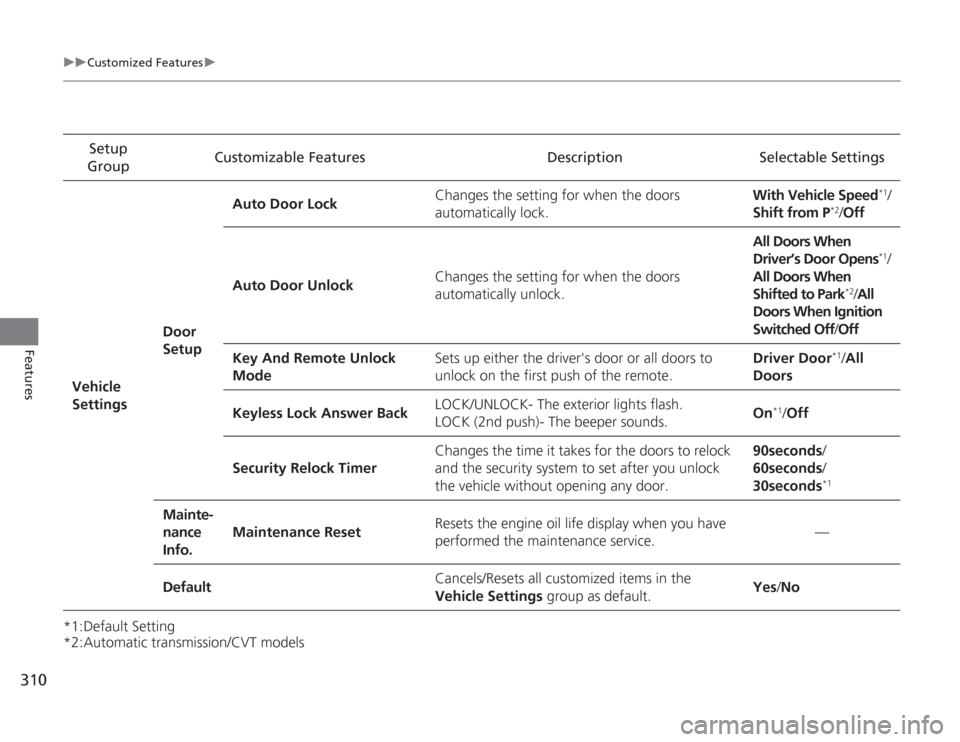
*1:Default Setting
*2:Automatic transmission/CVT modelsSetup
Group Customizable Features Description Selectable Settings
Vehicle
Settings Door
SetupAuto Door Lock
Changes the setting for when the doors
automatically lock. With Vehicle Speed
*1/
Shift from P
*2/ Off
Auto Door Unlock Changes the setting for when the doors
automatically unlock. All Doors When
Driver’s Door Opens
*1/
All Doors When
Shifted to Park
*2/ All
Doors When Ignition
Switched Off /Off
Key And Remote Unlock
Mode Sets up either the driver's door or all doors to
unlock on the first push of the remote. Driver Door
*1/
All
Doors
Keyless Lock Answer Back LOCK/UNLOCK- The exterior lights flash.
LOCK (2nd push)- The beeper sounds.
On
*1/
Off
Security Relock Timer Changes the time it takes for the doors to relock
and the security system to set after you unlock
the vehicle without opening any door. 90seconds/
60seconds/
30seconds
*1
Mainte-
nance
Info.
Maintenance Reset
Resets the engine oil life display when you have
performed the maintenance service. —
Default Cancels/Resets all customized items in the
Vehicle Settings
group as default. Yes
/No
Page 418 of 595
417
Driving
This chapter discusses driving, refueling, and information on items such as accessories.
Before DrivingDriving Preparation .......................... 418
Maximum Load Limit........................ 421
Towing a Trailer Towing Preparation .......................... 423
Driving Safely with a Trailer .............. 425
Towing Your Vehicle ........................ 426
When Driving Starting the Engine .................. 427, 429
Precautions While Driving................. 433
Automatic Transmission/CVT ............ 434
Shifting .................... 435, 437, 441, 443
ECON Button ................................... 446 Cruise Control
*............................... 447
ACC (Adaptive Cruise Control)
*....... 450
Forward Collision Warning (FCW)*.. 458
Lane Departure Warning (LDW)
*..... 462
VSA
® (Vehicle Stability Assist), aka ESC
(Electronic Stability Control), System ...... 466
LaneWatch
TM*.......................................... 468
TPMS (Tire Pressure Monitoring System) ... 470
Tire Pressure Monitoring System (TPMS) - Required Federal Explanation ......... 472
Braking
Brake System ................................... 474 ABS (Anti-lock Brake System) ........... 476
Brake Assist System ......................... 477
Parking Your Vehicle When Stopped ................................ 478
Multi-View Rear Camera .................. 479
Rearview Camera ............................. 480
Refueling Fuel Information .............................. 481
How to Refuel ................................. 482
Fuel Economy Improving Fuel Economy .................. 483
Accessories and Modifications ........ 484
* Not available on all models
Page 426 of 595
425
uuTowing a Trailer uDriving Safely with a Trailer
Continued
Driving
Driving Safely with a Trailer• Have the trailer properly serviced and keep it in good condition.
• Make sure that all the weights and load in the vehicle and trailer are within limits.
2 Towing Load Limits P. 423
•Securely attach the hitch, safety chains, and other necessary parts to the trailer.
• Securely store all the items in and on the trailer so that they do not shift while
driving.
• Check if the lights and brakes on the trailer are working properly.
• Check the pressures of the trailer tires, including the spare.
• Drive slower than normal.
• Obey posted speed limits for vehicles with trailers.
• Use the
(D
position when towing a trailer on level roads.
• Turn more slowly and with a wider turning arc than normal.
• Allow more time and distance for braking.
• Do not brake or turn suddenly.
■
Things You Need To Know Before Towing a Trailer
■
Towing Speeds and Gears
■
Turning and Braking
1Driving Safely with a Trailer
Parking
In addition to the normal precautions, place wheel
chocks at each of the trailer's tires.
Automatic transmission/CVT models
Page 428 of 595
427
Continued
Driving
When DrivingStarting the Engine
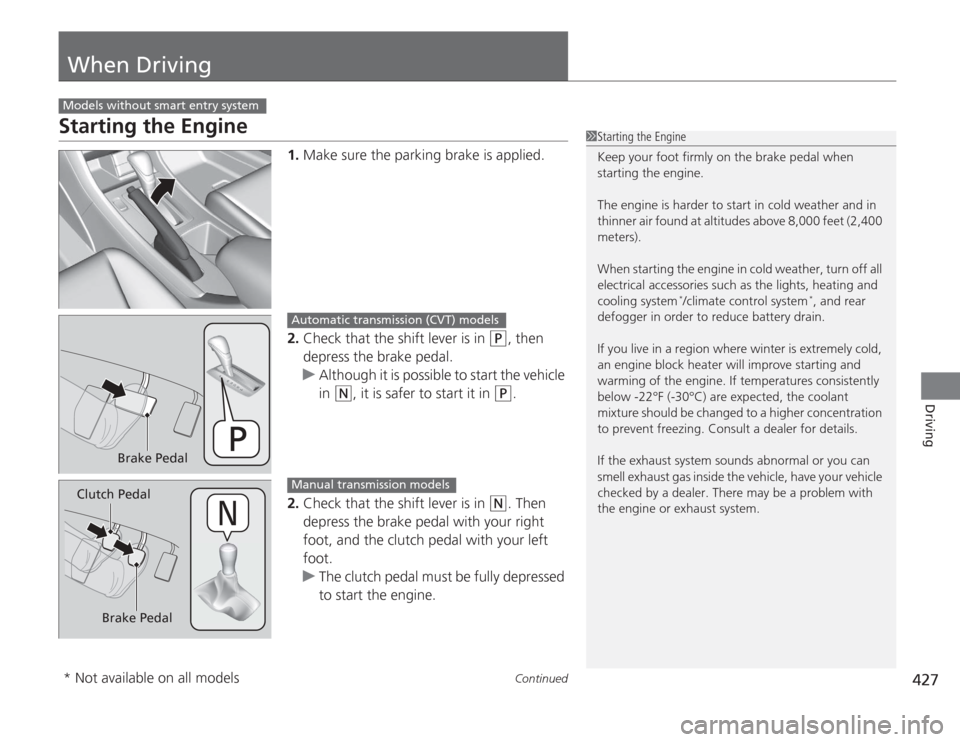
1.Make sure the parking brake is applied.
2. Check that the shift lever is in
(P
, then
depress the brake pedal.
u Although it is possible to start the vehicle
in
(N
, it is safer to start it in
(P
.
2. Check that the shift lever is in
(N
. Then
depress the brake pedal with your right
foot, and the clutch pedal with your left
foot.
u The clutch pedal must be fully depressed
to start the engine.
Models without smart entry system
1Starting the Engine
Keep your foot firmly on the brake pedal when
starting the engine.
The engine is harder to start in cold weather and in
thinner air found at altitudes above 8,000 feet (2,400
meters).
When starting the engine in cold weather, turn off all
electrical accessories such as the lights, heating and
cooling system
*/climate control system
*, and rear
defogger in order to reduce battery drain.
If you live in a region where winter is extremely cold,
an engine block heater will improve starting and
warming of the engine. If temperatures consistently
below -22°F (-30°C) are expected, the coolant
mixture should be changed to a higher concentration
to prevent freezing. Consult a dealer for details.
If the exhaust system sounds abnormal or you can
smell exhaust gas inside the vehicle, have your vehicle
checked by a dealer. There may be a problem with
the engine or exhaust system.
Brake Pedal
Automatic transmission (CVT) models
Brake Pedal
Clutch Pedal
Manual transmission models
* Not available on all models