change time HONDA ACCORD 2015 9.G Owners Manual
[x] Cancel search | Manufacturer: HONDA, Model Year: 2015, Model line: ACCORD, Model: HONDA ACCORD 2015 9.GPages: 593
Page 3 of 593
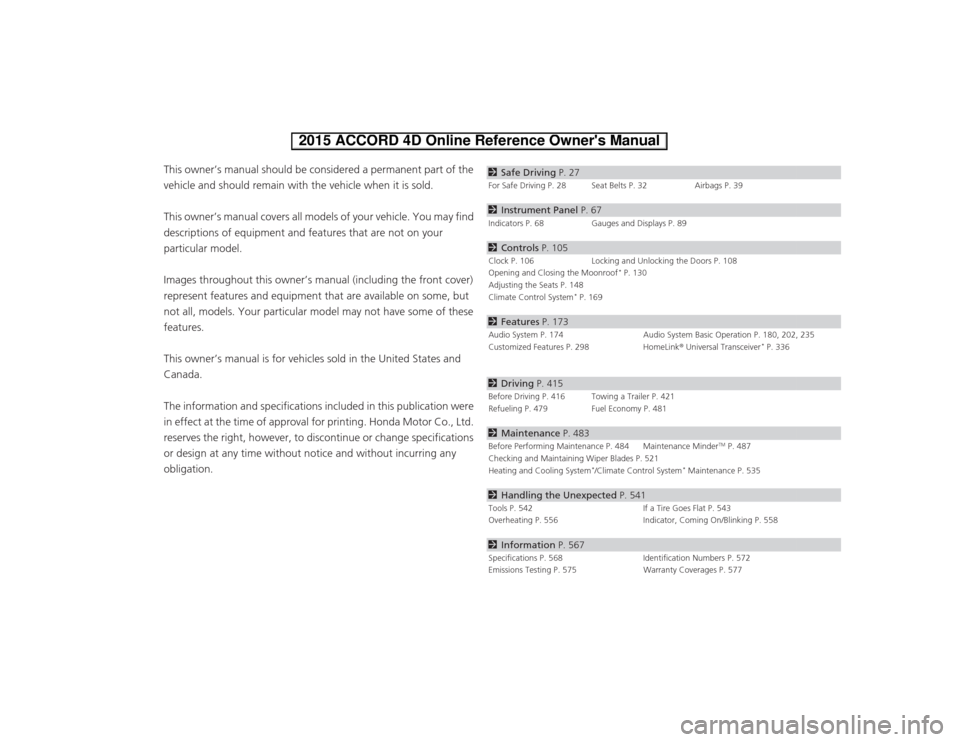
ContentsThis owner’s manual should be considered a permanent part of the
vehicle and should remain with the vehicle when it is sold.
This owner’s manual covers all models of your vehicle. You may find
descriptions of equipment and features that are not on your
particular model.
Images throughout this owner’s manual (including the front cover)
represent features and equipment that are available on some, but
not all, models. Your particular model may not have some of these
features.
This owner’s manual is for vehicles sold in the United States and
Canada.
The information and specifications included in this publication were
in effect at the time of approval for printing. Honda Motor Co., Ltd.
reserves the right, however, to discontinue or change specifications
or design at any time without notice and without incurring any
obligation.
2Safe Driving P. 27For Safe Driving P. 28 Seat Belts P. 32 Airbags P. 392Instrument Panel P. 67Indicators P. 68 Gauges and Displays P. 892Controls P. 105Clock P. 106 Locking and Unlocking the Doors P. 108
Opening and Closing the Moonroof
* P. 130
Adjusting the Seats P. 148
Climate Control System
* P. 169
2 Features P. 173Audio System P. 174 Audio System Basic Operation P. 180, 202, 235
Customized Features P. 298 HomeLink® Universal Transceiver
* P. 336
2 Driving P. 415Before Driving P. 416 Towing a Trailer P. 421
Refueling P. 479 Fuel Economy P. 4812Maintenance P. 483Before Performing Maintenance P. 484 Maintenance Minder
TM P. 487
Checking and Maintaining Wiper Blades P. 521
Heating and Cooling System
*/Climate Control System
* Maintenance P. 535
2 Handling the Unexpected P. 541Tools P. 542 If a Tire Goes Flat P. 543
Overheating P. 556 Indicator, Coming On/Blinking P. 5582Information P. 567Specifications P. 568 Identification Numbers P. 572
Emissions Testing P. 575 Warranty Coverages P. 577
Page 22 of 593
21Quick Reference Guide
VSA® OFF Button
(P 465)
● The vehicle stability assist (VSA ®) system
helps stabilize the vehicle during
cornering, and helps maintain traction
while accelerating on loose or slippery
road surfaces.
● VSA ® comes on automatically every time
you start the engine.
● To turn VSA ® on or off, press and hold
the button until you hear a beep.
Cruise Control
(P 445)
● Cruise control allows you to maintain a
set speed without keep ing your foot on
the accelerator pedal.
● To use cruise control, press the CRUISE
button, then press the –/SET button once
you have achieved the desired speed
(above 25 mph or 40 km/h).
Tire Pressure Monitoring
System (TPMS)
(P 468)
● Detects a change in tire conditions and
overall dimensions du e to decrease in tire
pressures.
● The TPMS is turned on automatically
every time you start the engine.
● A calibration procedure must be
performed when certain conditions arise.
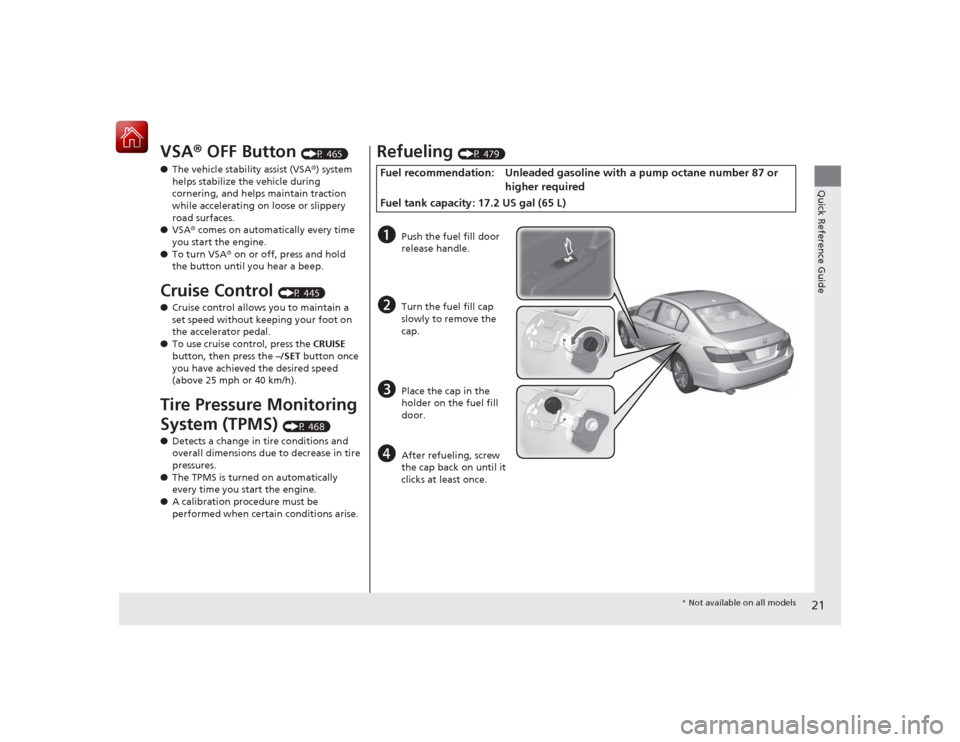
Refueling
(P 479)
Fuel recommendation: Unle aded gasoline with a pump octane number 87 or
higher required
Fuel tank capacity: 17.2 US gal (65 L)a
Push the fuel fill door
release handle.
b
Turn the fuel fill cap
slowly to remove the
cap.
c
Place the cap in the
holder on the fuel fill
door.
d
After refueling, screw
the cap back on until it
clicks at least once.
* Not available on all models
Page 77 of 593
76
uuIndicators u
Instrument Panel
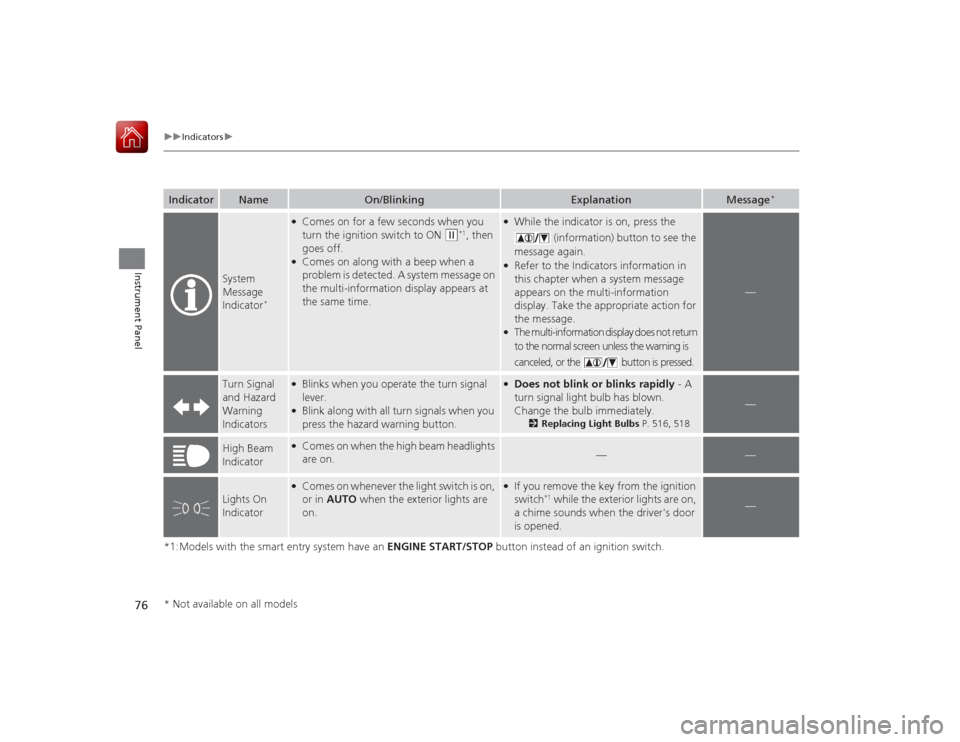
*1:Models with the smart entry system have an ENGINE START/STOP button instead of an ignition switch.Indicator
Name
On/Blinking
Explanation
Message
*
System
Message
Indicator
*
●Comes on for a few seconds when you
turn the ignition switch to ON
(w
*1, then
goes off.
●Comes on along with a beep when a
problem is detected. A system message on
the multi-information display appears at
the same time.
●While the indicator is on, press the
(information) button to see the
message again.●Refer to the Indicators information in
this chapter when a system message
appears on the multi-information
display. Take the appropriate action for
the message.●The multi-information display does not return
to the normal screen unless the warning is
canceled, or the button is pressed.
—
Turn Signal
and Hazard
Warning
Indicators
●Blinks when you operate the turn signal
lever.●Blink along with all turn signals when you
press the hazard warning button.
●Does not blink or blinks rapidly - A
turn signal light bulb has blown.
Change the bulb immediately.
2 Replacing Light Bulbs P. 516, 518
—
High Beam
Indicator
●Comes on when the high beam headlights
are on.
—
—
Lights On
Indicator
●Comes on whenever the light switch is on,
or in AUTO when the exterior lights are
on.
●If you remove the key from the ignition
switch
*1 while the exterior lights are on,
a chime sounds when the driver's door
is opened.
—
* Not available on all models
Page 91 of 593
90
uuGauges and Displays uInformation Display
*
Instrument Panel
Information Display
*
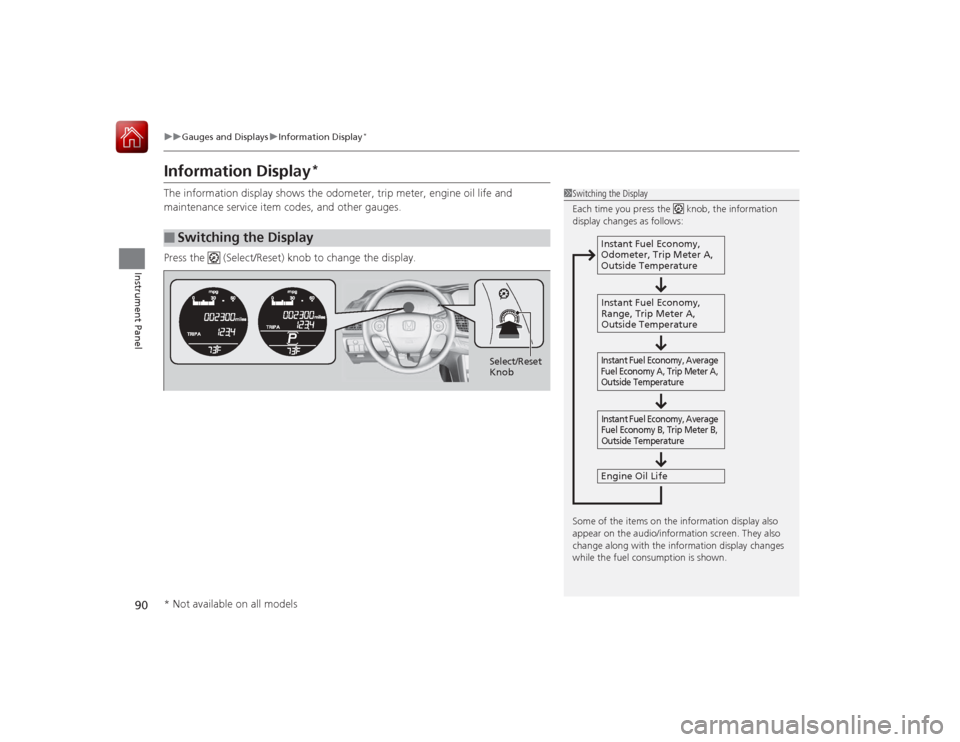
The information display shows the odometer, trip meter, engine oil life and
maintenance service item codes, and other gauges.
Press the (Select/Reset) knob to change the display.■
Switching the Display
1Switching the Display
Each time you press the knob, the information
display changes as follows:
Some of the items on the information display also
appear on the audio/information screen. They also
change along with the information display changes
while the fuel consumption is shown.
Instant Fuel Economy,
Odometer, Trip Meter A,
Outside Temperature
Instant Fuel Economy,
Range, Trip Meter A,
Outside Temperature
Engine Oil LifeInstant Fuel Economy, Average
Fuel Economy A, Trip Meter A,
Outside Temperature Instant Fuel Economy, Average
Fuel Economy B, Trip Meter B,
Outside Temperature
Select/Reset
Knob
* Not available on all models
Page 94 of 593
93
uuGauges and Displays uMulti-Information Display
*
Continued
Instrument Panel
Multi-Information Display
*
The multi-information display shows the odometer, trip meter, outside temperature
indicator, and other gauges.
It also displays important messages such as warnings and other helpful information.■Main displays
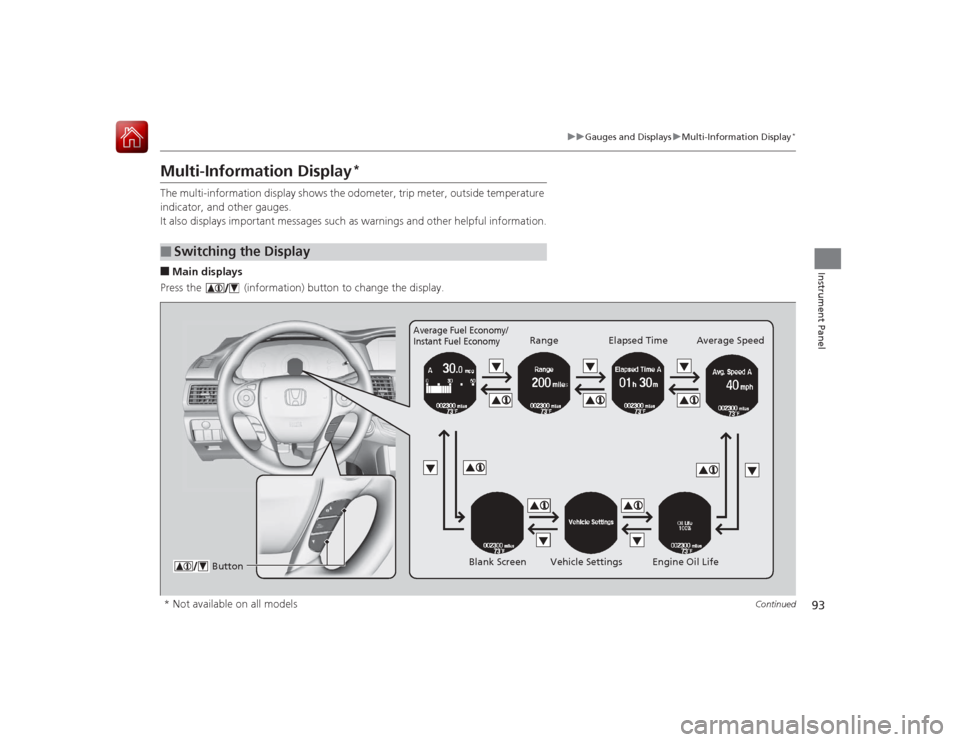
Press the (information) button to change the display.■
Switching the Display
Average Fuel Economy/
Instant Fuel Economy
Range Elapsed Time Average Speed
Blank Screen Vehicle Settings Engine Oil Life
Button
* Not available on all models
Page 96 of 593
Continued
95
uuGauges and Displays uMulti-Information Display
*
Instrument Panel
Shows the total number of miles (U.S.) or kilometers (Canada) that your vehicle has
accumulated.
Shows the total number of miles (U.S.) or kilometers (Canada) driven since the last
reset. Meters A and B can be used to measure two separate trips.■Resetting a trip meter
To reset a trip meter, display it, then press and hold the SEL/RESET button. The trip
meter is reset to 0.0.
Shows the estimated average fuel economy of each trip meter in mpg (U.S.) or l/100
km (Canada). The display is updated at set intervals. When a trip meter is reset, the
average fuel economy is also reset.
Shows the estimated distance you can travel on the remaining fuel. This distance is
estimated from the fuel economy of your previous trips.
Shows the time elapsed since Trip A or Trip B was reset.■
Odometer
■
Trip Meter
■
Average Fuel Economy
■
Range
■
Elapsed Time
1 Trip Meter
Switch between trip meter A and trip meter B by
pressing the SEL/RESET button.1Average Fuel Economy
You can change when to reset the average fuel
economy.
2 Customized Features P. 97, 2981Elapsed Time
You can change when to reset the elapsed time.
2 Customized Features P. 97, 298
Page 98 of 593
Continued
97
uuGauges and Displays uMulti-Information Display
*
Instrument Panel
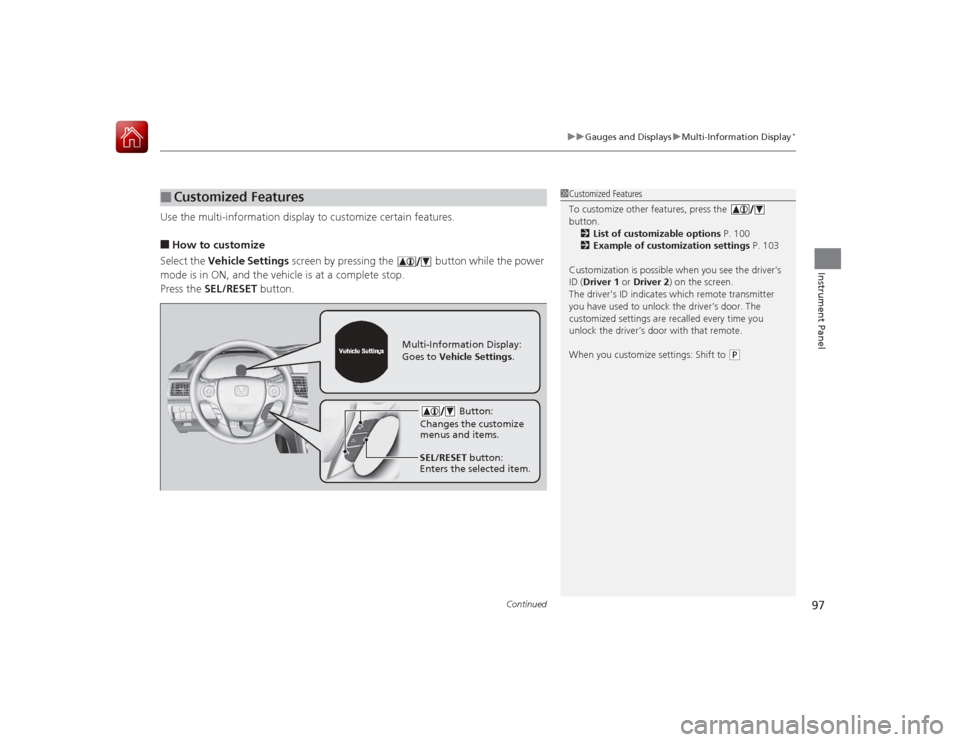
Use the multi-information display to customize certain features.■How to customize
Select the Vehicle Settings screen by pressing the button while the power
mode is in ON, and the vehicle is at a complete stop.
Press the SEL/RESET button.■
Customized Features
1Customized Features
To customize other features, press the
button.
2 List of customizable options P. 100
2 Example of customization settings P. 103
Customization is possible when you see the driver’s
ID ( Driver 1 or Driver 2) on the screen.
The driver’s ID indicates which remote transmitter
you have used to unlock the driver’s door. The
customized settings are recalled every time you
unlock the driver’s door with that remote.
When you customize settings: Shift to
( P
Button:
Changes the customize
menus and items.
Multi-Information Display:
Goes to Vehicle Settings .
SEL/RESET button:
Enters the selected item.
Page 101 of 593
100
uuGauges and Displays uMulti-Information Display
*
Instrument Panel
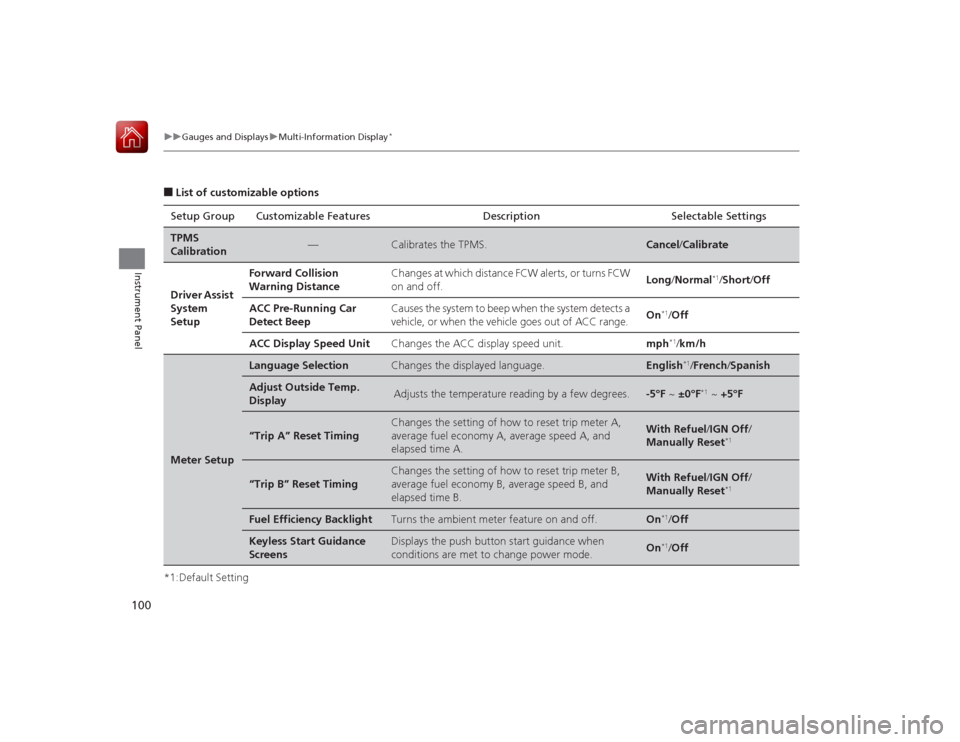
■List of customizable options
*1:Default Setting Setup Group Customizable Features Description Selectable SettingsTPMS
Calibration
—
Calibrates the TPMS.
Cancel
/Calibrate
Driver Assist
System
Setup
Forward Collision
Warning Distance
Changes at which distance FCW alerts, or turns FCW
on and off.
Long /Normal
*1/Short /Off
ACC Pre-Running Car
Detect Beep
Causes the system to beep when the system detects a
vehicle, or when the vehicle goes out of ACC range.
On
*1/Off
ACC Display Speed Unit
Changes the ACC display speed unit.
mph
*1/km/h
Meter Setup
Language Selection
Changes the displayed language.
English
*1/French /Spanish
Adjust Outside Temp.
Display
Adjusts the temperature reading by a few degrees.
-5°F ~ ±0°F
*1 ~ +5°F
“Trip A” Reset Timing
Changes the setting of how to reset trip meter A,
average fuel economy A, average speed A, and
elapsed time A.
With Refuel /IGN Off /
Manually Reset
*1
“Trip B” Reset Timing
Changes the setting of how to reset trip meter B,
average fuel economy B, average speed B, and
elapsed time B.
With Refuel /IGN Off /
Manually Reset
*1
Fuel Efficiency Backlight
Turns the ambient meter feature on and off.
On
*1/ Off
Keyless Start Guidance
Screens
Displays the push button start guidance when
conditions are met to change power mode.
On
*1/ Off
Page 102 of 593
101
uuGauges and Displays uMulti-Information Display
*
Continued
Instrument Panel
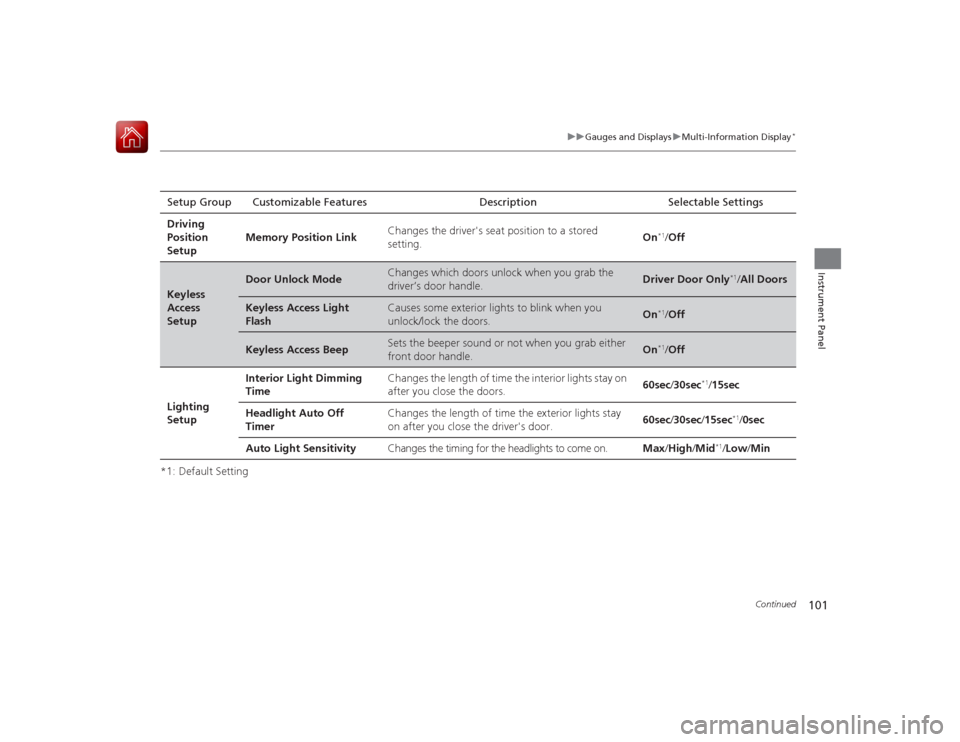
*1: Default SettingSetup Group Customizable Features Description Selectable Settings
Driving
Position
Setup Memory Position Link
Changes the driver's seat position to a stored
setting.
On
*1/
Off
Keyless
Access
Setup
Door Unlock Mode
Changes which doors unlock when you grab the
driver’s door handle.
Driver Door Only
*1/All Doors
Keyless Access Light
Flash
Causes some exterior lights to blink when you
unlock/lock the doors.
On
*1/ Off
Keyless Access Beep
Sets the beeper sound or not when you grab either
front door handle.
On
*1/Off
Lighting
Setup Interior Light Dimming
Time
Changes the length of time the interior lights stay on
after you close the doors.
60sec
/30sec
*1/15sec
Headlight Auto Off
Timer Changes the length of time the exterior lights stay
on after you close the driver's door.
60sec
/30sec /15sec
*1/ 0sec
Auto Light Sensitivity Changes the timing for the headlights to come on. Max/High /Mid
*1/Low /Min
Page 103 of 593
102
uuGauges and Displays uMulti-Information Display
*
Instrument Panel
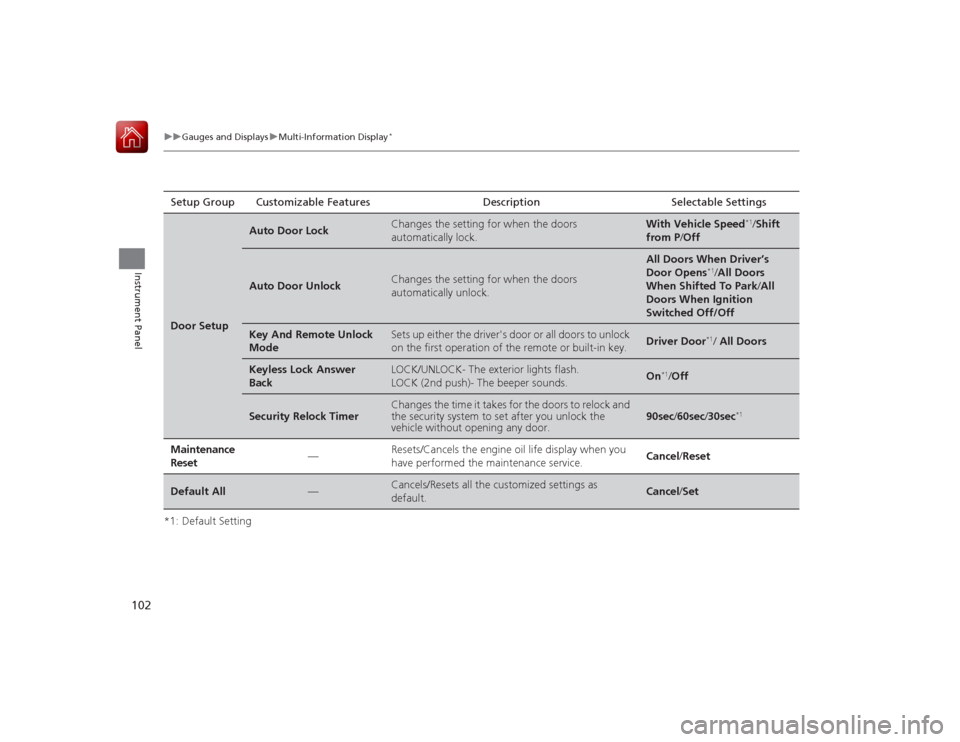
*1: Default SettingSetup Group Customizable Features Description Selectable SettingsDoor Setup
Auto Door Lock
Changes the setting for when the doors
automatically lock.
With Vehicle Speed
*1/
Shift
from P /Off
Auto Door Unlock
Changes the setting for when the doors
automatically unlock.
All Doors When Driver’s
Door Opens
*1/All Doors
When Shifted To Park /All
Doors When Ignition
Switched Off/Off
Key And Remote Unlock
Mode
Sets up either the driver's door or all doors to unlock
on the first operation of the remote or built-in key.
Driver Door
*1/ All Doors
Keyless Lock Answer
Back
LOCK/UNLOCK- The exterior lights flash.
LOCK (2nd push)- The beeper sounds.
On
*1/ Off
Security Relock Timer
Changes the time it takes for the doors to relock and
the security system to set after you unlock the
vehicle without opening any door.
90sec /60sec /30sec
*1
Maintenance
Reset
—
Resets/Cancels the engine oil life display when you
have performed the maintenance service.
Cancel /Reset
Default All
—
Cancels/Resets all the customized settings as
default.
Cancel /Set