transmission HONDA ACCORD 2016 9.G Quick Guide
[x] Cancel search | Manufacturer: HONDA, Model Year: 2016, Model line: ACCORD, Model: HONDA ACCORD 2016 9.GPages: 83, PDF Size: 7.35 MB
Page 15 of 83
22 || 23
INSTRUMENT PANELSAFETY
INSTRUMENT PANELReporting Safety Defects
In the U.S.
If you believe that your vehicle has a defect which could cause a crash or could
cause injury or death, you should immediately inform the National Highway Traffic
Safety Administration (NHTSA) in addition to notifying American Honda \
Motor Co.,
Inc.
If NHTSA receives similar complaints, it may open an investigation, and if it finds
that a safety defect exists in a group of vehicles, it may order a recal\
l and remedy
campaign. However, NHTSA cannot become involved in individual problems
between you, your dealer, or American Honda Motor Co., Inc.
To contact NHTSA, you may call the vehicle Safety Hotline toll-free at 1-888-327-
4236 (TTY: 1-800-424-9153); go to http://www.safercar.gov; or write to: Administrator,
NHTSA, 1200 New Jersey Avenue, SE., Washington, DC 20590. You can also obtain
other information about motor vehicle safety from http://www.safercar.gov.
In Canada
If you believe that your vehicle has a defect which could cause a crash or could
cause injury or death, you should immediately inform Honda Canada, Inc., and you
may also inform Transport Canada.
If Transport Canada receives similar complaints, it may open an investigation, and if
it finds that a safety defect exists in a group of vehicles, it may le\
ad to a recall and
remedy campaign. However, Transport Canada cannot become involved in individual
problems between you, your dealer, or Honda Canada, Inc.
To contact Transport Canada’s Defect Investigations and Recalls Division, you may
call 1-800-333-0510. For more information on reporting safety defects or about motor
vehicle safety, go to http://www.tc.gc.ca/roadsafety.
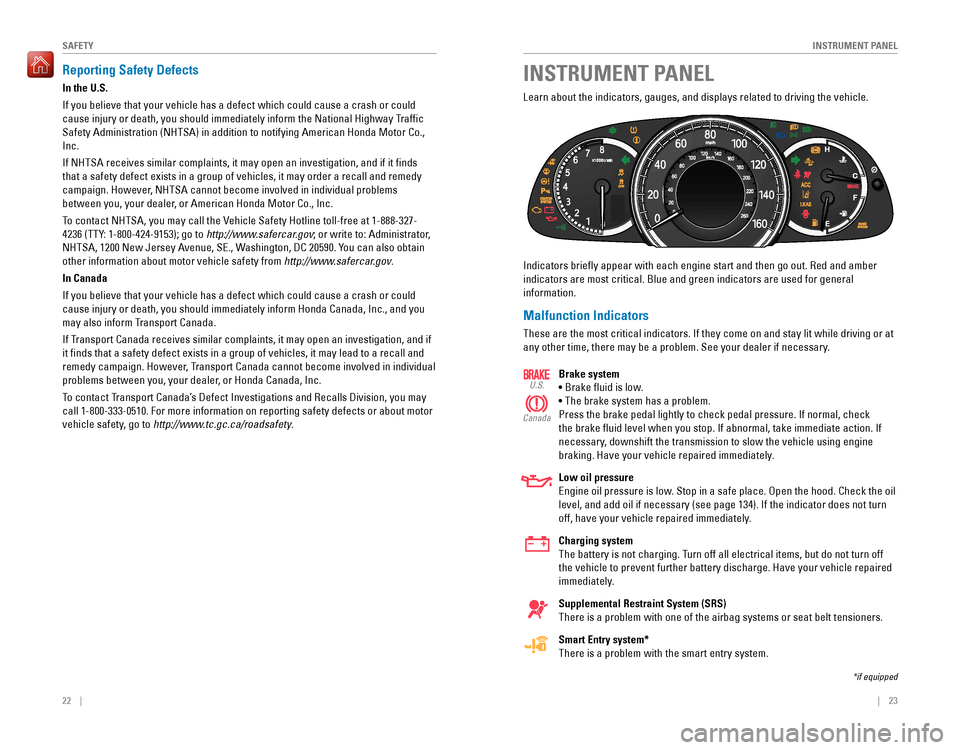
Learn about the indicators, gauges, and displays related to driving the vehicle.
Indicators briefly appear with each engine start and then go out. Red and amber
indicators are most critical. Blue and green indicators are used for gen\
eral
information.
Malfunction Indicators
These are the most critical indicators. If they come on and stay lit while driving or at
any other time, there may be a problem. See your dealer if necessary.
Brake system
• Brake fluid is low.
• The brake system has a problem.
Press the brake pedal lightly to check pedal pressure. If normal, check
the brake fluid level when you stop. If abnormal, take immediate action. If
necessary, downshift the transmission to slow the vehicle using engine
braking. Have your vehicle repaired immediately.
Low oil pressure
engine oil pressure is low. Stop in a safe place. open the hood. Check the oil
level, and add oil if necessary (see page 134). If the indicator does not turn
off, have your vehicle repaired immediately.
Charging system
The battery is not charging. Turn off all electrical items, but do not turn off
the vehicle to prevent further battery discharge. Have your vehicle repaired
immediately.
Supplemental Restraint System (SRS)
There is a problem with one of the airbag systems or seat belt tensioners.
Smart Entry system*
There is a problem with the smart entry system.
U.S.
Canada
*if equipped
Page 36 of 83
64 || 65
AUDIO AND CONNECTIVITY
AUDIO AND CONNECTIVITY
Models with touchscreen
Wi-Fi Connection
You can connect the audio system to the internet using Wi-Fi and use online
services through the touchscreen. If your compatible phone has hotspot capabilities,
the system can be tethered to the phone. Follow the steps below to set up Wi-Fi
when the vehicle is stopped. Standard data rates apply with your phone s\
ervice
provider.
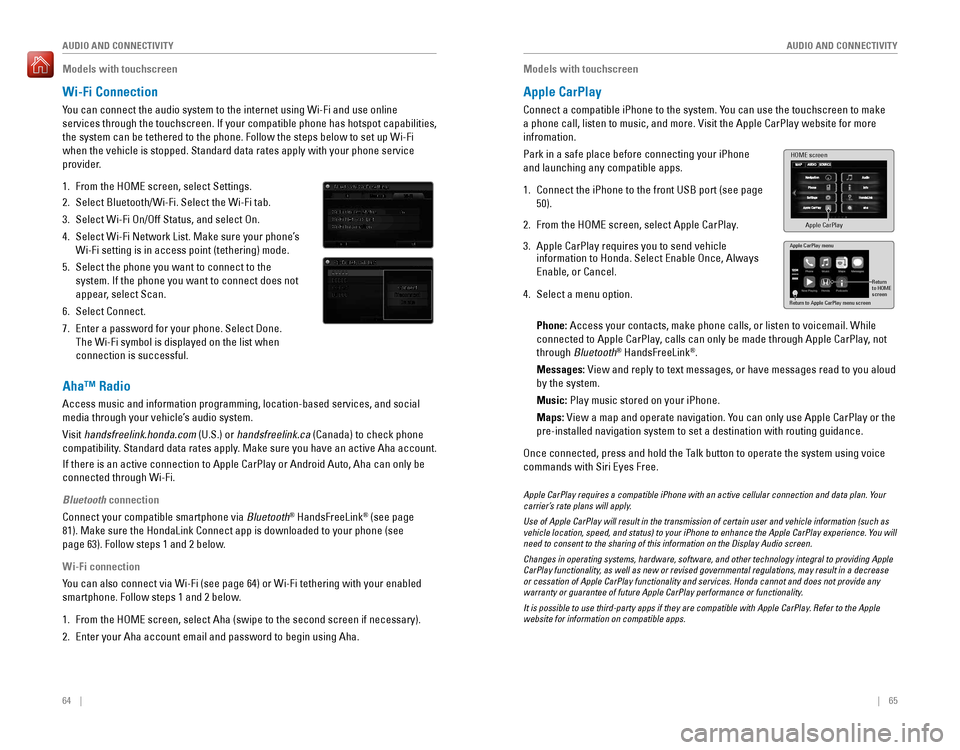
1. From the HoMe screen, select Settings.
2. Select Bluetooth/Wi-Fi. Select the Wi-Fi tab.
3. Select Wi-Fi On/Off Status, and select On.
4. Select Wi-Fi Network List. Make sure your phone’s
Wi-Fi setting is in access point (tethering) mode.
5. Select the phone you want to connect to the
system. If the phone you want to connect does not
appear, select Scan.
6. Select Connect.
7. enter a password for your phone. Select Done.
The Wi-Fi symbol is displayed on the list when
connection is successful.
Aha™ Radio
Access music and information programming, location-based services, and social
media through your vehicle’s audio system.
visit handsfreelink.honda.com (U.S.) or handsfreelink.ca (Canada) to check phone
compatibility. Standard data rates apply. Make sure you have an active Aha account.
If there is an active connection to Apple CarPlay or Android Auto, Aha can only be
connected through Wi-Fi.
Bluetooth connection
Connect your compatible smartphone via Bluetooth® HandsFreeLink® (see page
81). Make sure the HondaLink Connect app is downloaded to your phone (\
see
page 63). Follow steps 1 and 2 below.
Wi-Fi connection
You can also connect via Wi-Fi (see page 64) or Wi-Fi tethering with your enabled
smartphone. Follow steps 1 and 2 below.
1. From the HoMe screen, select Aha (swipe to the second screen if necessary).
2. Enter your Aha account email and password to begin using Aha.
Models with touchscreen
Apple CarPlay
Connect a compatible iPhone to the system. You can use the touchscreen to make
a phone call, listen to music, and more. Visit the Apple CarPlay website for more
infromation.
Park in a safe place before connecting your iPhone
and launching any compatible apps.
1. Connect the iPhone to the front USB port (see page
50).
2. From the HoMe screen, select Apple CarPlay.
3. Apple CarPlay requires you to send vehicle information to Honda. Select Enable Once, Always
Enable, or Cancel.
4. Select a menu option.
Phone:
Access your contacts, make phone calls, or listen to voicemail. While
connected to Apple CarPlay, calls can only be made through Apple CarPlay, not
through Bluetooth® HandsFreeLink®.
Messages:
view and reply to text messages, or have messages read to you aloud
by the system.
Music: Play music stored on your iPhone.
Maps:
view a map and operate navigation. You can only use Apple CarPlay or the
pre-installed navigation system to set a destination with routing guidan\
ce.
Once connected, press and hold the Talk button to operate the system using voice
commands with Siri eyes Free.
HOME screen
Apple CarPlay
Apple CarPlay menu
Return
to HOME
screen
Return to Apple CarPlay menu screen
Apple CarPlay requires a compatible iPhone with an active cellular connection and data plan. Your carrier’s rate plans will apply.
Use of Apple CarPlay will result in the transmission of certain user and vehicle information (such as vehicle location, speed, and status) to your iPhone to enhance the Apple CarPlay experience. You will need to consent to the sharing of this information on the Display Audio screen.
Changes in operating systems, hardware, software, and other technology integral to providing Apple CarPlay functionality, as well as new or revised governmental regulations, may result in a decrease or cessation of Apple CarPlay functionality and services. Honda cannot and does not provide any warranty or guarantee of future Apple CarPlay performance or functionality.
It is possible to use third-party apps if they are compatible with Apple CarPlay. Refer to the Apple website for information on compatible apps.
Page 54 of 83
100 || 101
DRIVING
DRIVING
Starting to Drive
Turn on the vehicle and start the engine to begin driving.
Before Starting the Engine
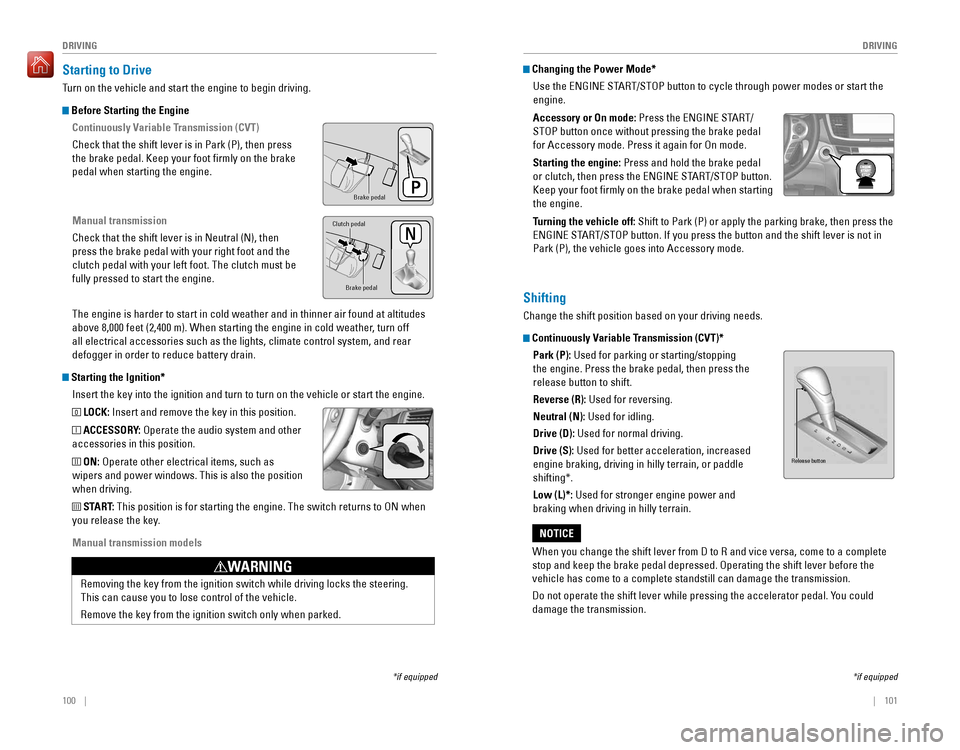
Continuously Variable Transmission (CVT)
Check that the shift lever is in Park (P), then press
the brake pedal. Keep your foot firmly on the brake
pedal when starting the engine.
Manual transmission
Check that the shift lever is in Neutral (N), then
press the brake pedal with your right foot and the
clutch pedal with your left foot. The clutch must be
fully pressed to start the engine.
The engine is harder to start in cold weather and in thinner air found a\
t altitudes
above 8,000 feet (2,400 m). When starting the engine in cold weather, turn off
all electrical accessories such as the lights, climate control system, a\
nd rear
defogger in order to reduce battery drain.
Starting the Ignition*
Insert the key into the ignition and turn to turn on the vehicle or start the engine.
0 LOCK: Insert and remove the key in this position.
I ACCESSORY: operate the audio system and other
accessories in this position.
II ON: operate other electrical items, such as
wipers and power windows. This is also the position
when driving.
III START: This position is for starting the engine. The switch returns to oN when
you release the key.
Manual transmission models
*if equipped
Brake peda l
Brake pedal
Clutch pedal
removing the key from the ignition switch while driving locks the steerin\
g.
This can cause you to lose control of the vehicle.
remove the key from the ignition switch only when parked.
WARNING
Changing the Power Mode*
Use the
ENGINE START/STOP button to cycle through power modes or start the
engine.
Accessory or On mode:
Press the ENGINE START/
STOP button once without pressing the brake pedal
for Accessory mode. Press it again for on mode.
Starting the engine: Press and hold the brake pedal
or clutch, then press the ENGINE START/STOP button.
Keep your foot firmly on the brake pedal when starting
the engine.
Turning the vehicle off:
Shift to Park (P) or apply the parking brake, then press the
ENGINE START/STOP button. If you press the button and the shift lever is not in
Park (P), the vehicle goes into Accessory mode.
*if equipped
Shifting
Change the shift position based on your driving needs.
Continuously Variable Transmission (CVT)*Park (P):
Used for parking or starting/stopping
the engine. Press the brake pedal, then press the
release button to shift.
Reverse (R): Used for reversing.
Neutral (N): Used for idling.
Drive (D): Used for normal driving.
Drive (S):
Used for better acceleration, increased
engine braking, driving in hilly terrain, or paddle
shifting*.
Low (L)*: Used for stronger engine power and
braking when driving in hilly terrain.
When you change the shift lever from D to R and vice versa, come to a complete
stop and keep the brake pedal depressed. Operating the shift lever before the
vehicle has come to a complete standstill can damage the transmission.
Do not operate the shift lever while pressing the accelerator pedal. You could
damage the transmission.
NOTICE
Release button
Page 55 of 83

102 || 103
DRIVING
DRIVING
Paddle Shifters*
Use the paddle shifters to change gears without removing your hands from\
the
steering wheel.
When the shift lever is in D: The vehicle goes into manual shift mode temporarily,
and the gear number appears in the instrument panel. When you start traveling at
a constant speed or accelerate, manual shift mode automatically turns of\
f, and the
gear number goes off.
To cancel manual shift mode, pull and hold the (+) paddle shifter for a\
few
seconds.
When the shift lever is in S: The vehicle goes into manual shift mode, and the
M indicator and gear number appear in the instrument panel. When the vehicle
comes to a stop, it automatically shifts down into 1st gear. You can pull away only
in 1st gear. If the vehicle speed increases and the engine speed approaches the
tachometer’s red zone, the transmission automatically shifts up.
To cancel manual shift mode, move the shift lever from S to D. The M indi\
cator and
gear number go off.
*if equipped
(-) Paddle shifter (+) Paddle shifter Recommended shift points
Shift up
1 to 2
2 to 3
3 to 4
4 to 5
5 to 6
6 to 7 Normal acceleration15 mph (24 km/h)25 mph (40 km/h)40 mph (64 km/h)45 mph (72 km/h)50 mph (80 km/h)56 mph (89 km/h)
Shift up1 to 2
2 to 3
3 to 4
4 to 5
5 to 6
Normal acceleration17 mph (27 km/h)29 mph (46 km/h)37 mph (60 km/h)43 mph (69 km/h)49 mph (79 km/h)
Recommended shift points
(LX models)
Manual Transmission*
Fully press the clutch pedal to operate the shift lever and change gears\
.
Do not shift to Reverse (R) before the vehicle comes to a complete stop. This can
damage the transmission.
NOTICE
Shift up 1 to 2
2 to 3
3 to 4
4 to 5
5 to 6 Normal acceleration15 mph (24 km/h)25 mph (40 km/h)40 mph (64 km/h)47 mph (76 km/h)52 mph (84 km/h)
Recommended shift points
(except LX models)
Before downshifting, make sure the engine will not go into the tachomete\
r’s red
zone. This can severely damage your engine.
NOTICE
*if equipped
Page 56 of 83
104 || 105
DRIVING
DRIVING
Braking
Slow down or stop your vehicle, and keep it from moving when parked.
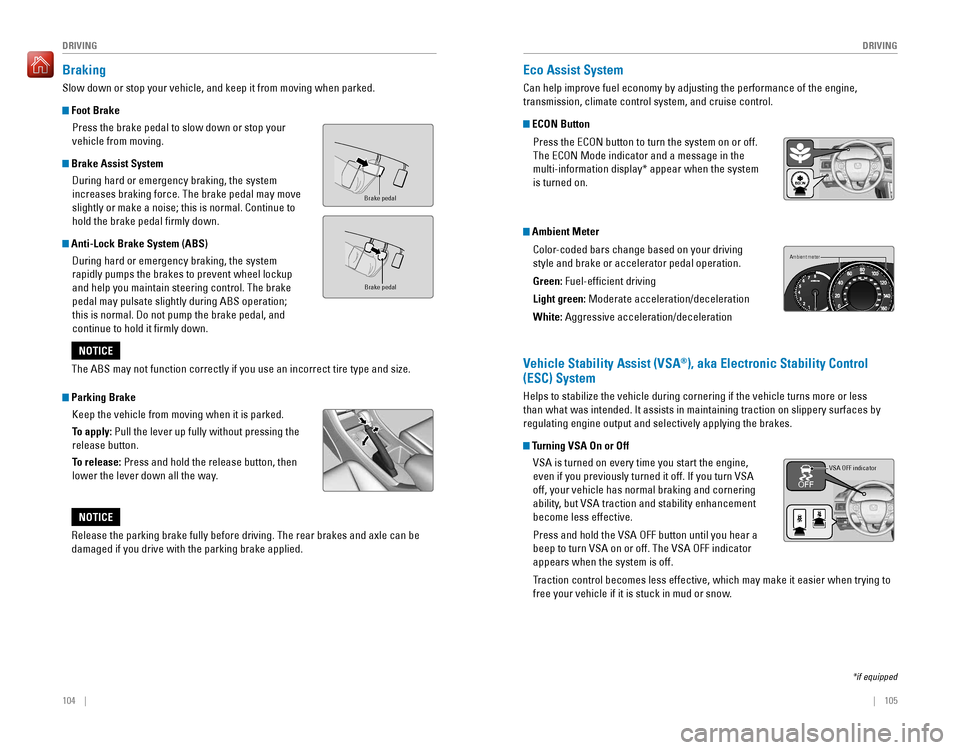
Foot Brake
Press the brake pedal to slow down or stop your
vehicle from moving.
Brake Assist System
During hard or emergency braking, the system
increases braking force. The brake pedal may move
slightly or make a noise; this is normal. Continue to
hold the brake pedal firmly down.
Anti-Lock Brake System (ABS)
During hard or emergency braking, the system
rapidly pumps the brakes to prevent wheel lockup
and help you maintain steering control. The brake
pedal may pulsate slightly during ABS operation;
this is normal. Do not pump the brake pedal, and
continue to hold it firmly down.
Parking Brake
Keep the vehicle from moving when it is parked.
To apply: Pull the lever up fully without pressing the
release button.
To release: Press and hold the release button, then
lower the lever down all the way.
Brake peda l
Brake pedal
The ABS may not function correctly if you use an incorrect tire type and size.
NOTICE
Release the parking brake fully before driving. The rear brakes and axle can be
damaged if you drive with the parking brake applied.
NOTICE
Eco Assist System
Can help improve fuel economy by adjusting the performance of the engine,
transmission, climate control system, and cruise control.
ECON Button
Press the ECON button to turn the system on or off.
The eCoN Mode indicator and a message in the
multi-information display* appear when the system
is turned on.
Ambient Meter
Color-coded bars change based on your driving
style and brake or accelerator pedal operation.
Green: Fuel-efficient driving
Light green:
Moderate acceleration/deceleration
White: Aggressive acceleration/deceleration
Ambient meter
Vehicle Stability Assist (VSA®), aka Electronic Stability Control
(ESC) System
Helps to stabilize the vehicle during cornering if the vehicle turns more or less
than what was intended. It assists in maintaining traction on slippery surfaces by
regulating engine output and selectively applying the brakes.
Turning VSA On or Off
vSA is turned on every time you start the engine,
even if you previously turned it off. If you turn VSA
off, your vehicle has normal braking and cornering
ability, but VSA traction and stability enhancement
become less effective.
Press and hold the VSA OFF button until you hear a
beep to turn VSA on or off. The VSA OFF indicator
appears when the system is off.
Traction control becomes less effective, which may make it easier when trying to
free your vehicle if it is stuck in mud or snow.
VSA OFF indicator
*if equipped
Page 64 of 83
120 || 121
HANDLING THE UNEXPECTED
HANDLING THE UNEXPECTED
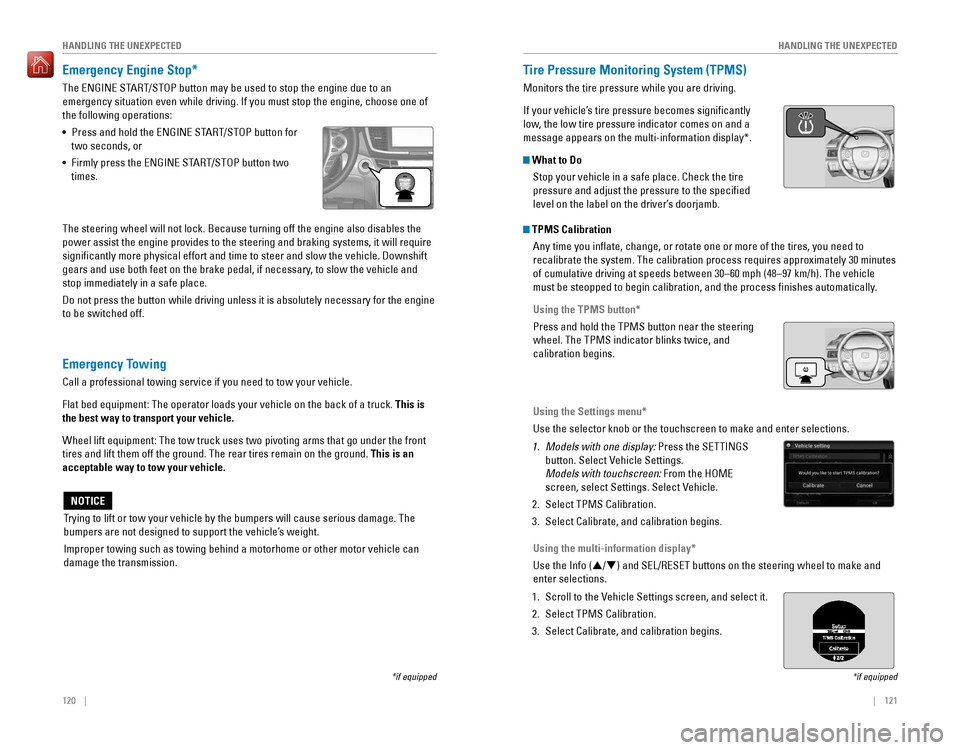
Emergency Engine Stop*
The ENGINE START/STOP button may be used to stop the engine due to an
emergency situation even while driving. If you must stop the engine, choose one of
the following operations:
•
Press and hold the ENGINE START/STOP button for
two seconds, or
•
Firmly press the ENGINE START/STOP button two
times.
The steering wheel will not lock. Because turning off the engine also disables the
power assist the engine provides to the steering and braking systems, it will require
significantly more physical effort and time to steer and slow the vehi\
cle. Downshift
gears and use both feet on the brake pedal, if necessary, to slow the vehicle and
stop immediately in a safe place.
Do not press the button while driving unless it is absolutely necessary for the engine
to be switched off.
*if equipped
Trying to lift or tow your vehicle by the bumpers will cause serious damage. The
bumpers are not designed to support the vehicle’s weight.
Improper towing such as towing behind a motorhome or other motor vehicle can
damage the transmission.
NOTICE
Emergency Towing
Call a professional towing service if you need to tow your vehicle.
Flat bed equipment: The operator loads your vehicle on the back of a truck. This is
the best way to transport your vehicle.
Wheel lift equipment: The tow truck uses two pivoting arms that go under the front
tires and lift them off the ground. The rear tires remain on the ground.\
This is an
acceptable way to tow your vehicle.
Tire Pressure Monitoring System (TPMS)
Monitors the tire pressure while you are driving.
If your vehicle’s tire pressure becomes significantly
low, the low tire pressure indicator comes on and a
message appears on the multi-information display*.
What to Do
Stop your vehicle in a safe place. Check the tire
pressure and adjust the pressure to the specified
level on the label on the driver’s doorjamb.
*if equipped
TPMS CalibrationAny time you inflate, change, or rotate one or more of the tires, you \
need to
recalibrate the system. The calibration process requires approximately 30 minutes
of cumulative driving at speeds between 30–60 mph (48–97 km/h). The vehicle
must be steopped to begin calibration, and the process finishes automatically.
Using the TPMS button*
Press and hold the TPMS button near the steering
wheel. The TPMS indicator blinks twice, and
calibration begins.
Using the Settings menu*
Use the selector knob or the touchscreen to make and enter selections.
1. Models with one display: Press the SETTINGS
button. Select Vehicle Settings.
Models with touchscreen: From the HoMe
screen, select Settings. Select vehicle.
2. Select TPMS Calibration.
3. Select Calibrate, and calibration begins.
Using the multi-information display*
Use the Info (p/q) and SEL/RESET buttons on the steering wheel to make and
enter selections.
1. Scroll to the vehicle Settings screen, and select it.
2. Select TPMS Calibration.
3. Select Calibrate, and calibration begins.
Page 69 of 83
130 || 131
MAINTENANCEMAINTENANCE
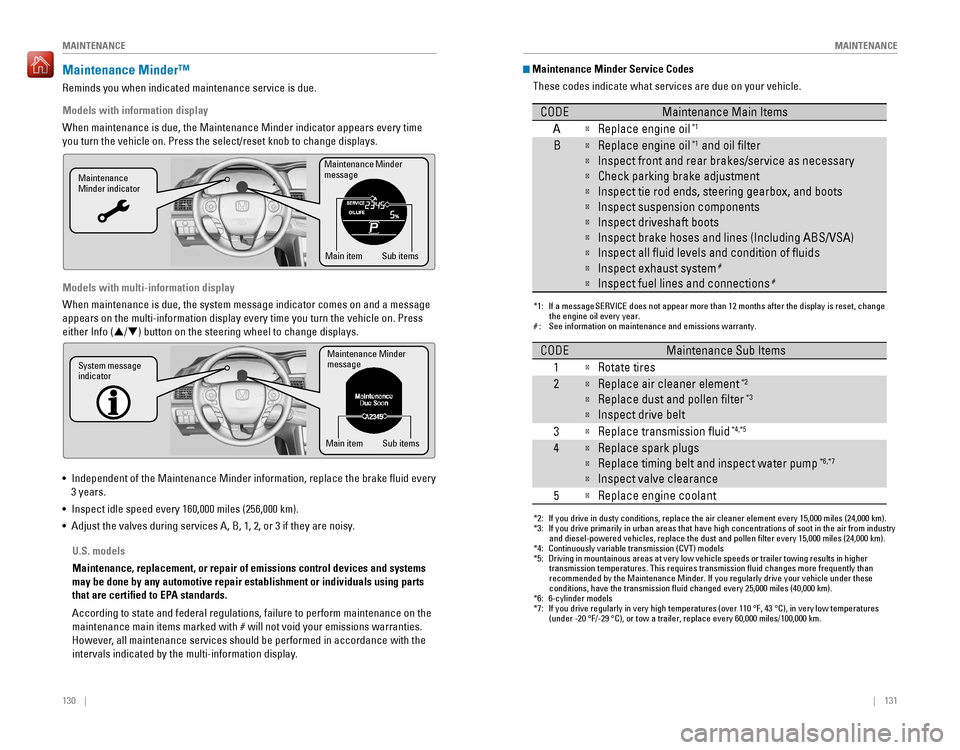
Maintenance Minder™
reminds you when indicated maintenance service is due.
Models with information display
When maintenance is due, the Maintenance Minder indicator appears every time
you turn the vehicle on. Press the select/reset knob to change displays.
Models with multi-information display
When maintenance is due, the system message indicator comes on and a message
appears on the multi-information display every time you turn the vehicle\
on. Press
either Info (p/q) button on the steering wheel to change displays.
• Independent of the Maintenance Minder information, replace the brake fluid every
3 years.
•
Inspect idle speed every 160,000 miles (256,000 km).
• Adjust the valves during services A, B, 1, 2, or 3 if they are noisy.
Maintenance Minder
message
Maintenance
Minder indicator
Sub items
Main item
Maintenance Minder
messag e
System message
indicator
Sub items
Main item
U.S. models
Maintenance, replacement, or repair of emissions control devices and sys\
tems
may be done by any automotive repair establishment or individuals using \
parts
that are certified to EPA standards.
According to state and federal regulations, failure to perform maintenan\
ce on the
maintenance main items marked with # will not void your emissions warranties.
However, all maintenance services should be performed in accordance with the
intervals indicated by the multi-information display.
Maintenance Minder Service Codes
These codes indicate what services are due on your vehicle.
*1: If a message SERVICE does not appear more than 12 months after the display is reset, change the engine oil every year.
#: See information on maintenance and emissions warranty.
CODEMaintenance Main Items
A
Replace engine oi l*1
BReplace engine oil*1 and oil lter
Inspect front and rear brakes/service as necessary
Check parking brake adjustment
Inspect tie rod ends, steering gearbox, and boots
Inspect suspension components
Inspect driveshaft boots
Inspect brake hoses and lines (Including ABS/VSA)
Inspect all uid levels and condition of uid s
Inspect exhaust system#
Inspect fuel lines and connections#
*2: If you drive in dusty conditions, replace the air cleaner element every \
15,000 miles (24,000 km).
*3: If you drive primarily in urban areas that have high concentrations of s\
oot in the air from industryand diesel-powered vehicles, replace the dust and pollen lter every \
15,000 miles (24,000 km).
*4: Continuously variable transmission (CVT) models
*5: Driving in mountainous areas at very low vehicle speeds or trailer towing results in higher
transmission temperatures. This requires transmission uid changes mo\
re frequently than
recommended by the Maintenance Minder. If you regularly drive your vehic\
le under these
conditions, have the transmission uid changed every 25,000 miles (4\
0,000 km).
*6: 6-cylinder models
*7: If you drive regularly in very high temperatures (over 110 °F, 43 °C), in very low temperatures
(under -20 °F/-29 °C), or tow a trailer, replace every 60,000 mi\
les/100,000 km.
CODEMaintenance Sub Items
1
Rotate tires
2Replace air cleaner element*2
Replace dust and pollen lter*3
Inspect drive belt
3
Replace transmission ui d*4,*5
4Replace spark plugs
Replace timing belt and inspect water pum p*6,*7
Inspect valve clearance
5
Replace engine coolant
Page 77 of 83
, B, and C, representing the\
tire’s
resistance to the generation of heat and it")
146 || 147
MAINTENANCEMAINTENANCE
Temperature
The temperature grades are A (the highest), B, and C, representing the\
tire’s
resistance to the generation of heat and its ability to dissipate heat when tested
under controlled conditions on a specified indoor laboratory test wheel. Sustained
high temperature can cause the material of the tire to degenerate and re\
duce
tire life, and excessive temperature can lead to sudden tire failure. Th\
e grade
C corresponds to a level of performance which all passenger car tires must
meet under the Federal Motor vehicle Safety Standard No. 109. Grades B and
A represent higher levels of performance on the laboratory test wheel than the
minimum required by law.
WARNING: The temperature grade for this tire is established for a tire that
is properly inflated and not overloaded. excessive speed, underinflation, or
excessive loading, either separately or in combination, can cause heat buildup
and possible tire failure.
Testing of Readiness Codes
Your vehicle has “readiness codes” as part of the onboard self-diagnostic system.
Some states refer to these codes as a test to see if your vehicle’s emissions
components are working properly. The codes may not be read if you go through the
testing just after the battery has gone dead or been disconnected.
To check if they are set, turn the vehicle on without starting the engine\
. The
malfunction indicator lamp will come on for several seconds. If it goes off, the
readiness codes are set. If it blinks five times, the readiness codes are not set.
If you are required to have your vehicle tested before the readiness codes are set,
prepare the vehicle for retesting by doing the following:
1. Fill the gas tank to approximately 3/4 full.
2. Park the vehicle and leave the engine off for 6 hours or more.
3. Make sure the ambient temperature is between 40°F and 95°F (4°C and 35°C).
4. Start the engine without touching the accelerator pedal, and let it idle\
for 20
seconds.
5. Keep the vehicle in Park (P) or Neutral for manual transmission. Increase the
engine speed to 2,000 rpm, and hold it there for about 3 minutes.
6. Let the engine idle with your foot off the accelerator for 20 seconds.
7. Select a nearby, lightly traveled major highway where you can maintain a speed
of 50 to 60 mph (80 to 97 km/h) for at least 20 minutes. Drive on the highway
with the vehicle in Drive (D) or 5th gear. Do not use cruise control. When traffic
allows, drive for 90 seconds without using the accelerator pedal. (vehicle speed
may vary slightly; this is OK.) If you cannot do this for a continuous 90 seconds
because of traffic conditions, drive for at least 30 seconds, then repeat two more
times (for a total of 90 seconds).
8. Drive in city/suburban traffic for at least 10 minutes. When traffic conditions
allow, let the vehicle coast for several seconds without using the accelerator
pedal or the brake pedal.
9. Park the vehicle and leave the engine off for 30 minutes.
The readiness codes are erased when the battery is disconnected, and set again
only after several days of driving under a variety of conditions.
If a testing facility determines that the readiness codes are not set, you may be
requested to return at a later date to complete the test, or see your dealer.
Page 78 of 83
148 || 149
SPECIFICATIONS
SPECIFICATIONS
SPECIFICATIONS
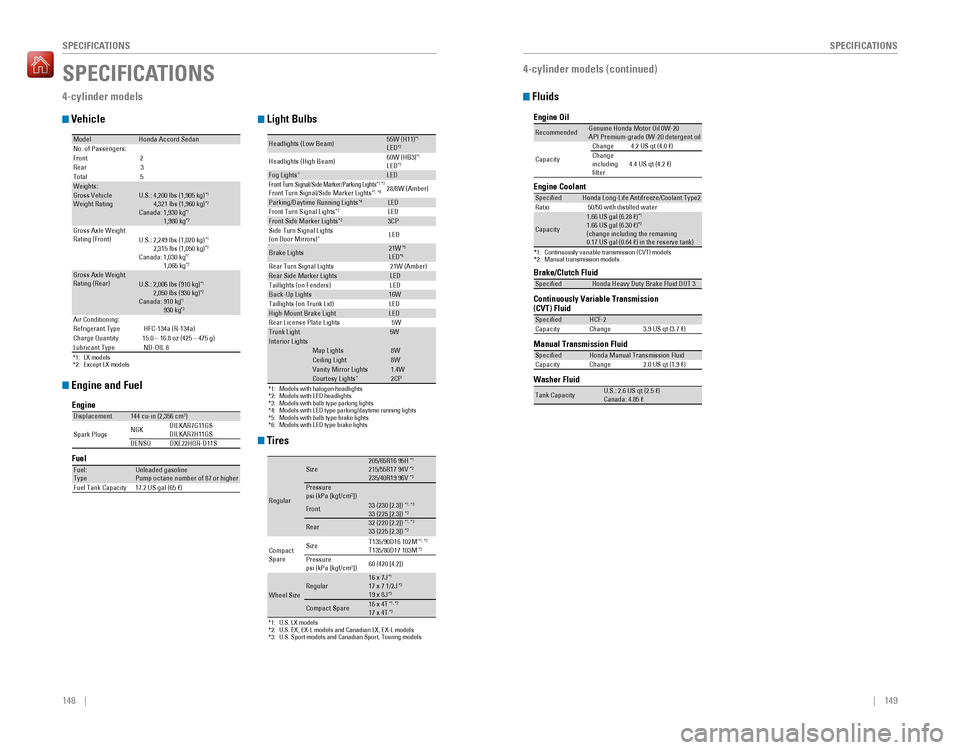
4-cylinder models
Vehicle
Engine and Fuel
Tires
Light Bulbs
*1: LX models*2: Except LX models
ModelHonda Accord SedanNo. of Passengers:
Front 2
Rear 3
Tota l5
Weights:Gross Vehicle
Weight Rating U.S.: 4,200 lbs (1,905 kg )*1 4,321 lbs (1,960 kg)*2Canada: 1,930 kg*1 1,980 kg*2Gross Axle Weight
Rating (Front)U.S.: 2,249 lbs (1,020 kg )*1 2,315 lbs (1,050 kg)*2Canada: 1,030 kg*1 1,065 kg*2Gross Axle Weight
Rating (Rear)U.S.: 2,006 lbs (910 kg )*1 2,050 lbs (930 kg)*2Canada: 910 kg*1 930 kg*2Air Conditioning:
Refrigerant Type HFC-134a (R-134a)
Charge Quantity 15.0 – 16.8 oz (425 – 475 g)
Lubricant Type ND-OIL 8
Engine
FuelDisplacement144 cu-in (2,356 cm3)
Spark Plugs NG
K DILKAR7G11GS
DILKAR7H11GS
DENSO DXE22HQR-D11 S
Fuel:
TypeUnleaded gasoline
Pump octane number of 87 or higher
Fuel Tank Capacity 17.2 US gal (65 )
*1:U.S. LX models*2:U.S. EX, EX-L models and Canadian LX, EX-L models*3: U.S. Sport models and Canadian Sport, Touring models
Regular
Size205/65R16 95 H*1215/55R17 94V*2235/40R19 96V*3Pressure
psi (kPa [kgf/cm2])
Front33 (230 [2.3])*1, *333 (225 [2.3])*2
Rear32 (220 [2.2])*1, *333 (225 [2.3])*2
Compact
Spar e Size
T135/90D16 102M*1
, *2T135/80D17 103M*3Pressure
psi (kPa [kgf/cm2]) 60 (420 [4.2])
Wheel SizeRegular16 x 7J*117 x 7 1/2J*219 x 8J*3
Compact Spar
e16 x 4T*1, *217 x 4T*3
*1:Models with halogen headlights*2:Models with LED headlights*3:Models with bulb type parking lights*4:Models with LED type parking/daytime running lights*5:Models with bulb type brake lights*6: Models with LED type brake lights
Headlights (Low Beam)55W (H11 )*1LED*2
Headlights (High Beam )60W (HB3
)*1LED*2Fog Lights*LEDFront Turn Si gnal/Side Marker/Parki ng Ligh ts*1, *3Front Turn Signal/Side Marker Light s*1, *428/8W (Amber )
Parking/Daytime Running Lights*4LE D
Front Turn Signal Light s*2LEDFront Side Marker Lights*23CP
Side Turn Signal Lights
(on Door Mirrors )
*LED
Brake Lights21W*5LED*6Rear Turn Signal Lights 21W (Amber)Rear Side Marker LightsLED
Taillights (on Fenders) LED
Back-Up Lights16W
Taillights (on Trunk Lid) LED
High-Mount Brake LightLED
Rear License Plate Lights5WTrunk Light5WIn terior Light sMap Lights8WCeiling Ligh t8WVanity Mirror Light s1.4WCourtesy Lights*2CP
Fluids
4-cylinder models (continued)
Brake/Clutch Fluid
Continuously Variable Transmission (CVT) Fluid
Manual Transmission Flui
d
Specie
dHonda Heavy Duty Brake Fluid DOT 3
SpeciedHCF-2
Capacity Change 3.9 US qt (3.7 )
SpeciedHonda Manual Transmission Flui d
Capacity Change 2.0 US qt (1.9 )
Engine Oil
Engine Coolan
t
*1:Continuously variable transmission (CVT) models*2:Manual transmission models
Recommended·Genuine Honda Motor Oil 0W-2 0
·API Premium-grade 0W-20 detergent oi l
Capacity Change
4.2 US qt (4.0 )
Change
including
lter 4.4 US qt (4.2 )
Specie
dHonda Long-Life Anti freeze/Coolant Type 2
Ratio 50/50 with distilled wate r
Capacity
1.66 US gal (6.28 )*11.66 US gal (6.30 ) *2(change including the remaining
0.17 US gal (0.64 ) in the reserve tank )
Washer Fluid
Tank CapacityU.S.: 2.6 US qt (2.5 )
Canada: 4.85
Page 79 of 83
150 || 151
CUSTOMER INFORMATION
SPECIFICATIONS
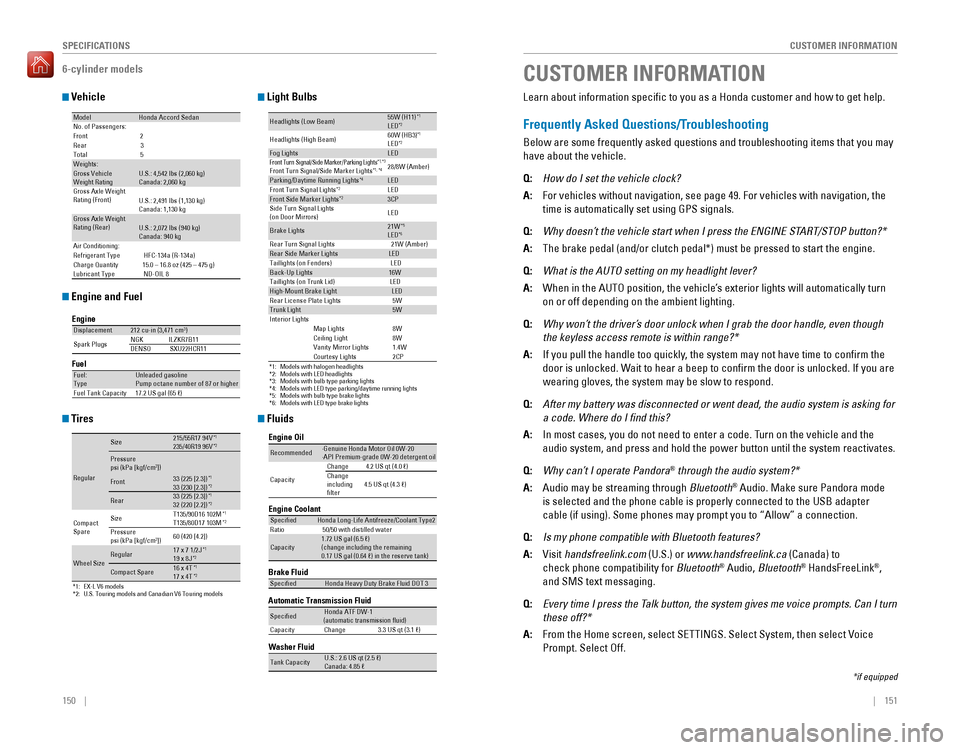
6-cylinder models
Vehicle
Engine and Fuel
Tires
Light Bulbs
Fluids
ModelHonda Accord SedanNo. of Passengers:
Front 2
Rear 3
Tota l5
Weights:Gross Vehicle
Weight Rating U.S.: 4,542 lbs (2,060 kg )
Canada: 2,060 kg
Gross Axle Weight
Rating (Front)U.S.: 2,491 lbs (1,130 kg )
Canada: 1,130 kg
Gross Axle Weight
Rating (Rear)U.S.: 2,072 lbs (940 kg )
Canada: 940 kg
Air Conditioning:
Refrigerant Type HFC-134a (R-134a)
Charge Quantit y15.0 – 16.8 oz (425 – 475 g)
Lubricant Type ND-OIL 8
Engine
FuelDisplacement212 cu-in (3,471 cm3)
Spark Plugs NG
KI LZKR7B11
DENSO SXU22HCR11
Fuel:
TypeUnleaded gasoline
Pump octane number of 87 or higher
Fuel Tank Capacity 17.2 US gal (65 )
*1: EX-L V6 models*2: U.S. Touring models and Canadian V6 Touring models
Regular
Size215/55R17 94 V*1235/40R19 96V*2
Pressure
psi (kPa [kgf/cm2])33 (225 [2.3])*133 (230 [2.3])*2Front
Rear33 (225 [2.3])*132 (220 [2.2])*2
Compact
Spar e Size
T135/90D16 102M*1T135/80D17 103M*2Pressure
psi (kPa [kgf/cm2])
60 (420 [4.2])
Wheel SizeRegula
r17 x 7 1/2J*119 x 8J*2
Compact Spar e16 x 4T*117 x 4T*2
*1:Models with halogen headlights*2:Models with LED headlights*3:Models with bulb type parking lights*4:Models with LED type parking/daytime running lights*5:Models with bulb type brake lights*6: Models with LED type brake lights
Headlights (Low Beam)55W (H11)*1LED*2
Headlights (High Beam )60W (HB3
)*1LED*2Fog LightsLEDFront Turn Si gnal/Side Marker/Parki ng Ligh ts*1, *3Front Turn Signal/Side Marker Light s*1, *428/8W (Amber )
Parking/Daytime Running Lights*4LE D
Front Turn Signal Light s*2LEDFront Side Marker Lights*23CP
Side Turn Signal Lights
(on Door Mirrors ) LE
D
Brake Lights21W*5LED*6Rear Turn Signal Lights 21W (Amber)Rear Side Marker LightsLED
Taillights (on Fenders) LED
Back-Up Lights16W
Taillights (on Trunk Lid) LED
High-Mount Brake LightLED
Rear License Plate Lights5WTrunk Light5WIn terior Light sMap Lights8WCeiling Ligh t8WVanity Mirror Light s1.4WCourtesy Lights2CP
Brake Fluid
Automatic Transmission Fluid
SpeciedHonda Heavy Duty Brake Fluid DOT 3
SpeciedHonda ATF DW-1
(automatic transmission uid )
Capacit yC hange3 .3 US qt (3.1 )
Engine Oil
Engine Coolan
t
Recommended·Genuine Honda Motor Oil 0W-2 0
·API Premium-grade 0W-20 detergent oi l
Capacity Chang
e4 .2 US qt (4.0 )
Change
including
lter 4.5 US qt (4.3 )
Specie
dHonda Long-Life Anti freeze/Coolant Type 2
Ratio 50/50 with distilled wate r
Capacity1.72 US gal (6.5 )
(change including the remaining
0.17 US gal (0.64 ) in the reserve tank )
Washer Fluid
Tank CapacityU.S.: 2.6 US qt (2.5 )
Canada: 4.85
CUSTOMER INFORMATION
*if equipped
Learn about information specific to you as a Honda customer and how to get help.
Frequently Asked Questions/Troubleshooting
Below are some frequently asked questions and troubleshooting items that you may
have about the vehicle.
Q: How do I set the vehicle clock?
A: For vehicles without navigation, see page 49. For vehicles with navigati\
on, the
time is automatically set using GPS signals.
Q: Why doesn’t the vehicle start when I press the ENGINE START/STOP button?*
A: The brake pedal (and/or clutch pedal*) must be pressed to start the engine.
Q: What is the AUTO setting on my headlight lever?
A: When in the AUTO position, the vehicle’ s exterior lights will automatically turn
on or off depending on the ambient lighting.
Q: Why won’t the driver’s door unlock when I grab the door handle, even though
the keyless access remote is within range?*
A: If you pull the handle too quickly, the system may not have time to confirm the
door is unlocked. Wait to hear a beep to confirm the door is unlocked. If you are
wearing gloves, the system may be slow to respond.
Q: After my battery was disconnected or went dead, the audio system is asking for
a code. Where do I find this?
A: In most cases, you do not need to enter a code. T urn on the vehicle and the
audio system, and press and hold the power button until the system reactivates.
Q: Why can’t I operate Pandora® through the audio system?*
A: Audio may be streaming through Bluetooth® Audio. Make sure Pandora mode
is selected and the phone cable is properly connected to the USB adapter
cable (if using). Some phones may prompt you to “Allow” a connection.
Q: Is my phone compatible with Bluetooth features?
A: visit handsfreelink.com (U.S.) or www.handsfreelink.ca (Canada) to
check phone compatibility for Bluetooth® Audio, Bluetooth® HandsFreeLink®,
and SMS text messaging.
Q: Every time I press the Talk button, the system gives me voice prompts. Can I turn
these off?*
A: From the Home screen, select SETTINGS. Select System, then select V oice
Prompt. Select off.