can HONDA ACCORD 2017 9.G Owners Manual
[x] Cancel search | Manufacturer: HONDA, Model Year: 2017, Model line: ACCORD, Model: HONDA ACCORD 2017 9.GPages: 613
Page 175 of 613
uuInterior Lights/Interior Convenience Items uInterior Convenience Items
174
Controls
To use the wireless charger, the ig nition switch must be in ACCESSORY (q or ON
(w*1.
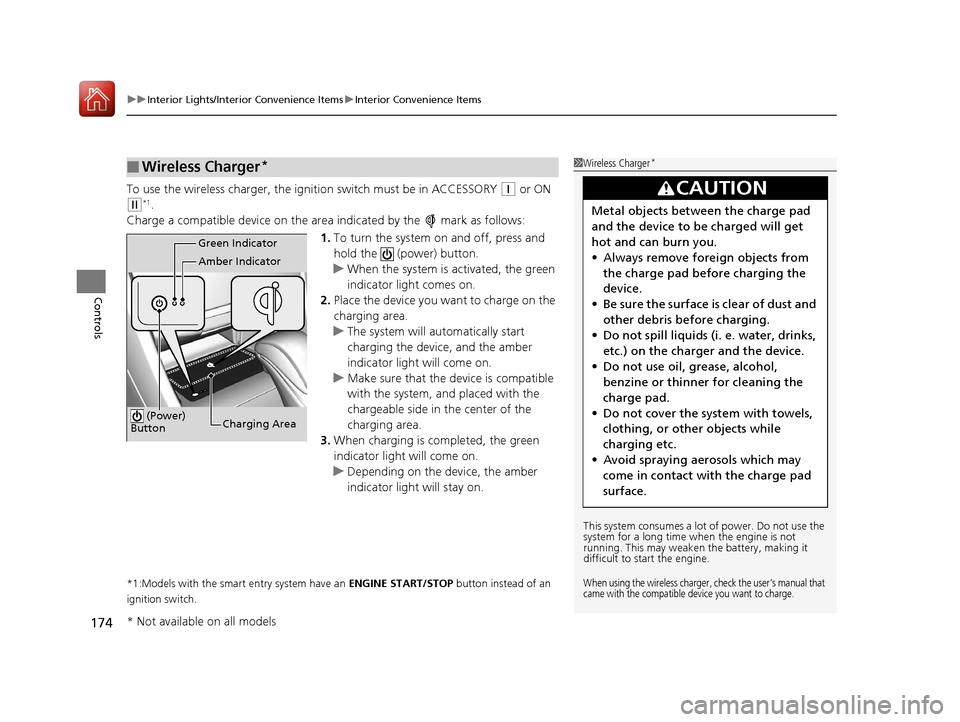
Charge a compatible device on the ar ea indicated by the mark as follows:
1. To turn the system on and off, press and
hold the (power) button.
u When the system is activated, the green
indicator light comes on.
2. Place the device you want to charge on the
charging area.
u The system will automatically start
charging the device, and the amber
indicator light will come on.
u Make sure that the device is compatible
with the system, and placed with the
chargeable side in the center of the
charging area.
3. When charging is completed, the green
indicator light will come on.
u Depending on the device, the amber
indicator light will stay on.
*1:Models with the smart entry system have an ENGINE START/STOP button instead of an
ignition switch.
■Wireless Charger*1 Wireless Charger*
This system consumes a lot of power. Do not use the
system for a long time when the engine is not
running. This may weaken the battery, making it
difficult to start the engine.
When using the wireless charger, check the user’s manual that
came with the compatible device you want to charge.
3CAUTION
Metal objects between the charge pad
and the device to be charged will get
hot and can burn you.
• Always remove foreign objects from
the charge pad before charging the
device.
• Be sure the surface is clear of dust and
other debris before charging.
• Do not spill liquids (i. e. water, drinks,
etc.) on the charger and the device.
• Do not use oil, grease, alcohol,
benzine or thinner for cleaning the
charge pad.
• Do not cover the system with towels,
clothing, or other objects while
charging etc.
• Avoid spraying aerosols which may
come in contact with the charge pad
surface.
Green Indicator
Amber Indicator
Charging Area
(Power)
Button
* Not available on all models
17 ACCORD 4D GAS-31T2A6400.book 174 ページ 2016年6月7日 火曜日 午後5時6分
Page 176 of 613
Continued175
uuInterior Lights/Interior Convenience Items uInterior Convenience Items
Controls
■When charging does not start
Perform one of the solutions in the following table.
IndicatorCauseSolution
Green &
AmberBlinking
simulta- neously
There is an obstacle(s) between
the charging area and the
device.Remove the
obstacle(s).
The device is not within the
charging area. Move the device to the
center of the charging
area where is
located.
AmberBlinkingThe wireless charger is faulty.Contact a dealer for
repairs.
1
Wireless Charger*
NOTICE
Do not place any magneti c recording media or
precision machines within the charging area while
charging.
The data on your cards such as credit cards can be
lost because of the magneti c effect. Also precision
machines such as watches can go wrong.
“Qi” and marks are the registered trademarks
owned by Wire less Power Consortium (WPC).
In the following cases, ch arging may stop or not start:
•The device is already fully charged.•The temperature of the device is extremely high
while charging.
•You are at a place that emits strong
electromagnetic wave or noi ses such as TV station,
electric power plant, or gas station.
A device may not charge if the size or shape of its
chargeable side is not appropriate for use with the
charging area.
Not all devices are compatible with the system.
During the charging phase, it is normal for the
charging area and de vice to heat up.
Charging may be briefl y interrupted when:
•All the doors or the trunk are closed
- to avoid interference with the proper functioning
of the smart entry system.
•The position of the device is altered.
Do not charge more than one device at a time on a
charging area.
* Not available on all models
17 ACCORD 4D GAS-31T2A6400.book 175 ページ 2016年6月7日 火曜日 午後5時6分
Page 177 of 613
uuInterior Lights/Interior Convenience Items uInterior Convenience Items
176
Controls
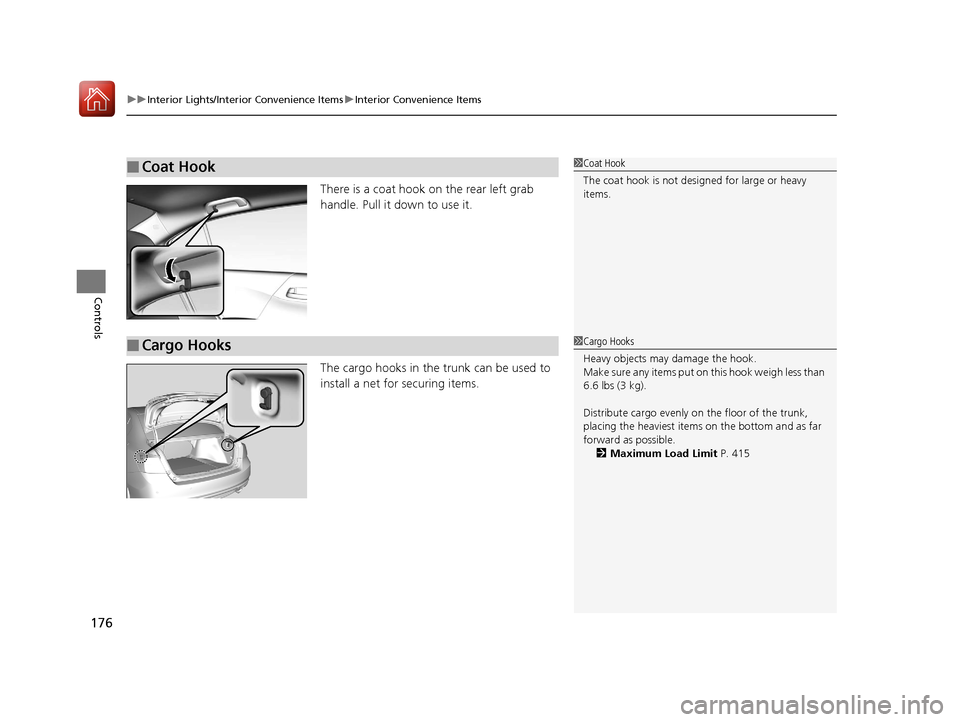
There is a coat hook on the rear left grab
handle. Pull it down to use it.
The cargo hooks in the trunk can be used to
install a net for securing items.
■Coat Hook1Coat Hook
The coat hook is not desi gned for large or heavy
items.
■Cargo Hooks1 Cargo Hooks
Heavy objects may damage the hook.
Make sure any items put on this hook weigh less than
6.6 lbs (3 kg).
Distribute cargo evenly on the floor of the trunk,
placing the heaviest item s on the bottom and as far
forward as possible.
2 Maximum Load Limit P. 415
17 ACCORD 4D GAS-31T2A6400.book 176 ページ 2016年6月7日 火曜日 午後5時6分
Page 178 of 613
Continued177
uuInterior Lights/Interior Convenience Items uInterior Convenience Items
Controls
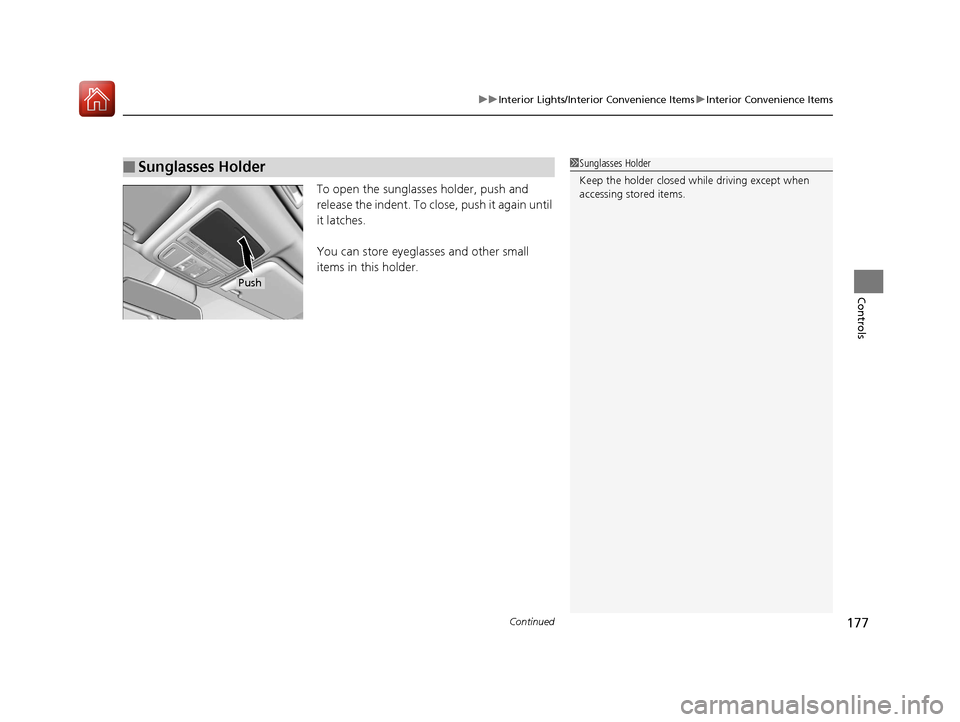
To open the sunglasses holder, push and
release the indent. To clos e, push it again until
it latches.
You can store eyeglasses and other small
items in this holder.
■Sunglasses Holder1 Sunglasses Holder
Keep the holder closed wh ile driving except when
accessing stored items.
Push
17 ACCORD 4D GAS-31T2A6400.book 177 ページ 2016年6月7日 火曜日 午後5時6分
Page 181 of 613
180
Controls
Climate Control System
Using Automatic Climate Control
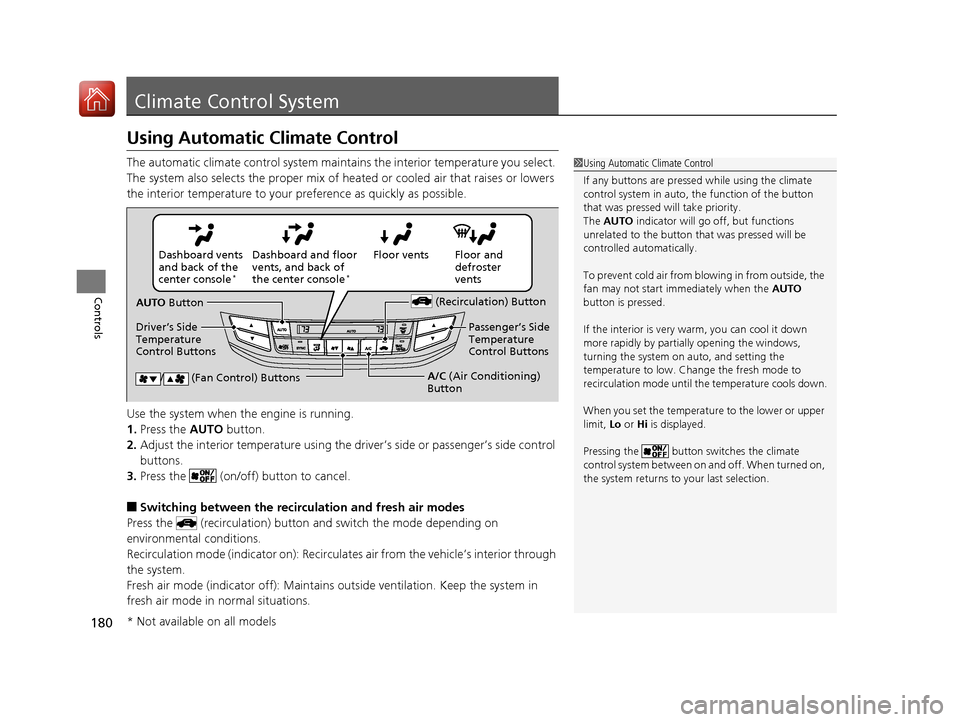
The automatic climate control system maintains the interior temperature you select.
The system also selects the proper mix of heated or cooled air that raises or lowers
the interior temperature to your pr eference as quickly as possible.
Use the system when the engine is running.
1. Press the AUTO button.
2. Adjust the interior temperature using the dr iver’s side or passenger’s side control
buttons.
3. Press the (on/off) button to cancel.
■Switching between the recirculation and fresh air modes
Press the (recirculation) button and switch the mode depending on
environmental conditions.
Recirculation mode (indicator on): Recirculat es air from the vehicle’s interior through
the system.
Fresh air mode (indicator off): Maintains ou tside ventilation. Keep the system in
fresh air mode in normal situations.
1 Using Automatic Climate Control
If any buttons are presse d while using the climate
control system in auto, the function of the button
that was pressed will take priority.
The AUTO indicator will go off, but functions
unrelated to the button th at was pressed will be
controlled automatically.
To prevent cold air from bl owing in from outside, the
fan may not start i mmediately when the AUTO
button is pressed.
If the interior is very warm, you can cool it down
more rapidly by partial ly opening the windows,
turning the system on auto, and setting the
temperature to low. Change the fresh mode to
recirculation mode until the temperature cools down.
When you set the temperat ure to the lower or upper
limit, Lo or Hi is displayed.
Pressing the button switches the climate
control system between on and off. When turned on,
the system returns to your last selection.
Floor and
defroster
vents
Floor vents
Dashboard and floor
vents, and back of
the center console
*
Dashboard vents
and back of the
center console
*
AUTO Button
Driver’s Side
Temperature
Control Buttons (Recirculation) Button
/ (Fan Control) ButtonsA/C
(Air Conditioning)
Button Passenger’s Side
Temperature
Control Buttons
* Not available on all models
17 ACCORD 4D GAS-31T2A6400.book 180 ページ 2016年6月7日 火曜日 午後5時6分
Page 183 of 613
uuClimate Control System uUsing Automatic Climate Control
182
Controls
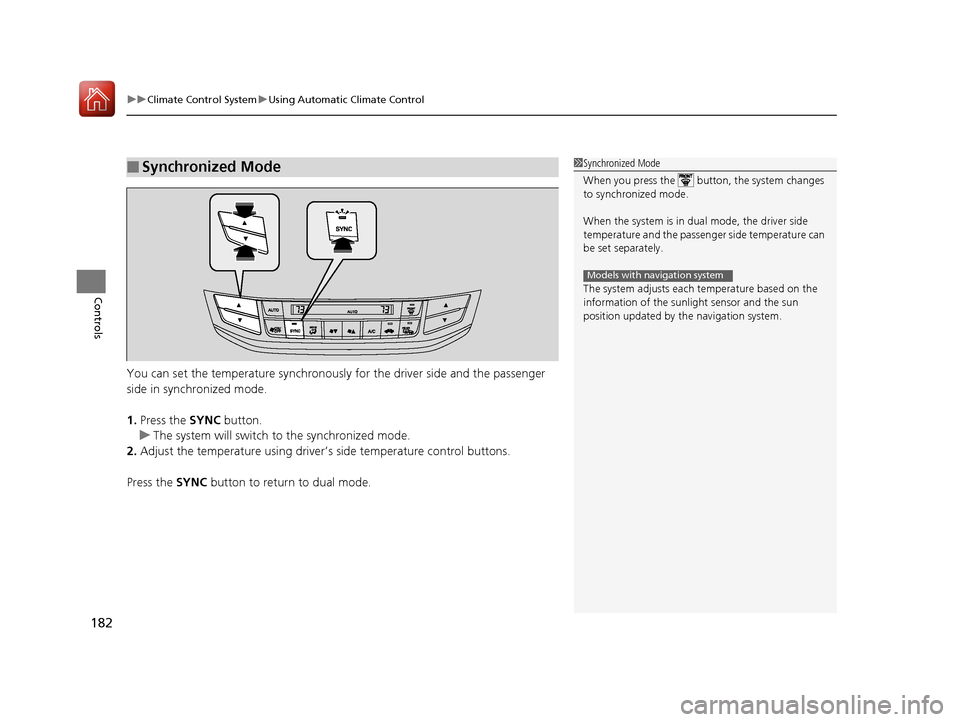
You can set the temperature synchronously for the driver side and the passenger
side in synchronized mode.
1. Press the SYNC button.
u The system will switch to the synchronized mode.
2. Adjust the temperature using driver’s side temperature control buttons.
Press the SYNC button to return to dual mode.
■Synchronized Mode1Synchronized Mode
When you press the button, the system changes
to synchronized mode.
When the system is in dua l mode, the driver side
temperature and the passenger side temperature can
be set separately.
The system adjusts each temperature based on the
information of the sunli ght sensor and the sun
position updated by the navigation system.
Models with navigation system
17 ACCORD 4D GAS-31T2A6400.book 182 ページ 2016年6月7日 火曜日 午後5時6分
Page 187 of 613
186
Features
Audio System
About Your Audio System
The audio system features AM/FM radio and SiriusXM ® Radio service*. It can also
play audio CDs, WMA/MP3/AAC files, USB flash drives, and iPod, iPhone and
Bluetooth ® devices.
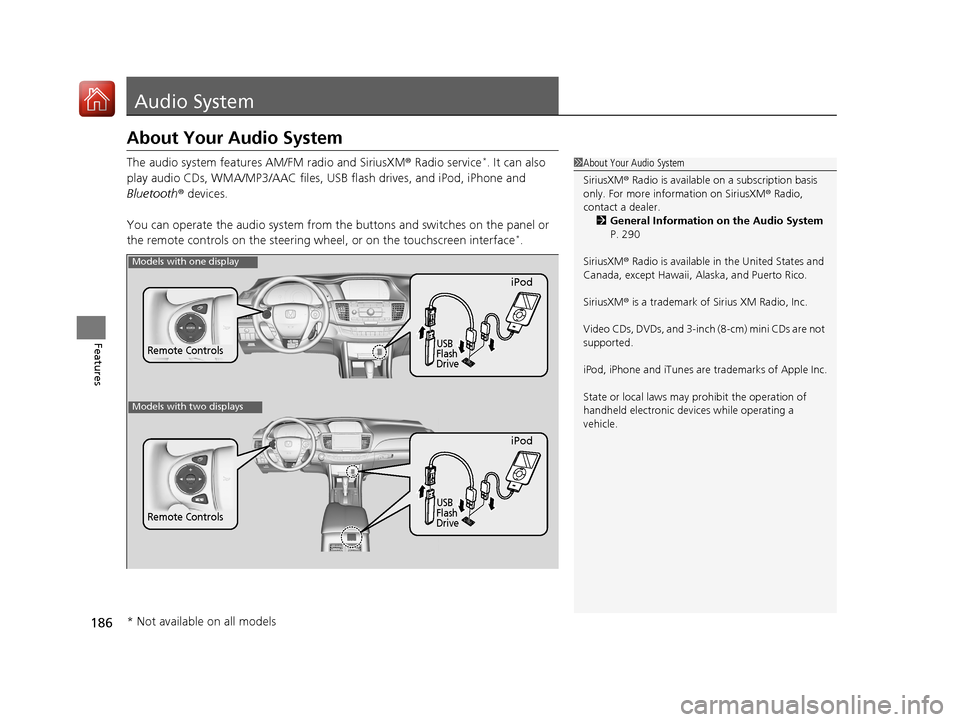
You can operate the audio system from the buttons and switches on the panel or
the remote controls on the steering wheel, or on the touchscreen interface
*.
1 About Your Audio System
SiriusXM ® Radio is available on a subscription basis
only. For more information on SiriusXM ® Radio,
contact a dealer.
2 General Information on the Audio System
P. 290
SiriusXM ® Radio is available in the United States and
Canada, except Ha waii, Alaska, and Puerto Rico.
SiriusXM ® is a trademark of Sirius XM Radio, Inc.
Video CDs, DVDs, and 3-inch (8-cm) mini CDs are not
supported.
iPod, iPhone and iTunes are trademarks of Apple Inc.
State or local laws may pr ohibit the operation of
handheld electronic devi ces while operating a
vehicle.
Remote Controls
iPod
USB
Flash
Drive
Models with one display
Remote Controls
iPod
USB
Flash
Drive
Models with two displays
* Not available on all models
17 ACCORD 4D GAS-31T2A6400.book 186 ページ 2016年6月7日 火曜日 午後5時6分
Page 188 of 613
187
uuAudio System uUSB Port(s*)
Features
USB Port(s*)
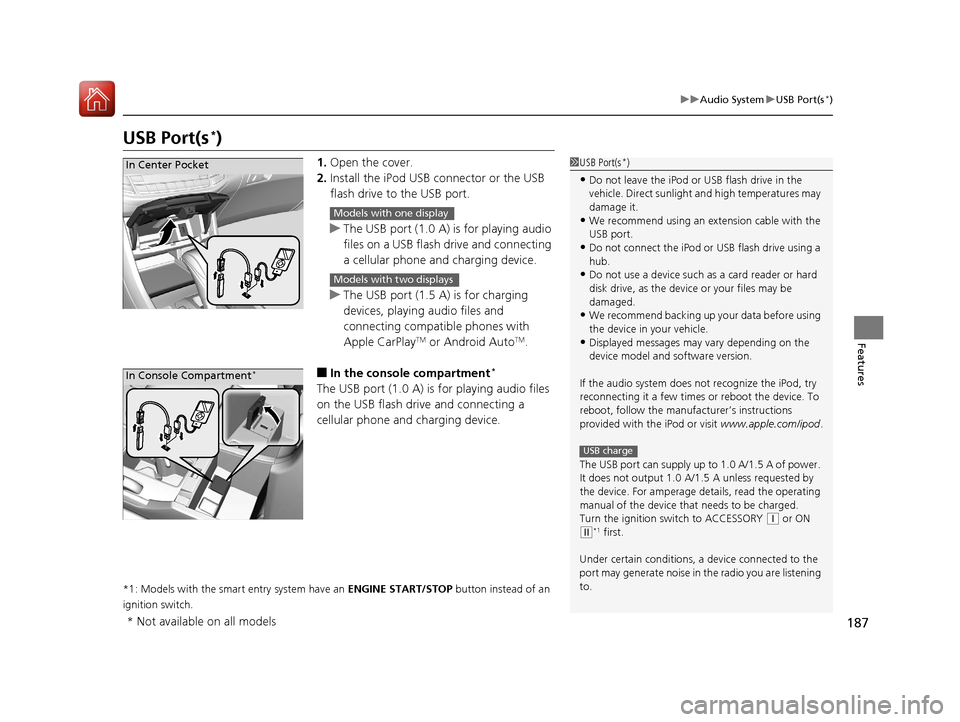
1. Open the cover.
2. Install the iPod USB connector or the USB
flash drive to the USB port.
u The USB port (1.0 A) is for playing audio
files on a USB flash drive and connecting
a cellular phone and charging device.
u The USB port (1.5 A) is for charging
devices, playing audio files and
connecting compatib le phones with
Apple CarPlay
TM or Android AutoTM.
■In the consol e compartment*
The USB port (1.0 A) is for playing audio files
on the USB flash drive and connecting a
cellular phone and charging device.
*1: Models with the smart entry system have an ENGINE START/STOP button instead of an
ignition switch.
1 USB Port(s*)
•Do not leave the iPod or USB flash drive in the
vehicle. Direct sunlight and high temperatures may
damage it.
•We recommend using an extension cable with the
USB port.
•Do not connect the iPod or USB flash drive using a
hub.
•Do not use a device such as a card reader or hard
disk drive, as the device or your files may be
damaged.
•We recommend backing up yo ur data before using
the device in your vehicle.
•Displayed messages may vary depending on the
device model and software version.
If the audio system does not recognize the iPod, try
reconnecting it a few times or reboot the device. To
reboot, follow the manufac turer’s instructions
provided with the iPod or visit www.apple.com/ipod.
The USB port can supply up to 1.0 A/1.5 A of power.
It does not output 1.0 A/1. 5 A unless requested by
the device. For amperage de tails, read the operating
manual of the device that needs to be charged.
Turn the ignition switch to ACCESSORY
( q or ON
(w*1 first.
Under certain condi tions, a device connected to the
port may generate noise in the radio you are listening
to.
USB charge
In Center Pocket
Models with one display
Models with two displays
In Console Compartment*
* Not available on all models
17 ACCORD 4D GAS-31T2A6400.book 187 ページ 2016年6月7日 火曜日 午後5時6分
Page 189 of 613
188
uuAudio System uAuxiliary Input Jack*
Features
Auxiliary Input Jack*
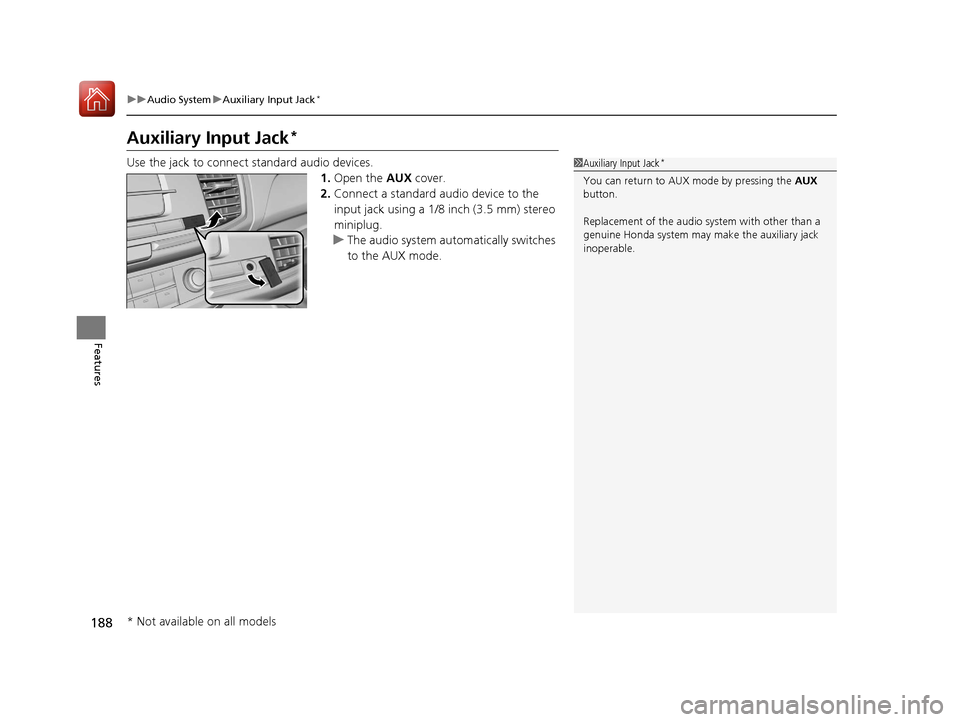
Use the jack to connect standard audio devices.
1.Open the AUX cover.
2. Connect a standard audio device to the
input jack using a 1/8 inch (3.5 mm) stereo
miniplug.
u The audio system automatically switches
to the AUX mode.1Auxiliary Input Jack*
You can return to AUX mode by pressing the AUX
button.
Replacement of the audio sy stem with other than a
genuine Honda system may make the auxiliary jack
inoperable.
* Not available on all models
17 ACCORD 4D GAS-31T2A6400.book 188 ページ 2016年6月7日 火曜日 午後5時6分
Page 192 of 613
191
uuAudio System uAudio Remote Controls
Features
Steering Wheel MENU Button
To choose options for the current audio device, press MENU, Audio Menu , and
then SOURCE .
Options available to you for each audio device:
• Radio: You can select Scan, Auto Select , Save Preset , Seek Up , or Seek
Down .
• HD Radio
TM *: You can select Scan, Auto Select, Save Preset, Seek Up, or Seek
Down .
• SiriusXM ®
*: You can select Scan, Save Preset , Channel Up , Channel Down ,
Category Up , or Category Down .
• CD or USB flash drive: You can select Scan Folders, Scan Tracks, Repeat
Folder, Repeat Track , Random in Folder , or Random All Tracks .
• iPod: You can select Play/Pause, Repeat Song, Shuffle Albums, or Shuffle All
Songs .
• Bluetooth ® Audio: You can select Pause or Play .
• Pandora ®
*: You can select Like, Dislike , Bookmark, or Play/Pause .
To choose options for the navigation system while it is in operation, press MENU,
select Navigation Menu , and then SOURCE.
2Refer to the Navigation System Manual
To choose options for HFL, press MENU, select Phone Menu , and then SOURCE.
You can select Speed Dial, Call History , or Redial.
To choose options for the display setting, press MENU, select Display Setting , and
then SOURCE .
You can select Brightness, Contrast, or Black Level .
1Audio Remote Controls
The MENU button is available only when the audio
mode is FM, AM, SiriusXM ®
*, CD, USB, iPod,
Pandora ®*, or Bluetooth® Audio.
Models with two displays
* Not available on all models
17 ACCORD 4D GAS-31T2A6400.book 191 ページ 2016年6月7日 火曜日 午後5時6分