audio HONDA ACCORD 2017 9.G Owners Manual
[x] Cancel search | Manufacturer: HONDA, Model Year: 2017, Model line: ACCORD, Model: HONDA ACCORD 2017 9.GPages: 613
Page 302 of 613
301
uuCustomized Features u
Continued
Features
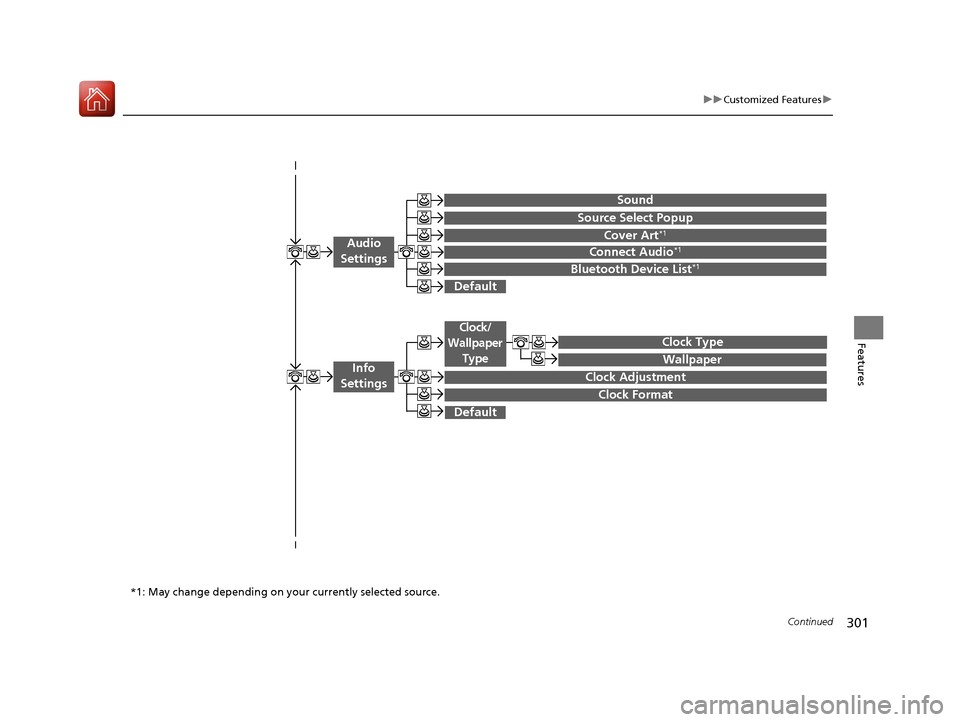
Wallpaper
Source Select Popup
Clock Type
Sound
Default
Cover Art*1
Connect Audio*1
Bluetooth Device List*1
Default
Clock Adjustment
Clock Format
Audio
Settings
Clock/
Wallpaper Type
Info
Settings
*1: May change depending on your currently selected source.
17 ACCORD 4D GAS-31T2A6400.book 301 ページ 2016年6月7日 火曜日 午後5時6分
Page 304 of 613
303
uuCustomized Features u
Continued
Features
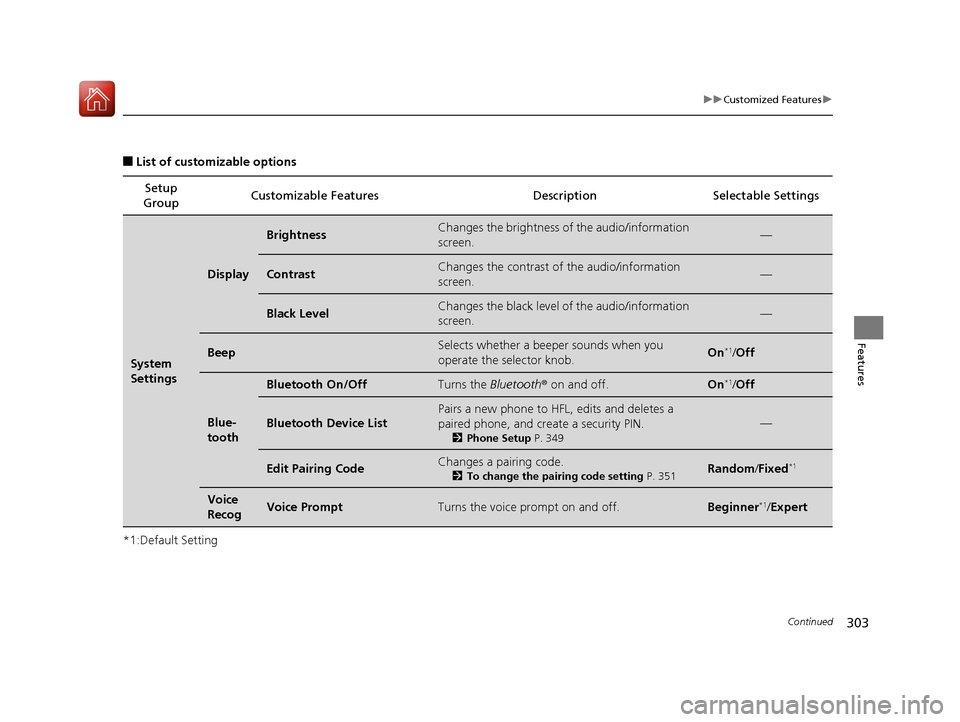
■List of customizable options
*1:Default Setting Setup
Group Customizable Features Description Selectable Settings
System
Settings
Display
BrightnessChanges the brightness of the audio/information
screen.—
ContrastChanges the contrast of the audio/information
screen.—
Black LevelChanges the black level of the audio/information
screen.—
BeepSelects whether a beep
er sounds when you
operate the selector knob.On*1/ Off
Blue-
tooth
Bluetooth On/OffTurns the Bluetooth® on and off.On*1/Off
Bluetooth Device List
Pairs a new phone to HFL, edits and deletes a
paired phone, and create a security PIN.
2 Phone Setup P. 349
—
Edit Pairing CodeChanges a pairing code.
2To change the pairing code setting P. 351Random/Fixed*1
Voice
RecogVoice PromptTurns the voice prompt on and off.Beginner*1/ Expert
17 ACCORD 4D GAS-31T2A6400.book 303 ページ 2016年6月7日 火曜日 午後5時6分
Page 305 of 613
304
uuCustomized Features u
Features
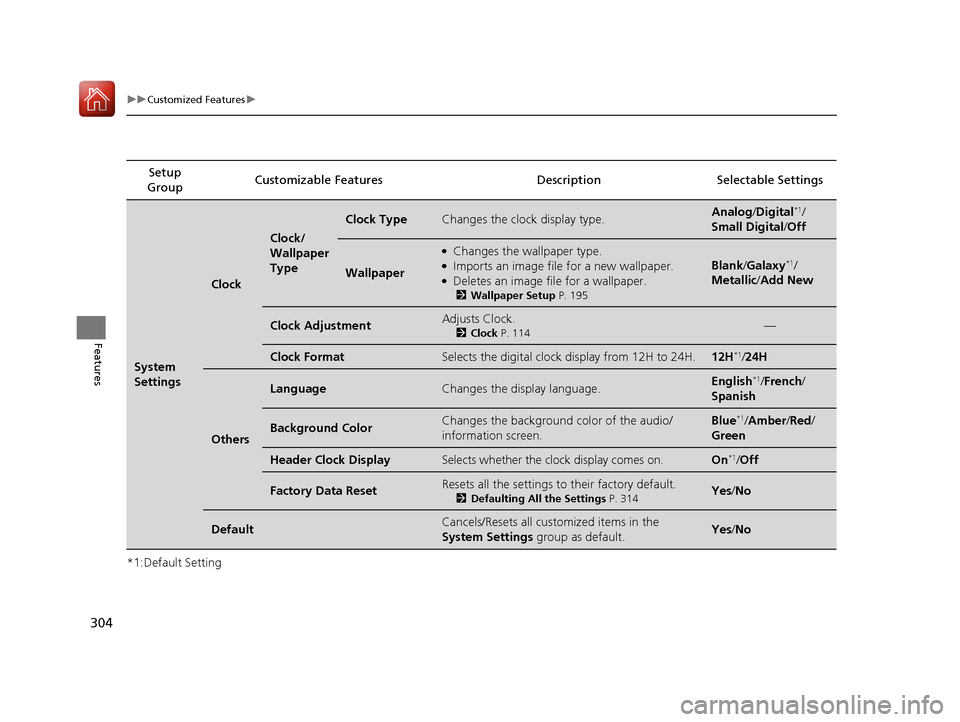
*1:Default SettingSetup
Group Customizable Features Descri
ption Selectable Settings
System
Settings
Clock
Clock/
Wallpaper
Type
Clock TypeChanges the clock display type.Analog/Digital*1/
Small Digital /Off
Wallpaper
●Changes the wallpaper type.●Imports an image file for a new wallpaper.●Deletes an image file for a wallpaper.
2 Wallpaper Setup P. 195
Blank/Galaxy*1/
Metallic /Add New
Clock AdjustmentAdjusts Clock.
2 Clock P. 114—
Clock FormatSelects the digital clock display from 12H to 24H.12H*1/24H
Others
LanguageChanges the display language.English*1/French /
Spanish
Background ColorChanges the background color of the audio/
information screen.Blue*1/ Amber /Red/
Green
Header Clock DisplaySelects whether the clock display comes on.On*1/ Off
Factory Data ResetResets all the settings to their factory default.
2 Defaulting All the Settings P. 314Yes/No
DefaultCancels/Resets all cust omized items in the
System Settings group as default.Yes/No
17 ACCORD 4D GAS-31T2A6400.book 304 ページ 2016年6月7日 火曜日 午後5時6分
Page 310 of 613
309
uuCustomized Features u
Continued
Features
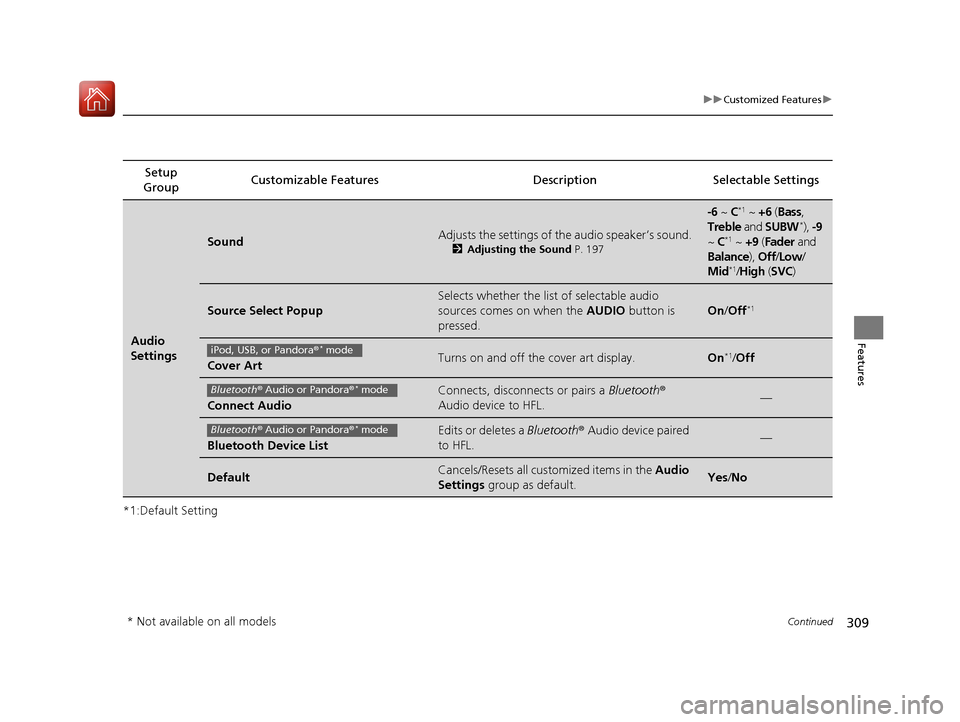
*1:Default SettingSetup
Group Customizable Features Description Selectable Settings
Audio
Settings
SoundAdjusts the settings of th
e audio speaker’s sound.
2Adjusting the Sound P. 197
-6 ~ C*1 ~ +6 (Bass,
Treble and SUBW*), -9
~ C*1 ~ +9 (Fader and
Balance ), Off/Low /
Mid
*1/ High (SVC)
Source Select Popup
Selects whether the list of selectable audio
sources comes on when the AUDIO button is
pressed.
On /Off*1
Cover ArtTurns on and off the cover art display.On*1/Off
Connect Audio
Connects, disconnects or pairs a Bluetooth®
Audio device to HFL.—
Bluetooth Device List
Edits or deletes a Bluetooth® Audio device paired
to HFL.—
DefaultCancels/Resets all customized items in the Audio
Settings group as default.Yes/No
iPod, USB, or Pandora ®* mode
Bluetooth® Audio or Pandora ®* mode
Bluetooth® Audio or Pandora ®* mode
* Not available on all models
17 ACCORD 4D GAS-31T2A6400.book 309 ページ 2016年6月7日 火曜日 午後5時6分
Page 315 of 613
314
uuCustomized Features uDefaulting All the Settings
Features
Defaulting All the Settings
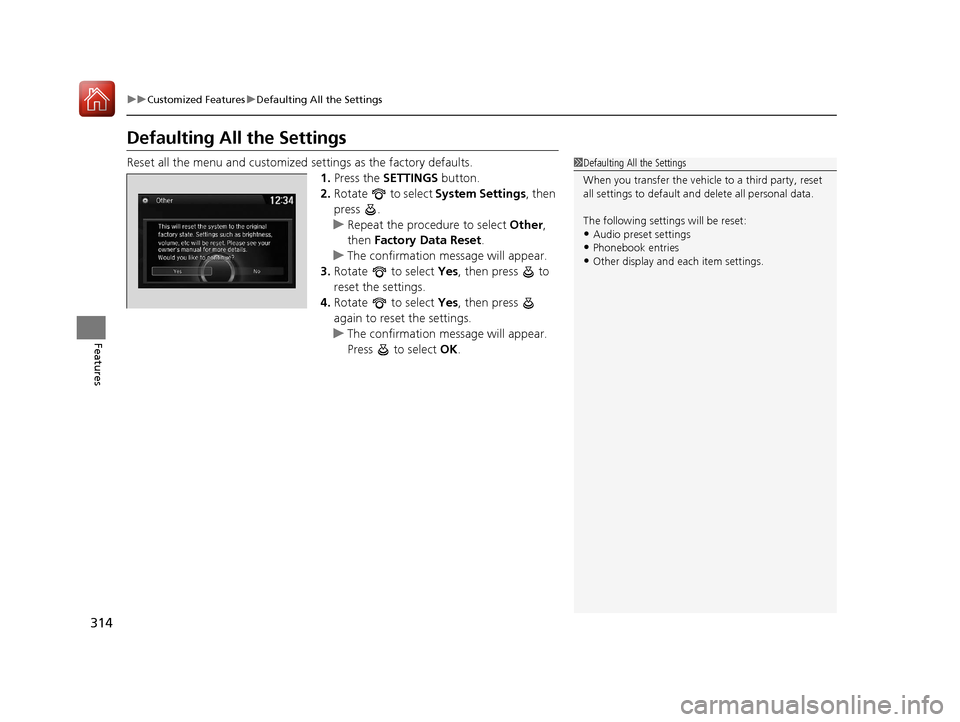
Reset all the menu and customized settings as the factory defaults.
1. Press the SETTINGS button.
2. Rotate to select System Settings, then
press .
u Repeat the procedure to select Other,
then Factory Data Reset .
u The confirmation message will appear.
3. Rotate to select Yes, then press to
reset the settings.
4. Rotate to select Yes, then press
again to reset the settings.
u The confirmation message will appear.
Press to select OK.1Defaulting All the Settings
When you transfer the vehicle to a third party, reset
all settings to default a nd delete all personal data.
The following settin gs will be reset:
•Audio preset settings
•Phonebook entries
•Other display and each item settings.
17 ACCORD 4D GAS-31T2A6400.book 314 ページ 2016年6月7日 火曜日 午後5時6分
Page 316 of 613
315Continued
Features
Customized Features
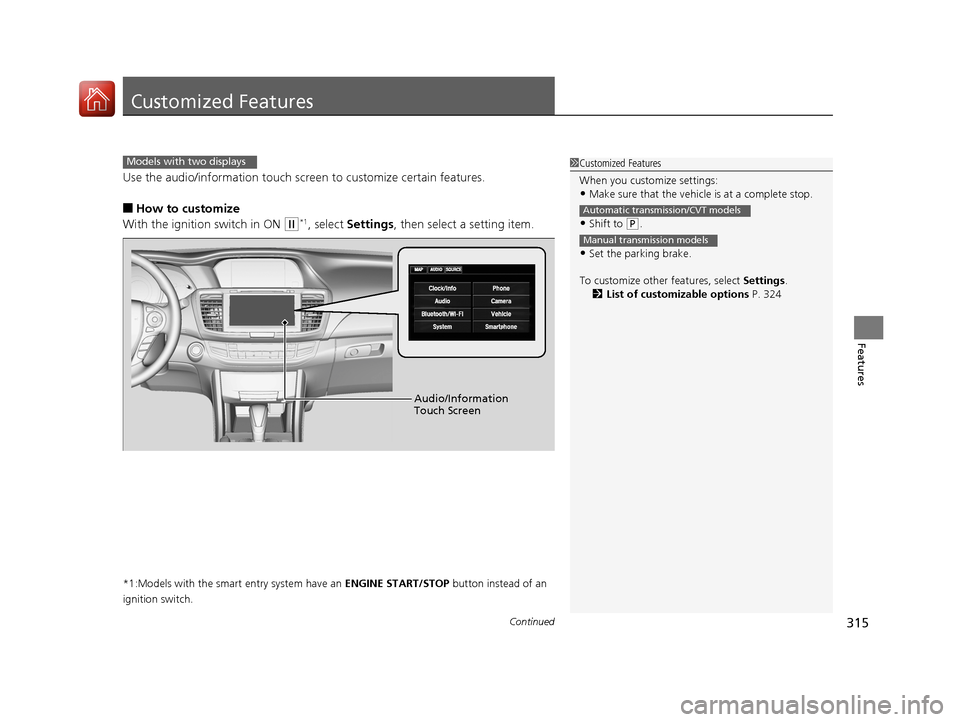
Use the audio/information touch screen to customize certain features.
■How to customize
With the ignition switch in ON
(w*1, select Settings , then select a setting item.
*1:Models with the smart entry system have an ENGINE START/STOP button instead of an
ignition switch.
1 Customized Features
When you customize settings:
•Make sure that the vehicle is at a complete stop.
•Shift to (P.
•Set the parking brake.
To customize other features, select Settings.
2 List of customizable options P. 324
Automatic transmission/CVT models
Manual transmission models
Models with two displays
Audio/Information
Touch Screen
17 ACCORD 4D GAS-31T2A6400.book 315 ページ 2016年6月7日 火曜日 午後5時6分
Page 321 of 613
320
uuCustomized Features u
Features
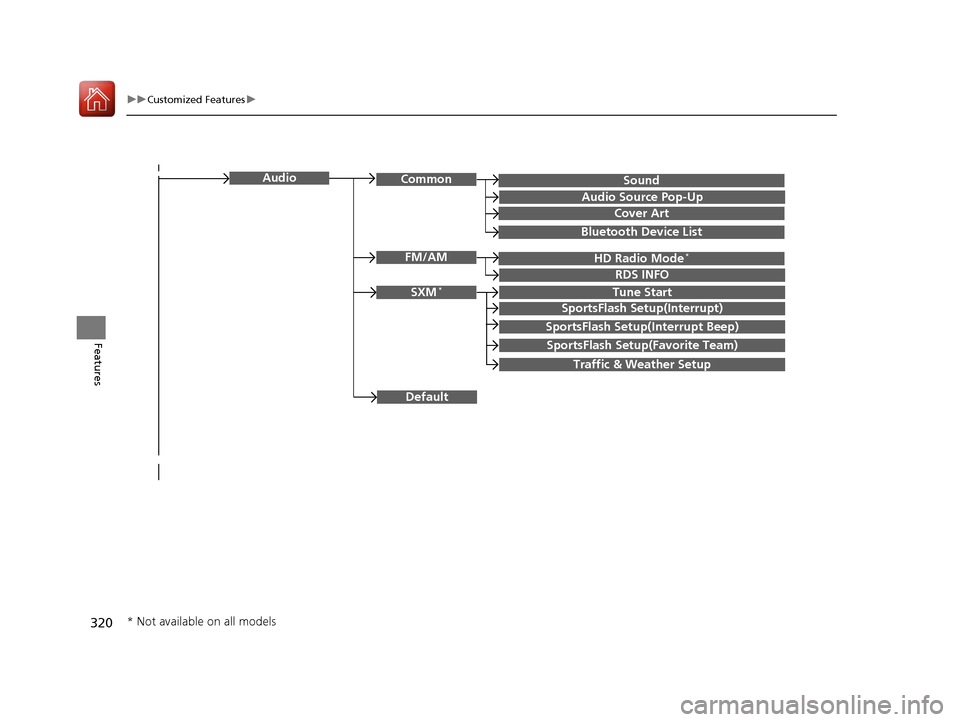
SoundAudioCommon
Audio Source Pop-Up
Cover Art
HD Radio Mode*FM/AM
RDS INFO
SXM*Tune Start
SportsFlash Setup(Interrupt)
SportsFlash Setup(Interrupt Beep)
SportsFlash Setup(Favorite Team)
Traffic & Weather Setup
Bluetooth Device List
Default
* Not available on all models
17 ACCORD 4D GAS-31T2A6400.book 320 ページ 2016年6月7日 火曜日 午後5時6分
Page 325 of 613
324
uuCustomized Features u
Features
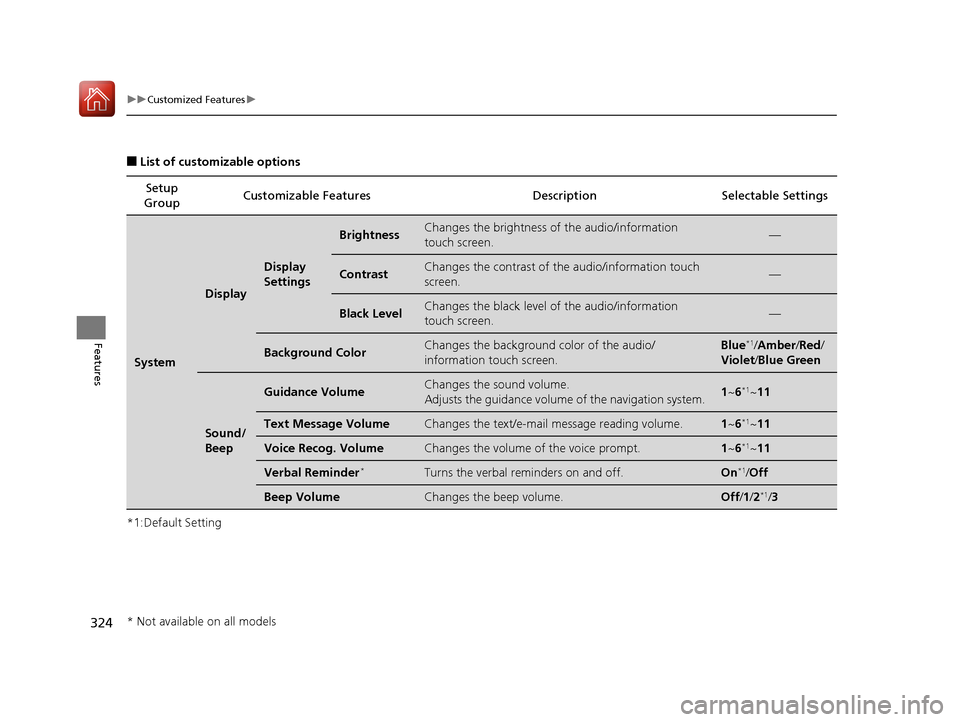
■List of customizable options
*1:Default Setting Setup
Group Customizable Features Description Selectable Settings
System
Display
Display
Settings
BrightnessChanges the brightness of the audio/information
touch screen.—
ContrastChanges the contrast of the audio/information touch
screen.—
Black LevelChanges the black level of the audio/information
touch screen.—
Background ColorChanges the background color of the audio/
information touch screen.Blue*1/
Amber /Red /
Violet /Blue Green
Sound/
Beep
Guidance VolumeChanges the sound volume.
Adjusts the guidance volume of the navigation system.1 ~6*1~11
Text Message VolumeChanges the text/e-mail message reading volume.1~6*1~11
Voice Recog. VolumeChanges the volume of the voice prompt.1~6*1~11
Verbal Reminder*Turns the verbal reminders on and off.On*1/Off
Beep VolumeChanges the beep volume.Off /1 /2*1/ 3
* Not available on all models
17 ACCORD 4D GAS-31T2A6400.book 324 ページ 2016年6月7日 火曜日 午後5時6分
Page 333 of 613
332
uuCustomized Features u
Features
*1:Default SettingSetup
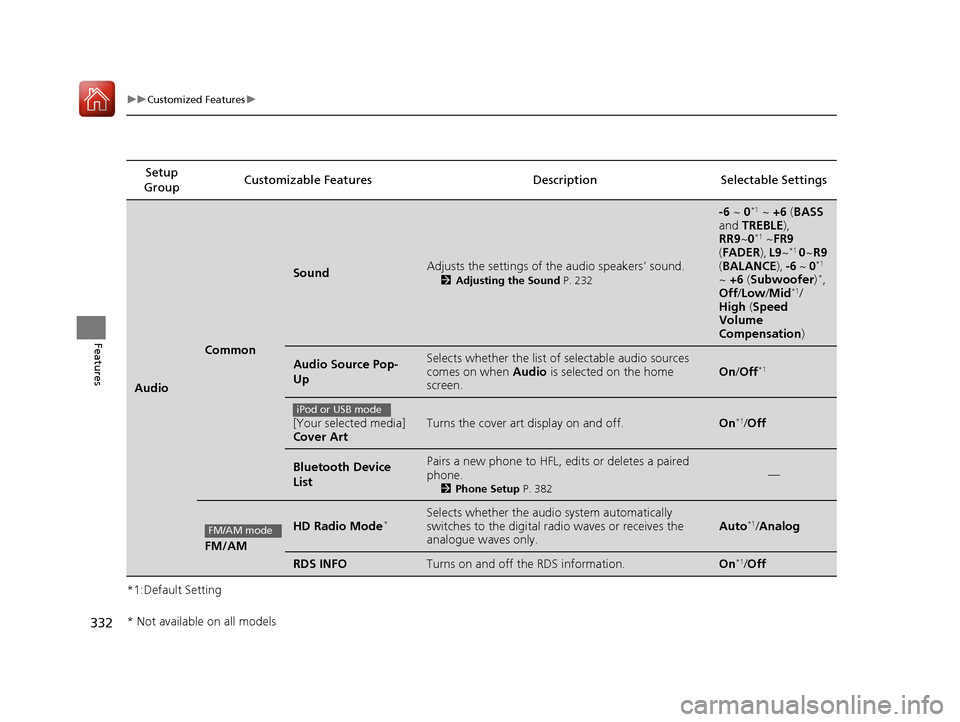
Group Customizable Features Description Selectable Settings
Audio
Common
SoundAdjusts the settings of the audio speakers’ sound.
2
Adjusting the Sound P. 232
-6 ~ 0*1 ~ +6 (BASS
and TREBLE ),
RR9 ~0
*1 ~FR9
( FADER ), L9 ~*1 0 ~R9
( BALANCE ), -6 ~ 0*1
~ +6 (Subwoofer )*,
Off /Low/ Mid*1/
High (Speed
Volume
Compensation )
Audio Source Pop-
UpSelects whether the list of selectable audio sources
comes on when Audio is selected on the home
screen.On /Off*1
[Your selected media]
Cover ArtTurns the cover art display on and off.On*1/Off
Bluetooth Device
ListPairs a new phone to HFL, edits or deletes a paired
phone.
2 Phone Setup P. 382
—
FM/AM
HD Radio Mode*Selects whether the audio system automatically
switches to the digital ra dio waves or receives the
analogue waves only.Auto*1/ Analog
RDS INFOTurns on and off the RDS information.On*1/Off
iPod or USB mode
FM/AM mode
* Not available on all models
17 ACCORD 4D GAS-31T2A6400.book 332 ページ 2016年6月7日 火曜日 午後5時6分
Page 334 of 613
333
uuCustomized Features u
Continued
Features
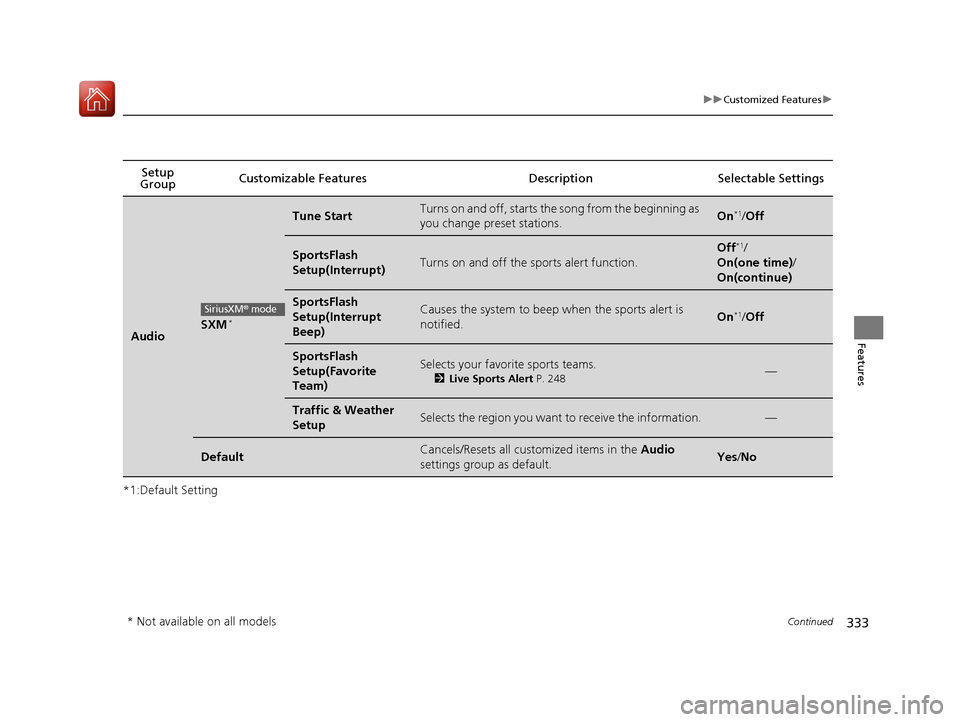
*1:Default SettingSetup
Group Customizable Features Descri
ption Selectable Settings
AudioSXM*
Tune StartTurns on and off, starts the song from the beginning as
you change preset stations.On*1/ Off
SportsFlash
Setup(Interrupt)Turns on and off the sp orts alert function.
Off*1/
On(one time) /
On(continue)
SportsFlash
Setup(Interrupt
Beep)Causes the system to beep when the sports alert is
notified.On*1/ Off
SportsFlash
Setup(Favorite
Team)Selects your favorite sports teams.
2 Live Sports Alert P. 248—
Traffic & Weather
SetupSelects the region you want to receive the information.—
DefaultCancels/Resets all customized items in the Audio
settings group as default.Yes /No
SiriusXM® mode
* Not available on all models
17 ACCORD 4D GAS-31T2A6400.book 333 ページ 2016年6月7日 火曜日 午後5時6分