Link HONDA ACCORD 2017 9.G Owner's Manual
[x] Cancel search | Manufacturer: HONDA, Model Year: 2017, Model line: ACCORD, Model: HONDA ACCORD 2017 9.GPages: 613
Page 85 of 613
84
uuIndicators u
Instrument Panel
*1:Models with the smart entry system have an ENGINE START/STOP button instead of an ignition switch.
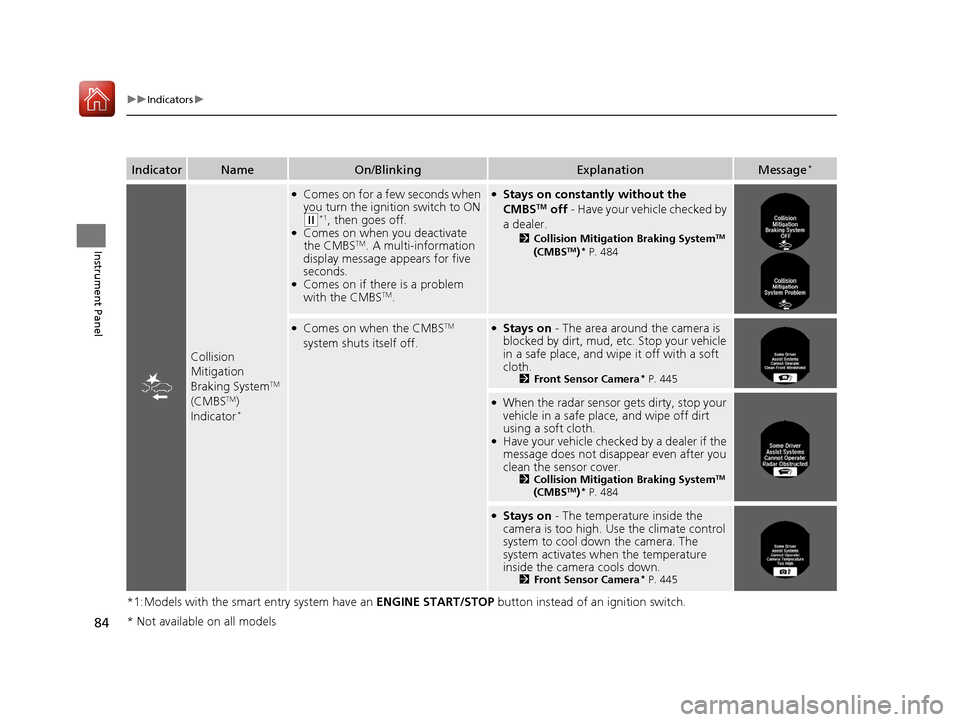
IndicatorNameOn/BlinkingExplanationMessage*
Collision
Mitigation
Braking System
TM
(CMBSTM)
Indicator*
●Comes on for a few seconds when
you turn the ignition switch to ON
(w*1, then goes off.●Comes on when you deactivate
the CMBSTM. A multi-information
display message appears for five
seconds.
●Comes on if there is a problem
with the CMBSTM.
●Stays on constantly without the
CMBSTM off - Have your vehicle checked by
a dealer.
2 Collision Mitigation Braking SystemTM
(CMBSTM)* P. 484
●Comes on when the CMBSTM
system shuts itself off.●Stays on - The area around the camera is
blocked by dirt, mud, etc. Stop your vehicle
in a safe place, and wipe it off with a soft
cloth.
2 Front Sensor Camera* P. 445
●When the radar sensor gets dirty, stop your
vehicle in a safe place, and wipe off dirt
using a soft cloth.
●Have your vehicle checked by a dealer if the
message does not disa ppear even after you
clean the sensor cover.
2 Collision Mitigation Braking SystemTM
(CMBSTM)* P. 484
●Stays on - The temperature inside the
camera is too high. Us e the climate control
system to cool down the camera. The
system activates when the temperature
inside the camera cools down.
2 Front Sensor Camera* P. 445
* Not available on all models
17 ACCORD 4D GAS-31T2A6400.book 84 ページ 2016年6月7日 火曜日 午後5時6分
Page 95 of 613
94
uuIndicators uMulti-Information Display Warn ing and Information Messages*
Instrument Panel
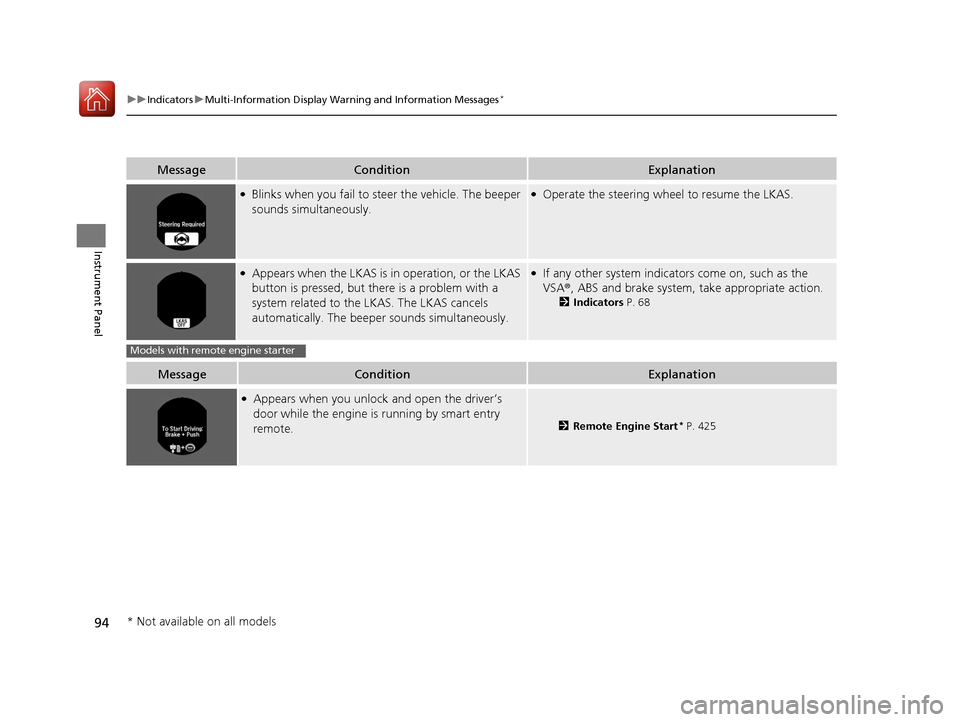
MessageConditionExplanation
●Blinks when you fail to steer the vehicle. The beeper
sounds simultaneously.●Operate the steering wheel to resume the LKAS.
●Appears when the LKAS is in operation, or the LKAS
button is pressed, but there is a problem with a
system related to the LKAS. The LKAS cancels
automatically. The beeper sounds simultaneously.●If any other system indicato rs come on, such as the
VSA ®, ABS and brake system, take appropriate action.
2Indicators P. 68
MessageConditionExplanation
●Appears when you unlock and open the driver’s
door while the engine is running by smart entry
remote.
2Remote Engine Start* P. 425
Models with remote engine starter
* Not available on all models
17 ACCORD 4D GAS-31T2A6400.book 94 ページ 2016年6月7日 火曜日 午後5時6分
Page 105 of 613
104
uuGauges and Displays uMulti-Information Display*
Instrument Panel
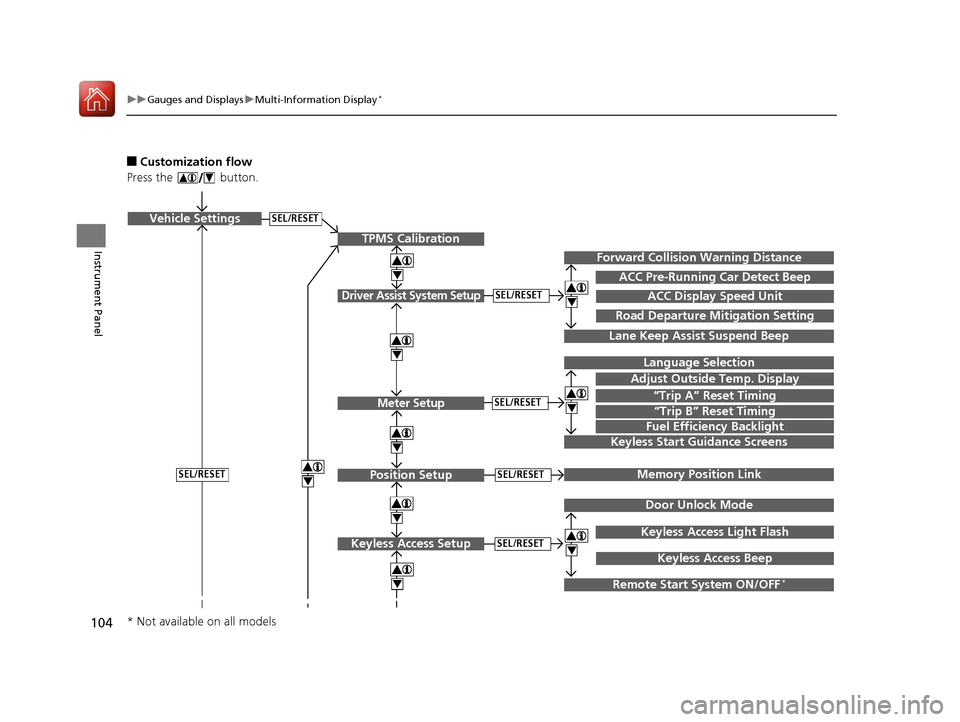
■Customization flow
Press the button.
SEL/RESETVehicle Settings
“Trip A” Reset Timing
Language Selection
Adjust Outside Temp. Display
Memory Position Link
Door Unlock Mode
Keyless Access Light Flash
4
4
4
4
TPMS Calibration
Driver Assist System Setup
Meter Setup
Position Setup
Keyless Access Setup
SEL/RESET
SEL/RESET
SEL/RESET
SEL/RESET
“Trip B” Reset Timing
Fuel Efficiency Backlight
4
ACC Pre-Running Car Detect Beep
ACC Display Speed Unit
4Keyless Start Guidance Screens
SEL/RESET
Keyless Access Beep
Forward Collision Warning Distance
4
4
4
Lane Keep Assist Suspend Beep
Road Departure Mi tigation Setting
Remote Start System ON/OFF*
* Not available on all models
17 ACCORD 4D GAS-31T2A6400.book 104 ページ 2016年6月7日 火曜日 午後5時6分
Page 108 of 613
107
uuGauges and Displays uMulti-Information Display*
Continued
Instrument Panel
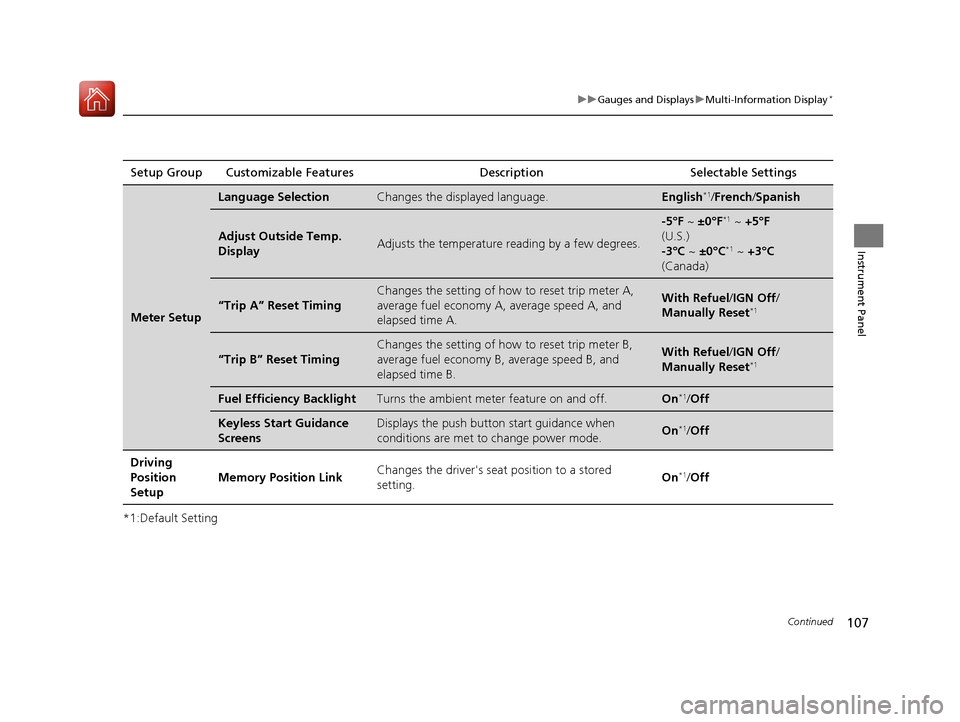
*1:Default SettingSetup Group Customizable Features
Description Selectable Settings
Meter Setup
Language SelectionChanges the displayed language.English*1/French /Spanish
Adjust Outside Temp.
DisplayAdjusts the temperature r eading by a few degrees.
-5°F ~ ±0°F*1 ~ +5°F
(U.S.)
-3°C ~ ±0°C
*1 ~ +3°C
(Canada)
“Trip A” Reset Timing
Changes the setting of how to reset trip meter A,
average fuel economy A, average speed A, and
elapsed time A.With Refuel /IGN Off /
Manually Reset*1
“Trip B” Reset Timing
Changes the setting of ho w to reset trip meter B,
average fuel economy B, average speed B, and
elapsed time B.With Refuel /IGN Off /
Manually Reset*1
Fuel Efficiency BacklightTurns the ambient meter feature on and off.On*1/ Off
Keyless Start Guidance
ScreensDisplays the push button start guidance when
conditions are met to change power mode.On*1/Off
Driving
Position
Setup Memory Position Link
Changes the driver's seat
position to a stored
setting. On
*1/
Off
17 ACCORD 4D GAS-31T2A6400.book 107 ページ 2016年6月7日 火曜日 午後5時6分
Page 109 of 613
108
uuGauges and Displays uMulti-Information Display*
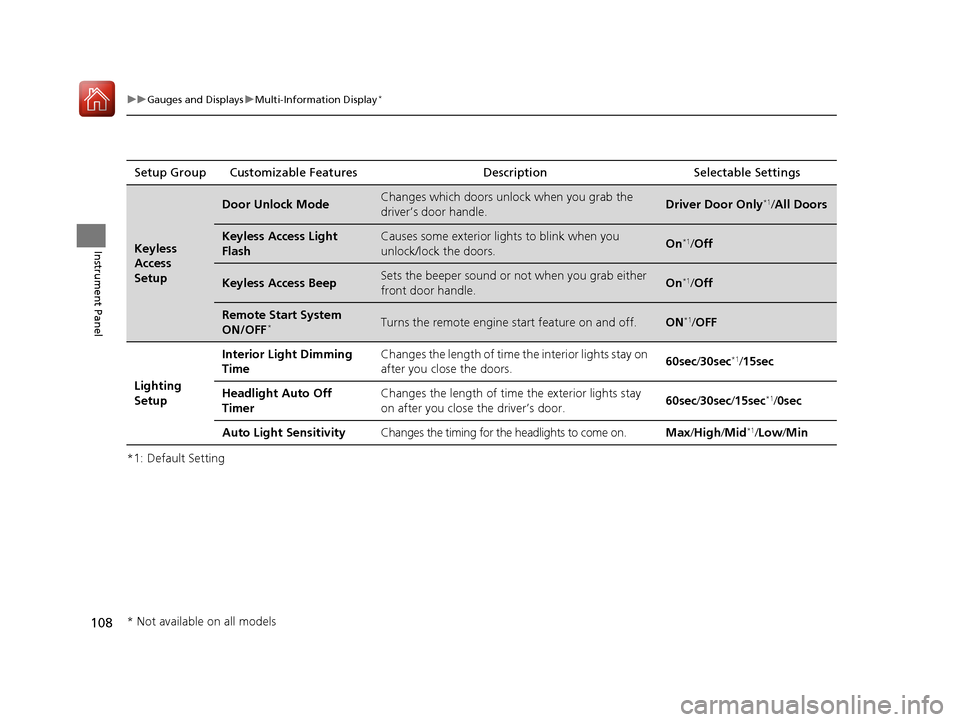
Instrument Panel
*1: Default SettingSetup Group Customizable Features Description Selectable Settings
Keyless
Access
Setup
Door Unlock ModeChanges which doors unlock when you grab the
driver’s door handle.Driver Door Only*1/
All Doors
Keyless Access Light
FlashCauses some exterior lights to blink when you
unlock/lock the doors.On*1/Off
Keyless Access BeepSets the beeper sound or not when you grab either
front door handle.On*1/Off
Remote Start System
ON/OFF*Turns the remote engine start feature on and off.ON*1/OFF
Lighting
Setup Interior Light Dimming
Time
Changes the length of time
the interior lights stay on
after you close the doors. 60sec
/30sec
*1/15sec
Headlight Auto Off
Timer Changes the length of time
the exterior lights stay
on after you close the driver’s door. 60sec
/30sec /15sec
*1/ 0sec
Auto Light Sensitivity Changes the timing for the headlights to come on. Max/High /Mid
*1/Low/ Min
* Not available on all models
17 ACCORD 4D GAS-31T2A6400.book 108 ページ 2016年6月7日 火曜日 午後5時6分
Page 115 of 613
114
Controls
Clock
Adjusting the Clock
You can adjust the time in the clock display with the ignition switch is in ON (w *1.
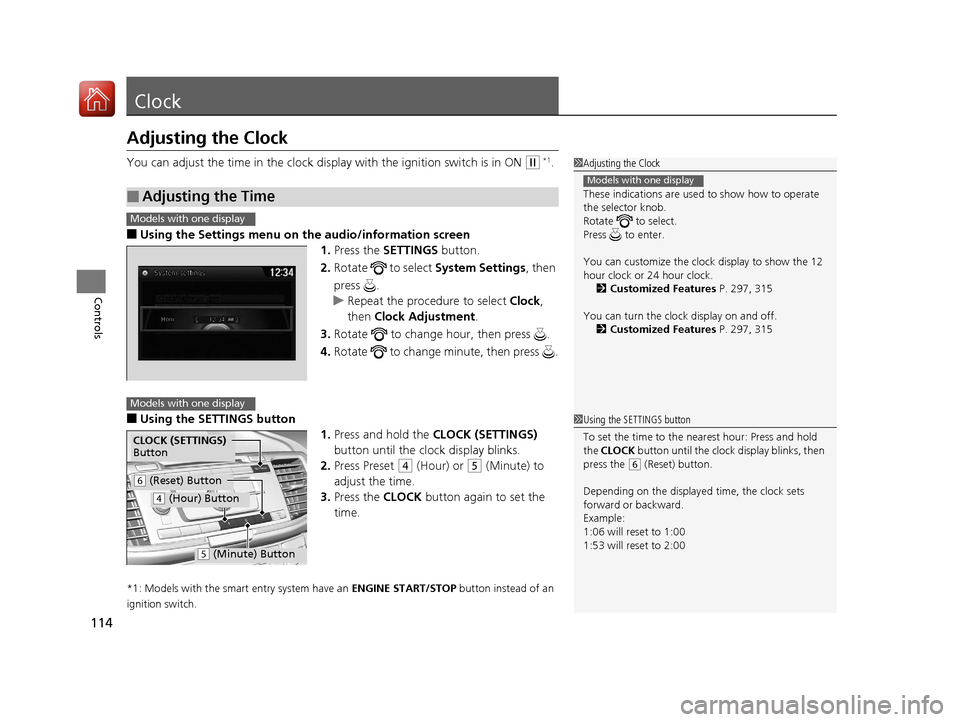
■Using the Settings menu on the audio/information screen
1. Press the SETTINGS button.
2. Rotate to select System Settings, then
press .
u Repeat the procedure to select Clock,
then Clock Adjustment .
3. Rotate to change hour, then press .
4. Rotate to change minute, then press .
■Using the SETTINGS button
1.Press and hold the CLOCK (SETTINGS)
button until the clock display blinks.
2. Press Preset
(4 (Hour) or (5 (Minute) to
adjust the time.
3. Press the CLOCK button again to set the
time.
*1: Models with the smart entry system have an ENGINE START/STOP button instead of an
ignition switch.
■Adjusting the Time
1 Adjusting the Clock
These indications are used to show how to operate
the selector knob.
Rotate to select.
Press to enter.
You can customize the clock display to show the 12
hour clock or 24 hour clock. 2 Customized Features P. 297, 315
You can turn the clock display on and off. 2 Customized Features P. 297, 315
Models with one display
1Using the SETTINGS button
To set the time to the nearest hour: Press and hold
the CLOCK button until the clock display blinks, then
press the
( 6 (Reset) button.
Depending on the displayed time, the clock sets
forward or backward.
Example:
1:06 will reset to 1:00
1:53 will reset to 2:00
Models with one display
Models with one display
CLOCK (SETTINGS)
Button
( 6 (Reset) Button
(4 (Hour) Button
(5 (Minute) Button
17 ACCORD 4D GAS-31T2A6400.book 114 ページ 2016年6月7日 火曜日 午後5時6分
Page 134 of 613
Continued133
uuSecurity System uSecurity System Alarm
Controls
■Setting the security system alarm
The security system alarm automatically sets when the following conditions have
been met:
• The ignition switch is in LOCK
(0*1, and the key has been removed from the
ignition switch.
• The hood and trunk are closed.
• All doors are locked from outside with the key, the remote transmitter, or smart
entry system.
■When the security system alarm sets
The security system alarm indicator in the instrument panel blinks. When the
blinking interval changes after about 15 seconds, the security system is set.
■To cancel the security system alarm
The security system alarm is canceled when the vehicle is unlocked using the remote
transmitter, smart entry system, or th e ignition switch is turned to ON
(w*1. The
security system indicator go es off at the same time.
*1: Models with the smart entry system have an ENGINE START/STOP button instead of an
ignition switch.
1 Security System Alarm
Do not set the security system alarm when someone
is in the vehicle or a window is open. The system can
accidentally activate when:
•Unlocking the door with the lock tab.•Opening the trunk with the trunk release or the
emergency trunk opener.
•Opening the hood with the hood release.
•Moving the shift lever out of ( P.
If the battery goes dead after you have set the
security system alarm, the security alarm may activate
once the battery is re charged or replaced.
If this occurs, deactivate the security system alarm by
unlocking a door using the ke y or remote transmitter.
Do not attempt to alter th is system or add another
device to it.
Automatic transmission/CVT models
17 ACCORD 4D GAS-31T2A6400.book 133 ページ 2016年6月7日 火曜日 午後5時6分
Page 141 of 613
140
uuOperating the Switches Around the Steering Wheel uENGINE START/STOP Button*
Controls
ENGINE START/STOP Button*
*1 : Except U.S. automatic transmission/CVT models
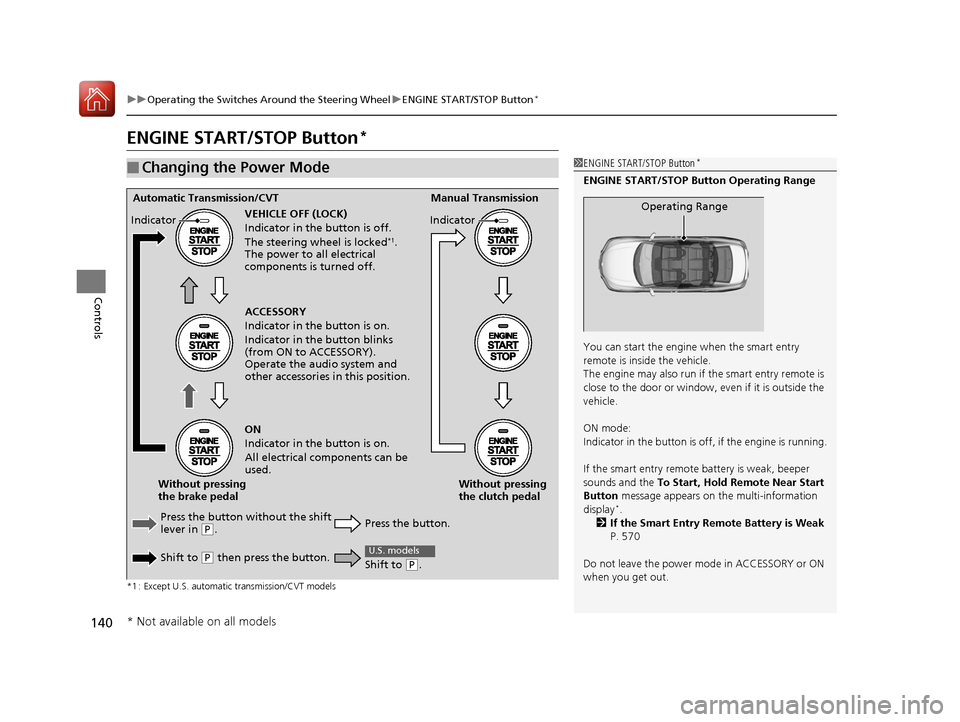
■Changing the Power Mode1ENGINE START/STOP Button*
ENGINE START/STOP Button Operating Range
You can start the engine when the smart entry
remote is inside the vehicle.
The engine may also run if the smart entry remote is
close to the door or window, ev en if it is outside the
vehicle.
ON mode:
Indicator in the button is of f, if the engine is running.
If the smart entry remote battery is weak, beeper
sounds and the To Start, Hold Remote Near Start
Button message appears on the multi-information
display
*.
2 If the Smart Entry Remote Battery is Weak
P. 570
Do not leave the power mode in ACCESSORY or ON
when you get out.
Operating RangeAutomatic Transmission/CVT Manual Transmission
VEHICLE OFF (LOCK)
Indicator in th e button is off.
The steering wheel is locked
*1.
The power to all electrical
components is turned off.
Press the button without the shift
lever in
( P.
Shift to
( P then press the button. Press the button.Without pressing
the clutch pedal
Without pressing
the brake pedal ACCESSORY
Indicator in the button is on.
Indicator in th
e button blinks
(from ON to ACCESSORY).
Operate the audio system and
other accessories in this position.
ON
Indicator in the button is on.
All electrical components can be
used.
Indicator
Indicator
Shift to (
P.
U.S. models
* Not available on all models
17 ACCORD 4D GAS-31T2A6400.book 140 ページ 2016年6月7日 火曜日 午後5時6分
Page 144 of 613
143
uuOperating the Switches Around the Steering Wheel uIgnition Switch and Power Mode Comparison
Controls
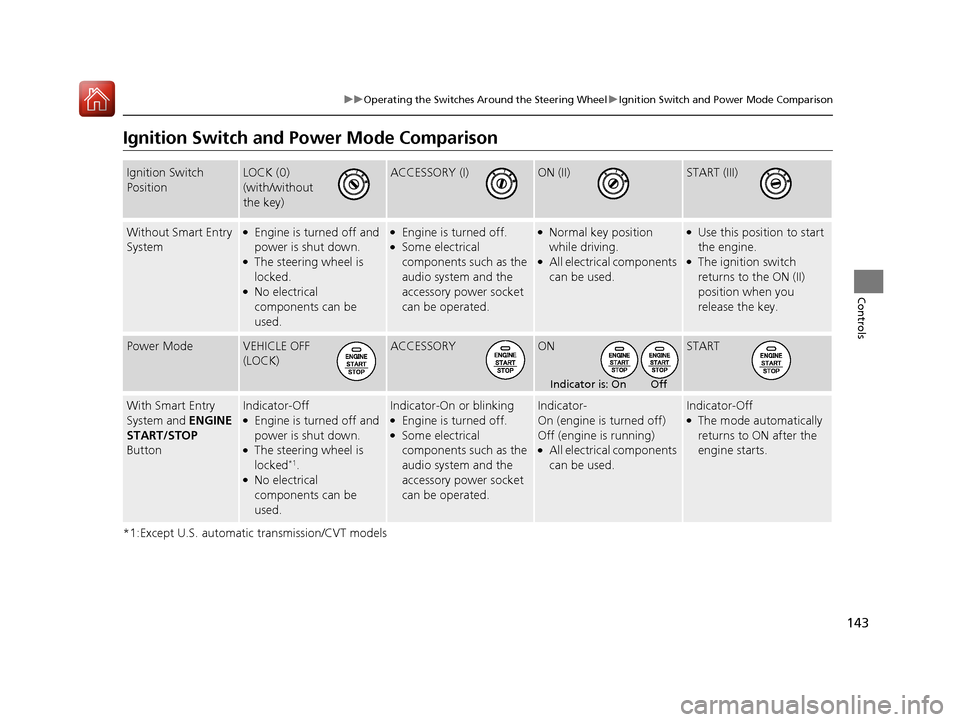
Ignition Switch and Po wer Mode Comparison
*1:Except U.S. automatic transmission/CVT models
Ignition Switch
PositionLOCK (0)
(with/without
the key)ACCESSORY (I)ON (II)START (III)
Without Smart Entry
System●Engine is turned off and
power is shut down.
●The steering wheel is
locked.
●No electrical
components can be
used.
●Engine is turned off.●Some electrical
components such as the
audio system and the
accessory power socket
can be operated.
●Normal key position
while driving.
●All electrical components
can be used.
●Use this position to start
the engine.
●The ignition switch
returns to the ON (II)
position when you
release the key.
Power ModeVEHICLE OFF
(LOCK)ACCESSORYONSTART
With Smart Entry
System and ENGINE
START/STOP
ButtonIndicator-Off●Engine is turned off and
power is shut down.
●The steering wheel is
locked*1.●No electrical
components can be
used.
Indicator-On or blinking●Engine is turned off.●Some electrical
components such as the
audio system and the
accessory power socket
can be operated.
Indicator-
On (engine is turned off)
Off (engine is running)
●All electrical components
can be used.
Indicator-Off●The mode automatically
returns to ON after the
engine starts.
Indicator is: On Off
17 ACCORD 4D GAS-31T2A6400.book 143 ページ 2016年6月7日 火曜日 午後5時6分
Page 145 of 613
144
uuOperating the Switches Around the Steering Wheel uTurn Signals
Controls
Turn Signals
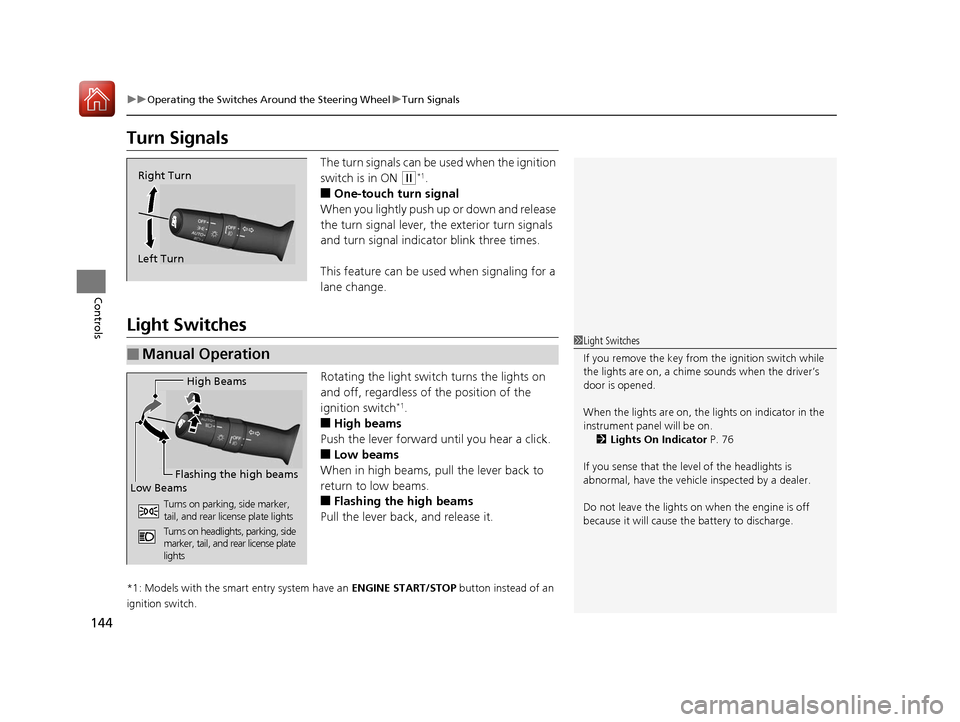
The turn signals can be used when the ignition
switch is in ON
(w*1.
■One-touch turn signal
When you lightly push up or down and release
the turn signal lever, th e exterior turn signals
and turn signal indicator blink three times.
This feature can be used when signaling for a
lane change.
Light Switches
Rotating the light switch turns the lights on
and off, regardless of the position of the
ignition switch
*1.
■High beams
Push the lever forward until you hear a click.
■Low beams
When in high beams, pull the lever back to
return to low beams.
■Flashing the high beams
Pull the lever back, and release it.
*1: Models with the smart entry system have an ENGINE START/STOP button instead of an
ignition switch.
Right Turn
Left Turn
■Manual Operation
1 Light Switches
If you remove the key from the ignition switch while
the lights are on, a chime sounds when the driver’s
door is opened.
When the lights are on, the lights on indicator in the
instrument pane l will be on.
2 Lights On Indicator P. 76
If you sense that the le vel of the headlights is
abnormal, have the vehicl e inspected by a dealer.
Do not leave the lights on when the engine is off
because it will cause the battery to discharge.
High Beams
Flashing the high beams
Low Beams
Turns on parking, side marker,
tail, and rear license plate lights
Turns on headlights, parking, side
marker, tail, and rear license plate
lights
17 ACCORD 4D GAS-31T2A6400.book 144 ページ 2016年6月7日 火曜日 午後5時6分