Link HONDA ACCORD 2017 9.G Workshop Manual
[x] Cancel search | Manufacturer: HONDA, Model Year: 2017, Model line: ACCORD, Model: HONDA ACCORD 2017 9.GPages: 613
Page 277 of 613
276
uuAudio System Basic Operation uApple CarPlayTM
Features
Apple CarPlayTM
If you connect an Apple CarPlayTM-compatible iPhone to the system via USB, you can
use the audio/information t ouch screen, instead of the iPhone display, to make a
phone call, listen to music, view ma ps (navigation), and access messages.
2USB Port(s*) P. 187
1 Apple CarPlayTM
Only iPhone 5 or newer versi ons with iOS 8.4 or later
are compatible with Apple CarPlayTM.
Park in a safe place before connecting your iPhone to
Apple CarPlay
TM and when launching any compatible
apps.
To use Apple CarPlay
TM, connect the USB cable to the
front USB port. The USB por t located in the center
console storage will not enable Apple CarPlay
TM
operation.
2 USB Port(s
*) P. 187
To directly access the Apple CarPlay
TM phone
function, select Phone on the home screen. While
connected to Apple CarPlay
TM, calls are only made
through Apple CarPlayTM. If you want to make a call
with Bluetooth ® HandsFreeLink ®, turn Apple
CarPlay
TM OFF or detach the USB cable from your
iPhone.
2 Setting Up Apple CarPlay
TM P. 278
When your iPhone is connected to Apple CarPlay
TM, it
is not possible to use the Bluetooth® Audio or
Bluetooth ® HandsFreeLink ®. However, other
previously paired phones can stream audio via
Bluetooth ® while Apple CarPlay
TM is connected.
2 Phone Setup P. 382
For details on c ountries and regions where Apple
CarPlay
TM is available, as well as information
pertaining to function, refer to the Apple homepage.
* Not available on all models
17 ACCORD 4D GAS-31T2A6400.book 276 ページ 2016年6月7日 火曜日 午後5時6分
Page 285 of 613
284
uuAudio System Basic Operation uSiri ® Eyes Free
Features
Siri ® Eyes Free
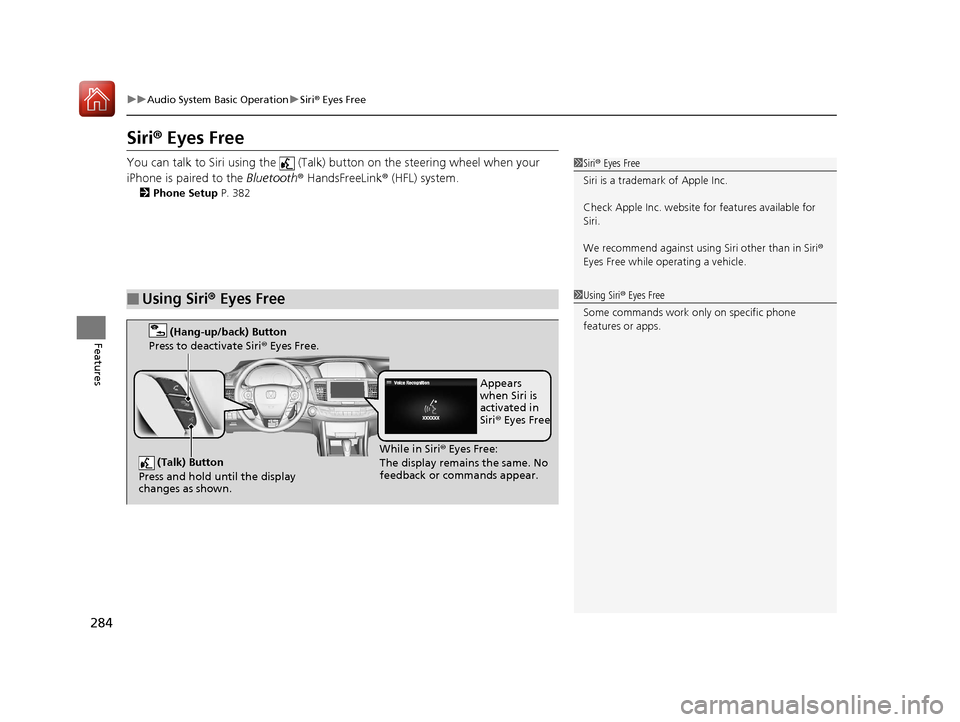
You can talk to Siri using the (Talk) button on the steering wheel when your
iPhone is paired to the Bluetooth® HandsFreeLink ® (HFL) system.
2Phone Setup P. 382
■Using Siri® Eyes Free
1Siri ® Eyes Free
Siri is a trademark of Apple Inc.
Check Apple Inc. website for features available for
Siri.
We recommend against using Siri other than in Siri ®
Eyes Free while operating a vehicle.
1 Using Siri ® Eyes Free
Some commands work only on specific phone
features or apps.
(Talk) Button
Press and hold until the display
changes as shown.
(Hang-up/back) Button
Press to deactivate Siri ® Eyes Free.
While in Siri ® Eyes Free:
The display remains the same. No
feedback or commands appear. Appears
when Siri is
activated in
Siri
® Eyes Free
17 ACCORD 4D GAS-31T2A6400.book 284 ページ 2016年6月7日 火曜日 午後5時6分
Page 300 of 613
299
uuCustomized Features u
Continued
Features
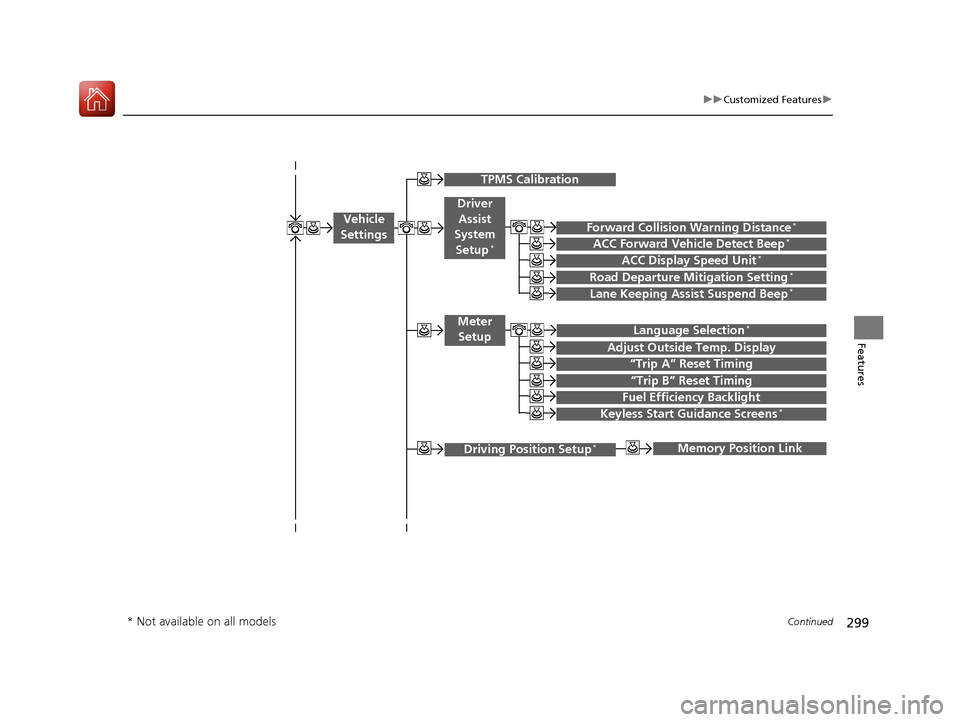
“Trip B” Reset Timing
Adjust Outside Temp. Display
“Trip A” Reset Timing
Fuel Efficiency Backlight
Memory Position Link
Keyless Start Guidance Screens*
Vehicle
Settings
Meter Setup
TPMS Calibration
Driving Position Setup*
Driver
Assist
System
Setup
*
ACC Display Speed Unit*
Forward Collision Warning Distance*
ACC Forward Vehicle Detect Beep*
Road Departure Mitigation Setting*
Lane Keeping Assist Suspend Beep*
Language Selection*
* Not available on all models
17 ACCORD 4D GAS-31T2A6400.book 299 ページ 2016年6月7日 火曜日 午後5時6分
Page 307 of 613
306
uuCustomized Features u
Features
*1:Default SettingSetup
Group Customizable Features Descri
ption Selectable Settings
Vehicle
SettingsMeter
SetupLanguage Selection
*Changes the displayed language on the multi-
information display.
English*1/
French /
Spanish
Adjust Outside Temp.
Display Adjusts the temperature reading by a few
degrees. -5°F ~ ±0°F
*1
~ +5°F
(U.S.)
-3°C ~ ±0°C
*1 ~ +3°C
(Canada)
“Trip A” Reset Timing Changes the setting of how to reset trip meter A
and average fuel economy A. With Refuel
/IGN Off /
Manually Reset
*1
“Trip B” Reset Timing Changes the setting of how to reset trip meter B
and average fuel economy B. With Refuel
/IGN Off /
Manually Reset*1
Fuel Efficiency Backlight Turns the ambient meter feature on and off. On*1/Off
Keyless Start Guidance
Screens
*Displays the push button start guidance when
conditions are met to change power mode. On*1/
Off
Driving
Position
Setup
*Memory Position Link Changes the driver’s seat position to a stored
setting. On*1/
Off
* Not available on all models
17 ACCORD 4D GAS-31T2A6400.book 306 ページ 2016年6月7日 火曜日 午後5時6分
Page 308 of 613
307
uuCustomized Features u
Continued
Features
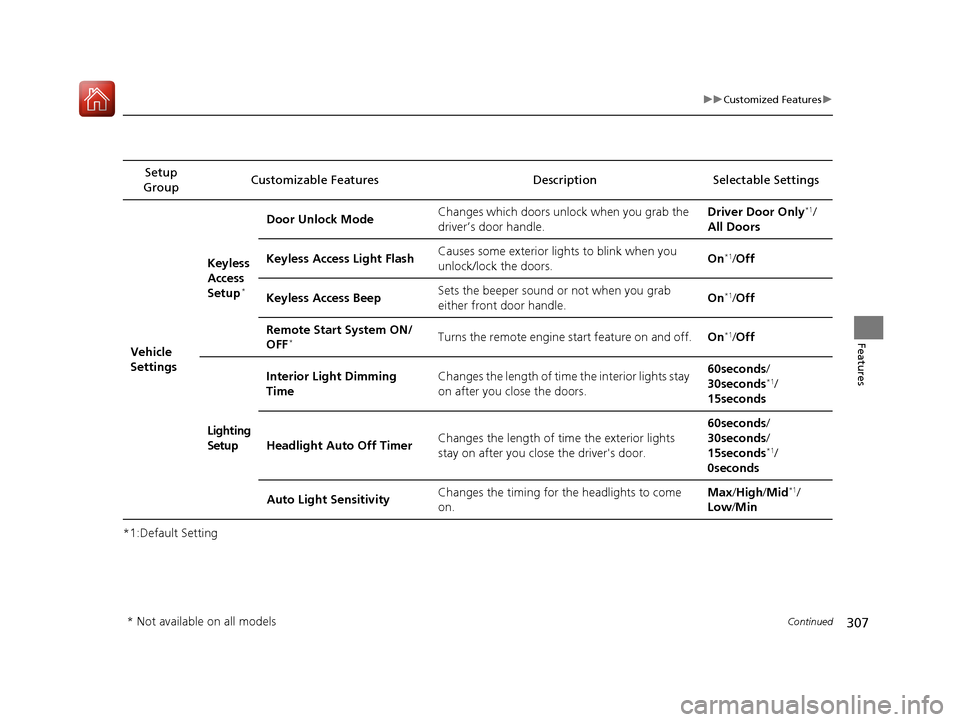
*1:Default SettingSetup
Group Customizable Features Description Selectable Settings
Vehicle
Settings Keyless
Access
Setup
*
Door Unlock Mode
Changes which doors unlock when you grab the
driver’s door handle. Driver Door Only*1/
All Doors
Keyless Access Light Flash Causes some exterior lights to blink when you
unlock/lock the doors.
On
*1/
Off
Keyless Access Beep Sets the beeper sound or not when you grab
either front door handle. On
*1/
Off
Remote Start System ON/
OFF
*Turns the remote engine start feature on and off. On*1/Off
Lighting
Setup Interior Light Dimming
Time
Changes the length of time the interior lights stay
on after you close the doors. 60seconds
/
30seconds
*1/
15seconds
Headlight Auto Off Timer Changes the length of time the exterior lights
stay on after you close the driver's door. 60seconds
/
30seconds /
15seconds
*1/
0seconds
Auto Light Sensitivity Changes the timing for the headlights to come
on. Max
/High /Mid
*1/
Low /Min
* Not available on all models
17 ACCORD 4D GAS-31T2A6400.book 307 ページ 2016年6月7日 火曜日 午後5時6分
Page 319 of 613
318
uuCustomized Features u
Features
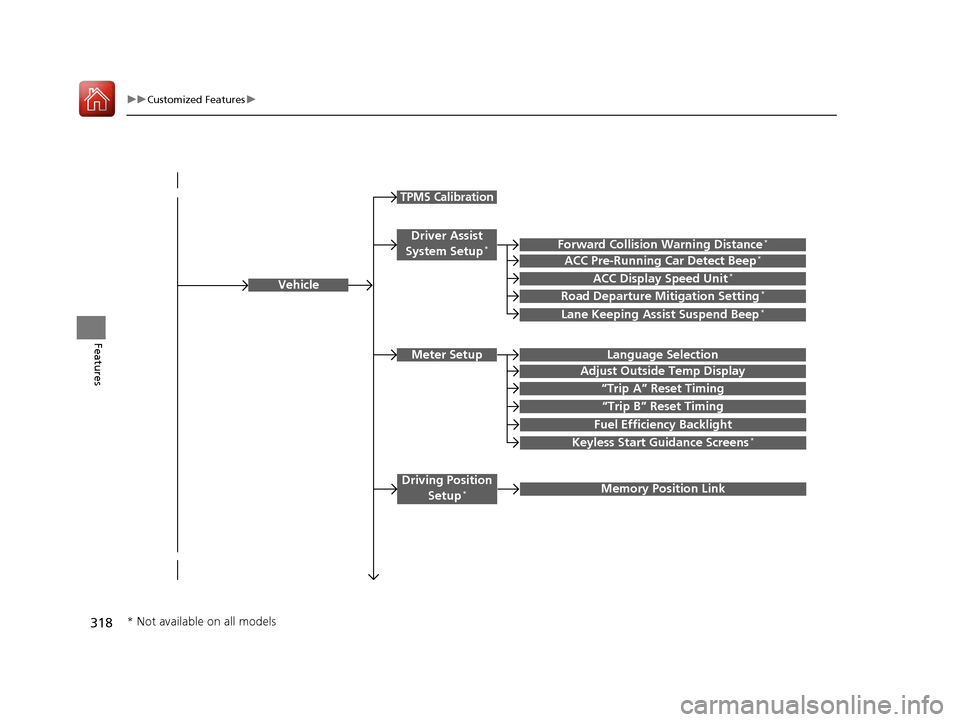
Vehicle
Driver Assist
System Setup*Forward Collision Warning Distance*
ACC Pre-Running Car Detect Beep*
Road Departure Mitigation Setting*
Lane Keeping Assist Suspend Beep*
Meter SetupLanguage Selection
Adjust Outside Temp Display
“Trip A” Reset Timing
“Trip B” Reset Timing
Fuel Efficiency Backlight
Keyless Start Guidance Screens*
Driving Position Setup*Memory Position Link
TPMS Calibration
ACC Display Speed Unit*
* Not available on all models
17 ACCORD 4D GAS-31T2A6400.book 318 ページ 2016年6月7日 火曜日 午後5時6分
Page 322 of 613
321
uuCustomized Features u
Continued
Features
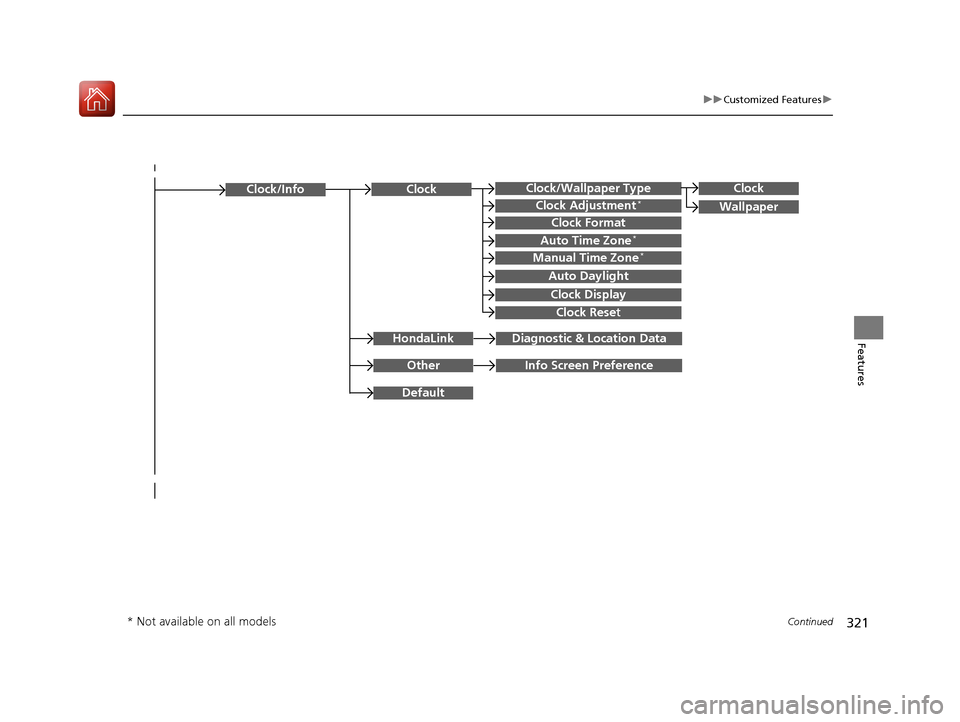
Clock/Wallpaper TypeClock
WallpaperClock Adjustment*
Clock Format
Auto Time Zone*
Manual Time Zone*
Auto Daylight
Clock Display
Clock Reset
OtherInfo Screen Preference
Default
Clock/Info
HondaLinkDiagnostic & Location Data
Clock
* Not available on all models
17 ACCORD 4D GAS-31T2A6400.book 321 ページ 2016年6月7日 火曜日 午後5時6分
Page 323 of 613
322
uuCustomized Features u
Features
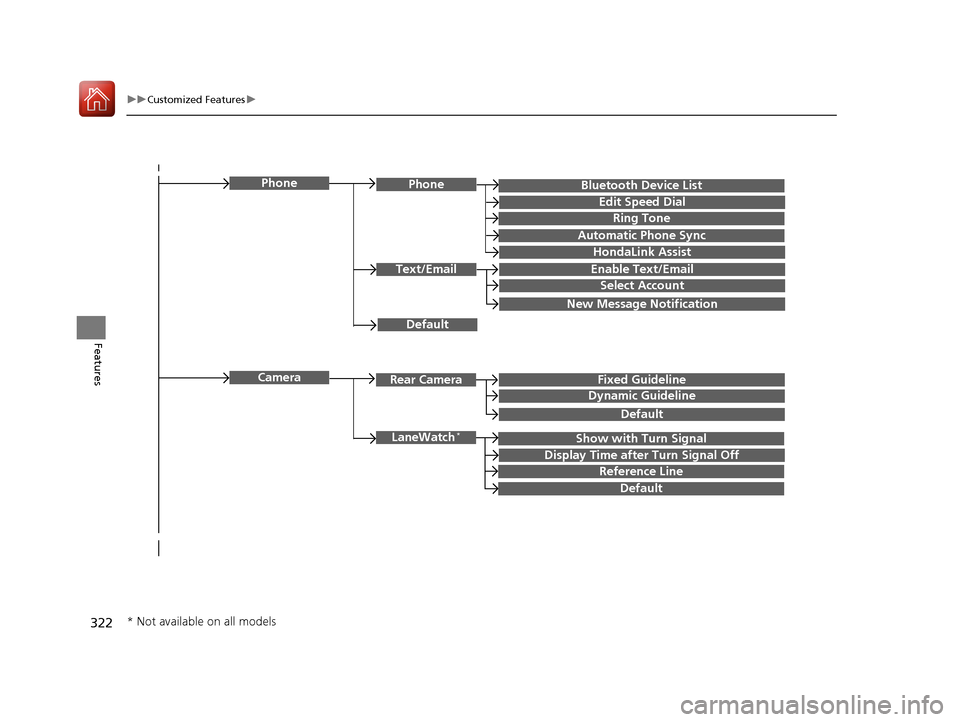
Bluetooth Device List
Default
PhonePhone
Edit Speed Dial
Ring Tone
Automatic Phone Sync
HondaLink Assist
Text/EmailEnable Text/Email
Select Account
New Message Notification
Camera
Show with Turn SignalLaneWatch*
Display Time after Turn Signal Off
Reference Line
Default
Rear CameraFixed Guideline
Dynamic Guideline
Default
* Not available on all models
17 ACCORD 4D GAS-31T2A6400.book 322 ページ 2016年6月7日 火曜日 午後5時6分
Page 331 of 613
330
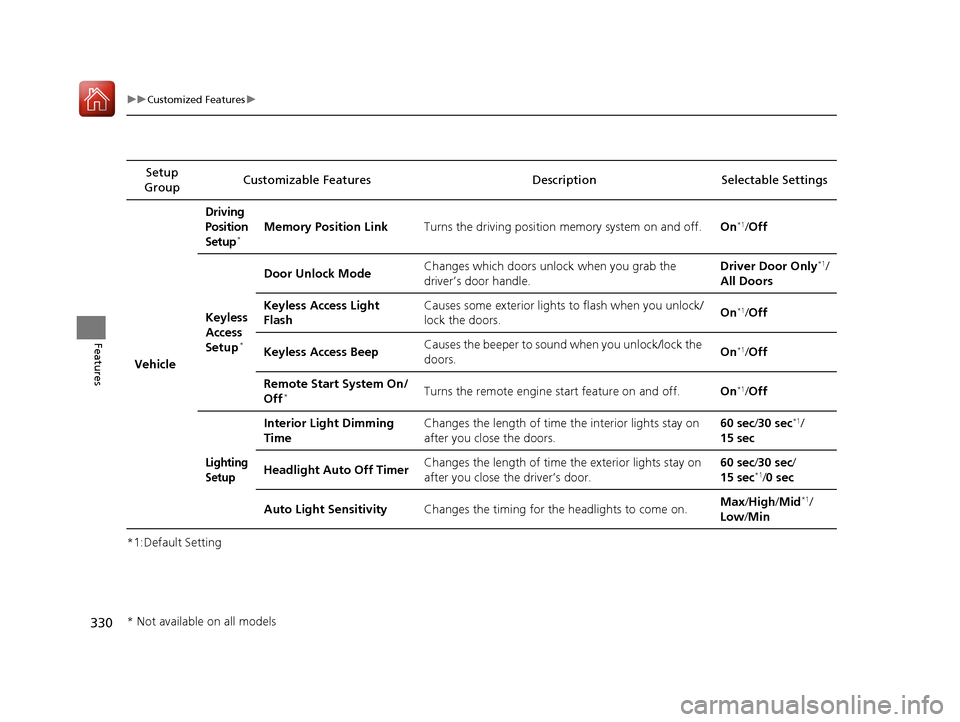
uuCustomized Features u
Features
*1:Default SettingSetup
Group Customizable Features Description Selectable Settings
Vehicle
Driving
Position
Setup
*Memory Position Link
Turns the driving position memory system on and off.On*1/Off
Keyless
Access
Setup
*
Door Unlock Mode Changes which doors unlock when you grab the
driver’s door handle. Driver Door Only*1/
All Doors
Keyless Access Light
Flash Causes some exterior lights
to flash when you unlock/
lock the doors. On
*1/
Off
Keyless Access Beep Causes the beeper to sound when you unlock/lock the
doors.
On
*1/
Off
Remote Start System On/
Off
*Turns the remote engine start feature on and off. On*1/Off
Lighting
Setup
Interior Light Dimming
Time Changes the length of time
the interior lights stay on
after you close the doors. 60 sec/
30 sec*1/
15 sec
Headlight Auto Off Timer Changes the length of time the exterior lights stay on
after you close the driver’s door. 60 sec/
30 sec/
15 sec
*1/ 0 sec
Auto Light Sensitivity Changes the timing for th e headlights to come on. Max
/High /Mid
*1/
Low /Min
* Not available on all models
17 ACCORD 4D GAS-31T2A6400.book 330 ページ 2016年6月7日 火曜日 午後5時6分
Page 335 of 613
334
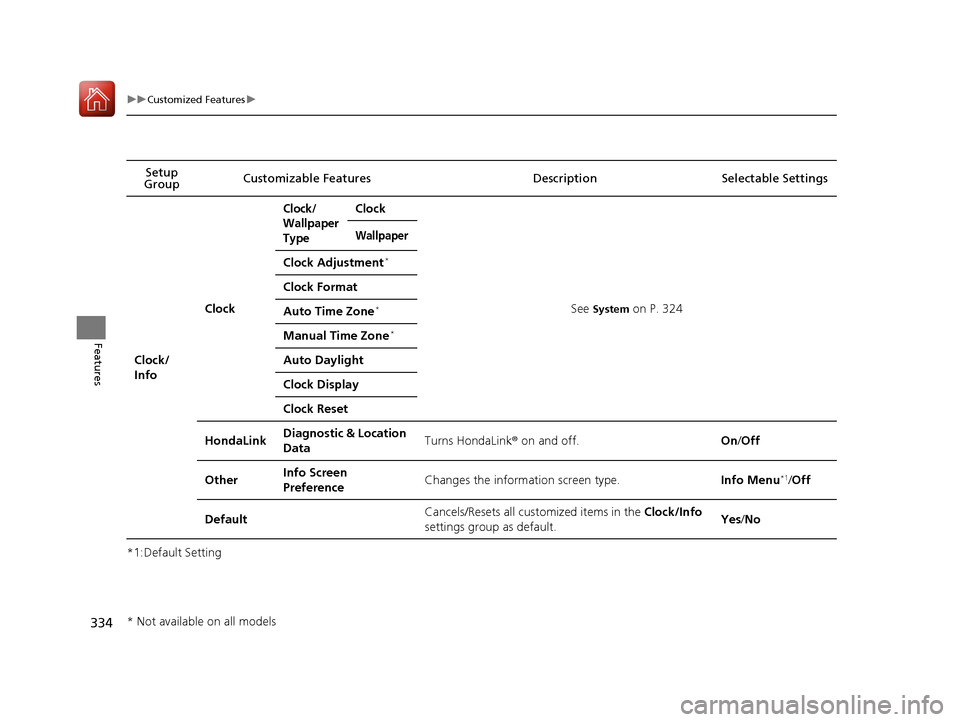
uuCustomized Features u
Features
*1:Default SettingSetup
Group Customizable Features Description Selectable Settings
Clock/
Info
Clock
Clock/
Wallpaper
TypeClock
See System on P. 324
Wallpaper
Clock Adjustment*
Clock Format
Auto Time Zone*
Manual Time Zone*
Auto Daylight
Clock Display
Clock Reset
HondaLinkDiagnostic & Location
DataTurns HondaLink
® on and off.On/Off
OtherInfo Screen
PreferenceChanges the information screen type.Info Menu*1/Off
DefaultCancels/Resets all cust omized items in the Clock/Info
settings group as default.Yes /No
* Not available on all models
17 ACCORD 4D GAS-31T2A6400.book 334 ページ 2016年6月7日 火曜日 午後5時6分