Vsa HONDA ACCORD 2017 9.G Owners Manual
[x] Cancel search | Manufacturer: HONDA, Model Year: 2017, Model line: ACCORD, Model: HONDA ACCORD 2017 9.GPages: 613
Page 5 of 613
4
Quick Reference Guide
Quick Reference Guide
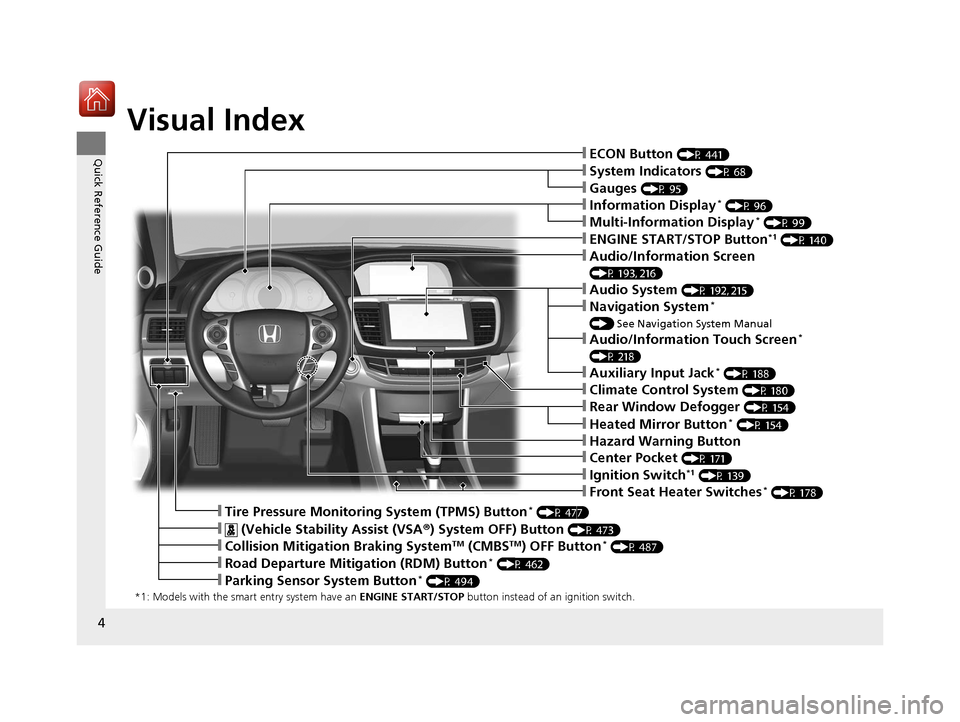
Visual Index
*1: Models with the smart entry system have an ENGINE START/STOP button instead of an ignition switch.
❙System Indicators (P 68)
❙Gauges (P 95)
❙Information Display* (P 96)
❙Audio System (P 192, 215)
❙ENGINE START/STOP Button*1 (P 140)
❙Front Seat Heater Switches* (P 178)
❙Ignition Switch*1 (P 139)
❙ECON Button (P 441)
❙Multi-Information Display* (P 99)
❙ (Vehicle Stability Assist (VSA ®) System OFF) Button (P 473)
❙Tire Pressure Monitoring System (TPMS) Button* (P 477)
❙Audio/Information Screen
(P 193, 216)
❙Navigation System*
() See Navigation System Manual
❙Audio/Information Touch Screen*
(P 218)
❙Auxiliary Input Jack* (P 188)
❙Rear Window Defogger (P 154)
❙Heated Mirror Button* (P 154)
❙Hazard Warning Button
❙Center Pocket (P 171)
❙Climate Control System (P 180)
❙Collision Mitigation Braking SystemTM (CMBSTM) OFF Button* (P 487)
❙Road Departure Mitigation (RDM) Button* (P 462)
❙Parking Sensor System Button* (P 494)
17 ACCORD 4D GAS-31T2A6400.book 4 ページ 2016年6月7日 火曜日 午後5時6分
Page 12 of 613
11
Quick Reference Guide
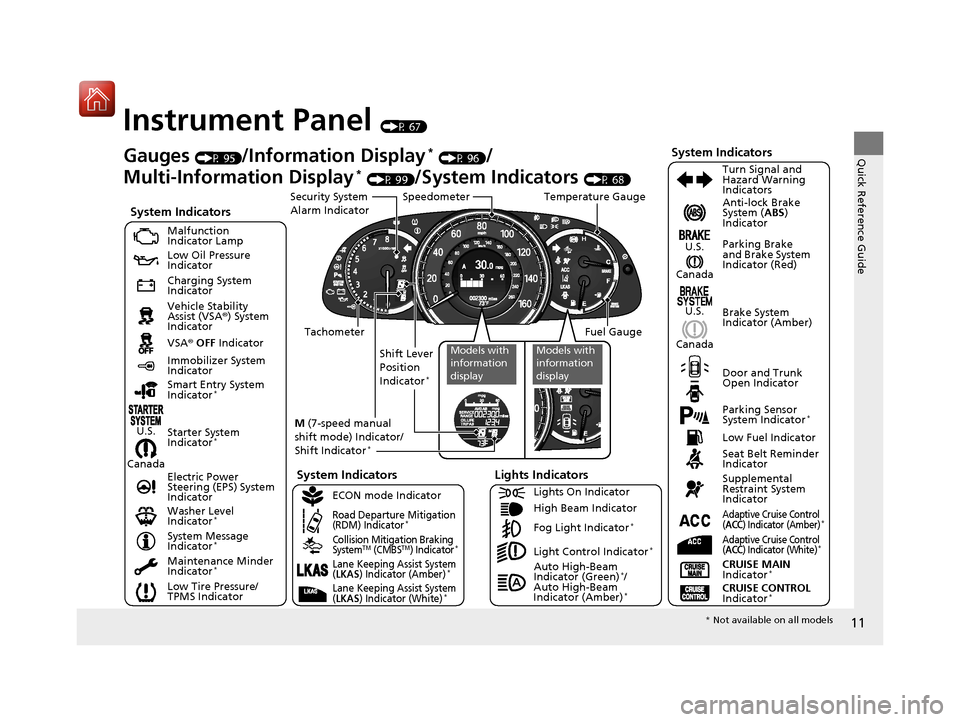
Instrument Panel (P 67)
CanadaU.S.
Low Fuel Indicator
Anti-lock Brake
System (
ABS)
Indicator
Parking Brake
and Brake System
Indicator (Red)
Canada U.S.
Washer Level
Indicator
*
System Indicators
Malfunction
Indicator Lamp
Low Oil Pressure
Indicator
Charging System
Indicator
Vehicle Stability
Assist (VSA ®) System
Indicator
VSA ® OFF Indicator
Low Tire Pressure/
TPMS Indicator Electric Power
Steering (EPS) System
Indicator
Lights Indicators
Lights On Indicator
High Beam Indicator
Fog Light Indicator
*
Immobilizer System
Indicator Seat Belt Reminder
Indicator
System Indicators
CRUISE CONTROL
Indicator*
Adaptive Cruise Control
(ACC) Indicator (Amber)*
CRUISE MAIN
Indicator*
Tachometer Speedometer
Fuel Gauge
Security System
Alarm Indicator
Shift Lever
Position
Indicator
*
Gauges (P 95)/Information Display* (P 96)/
Multi-Information Display
* (P 99)/System Indicators (P 68) Turn Signal and
Hazard Warning
Indicators
System Indicators
Temperature Gauge
M (7-speed manual
shift mode) Indicator/
Shift Indicator
*
Maintenance Minder
Indicator*
Smart Entry System
Indicator*
Starter System
Indicator*
System Message
Indicator*
ECON mode Indicator
Road Departure Mitigation
(RDM) Indicator*
Collision Mitigation Braking
SystemTM (CMBSTM) Indicator*Light Control Indicator*
Door and Trunk
Open Indicator Brake System
Indicator (Amber)
Supplemental
Restraint System
Indicator
Canada
U.S.
Models with
information
displayModels with
information
display
Auto High-Beam
Indicator (Green)*/
Auto High-Beam
Indicator (Amber)
*
Lane Keeping Assist System
(LKAS) Indicator (Amber)*
Lane Keeping Assist System
(LKAS) Indicator (White)*
Parking Sensor
System Indicator*
Adaptive Cruise Control
(ACC) Indicator (White)*
* Not available on all models
17 ACCORD 4D GAS-31T2A6400.book 11 ページ 2016年6月7日 火曜日 午後5時6分
Page 21 of 613
20
Quick Reference Guide
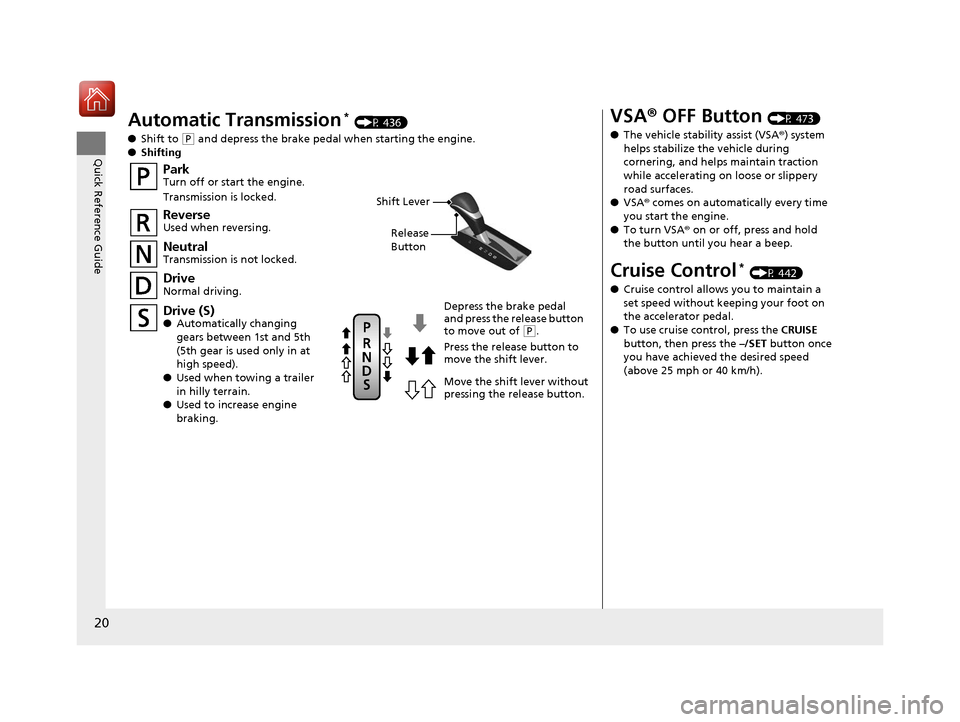
Automatic Transmission* (P 436)
● Shift to
(P and depress the brake pedal when starting the engine.
● Shifting
ParkTurn off or start the engine.
Transmission is locked.
NeutralTransmission is not locked.
Drive (S)● Automatically changing
gears between 1st and 5th
(5th gear is used only in at
high speed).
● Used when towing a trailer
in hilly terrain.
● Used to increase engine
braking.
Depress the brake pedal
and press the release button
to move out of
(P.
Press the release button to
move the shift lever.
Move the shift lever without
pressing the release button.
ReverseUsed when reversing.
DriveNormal driving.
Shift Lever
Release
Button
VSA ® OFF Button (P 473)
● The vehicle stability assist (VSA® ) system
helps stabilize the vehicle during
cornering, and helps maintain traction
while accelerating on loose or slippery
road surfaces.
● VSA ® comes on automatically every time
you start the engine.
● To turn VSA ® on or off, press and hold
the button until you hear a beep.
Cruise Control* (P 442)
● Cruise control allows you to maintain a
set speed without keeping your foot on
the accelerator pedal.
● To use cruise control, press the CRUISE
button, then press the –/SET button once
you have achieved the desired speed
(above 25 mph or 40 km/h).
17 ACCORD 4D GAS-31T2A6400.book 20 ページ 2016年6月7日 火曜日 午後5時6分
Page 74 of 613
73
uuIndicators u
Continued
Instrument Panel
*1:Models with the smart entry system have an ENGINE START/STOP button instead of an ignition switch.
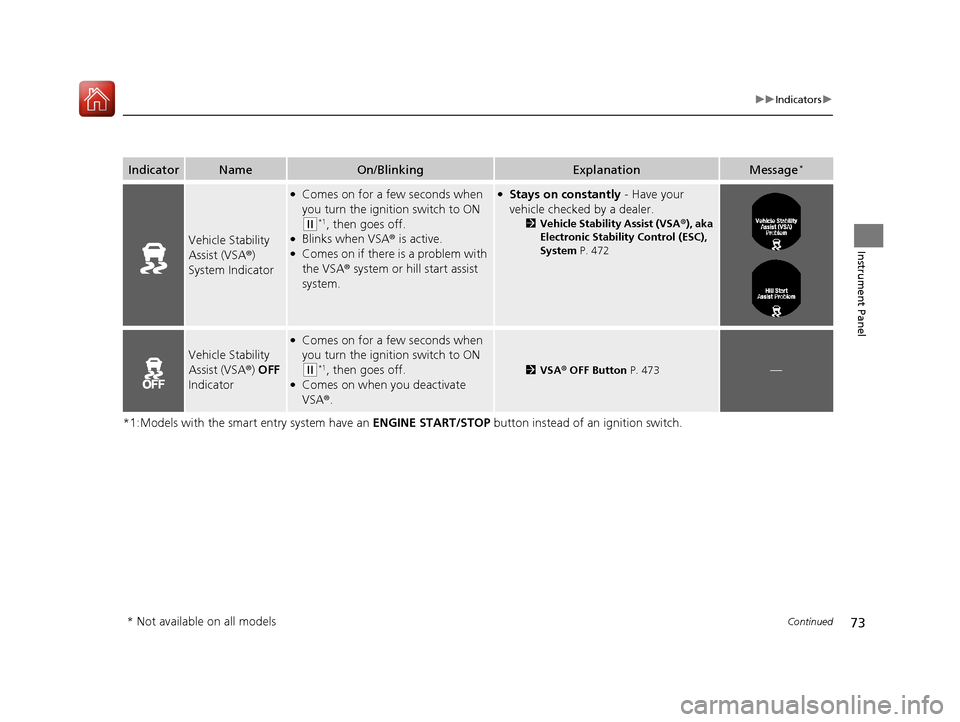
IndicatorNameOn/BlinkingExplanationMessage*
Vehicle Stability
Assist (VSA®)
System Indicator
●Comes on for a few seconds when
you turn the igniti on switch to ON
(w*1, then goes off.●Blinks when VSA® is active.●Comes on if there is a problem with
the VSA® system or hill start assist
system.
●Stays on constantly - Have your
vehicle checked by a dealer.
2 Vehicle Stability Assist (VSA ®), aka
Electronic Stability Control (ESC),
System P. 472
Vehicle Stability
Assist (VSA®) OFF
Indicator
●Comes on for a few seconds when
you turn the igniti on switch to ON
(w*1, then goes off.●Comes on when you deactivate
VSA®.
2VSA ® OFF Button P. 473—
* Not available on all models
17 ACCORD 4D GAS-31T2A6400.book 73 ページ 2016年6月7日 火曜日 午後5時6分
Page 95 of 613
94
uuIndicators uMulti-Information Display Warn ing and Information Messages*
Instrument Panel
MessageConditionExplanation
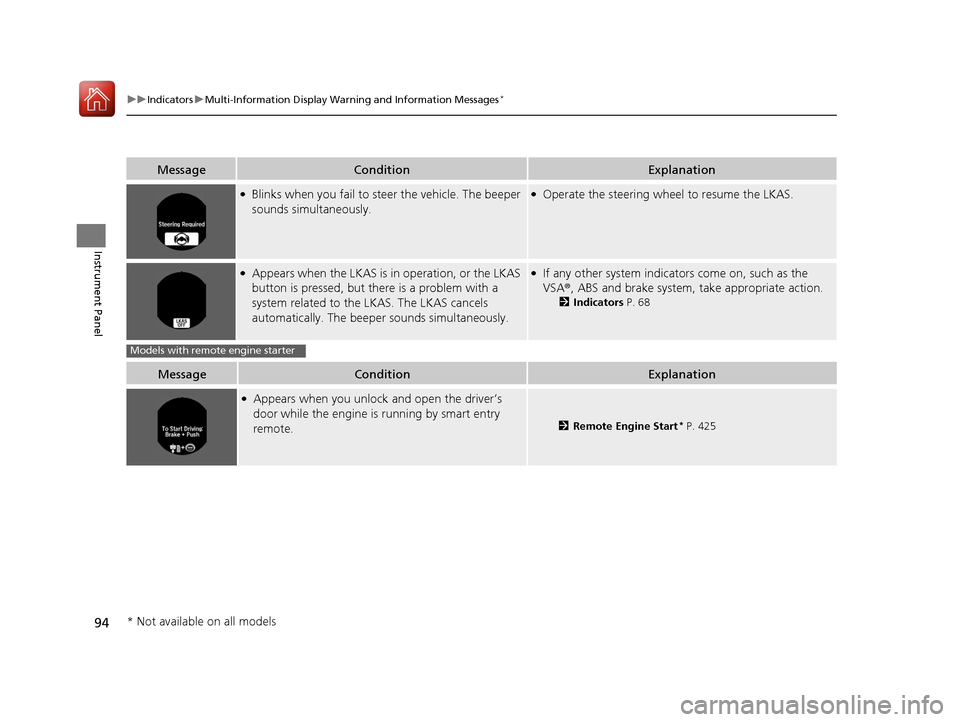
●Blinks when you fail to steer the vehicle. The beeper
sounds simultaneously.●Operate the steering wheel to resume the LKAS.
●Appears when the LKAS is in operation, or the LKAS
button is pressed, but there is a problem with a
system related to the LKAS. The LKAS cancels
automatically. The beeper sounds simultaneously.●If any other system indicato rs come on, such as the
VSA ®, ABS and brake system, take appropriate action.
2Indicators P. 68
MessageConditionExplanation
●Appears when you unlock and open the driver’s
door while the engine is running by smart entry
remote.
2Remote Engine Start* P. 425
Models with remote engine starter
* Not available on all models
17 ACCORD 4D GAS-31T2A6400.book 94 ページ 2016年6月7日 火曜日 午後5時6分
Page 412 of 613
411
Driving
This chapter discusses driving, refueling, and information on items such as accessories.
Before Driving
Driving Preparation .......................... 412
Maximum Load Limit........................ 415
Towing a Trailer Towing Preparation .......................... 417
Driving Safely with a Trailer .............. 419
Towing Your Vehicle ........................ 420
When Driving Starting the Engine .................. 421, 423
Precautions While Driving................. 428
Automatic Transmission/CVT
*.......... 429
Shifting .................... 430, 432, 436, 438
ECON Button ................................... 441 Cruise Control
*................................ 442
Front Sensor Camera*..................... 445
Adaptive Cruise Control (ACC)*....... 447Road Departure Mitigation (RDM) System*...... 461Lane Keeping Assist System (LKAS)*.... 465
Vehicle Stabilit y Assist (VSA®), aka Electronic
Stability Control (ESC), System........... 472
LaneWatchTM*.................................. 474Tire Pressure Monitoring System (TPMS) ... 476Tire Pressure Monitoring System (TPMS) - Required Federal Explanation ......... 478
Braking Brake System ................................... 480 Anti-lock Brake System (ABS) ........... 482
Brake Assist System ......................... 483
Collision Mitigation Braking System
TM
(CMBSTM)*..................................... 484
Parking Your Vehicle When Stopped ................................ 492
Parking Sensor System
*................... 493
Multi-View Rear Camera .................. 497
Refueling Fuel Information .............................. 499
How to Refuel ................................. 500
Fuel Economy and CO
2 Emissions
Improving Fuel Economy and Reducing
CO
2 Emissions ................................ 501
* Not available on all models
17 ACCORD 4D GAS-31T2A6400.book 411 ページ 2016年6月7日 火曜日 午後5時6分
Page 459 of 613
uuWhen Driving uAdaptive Cruise Control (ACC)*
458
Driving
■Automatic cancellation
The beeper sounds and a message appears on the multi-information display when
ACC is automatically canceled. Any of these conditions may cause the ACC to
automatically cancel:
• Bad weather (rain, fog, snow, etc.)
• When the radar sensor at the lower part of the front bumper gets dirty.
• The vehicle ahead of you cannot be detected.
• An abnormal tire condition is detected, or the tires are skidding.
• Driving on a mountainous road, or driving off road for extended periods.
• Abrupt steering wheel movement.
• When the ABS, VSA ® or CMBS
TM is activated.
• When the ABS or VSA ® system indicator comes on.
• When you manually apply the parking brake.
• When the detected vehicle within the ACC range is too close to your vehicle.
• The camera behind the rearview mirror, or the area around the camera, including
the windshield, gets dirty.
1Automatic cancellation
Even though ACC has been automatically canceled,
you can still resume the prior set speed.
Wait until the condition that caused ACC to cancel
improves, then press the RES/+ button.
17 ACCORD 4D GAS-31T2A6400.book 458 ページ 2016年6月7日 火曜日 午後5時6分
Page 471 of 613
470
uuWhen Driving uLane Keeping Assist System (LKAS)*
Driving
■The LKAS may automatically be canceled when:
• The camera temperature gets extremely high or low.
• The camera behind the rearview mirror, or the area around the camera, including
the windshield, gets dirty.
• The ABS or VSA system engages.
The beeper sounds if the LKAS is automatically canceled.
The system may not detect lane markings and therefore may not keep the vehicle in
the middle of a lane under certain conditions, including the following:
■Environmental conditions
• Driving in bad weather (rain, fog, snow, etc.).
• Sudden changes between light and dark, such as an entrance or exit of a tunnel.
• There is little contrast between la ne lines and the roadway surface.
• Driving into low sunlight (e.g., at dawn or dusk).
• Strong light is reflected onto the roadway.
• Driving in the shadows of trees, buildings, etc.
• Shadows of adjacent objects are parallel to lane markings.
• Roadway objects or structures are misinterpreted as lane markers.
• Reflections on the interi or of the windshield.
■LKAS Conditions and Limitations
17 ACCORD 4D GAS-31T2A6400.book 470 ページ 2016年6月7日 火曜日 午後5時6分
Page 473 of 613
472
uuWhen Driving uVehicle Stability Assist (VSA® ), aka Electronic Stability Control (ESC), System
Driving
Vehicle Stability Assist (VSA®), aka Electronic
Stability Control (ESC), System
Helps to stabilize the vehicle during cornerin g if the vehicle turns more or less than
what was intended. It also assists in mainta ining traction on slippery surfaces. It does
so by regulating engine output and selectively applying the brakes.
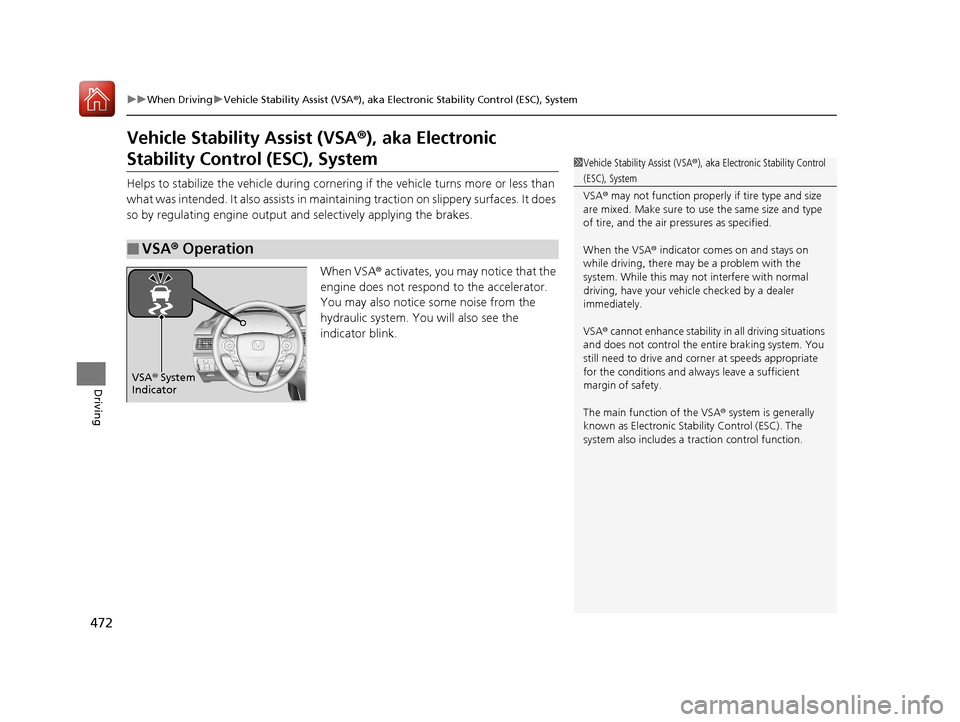
When VSA® activates, you may notice that the
engine does not respond to the accelerator.
You may also notice some noise from the
hydraulic system. You will also see the
indicator blink.
■VSA ® Operation
1 Vehicle Stability Assist (VSA ®), aka Electronic Stability Control
(ESC), System
VSA ® may not function properly if tire type and size
are mixed. Make sure to use the same size and type
of tire, and the air pr essures as specified.
When the VSA ® indicator comes on and stays on
while driving, there may be a problem with the
system. While this may not interfere with normal
driving, have your vehi cle checked by a dealer
immediately.
VSA ® cannot enhance stability in all driving situations
and does not control the entire braking system. You
still need to drive and corner at speeds appropriate
for the conditions and always leave a sufficient
margin of safety.
The main function of the VSA ® system is generally
known as Electronic Stab ility Control (ESC). The
system also includes a traction control function.
VSA® System
Indicator
17 ACCORD 4D GAS-31T2A6400.book 472 ページ 2016年6月7日 火曜日 午後5時6分
Page 474 of 613
473
uuWhen Driving uVehicle Stability Assist (VSA ®), aka Electronic Stability Control (ESC), System
Driving
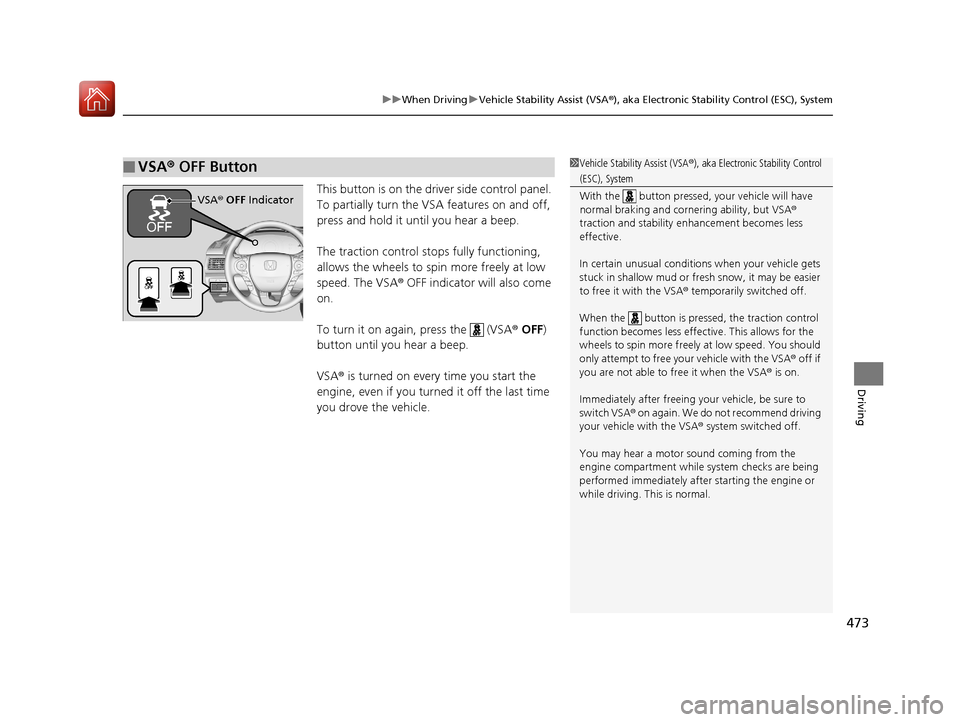
This button is on the driver side control panel.
To partially turn the VSA features on and off,
press and hold it until you hear a beep.
The traction control stop s fully functioning,
allows the wheels to sp in more freely at low
speed. The VSA ® OFF indicator will also come
on.
To turn it on again, press the (VSA ® OFF )
button until you hear a beep.
VSA ® is turned on every time you start the
engine, even if you turned it off the last time
you drove the vehicle.
■VSA ® OFF Button1 Vehicle Stability Assist (VSA ®), aka Electronic Stability Control
(ESC), System
With the button pressed, your vehicle will have
normal braking and corn ering ability, but VSA®
traction and stability enhancement becomes less
effective.
In certain unusual conditions when your vehicle gets
stuck in shallow mud or fr esh snow, it may be easier
to free it with the VSA ® temporarily switched off.
When the button is pressed, the traction control
function becomes less effective. This allows for the
wheels to spin more freely at low speed. You should
only attempt to free your vehicle with the VSA ® off if
you are not able to free it when the VSA ® is on.
Immediately after freeing your vehicle, be sure to
switch VSA ® on again. We do not recommend driving
your vehicle with the VSA ® system switched off.
You may hear a motor sound coming from the
engine compartment while system checks are being
performed immediately after starting the engine or
while driving. This is normal.
VSA ® OFF Indicator
17 ACCORD 4D GAS-31T2A6400.book 473 ページ 2016年6月7日 火曜日 午後5時6分