ECU HONDA ACCORD 2022 Owner's Manual
[x] Cancel search | Manufacturer: HONDA, Model Year: 2022, Model line: ACCORD, Model: HONDA ACCORD 2022Pages: 657, PDF Size: 11.42 MB
Page 167 of 657
165
Controls
This chapter explains how to operate the various controls necessary for driving.
Clock.................................................. 166
Locking and Unlocking the Doors
Key .................................................. 167
Low Keyless Remote Signal Strength ... 169
Locking/Unlocking the Doors from the Outside .......................................... 170
Locking/Unlocking the Doors from the
Inside ............................................. 177
Childproof Door Locks ..................... 179
Auto Door Locking/Unlocking .......... 180
Opening and Closing the Trunk ....... 181
Security System
Immobilizer System .......................... 184
Security System Alarm ...................... 185
Windows ........................................... 187 Moonroof*........................................ 190
Operating the Switches Around the
Steering Wheel ENGINE START/STOP Button............. 191
Turn Signals ..................................... 194
Light Switches.................................. 195
Fog Lights
*...................................... 197
Daytime Running Lights ................... 198
Auto High-Beam .............................. 199
Wipers and Washers ........................ 202
Rear Defogger/Heat ed Door Mirror
*
Button ........................................... 204 Heated Windshield Button ............... 204
Brightness Control ........................... 205
Driving Position Memory System
*.... 207
Adjusting the Steering Wheel .......... 209
Mirrors Interior Rearview Mirror ................... 210
Power Door Mirrors ......................... 211
Seats .................................................. 212
Interior Convenience Items .............. 223
Climate Control System Using Automatic Climate Control .... 240
Automatic Climate Control Sensors ... 243
Canadian models
* Not available on all models
Page 172 of 657
170
uuLocking and Unlocking the Doors uLocking/Unlocking the Doors from the Outside
Controls
Locking/Unlocking the Doors from the Outside
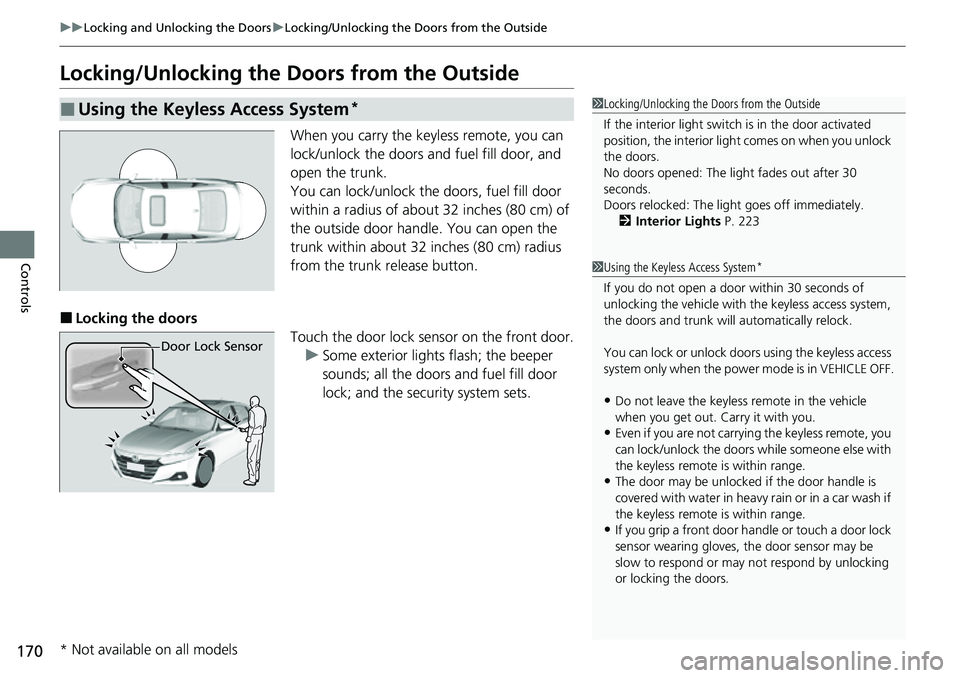
When you carry the keyless remote, you can
lock/unlock the doors and fuel fill door, and
open the trunk.
You can lock/unlock the doors, fuel fill door
within a radius of about 32 inches (80 cm) of
the outside door handle. You can open the
trunk within about 32 inches (80 cm) radius
from the trunk release button.
■Locking the doors
Touch the door lock sensor on the front door.u Some exterior lights flash; the beeper
sounds; all the doors and fuel fill door
lock; and the security system sets.
■Using the Keyless Access System*1Locking/Unlocking the Doors from the Outside
If the interior light switch is in the door activated
position, the interior light comes on when you unlock
the doors.
No doors opened: The li ght fades out after 30
seconds.
Doors relocked: The light goes off immediately.
2 Interior Lights P. 223
Door Lock Sensor
1Using the Keyless Access System*
If you do not open a door within 30 seconds of
unlocking the vehicle with the keyless access system,
the doors and trunk will automatically relock.
You can lock or unlock doors using the keyless access
system only when the power mode is in VEHICLE OFF.
•Do not leave the keyless remote in the vehicle
when you get out. Carry it with you.
•Even if you are not carrying the keyless remote, you
can lock/unlock the doors while someone else with
the keyless remote is within range.
•The door may be unlocked if the door handle is
covered with water in heavy rain or in a car wash if
the keyless remote is within range.
•If you grip a front door ha ndle or touch a door lock
sensor wearing gloves, the door sensor may be
slow to respond or may not respond by unlocking
or locking the doors.
* Not available on all models
Page 176 of 657
uuLocking and Unlocking the Doors uLocking/Unlocking the Doors from the Outside
174
Controls
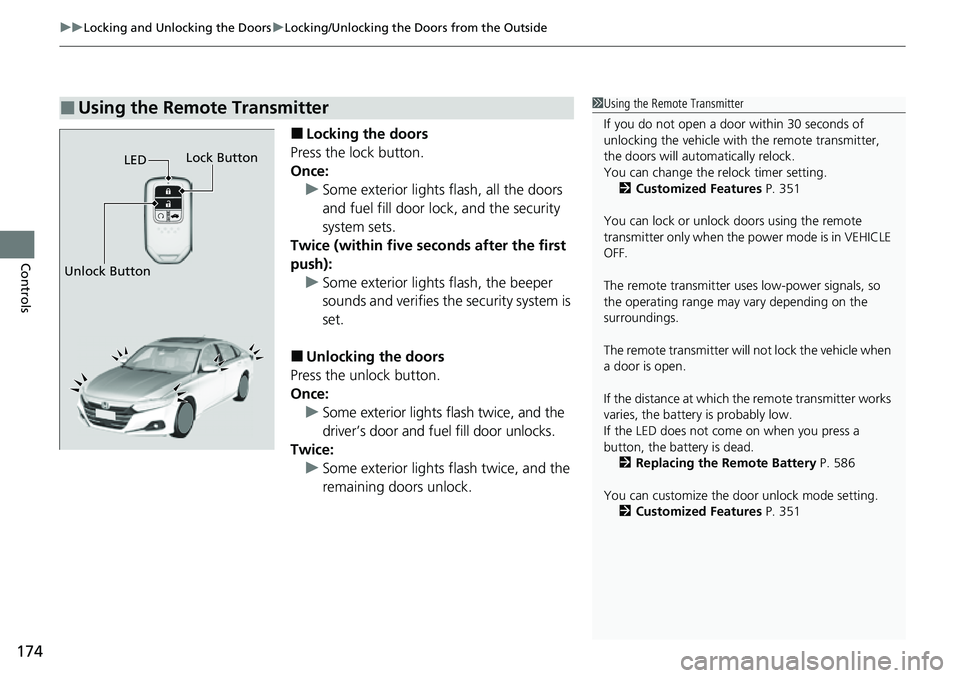
■Locking the doors
Press the lock button.
Once: u Some exterior lights flash, all the doors
and fuel fill door lock, and the security
system sets.
Twice (within five seco nds after the first
push): u Some exterior lights flash, the beeper
sounds and verifies the security system is
set.
■Unlocking the doors
Press the unlock button.
Once: u Some exterior lights flash twice, and the
driver’s door and fuel fill door unlocks.
Twice: u Some exterior lights flash twice, and the
remaining doors unlock.
■Using the Remote Transmitter1Using the Remote Transmitter
If you do not open a door within 30 seconds of
unlocking the vehicle with the remote transmitter,
the doors will automatically relock.
You can change the relock timer setting. 2 Customized Features P. 351
You can lock or unlock doors using the remote
transmitter only when the power mode is in VEHICLE
OFF.
The remote transmitter us es low-power signals, so
the operating range may vary depending on the
surroundings.
The remote transmitter will not lock the vehicle when
a door is open.
If the distance at which the remote transmitter works
varies, the batter y is probably low.
If the LED does not come on when you press a
button, the battery is dead. 2 Replacing the Remote Battery P. 586
You can customize the door unlock mode setting. 2 Customized Features P. 351
LED
Unlock Button Lock Button
Page 186 of 657
184
Controls
Security System
Immobilizer System
This system prevents a key that has not been pre-registered from starting the
engine.
Pay attention to the follo wing when pressing the ENGINE START/STOP button:
• Do not allow objects that emit strong radio waves near the ENGINE START/
STOP button.
• Make sure the key is not covered by or touching a metal object.
• Do not bring a key from another vehi cle’s immobilizer system near the ENGINE
START/STOP button.
Do not put the key near magnetic items. El ectronic device, such as televisions and
audio systems emit strong magnetic fields . Note that even a key chain can become
magnetic.1 Immobilizer System
NOTICE
Leaving the key in the vehicl e can result in theft or
accidental movement of the vehicle.
Always take the key with you whenever you leave the
vehicle unattended.
Do not alter the system or add other devices to it.
Doing so may damage the system and make your
vehicle inoperable.
Apply and hold the brake pedal before turning the
vehicle on the first time after the battery has been
disconnected.
Canadian models
Page 187 of 657
185
uuSecurity System uSecurity System Alarm
Continued
Controls
Security System Alarm
The security system alarm activates when the trunk, hood or doors are forcibly
opened. The alarm does not activate if the trunk or doors are opened with the key,
remote transmitter, or keyless access system
*.
However, the alarm activates if a door is opened with the key and then the
transmission is taken out of
(P (continuously variable transmission models) or the
hood is opened before the power mode is in ON.
■When the security system alarm activates
The horn sounds intermittently, and some exterior lights flash.
■To deactivate the security system alarm
Unlock the vehicle using the key, remote transmitter or keyless access system*, or set
the power mode to ON. The system, along with the horn and flashing lights, is
deactivated.
■Setting the security system alarm
The security system alarm automatically sets when the following conditions have
been met:
• The power mode is set to VEHICLE OFF.
• The hood is closed.
• All doors and trunk are locked from outsid e with the key, remote transmitter, or
keyless access system
*.
■When the security system alarm sets
The security system alarm in dicator in the instrument panel blinks and the blinking
interval changes after about 15 seconds.
■To cancel the security system alarm
The security system alarm is canceled wh en the vehicle is unlocked using the key,
remote transmitter or keyless access system
*, or when the power mode is set to ON.
The security system alarm indicator goes off at the same time.
1 Security System Alarm
Do not alter the system or add other devices to it.
Doing so may damage the system and make your
vehicle inoperable.
The security system alarm continues for a maximum
of two minutes until the security system alarm
deactivates.
Do not set the security system alarm when someone
is in the vehicle or a window is open. The system can
accidentally activate when:
•Unlocking the door with the lock tab.
•Opening the trunk with the trunk opener or the
emergency trunk opener.
•Opening the hood with the hood release.
•Taking the transmission out of ( P.
If the battery goes dead after you have set the
security system alarm, the security alarm may go off
once the battery is re charged or replaced.
If this occurs, deactivate the security system alarm by
unlocking a door using the ke y, remote transmitter,
or keyless access system
*.
Continuously variable transmission models
* Not available on all models
Page 188 of 657
186
uuSecurity System uSecurity System Alarm
Controls
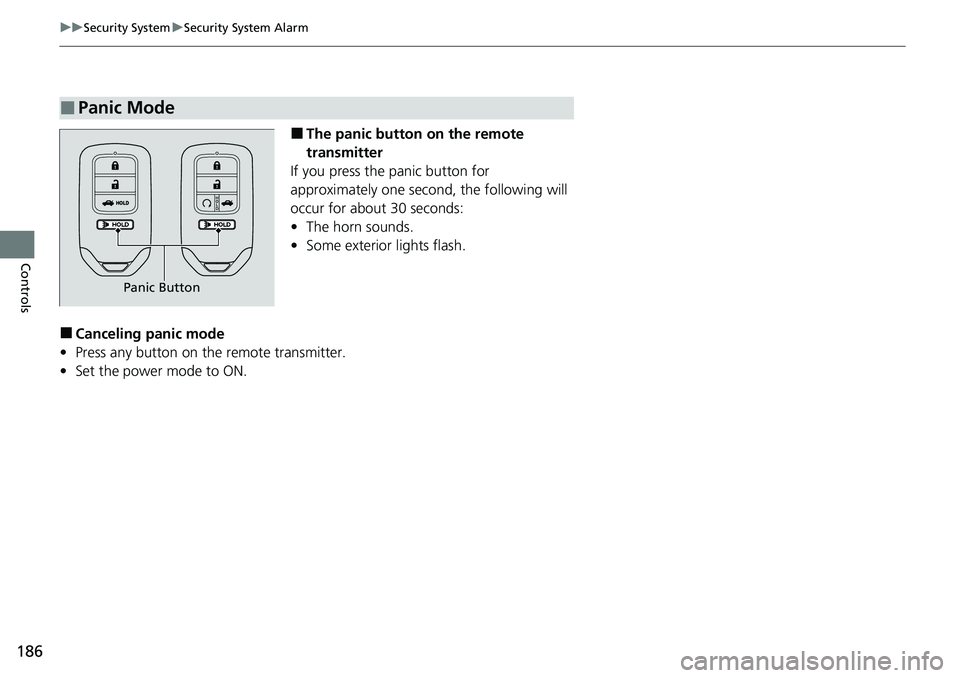
■The panic button on the remote
transmitter
If you press the panic button for
approximately one seco nd, the following will
occur for about 30 seconds:
• The horn sounds.
• Some exterior lights flash.
■Canceling panic mode
• Press any button on the remote transmitter.
• Set the power mode to ON.
■Panic Mode
Panic Button
Page 211 of 657
209
uuOperating the Switches Around the Steering Wheel uAdjusting the Steering Wheel
Controls
Adjusting the Steering Wheel
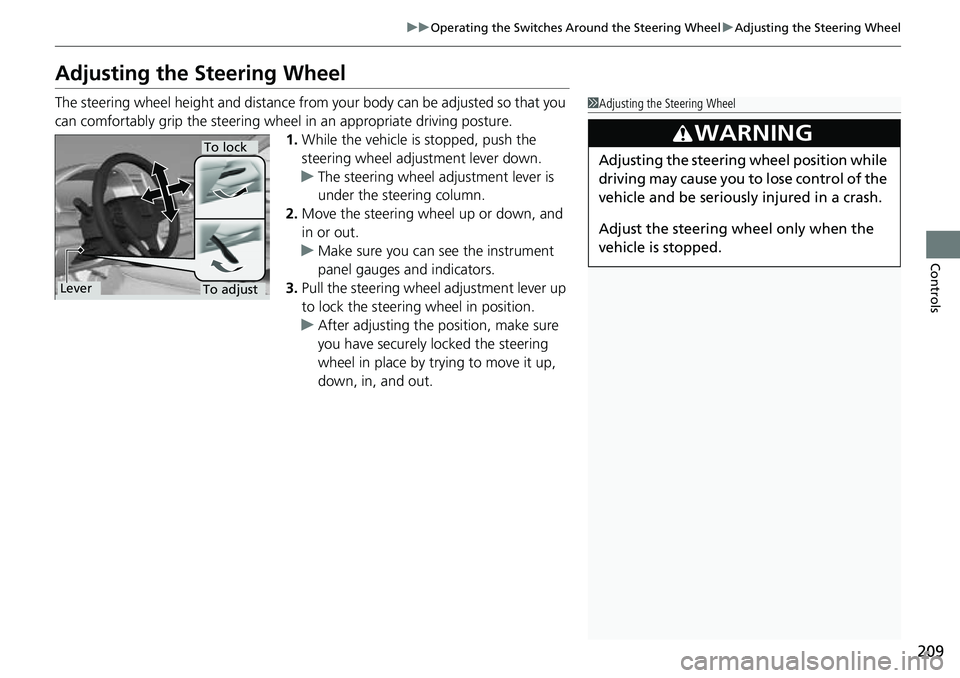
The steering wheel height and distance from your body can be adjusted so that you
can comfortably grip the steering wheel in an appropriate driving posture.
1. While the vehicle is stopped, push the
steering wheel adjustment lever down.
u The steering wheel adjustment lever is
under the steering column.
2. Move the steering wheel up or down, and
in or out.
u Make sure you can see the instrument
panel gauges and indicators.
3. Pull the steering wheel adjustment lever up
to lock the steering wheel in position.
u After adjusting the position, make sure
you have securely locked the steering
wheel in place by trying to move it up,
down, in, and out.1Adjusting the Steering Wheel
3WARNING
Adjusting the steering wheel position while
driving may cause you to lose control of the
vehicle and be seriously injured in a crash.
Adjust the steering wheel only when the
vehicle is stopped.
To adjust
To lock
Lever
Page 218 of 657
216
uuSeats uRear Seats
Controls
Rear Seats
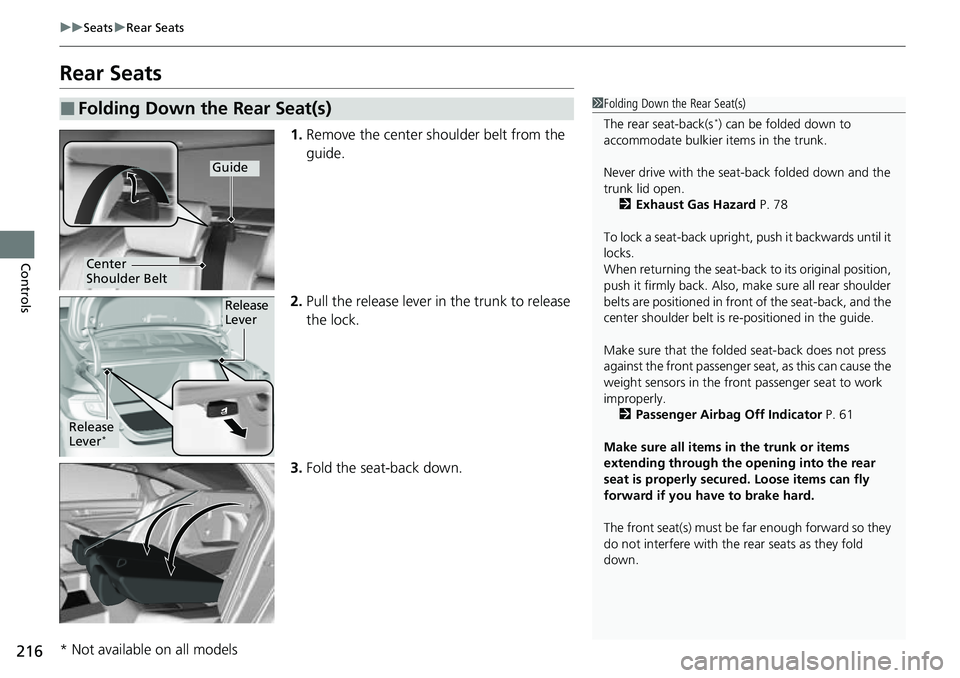
1. Remove the center shoulder belt from the
guide.
2. Pull the release lever in the trunk to release
the lock.
3. Fold the seat-back down.
■Folding Down the Rear Seat(s)1Folding Down the Rear Seat(s)
The rear seat-back(s
*) can be folded down to
accommodate bulkier items in the trunk.
Never drive with the seat-back folded down and the
trunk lid open.
2 Exhaust Gas Hazard P. 78
To lock a seat-back upright, push it backwards until it
locks.
When returning the seat-back to its original position,
push it firmly back. Also, m ake sure all rear shoulder
belts are positioned in front of the seat-back, and the
center shoulder belt is re -positioned in the guide.
Make sure that the folded seat-back does not press
against the front passenger seat, as this can cause the
weight sensors in the front passenger seat to work
improperly. 2 Passenger Airbag Off Indicator P. 61
Make sure all items in the trunk or items
extending through the opening into the rear
seat is properly secured. Loose items can fly
forward if you have to brake hard.
The front seat(s) must be far enough forward so they
do not interfere with the rear seats as they fold
down.
Guide
Center
Shoulder Belt
Release
Lever
Release
Lever*
* Not available on all models
Page 231 of 657
Continued229
uuInterior Convenience Items uStorage Items
Controls
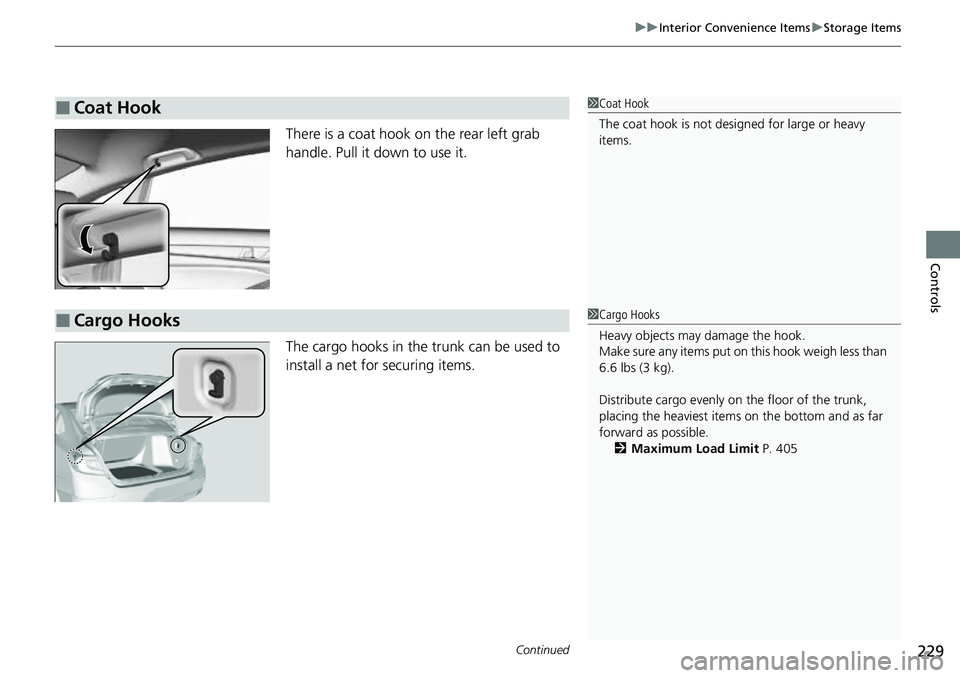
There is a coat hook on the rear left grab
handle. Pull it down to use it.
The cargo hooks in the trunk can be used to
install a net for securing items.
■Coat Hook1Coat Hook
The coat hook is not desi gned for large or heavy
items.
■Cargo Hooks1 Cargo Hooks
Heavy objects may damage the hook.
Make sure any items put on this hook weigh less than
6.6 lbs (3 kg).
Distribute cargo evenly on the floor of the trunk,
placing the heaviest item s on the bottom and as far
forward as possible. 2 Maximum Load Limit P. 405
Page 307 of 657
305
uuAudio System Basic Operation uHondaLink® Service*
Continued
Features
HondaLink® Service*
Is a subscription-based service that provides convenient features such as voice
communication in case of emergency, online security, and one-on-one operator
assistance.
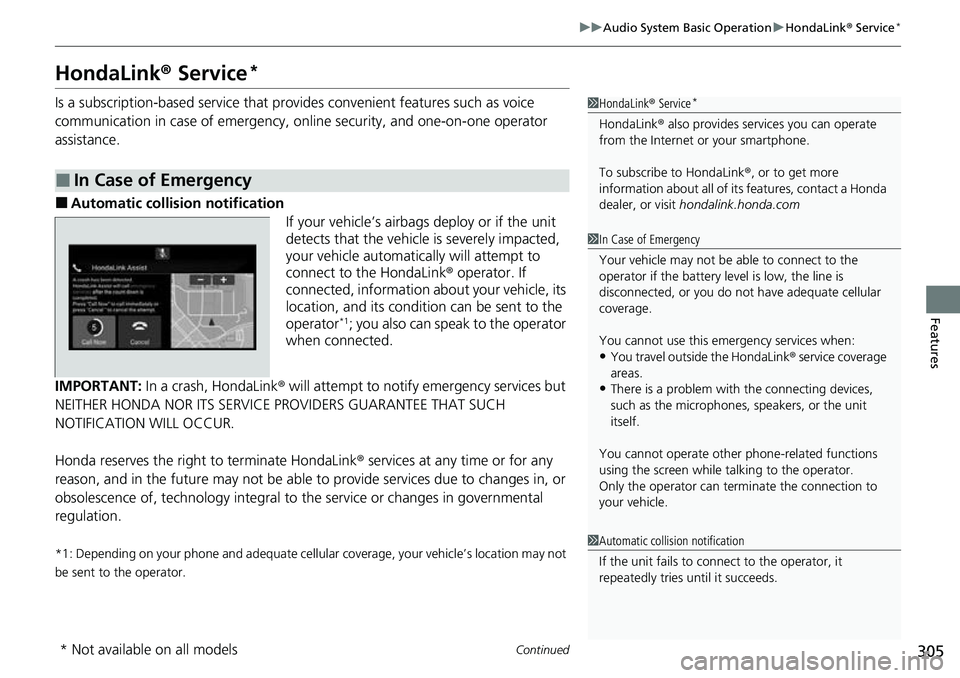
■Automatic collis ion notification
If your vehicle’s airbags deploy or if the unit
detects that the vehicle is severely impacted,
your vehicle automatically will attempt to
connect to the HondaLink ® operator. If
connected, information ab out your vehicle, its
location, and its condition can be sent to the
operator
*1; you also can speak to the operator
when connected.
IMPORTANT: In a crash, HondaLink® will attempt to notify emergency services but
NEITHER HONDA NOR ITS SERVICE PROVIDERS GUARANTEE THAT SUCH
NOTIFICATION WILL OCCUR.
Honda reserves the right to terminate HondaLink ® services at any time or for any
reason, and in the future may not be able to provide services due to changes in, or
obsolescence of, technology integral to the service or changes in governmental
regulation.
*1: Depending on your phone and adequate cellular coverage, your vehicle’s location may not
be sent to the operator.
■In Case of Emergency
1 HondaLink ® Service*
HondaLink ® also provides serv ices you can operate
from the Internet or your smartphone.
To subscribe to HondaLink ®, or to get more
information about all of it s features, contact a Honda
dealer, or visit hondalink.honda.com
1In Case of Emergency
Your vehicle may not be able to connect to the
operator if the battery level is low, the line is
disconnected, or you do not have adequate cellular
coverage.
You cannot use this emergency services when:
•You travel outside the HondaLink ® service coverage
areas.
•There is a problem with the connecting devices,
such as the microphones, speakers, or the unit
itself.
You cannot operate othe r phone-related functions
using the screen while talking to the operator.
Only the operator can terminate the connection to
your vehicle.
1 Automatic collision notification
If the unit fails to connect to the operator, it
repeatedly tries until it succeeds.
* Not available on all models