key HONDA ACCORD 2022 Workshop Manual
[x] Cancel search | Manufacturer: HONDA, Model Year: 2022, Model line: ACCORD, Model: HONDA ACCORD 2022Pages: 657, PDF Size: 11.42 MB
Page 534 of 657
532
uuRefueling uHow to Refuel
Driving
How to Refuel
Your fuel tank is not equipped with a fuel filler cap. You can insert the filler nozzle
directly into the filler neck. The tank seal s itself again when you pull out the filler
nozzle.
1.Stop your vehicle with the service station
pump on the left side of the vehicle in the
rear.
2. Turn off the engine.
3. Unlock the driver’s door.
u The fuel fill door on the outer side of the
vehicle will unlock.
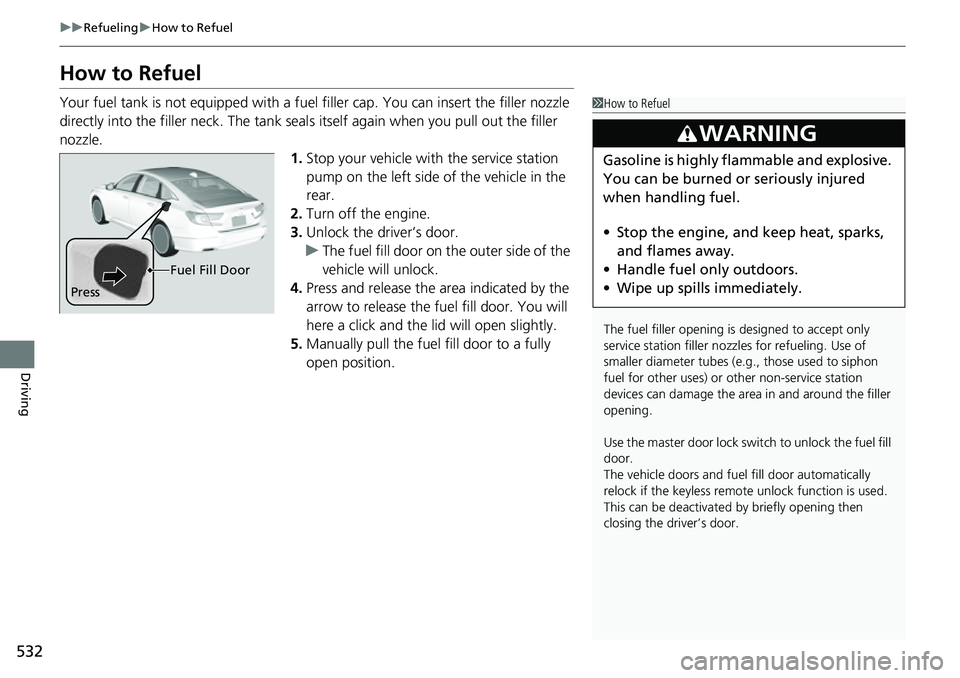
4. Press and release the area indicated by the
arrow to release the fu el fill door. You will
here a click and the lid will open slightly.
5. Manually pull the fuel fill door to a fully
open position.1How to Refuel
The fuel filler opening is designed to accept only
service station filler nozzles for refueling. Use of
smaller diamet er tubes (e.g., those used to siphon
fuel for other uses) or other non-service station
devices can damage the area in and around the filler
opening.
Use the master door lock switch to unlock the fuel fill
door.
The vehicle doors and fuel fill door automatically
relock if the keyless remo te unlock function is used.
This can be deactivated by briefly opening then
closing the driver’s door.
3WARNING
Gasoline is highly flammable and explosive.
You can be burned or seriously injured
when handling fuel.
• Stop the engine, and keep heat, sparks,
and flames away.
• Handle fuel only outdoors.
• Wipe up spills immediately.
Press Fuel Fill Door
Page 588 of 657
586
Maintenance
Remote Transmitter Care
Replacing the Remote Battery
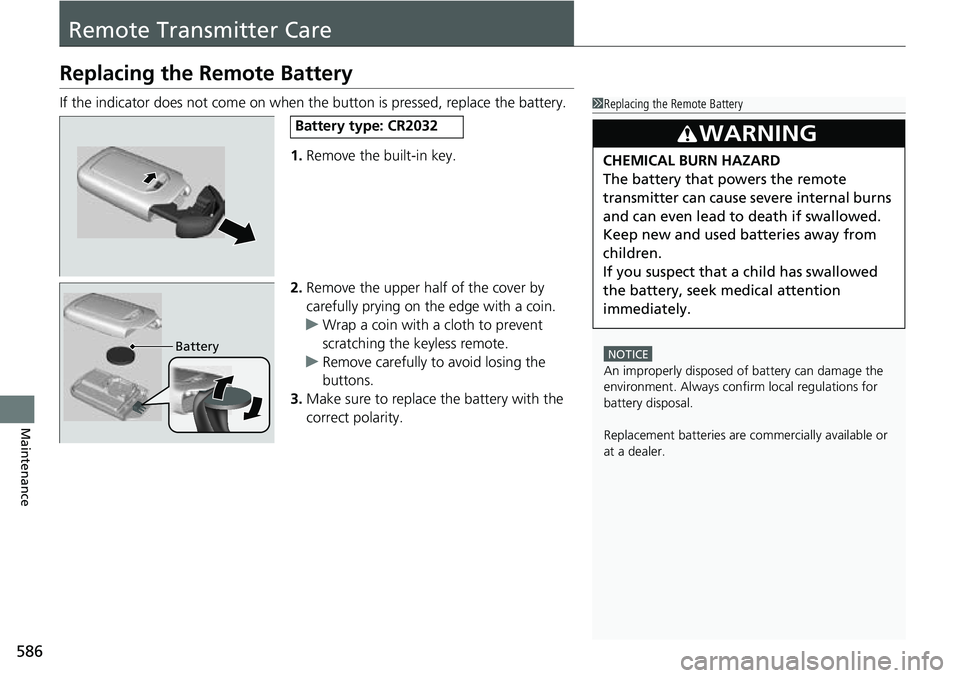
If the indicator does not come on when the button is pressed, replace the battery.1.Remove the built-in key.
2. Remove the upper half of the cover by
carefully prying on the edge with a coin.
u Wrap a coin with a cloth to prevent
scratching the keyless remote.
u Remove carefully to avoid losing the
buttons.
3. Make sure to replace the battery with the
correct polarity.1 Replacing the Remote Battery
NOTICE
An improperly disposed of battery can damage the
environment. Always conf irm local regulations for
battery disposal.
Replacement batteries are commercially available or
at a dealer.
3WARNING
CHEMICAL BURN HAZARD
The battery that powers the remote
transmitter can cause severe internal burns
and can even lead to death if swallowed.
Keep new and used batteries away from
children.
If you suspect that a child has swallowed
the battery, seek medical attention
immediately.
Battery type: CR2032
Battery
Page 597 of 657
595
Handling the Unexpected
This chapter explains how to handle unexpected troubles.
ToolsTypes of Tools .................................. 596
If a Tire Goes Flat
Changing a Flat Tire ......................... 597
Engine Does Not Start Checking the Engine ........................ 603
If the Keyless Remote Battery is Weak ....604Emergency Engine Stop ................... 605
If the Battery Is Dead ....................... 606
Shift Lever Does Not Move .............. 609
Overheating How to Handle Overheating ............. 611 Indicator, Coming On/Blinking
If the Low Oil Pressure Warning Appears ... 613If the Charging System Indicator Comes
On ................................................. 613
If the Malfunction Indicator Lamp Comes On or Blinks ................................... 614
If the Brake System Indicator (Red) Comes
On or Blinks ................................... 615
If the Brake System Indicator (Red) Comes On
or Blinks at the Same Time When the Brake
System Indicator (Amber) Comes On.... 616
If the Electric Power Steering (EPS) System Indicator Comes On ....................... 617 If the Low Tire Pressure/TPMS Indicator
Comes On or Blinks ....................... 618
If the Transmission System Indicator Blinks along with the Warning Message... 619
Fuses Fuse Locations ................................. 620
Inspecting and Changing Fuses ........ 625
Emergency Towing ........................... 626
If You Cannot Unlock the Fuel Fill Door....627
If You Cannot Open the Trunk ........... 628
Refueling ........................................... 630
Page 605 of 657
603
Handling the Unexpected
Engine Does Not Start
Checking the Engine
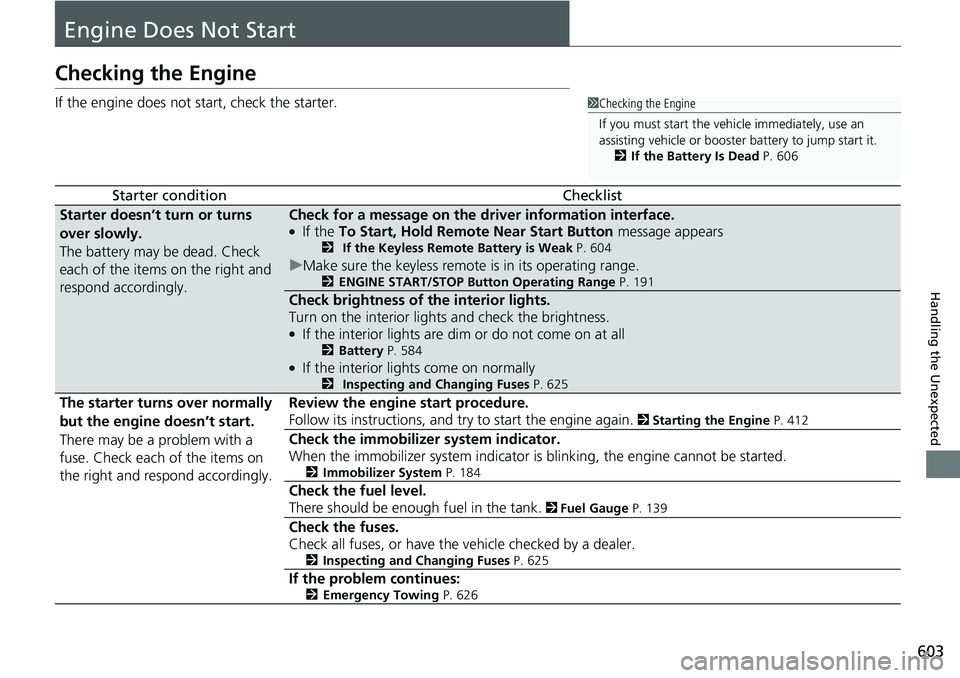
If the engine does not start, check the starter.
Starter conditionChecklist
Starter doesn’t turn or turns
over slowly.
The battery may be dead. Check
each of the items on the right and
respond accordingly.Check for a message on the driver information interface.●If the To Start, Hold Remote Near Start Button message appears2 If the Keyless Remote Battery is Weak P. 604
uMake sure the keyless remote is in its operating range.2ENGINE START/STOP Button Operating Range P. 191
Check brightness of the interior lights.
Turn on the interior lights and check the brightness.
●If the interior lights are dim or do not come on at all2Battery P. 584●If the interior lights come on normally2 Inspecting and Changing Fuses P. 625
The starter turns over normally
but the engine doesn’t start.
There may be a problem with a
fuse. Check each of the items on
the right and respond accordingly. Review the engine start procedure.
Follow its instructions, and try
to start the engine again.
2 Starting the Engine P. 412
Check the immobilize r system indicator.
When the immobilizer system indicator is blinking, the engine cannot be started.
2 Immobilizer System P. 184
Check the fuel level.
There should be enough fuel in the tank.
2 Fuel Gauge P. 139
Check the fuses.
Check all fuses, or have the vehicle checked by a dealer.
2 Inspecting and Changing Fuses P. 625
If the problem continues:2Emergency Towing P. 626
1Checking the Engine
If you must start the vehi cle immediately, use an
assisting vehicle or booster battery to jump start it.
2 If the Battery Is Dead P. 606
Page 606 of 657
604
uuEngine Does Not Start uIf the Keyless Remote Battery is Weak
Handling the Unexpected
If the Keyless Remote Battery is Weak
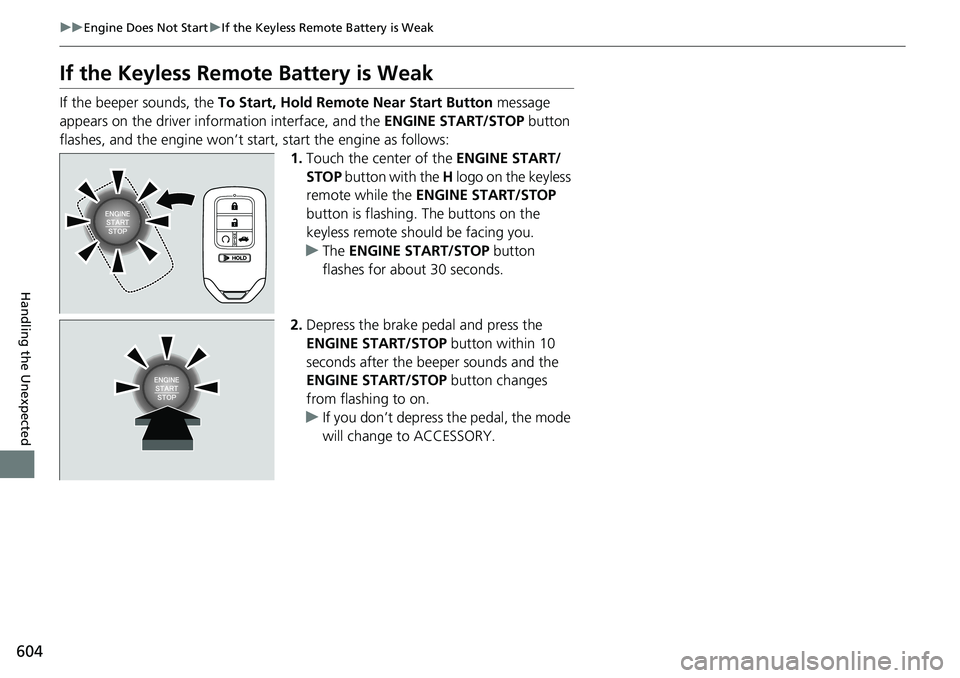
If the beeper sounds, the To Start, Hold Remote Near Start Button message
appears on the driver information interface, and the ENGINE START/STOP button
flashes, and the engine won’t star t, start the engine as follows:
1.Touch the center of the ENGINE START/
STOP button with the H logo on the keyless
remote while the ENGINE START/STOP
button is flashing. The buttons on the
keyless remote should be facing you.
u The ENGINE START/STOP button
flashes for about 30 seconds.
2. Depress the brake pedal and press the
ENGINE START/STOP button within 10
seconds after the beeper sounds and the
ENGINE START/STOP button changes
from flashing to on.
u If you don’t depress the pedal, the mode
will change to ACCESSORY.
Page 611 of 657
609Continued
Handling the Unexpected
Shift Lever Does Not Move
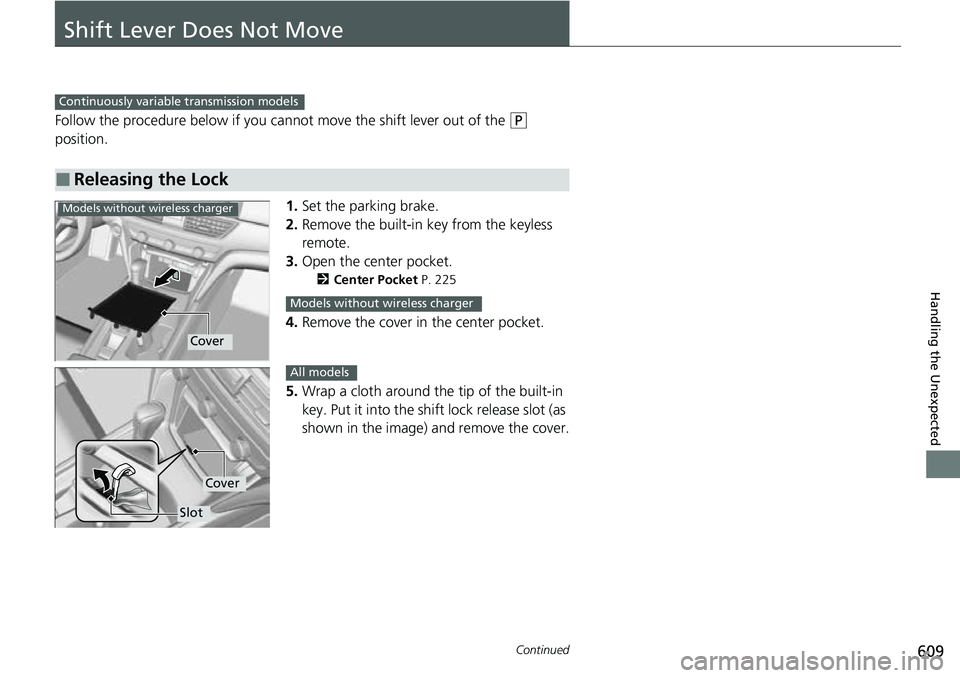
Follow the procedure below if you cannot move the shift lever out of the (P
position.
1.Set the parking brake.
2. Remove the built-in key from the keyless
remote.
3. Open the center pocket.
2 Center Pocket P. 225
4.Remove the cover in the center pocket.
5. Wrap a cloth around the tip of the built-in
key. Put it into the shift lock release slot (as
shown in the image) and remove the cover.
■Releasing the Lock
Continuously variable transmission models
Models without wireless charger
Cover
Models without wireless charger
Slot
Cover
All models
Page 612 of 657
610
uuShift Lever Does Not Move u
Handling the Unexpected
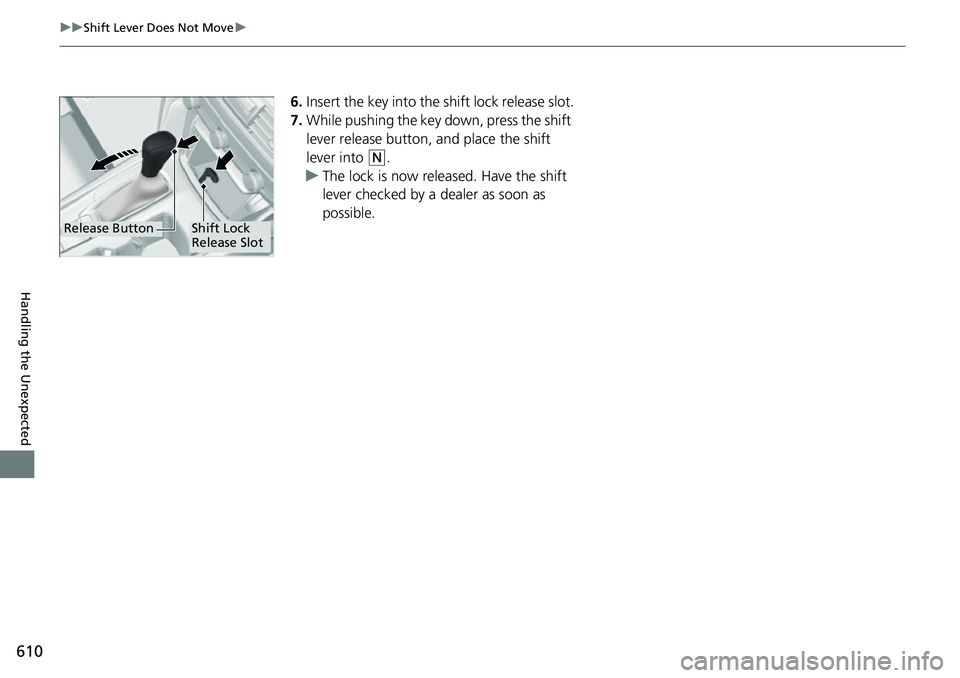
6.Insert the key into the sh ift lock release slot.
7. While pushing the key down, press the shift
lever release button, and place the shift
lever into
(N.
u The lock is now released. Have the shift
lever checked by a dealer as soon as
possible.
Release ButtonShift Lock
Release Slot
Page 625 of 657
623
uuFuses uFuse Locations
Continued
Handling the Unexpected
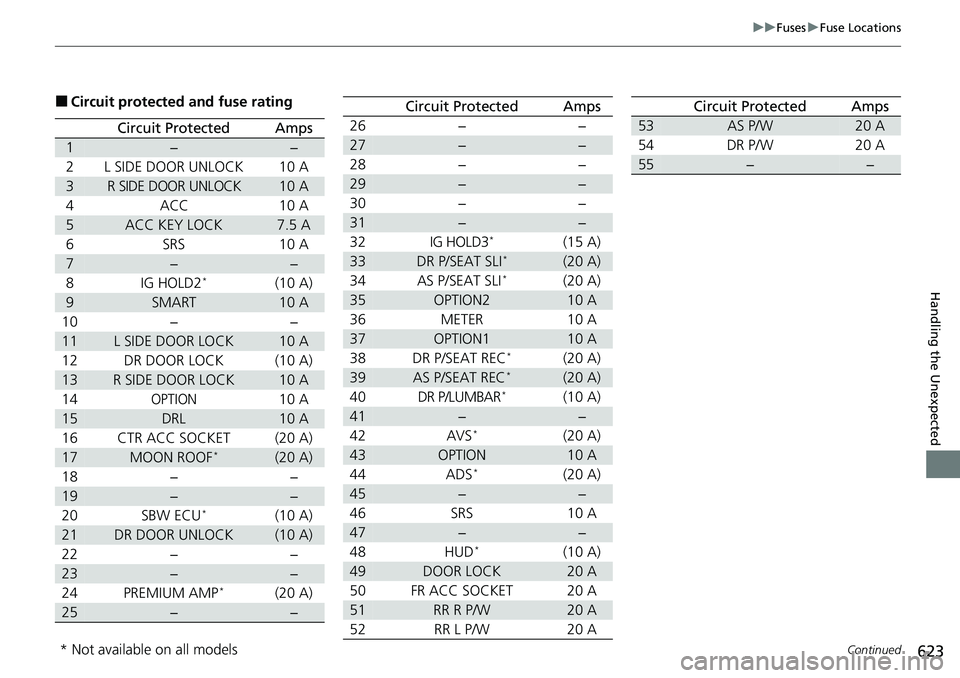
■Circuit protected and fuse rating
Circuit ProtectedAmps
1−−
2L SIDE DOOR UNLOCK10 A
3R SIDE DOOR UNLOCK10 A
4ACC10 A
5ACC KEY LOCK7.5 A
6SRS10 A
7−−
8IG HOLD2*(10 A)
9SMART10 A
10−−
11L SIDE DOOR LOCK10 A
12DR DOOR LOCK(10 A)
13R SIDE DOOR LOCK10 A
14OPTION10 A
15DRL10 A
16CTR ACC SOCKET(20 A)
17MOON ROOF*(20 A)
18−−
19−−
20SBW ECU*(10 A)
21DR DOOR UNLOCK(10 A)
22−−
23−−
24PREMIUM AMP*(20 A)
25−−
26−−
27−−
28−−
29−−
30−−
31−−
32IG HOLD3*(15 A)
33DR P/SEAT SLI*(20 A)
34AS P/SEAT SLI*(20 A)
35OPTION210 A
36METER10 A
37OPTION110 A
38DR P/SEAT REC*(20 A)
39AS P/SEAT REC*(20 A)
40DR P/LUMBAR*(10 A)
41−−
42AVS*(20 A)
43OPTION10 A
44ADS*(20 A)
45−−
46SRS10 A
47−−
48HUD*(10 A)
49DOOR LOCK20 A
50FR ACC SOCKET20 A
51RR R P/W20 A
52RR L P/W20 A
Circuit ProtectedAmps
53AS P/W20 A
54DR P/W20 A
55−−
Circuit ProtectedAmps
* Not available on all models
Page 630 of 657
628
Handling the Unexpected
If You Cannot Open the Trunk
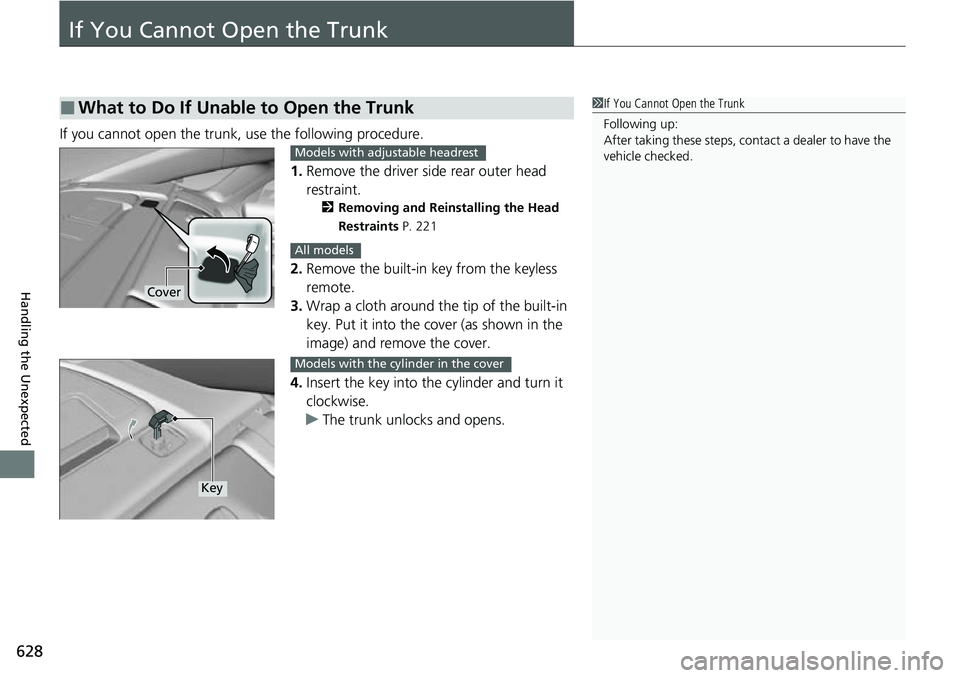
If you cannot open the trunk, use the following procedure.1.Remove the driver side rear outer head
restraint.
2 Removing and Reinstalling the Head
Restraints P. 221
2.Remove the built-in key from the keyless
remote.
3. Wrap a cloth around the tip of the built-in
key. Put it into the cover (as shown in the
image) and remove the cover.
4. Insert the key into the cylinder and turn it
clockwise.
u The trunk unlocks and opens.
■What to Do If Unable to Open the Trunk1If You Cannot Open the Trunk
Following up:
After taking these steps, cont act a dealer to have the
vehicle checked.
Cover
Models with adjustable headrest
All models
Key
Models with the cylinder in the cover
Page 650 of 657
648
Index
Shift Lever Does Not Move....................... 609
Shifting............................................ 427, 429
Controls ..................................................... 165
Coolant (Engine) ....................................... 559
Adding to the Engine Coolant Reserve
Tank ...................................................... 559
Adding to the Radiator ............................ 560
Overheating............................................. 611
Creeping (Automatic Transmission/ Continuously Variable Transmission) ..... 419
Cross Traffic Monitor ................................ 525
Cup Holders ............................................... 227
Customer Service Information ................. 645
Customized Features ................................ 351
D
Daytime Running Lights ........................... 198
Dead Battery ............................................. 606
Defaulting All the Settings ...................... 370
Defrosting the Windshield and
Windows .................................................. 241
Devices that Emit Radio Waves ................ 637
Dimming
Headlights ............................................... 195
Rearview Mirror ....................................... 210
Dipstick (Engine Oil) ................................. 552
Directional Signals (Turn Signal) .............. 194
Door Mirrors ............................................. 211 Doors
......................................................... 167
Auto Door Locking .................................. 180
Auto Door Unlocking .............................. 180
Door and Trunk Open Message ................. 37
Keys ........................................................ 167
Locking/Unlocking the Doors from the Inside ...................................... 177
Locking/Unlocking the Doors
from the Outside ................................... 170
Lockout Prevention System ...................... 176
DOT Tire Quality Grading ........................ 578
Driver Attention Monitor ........................ 154
Driver Information Interface ................... 140
Switching the Display .............................. 140
Warning and Information Messages ........ 109
Driving ...................................................... 401
Automatic Transmission/Continuously Variable
Transmission.......................................... 419
Braking ................................................... 508
Shifting Position ...................... 420, 427, 429
Starting the Engine.................................. 412
Driving Position Memory System ............ 207
Driving Support Information ................... 157
Dust and Pollen Filter ............................... 587
E
Eco Assist® System ...................................... 12
ECON Button ............................................ 434
Econ Mode
Indicator.................................................. 100 Elapsed Time
............................................ 147
Electric Power Steering (EPS) System
Indicator ........................................... 95, 617
Electronic Stability Control (ESC) ............ 441
Emergency ................................................ 626
Emergency Engine Stop ........................... 605
Emergency Trunk Opener ....................... 183
Emissions Testing (Readiness Codes) ...... 639
Engine ....................................................... 636
Coolant .................................................. 559
Jump Starting ......................................... 606
Oil .......................................................... 551
Starting................................................... 412
Engine Coolant ........................................ 559
Adding to the Engine Coolant Reserve Tank ..................................................... 559
Adding to the Radiator ........................... 560
Overheating ............................................ 611
Temperature Gauge ................................ 139
Engine Oil ................................................. 551
Adding ................................................... 554
Checking ................................................ 552
Displaying Oil Life ................................... 542
Low Oil Pressure Warning ....................... 613
Recommended Engine Oil ....................... 551
ENGINE START/STOP Button .................... 191
EPS (Electric Power Steering) System ...... 617
Exhaust Gas Hazard
(Carbon Monoxide) .................................. 78
Exterior Care (Cleaning) .......................... 590
Exterior Mirrors ........................................ 211