ECO mode HONDA ACCORD 2022 Manual Online
[x] Cancel search | Manufacturer: HONDA, Model Year: 2022, Model line: ACCORD, Model: HONDA ACCORD 2022Pages: 657, PDF Size: 11.42 MB
Page 315 of 657
313
uuAudio System Basic Operation uApple CarPlay
Continued
Features
Apple CarPlay
If you connect an Apple CarPlay-compatib le iPhone to the system via the USB port
in the center pocket or wirelessly*, you can use the audio/information screen,
instead of the iPhone display, to make a phone call, listen to music, view maps
(navigation), and access messages.
2 USB Ports P. 247
■Phone
Access the contact list, make phone calls, or listen to voicemail.
■Messages
Check and reply to text messages, or have messages read to you.
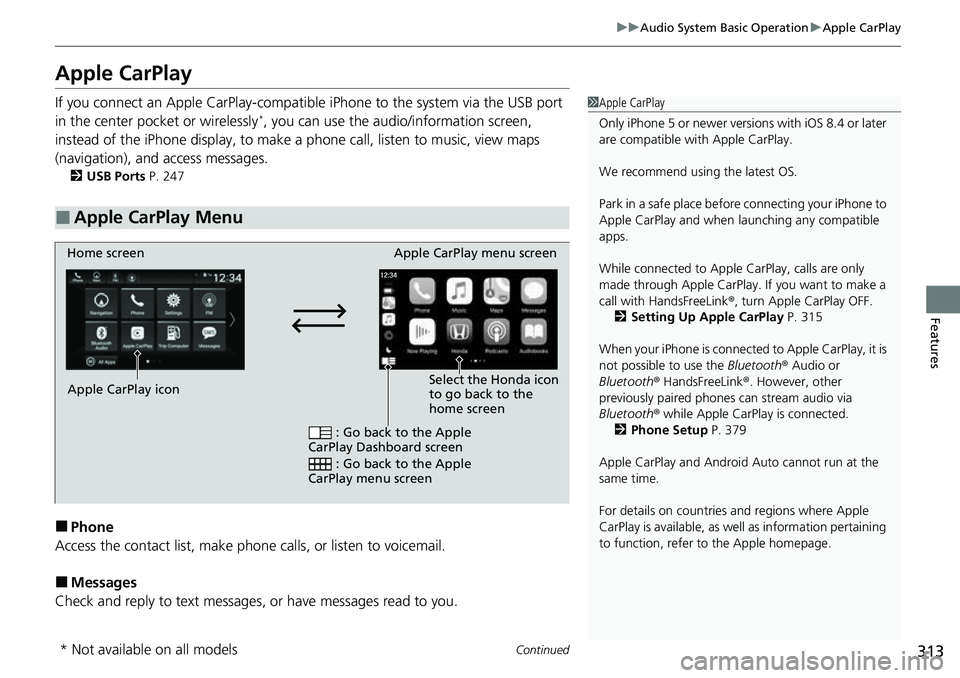
■Apple CarPlay Menu
1 Apple CarPlay
Only iPhone 5 or newer versi ons with iOS 8.4 or later
are compatible with Apple CarPlay.
We recommend using the latest OS.
Park in a safe place before connecting your iPhone to
Apple CarPlay and when launching any compatible
apps.
While connected to Apple CarPlay, calls are only
made through Apple CarPlay. If you want to make a
call with HandsFreeLink ®, turn Apple CarPlay OFF.
2 Setting Up Apple CarPlay P. 315
When your iPhone is connected to Apple CarPlay, it is
not possible to use the Bluetooth® Audio or
Bluetooth ® HandsFreeLink ®. However, other
previously paired phones can stream audio via
Bluetooth ® while Apple CarPlay is connected.
2 Phone Setup P. 379
Apple CarPlay and Android Auto cannot run at the
same time.
For details on c ountries and regions where Apple
CarPlay is available, as well as information pertaining
to function, refer to the Apple homepage.
Home screen
Apple CarPlay icon Apple CarPlay menu screen
: Go back to the Apple
CarPlay Dashboard screen
: Go back to the Apple
CarPlay menu screen
Select the Honda icon
to go back to the
home screen
* Not available on all models
Page 322 of 657
320
uuAudio System Basic Operation uAndroid Auto
Features
Android Auto
When you connect an Android phone to the audio system via the front USB port or
wirelessly*, Android Auto is automatically initiated. When connected via Android
Auto, you can use the audio/information screen to access the Phone, Google Maps
(Navigation), Google Play Music, and Google Now functions. When you first use
Android Auto, a tutorial w ill appear on the screen.
We recommend that you complete this tuto rial while safely parked before using
Android Auto.
2 USB Ports P. 247
2 Auto Pairing Connection P. 322
1Android Auto
To use Android Auto, you need to download the
Android Auto app from Google Play to your
smartphone.
Only Android 5.0 (Lollipop) or later versions are
compatible with Android Auto.
Bluetooth A2DP cannot be used while your phone is
connected to Android Auto.
Park in a safe place befo re connecting your Android
phone to Android Auto and when launching any
compatible apps.
To directly access the Android Auto phone function,
press Phone on the home screen.
2 Auto Pairing Connection P. 322
When your Android phone is connected to Android
Auto, it is not possible to use the Bluetooth® Audio.
However, other previously paired phones can stream
audio via Bluetooth ® while Android Auto is
connected. 2 Phone Setup P. 379
Apple CarPlay and Android Auto cannot run at the
same time.
* Not available on all models
Page 332 of 657
330
uuGeneral Information on the Audio System uCompatible iPod, iPhone, and USB Flash Drives
Features
Compatible iPod, iPhone, and USB Flash Drives
• A USB flash drive of 256 MB or higher is recommended.
• Some digital audio players may not be compatible.
• Some USB flash drives (e.g., a device with security lockout) may not work.
• Some software files may not allow for audio play or text data display.
• Some versions of MP3, WMA, AAC, FLAC, or WAV formats may be unsupported.
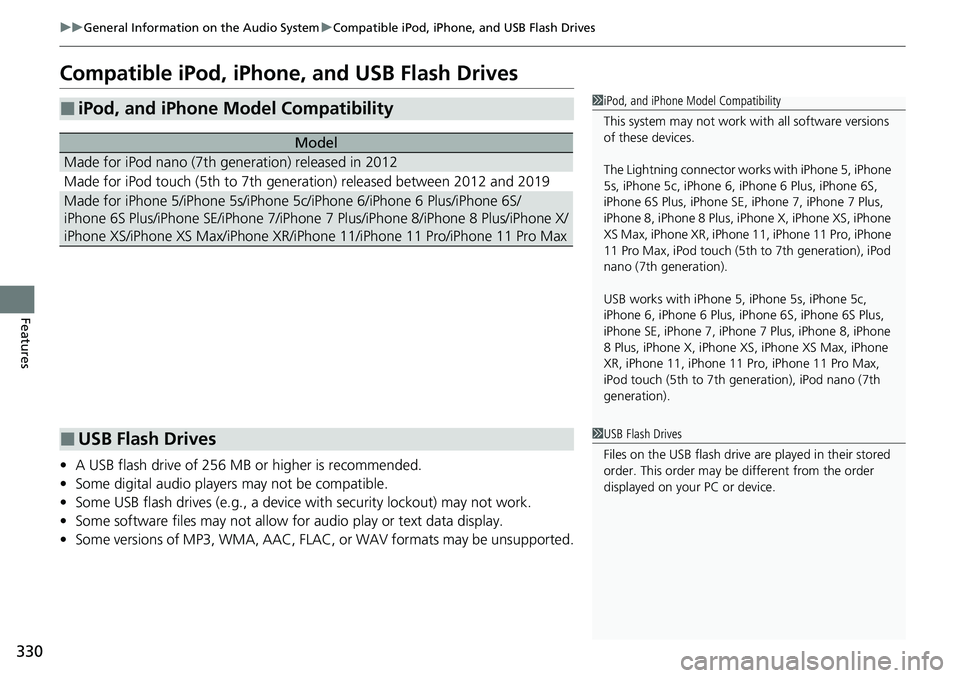
■iPod, and iPhone Model Compatibility
Model
Made for iPod nano (7th generation) released in 2012
Made for iPod touch (5th to 7th generation) released between 2012 and 2019
Made for iPhone 5/iPhone 5s/iPhone 5c/iPhone 6/iPhone 6 Plus/iPhone 6S/
iPhone 6S Plus/iPhone SE/iPhone 7/iPhone 7 Plus/iPhone 8/iPhone 8 Plus/iPhone X/
iPhone XS/iPhone XS Max/iPhone XR/iPhon e 11/iPhone 11 Pro/iPhone 11 Pro Max
1iPod, and iPhone Model Compatibility
This system may not work with all software versions
of these devices.
The Lightning connector work s with iPhone 5, iPhone
5s, iPhone 5c, iPhone 6, iPhone 6 Plus, iPhone 6S,
iPhone 6S Plus, iPhone SE, iPhone 7, iPhone 7 Plus,
iPhone 8, iPhone 8 Plus, iP hone X, iPhone XS, iPhone
XS Max, iPhone XR, iPhone 11, iPhone 11 Pro, iPhone
11 Pro Max, iPod touch (5th to 7th generation), iPod
nano (7th generation).
USB works with iPhone 5, iPhone 5s, iPhone 5c,
iPhone 6, iPhone 6 Plus, iPhone 6S, iPhone 6S Plus,
iPhone SE, iPhone 7, iPhone 7 Plus, iPhone 8, iPhone
8 Plus, iPhone X, iPhone XS, iPhone XS Max, iPhone
XR, iPhone 11, iPhone 11 Pro, iPhone 11 Pro Max,
iPod touch (5th to 7th ge neration), iPod nano (7th
generation).
■USB Flash Drives1 USB Flash Drives
Files on the USB flash drive are played in their stored
order. This order may be different from the order
displayed on your PC or device.
Page 355 of 657
353
uuCustomized Features u
Continued
Features
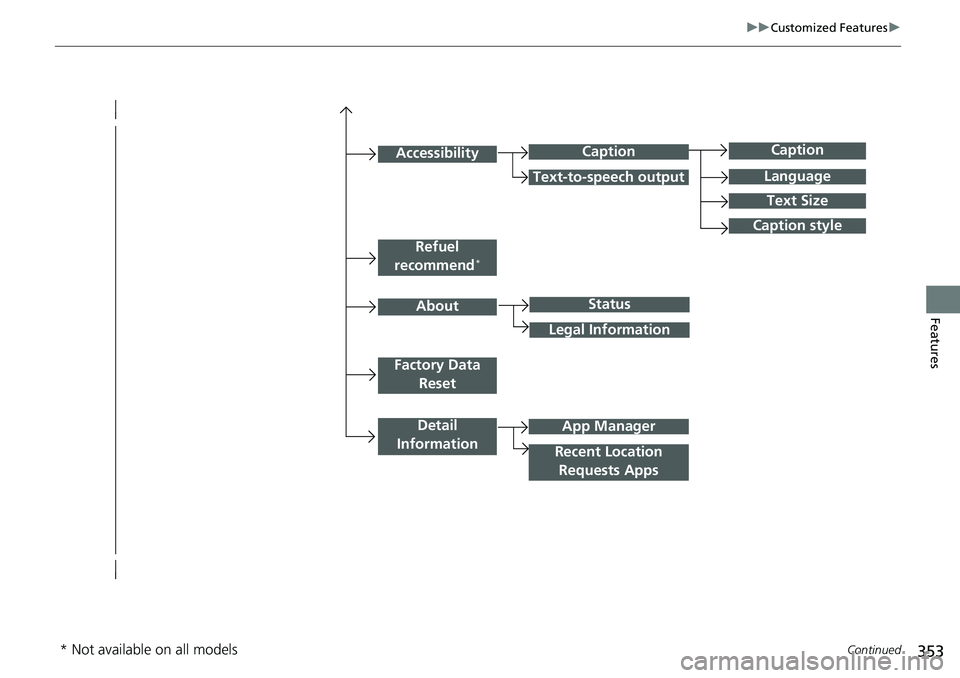
Caption
Language
Caption style
Detail
Information
Factory Data Reset
About
Refuel
recommend*
Accessibility
Status
Legal Information
App Manager
Recent Location Requests Apps
Caption
Text-to-speech output
Text Size
* Not available on all models
Page 357 of 657

355
uuCustomized Features u
Continued
Features
Vehicle
Meter Setup
Adjust Outside Temp. Display
“Trip A” Reset Timing
“Trip B” Reset Timing
Reverse Alert Tone*
Config. of Instrument Panel
Adjust Alarm Volume
Turn By Turn Auto Display
Fuel Efficiency Backlight
TPMS Calibration
Driver Assist
System SetupBlind Spot Info*
Head-up Warning*
Traffic Sign Recognition System
Forward Collision Warning Distance
ACC Forward Vehicle Detect Beep
Lane Keeping Assist Suspend Beep
Road Departure Mitigation Setting
Driver Attention Monitor
Speed/Distance Units
Tachometer
Language Selection
Auto Engine Idle Stop Guidance Screens*
Rear Seat Reminder*
* Not available on all models
Page 363 of 657
361
uuCustomized Features u
Continued
Features
*1:Default SettingSetup
Group Customizable Features Desc
riptionSelectable Settings
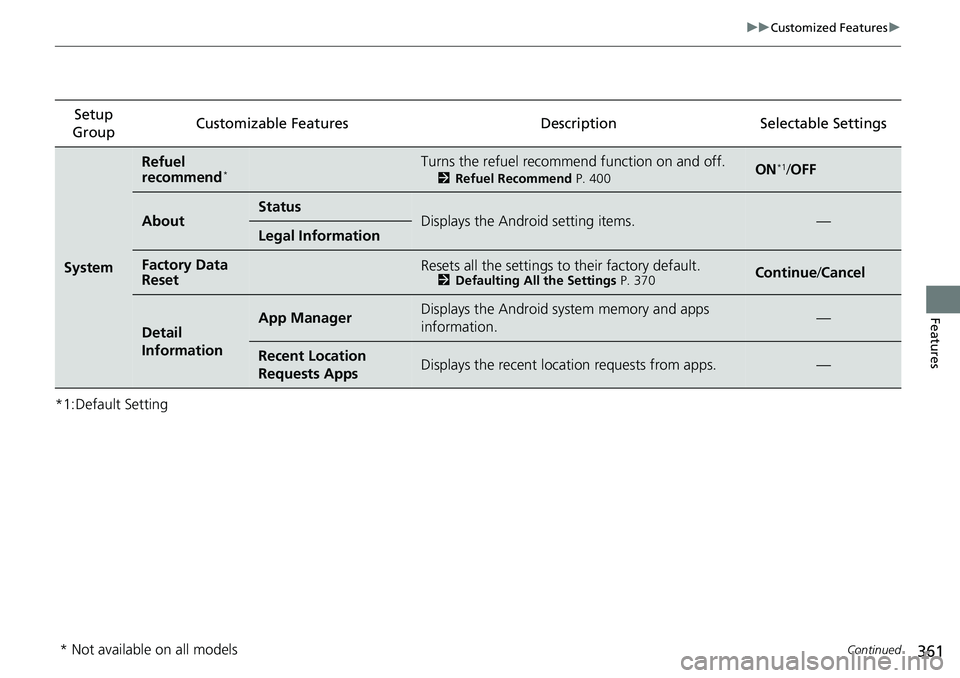
System
Refuel
recommend*Turns the refuel recommend function on and off.
2Refuel Recommend P. 400ON*1/OFF
AboutStatusDisplays the Android setting items.—Legal Information
Factory Data
ResetResets all the settings to their factory default.2 Defaulting All the Settings P. 370Continue/Cancel
Detail
InformationApp ManagerDisplays the Android system memory and apps
information.—
Recent Location
Requests AppsDisplays the recent locati on requests from apps.—
* Not available on all models
Page 365 of 657
363
uuCustomized Features u
Continued
Features
*1:Default SettingSetup
Group Customizable Features Description Selectable Settings
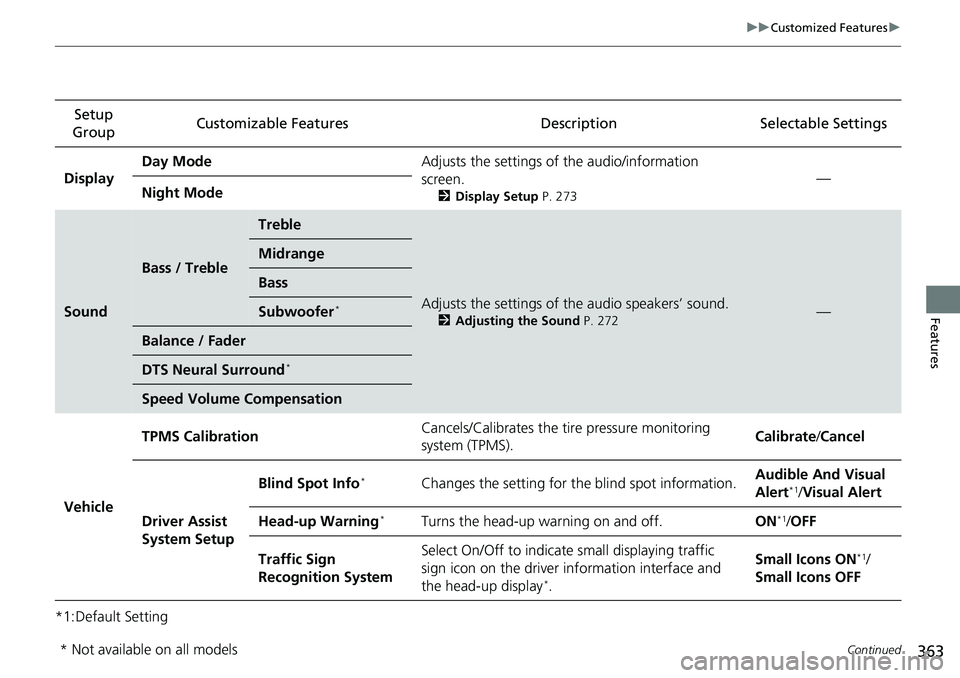
Display Day Mode
Adjusts the settings of the audio/information
screen.
2Display Setup P. 273
—
Night Mode
Sound
Bass / Treble
Treble
Adjusts the settings of the audio speakers’ sound.
2Adjusting the Sound P. 272—
Midrange
Bass
Subwoofer*
Balance / Fader
DTS Neural Surround*
Speed Volume Compensation
Vehicle TPMS Calibration
Cancels/Calibrates the tire pressure monitoring
system (TPMS). Calibrate
/Cancel
Driver Assist
System Setup Blind Spot Info
*Changes the setting for the blind spot information.
Audible And Visual
Alert*1/
Visual Alert
Head-up Warning
*Turns the head-up warning on and off. ON*1/OFF
Traffic Sign
Recognition System Select On/Off to indicate
small displaying traffic
sign icon on the driver information interface and
the head-up display
*. Small Icons ON
*1/
Small Icons OFF
* Not available on all models
Page 367 of 657
365
uuCustomized Features u
Continued
Features
*1:Default SettingSetup
Group Customizable Features Description Selectable Settings
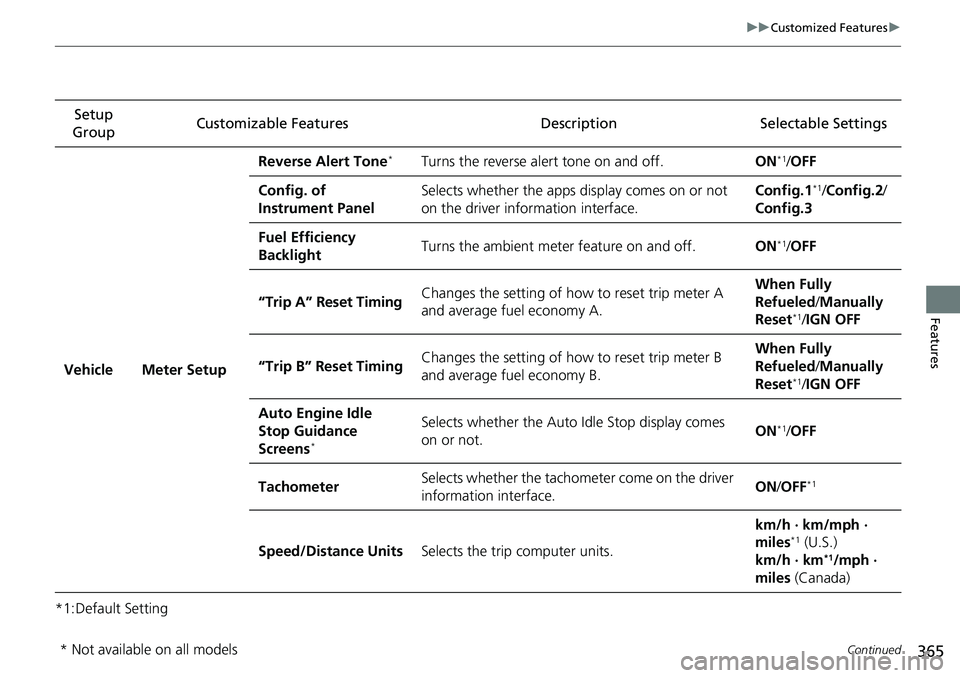
Vehicle Meter Setup Reverse Alert Tone
*Turns the reverse alert tone on and off.
ON*1/OFF
Config. of
Instrument Panel Selects whether the apps display comes on or not
on the driver information interface. Config.1
*1/
Config.2 /
Config.3
Fuel Efficiency
Backlight Turns the ambient meter feature on and off.
ON
*1/OFF
“Trip A” Reset Timing Changes the setting of how to reset trip meter A
and average fuel economy A. When Fully
Refueled
/Manually
Reset
*1/ IGN OFF
“Trip B” Reset Timing Changes the setting of how to reset trip meter B
and average fuel economy B. When Fully
Refueled
/Manually
Reset
*1/ IGN OFF
Auto Engine Idle
Stop Guidance
Screens
*
Selects whether the Auto Idle Stop display comes
on or not. ON*1/
OFF
Tachometer Selects whether the tachometer come on the driver
information interface. ON
/OFF
*1
Speed/Distance Units Selects the trip computer units. km/h · km/mph ·
miles*1 (U.S.)
km/h · km*1/mph ·
miles (Canada)
* Not available on all models
Page 402 of 657
400
Features
Refuel Recommend
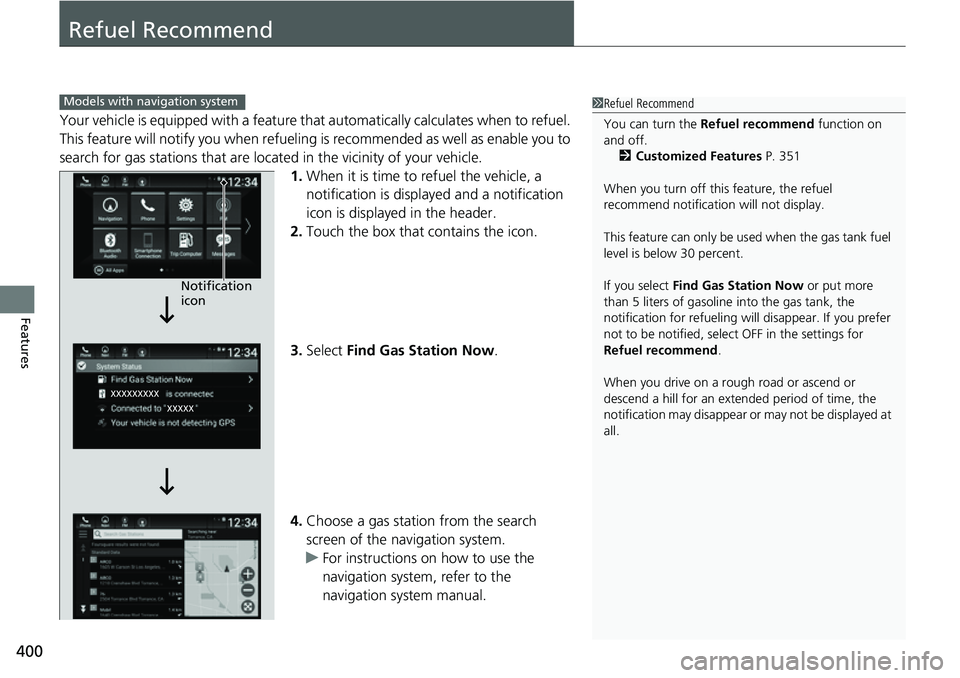
Your vehicle is equipped with a feature that automatically calculates when to refuel.
This feature will notify you when refueling is recommended as well as enable you to
search for gas stations that are loca ted in the vicinity of your vehicle.
1. When it is time to refuel the vehicle, a
notification is displayed and a notification
icon is displayed in the header.
2. Touch the box that contains the icon.
3. Select Find Gas Station Now .
4. Choose a gas station from the search
screen of the navigation system.
u For instructions on how to use the
navigation system, refer to the
navigation system manual.
1Refuel Recommend
You can turn the Refuel recommend function on
and off.
2 Customized Features P. 351
When you turn off this feature, the refuel
recommend notification will not display.
This feature can only be us ed when the gas tank fuel
level is below 30 percent.
If you select Find Gas Station Now or put more
than 5 liters of gasoline into the gas tank, the
notification for refueling will disappear. If you prefer
not to be notified, select OFF in the settings for
Refuel recommend .
When you drive on a rough road or ascend or
descend a hill for an ex tended period of time, the
notification may disappear or may not be displayed at
all.Models with navigation system
Notification
icon
Page 403 of 657
401
Driving
This chapter discusses driving and refueling.
Before Driving................................... 402
Towing a Trailer ................................ 407
When Driving Starting the Engine .......................... 412
Precautions While Driving................. 418
Transmission .................................... 419
Shifting ............................ 420, 427, 429
SPORT Mode
*.................................. 433
ECON Mode .................................... 434
Auto Idle Stop
*................................ 435
Adaptive Damper System*............... 440Vehicle Stability AssistTM (VSA ®), aka Electronic
Stability Control (ESC), System ..............441
Agile Handling Assist ..............................443
Tire Pressure Monitoring System (TPMS) .... 444Tire Pressure Monitoring System (TPMS) - Required Federal Explanation ......... 448
Blind spot information System
*........... 450
Honda Sensing ®................................ 453
Collision Mitigati on Braking System
TM
(CMBSTM) ....................................... 456
Low Speed Braking Control*............ 465
Adaptive Cruise Control (ACC) with Low
Speed Follow ................................. 470
Lane Keeping Assist System (LKAS).... 486
Road Departure Mitigation (RDM) System ....................................... 494
Traffic Sign Recognition System ....... 498 Front Sensor Camera ....................... 504
Radar Sensor ................................... 506
Sonar Sensors
*................................ 507
Braking
Brake System ................................... 508
Anti-lock Brake System (ABS) ........... 516
Brake Assist System ......................... 517
Parking Your Vehicle ........................ 518
Multi-View Rear Camera .................. 529
Refueling ........................................... 531
Fuel Economy and CO
2 Emissions .... 534
Turbo Engine Vehicle ....................... 535
* Not available on all models