instrument panel HONDA ACCORD 2022 Manual Online
[x] Cancel search | Manufacturer: HONDA, Model Year: 2022, Model line: ACCORD, Model: HONDA ACCORD 2022Pages: 657, PDF Size: 11.42 MB
Page 157 of 657
155
uuGauges and Displays uDriver Information Interface
Continued
Instrument Panel
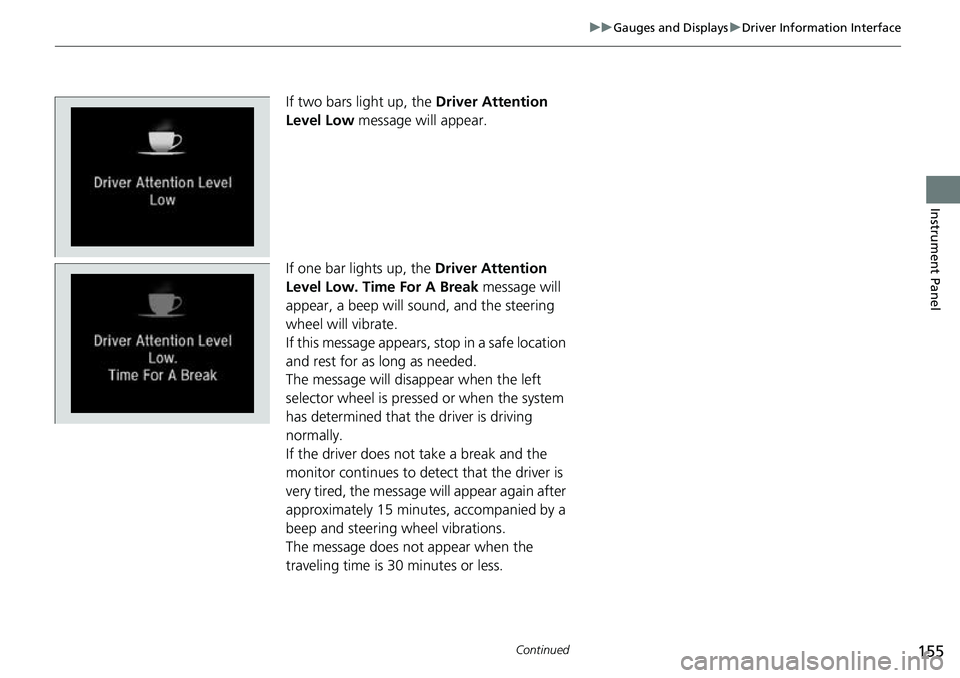
If two bars light up, the Driver Attention
Level Low message will appear.
If one bar lights up, the Driver Attention
Level Low. Time For A Break message will
appear, a beep will sound, and the steering
wheel will vibrate.
If this message appears, stop in a safe location
and rest for as long as needed.
The message will disappear when the left
selector wheel is presse d or when the system
has determined that the driver is driving
normally.
If the driver does not take a break and the
monitor continues to detect that the driver is
very tired, the message will appear again after
approximately 15 minutes, accompanied by a
beep and steering wheel vibrations.
The message does not appear when the
traveling time is 30 minutes or less.
Page 158 of 657
uuGauges and Displays uDriver Information Interface
156
Instrument Panel
■The Driver Attention Monitor resets when:
• The engine is turned off.
• The driver unfastens the seat belt and op ens the door while the vehicle is stopped.
■For the Driver Attention Monitor to function:
• The vehicle must be traveling above 25 mph (40 km/h).
• The electric power steering (EPS) system indicator must be off.
■Depending on driving conditions or other factors, the Driver Attention
Monitor may not function in the following circumstances:
• The steering assist function of the Lane Keeping Assist System (LKAS) is active.
2Lane Keeping Assist System (LKAS) P. 486
•The condition of the road is poor, e.g. the surface is unpaved or bumpy.
• It is windy.
• The driver is frequently op erating the vehicle in an assertive manner such as
changing lanes or accelerating.
■Customizing
You can change the Driver Attention Monitor settings. Select Tactile And Audible
Alert , Tactile Alert , or OFF.
2Customized Features P. 351
1For the Driver Attention Monitor to function:
The bars on the driver information interface remain
grayed out unless the Driv er Attention Monitor is
functioning.
Page 159 of 657
Continued157
uuGauges and Displays uDriver Information Interface
Instrument Panel
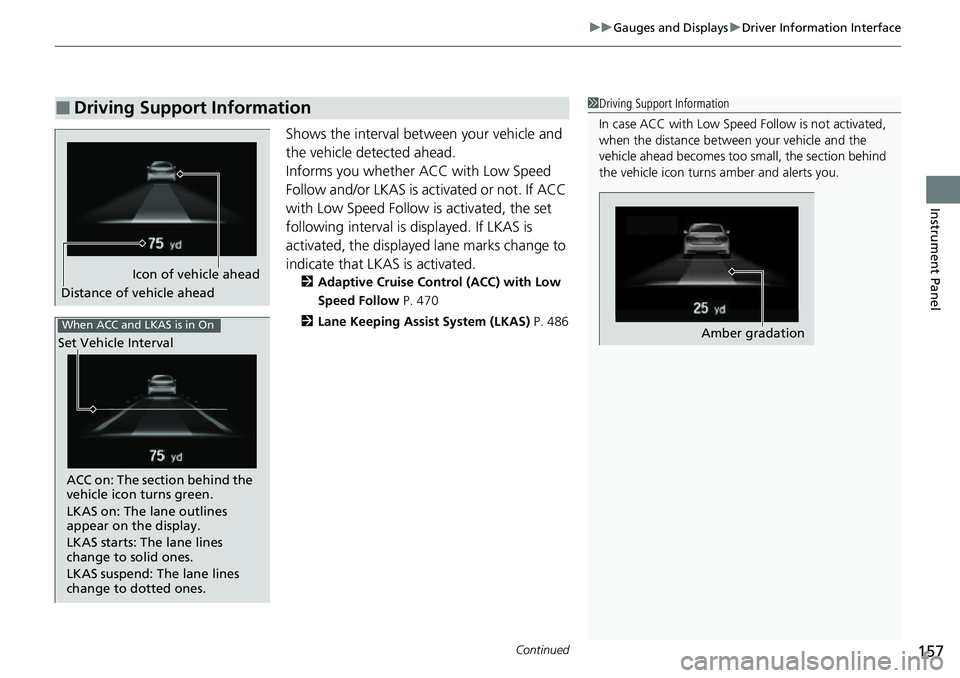
Shows the interval between your vehicle and
the vehicle detected ahead.
Informs you whether ACC with Low Speed
Follow and/or LKAS is activated or not. If ACC
with Low Speed Follow is activated, the set
following interval is displayed. If LKAS is
activated, the displayed lane marks change to
indicate that LKAS is activated.
2 Adaptive Cruise Control (ACC) with Low
Speed Follow P. 470
2 Lane Keeping Assist System (LKAS) P. 486
■Driving Support Information1Driving Support Information
In case ACC with Low Speed Follow is not activated,
when the distance betwee n your vehicle and the
vehicle ahead becomes too small, the section behind
the vehicle icon turns amber and alerts you.
Amber gradation
Icon of vehicle ahead
Distance of vehicle ahead
When ACC and LKAS is in On
Set Vehicle Interval
ACC on: The section behind the
vehicle icon turns green.
LKAS on: The lane outlines
appear on the display.
LKAS starts: The lane lines
change to solid ones.
LKAS suspend: The lane lines
change to dotted ones.
Page 160 of 657
uuGauges and Displays uDriver Information Interface
158
Instrument Panel
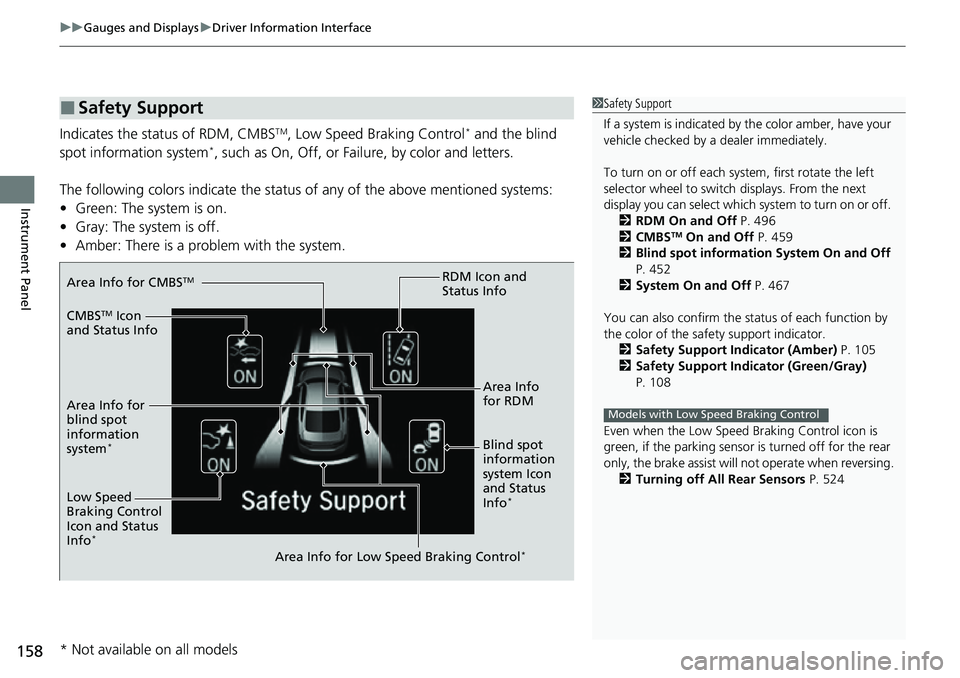
Indicates the status of RDM, CMBSTM, Low Speed Braking Control* and the blind
spot information system*, such as On, Off, or Fail ure, by color and letters.
The following colors indica te the status of any of the above mentioned systems:
• Green: The system is on.
• Gray: The system is off.
• Amber: There is a probl em with the system.
■Safety Support1Safety Support
If a system is indicated by the color amber, have your
vehicle checked by a dealer immediately.
To turn on or off each system, first rotate the left
selector wheel to switch displays. From the next
display you can select which system to turn on or off. 2 RDM On and Off P. 496
2 CMBS
TM On and Off P. 459
2 Blind spot information System On and Off
P. 452
2 System On and Off P. 467
You can also confirm the st atus of each function by
the color of the safe ty support indicator.
2 Safety Support Indicator (Amber) P. 105
2 Safety Support Indicator (Green/Gray)
P. 108
Even when the Low Speed Braking Control icon is
green, if the parking sensor is turned off for the rear
only, the brake assist will not operate when reversing.
2 Turning off All Rear Sensors P. 524
Models with Low Speed Braking Control
Area Info for CMBSTM
CMBSTM Icon
and Status Info
Area Info for
blind spot
information
system
*Blind spot
information
system Icon
and Status
Info
*Low Speed
Braking Control
Icon and Status
Info
*
Area Info for Low Speed Braking Control*
RDM Icon and
Status Info
Area Info
for RDM
* Not available on all models
Page 161 of 657
159
uuGauges and Displays uHead-Up Display*
Continued
Instrument Panel
Head-Up Display*
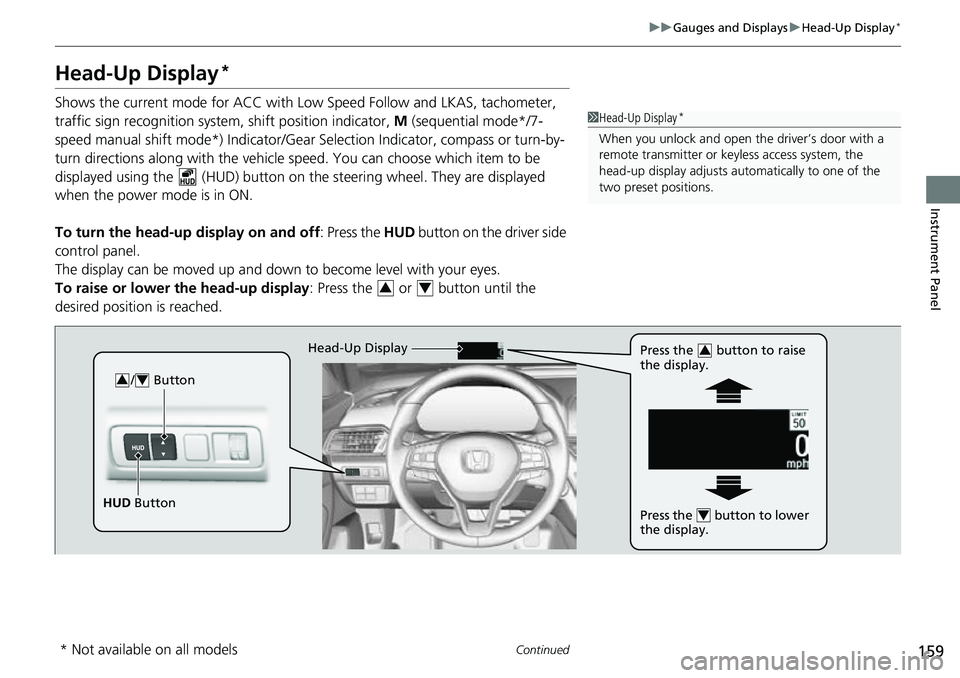
Shows the current mode for ACC with Lo w Speed Follow and LKAS, tachometer,
traffic sign recognition system, shift position indicator, M (sequential mode*/7-
speed manual shift mode*) Indicator/Gear Selection Indicator, compass or turn-by-
turn directions along with the vehicle speed. You can choose which item to be
displayed using the (HUD) button on th e steering wheel. They are displayed
when the power mode is in ON.
To turn the head-up display on and off: Press the HUD button on the driver side
control panel.
The display can be moved up and down to become level with your eyes.
To raise or lower the head-up display : Press the or button until the
desired position is reached.1 Head-Up Display*
When you unlock and open the driver’s door with a
remote transmitter or keyless access system, the
head-up display adjusts auto matically to one of the
two preset positions.
34
/ Button34
HUD Button Head-Up Display
Press the button to raise
the display.
3
Press the button to lower
the display.4
* Not available on all models
Page 162 of 657
160
uuGauges and Displays uHead-Up Display*
Instrument Panel
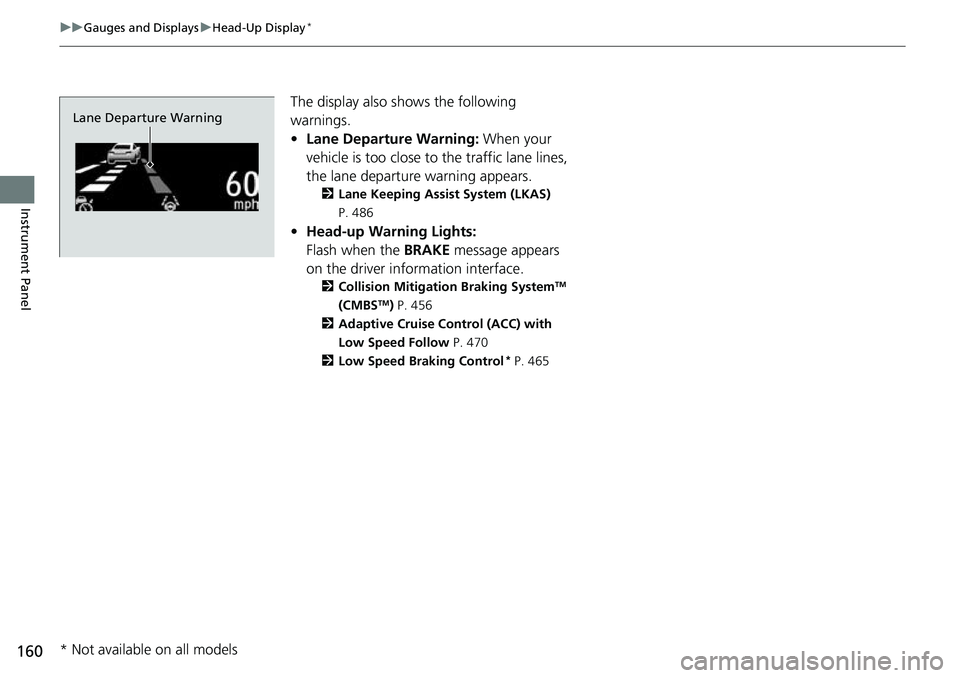
The display also s hows the following
warnings.
• Lane Departure Warning: When your
vehicle is too close to the traffic lane lines,
the lane departure warning appears.
2 Lane Keeping Assist System (LKAS)
P. 486
• Head-up Warning Lights:
Flash when the BRAKE message appears
on the driver information interface.
2 Collision Mitigation Braking SystemTM
(CMBSTM) P. 456
2 Adaptive Cruise Control (ACC) with
Low Speed Follow P. 470
2 Low Speed Braking Control
* P. 465
Lane Departure Warning
* Not available on all models
Page 163 of 657
161
uuGauges and Displays uHead-Up Display*
Continued
Instrument Panel
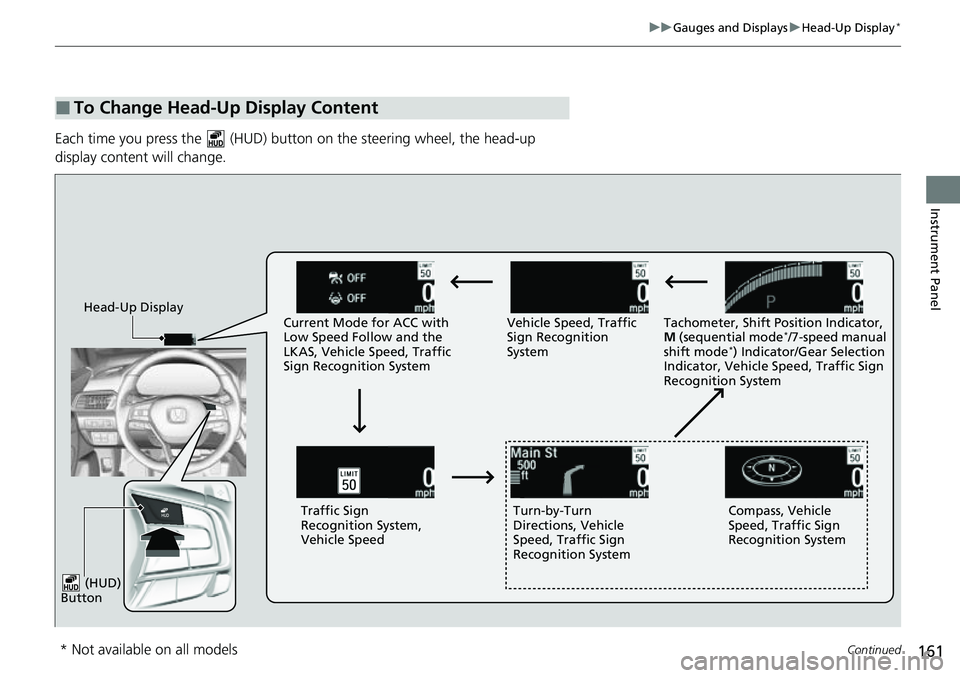
Each time you press the (HUD) bu tton on the steering wheel, the head-up
display content will change.
■To Change Head-Up Display Content
Head-Up Display Current Mode for ACC with
Low Speed Follow and the
LKAS, Vehicle Speed, Traffic
Sign Recognition System Vehicle Speed, Traffic
Sign Recognition
System
Tachometer, Shift Position Indicator,
M
(sequential mode
*/7-speed manual
shift mode*) Indicator/Gear Selection
Indicator, Vehicle Speed, Traffic Sign
Recognition System
Traffic Sign
Recognition System,
Vehicle Speed Turn-by-Turn
Directions, Vehicle
Speed, Traffic Sign
Recognition System Compass, Vehicle
Speed, Traffic Sign
Recognition System
(HUD)
Button
* Not available on all models
Page 164 of 657
uuGauges and Displays uHead-Up Display*
162
Instrument Panel
Shows your driving speed in mph or km/h.
Shows the number of engine revolutions as a bar graph.
Shows the current shift position.
2 Shift Position Indicator P. 88
Shows the current mode for the sequential mode*/7-speed manual shift mode*.
Shows the current mode for ACC wi th Low Speed Follow and LKAS.
2Adaptive Cruise Control (ACC) with Low Speed Follow P. 470
2 Lane Keeping Assist System (LKAS) P. 486
■Vehicle Speed
■Tachometer
■Shift Position Indicator
■M (sequential mode*/7-speed manual shift mode*)
Indicator/Gear Selection Indicator
■Current Mode for ACC with Low Speed Follow and LKAS
1 Vehicle Speed
Switch between mph and km/h by using the driver
information interface or cu stomized features on the
audio/information screen. 2 Speed/Distance Units P. 151
2 Customized Features P. 351
* Not available on all models
Page 165 of 657
163
uuGauges and Displays uHead-Up Display*
Instrument Panel
■Compass
Shows the compass screen.
■Turn-by-Turn Directions
When driving guidance is provided by the navigation system, Android Auto or Apple
CarPlay, turn-by-turn directions to your destination appear.
2Refer to the Navigation System Manual
2 Android Auto P. 320
2 Apple CarPlay P. 313
Shows the traffic sign recognition system.
2Traffic Sign Recognition System P. 498
■Navigation
■Traffic Sign Recognition System
1Navigation
You can select whether th e turn-by-turn display
comes on during the route guidance.
2 Customized Features P. 351
Turn-by-turn directions may not be available for all
apps.
Page 187 of 657
185
uuSecurity System uSecurity System Alarm
Continued
Controls
Security System Alarm
The security system alarm activates when the trunk, hood or doors are forcibly
opened. The alarm does not activate if the trunk or doors are opened with the key,
remote transmitter, or keyless access system
*.
However, the alarm activates if a door is opened with the key and then the
transmission is taken out of
(P (continuously variable transmission models) or the
hood is opened before the power mode is in ON.
■When the security system alarm activates
The horn sounds intermittently, and some exterior lights flash.
■To deactivate the security system alarm
Unlock the vehicle using the key, remote transmitter or keyless access system*, or set
the power mode to ON. The system, along with the horn and flashing lights, is
deactivated.
■Setting the security system alarm
The security system alarm automatically sets when the following conditions have
been met:
• The power mode is set to VEHICLE OFF.
• The hood is closed.
• All doors and trunk are locked from outsid e with the key, remote transmitter, or
keyless access system
*.
■When the security system alarm sets
The security system alarm in dicator in the instrument panel blinks and the blinking
interval changes after about 15 seconds.
■To cancel the security system alarm
The security system alarm is canceled wh en the vehicle is unlocked using the key,
remote transmitter or keyless access system
*, or when the power mode is set to ON.
The security system alarm indicator goes off at the same time.
1 Security System Alarm
Do not alter the system or add other devices to it.
Doing so may damage the system and make your
vehicle inoperable.
The security system alarm continues for a maximum
of two minutes until the security system alarm
deactivates.
Do not set the security system alarm when someone
is in the vehicle or a window is open. The system can
accidentally activate when:
•Unlocking the door with the lock tab.
•Opening the trunk with the trunk opener or the
emergency trunk opener.
•Opening the hood with the hood release.
•Taking the transmission out of ( P.
If the battery goes dead after you have set the
security system alarm, the security alarm may go off
once the battery is re charged or replaced.
If this occurs, deactivate the security system alarm by
unlocking a door using the ke y, remote transmitter,
or keyless access system
*.
Continuously variable transmission models
* Not available on all models