park assist HONDA ACCORD 2022 Owners Manual
[x] Cancel search | Manufacturer: HONDA, Model Year: 2022, Model line: ACCORD, Model: HONDA ACCORD 2022Pages: 657, PDF Size: 11.42 MB
Page 8 of 657
6
Quick Reference Guide
Quick Reference Guide
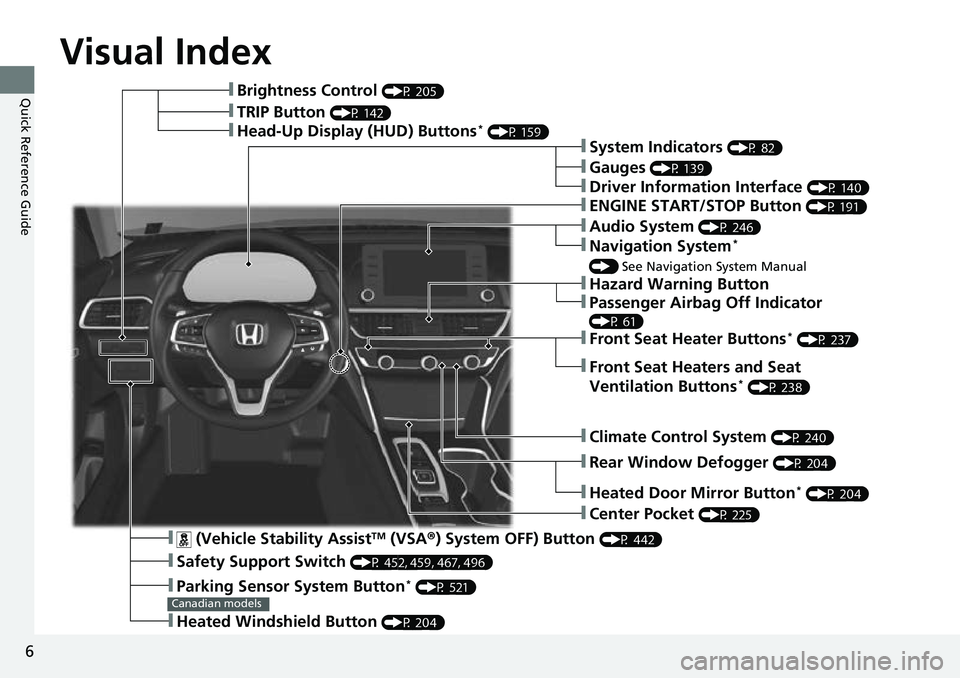
Visual Index
❚ (Vehicle Stability AssistTM (VSA®) System OFF) Button (P 442)
❚Safety Support Switch (P 452, 459, 467, 496)
❚Parking Sensor System Button* (P 521)
❚Heated Windshield Button (P 204)
Canadian models
❚Brightness Control (P 205)
❚Head-Up Display (HUD) Buttons* (P 159)❚System Indicators (P 82)
❚Gauges (P 139)
❚Driver Information Interface (P 140)
❚ENGINE START/STOP Button (P 191)
❚Climate Control System (P 240)
❚Rear Window Defogger (P 204)
❚Heated Door Mirror Button* (P 204)
❚Center Pocket (P 225)
❚Hazard Warning Button
❚TRIP Button (P 142)
❚Audio System (P 246)
❚Navigation System*
() See Navigation System Manual
❚Front Seat Heater Buttons* (P 237)
❚Front Seat Heaters and Seat
Ventilation Buttons* (P 238)
❚Passenger Airbag Off Indicator
(P 61)
Page 84 of 657
82
Instrument Panel
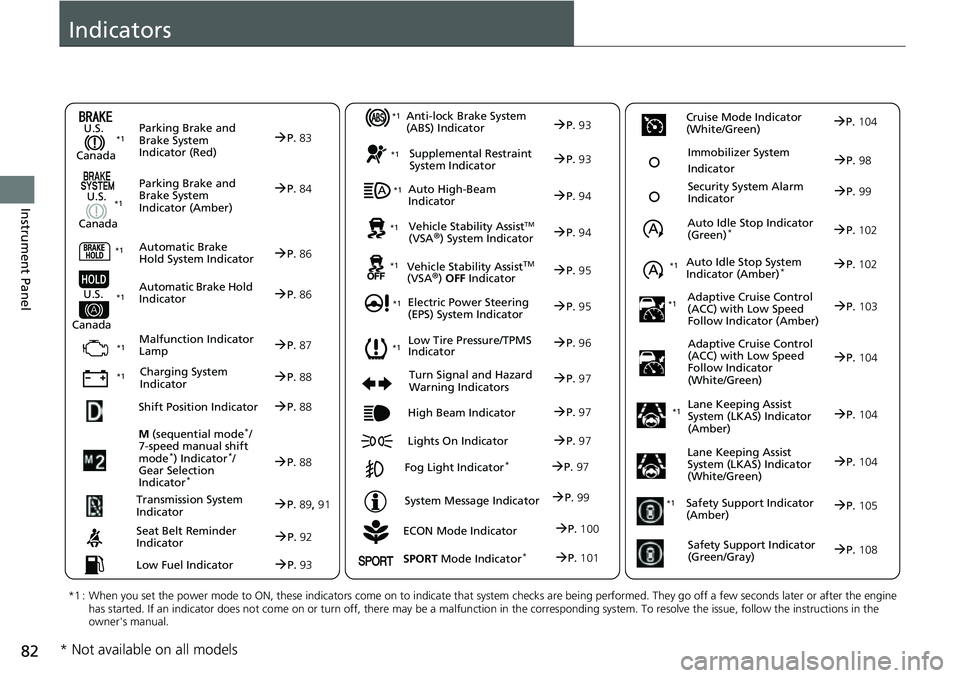
Indicators
ECON Mode Indicator
M
(sequential mode
*/
7-speed manual shift
mode
*) Indicator*/
Gear Selection
Indicator
*
P. 88
Parking Brake and
Brake System
Indicator (Red)
Parking Brake and
Brake System
Indicator (Amber)
U.S.
Canada
U.S.
Canada Automatic Brake
Hold System Indicator
Automatic Brake Hold
IndicatorU.S.
Canada
*1 : When you set the power mode to ON, these indicators come on to indicate that system checks are being performed. They go off a few seconds later or after the engine
has started. If an indicator does not come on or turn off, ther e may be a malfunction in the corresponding system. To resolve the issue, follow the instructions in the
owner's manual.
P. 83*1
Malfunction Indicator
Lamp
Charging System
Indicator
Anti-lock Brake System
(ABS) Indicator
Seat Belt Reminder
Indicator
Low Fuel Indicator
Vehicle Stability AssistTM (VSA®) System Indicator
Vehicle Stability Assist
TM (VSA®) OFF Indicator
Supplemental Restraint
System Indicator
Auto High-Beam
Indicator
Low Tire Pressure/TPMS
Indicator
Electric Power Steering
(EPS) System Indicator
Turn Signal and Hazard
Warning Indicators
Lights On Indicator High Beam Indicator
Fog Light Indicator*
System Message Indicator Auto Idle Stop Indicator
(Green)
*
Lane Keeping Assist
System (LKAS) Indicator
(Amber)
Safety Support Indicator
(Amber)
Safety Support Indicator
(Green/Gray)
P. 84
P.86
P.86
P.87
P.88
*1
*1 *1 *1
P.
96*1
*1
Shift Position IndicatorP. 88
Transmission System
Indic a
torP.89, 91
P.92
P.93
P.93
P.93
P.94
P.94
*1
*1
*1
*1
P. 95
*1P.95
P.97
P.102
*1
P.97
P.97
P.97 Security System Alarm
Indica
to
r P.99
P.99
P. 104
P.105
P.108
*1Auto Idle Stop System
Indicator (Amber)*P.102
*1
Lane Keeping Assist
System (LKAS) Indicator
(White/Green)P.104
*1
Immobilizer System
IndicatorP.98
SPORT Mode Indicator*P.101
P.100
Cruise Mode Indicator
(White/Green)P. 104
Adaptive Cruise Control
(A C
C) with Low Speed
Follow Indicator (Amber)P. 103*1
Adaptive Cruise Control
(ACC) with Low Speed
Follow Indicator
(White/Green)P.104
* Not available on all models
Page 160 of 657
uuGauges and Displays uDriver Information Interface
158
Instrument Panel
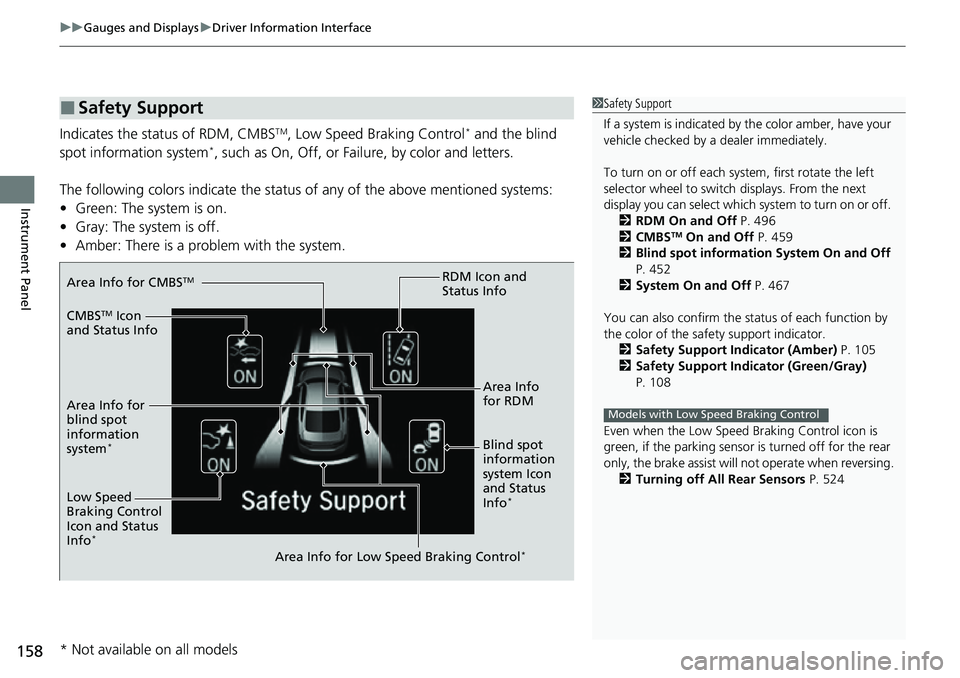
Indicates the status of RDM, CMBSTM, Low Speed Braking Control* and the blind
spot information system*, such as On, Off, or Fail ure, by color and letters.
The following colors indica te the status of any of the above mentioned systems:
• Green: The system is on.
• Gray: The system is off.
• Amber: There is a probl em with the system.
■Safety Support1Safety Support
If a system is indicated by the color amber, have your
vehicle checked by a dealer immediately.
To turn on or off each system, first rotate the left
selector wheel to switch displays. From the next
display you can select which system to turn on or off. 2 RDM On and Off P. 496
2 CMBS
TM On and Off P. 459
2 Blind spot information System On and Off
P. 452
2 System On and Off P. 467
You can also confirm the st atus of each function by
the color of the safe ty support indicator.
2 Safety Support Indicator (Amber) P. 105
2 Safety Support Indicator (Green/Gray)
P. 108
Even when the Low Speed Braking Control icon is
green, if the parking sensor is turned off for the rear
only, the brake assist will not operate when reversing.
2 Turning off All Rear Sensors P. 524
Models with Low Speed Braking Control
Area Info for CMBSTM
CMBSTM Icon
and Status Info
Area Info for
blind spot
information
system
*Blind spot
information
system Icon
and Status
Info
*Low Speed
Braking Control
Icon and Status
Info
*
Area Info for Low Speed Braking Control*
RDM Icon and
Status Info
Area Info
for RDM
* Not available on all models
Page 203 of 657
201
uuOperating the Switches Around the Steering Wheel uAuto High-Beam
Controls
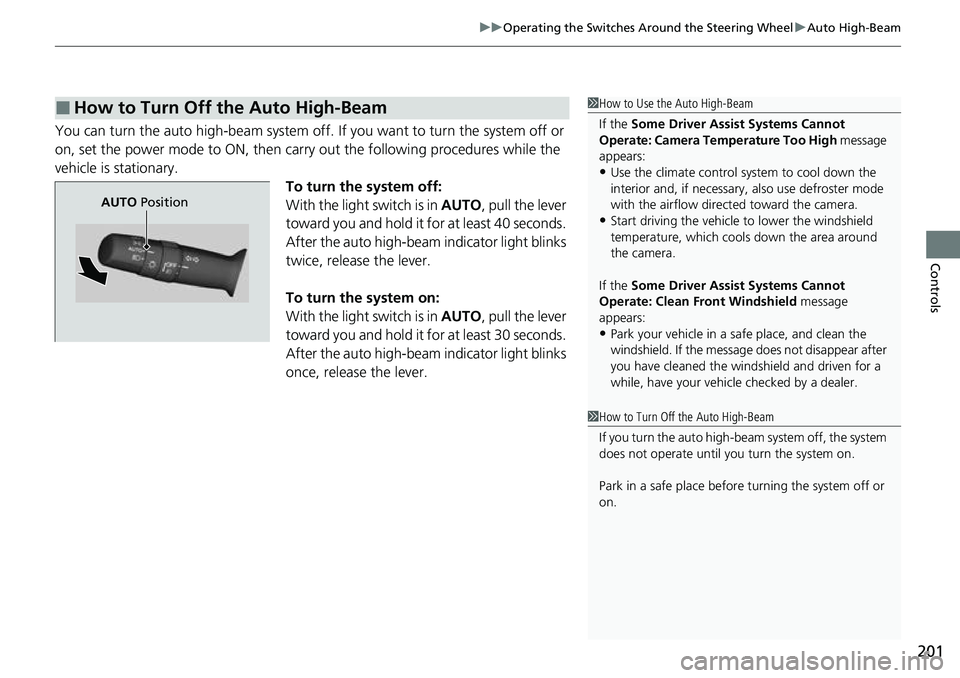
You can turn the auto high-beam system off. If you want to turn the system off or
on, set the power mode to ON, then carry out the following procedures while the
vehicle is stationary. To turn the system off:
With the light switch is in AUTO, pull the lever
toward you and hold it for at least 40 seconds.
After the auto high-beam indicator light blinks
twice, release the lever.
To turn the system on:
With the light switch is in AUTO, pull the lever
toward you and hold it for at least 30 seconds.
After the auto high-beam indicator light blinks
once, release the lever.
■How to Turn Off the Auto High-Beam1 How to Use the Auto High-Beam
If the Some Driver Assist Systems Cannot
Operate: Camera Temperature Too High message
appears:
•Use the climate control system to cool down the
interior and, if necessary, also use defroster mode
with the airflow directed toward the camera.
•Start driving the vehicle to lower the windshield
temperature, which cool s down the area around
the camera.
If the Some Driver Assist Systems Cannot
Operate: Clean Front Windshield message
appears:
•Park your vehicle in a sa fe place, and clean the
windshield. If the message does not disappear after
you have cleaned the windshield and driven for a
while, have your vehicle checked by a dealer.
1 How to Turn Off the Auto High-Beam
If you turn the au to high-beam system off, the system
does not operate until you turn the system on.
Park in a safe place before turning the system off or
on.
AUTO Position
Page 308 of 657
uuAudio System Basic Operation uHondaLink ® Service*
306
Features
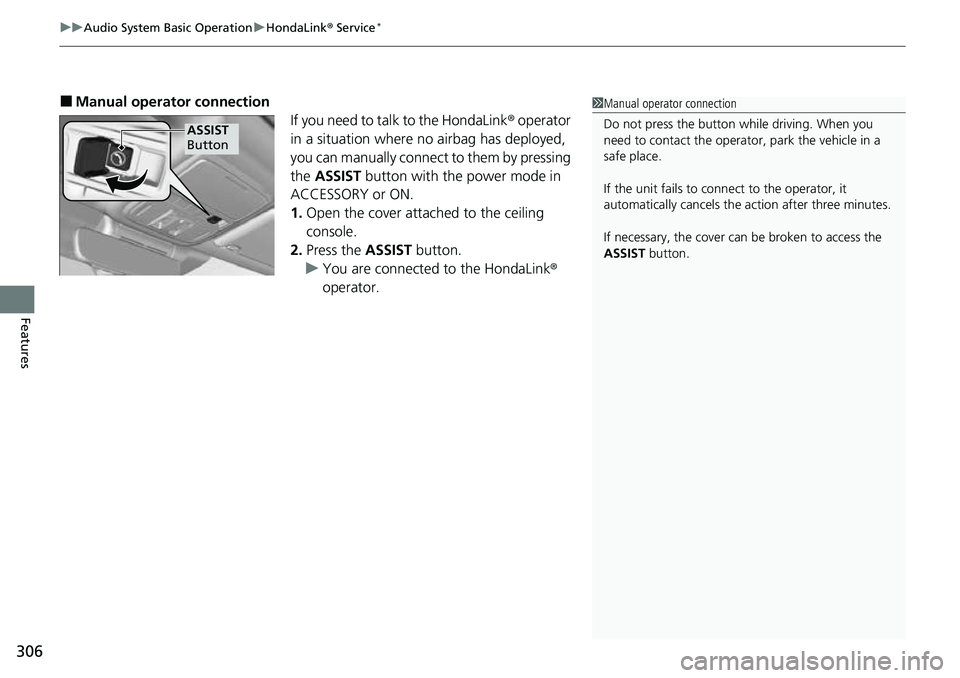
■Manual operator connection
If you need to talk to the HondaLink ® operator
in a situation where no airbag has deployed,
you can manually connect to them by pressing
the ASSIST button with the power mode in
ACCESSORY or ON.
1. Open the cover attached to the ceiling
console.
2. Press the ASSIST button.
u You are connected to the HondaLink ®
operator.1 Manual operator connection
Do not press the button while driving. When you
need to contact the operato r, park the vehicle in a
safe place.
If the unit fails to connect to the operator, it
automatically cancels the action after three minutes.
If necessary, the cover can be broken to access the
ASSIST button.
ASSIST
Button
Page 379 of 657
377
uuBluetooth ® HandsFreeLink ®u HFL Menus
Continued
Features
HFL Menus
The power mode must be in ACCESSO RY or ON to use the system.
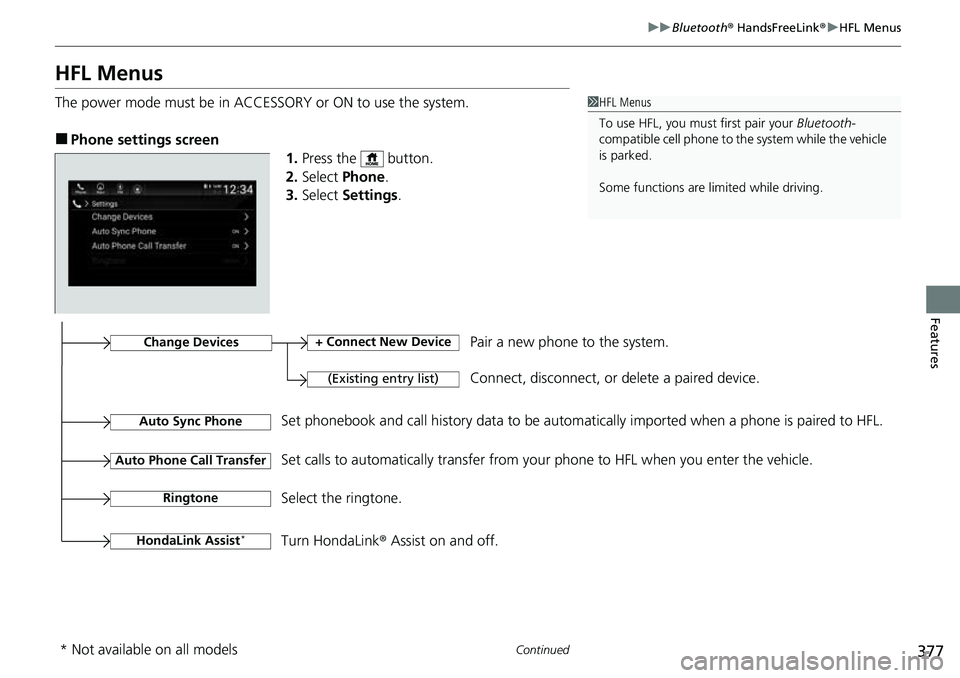
■Phone settings screen
1.Press the button.
2. Select Phone .
3. Select Settings .
1HFL Menus
To use HFL, you must first pair your Bluetooth-
compatible cell phone to th e system while the vehicle
is parked.
Some functions are limited while driving.
Change Devices
(Existing entry list)
+ Connect New DevicePair a new phone to the system.
Connect, disconnect, or delete a paired device.
RingtoneSelect the ringtone.
Auto Sync PhoneSet phonebook and call history data to be automa tically imported when a phone is paired to HFL.
Auto Phone Call TransferSet calls to automatically transfer from your phone to HFL when you enter the vehicle.
HondaLink Assist*Turn HondaLink® Assist on and off.
* Not available on all models
Page 403 of 657
401
Driving
This chapter discusses driving and refueling.
Before Driving................................... 402
Towing a Trailer ................................ 407
When Driving Starting the Engine .......................... 412
Precautions While Driving................. 418
Transmission .................................... 419
Shifting ............................ 420, 427, 429
SPORT Mode
*.................................. 433
ECON Mode .................................... 434
Auto Idle Stop
*................................ 435
Adaptive Damper System*............... 440Vehicle Stability AssistTM (VSA ®), aka Electronic
Stability Control (ESC), System ..............441
Agile Handling Assist ..............................443
Tire Pressure Monitoring System (TPMS) .... 444Tire Pressure Monitoring System (TPMS) - Required Federal Explanation ......... 448
Blind spot information System
*........... 450
Honda Sensing ®................................ 453
Collision Mitigati on Braking System
TM
(CMBSTM) ....................................... 456
Low Speed Braking Control*............ 465
Adaptive Cruise Control (ACC) with Low
Speed Follow ................................. 470
Lane Keeping Assist System (LKAS).... 486
Road Departure Mitigation (RDM) System ....................................... 494
Traffic Sign Recognition System ....... 498 Front Sensor Camera ....................... 504
Radar Sensor ................................... 506
Sonar Sensors
*................................ 507
Braking
Brake System ................................... 508
Anti-lock Brake System (ABS) ........... 516
Brake Assist System ......................... 517
Parking Your Vehicle ........................ 518
Multi-View Rear Camera .................. 529
Refueling ........................................... 531
Fuel Economy and CO
2 Emissions .... 534
Turbo Engine Vehicle ....................... 535
* Not available on all models
Page 419 of 657
417
uuWhen Driving uStarting the Engine
Driving
1. Depress and hold the brake pedal, then press the ENGINE START/STOP button.
2. Keeping your right foot on the br ake pedal, put the transmission into
(D. Select
(R when reversing.
3. With the parking brake applied, release the brake pedal and gently depress the
accelerator pedal.
u Make sure the parking brake and brake system indicator (red) goes off.
2Parking Brake P. 508
■Hill start assist system
Hill start assist keeps the brake engaged br iefly to help prevent the vehicle from
rolling on inclines as you move your foot from the brake pedal to the accelerator.
Put the transmission into
(D, (S* or (L* when facing uphill, or (R when facing
downhill, then release the brake pedal.
You can turn the engine off when the vehicle is completely stopped.
1. Put the transmission into
(P.
2. Press the ENGINE START/STOP button.
■Starting to Drive
■Stopping the Engine
1Starting to Drive
The engine stops when th e transmission is taken out
of
( P before the ENGINE START/STOP button is
pressed. Follow the step 1 when starting to drive.
You can also release the parking brake by pressing
the electric parking brake sw itch while depressing the
brake pedal.
When facing downhill, you can start your vehicle
more smoothly by manually releasing it with the
electric parking brake switch than by releasing it with
the accelerator pedal.
When the engine was started using the button on the
keyless remoteWhen the engine was started using the button on the keyless remote
When the engine was started in any case
1 Hill start assist system
Hill start assist may not prevent the vehicle from
rolling downhill on a very st eep or slippery slope, and
will not operate on small inclines.
Hill start assist is not a replacement for the parking
brake.
Hill start assist will operate even when VSA ® is
switched off.
* Not available on all models
Page 452 of 657
450
uuWhen Driving uBlind spot information System*
Driving
Blind spot information System*
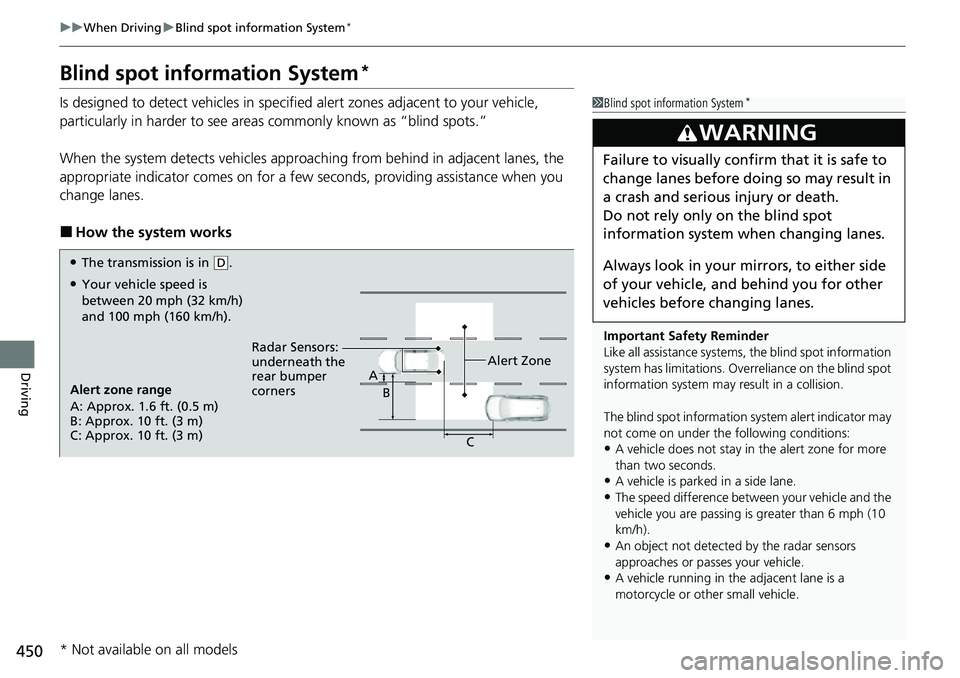
Is designed to detect vehicles in specified alert zones adjacent to your vehicle,
particularly in harder to see areas commonly known as “blind spots.”
When the system detects vehi cles approaching from behind in adjacent lanes, the
appropriate indicator comes on for a few se conds, providing assistance when you
change lanes.
■How the system works
1 Blind spot information System*
Important Safety Reminder
Like all assistance systems, the blind spot information
system has limitations. Ove rreliance on the blind spot
information system may result in a collision.
The blind spot information system alert indicator may
not come on under the following conditions:
•A vehicle does not stay in the alert zone for more
than two seconds.
•A vehicle is parked in a side lane.•The speed difference betw een your vehicle and the
vehicle you are passing is greater than 6 mph (10
km/h).
•An object not detected by the radar sensors
approaches or passes your vehicle.
•A vehicle running in the adjacent lane is a
motorcycle or other small vehicle.
3WARNING
Failure to visually confirm that it is safe to
change lanes before doing so may result in
a crash and serious injury or death.
Do not rely only on the blind spot
information system wh en changing lanes.
Always look in your mi rrors, to either side
of your vehicle, and behind you for other
vehicles before changing lanes.
Alert zone range
A: Approx. 1.6 ft. (0.5 m)
B: Approx. 10 ft. (3 m)
C: Approx. 10 ft. (3 m) Radar Sensors:
underneath the
rear bumper
corners
Alert ZoneA
B
C
●Your vehicle speed is
between 20 mph (32 km/h)
and 100 mph (160 km/h).
●The transmission is in (D.
* Not available on all models
Page 468 of 657
uuHonda Sensing ®u Low Speed Braking Control*
466
Driving
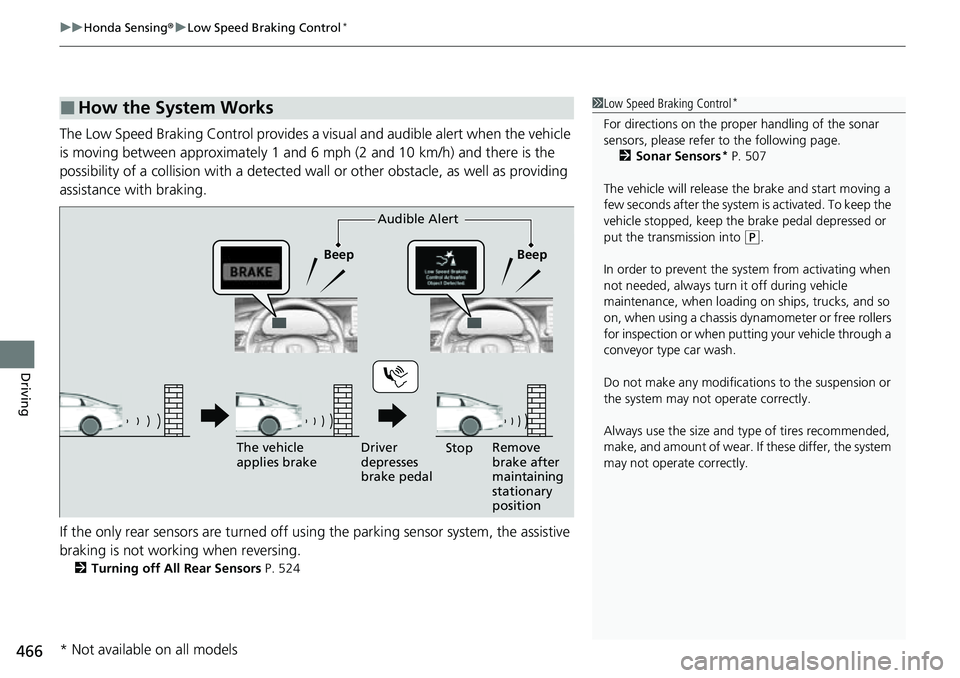
The Low Speed Braking Control provides a visual and audible alert when the vehicle
is moving between approximately 1 and 6 mph (2 and 10 km/h) and there is the
possibility of a collision with a detected wall or other obstacle, as well as providing
assistance with braking.
If the only rear sensors are turned off using the parking sensor system, the assistive
braking is not working when reversing.
2 Turning off All Rear Sensors P. 524
■How the System Works1Low Speed Braking Control*
For directions on the prop er handling of the sonar
sensors, please refer to the following page.
2 Sonar Sensors
* P. 507
The vehicle will release the brake and start moving a
few seconds after the system is activated. To keep the
vehicle stopped, keep the brake pedal depressed or
put the transmission into
( P.
In order to prevent the sy stem from activating when
not needed, always turn it off during vehicle
maintenance, when loading on ships, trucks, and so
on, when using a chassis dy namometer or free rollers
for inspection or when pu tting your vehicle through a
conveyor type car wash.
Do not make any modificati ons to the suspension or
the system may not operate correctly.
Always use the size and ty pe of tires recommended,
make, and amount of wear. If these differ, the system
may not operate correctly.
Beep Beep
The vehicle
applies brake Driver
depresses
brake pedal Remove
brake after
maintaining
stationary
position
Stop
Audible Alert
* Not available on all models