reset HONDA ACCORD 2023 User Guide
[x] Cancel search | Manufacturer: HONDA, Model Year: 2023, Model line: ACCORD, Model: HONDA ACCORD 2023Pages: 533, PDF Size: 20.09 MB
Page 136 of 533
134
uuGauges and Driver Information Interface uDriver Information Interface (Right Side Area)
Instrument Panel
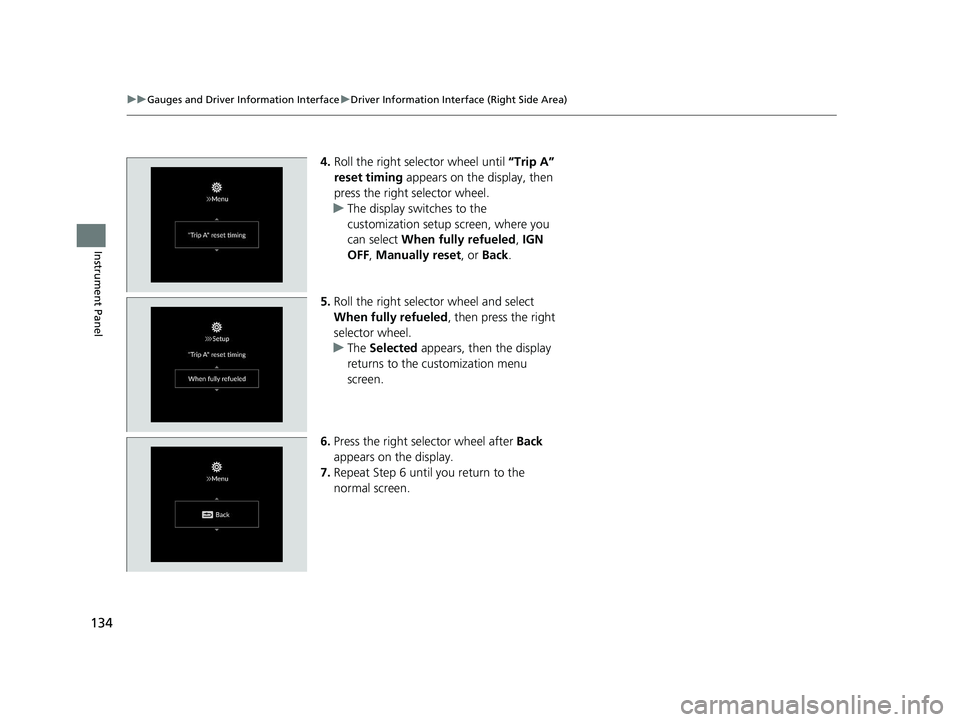
4. Roll the right selector wheel until “Trip A”
reset timing appears on the display, then
press the right selector wheel.
u The display switches to the
customization setup screen, where you
can select When fully refueled , IGN
OFF , Manually reset , or Back.
5. Roll the right selector wheel and select
When fully refueled , then press the right
selector wheel.
u The Selected appears, then the display
returns to the customization menu
screen.
6. Press the right selector wheel after Back
appears on the display.
7. Repeat Step 6 until you return to the
normal screen.
23 ACCORD 4D US PET MAP-3130A6000_01.book 134 ページ 2022年10月19日 水曜日 午前11時49分
Page 146 of 533
uuLocking and Unlocking the Doors uLocking/Unlocking the Doors from the Outside
144
Controls
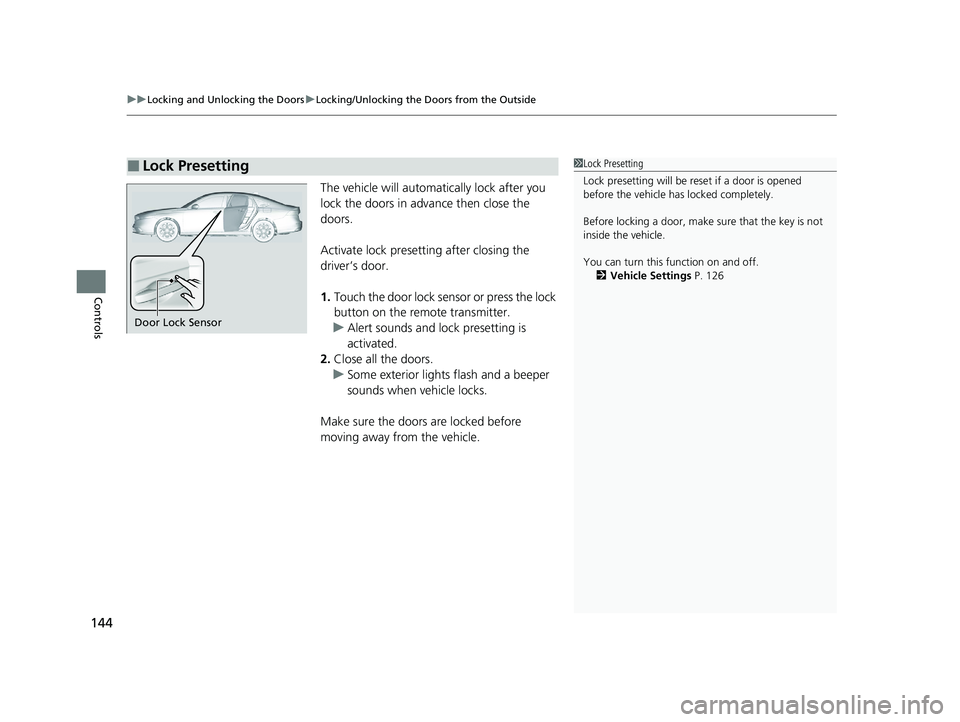
The vehicle will automatically lock after you
lock the doors in advance then close the
doors.
Activate lock presetting after closing the
driver’s door.
1. Touch the door lock sensor or press the lock
button on the remote transmitter.
u Alert sounds and lock presetting is
activated.
2. Close all the doors.
u Some exterior lights flash and a beeper
sounds when vehicle locks.
Make sure the doors are locked before
moving away from the vehicle.
■Lock Presetting1 Lock Presetting
Lock presetting will be re set if a door is opened
before the vehicle ha s locked completely.
Before locking a door, make sure that the key is not
inside the vehicle.
You can turn this function on and off. 2 Vehicle Settings P. 126
Door Lock Sensor
23 ACCORD 4D US PET MAP-3130A6000_01.book 144 ページ 2022年10月19日 水曜日 午前11時49分
Page 211 of 533
209
uuAudio System uAudio Remote Controls
Continued
Features
Audio Remote Controls
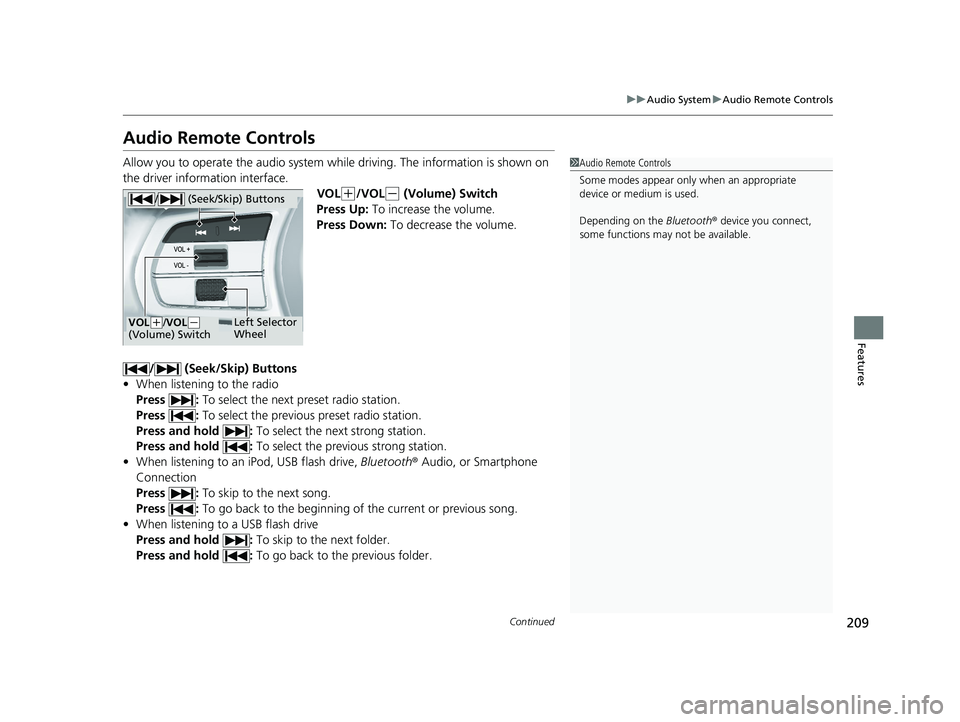
Allow you to operate the audio system whil e driving. The information is shown on
the driver information interface. VOL
(+/VOL(- (Volume) Switch
Press Up: To increase the volume.
Press Down: To decrease the volume.
/ (Seek/Skip) Buttons
• When listening to the radio
Press : To select the next preset radio station.
Press : To select the previous preset radio station.
Press and hold : To select the next strong station.
Press and hold : To select the previous strong station.
• When listening to an iPod, USB flash drive, Bluetooth® Audio, or Smartphone
Connection
Press : To skip to the next song.
Press : To go back to the beginning of the current or previous song.
• When listening to a USB flash drive
Press and hold : To skip to the next folder.
Press and hold : To go back to the previous folder.
1Audio Remote Controls
Some modes appear only when an appropriate
device or medium is used.
Depending on the Bluetooth® device you connect,
some functions may not be available.
/ (Seek/Skip) Buttons
Left Selector
WheelVOL(+/VOL(-
(Volume) Switch
23 ACCORD 4D US PET MAP-3130A6000_01.book 209 ページ 2022年10月19日 水曜日 午前11時49分
Page 217 of 533
215
uuAudio System Basic Operation uPlaying AM/FM Radio
Continued
Features
Playing AM/FM Radio
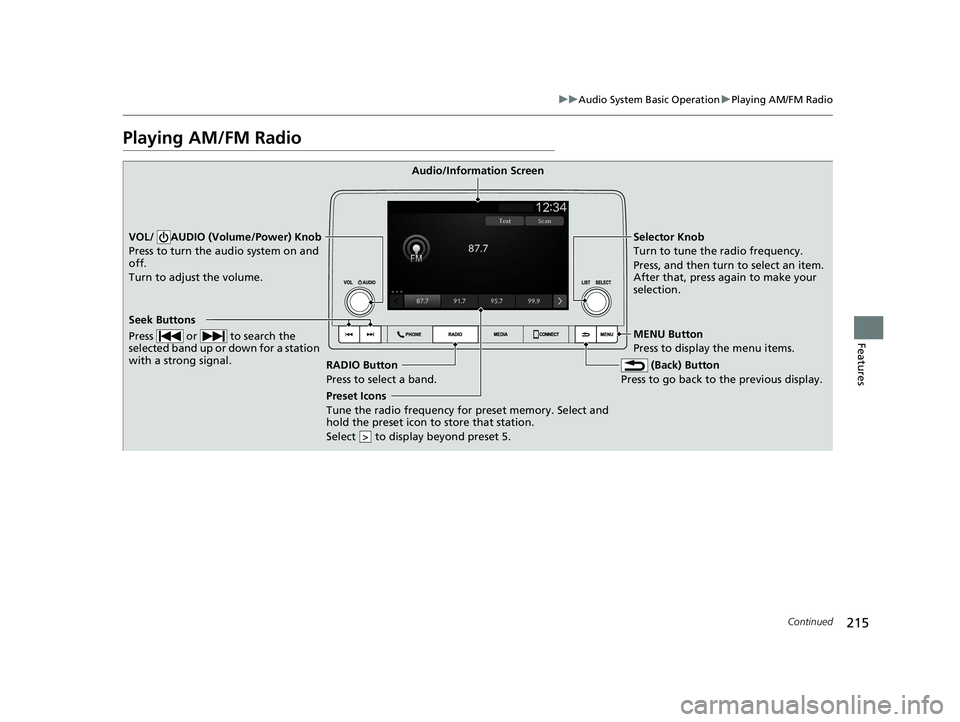
RADIO Button
Press to select a band. (Back) Button
Press to go back to the previous display.
Seek Buttons
Press or to search the
selected band up or down for a station
with a strong signal.
VOL/ AUDIO (Volume/Power) Knob
Press to turn the audio system on and
off.
Turn to adjust the volume.Selector Knob
Turn to tune the radio frequency.
Press, and then turn to select an item.
After that, press again to make your
selection.
MENU Button
Press to display the menu items.
Audio/Information Screen
Preset Icons
Tune the radio frequency for preset
memory. Select and
hold the preset icon to store that station.
Select to display beyond preset 5.
>
23 ACCORD 4D US PET MAP-3130A6000_01.book 215 ページ 2022年10月19日 水曜日 午前11時49分
Page 218 of 533
uuAudio System Basic Operation uPlaying AM/FM Radio
216
Features
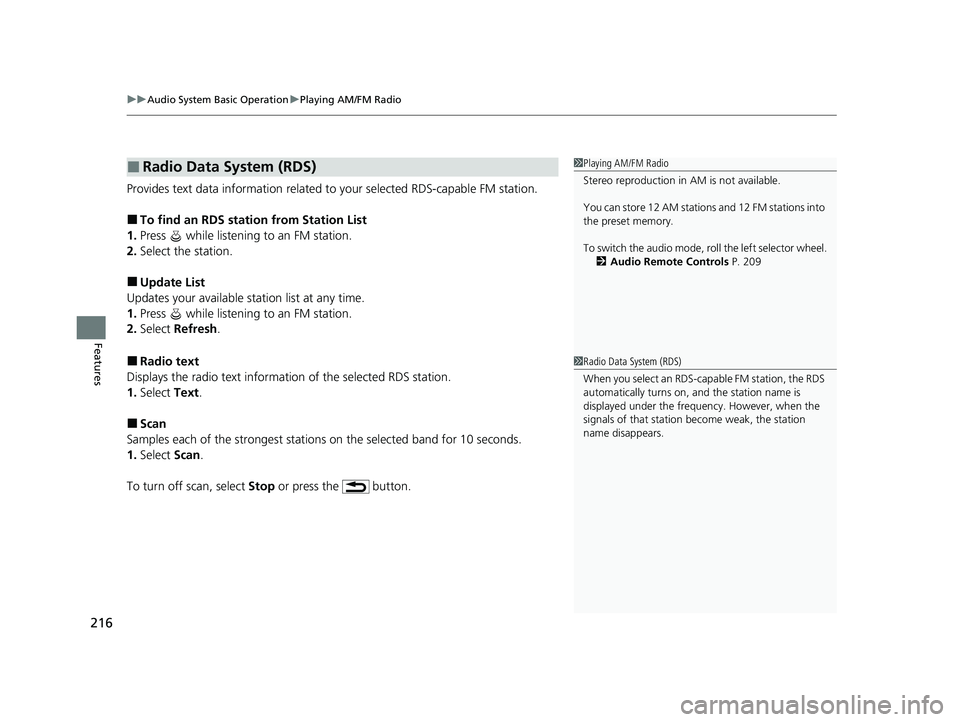
Provides text data information related to your selected RDS-capable FM station.
■To find an RDS station from Station List
1. Press while listening to an FM station.
2. Select the station.
■Update List
Updates your available station list at any time.
1. Press while listening to an FM station.
2. Select Refresh .
■Radio text
Displays the radio text informat ion of the selected RDS station.
1. Select Text.
■Scan
Samples each of the strongest stations on the selected band for 10 seconds.
1. Select Scan.
To turn off scan, select Stop or press the button.
■Radio Data System (RDS)1Playing AM/FM Radio
Stereo reproduction in AM is not available.
You can store 12 AM stations and 12 FM stations into
the preset memory.
To switch the audio mode, ro ll the left selector wheel.
2 Audio Remote Controls P. 209
1Radio Data System (RDS)
When you select an RDS-capable FM station, the RDS
automatically turns on, and the station name is
displayed under the frequency. However, when the
signals of that station become weak, the station
name disappears.
23 ACCORD 4D US PET MAP-3130A6000_01.book 216 ページ 2022年10月19日 水曜日 午前11時49分
Page 264 of 533
262
uuCustomized Features u
Features*1:Default Setting
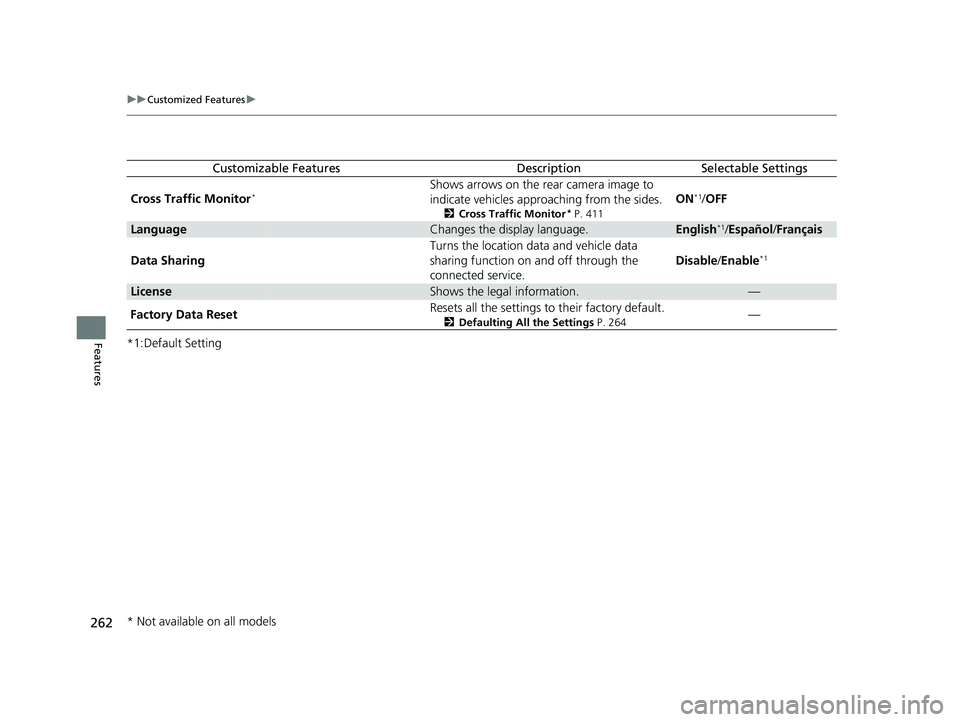
Customizable FeaturesDescriptionSelectable Settings
Cross Traffic Monitor
*Shows arrows on the rear camera image to
indicate vehicles approaching from the sides.
2 Cross Traffic Monitor* P. 411
ON*1/OFF
LanguageChanges the display language.English*1/Español /Français
Data Sharing Turns the location data and vehicle data
sharing function on and off through the
connected service.Disable
/Enable
*1
LicenseShows the legal information.—
Factory Data Reset Resets all the settings to their factory default.
2
Defaulting All the Settings P. 264—
* Not available on all models
23 ACCORD 4D US PET MAP-3130A6000_01.book 262 ページ 2022年10月19日 水曜日 午前11時49分
Page 265 of 533
263
uuCustomized Features u
Features
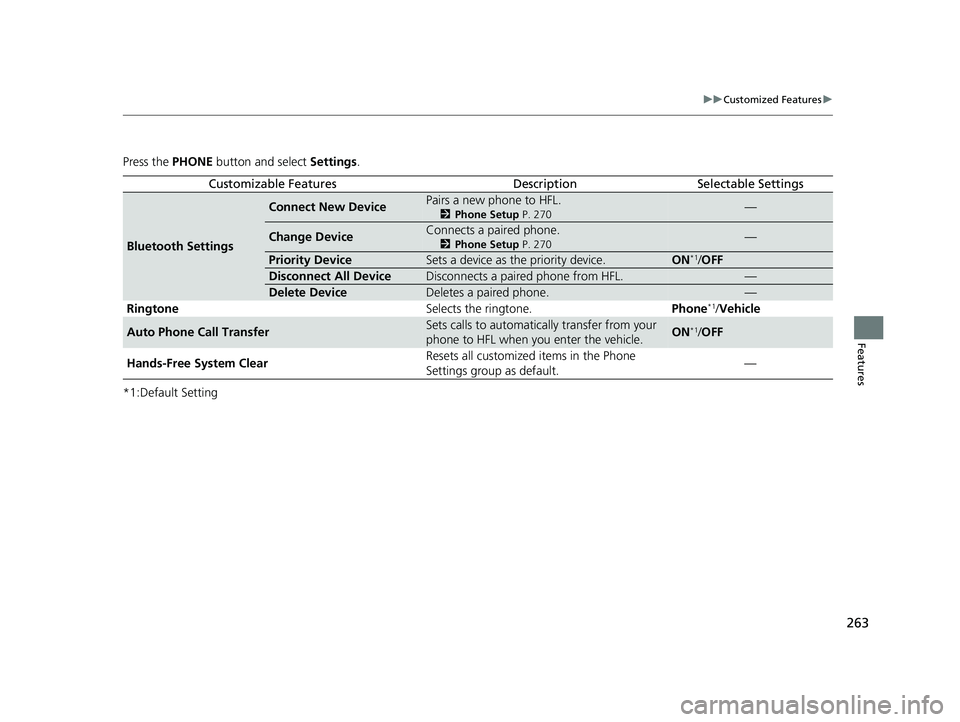
Press the PHONE button and select Settings.
*1:Default Setting
Customizable FeaturesDescriptionSelectable Settings
Bluetooth Settings
Connect New DevicePairs a new phone to HFL.
2 Phone Setup P. 270—
Change DeviceConnects a paired phone.
2Phone Setup P. 270—
Priority DeviceSets a device as the priority device.ON*1/OFF
Disconnect All DeviceDisconnects a paired phone from HFL.—
Delete DeviceDeletes a paired phone.—
Ringtone Selects the ringtone.Phone*1/Vehicle
Auto Phone Call TransferSets calls to automatically transfer from your
phone to HFL when you enter the vehicle.ON*1/OFF
Hands-Free System Clear Resets all customized items in the Phone
Settings group as default.
—
23 ACCORD 4D US PET MAP-3130A6000_01.book 263 ページ 2022年10月19日 水曜日 午前11時49分
Page 266 of 533
264
uuCustomized Features uDefaulting All the Settings
Features
Defaulting All the Settings
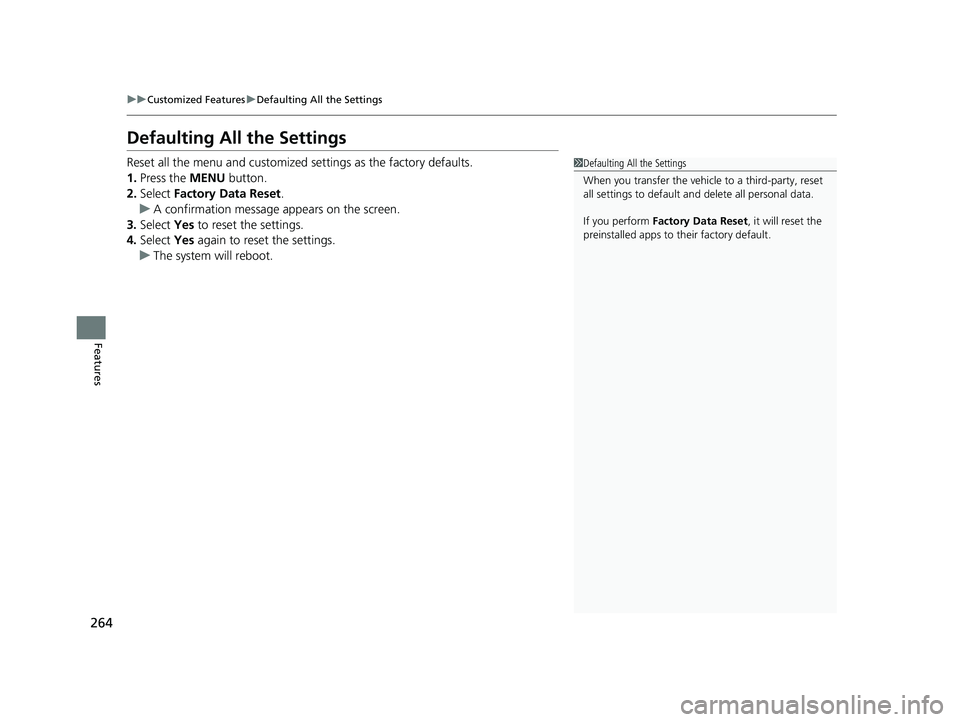
Reset all the menu and customized settings as the factory defaults.
1. Press the MENU button.
2. Select Factory Data Reset .
u A confirmation message appears on the screen.
3. Select Yes to reset the settings.
4. Select Yes again to reset the settings.
u The system will reboot.1Defaulting All the Settings
When you transfer the vehicle to a third-party, reset
all settings to default a nd delete all personal data.
If you perform Factory Data Reset , it will reset the
preinstalled apps to their factory default.
23 ACCORD 4D US PET MAP-3130A6000_01.book 264 ページ 2022年10月19日 水曜日 午前11時49分
Page 434 of 533
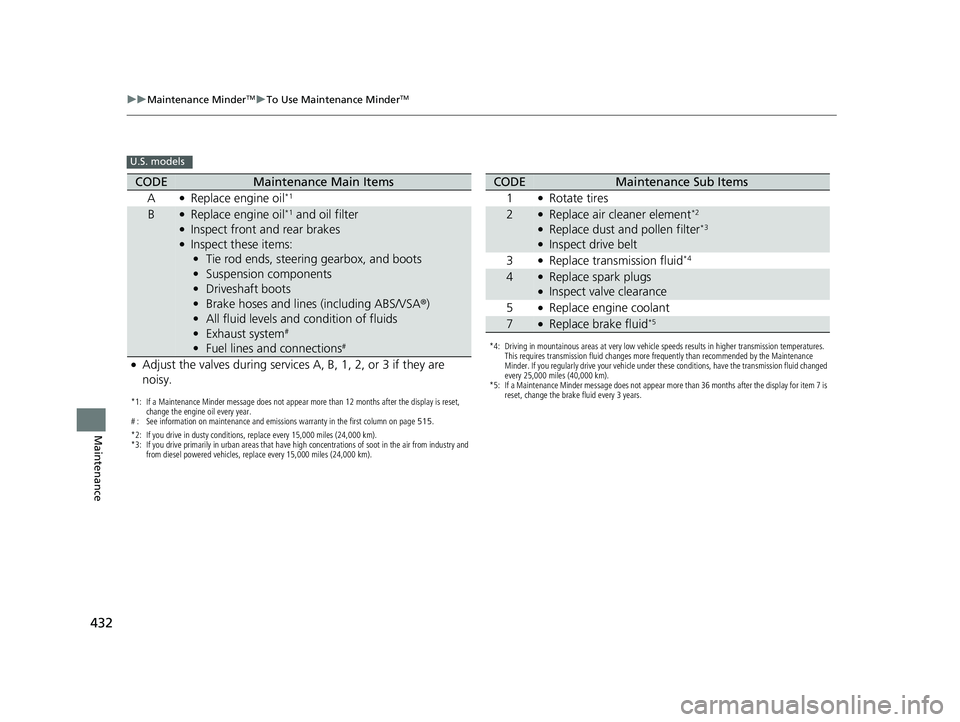
432
uuMaintenance MinderTMuTo Use Maintenance MinderTM
Maintenance
U.S. models
*1: If a Maintenance Minder message does not appear more than 12 months after the display is reset,
change the engine oil every year.
# : See information on maintenance and emissions warranty in the first column on page 515.
*2: If you drive in dusty conditions, replace every 15,000 miles (24,000 km).
*3: If you drive primarily in urban areas that have high concentrations of soot in the air from industry and from diesel powered vehicles, replace every 15,000 miles (24,000 km).
CODEMaintenance Main Items
A
●Replace engine oil*1
B●Replace engine oil*1 and oil filter●Inspect front and rear brakes●Inspect these items: • Tie rod ends, steering gearbox, and boots
• Suspension components
• Driveshaft boots
• Brake hoses and lines (including ABS/VSA ®)
• All fluid levels and condition of fluids
• Exhaust system
#
•Fuel lines and connections#
●Adjust the valves during services A, B, 1, 2, or 3 if they are
noisy.
*4: Driving in mountainous areas at very low vehicle speeds results in higher transmission temperatures.
This requires transmission fluid changes more frequently than recommended by the Maintenance
Minder. If you regularly drive your vehicle under these conditions, have the transmission fluid changed
every 25,000 miles (40,000 km).
*5: If a Maintenance Minder message does not appear more than 36 months after the display for item 7 is reset, change the brake fluid every 3 years.
CODEMaintenance Sub Items
1
●Rotate tires
2●Replace air cleaner element*2
●Replace dust and pollen filter*3
●Inspect drive belt
3
●Replace transmission fluid*4
4●Replace spark plugs●Inspect valve clearance
5
●Replace engine coolant
7●Replace brake fluid*5
23 ACCORD 4D US PET MAP-3130A6000_01.book 432 ページ 2022年10月19日 水曜日 午前11時49分
Page 435 of 533
433
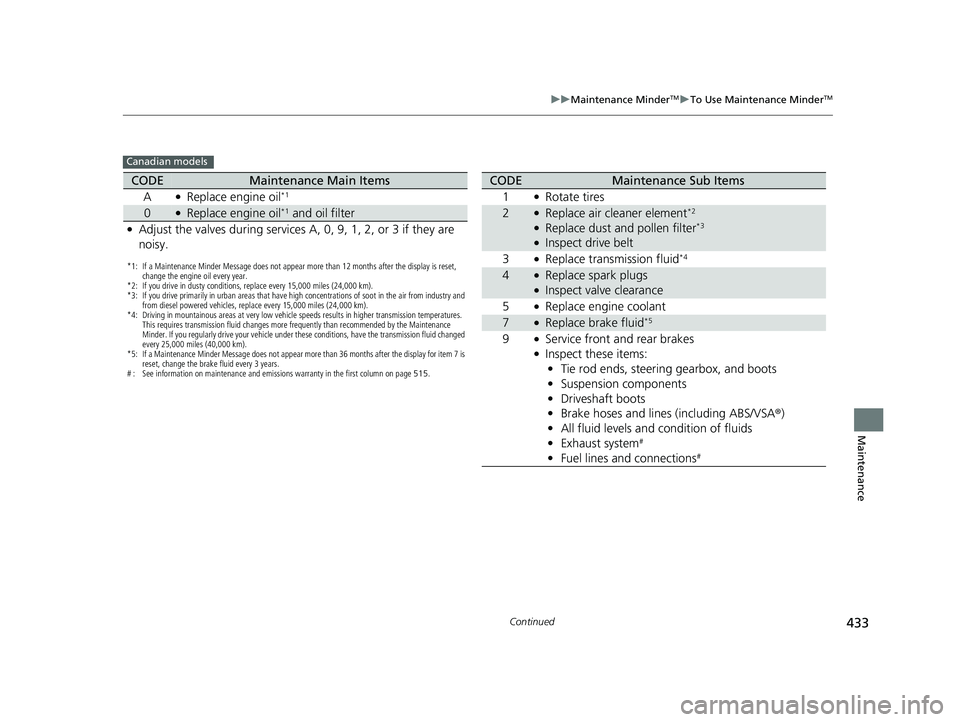
uuMaintenance MinderTMuTo Use Maintenance MinderTM
Continued
Maintenance
Canadian models
*1: If a Maintenance Minder Message does not appear more than 12 months after the display is reset,
change the engine oil every year.
*2: If you drive in dusty conditions, replace every 15,000 miles (24,000 km).
*3: If you drive primarily in urban areas that have high concentrations of soot in the air from industry and from diesel powered vehicles, replace every 15,000 miles (24,000 km).
*4: Driving in mountainous areas at very low vehicle speeds results in higher transmission temperatures. This requires transmission fluid changes more frequently than recommended by the Maintenance
Minder. If you regularly drive your vehicle under these conditions, have the transmission fluid changed
every 25,000 miles (40,000 km).
*5: If a Maintenance Minder Message does not appear more than 36 months after the display for item 7 is reset, change the brake fluid every 3 years.
# : See information on maintenance and emissions warranty in the first column on page 515.
CODEMaintenance Main Items
A
●Replace engine oil*1
0●Replace engine oil*1 and oil filter
●Adjust the valves during services A, 0, 9, 1, 2, or 3 if they are
noisy.
CODEMaintenance Sub Items
1
●Rotate tires
2●Replace air cleaner element*2
●Replace dust and pollen filter*3
●Inspect drive belt
3
●Replace transmission fluid*4
4●Replace spark plugs●Inspect valve clearance
5
●Replace engine coolant
7●Replace brake fluid*5
9●Service front and rear brakes●Inspect these items: • Tie rod ends, steering gearbox, and boots
• Suspension components
• Driveshaft boots
• Brake hoses and lines (including ABS/VSA®)
• All fluid levels and condition of fluids
• Exhaust system
#
•Fuel lines and connections#
23 ACCORD 4D US PET MAP-3130A6000_01.book 433 ページ 2022年10月19日 水曜日 午前11時49分