Mirror HONDA ACCORD 2023 Owner's Manual
[x] Cancel search | Manufacturer: HONDA, Model Year: 2023, Model line: ACCORD, Model: HONDA ACCORD 2023Pages: 533, PDF Size: 20.09 MB
Page 344 of 533
342
uuHonda Sensing ®u Adaptive Cruise Control (ACC) with Low Speed Follow
Driving
Adaptive Cruise Control (ACC) with Low Speed
Follow
Helps maintain a constant vehicle speed a nd a set following-interval behind a vehicle
detected ahead of yours and, if the detect ed vehicle comes to a stop, can decelerate
and stop your vehicle, without you having to keep your foot on the brake or the
accelerator.
When ACC with Low Speed Follow slows y our vehicle by applying the brakes, your
vehicle’s brake lights will illuminate.
1 Adaptive Cruise Control (ACC) with Low Speed Follow
3WARNING
Improper use of ACC with Low Speed
Follow can lead to a crash.
Use ACC with Low Speed Follow only when
driving on expressways or freeways and in
good road and weather conditions.
3WARNING
ACC with Low Speed Follow has limited
braking capability and may not stop your
vehicle in time to avoid a collision with a
vehicle that quickly stops in front of you.
Always be prepared to apply the brake
pedal if the conditions require.
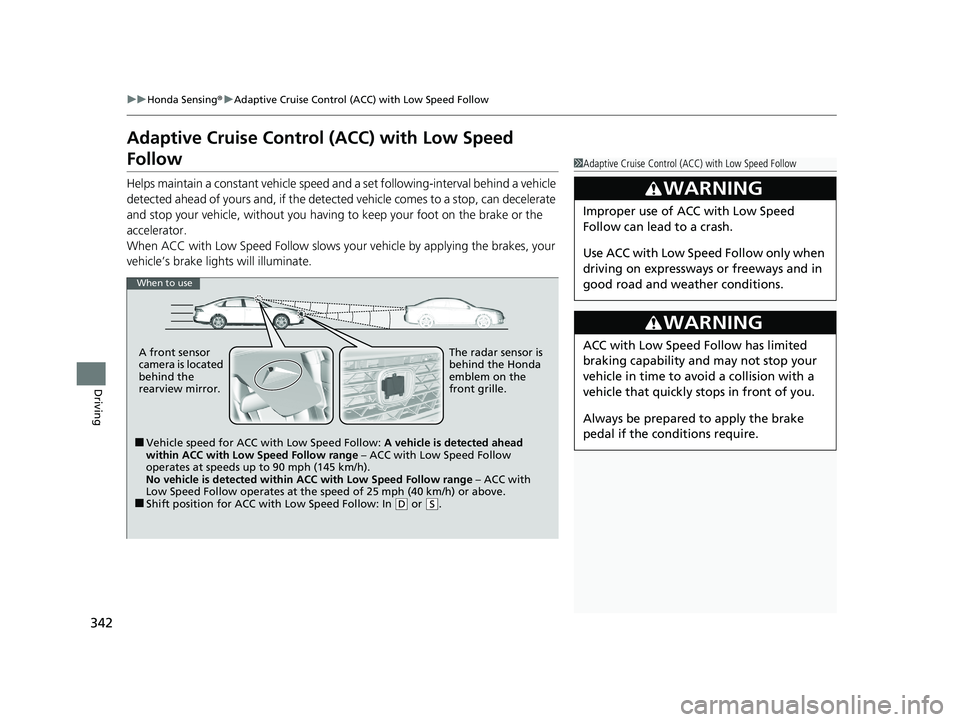
When to use
■Vehicle speed for ACC wi th Low Speed Follow: A vehicle is detected ahead
within ACC with Low Speed Follow range – ACC with Low Speed Follow
operates at speeds up to 90 mph (145 km/h).
No vehicle is detected within ACC with Low Speed Follow range – ACC with
Low Speed Follow operates at the speed of 25 mph (40 km/h) or above.
■Shift position for ACC with Low Speed Follow: In ( D or (S.
A front sensor
camera is located
behind the
rearview mirror.
The radar sensor is
behind the Honda
emblem on the
front grille.
23 ACCORD 4D US PET MAP-3130A6000_01.book 342 ページ 2022年10月19日 水曜日 午前11時49分
Page 360 of 533
uuHonda Sensing ®u Adaptive Cruise Control (ACC) with Low Speed Follow
358
Driving
■Automatic cancellation
The beeper sounds and a message appears on the driver information interface when
ACC with Low Speed Follow is automaticall y canceled. Any of these conditions may
cause the ACC with Low Speed Fo llow to automatically cancel:
• Bad weather (rain, fog, snow, etc.)
• When the radar sensor behind the Honda emblem gets dirty.
• The vehicle ahead of you cannot be detected.
• An abnormal tire condition is detected, or the tires are skidding.
• Driving on a mountainous road for extended periods, or driving off road.
• Abrupt steering wheel movement.
• When the ABS, VSA ®, or CMBS
TM is activated.
• When the ABS or VSA ® system indicator comes on.
• When the vehicle is stopped on a very steep slope.
• When you manually apply the parking brake.
• When the detected vehicle within the ACC with Low Speed Follow range is too
close to your vehicle.
• When accelerating rapidly.
• The camera behind the rearview mirror, or the area around the camera, including
the windshield, gets dirty.
• The vehicle has repeatedly applied the brakes to maintain the set speed (for
example, you are descending a long slope).
• When the system doesn’t detect any driv ing actions from the driver for a certain
amount of time while the LKAS is also activated.
• When the Maximum Load Limit is exceeded.
• When passing through an enclos ed space, such as tunnel.
• When the parking brake and brake sy stem indicator (amber) comes on.
1To Cancel
The set speed cannot be set or resumed when ACC
with Low Speed Follow has been turned off using the
button. Press the button to activate the
system, then set the desired speed.
23 ACCORD 4D US PET MAP-3130A6000_01.book 358 ページ 2022年10月19日 水曜日 午前11時49分
Page 370 of 533
368
uuHonda Sensing ®u Lane Keeping Assist System (LKAS)
Driving
■The LKAS may be automa tically suspended when:
• The system fails to detect lane lines.
• The steering wheel is turned quickly.
• You fail to steer the vehicle.
• Driving through a sharp curve.
• Driving at a speed in excess of approximately 94 mph (150 km/h).
• The ABS or VSA ® system engages.
Once these conditions no longer exist, the LKAS automatically resumes.
■The LKAS may be automa tically canceled when:
In the following cases, traffic lane lines may disappear on the gauge, the beeper may
sound, and the LKAS may be automatically canceled:
• The camera temperature gets extremely high.
• The camera behind the rearview mirror, or the area around the camera, including
the windshield, gets dirty.
23 ACCORD 4D US PET MAP-3130A6000_01.book 368 ページ 2022年10月19日 水曜日 午前11時49分
Page 379 of 533
Continued377
uuHonda Sensing ®u Traffic Jam Assist
Driving
Press the LKAS button to ca ncel Traffic Jam Assist.
■Traffic Jam Assist may be au tomatically suspended when:
The system is automatically temporarily canceled under the fo llowing circumstances.
• The system fails to detect lane lines.
• The steering wheel is turned sharply.
• You fail to steer the vehicle.
• You are driving through a sharp curve.
• The brake pedal is depressed.
Once these conditions no longer exist, Traffic Jam Assist automatically resumes.
■Traffic Jam Assist may be au tomatically canceled when:
The traffic lane lines will disappear from the screen, the beeper may sound, and
Traffic Jam Assist will be canceled under the following circumstances:
• The temperature of the camera is too high.
• The camera behind the rearview mirror, or the area around the camera, including
the windshield, is dirty.
■Canceling Traffic Jam Assist
1Traffic Jam Assist may be au tomatically suspended when:
You are traveling over 45 mph (72 km/h).
u When the speed of the vehicle reaches 45 mph (72
km/h), Traffic Jam Assist is deactivated. Once the
speed of the vehicle drops to under 40 mph (64 km/
h), Traffic Jam Assist is reactivated.
You can change the setting for the Traffic Jam Assist.
Traffic Jam Assist suspe nded beep on and off when
you select the Lane keeping assist suspend beep
on the driver information interface.
2 Vehicle Settings P. 126
23 ACCORD 4D US PET MAP-3130A6000_01.book 377 ページ 2022年10月19日 水曜日 午前11時49分
Page 384 of 533
382
uuHonda Sensing ®u Road Departure Mitigation System
Driving
Road Departure Mitigation System
Alerts and helps assist you when the syst em detects a possibility of your vehicle
crossing over detected lane markings, or approaching the outer edge of the
pavement (into grass or gravel border) or a detected oncoming vehicle.
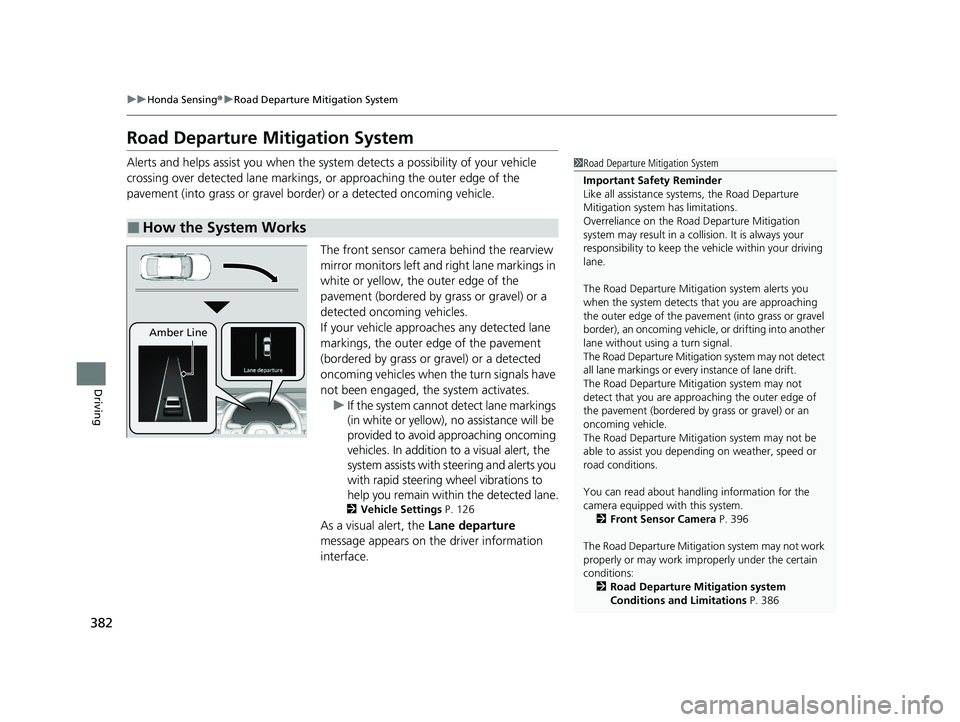
The front sensor camera behind the rearview
mirror monitors left and right lane markings in
white or yellow, the outer edge of the
pavement (bordered by grass or gravel) or a
detected oncoming vehicles.
If your vehicle approaches any detected lane
markings, the outer edge of the pavement
(bordered by grass or gravel) or a detected
oncoming vehicles when the turn signals have
not been engaged, the system activates.u If the system cannot de tect lane markings
(in white or yellow), no assistance will be
provided to avoid approaching oncoming
vehicles. In addition to a visual alert, the
system assists with steering and alerts you
with rapid steering wheel vibrations to
help you remain within the detected lane.
2 Vehicle Settings P. 126
As a visual alert, the Lane departure
message appears on the driver information
interface.
■How the System Works
1 Road Departure Mitigation System
Important Safety Reminder
Like all assistance systems, the Road Departure
Mitigation system has limitations.
Overreliance on the Road Departure Mitigation
system may result in a collision. It is always your
responsibility to keep the vehicle within your driving
lane.
The Road Departure Mitiga tion system alerts you
when the system detects that you are approaching
the outer edge of the paveme nt (into grass or gravel
border), an oncoming vehicle, or drifting into another
lane without using a turn signal.
The Road Departure Mitigation system may not detect
all lane markings or ever y instance of lane drift.
The Road Departure Miti gation system may not
detect that you are approa ching the outer edge of
the pavement (bordered by grass or gravel) or an
oncoming vehicle.
The Road Departure Mitiga tion system may not be
able to assist you depend ing on weather, speed or
road conditions.
You can read about handling information for the
camera equipped with this system. 2 Front Sensor Camera P. 396
The Road Departure Mitigati on system may not work
properly or may work im properly under the certain
conditions:
2 Road Departure Mitigation system
Conditions and Limitations P. 386
Amber Line
23 ACCORD 4D US PET MAP-3130A6000_01.book 382 ページ 2022年10月19日 水曜日 午前11時49分
Page 392 of 533
390
uuHonda Sensing ®u Traffic Sign Recognition System
Driving
Traffic Sign Recognition System
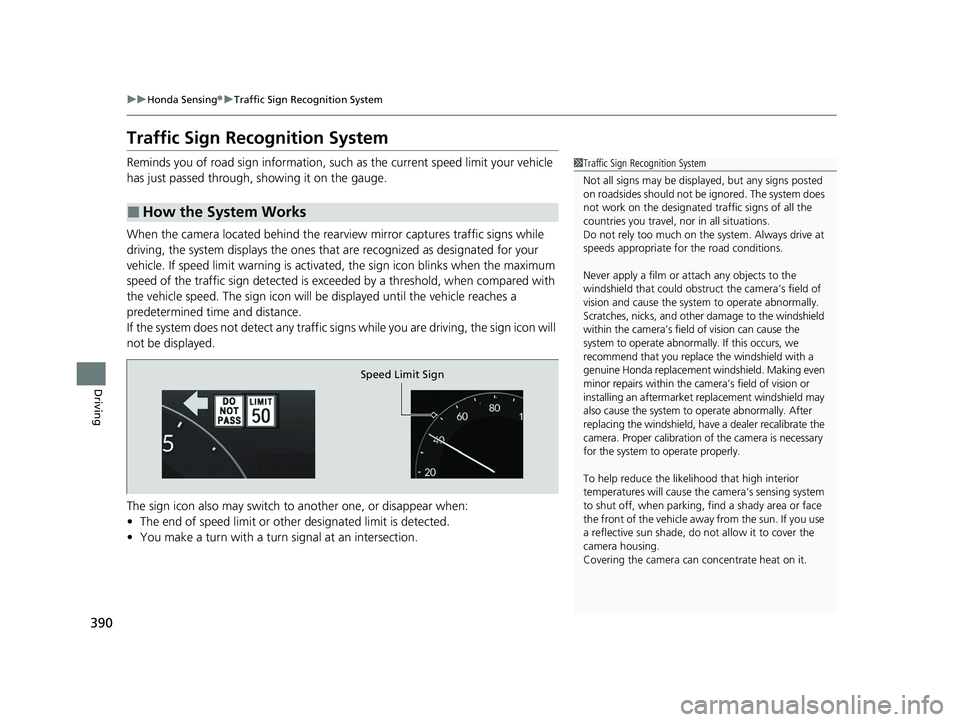
Reminds you of road sign information, such as the current speed limit your vehicle
has just passed through, showing it on the gauge.
When the camera located behind the rear view mirror captures traffic signs while
driving, the system displays the ones that are recognized as designated for your
vehicle. If speed limit warn ing is activated, the sign icon blinks when the maximum
speed of the traffic sign detected is exceed ed by a threshold, when compared with
the vehicle speed. The sign icon will be displayed until the vehicle reaches a
predetermined time and distance.
If the system does not detect any traffic signs while you are driving, the sign icon will
not be displayed.
The sign icon also may switch to another one, or disappear when:
• The end of speed limit or other designated limit is detected.
• You make a turn with a turn signal at an intersection.
■How the System Works
1Traffic Sign Recognition System
Not all signs may be displa yed, but any signs posted
on roadsides should not be ignored. The system does
not work on the designated traffic signs of all the
countries you travel, nor in all situations.
Do not rely too much on the system. Always drive at
speeds appropriate fo r the road conditions.
Never apply a film or attach any objects to the
windshield that could obstruc t the camera’s field of
vision and cause the system to operate abnormally.
Scratches, nicks, and othe r damage to the windshield
within the camera’s field of vision can cause the
system to operate abnormally. If this occurs, we
recommend that you replace the windshield with a
genuine Honda replacement windshield. Making even
minor repairs within the ca mera’s field of vision or
installing an aftermarket replacement windshield may
also cause the system to operate abnormally. After
replacing the windshield, have a dealer recalibrate the
camera. Proper calibration of the camera is necessary
for the system to operate properly.
To help reduce the likel ihood that high interior
temperatures will cause the camera’s sensing system
to shut off, when parking, find a shady area or face
the front of the vehicle away from the sun. If you use
a reflective sun shade, do not allow it to cover the
camera housing.
Covering the camera can concentrate heat on it.
Speed Limit Sign
23 ACCORD 4D US PET MAP-3130A6000_01.book 390 ページ 2022年10月19日 水曜日 午前11時49分
Page 398 of 533
396
uuHonda Sensing ®u Front Sensor Camera
Driving
Front Sensor Camera
The camera, used in systems such as La ne Keeping Assist System (LKAS), Road
Departure Mitigation system, Adaptive Cruise Control (ACC) with Low Speed
Follow, Collision Mitigation Braking System
TM (CMBSTM), Traffic Jam Assist, and
Traffic Sign Recognition system is designed to detect an object that triggers any of
the systems to operate their functions.
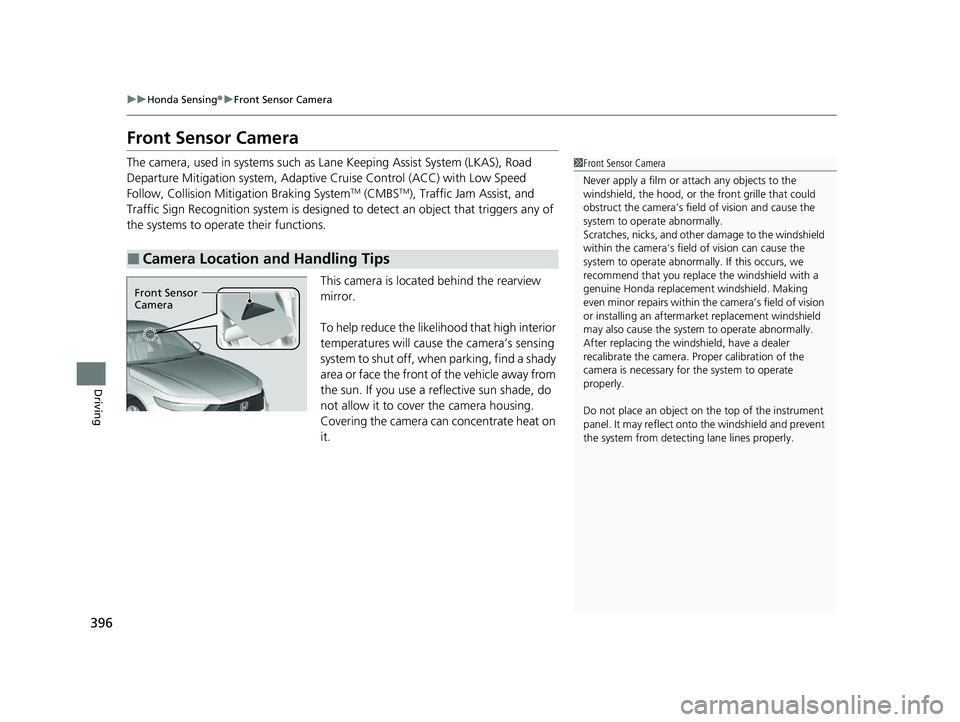
This camera is located behind the rearview
mirror.
To help reduce the likelihood that high interior
temperatures will cause the camera’s sensing
system to shut off, when parking, find a shady
area or face the front of the vehicle away from
the sun. If you use a reflective sun shade, do
not allow it to cover the camera housing.
Covering the camera can concentrate heat on
it.
■Camera Location and Handling Tips
1 Front Sensor Camera
Never apply a film or attach any objects to the
windshield, the hood, or th e front grille that could
obstruct the camera’s fiel d of vision and cause the
system to operate abnormally.
Scratches, nicks, and othe r damage to the windshield
within the camera’s fiel d of vision can cause the
system to operate abnormall y. If this occurs, we
recommend that you replac e the windshield with a
genuine Honda replacem ent windshield. Making
even minor repairs within th e camera’s field of vision
or installing an aftermarket replacement windshield
may also cause the system to operate abnormally.
After replacing the winds hield, have a dealer
recalibrate the camera. Pr oper calibration of the
camera is necessary for the system to operate
properly.
Do not place an object on the top of the instrument
panel. It may reflect onto the windshield and prevent
the system from detecting lane lines properly.
Front Sensor
Camera
23 ACCORD 4D US PET MAP-3130A6000_01.book 396 ページ 2022年10月19日 水曜日 午前11時49分
Page 413 of 533
411
uuParking Your Vehicle uCross Traffic Monitor*
Continued
Driving
Cross Traffic Monitor*
Monitors the rear corner areas using the radar sensors when reversing, and alerts
you if a vehicle approaching from a rear corner is detected.
The system is convenient when you are backing out of a parking space.1Cross Traffic Monitor*
3CAUTION
Cross Traffic Monitor cannot detect all
approaching vehicles and may not detect
an approaching vehicle at all.
Failure to visually confirm that it is safe to
back up the vehicle before doing so may
result in a collision.
Do not solely rely on the system when
reversing; always also use your mirrors, and
look behind and to the sides of your vehicle
before reversing.
* Not available on all models
23 ACCORD 4D US PET MAP-3130A6000_01.book 411 ページ 2022年10月19日 水曜日 午前11時49分
Page 466 of 533
464
Maintenance
Cleaning
Interior Care
Use a damp cloth with a mixture of mild detergent and warm water to remove dirt.
Use a clean cloth to remove detergent residue.
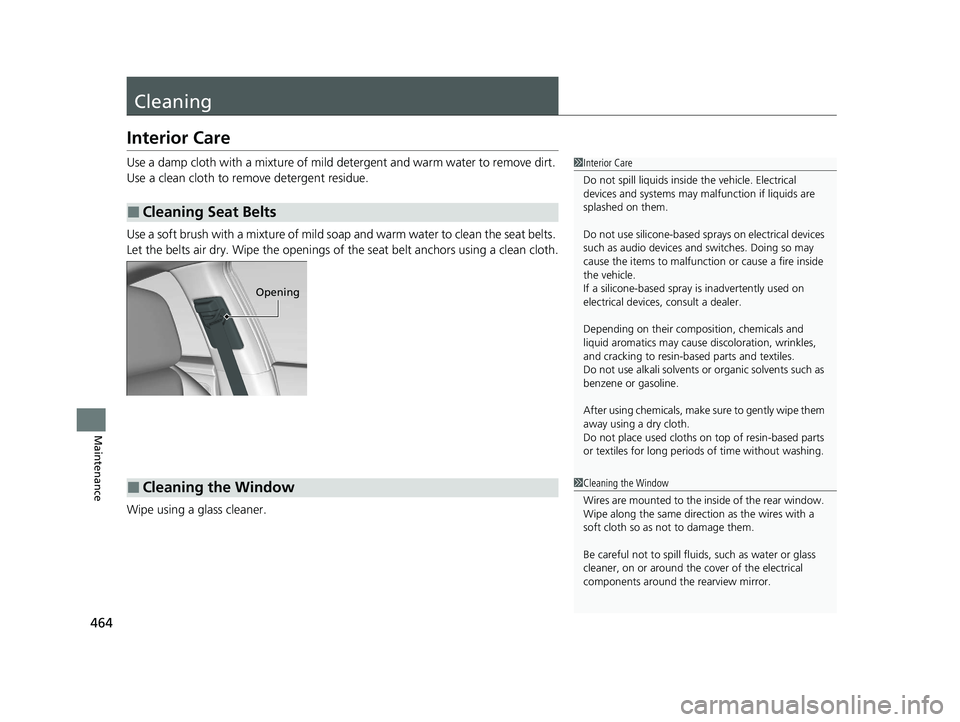
Use a soft brush with a mixture of mild soap and warm water to clean the seat belts.
Let the belts air dry. Wipe the openings of the seat belt anchors using a clean cloth.
Wipe using a glass cleaner.
■Cleaning Seat Belts
1 Interior Care
Do not spill liquids inside the vehicle. Electrical
devices and systems may ma lfunction if liquids are
splashed on them.
Do not use silicone-based sp rays on electrical devices
such as audio devices and switches. Doing so may
cause the items to malfunction or cause a fire inside
the vehicle.
If a silicone-based spray is inadvertently used on
electrical devices, consult a dealer.
Depending on their compos ition, chemicals and
liquid aromatics may cause discoloration, wrinkles,
and cracking to resin-ba sed parts and textiles.
Do not use alkali solvents or organic solvents such as
benzene or gasoline.
After using chemicals, make su re to gently wipe them
away using a dry cloth.
Do not place used cloths on top of resin-based parts
or textiles for long periods of time without washing.
Opening
■Cleaning the Window1Cleaning the Window
Wires are mounted to the in side of the rear window.
Wipe along the same direct ion as the wires with a
soft cloth so as not to damage them.
Be careful not to spill fluids, such as water or glass
cleaner, on or around the cover of the electrical
components around the rearview mirror.
23 ACCORD 4D US PET MAP-3130A6000_01.book 464 ページ 2022年10月19日 水曜日 午前11時49分
Page 468 of 533
466
uuCleaning uExterior Care
Maintenance
Exterior Care
Dust off the vehicle body after you drive.
Regularly inspect your vehi cle for scratches on painted surfaces. A scratch on a
painted surface can result in body rust. If you find a scratch, promptly repair it.
Wash the vehicle regularly. Wash more frequently when driving in the following
conditions:
• If driving on roads with road salt.
• If driving in coastal areas.
• If tar, soot, bird droppings, insects, or tree sap is stuck to painted surfaces.
• Make sure to follow the instructions indicated on the automated car wash.
• Fold in the door mirrors.
• Keep sufficient distance between the cleaning nozzl e and the vehicle body.
• Take particular care around the windows. St anding too close may cause water to
enter the vehicle interior.
• Do not spray high pressure water directly into the engine compartment. Instead,
use low pressure water and a mild detergent.
• Do not spray water directly onto the ca mera or the area around it. Water may
enter the lens and cause the camera to malfunction.
■Washing the Vehicle
■Using an Automated Car Wash
■Using High Pressure Cleaners
1 Washing the Vehicle
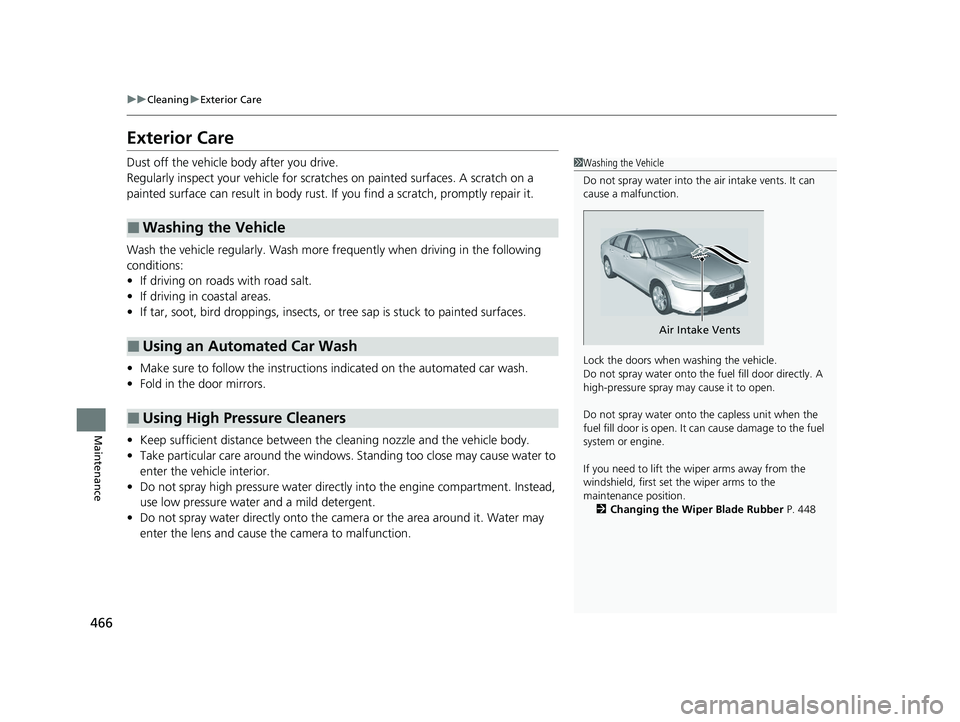
Do not spray water into the air intake vents. It can
cause a malfunction.
Lock the doors when washing the vehicle.
Do not spray water onto the fuel fill door directly. A
high-pressure spray ma y cause it to open.
Do not spray water onto the capless unit when the
fuel fill door is open. It ca n cause damage to the fuel
system or engine.
If you need to lift the wiper arms away from the
windshield, first set the wiper arms to the
maintenance position. 2 Changing the Wiper Blade Rubber P. 448
Air Intake Vents
23 ACCORD 4D US PET MAP-3130A6000_01.book 466 ページ 2022年10月19日 水曜日 午前11時49分