Audio HONDA ACCORD 2023 Service Manual
[x] Cancel search | Manufacturer: HONDA, Model Year: 2023, Model line: ACCORD, Model: HONDA ACCORD 2023Pages: 533, PDF Size: 20.09 MB
Page 234 of 533
uuAudio System Basic Operation uApple CarPlay
232
Features
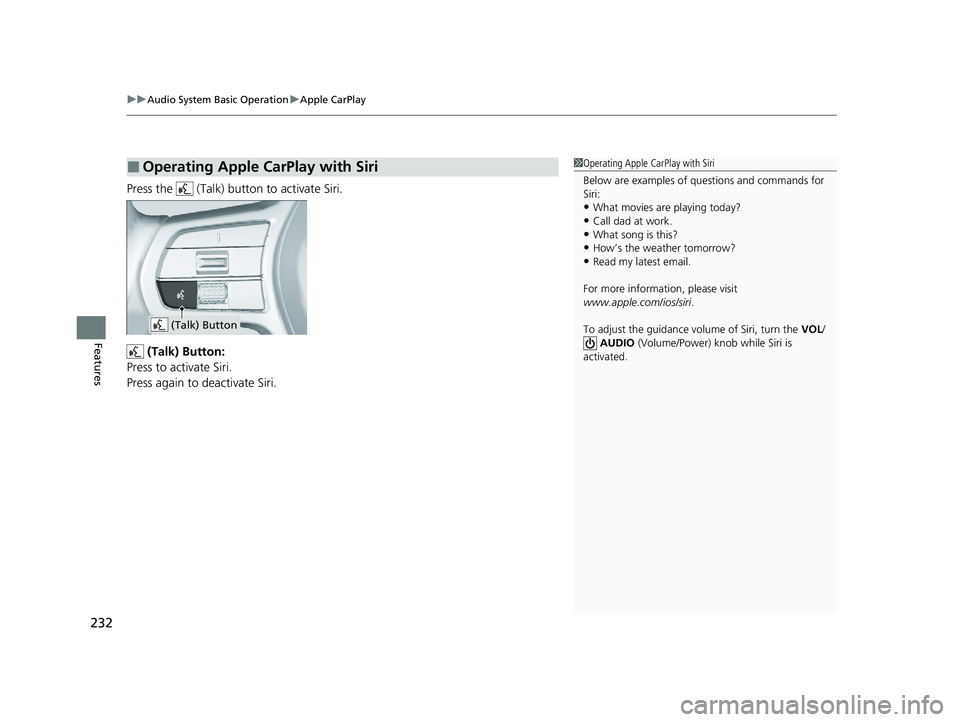
Press the (Talk) button to activate Siri.
(Talk) Button:
Press to activate Siri.
Press again to deactivate Siri.
■Operating Apple CarPlay with Siri1 Operating Apple CarPlay with Siri
Below are examples of questions and commands for
Siri:
•What movies are playing today?
•Call dad at work.•What song is this?
•How’s the weather tomorrow?
•Read my latest email.
For more information, please visit
www.apple.com/ios/siri .
To adjust the guidance volume of Siri, turn the VOL/
AUDIO (Volume/Power) knob while Siri is
activated.
(Talk) Button
23 ACCORD 4D US PET MAP-3130A6000_01.book 232 ページ 2022年10月19日 水曜日 午前11時49分
Page 235 of 533
233
uuAudio System Basic Operation uAndroid AutoTM
Continued
Features
Android AutoTM
When you connect an Android phone to the audio system via the USB port, Android
Auto is automatically initiated. When connected via Android Auto, you can use the
audio/information screen to access the Phone, Google Maps (Navigation), and
Google Now functions. When you first use Android Auto, a tutorial will appear on
the screen.
We recommend that you complete this tuto rial while safely parked before using
Android Auto.
2 USB Ports P. 207
2 Auto Pairing Connection P. 235
1Android AutoTM
We recommend that you upda te Android OS to the
latest version when using Android Auto.
Bluetooth A2DP cannot be used while your phone is
connected to Android Auto.
To use Android Auto on a smartphone with Android
9.0 (Pie) or earl ier, you need to download the
Android Auto app from Google Play to your
smartphone.
Park in a safe place befo re connecting your Android
phone to Android Auto and when launching any
compatible apps.
To use Android Auto, connect the USB cable to the
USB port. 2 USB Ports P. 207
When your Android phone is connected to Android
Auto, it is not possible to use the Bluetooth® Audio.
2 Phone Setup P. 270
Apple CarPlay and Android Auto cannot run at the
same time.
Android Auto is a trademark of Google LLC.
23 ACCORD 4D US PET MAP-3130A6000_01.book 233 ページ 2022年10月19日 水曜日 午前11時49分
Page 236 of 533
uuAudio System Basic Operation uAndroid AutoTM
234
Features
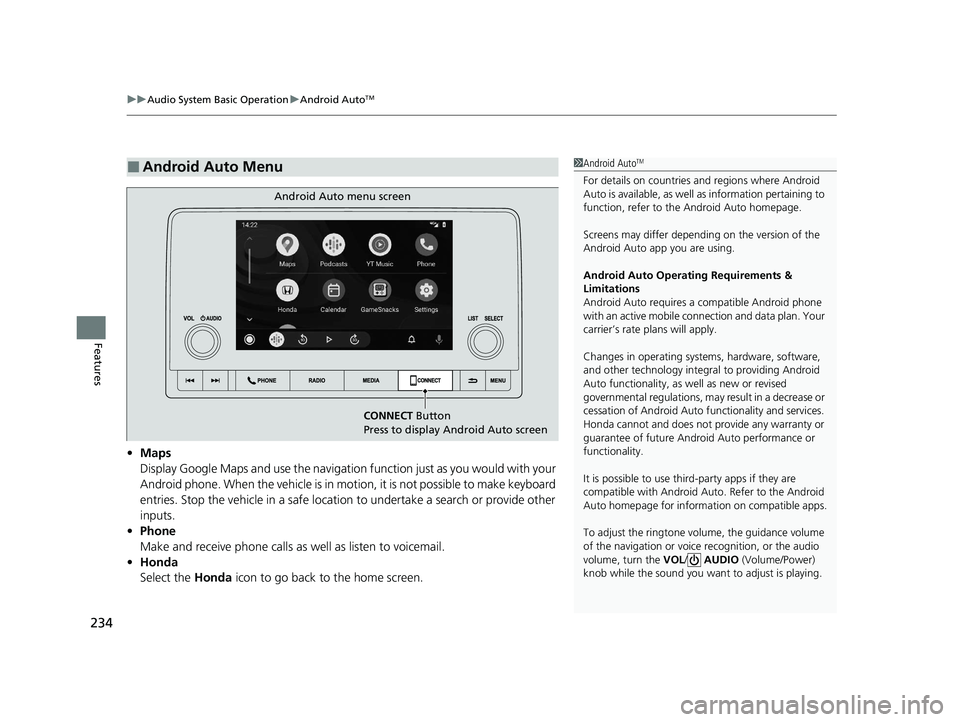
• Maps
Display Google Maps and use the navigation function just as you would with your
Android phone. When the vehicle is in motion, it is not possible to make keyboard
entries. Stop the vehicle in a safe location to undertake a search or provide other
inputs.
• Phone
Make and receive phone calls as well as listen to voicemail.
• Honda
Select the Honda icon to go back to the home screen.
■Android Auto Menu1Android AutoTM
For details on c ountries and regions where Android
Auto is available, as well as information pertaining to
function, refer to the Android Auto homepage.
Screens may differ depending on the version of the
Android Auto app you are using.
Android Auto Operating Requirements &
Limitations
Android Auto requires a compatible Android phone
with an active mobile connection and data plan. Your
carrier’s rate plans will apply.
Changes in operating systems, hardware, software,
and other technology integral to providing Android
Auto functionality, as well as new or revised
governmental regulations, may result in a decrease or
cessation of Android Auto functionality and services.
Honda cannot and does not pr ovide any warranty or
guarantee of future Android Auto performance or
functionality.
It is possible to use thir d-party apps if they are
compatible with Android Auto. Refer to the Android
Auto homepage for informat ion on compatible apps.
To adjust the ringtone volume, the guidance volume
of the navigation or voice recognition, or the audio
volume, turn the VOL / AUDIO (Volume/Power)
knob while the sound you want to adjust is playing.
CONNECT Button
Press to display Android Auto screen
Android Auto menu screen
23 ACCORD 4D US PET MAP-3130A6000_01.book 234 ページ 2022年10月19日 水曜日 午前11時49分
Page 237 of 533
Continued235
uuAudio System Basic Operation uAndroid AutoTM
Features
•
Operate Android Auto with your voice.
•
You can check Android notifications.
• (Android Auto Home)
Display useful information organized by Android Auto into simple cards that
appear just when they’re needed.
When you connect an Android phone to the unit via the USB port, Android Auto is
automatically initiated.
To enable Android Auto after connecting an Android phone to the system, select
Yes on the screen.
You may change the consent settings under the Smartphone Settings menu.
■Auto Pairing Connection
■Enabling Android Auto1Enabling Android Auto
Only initialize Android Auto when you are safely
parked. When Android Auto first detects your phone,
you will need to set up your phone so that auto
pairing is possibl e. Refer to the instruction manual
that came with your phone.
You can use the following procedure to disconnect or
delete the devices connecting Android Auto after you
have completed the initial setup:
Press the MENU button
Select Smartphone Settings Android Auto
Select device
Use of user and vehicle information
The use and handling of user and vehicle information
transmitted to/from your phone by Android Auto is
governed by Google’s Privacy Policy.
23 ACCORD 4D US PET MAP-3130A6000_01.book 235 ページ 2022年10月19日 水曜日 午前11時49分
Page 238 of 533
uuAudio System Basic Operation uAndroid AutoTM
236
Features
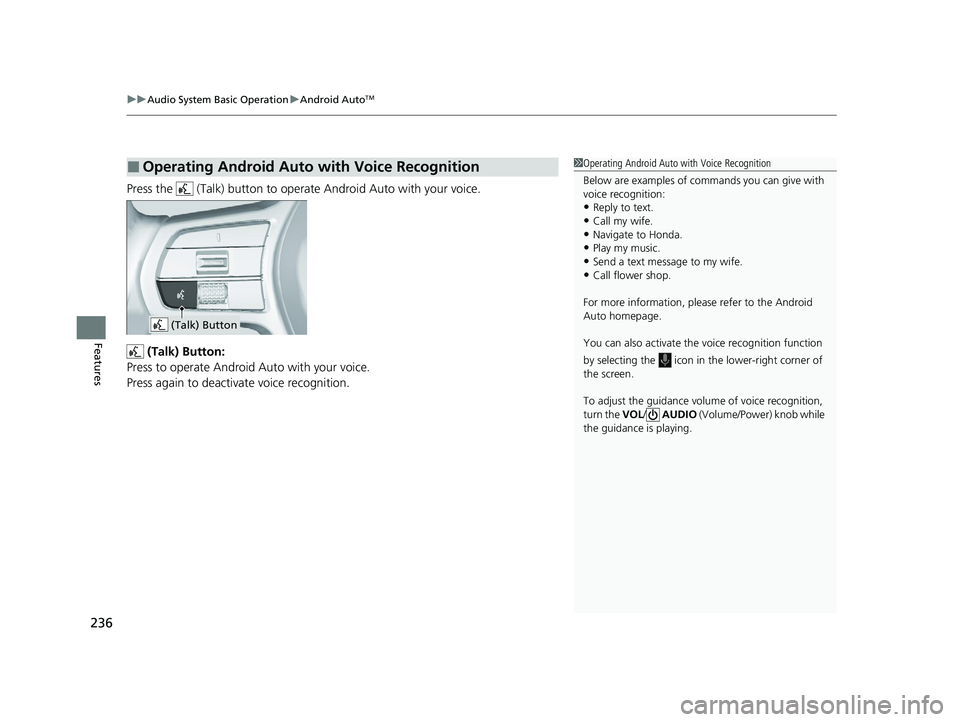
Press the (Talk) button to operat e Android Auto with your voice.
(Talk) Button:
Press to operate Android Auto with your voice.
Press again to deactivate voice recognition.
■Operating Android Auto with Voice Recognition1 Operating Android Auto with Voice Recognition
Below are examples of co mmands you can give with
voice recognition:
•Reply to text.
•Call my wife.•Navigate to Honda.
•Play my music.
•Send a text message to my wife.•Call flower shop.
For more information, please refer to the Android
Auto homepage.
You can also activate the voice recognition function
by selecting the icon in the lower-right corner of
the screen.
To adjust the guidance volume of voice recognition,
turn the VOL/ AUDIO (Volume/Power) knob while
the guidance is playing.
(Talk) Button
23 ACCORD 4D US PET MAP-3130A6000_01.book 236 ページ 2022年10月19日 水曜日 午前11時49分
Page 239 of 533
237Continued
Features
Audio Error Messages
iPod/USB Flash Drive
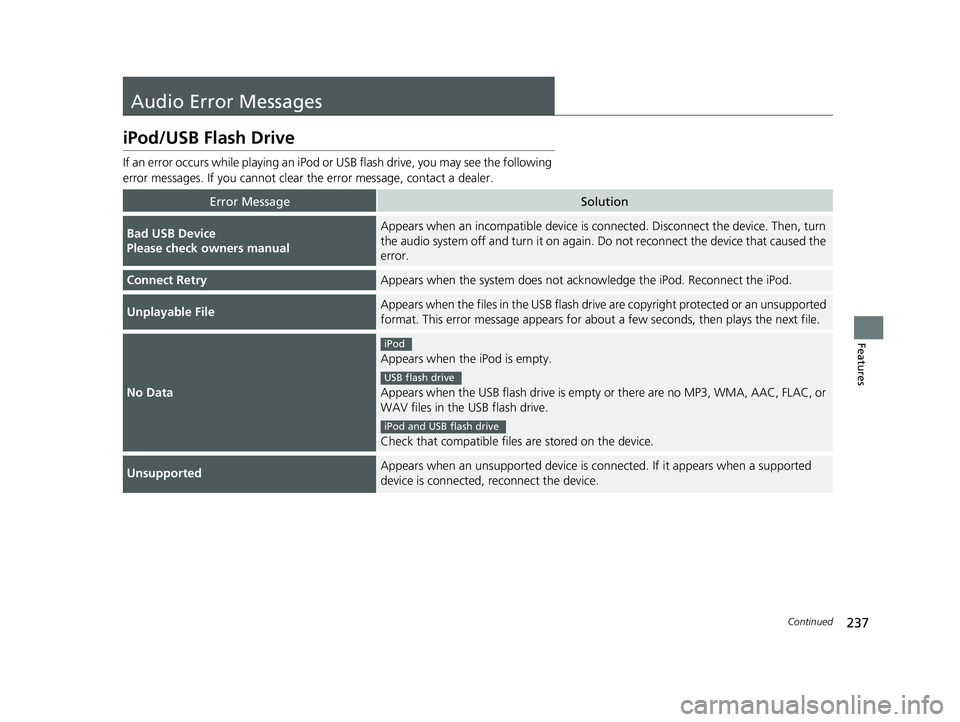
If an error occurs while playing an iPod or USB flash drive, you may see the following
error messages. If you cannot clear the error message, contact a dealer.
Error MessageSolution
Bad USB Device
Please check owners manualAppears when an incompatible device is connected. Disconnect the device. Then, turn
the audio system off and turn it on again. Do not reconnect the device that caused the
error.
Connect RetryAppears when the system does not acknowledge the iPod. Reconnect the iPod.
Unplayable FileAppears when the files in the USB flash dr ive are copyright protected or an unsupported
format. This error message appears for about a few seconds, then plays the next file.
No Data
Appears when the iPod is empty.
Appears when the USB flash drive is empty or there are no MP3, WMA, AAC, FLAC, or
WAV files in the USB flash drive.
Check that compatible files are stored on the device.
UnsupportedAppears when an unsupported device is c onnected. If it appears when a supported
device is connected, reconnect the device.
iPod
USB flash drive
iPod and USB flash drive
23 ACCORD 4D US PET MAP-3130A6000_01.book 237 ページ 2022年10月19日 水曜日 午前11時49分
Page 240 of 533
238
uuAudio Error Messages uiPod/USB Flash Drive
Features
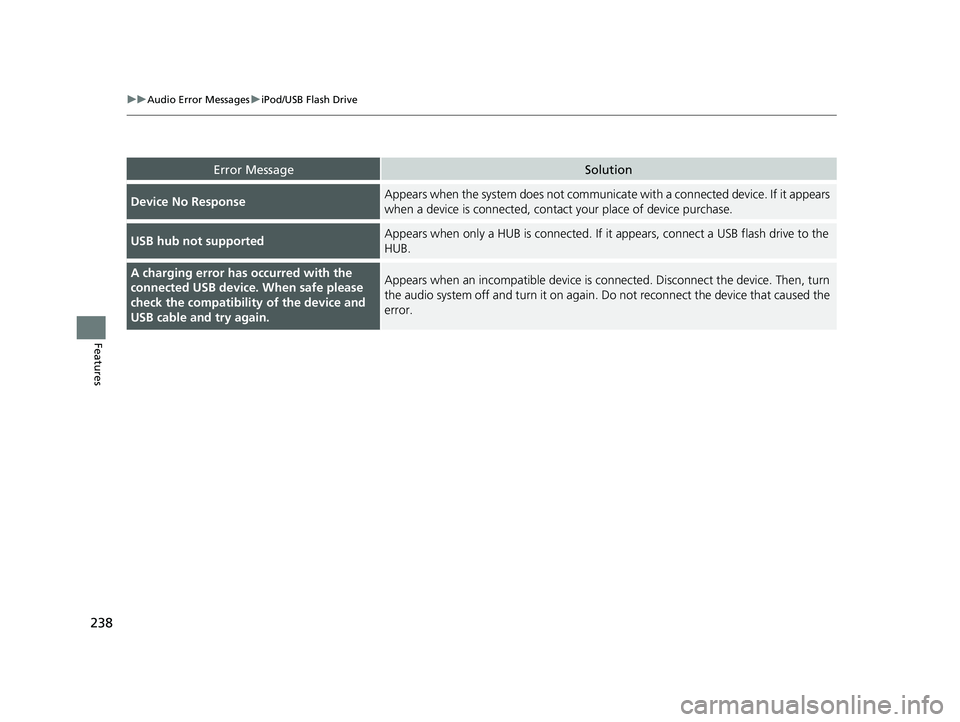
Error MessageSolution
Device No ResponseAppears when the system does not communicate with a connected device. If it appears
when a device is connected, contact your place of device purchase.
USB hub not supportedAppears when only a HUB is co nnected. If it appears, connect a USB flash drive to the
HUB.
A charging error ha s occurred with the
connected USB device. When safe please
check the compatibility of the device and
USB cable and try again.Appears when an incompatible device is co nnected. Disconnect the device. Then, turn
the audio system off and turn it on again. Do not reconnect the device that caused the
error.
23 ACCORD 4D US PET MAP-3130A6000_01.book 238 ページ 2022年10月19日 水曜日 午前11時49分
Page 241 of 533
239
Features
General Information on the Audio System
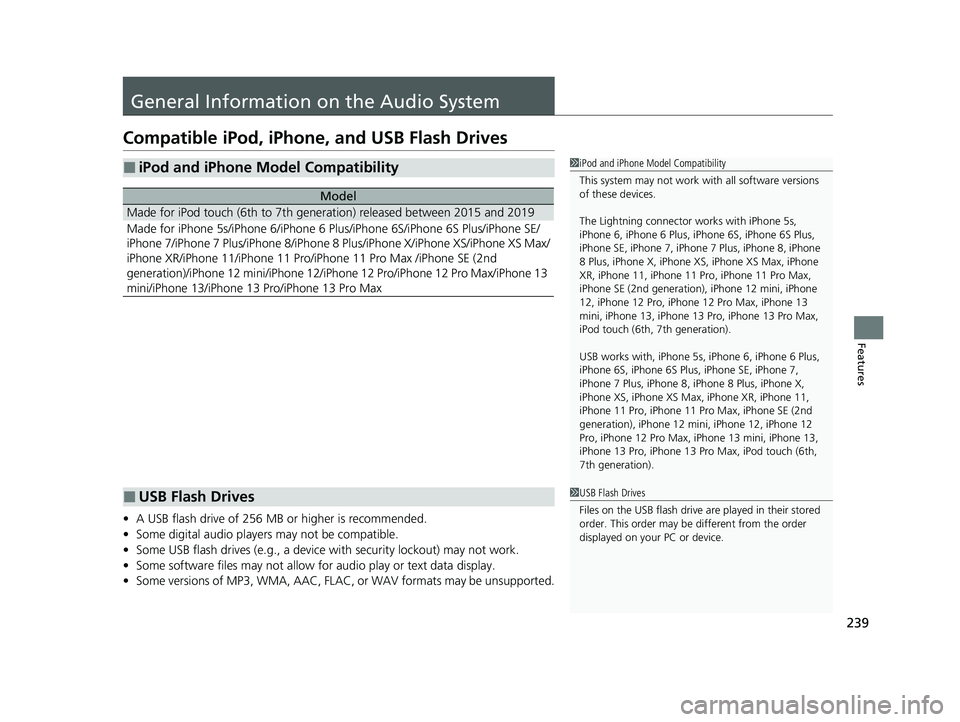
Compatible iPod, iPhone , and USB Flash Drives
•A USB flash drive of 256 MB or higher is recommended.
• Some digital audio players may not be compatible.
• Some USB flash drives (e.g., a device with security lockout) may not work.
• Some software files may not allow for audio play or text data display.
• Some versions of MP3, WMA, AAC, FLAC, or WAV formats may be unsupported.
■iPod and iPhone Model Compatibility
Model
Made for iPod touch (6th to 7th generation) released between 2015 and 2019
Made for iPhone 5s/iPhone 6/iPhone 6 Plus/iPhone 6S/iPhone 6S Plus/iPhone SE/
iPhone 7/iPhone 7 Plus/iPhone 8/iPhone 8 Plus/iPhone X/iPhone XS/iPhone XS Max/
iPhone XR/iPhone 11/iPhone 11 Pro/iPhone 11 Pro Max /iPhone SE (2nd
generation)/iPhone 12 mini/iPhone 12/iP hone 12 Pro/iPhone 12 Pro Max/iPhone 13
mini/iPhone 13/iPhone 13 Pro/iPhone 13 Pro Max
1 iPod and iPhone Model Compatibility
This system may not work with all software versions
of these devices.
The Lightning connector wo rks with iPhone 5s,
iPhone 6, iPhone 6 Plus, iPhone 6S, iPhone 6S Plus,
iPhone SE, iPhone 7, iPhone 7 Plus, iPhone 8, iPhone
8 Plus, iPhone X, iPhone XS, iPhone XS Max, iPhone
XR, iPhone 11, iPhone 11 Pro, iPhone 11 Pro Max,
iPhone SE (2nd generation), iPhone 12 mini, iPhone
12, iPhone 12 Pro, iPhone 12 Pro Max, iPhone 13
mini, iPhone 13, iPhone 13 Pro, iPhone 13 Pro Max,
iPod touch (6th, 7th generation).
USB works with, iPhone 5s, iPhone 6, iPhone 6 Plus,
iPhone 6S, iPhone 6S Plus, iPhone SE, iPhone 7,
iPhone 7 Plus, iPhone 8, iPhone 8 Plus, iPhone X,
iPhone XS, iPhone XS Ma x, iPhone XR, iPhone 11,
iPhone 11 Pro, iPhone 11 Pr o Max, iPhone SE (2nd
generation), iPhone 12 mi ni, iPhone 12, iPhone 12
Pro, iPhone 12 Pro Max, iPhone 13 mini, iPhone 13,
iPhone 13 Pro, iPhone 13 Pro Max, iPod touch (6th,
7th generation).
■USB Flash Drives1 USB Flash Drives
Files on the USB flash drive are played in their stored
order. This order may be different from the order
displayed on your PC or device.
23 ACCORD 4D US PET MAP-3130A6000_01.book 239 ページ 2022年10月19日 水曜日 午前11時49分
Page 242 of 533
240
uuGeneral Information on the Audio System uHonda App License Agreement
Features
Honda App License Agreement
PLEASE CAREFULLY READ THIS END USER LICENSE AGREEMENT (T HIS “AGREEMENT”) WHICH GOVERNS YOUR USE OF THE SOFTWARE
INSTALLED ON YOUR HONDA OR ACURA VEHICLE (YOUR “VEHICLE”) AS WELL AS THE APPLICATIONS, SERVICES, FUNCTIONS, AND
CONTENT PROVIDED THROUGH THE SOFTWARE (COLLECTIVELY, THE “SERVICES”). YOUR USE OF THE SOFTWARE OR SERVICES WILL
SERVE AS YOUR CONSENT TO THE TERMS OF THIS AGREEMENT. THE SOFTWARE IS OWNED (OR LICENSED), PROVIDED, AND/OR
OPERATED BY AMERICAN HONDA MOTOR CO. INC., (“HONDA,” “U S,” “WE,” OR “OUR”), WITH ITS BUSINESS ADDRESS AT 1919
TORRANCE BLVD., TORRANCE, CA 90501. REFERENCE TO “HONDA ” IN THIS AGREEMENT INCLUDES HONDA’S PARENT COMPANY AND
ITS AFFILIATES AND DESIGNATED AGENTS. TH E SERVICES ARE OWNED (OR LICENSED), PROV IDED, AND/OR OPERATED BY HONDA OR A
THIRD-PARTY SERVICE PROVIDER (A “PROVIDER”). REFERENCE TO A “PROVIDER” IN THIS AGREEMENT INCLUDES SUCH PROVIDER’S
PARENT COMPANY, AFFILIATES, AND DESIGNATED AGENTS.
A. Description of the Software. The SOFTWARE includes the software, firmware and the like, installe d and executing on your VEHICLE
during manufacture, and thereafter updated from time to time by HONDA, you or an authorized HONDA dealer (a “DEALER”). The
SOFTWARE allows you to access and use a va riety of SERVICES, including but not limited to: (a) HONDA applications, services, an d content
provided through the SOFTWARE (together, “H ONDA SERVICES”); and (b) PROVIDER applications, services, and content provided through
the SOFTWARE (together, “PROVIDER SERVICES” ), each of which may provide access to various information, media, content, and services.
B. SOFTWARE Licensing and Intellectual Property.
1. SOFTWARE. This AGREEMENT grants you a non-exclusive, limited, and re vocable license to use the SOFTWARE and SERVICES solely (a)
as installed on your VEHICLE by HONDA, (b) as updated on your Vehicle by HONDA, you (but only as and when directed by HONDA), o r a
DEALER and (c) as permitted unde r the terms of this AGREEMENT.
2. HONDA Services. The SOFTWARE may provide you with access to various HONDA SERVICES. Installation, activation, or use of HONDA
SERVICES may require your consent to additi onal terms, conditions, and privacy policies applicable to those HONDA SERVICES (the
“HONDA TERMS”). You acknowledge a nd agree that any collection, use, sharing of data generated by your VEHICLE or your use of your
VEHICLE, and your use of the HONDA SERVI CES shall be subject to this AGREEMENT and any additional HONDA TERMS that may be
specifically applicable to such HONDA SERVI CES or data generation. The HONDA SERVICES may collect, use, and share such data whi le
you are using the SOFTWARE.
■END USER LICENSE AGREEMENT
23 ACCORD 4D US PET MAP-3130A6000_01.book 240 ページ 2022年10月19日 水曜日 午前11時49分
Page 243 of 533
241
uuGeneral Information on the Audio System uHonda App License Agreement
Continued
Features
3. Open-Source Software. The SOFTWARE and SERVICES may in corporate software licensed to HONDA under free or open-source
licenses which govern HONDA’s distribution and y our use of such software. HONDA and the third-party authors, licensors, and distributors
of such software disclaim all warranties and all liability arising from any and all use or distribution of the software. To the extent such
software is provided under terms that diffe r from the applicable free or open-source licenses, those terms are offered by HONDA alone.
Additional information regarding fr ee and open-source software incorporated in the SOFTWARE an d SERVICES is available in this manual
or within the SOFTWARE.
4. Provider Services. The SOFTWARE may provide you with access to various PR OVIDER SERVICES. Installation or use of such PROVIDER
SERVICES may require your consent to additi onal terms, conditions, and privacy policies of the applicable PROVIDER (the “PROVIDER
TERMS”). This AGREEMENT restricts the manner in which you can install and use PROVIDER SERVICES but does not grant you a licens e or
permission to use such PROVIDER SERVICES. Your permission to use PROVIDER SERVICES is limited and subject to any license grants,
conditions, and limitations included in the PROVIDER TERMS. You acknowledge that any collection, use, sharing of your information,
targeted advertising practice s by PROVIDERS, and your use of the PROVIDER SERVICES shall be subj ect to both this AGREEMENT and any
applicable PROVIDER TERMS. The PR OVIDER SERVICES may collect, use, and share such information while you are using the SOFTWARE.
5. License Limitations an d Restrictions on Use.
(a) Limited License.
You understand and agree that the SOFTWA RE and SERVICES are licensed, not sold, to you solely for use in accordance
with this AGREEMENT and any a pplicable PROVIDER TERMS, and an y documentation for the VEHICLE made available to you by HONDA
(any “DOCUMENTATION”). HONDA and its licensors reserve all rights in the SOFTWARE and HONDA SERVICES not expressly granted to
you under this AGREEMENT. PROVIDERS and th eir licensors reserve all rights in the PROVIDER SERVICES not expressly granted to yo u under
the applicable PROVIDER TERMS.
23 ACCORD 4D US PET MAP-3130A6000_01.book 241 ページ 2022年10月19日 水曜日 午前11時49分