ECU HONDA ACCORD COUPE 2002 CL7 / 7.G User Guide
[x] Cancel search | Manufacturer: HONDA, Model Year: 2002, Model line: ACCORD COUPE, Model: HONDA ACCORD COUPE 2002 CL7 / 7.GPages: 375, PDF Size: 4.89 MB
Page 38 of 375
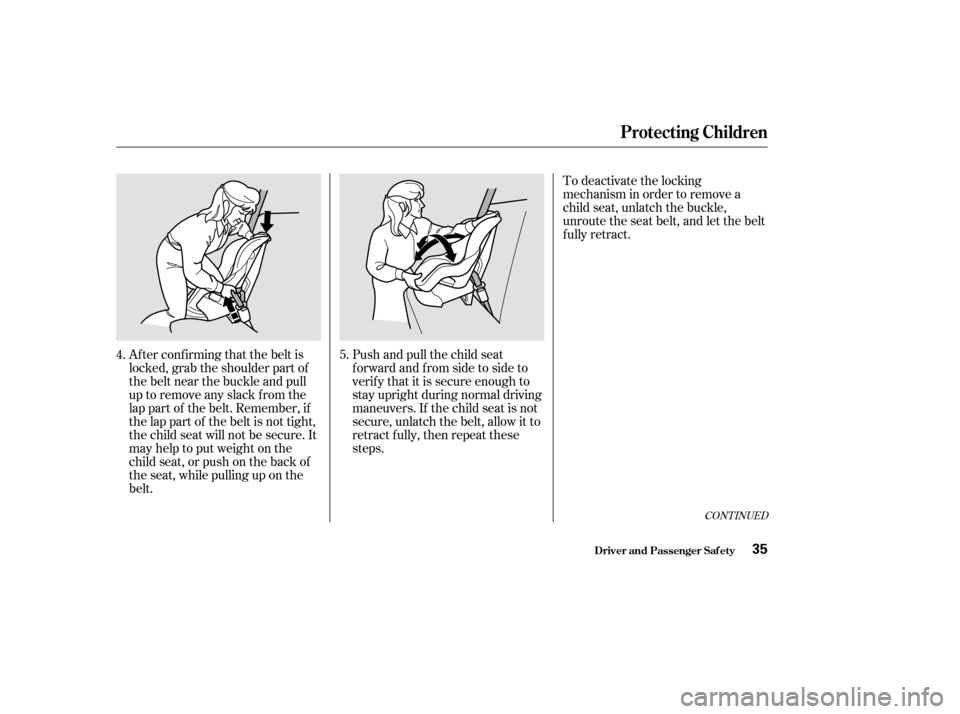
Af ter conf irming that the belt is
locked, grab the shoulder part of
the belt near the buckle and pull
up to remove any slack from the
lap part of the belt. Remember, if
the lap part of the belt is not tight,
the child seat will not be secure. It
mayhelptoputweightonthe
child seat, or push on the back of
the seat, while pulling up on the
belt.Push and pull the child seat
f orward and f rom side to side to
verif y that it is secure enough to
stay upright during normal driving
maneuvers. If the child seat is not
secure, unlatch the belt, allow it to
retract f ully, then repeat these
steps.To deactivate the locking
mechanism in order to remove a
child seat, unlatch the buckle,
unroute the seat belt, and let the belt
fully retract.
4. 5.
CONT INUED
Protecting Children
Driver and Passenger Saf ety35
Page 42 of 375

Move the vehicle seat to the rear-
most position.
Have the child sit up straight, back
against the seat, and feet on or
near the f loor. Caref ully read the owner’s manual
and make sure you understand all
seat belt instructions and all saf ety
inf ormation.
If you decide that a child can saf ely
ride up f ront, be sure to:
Of course, children vary widely. And
while age may be one indicator of
when a child can saf ely ride in the
f ront, there are other important
f actors you should consider.
Physically, a child must be large
enough f or the lap/shoulder belt to
properly f it over the hips, chest, and
shoulder (see pages and ). If
the seat belt does not f it properly,
the child should not sit in the f ront.
To saf ely ride in f ront, a child must
be able to f ollow the rules, including
sitting properly and wearing the seat
belt properly throughout a ride. Check that the child’s seat belt is
properly positioned and secured.
Supervise the child. Even mature
children sometimes need to be
reminded to f asten the seat belts
or sit properly.
15 36
Physical Size
Maturity
Protecting Children
Driver and Passenger Saf ety39
Page 43 of 375
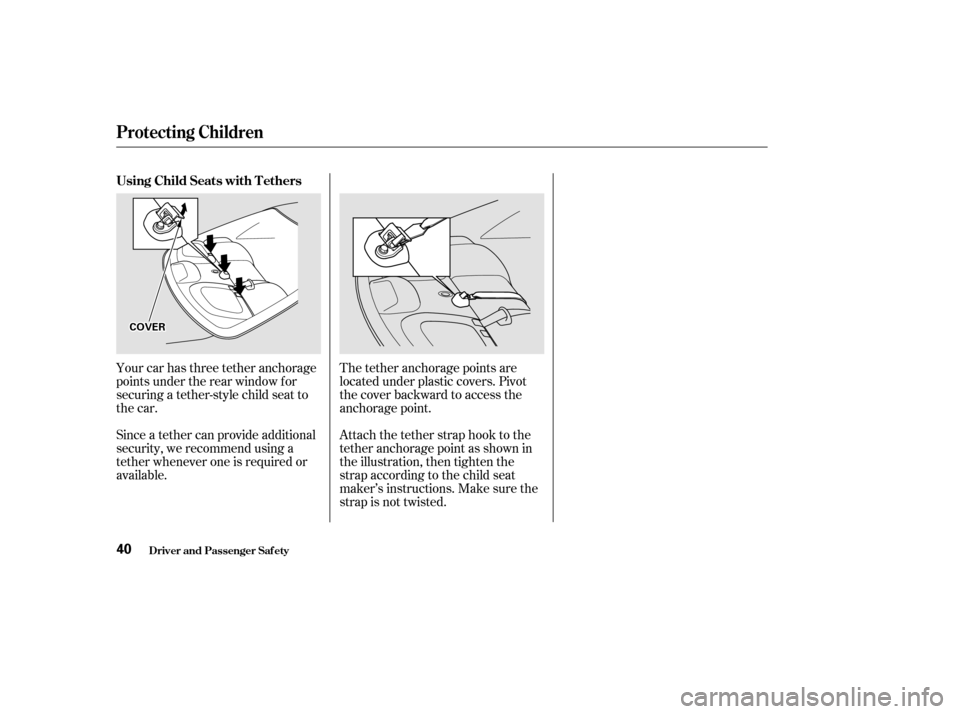
Your car has three tether anchorage
points under the rear window f or
securing a tether-style child seat to
the car.
Since a tether can provide additional
security, we recommend using a
tether whenever one is required or
available.The tether anchorage points are
located under plastic covers. Pivot
the cover backward to access the
anchorage point.
Attach the tether strap hook to the
tether anchorage point as shown in
the illustration, then tighten the
strap according to the child seat
maker’s instructions. Make sure the
strap is not twisted.
Using Child Seats with T ethers
Protecting Children
Driver and Passenger Saf ety40
C CO
OV VE
ER
R
Page 45 of 375

See page f or instructions on how
to wear the lap/shoulder belt
properly.
The seat belts in all seating positions
except the driver’s have an additional
locking mechanism that must be
activated to secure a child seat. (See
pages and f or instructions on
how to secure child seats with this
type of seat belt.)
If the shoulder part of the belt is
pulled all the way out, the locking
mechanism will activate. The belt
will retract, but it will not allow the
passenger to move f reely.
To deactivate the locking
mechanism, unlatch the buckle and
let the seat belt f ully retract. To
ref asten the belt, pull it out only as
f ar as needed.
All seat belts have an emergency
locking retractor. In normal driving,
the retractor lets you move f reely in
your seat while it keeps some
tension on the belt. During a collision
or sudden stop, the retractor
automatically locks the belt to help
restrain your body.
15
30 34
Additional Inf ormation About Your Seat Belts
Driver and Passenger Saf ety42
Page 76 of 375
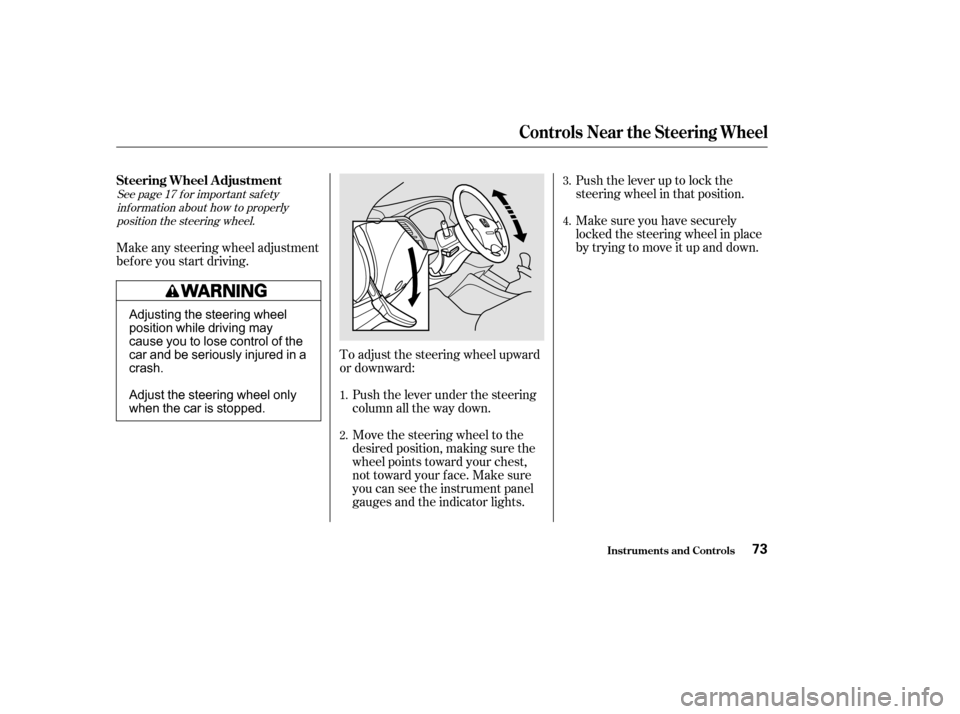
Push the lever up to lock the
steering wheel in that position.
Make sure you have securely
locked the steering wheel in place
by trying to move it up and down.
To adjust the steering wheel upward
or downward: Push the lever under the steering
column all the way down.
Move the steering wheel to the
desired position, making sure the
wheel points toward your chest,
not toward your f ace. Make sure
you can see the instrument panel
gauges and the indicator lights.
Make any steering wheel adjustment
bef ore you start driving.
See page f or important saf ety
inf ormation about how to properlyposition the steering wheel.
3.
4.
1.
2.
17
Steering Wheel A djustment
Controls Near the Steering Wheel
Inst rument s and Cont rols73
Adjusting the steering wheel
position while driving may
cause you to lose control of the
car and be seriously injured in a
crash.
Adjust the steering wheel only
when the car is stopped.
Page 82 of 375
CONT INUED
The ceiling light (if the ceiling light
switch is in the center position) will
come on when you press the
UNLOCK button. If you do not open
either door, the light stays on f or
about 10 seconds, then f ades out. If
you relock the doors with the remote
transmitter before 10 seconds have
elapsed, the light will go of f
immediately. When you push the LOCK button a
second time within 5 seconds after
you have locked the doors, the horn
will sound once to verify that the
security system will be set.
When you push the UNLOCK button
once, only the driver’s door unlocks.
The passenger’s door unlocks when
you push the button a second time.
The parking lights, side marker
lights, and taillights f lash twice.
If you f orget and leave the key in the
ignition switch, Lockout Prevention
will not allow you to lock the driver’s
door. With the driver’s door open
andthekeyintheignition,both
master door lock switches are
disabled. However, if the driver’s
door is not open, the master door
lock switches are not disabled.
Pushing the switch down on the
open passenger’s door will lock both
doors. If you try to lock an open
driver’s door by pushing down the
lock tab, the tabs on both doors pop
up. Pushing down the lock tab on the
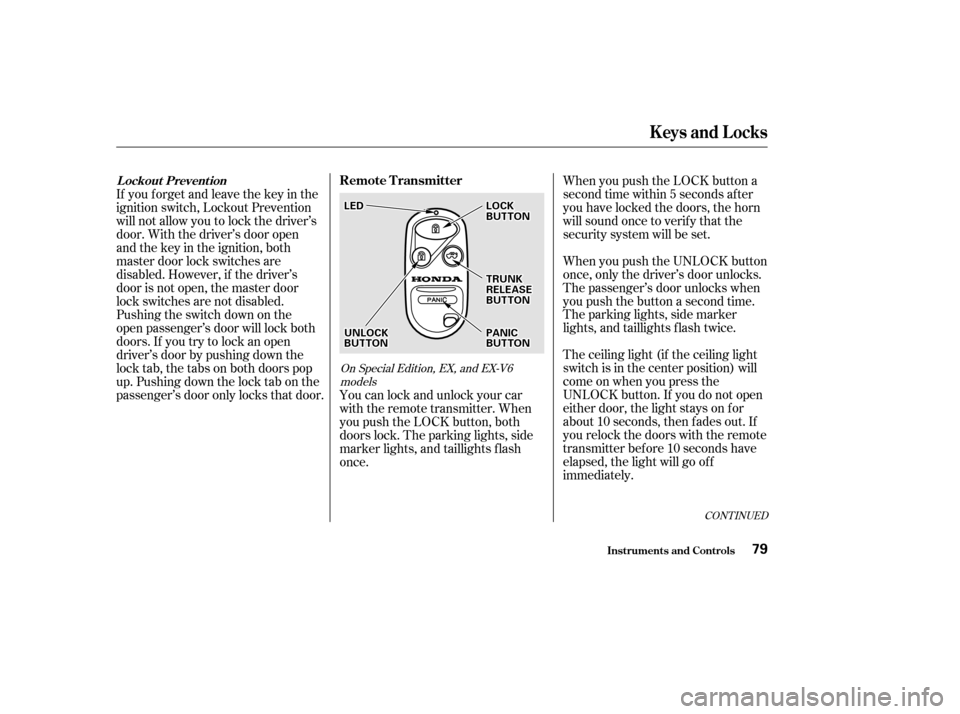
passenger’s door only locks that door. You can lock and unlock your car
with the remote transmitter. When
you push the LOCK button, both
doors lock. The parking lights, side
marker lights, and taillights f lash
once.
On Special Edition, EX, and EX-V6
models
Keys and Locks
Inst rument s and Cont rols
Remote TransmitterL ockout Prevent ion
79
L LE E D
D
U
UN NLLOOC CKK
B
BU UT TT
TO
ON N L
LO
OC CKK
B
BU UT TT
TO
ON N
P
P A
A N
NI ICC
B
BU UT TT
TO
ON N
T
T
R
RU UN NKK
R
RE EL
LEE A
A S
SEE
B
BU UT TT
TO
ON N
Page 83 of 375
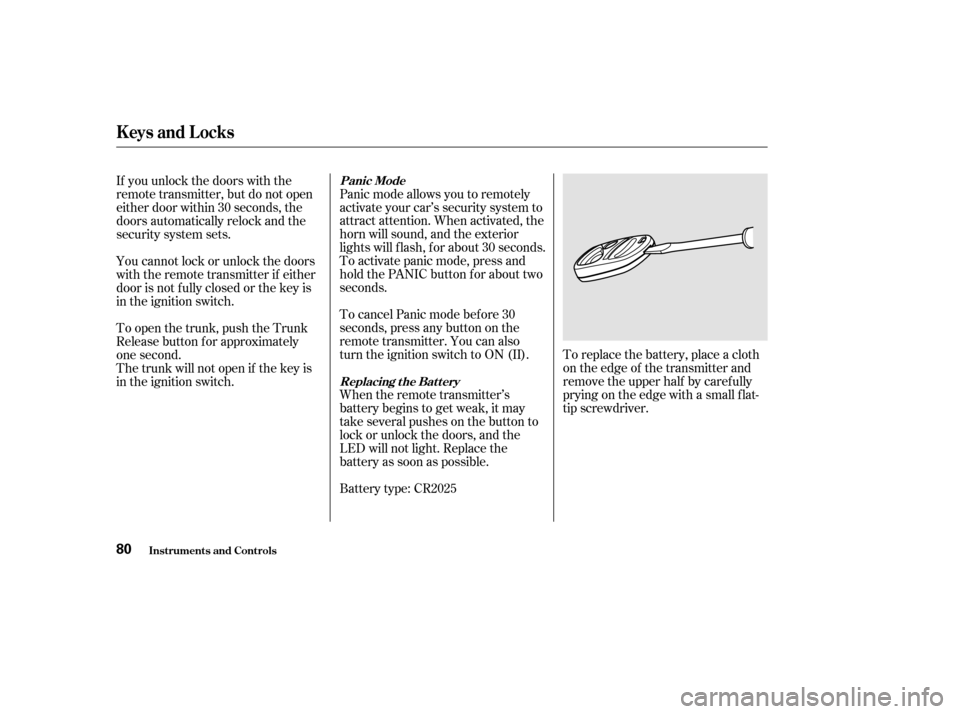
To replace the battery, place a cloth
on the edge of the transmitter and
remove the upper half by carefully
prying on the edge with a small f lat-
tip screwdriver.
Panic mode allows you to remotely
activate your car’s security system to
attract attention. When activated, the
horn will sound, and the exterior
lights will f lash, f or about 30 seconds.
To activate panic mode, press and
hold the PANIC button for about two
seconds.
To cancel Panic mode bef ore 30
seconds, press any button on the
remote transmitter. You can also
turn the ignition switch to ON (II).
When the remote transmitter’s
battery begins to get weak, it may
take several pushes on the button to
lock or unlock the doors, and the
LED will not light. Replace the
battery as soon as possible.
Battery type: CR2025
If you unlock the doors with the
remote transmitter, but do not open
either door within 30 seconds, the
doors automatically relock and the
security system sets.
You cannot lock or unlock the doors
with the remote transmitter if either
door is not f ully closed or the key is
in the ignition switch.
To open the trunk, push the Trunk
Release button f or approximately
one second.
The trunk will not open if the key is
in the ignition switch.
Keys and Locks
Inst rument s and Cont rols
Panic Mode
Replacing the Battery
80
Page 95 of 375
Make sure all rear shoulder belts are
positioned in f ront of the rear seat-
back whenever the seat-back is in its
upright position.
Never drive with the seat-back
f olded down and the trunk lid open.
Seeon
page .
To lock the seat-back upright, push it
f irmly against the trunk panel. Make
sure it is latched in place by pulling
on the top of the seat. Make sure all items in the trunk, or
items extending through the opening
into the back seat, are secured.
Looseitemscanflyforwardand
cause injury if you have to brake
hard. See
on page
.
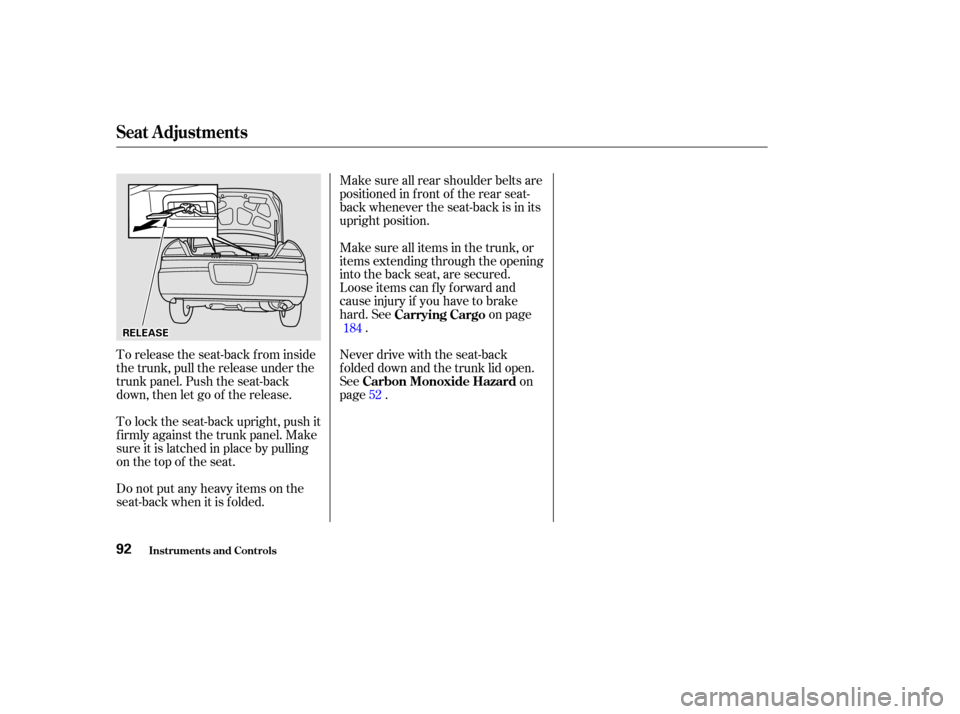
To release the seat-back from inside
the trunk, pull the release under the
trunk panel. Push the seat-back
down, then let go of the release.
Do not put any heavy items on the
seat-back when it is folded. 184
52
Carbon Monoxide Hazard Carrying Cargo
Seat A djustments
Inst rument s and Cont rols92
R RE
EL
LEE A
A S
SEE
Page 110 of 375
.....................
Heating and Cooling .108
.........
What Each Control Does . 108
............
How to Use the System . 111
..........
To Turn Everything Of f . 114
...............
Climate Control System . 115
.......
Fully-automatic Operation . 117
.......
Semi-automatic Operation . 118
Sunlight Sensor/ ............
Temperature Sensor . 122
..........
Audio System (LX, LX-V6) . 123
....
AM/FM/CD Audio System . 123
.................
Operating the Radio . 124
.................
Adjusting the Sound . 128
............
Audio System Lighting . 129
.........
Operating the CD Player . 130 .....
Operating the CD Changer . 132
....
CD Player Error Indications . 133
CD Changer Error .............................
Indications .134
Operating the Cassette .....................................
Player .135
............
Tape Search Functions . 136
..........
Audio System (EX, EX-V6) . 138
AM/FM/Cassette/ .
CD Changer Audio System . 138
.................
Operating the Radio . 139
.................
Adjusting the Sound . 143
............
Audio System Lighting . 144
....................
Radio Frequencies . 144
........................
Radio Reception .144
Operating the Cassette .....................................
Player .146
............
Tape Search Functions . 147
Caring f or the Cassette .....................................
Player .150
.....
Operating the CD Changer . 151
Loading CDs in the .............................
Changer .152
...............................
Operation .154
Removing CDs from the .............................
Changer .156 .......
Protecting Compact Discs . 158
CD Changer Error .............................
Indications .159
...........
Remote Audio Controls . 160
Audio System (Special Edition ..................................
models) .161
.................
Operating the Radio . 162
.................
Adjusting the Sound . 166
....................
Radio Frequencies . 167
........................
Radio Reception .167
.........
Operating the CD Player . 169
Operating the Optional CD .................................
Changer .171
.......
Protecting Compact Discs . 172
.....
CD Player Error Indication . 173
CD Changer Error Indications. 174
Operating the Cassette .....................................
Player .175
Caring f or the Cassette .....................................
Player .178
.......................
Thef t Protection .179
............................
Security System .180
................................
Cruise Control .181
HomeLink Universal .................................
Transceiver .185
Comf ort and Convenience Features
Comf ort and Convenience Feat ures107
Page 183 of 375
Once the security system is set,
opening either door (without using
the key or the remote transmitter),
or the hood, will cause it to alarm. It
also alarms if the radio is removed
f rom the dashboard or the wiring is
cut.
The security system helps to protect
your car and valuables f rom thef t.
The horn sounds and a combination
of headlights, parking lights, side
marker lights and taillights f lashes if
someone attempts to break into your
carorremovetheradio.Thisalarm
continues f or two minutes, then the
system resets. To reset an alarming
system bef ore the two minutes have
elapsed, unlock either door with the
key or the remote transmitter.
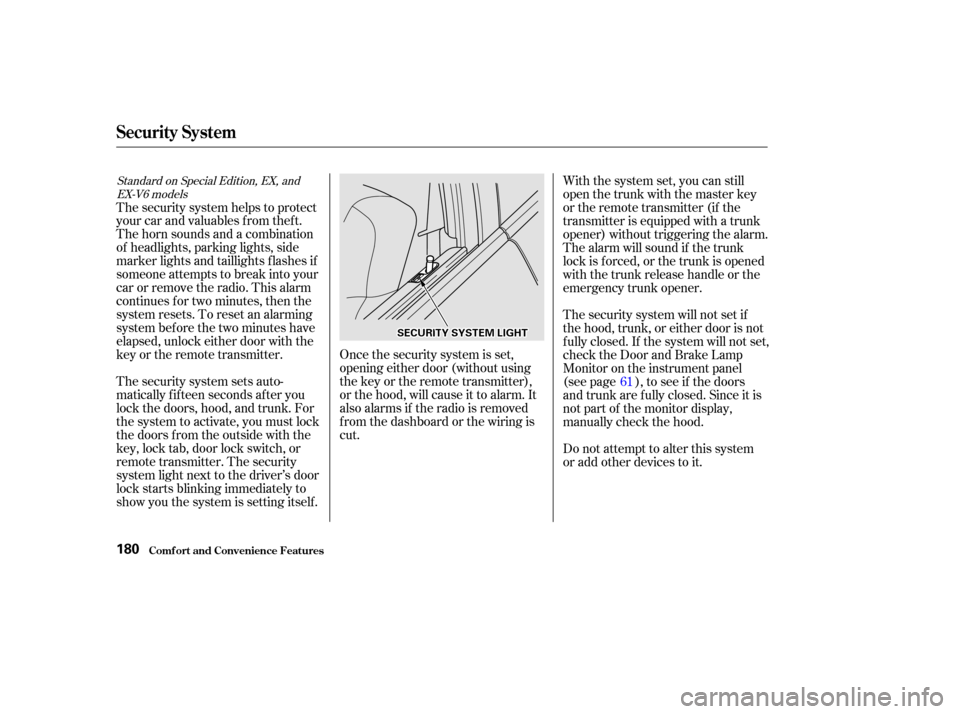
The security system sets auto-
matically fifteen seconds after you
lock the doors, hood, and trunk. For
the system to activate, you must lock
the doors f rom the outside with the
key, lock tab, door lock switch, or
remote transmitter. The security
system light next to the driver’s door
lock starts blinking immediately to
show you the system is setting itself . With the system set, you can still
open the trunk with the master key
or the remote transmitter (if the
transmitter is equipped with a trunk
opener) without triggering the alarm.
The alarm will sound if the trunk
lock is f orced, or the trunk is opened
with the trunk release handle or the
emergency trunk opener.
The security system will not set if
the hood, trunk, or either door is not
f ully closed. If the system will not set,
check the Door and Brake Lamp
Monitor on the instrument panel
(see page ), to see if the doors
and trunk are f ully closed. Since it is
notpartofthemonitordisplay,
manually check the hood.
Do not attempt to alter this system
or add other devices to it.
61
Standard on Special Edition, EX, and
EX-V6 models
Security System
Comf ort and Convenience Feat ures180
S SE EC
CU UR RIITT Y
Y S
SYYSSTTE
EM
M L
LIIGGH HT
T