navigation system HONDA ACCORD COUPE 2014 9.G User Guide
[x] Cancel search | Manufacturer: HONDA, Model Year: 2014, Model line: ACCORD COUPE, Model: HONDA ACCORD COUPE 2014 9.GPages: 593, PDF Size: 22.22 MB
Page 236 of 593
235
Features
Audio System Basic Operation
To use the audio system function, the power mode must be in ACCESSORY or ON.
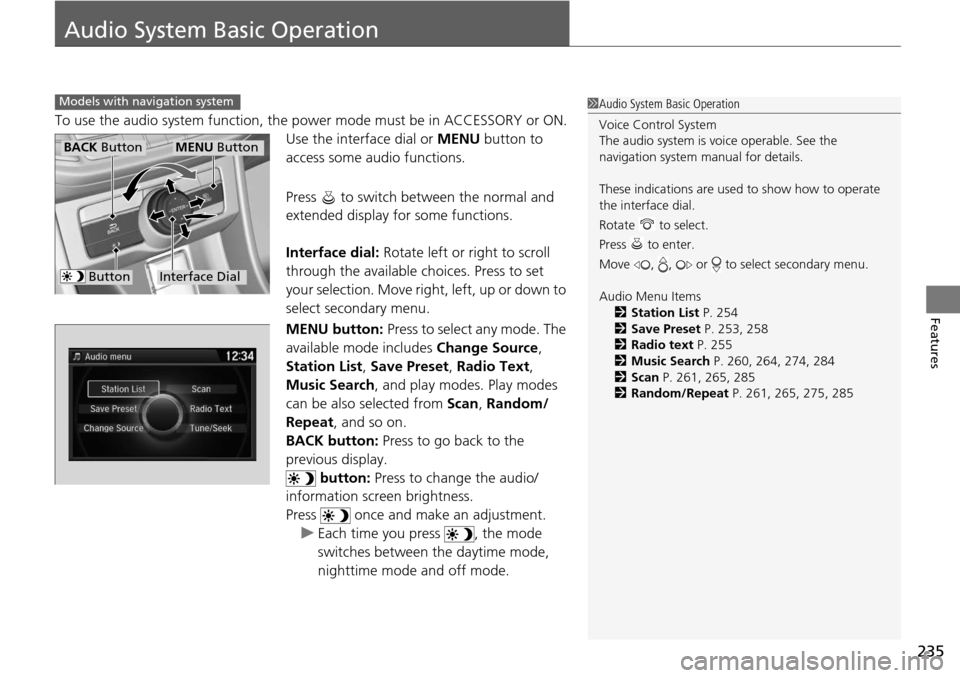
Use the interface dial or MENU button to
access some au dio functions.
Press to switch between the normal and
extended display fo r some functions.
Interface dial: Rotate left or right to scroll
through the available choices. Press to set
your selection. Move right, left, up or down to
select secondary menu.
MENU button: Press to select any mode. The
available mode includes Change Source,
Station List , Save Preset, Radio Text ,
Music Search , and play mode s. Play modes
can be also selected from Scan, Random/
Repeat , and so on.
BACK button: Press to go back to the
previous display. button: Press to change the audio/
information screen brightness.
Press once and make an adjustment.
u Each time you press , the mode
switches between the daytime mode,
nighttime mode and off mode.
Models with navigation system1Audio System Basic Operation
Voice Control System
The audio system is voice operable. See the
navigation system manual for details.
These indications are used to show how to operate
the interface dial.
Rotate to select.
Press to enter.
Move , , or to select secondary menu.
Audio Menu Items
2 Station List P. 254
2 Save Preset P. 253, 258
2 Radio text P. 255
2 Music Search P. 260, 264, 274, 284
2 Scan P. 261, 265, 285
2 Random/Repeat P. 261, 265, 275, 285
Interface Dial
MENU ButtonBACK Button
Button
Page 239 of 593
238
uuAudio System Basic Operation uAudio/Information Screen
Features
Audio/Information Screen
Displays the audio status and wallpaper. From this screen, you can go to various
setup options.
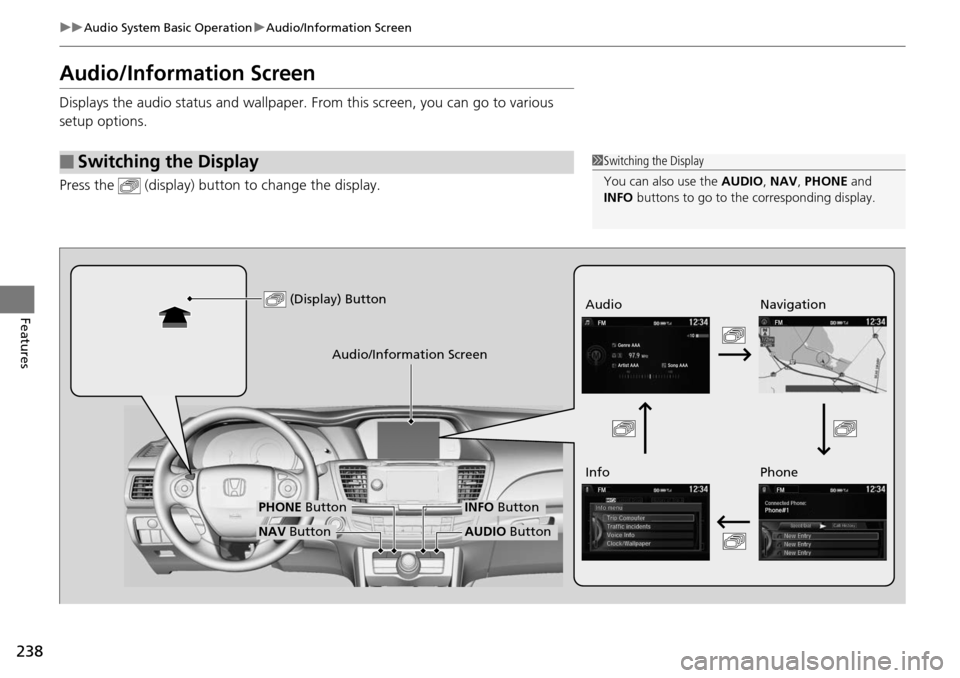
Press the (display) butto n to change the display.
■Switching the Display1Switching the Display
You can also use the AUDIO, NAV, PHONE and
INFO buttons to go to the corresponding display.
(Display) ButtonAudio
Info
Audio/Information Screen
Navigation
Phone
AUDIO ButtonNAV Button
PHONE ButtonINFO Button
Page 240 of 593
239
uuAudio System Basic Operation uAudio/Information Screen
Continued
Features
■Audio
Shows the current audio information.
■Navigation
Shows the navigation screen.
2 Refer to the Navigation System Manual
■Phone
Shows the HFL information.
2 Bluetooth® HandsFreeLink® P. 375
■Info
Shows the Trip Computer or Clock/Wallpaper and other information. Rotate
to select an item, then press .
■Trip computer (Current Drive)
Shows the range, and instant and average fuel economy of the current trip, as well
as the average fuel economy from your last trip.
■Trip computer (History of Trip A)
Shows the range, average fuel economy and dist ances traveled for the current trip, as well
as the average fuel economy and distances traveled during the last three driving cycles.
Each time you reset the trip meter A, th e information on the display updates. The
history of the previous three driving cycles is kept.
■Deleting the history manually
1. Move on the History of Trip A screen to select Delete History , then press .
2. You will receive a confirmation message on the screen. Rotate to select Yes,
then press .
■Clock/Wallpaper
Shows a clock screen or an image you import.
Page 245 of 593
244
uuAudio System Basic Operation uVoice Control Operation
Features
Voice Control Operation
Your vehicle has a voice control system that allows hands-free operation of most of
the navigation system functions.
The voice control system uses the ( Talk) and (hang-up/back) buttons on the
steering wheel and a microphone near the map lights on the ceiling.
To achieve optimum voice recognition when using the navigation voice control
system:
• Make sure the correct screen is displa yed for the voice command that you are
using.
• Close the windows and moonroof.
• Adjust the dashboard and side vents so air does not blow onto the microphone
on the ceiling.
• Speak clearly in a clear, natural speaking voice without pausing between words.
• Reduce any background noise if possible. The system may misinterpret your
command if more than one person is speaking at the same time.
• Refer to the Voice Help feature.
2 Refer to the Navigation System Manual
■Voice Recognition
1Voice Control Operation
When you press the button, a helpful prompt asks
what you would like to do. Press and release the
button again to bypass this prompt and give a
command.
1 Voice Recognition
The voice control system can only be used from the
driver’s seat because the microphone unit removes
noises from the front passenger’s side.
Page 246 of 593
245
uuAudio System Basic Operation uVoice Control Operation
Continued
Features
The system accepts these commands on the
Voice Portal screen.
• Call Your contact name
• Call Phone Number
• Find nearest POI category name
• Go home
• Route menu
• Cancel route
The system accepts these commands on any
screen.
• Call by number
• Call by name
• Call Phone number
• Call your contact name
Contacts that are imported from your
phone to the vehicle ar e all made available
by voice. Voice Tags ca n also be recorded
for each of your Speed Dial entries.
■Voice Portal Commands
■Phone Commands
2 Refer to the Navigation System Manual
The system accepts these commands on any
screen.
•Trip computer
• Traffic information
• Display clock
• Display wallpaper
■Navigation Commands
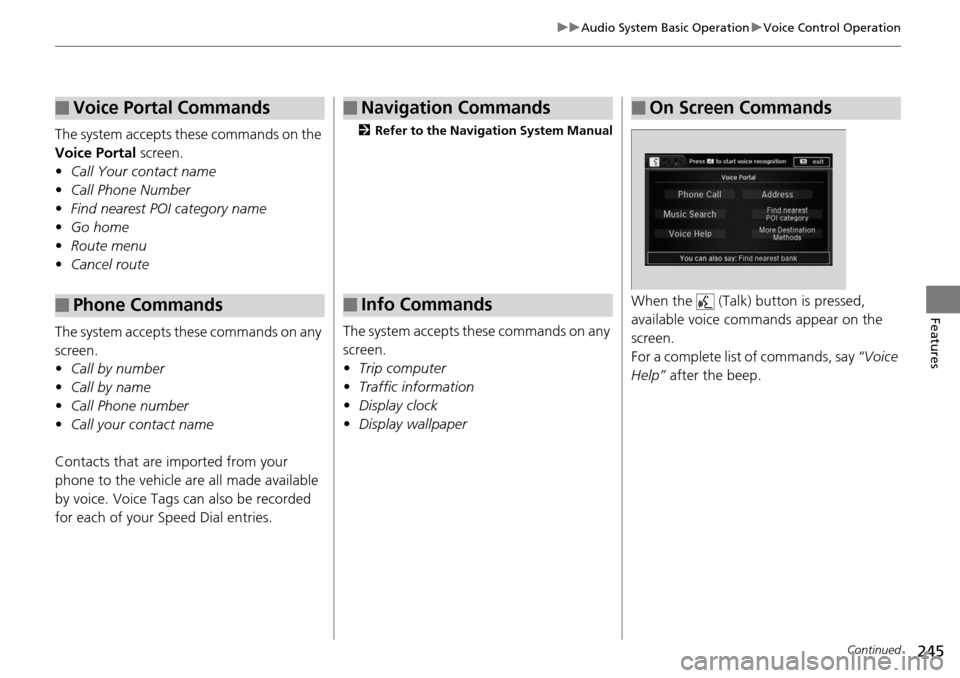
■Info CommandsWhen the (Talk) button is pressed,
available voice comma nds appear on the
screen.
For a complete list of commands, say “Voice
Help” after the beep.
■On Screen Commands
Page 272 of 593
271
uuAudio System Basic Operation uPlaying Hard Disc Drive (HDD) Audio
Features
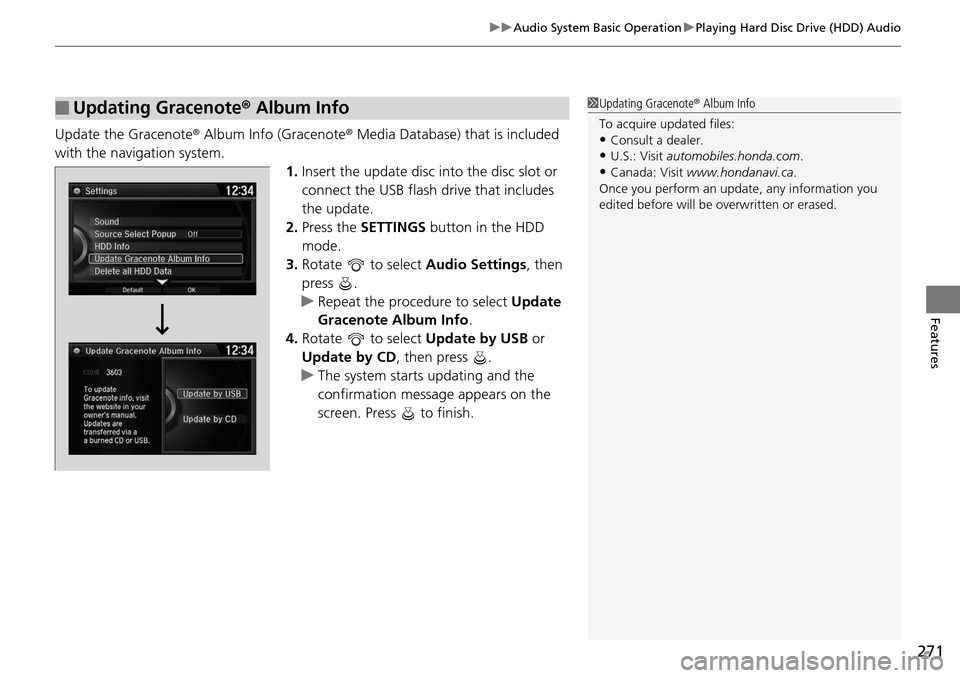
Update the Gracenote ® Album Info (Gracenote ® Media Database) that is included
with the navigation system. 1.Insert the update disc into the disc slot or
connect the USB flash drive that includes
the update.
2. Press the SETTINGS button in the HDD
mode.
3. Rotate to select Audio Settings, then
press .
u Repeat the procedure to select Update
Gracenote Album Info .
4. Rotate to select Update by USB or
Update by CD, then press .
u The system starts updating and the
confirmation message appears on the
screen. Press to finish.
■Updating Gracenote ® Album Info1 Updating Gracenote ® Album Info
To acquire updated files:
•Consult a dealer.
•U.S.: Visit automobiles.honda.com .
•Canada: Visit www.hondanavi.ca .
Once you perform an update, any information you
edited before will be overwritten or erased.
Page 290 of 593
289
uuAudio Error Messages uHard Disc Drive (HDD) Audio
Features
Hard Disc Drive (HDD) Audio
If an error occurs while playing the Hard Disc Drive (HDD) Audio, you may see the
following error messages. If you cannot cl ear the error message, contact a dealer.
Error MessageSolution
HDD access error.
Please consult your dealer.—
The navigation system temperature is too high. For
protection, the system will shut off until it cools down.Turn the audio system off and allow the player to cool down until
the error message is cleared.
The navigation system temperature is too low. For
protection, the system will shut off until it warms up.The navigation system has diffi culty reading the HDD when the
temperature is below approximat ely -22°F (-30°C). The navigation
system starts up automatically when the display warms up.
Unplayable FileAppears when a file format not s upported. Current track will be
skipped. The next supported track plays automatically.
Models with navigation system
Page 298 of 593
297
uuGeneral Information on the Audio System uCompatible iPod, iPhone® , and USB Flash Drives
Features
Compatible iPod, iPhone®, and USB Flash Drives
*1:Models with one display
*2:Models with two displays or the navigation system
• Use a recommended USB flash drive of 256 MB or higher.
• Some digital audio players may not be compatible.
• Some USB flash drives (e.g., a device with security lockout) may not work.
• Some software files may not allow for audio play or text data display.
• Some versions of MP3, WMA, or AAC formats may be unsupported.
■iPod and iPhone® Model Compatibility
Model
iPod (5th generation)
iPod classic 80GB/160GB (launch in 2007)
iPod classic 120GB (launch in 2008)
iPod classic 160GB (launch in 2009)
iPod nano (1st to 7th generation) launch in 2012*1
iPod nano (1st to 6th generation) launch in 2010*2
iPod touch (1st to 5th generation) launch in 2012*1
iPod touch (1st to 4th generation) launch in 2010*2
iPhone® 3G/iPhone ® 3GS/iPhone ® 4/iPhone ® 4S/iPhone ® 5*1
iPhone® 3G/iPhone ® 3GS/iPhone ® 4/iPhone® 4S*2
■USB Flash Drives
1 iPod and iPhone ® Model Compatibility
This system may not work with all software versions
of these devices.
1 USB Flash Drives
Files on the USB flash drive are played in their stored
order. This order may be different from the order
displayed on your PC or device.
Page 299 of 593
298
Features
Customized Features
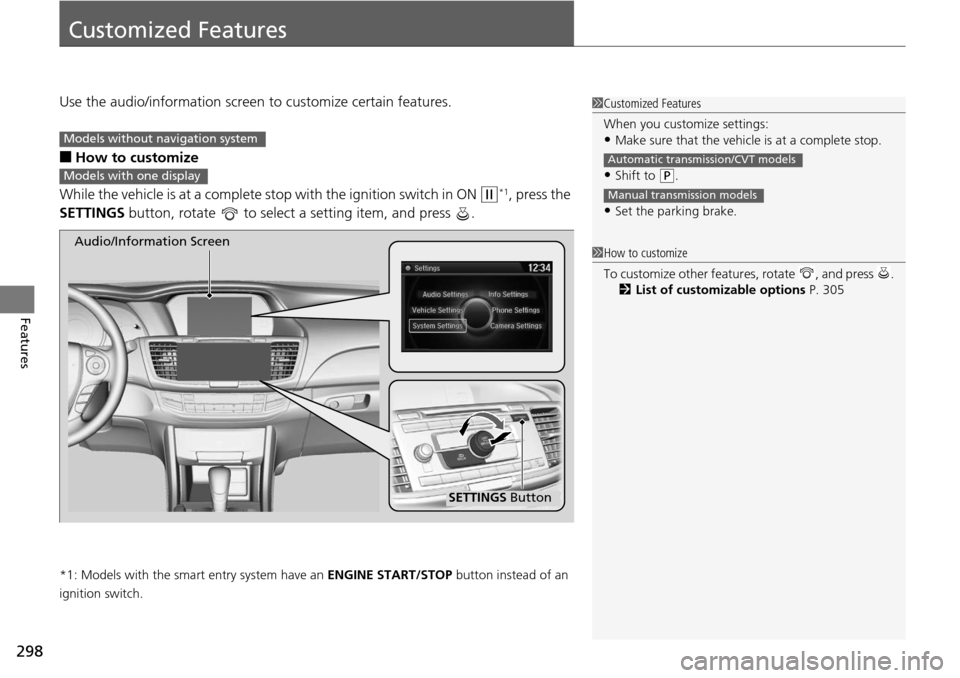
Use the audio/information screen to customize certain features.
■How to customize
While the vehicle is at a complete st op with the ignition switch in ON
(w*1, press the
SETTINGS button, rotate to select a setting item, and press .
*1: Models with the smart entry system have an ENGINE START/STOP button instead of an
ignition switch.
1 Customized Features
When you customize settings:
•Make sure that the vehicle is at a complete stop.
•Shift to (P.
•Set the parking brake.
Automatic transmission/CVT models
Manual transmission models
1 How to customize
To customize other featur es, rotate , and press .
2 List of customizable options P. 305
Models without navigation system
Models with one display
SETTINGS Button
Audio/Information Screen
Page 301 of 593
300
uuCustomized Features u
Features
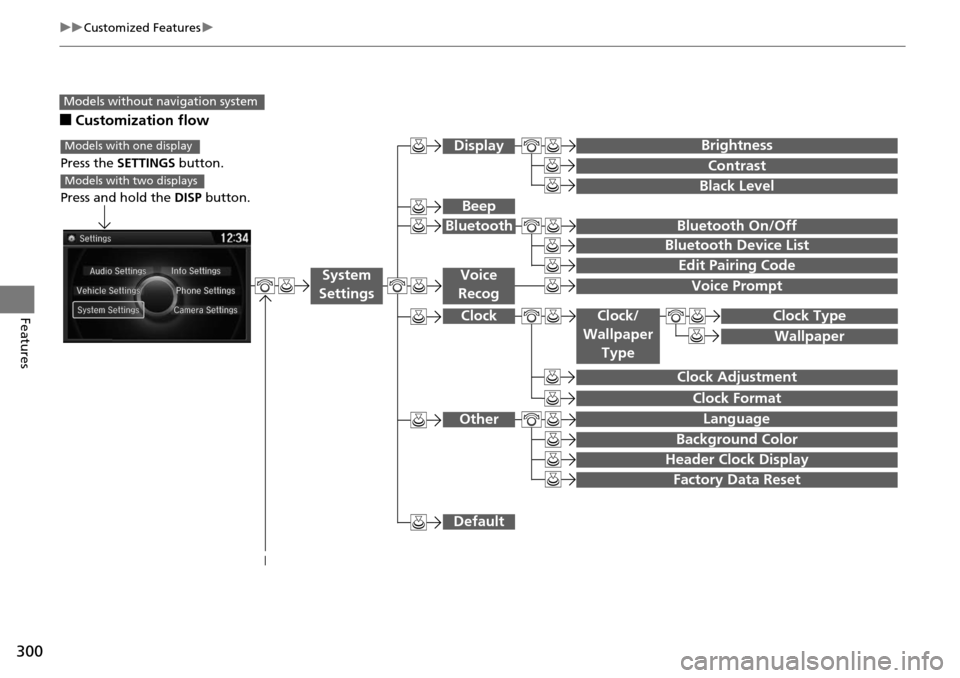
■Customization flow
Models without navigation system
Clock Format
Background Color
Header Clock Display
Factory Data Reset
Clock Adjustment
Press the SETTINGS button.
Press and hold the DISP button.
Models with one display
Models with two displays
Language
Default
Edit Pairing Code
Bluetooth On/Off
Bluetooth Device List
Voice Prompt
Brightness
Contrast
Black Level
Beep
Clock/
Wallpaper
TypeClock Type
Wallpaper
System
SettingsVoice
Recog
Bluetooth
Display
Clock
Other