lock HONDA ACCORD COUPE 2016 9.G Quick Guide
[x] Cancel search | Manufacturer: HONDA, Model Year: 2016, Model line: ACCORD COUPE, Model: HONDA ACCORD COUPE 2016 9.GPages: 84, PDF Size: 19.4 MB
Page 23 of 84
38 || 39
VEHICLE CONTROLSVEHICLE CONTROLS
Always ensure the wiper lever is in the OFF position before entering a car wash to
prevent severe damage to the windshield wiper system.
NOTICE
Do not use the wipers when the windshield is dry. The windshield will get
scratched, or the rubber blades will get damaged.
In cold weather, the blades may freeze to the windshield, becoming stuck.
operating the wipers in this condition may damage the wipers. Use the def\
roster
to warm the windshield, or manually clear the windshield of ice and snow before
turning on the wipers.
NOTICE
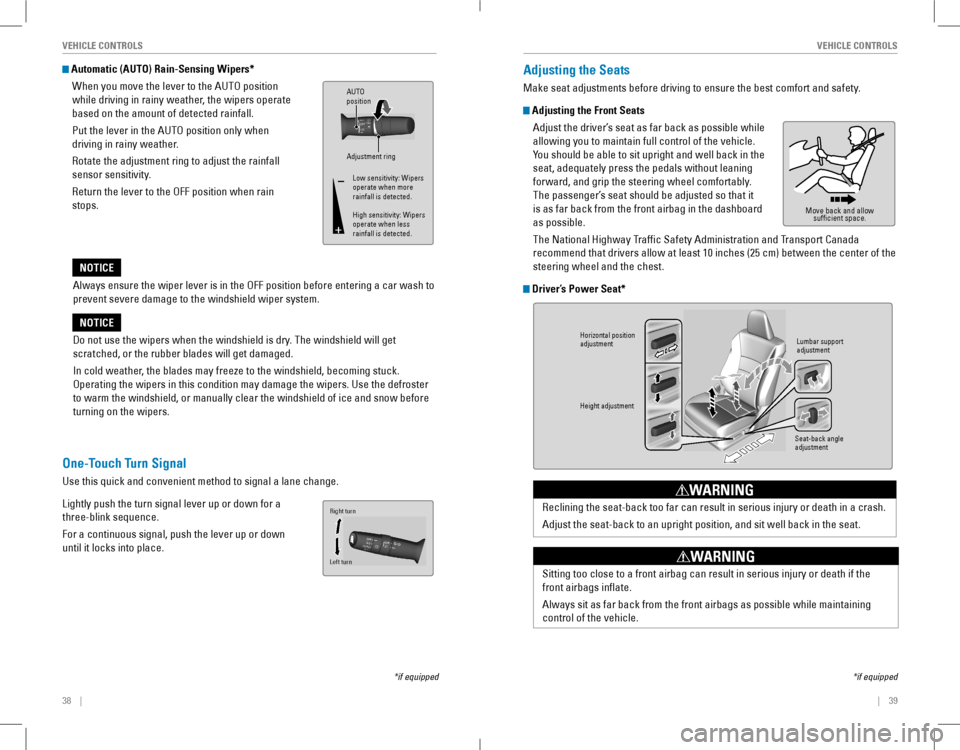
Automatic (AUTO) Rain-Sensing Wipers*
When you move the lever to the AUTO position
while driving in rainy weather, the wipers operate
based on the amount of detected rainfall.
Put the lever in the AUTo position only when
driving in rainy weather.
rotate the adjustment ring to adjust the rainfall
sensor sensitivity.
return the lever to the oFF position when rain
stops.
Adjustment ring
AUTO
position
Low sensitivity: Wipers
operate when more
rainfall is detected.
High sensitivity: Wipers
operate when less
rainfall is detected.
*if equipped
One-Touch Turn Signal
Use this quick and convenient method to signal a lane change.
Lightly push the turn signal lever up or down for a
three-blink sequence.
For a continuous signal, push the lever up or down
until it locks into place.
Right turn
Left turn
Adjusting the Seats
Make seat adjustments before driving to ensure the best comfort and safety.
Adjusting the Front Seats
Adjust the driver’s seat as far back as possible while
allowing you to maintain full control of the vehicle.
You should be able to sit upright and well back in the
seat, adequately press the pedals without leaning
forward, and grip the steering wheel comfortably.
The passenger’s seat should be adjusted so that it
is as far back from the front airbag in the dashboard
as possible.
The National Highway Traffic Safety Administration and Transport Canada
recommend that drivers allow at least 10 inches (25 cm) between the center of the
steering wheel and the chest.
Driver’s Power Seat*
Move back and allow
sufficient space.
*if equipped
Horizontal position
adjustment
Height adjustmen t
Seat-back angle
adjustmentLumbar support
adjustmen
t
Reclining the seat-back too far can result in serious injury or death in a crash.
Adjust the seat-back to an upright position, and sit well back in the seat.
WARNING
Sitting too close to a front airbag can result in serious injury or death if the
front airbags inflate.
Always sit as far back from the front airbags as possible while maintaining
control of the vehicle.
WARNING
Page 24 of 84
40 || 41
VEHICLE CONTROLSVEHICLE CONTROLS
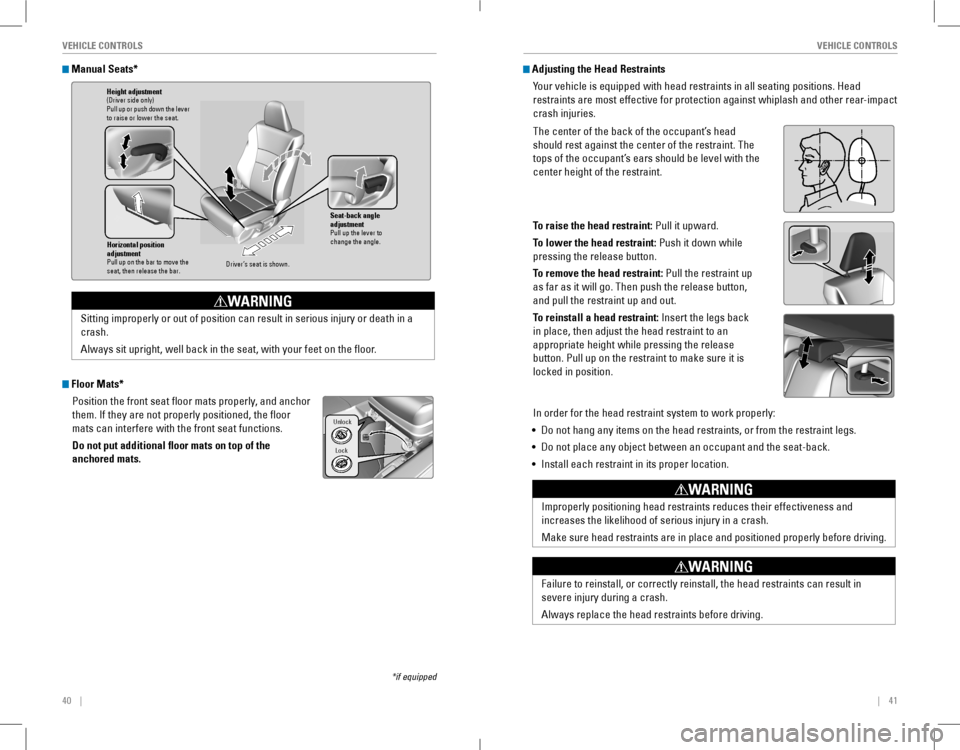
Manual Seats*
Floor Mats*
Position the front seat floor mats properly, and anchor
them. If they are not properly positioned, the floor
mats can interfere with the front seat functions.
Do not put additional floor mats on top of the
anchored mats.
*if equipped
Horizontal position
adjustment
Pull up on the bar to move the
seat, then release the bar.
Height adjustmen t(Driver side only)
Pull up or push down the lever
to raise or lower the seat .
Seat-back angle
adjustment
Pull up the lever to
change the angle.
Driver’s seat is shown .
Sitting improperly or out of position can result in serious injury or de\
ath in a
crash.
Always sit upright, well back in the seat, with your feet on the floor.
WARNING
Lock
Unlock
Adjusting the Head Restraints
Your vehicle is equipped with head restraints in all seating positions. Head
restraints are most effective for protection against whiplash and other \
rear-impact
crash injuries.
The center of the back of the occupant’s head
should rest against the center of the restraint. The
tops of the occupant’s ears should be level with the
center height of the restraint.
To raise the head restraint: Pull it upward.
To lower the head restraint: Push it down while
pressing the release button.
To remove the head restraint: Pull the restraint up
as far as it will go. Then push the release button,
and pull the restraint up and out.
To reinstall a head restraint: Insert the legs back
in place, then adjust the head restraint to an
appropriate height while pressing the release
button. Pull up on the restraint to make sure it is
locked in position.
In order for the head restraint system to work properly:
• Do not hang any items on the head restraints, or from the restraint legs\
.
• Do not place any object between an occupant and the seat-back.
• Install each restraint in its proper location.
Position head in the
center of the head
restraint.
Improperly positioning head restraints reduces their effectiveness and
increases the likelihood of serious injury in a crash.
Make
sure head restraints are in place and positioned properly before driving.
WARNING
Failure to reinstall, or correctly reinstall, the head restraints can re\
sult in
severe injury during a crash.
Always replace the head restraints before driving.
WARNING
Page 25 of 84
42 || 43
VEHICLE CONTROLSVEHICLE CONTROLS
Folding Down the Rear Seats
The rear seat-back(s*) can be folded down to make room for large items in the
trunk.
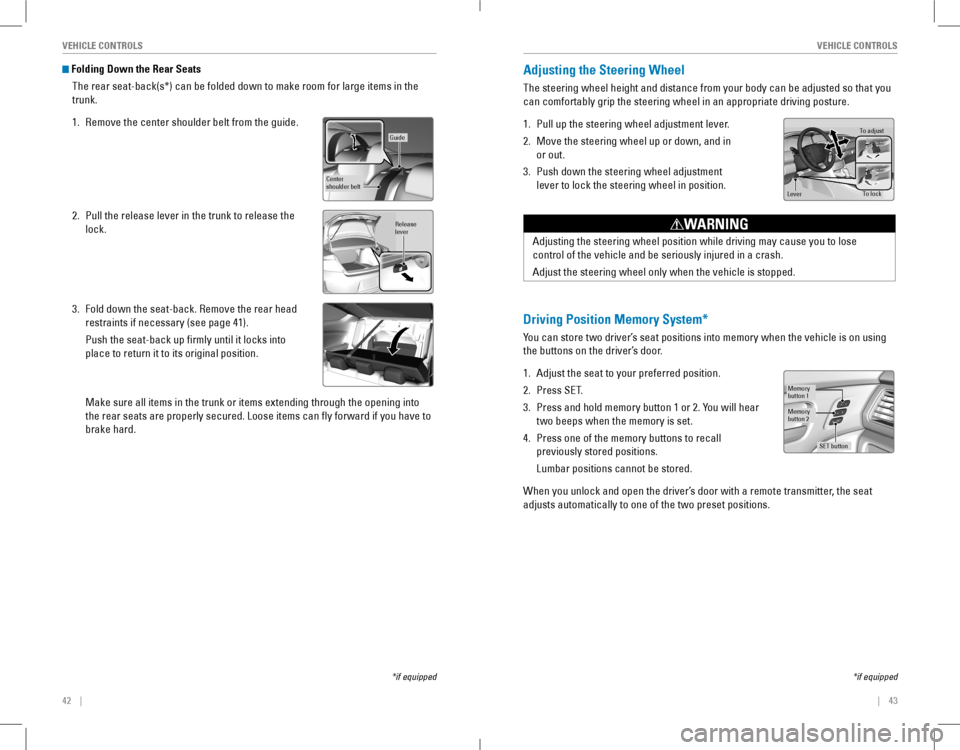
1. Remove the center shoulder belt from the guide.
2. Pull the release lever in the trunk to release the
lock.
3. Fold down the seat-back. Remove the rear head
restraints if necessary (see page 41).
Push the seat-back up firmly until it locks into
place to return it to its original position.
Make sure all items in the trunk or items extending through the opening \
into
the rear seats are properly secured. Loose items can fly forward if yo\
u have to
brake hard.
*if equipped
Guide
Center
shoulder belt
Release
lever
Adjusting the Steering Wheel
The steering wheel height and distance from your body can be adjusted so that you
can comfortably grip the steering wheel in an appropriate driving posture.
1. Pull up the steering wheel adjustment lever.
2. Move the steering wheel up or down, and in
or out.
3. Push down the steering wheel adjustment
lever to lock the steering wheel in position.
To adjus t
To lock
Lever
Adjusting the steering wheel position while driving may cause you to los\
e
control of the vehicle and be seriously injured in a crash.
Adjust the steering wheel only when the vehicle is stopped.
WARNING
Driving Position Memory System*
You can store two driver’s seat positions into memory when the vehicle is on using
the buttons on the driver’s door.
1. Adjust the seat to your preferred position.
2. Press SeT.
3. Press and hold memory button 1 or 2. You will hear
two beeps when the memory is set.
4. Press one of the memory buttons to recall
previously stored positions.
Lumbar positions cannot be stored.
When you unlock and open the driver’s door with a remote transmitter, the seat
adjusts automatically to one of the two preset positions.
Memory
button 1
Memory
button 2
SET button
*if equipped
Page 28 of 84
48 || 49
AUDIO AND CONNECTIVITYVEHICLE CONTROLS
Setting the Clock
Adjust the time using the steps described for your vehicle type.
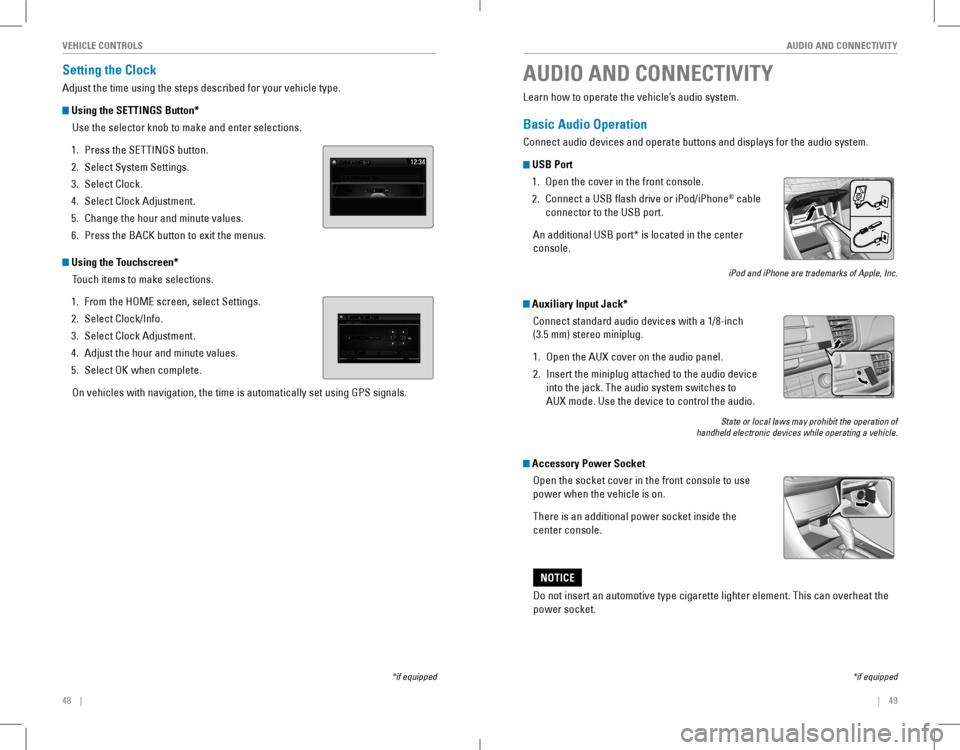
Using the SETTINGS Button*
Use the selector knob to make and enter selections.
1. Press the SETTINGS button.
2. Select System Settings.
3. Select Clock.
4. Select Clock Adjustment.
5. Change the hour and minute values.
6. Press the BACK button to exit the menus.
Using the Touchscreen*
Touch items to make selections.
1. From the HoMe screen, select Settings.
2. Select Clock/Info.
3. Select Clock Adjustment.
4. Adjust the hour and minute values.
5. Select oK when complete.
on vehicles with navigation, the time is automatically set using GPS sign\
als.
*if equipped
AUDIO AND CONNECTIVITY
*if equipped
Learn how to operate the vehicle’s audio system.
Basic Audio Operation
Connect audio devices and operate buttons and displays for the audio system.
USB Port
1. open the cover in the front console.
2. Connect a USB flash drive or iPod/iPhone® cable
connector to the USB port.
An additional USB port* is located in the center
console.
iPod and iPhone are trademarks of Apple, Inc.
Auxiliary Input Jack*
Connect standard audio devices with a 1/8-inch
(3.5 mm) stereo miniplug.
1. open the AUX cover on the audio panel.
2. Insert the miniplug attached to the audio device
into the jack. The audio system switches to
AUX mode. Use the device to control the audio.
State or local laws may prohibit the operation of handheld electronic devices while operating a vehicle.
Accessory Power Socket
open the socket cover in the front console to use
power when the vehicle is on.
There is an additional power socket inside the
center console.
Do not insert an automotive type cigarette lighter element. This can ove\
rheat the
power socket.
NOTICE
Page 50 of 84
92 || 93
DRIVINGNAVIGATION
Traffic
view traffic flow and incidents in major metro areas. You can also select traffic to
avoid. Traffic coverage is limited in Canada.
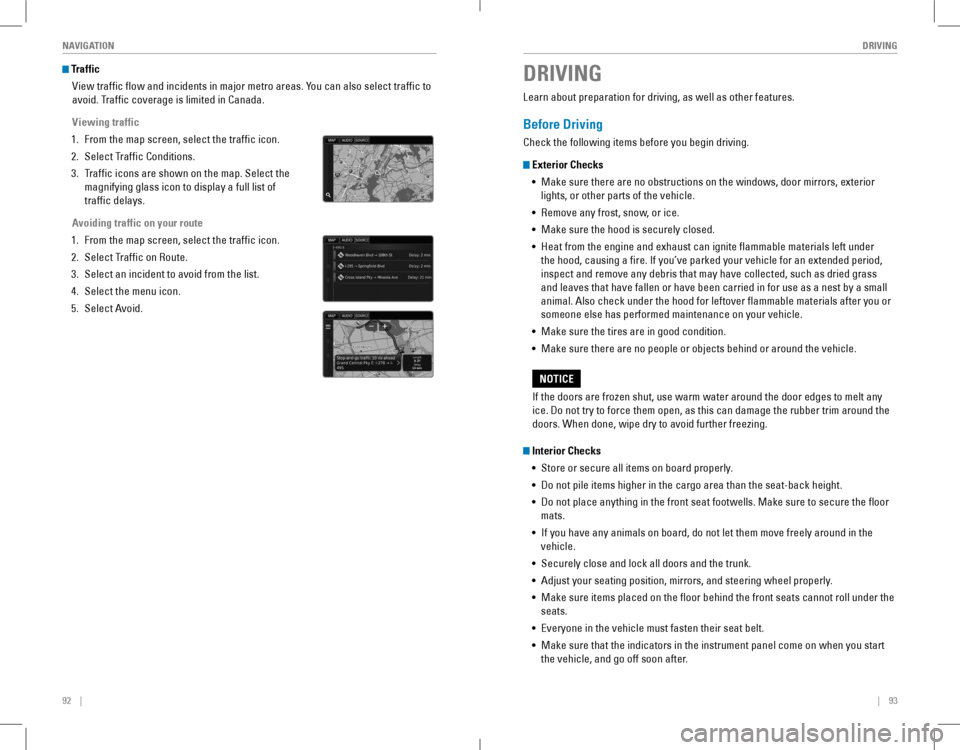
Viewing traffic
1. From the map screen, select the traffic icon.
2. Select Traffic Conditions.
3. Traffic icons are shown on the map. Select the
magnifying glass icon to display a full list of
traffic delays.
Avoiding traffic on your route
1. From the map screen, select the traffic icon.
2. Select Traffic on route.
3. Select an incident to avoid from the list.
4. Select the menu icon.
5. Select Avoid.
DRIVING
Learn about preparation for driving, as well as other features.
Before Driving
Check the following items before you begin driving.
Exterior Checks
• Make sure there are no obstructions on the windows, door mirrors, exterior
lights, or other parts of the vehicle.
• remove any frost, snow, or ice.
• Make sure the hood is securely closed.
• Heat from the engine and exhaust can ignite flammable materials left under
the hood, causing a fire. If you’ve parked your vehicle for an extended period,
inspect and remove any debris that may have collected, such as dried grass
and leaves that have fallen or have been carried in for use as a nest by a small
animal. Also check under the hood for leftover flammable materials after you or
someone else has performed maintenance on your vehicle.
• Make sure the tires are in good condition.
• Make sure there are no people or objects behind or around the vehicle.
Interior Checks
• Store or secure all items on board properly.
• Do not pile items higher in the cargo area than the seat-back height.
• Do not place anything in the front seat footwells. Make sure to secure t\
he floor
mats.
• If you have any animals on board, do not let them move freely around in the
vehicle.
• Securely close and lock all doors and the trunk.
• Adjust your seating position, mirrors, and steering wheel properly.
• Make sure items placed on the floor behind the front seats cannot roll under the
seats.
• Everyone in the vehicle must fasten their seat belt.
• Make sure that the indicators in the instrument panel come on when you s\
tart
the vehicle, and go off soon after.
If the doors are frozen shut, use warm water around the door edges to melt any
ice. Do not try to force them open, as this can damage the rubber trim around the
doors. When done, wipe dry to avoid further freezing.
NOTICE
Page 53 of 84
98 || 99
DRIVINGDRIVING
Remote Engine Start*
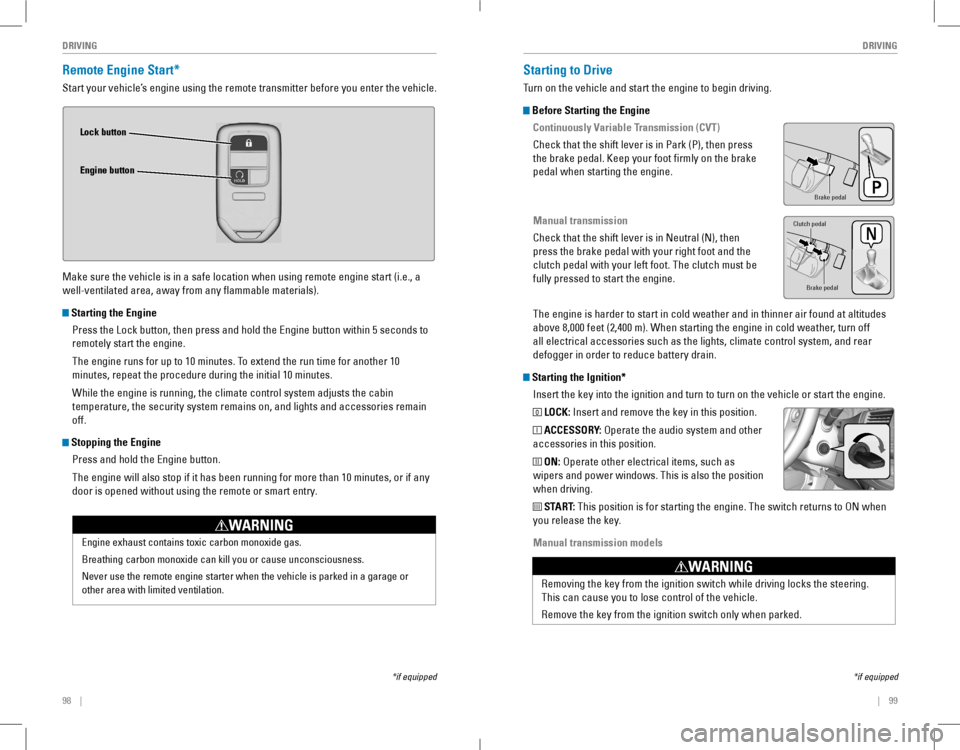
Start your vehicle’s engine using the remote transmitter before you enter the vehicle.
Make sure the vehicle is in a safe location when using remote engine start (i.e., a
well-ventilated area, away from any flammable materials).
Starting the Engine
Press the Lock button, then press and hold the Engine button within 5 seconds to
remotely start the engine.
The engine runs for up to 10 minutes. To extend the run time for another 10
minutes, repeat the procedure during the initial 10 minutes.
While the engine is running, the climate control system adjusts the cabin
temperature, the security system remains on, and lights and accessories remain
off.
Stopping the Engine
Press and hold the Engine button.
The engine will also stop if it has been running for more than 10 minutes, or if any
door is opened without using the remote or smart entry.
Engine exhaust contains toxic carbon monoxide gas.
Breathing carbon monoxide can kill you or cause unconsciousness.
Never use the remote engine starter when the vehicle is parked in a gara\
ge or
other area with limited ventilation.
WARNING
Lock button
Engine button
*if equipped
Starting to Drive
Turn on the vehicle and start the engine to begin driving.
Before Starting the Engine
Continuously Variable Transmission (CVT)
Check that the shift lever is in Park (P), then press
the brake pedal. Keep your foot firmly on the brake
pedal when starting the engine.
Manual transmission
Check that the shift lever is in Neutral (N), then
press the brake pedal with your right foot and the
clutch pedal with your left foot. The clutch must be
fully pressed to start the engine.
The engine is harder to start in cold weather and in thinner air found a\
t altitudes
above 8,000 feet (2,400 m). When starting the engine in cold weather, turn off
all electrical accessories such as the lights, climate control system, a\
nd rear
defogger in order to reduce battery drain.
Starting the Ignition*
Insert the key into the ignition and turn to turn on the vehicle or start the engine.
0 LOCK: Insert and remove the key in this position.
I ACCESSORY: operate the audio system and other
accessories in this position.
II ON: operate other electrical items, such as
wipers and power windows. This is also the position
when driving.
III START: This position is for starting the engine. The switch returns to oN when
you release the key.
Manual transmission models
*if equipped
Brake peda l
Brake pedal
Clutch pedal
removing the key from the ignition switch while driving locks the steerin\
g.
This can cause you to lose control of the vehicle.
remove the key from the ignition switch only when parked.
WARNING
Page 55 of 84
102 || 103
DRIVINGDRIVING
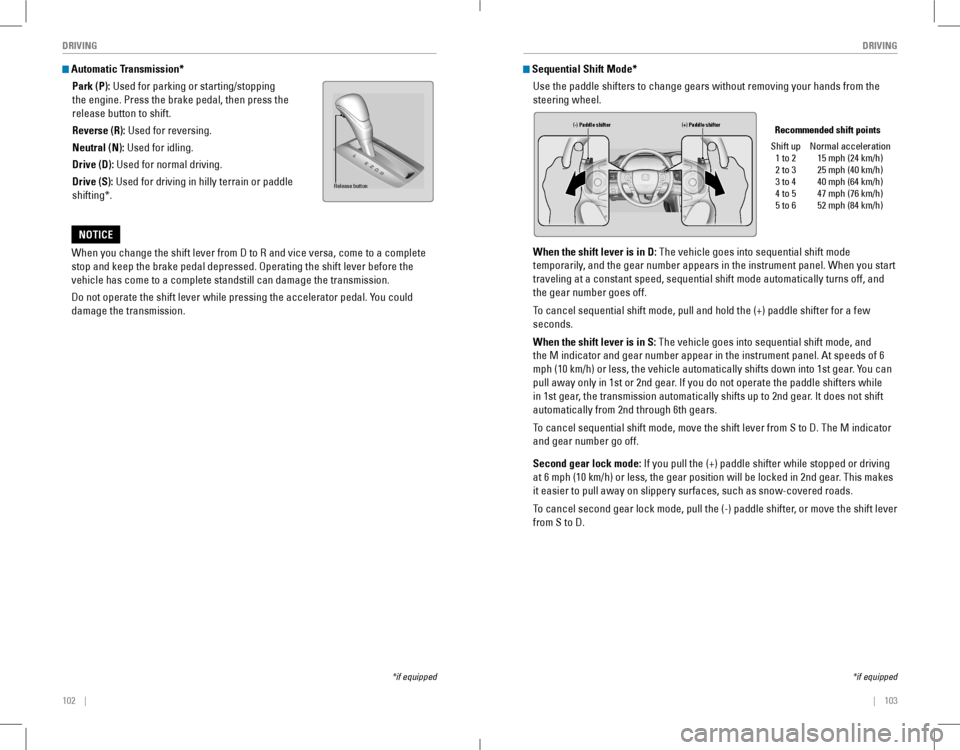
Automatic Transmission*
Park (P): Used for parking or starting/stopping
the engine. Press the brake pedal, then press the
release button to shift.
Reverse (R): Used for reversing.
Neutral (N): Used for idling.
Drive (D): Used for normal driving.
Drive (S): Used for driving in hilly terrain or paddle
shifting*.
When you change the shift lever from D to R and vice versa, come to a complete
stop and keep the brake pedal depressed. Operating the shift lever before the
vehicle has come to a complete standstill can damage the transmission.
Do not operate the shift lever while pressing the accelerator pedal. You could
damage the transmission.
NOTICE
Release button
*if equipped*if equipped
Sequential Shift Mode*
Use the paddle shifters to change gears without removing your hands from\
the
steering wheel.
When the shift lever is in D: The vehicle goes into sequential shift mode
temporarily, and the gear number appears in the instrument panel. When you start
traveling at a constant speed, sequential shift mode automatically turns off, and
the gear number goes off.
To cancel sequential shift mode, pull and hold the (+) paddle shifter for a few
seconds.
When the shift lever is in S: The vehicle goes into sequential shift mode, and
the M indicator and gear number appear in the instrument panel. At speeds of 6
mph (10 km/h) or less, the vehicle automatically shifts down into 1st gear. You can
pull away only in 1st or 2nd gear. If you do not operate the paddle shifters while
in 1st gear, the transmission automatically shifts up to 2nd gear. It does not shift
automatically from 2nd through 6th gears.
To cancel sequential shift mode, move the shift lever from S to D. The M indicator
and gear number go off.
Second gear lock mode: If you pull the (+) paddle shifter while stopped or driving
at 6 mph (10 km/h) or less, the gear position will be locked in 2nd gear. This makes
it easier to pull away on slippery surfaces, such as snow-covered roads.\
To cancel second gear lock mode, pull the (-) paddle shifter, or move the shift lever
from S to D.
(-) Paddle shifter (+) Paddle shifter Recommended shift points
Shift up1 to 22 to 33 to 44 to 55 to 6
Normal acceleration15 mph (24 km/h)25 mph (40 km/h)40 mph (64 km/h)47 mph (76 km/h)52 mph (84 km/h)
Page 56 of 84
104 || 105
DRIVINGDRIVING
*if equipped
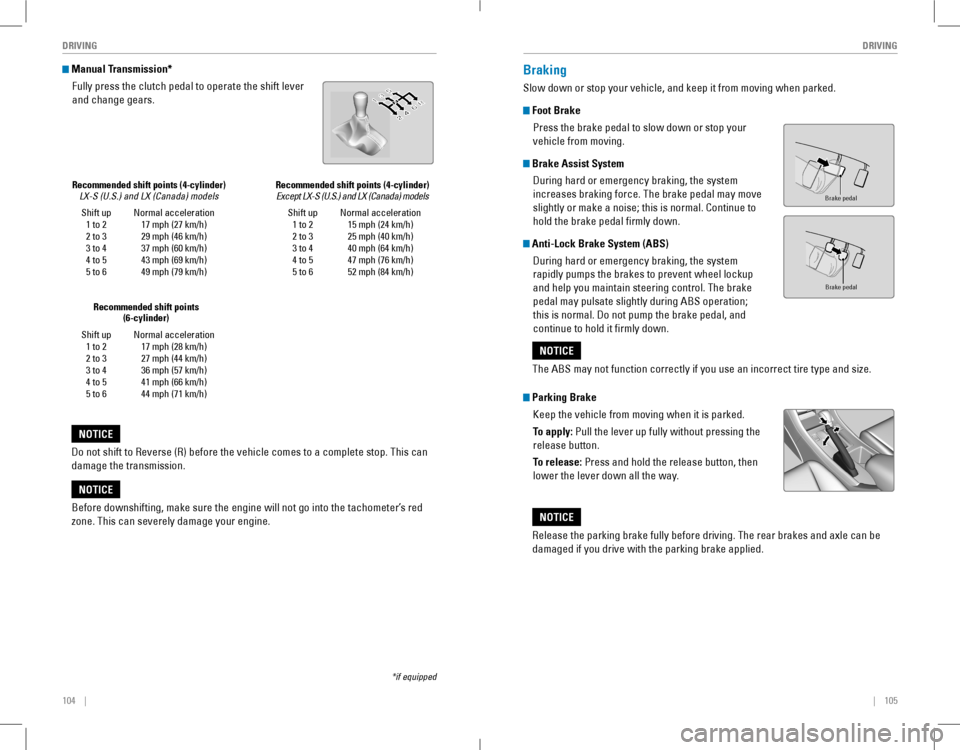
Shift up1 to 22 to 33 to 44 to 55 to 6
Normal acceleration17 mph (27 km/h)29 mph (46 km/h)37 mph (60 km/h)43 mph (69 km/h)49 mph (79 km/h)
Recommended shift points (4-cylinder) LX-S (U.S.) and LX (Canada) models
Manual Transmission*
Fully press the clutch pedal to operate the shift lever
and change gears.
Do not shift to Reverse (R) before the vehicle comes to a complete stop. This can
damage the transmission.
NOTICE
Shift up1 to 22 to 33 to 44 to 55 to 6
Normal acceleration17 mph (28 km/h)27 mph (44 km/h)36 mph (57 km/h)41 mph (66 km/h)44 mph (71 km/h)
Recommended shift points (6-cylinder)
Before downshifting, make sure the engine will not go into the tachomete\
r’s red
zone. This can severely damage your engine.
NOTICE
Braking
Slow down or stop your vehicle, and keep it from moving when parked.
Foot Brake
Press the brake pedal to slow down or stop your
vehicle from moving.
Brake Assist System
During hard or emergency braking, the system
increases braking force. The brake pedal may move
slightly or make a noise; this is normal. Continue to
hold the brake pedal firmly down.
Anti-Lock Brake System (ABS)
During hard or emergency braking, the system
rapidly pumps the brakes to prevent wheel lockup
and help you maintain steering control. The brake
pedal may pulsate slightly during ABS operation;
this is normal. Do not pump the brake pedal, and
continue to hold it firmly down.
Parking Brake
Keep the vehicle from moving when it is parked.
To apply: Pull the lever up fully without pressing the
release button.
To release: Press and hold the release button, then
lower the lever down all the way.
Brake pedal
Brake pedal
The ABS may not function correctly if you use an incorrect tire type and size.
NOTICE
Release the parking brake fully before driving. The rear brakes and axle can be
damaged if you drive with the parking brake applied.
NOTICE
Shift up1 to 22 to 33 to 44 to 55 to 6
Normal acceleration15 mph (24 km/h)25 mph (40 km/h)40 mph (64 km/h)47 mph (76 km/h)52 mph (84 km/h)
Recommended shift points (4-cylinder) Except LX-S (U.S.) and LX (Canada) models
Page 62 of 84
116 || 117
HANDLING THE UNEXPECTEDDRIVING
Refueling
Use the proper fuel and refueling procedure to ensure the best performance and
safety of your vehicle.
Fuel Information
Use of unleaded gasoline of 87 octane or higher is recommended.
• Honda recommends TOP TIER Detergent Gasoline where available.
• Do NOT use gasoline containing more than 15% ethanol.
• Do NoT use gasoline containing methanol.
• Do NoT use gasoline containing MMT.
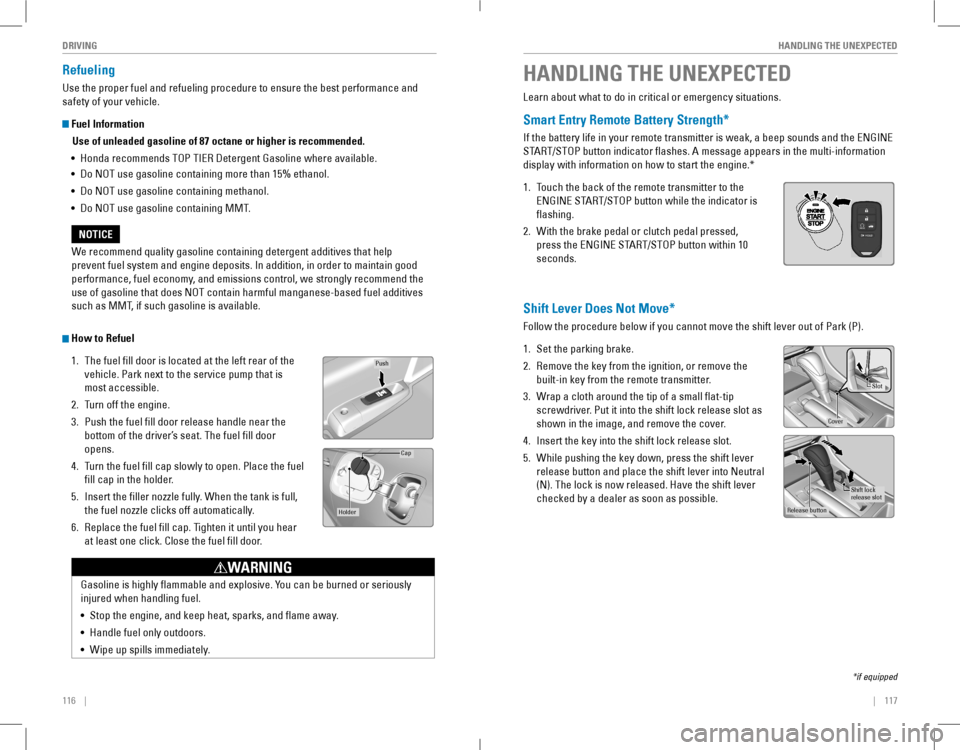
How to Refuel
1. The fuel fill door is located at the left rear of the
vehicle. Park next to the service pump that is
most accessible.
2. Turn off the engine.
3. Push the fuel fill door release handle near the
bottom of the driver’s seat. The fuel fill door
opens.
4. Turn the fuel fill cap slowly to open. Place the fuel
fill cap in the holder.
5. Insert the filler nozzle fully. When the tank is full,
the fuel nozzle clicks off automatically.
6. replace the fuel fill cap. Tighten it until you hear
at least one click. Close the fuel fill door.
Push
Cap
Holder
Gasoline is highly flammable and explosive. You can be burned or seriously
injured when handling fuel.
• Stop the engine, and keep heat, sparks, and flame away.
• Handle fuel only outdoors.
• Wipe up spills immediately.
WARNING
We recommend quality gasoline containing detergent additives that help
prevent fuel system and engine deposits. In addition, in order to maintain good
performance, fuel economy, and emissions control, we strongly recommend the
use of gasoline that does NOT contain harmful manganese-based fuel additives
such as MMT, if such gasoline is available.
NOTICE
HANDLING THE UNEXPECTED
Learn about what to do in critical or emergency situations.
Smart Entry Remote Battery Strength*
If the battery life in your remote transmitter is weak, a beep sounds and the ENGINE
START/STOP button indicator flashes. A message appears in the multi-information
display with information on how to start the engine.*
1. Touch the back of the remote transmitter to the
ENGINE START/STOP button while the indicator is
flashing.
2. With the brake pedal or clutch pedal pressed,
press the ENGINE START/STOP button within 10
seconds.
Shift Lever Does Not Move*
Follow the procedure below if you cannot move the shift lever out of Park (P).
1. Set the parking brake.
2. remove the key from the ignition, or remove the
built-in key from the remote transmitter.
3. Wrap a cloth around the tip of a small flat-tip
screwdriver. Put it into the shift lock release slot as
shown in the image, and remove the cover.
4. Insert the key into the shift lock release slot.
5. While pushing the key down, press the shift lever
release button and place the shift lever into Neutral
(N). The lock is now released. Have the shift lever
checked by a dealer as soon as possible.
*if equipped
Slot
Cove r
Release button
Shift lock
release slo t
FPO
Page 64 of 84
120 || 121
HANDLING THE UNEXPECTEDHANDLING THE UNEXPECTED
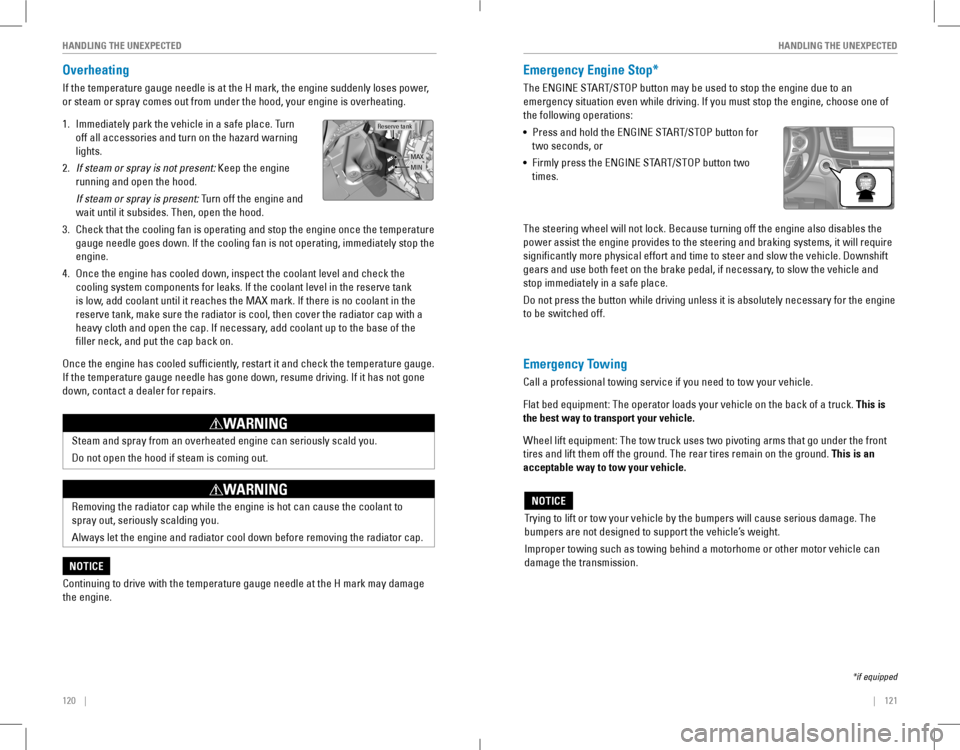
Overheating
If the temperature gauge needle is at the H mark, the engine suddenly loses power,
or steam or spray comes out from under the hood, your engine is overheat\
ing.
1. Immediately park the vehicle in a safe place. Turn
off all accessories and turn on the hazard warning
lights.
2. If steam or spray is not present: Keep the engine
running and open the hood.
If steam or spray is present: Turn off the engine and
wait until it subsides. Then, open the hood.
3. Check that the cooling fan is operating and stop the engine once the tem\
perature
gauge needle goes down. If the cooling fan is not operating, immediately stop the
engine.
4. once the engine has cooled down, inspect the coolant level and check the \
cooling system components for leaks. If the coolant level in the reserve tank
is low, add coolant until it reaches the MAX mark. If there is no coolant in the
reserve tank, make sure the radiator is cool, then cover the radiator ca\
p with a
heavy cloth and open the cap. If necessary, add coolant up to the base of the
filler neck, and put the cap back on.
once the engine has cooled sufficiently, restart it and check the temperature gauge.
If the temperature gauge needle has gone down, resume driving. If it has not gone
down, contact a dealer for repairs.
MAX
Reserve tank
MIN
Steam and spray from an overheated engine can seriously scald you.
Do not open the hood if steam is coming out.
WARNING
removing the radiator cap while the engine is hot can cause the coolant t\
o
spray out, seriously scalding you.
Always let the engine and radiator cool down before removing the radiator cap.
WARNING
Continuing to drive with the temperature gauge needle at the H mark may \
damage
the engine.
NOTICE
Emergency Engine Stop*
The ENGINE START/STOP button may be used to stop the engine due to an
emergency situation even while driving. If you must stop the engine, choose one of
the following operations:
• Press and hold the ENGINE START/STOP button for
two seconds, or
• Firmly press the ENGINE START/STOP button two
times.
The steering wheel will not lock. Because turning off the engine also disables the
power assist the engine provides to the steering and braking systems, it will require
significantly more physical effort and time to steer and slow the vehi\
cle. Downshift
gears and use both feet on the brake pedal, if necessary, to slow the vehicle and
stop immediately in a safe place.
Do not press the button while driving unless it is absolutely necessary for the engine
to be switched off.
*if equipped
Trying to lift or tow your vehicle by the bumpers will cause serious damage. The
bumpers are not designed to support the vehicle’s weight.
Improper towing such as towing behind a motorhome or other motor vehicle can
damage the transmission.
NOTICE
Emergency Towing
Call a professional towing service if you need to tow your vehicle.
Flat bed equipment: The operator loads your vehicle on the back of a truck. This is
the best way to transport your vehicle.
Wheel lift equipment: The tow truck uses two pivoting arms that go under the front
tires and lift them off the ground. The rear tires remain on the ground.\
This is an
acceptable way to tow your vehicle.