lights HONDA ACCORD COUPE 2016 9.G Quick Guide
[x] Cancel search | Manufacturer: HONDA, Model Year: 2016, Model line: ACCORD COUPE, Model: HONDA ACCORD COUPE 2016 9.GPages: 84, PDF Size: 19.4 MB
Page 3 of 84
INTRODUCTIONTABLE OF CONTENTS
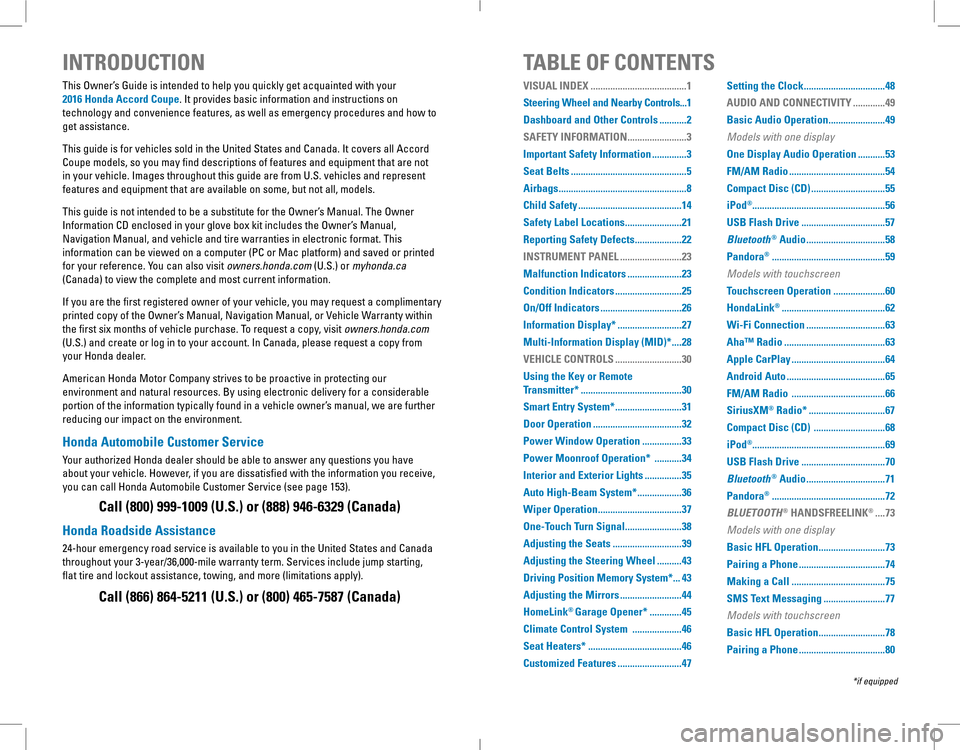
This Owner’s Guide is intended to help you quickly get acquainted with your
2016 Honda Accord Coupe. It provides basic information and instructions on
technology and convenience features, as well as emergency procedures and\
how to
get assistance.
This guide is for vehicles sold in the United States and Canada. It covers all Accord
Coupe models, so you may find descriptions of features and equipment that are not
in your vehicle. Images throughout this guide are from U.S. vehicles and represent
features and equipment that are available on some, but not all, models.
This guide is not intended to be a substitute for the Owner’s Manual. The Owner
Information CD enclosed in your glove box kit includes the Owner’s Manual,
Navigation Manual, and vehicle and tire warranties in electronic format.\
This
information can be viewed on a computer (PC or Mac platform) and saved or printed
for your reference. You can also visit owners.honda.com (U.S.) or myhonda.ca
(Canada) to view the complete and most current information.
If you are the first registered owner of your vehicle, you may request a complimentary
printed copy of the Owner’s Manual, Navigation Manual, or Vehicle Warranty within
the first six months of vehicle purchase. To request a copy, visit owners.honda.com
(U.S.) and create or log in to your account. In Canada, please request a copy from
your Honda dealer.
American Honda Motor Company strives to be proactive in protecting our
environment and natural resources. By using electronic delivery for a considerable
portion of the information typically found in a vehicle owner’s manual, we are further
reducing our impact on the environment.
Honda Automobile Customer Service
Your authorized Honda dealer should be able to answer any questions you have
about your vehicle. However, if you are dissatisfied with the information you receive,
you can call Honda Automobile Customer Service (see page 153).
Call (800) 999-1009 (U.S.) or (888) 946-6329 (Canada)
Honda Roadside Assistance
24-hour emergency road service is available to you in the United States and Canada
throughout your 3-year/36,000-mile warranty term. Services include jump starting,
flat tire and lockout assistance, towing, and more (limitations apply\
).
Call (866) 864-5211 (U.S.) or (800) 465-7587 (Canada)
*if equipped
VISUAL INDEX .......................................1
Steering Wheel and Nearby Controls...1
Dashboard and Other Controls ...........2
SAFETY INFORMATION ........................3
Important Safety Information ..............3
Seat Belts ...............................................5
Airbags ....................................................8
Child Safety ..........................................14
Safety Label Locations .......................21
Reporting Safety Defects ...................22
INSTRUMENT PANEL .........................23
Malfunction Indicators ......................23
Condition Indicators ...........................25
On/Off Indicators .................................26
Information Display* ..........................27
Multi-Information Display (MID)* ....28
VEHICLE CONTROLS ...........................30
Using the Key or Remote
Transmitter* .........................................30
Smart Entry System* ...........................31
Door Operation ....................................32
Power Window Operation ................33
Power Moonroof Operation* ...........34
Interior and Exterior Lights ...............35
Auto High-Beam System* ..................36
Wiper Operation ..................................37
One-Touch Turn Signal .......................38
Adjusting the Seats ............................39
Adjusting the Steering Wheel ..........43
Driving Position Memory System* ...43
Adjusting the Mirrors .........................44
HomeLink® Garage Opener* .............45
Climate Control System ....................46
Seat Heaters* ......................................46
Customized Features ..........................47
Setting the Clock .................................48
AUDIO AND CONNECTIVITY .............49
Basic Audio Operation .......................49
Models with one display
One Display Audio Operation ...........53
FM/AM Radio .......................................54
Compact Disc (CD) ..............................55
iPod®......................................................56
USB Flash Drive ..................................57
Bluetooth® Audio ................................58
Pandora® ..............................................59
Models with touchscreen
Touchscreen Operation .....................60
HondaLink® ..........................................62
Wi-Fi Connection ................................63
Aha™ Radio .........................................63
Apple CarPlay ......................................64
Android Auto ........................................65
FM/AM Radio ......................................66
SiriusXM® Radio* ...............................67
Compact Disc (CD) .............................68
iPod®......................................................69
USB Flash Drive ..................................70
Bluetooth® Audio ................................71
Pandora® ..............................................72
BLUETOOTH® HANDSFREELINK® ....73
Models with one display
Basic HFL Operation ...........................73
Pairing a Phone ...................................74
Making a Call ......................................75
SMS Text Messaging .........................77
Models with touchscreen
Basic HFL Operation ...........................78
Pairing a Phone ...................................80
Page 4 of 84
| 1
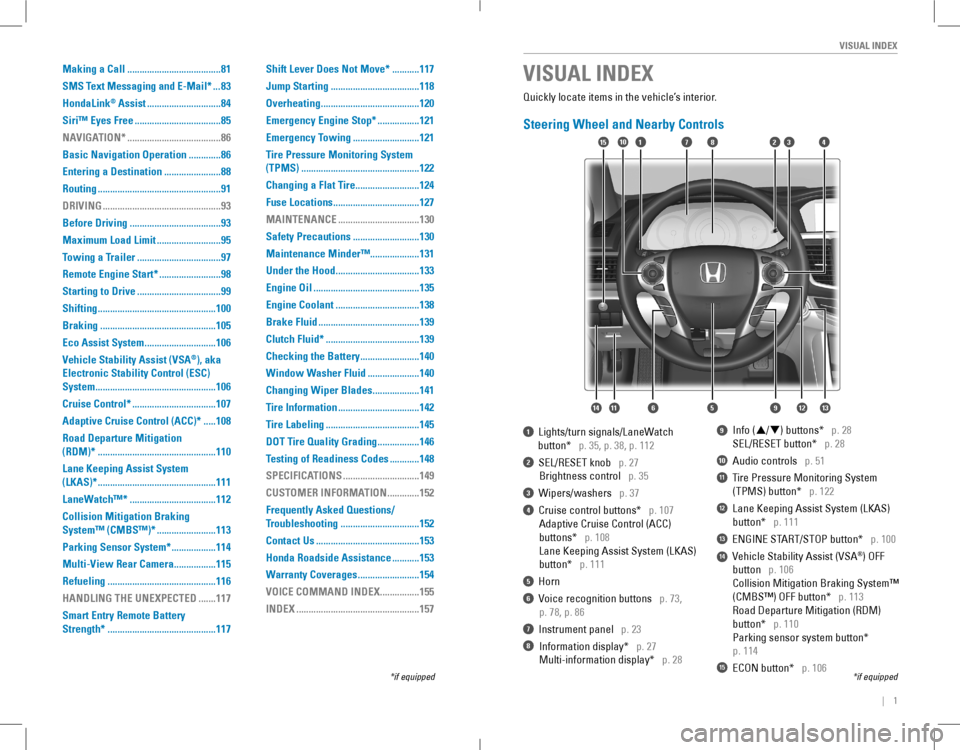
VISUAL INDEX
1 Lights/turn signals/LaneWatch
button* p. 35, p. 38, p. 112
2 SEL/RESET knob p. 27
Brightness control p. 35
3 Wipers/washers p. 37
4 Cruise control buttons* p. 107
Adaptive Cruise Control (ACC)
buttons* p. 108
Lane Keeping Assist System (LKAS)
button* p. 111
5 Horn
6 Voice recognition buttons p. 73,
p. 78, p. 86
7 Instrument panel p. 23
8 Information display* p. 27
Multi-information display* p. 28
9 Info (p/q) buttons* p. 28
SEL/RESET button* p. 28
10 Audio controls p. 51
11 Tire Pressure Monitoring System
(TPMS) button* p. 122
12 Lane Keeping Assist System (LKAS)
button* p. 111
13 ENGINE START/STOP button* p. 100
14 Vehicle Stability Assist (VSA®) oFF
button p. 106
Collision Mitigation Braking System™
(CMBS™) OFF button* p. 113
road Departure Mitigation (rDM)
button* p. 110
Parking sensor system button*
p. 114
15 ECON button* p. 106
VISUAL INDEX
*if equipped*if equipped
Quickly locate items in the vehicle’s interior.
Steering Wheel and Nearby Controls
12
5
107415
116
38
9121314
Making a Call ......................................81
SMS Text Messaging and E-Mail* ...83
HondaLink® Assist ..............................84
Siri™ Eyes Free ...................................85
NAVIGATION* ......................................86
Basic Navigation Operation .............86
Entering a Destination .......................88
Routing ..................................................91
DRIVING ................................................93
Before Driving .....................................93
Maximum Load Limit ..........................95
Towing a Trailer ..................................97
Remote Engine Start* .........................98
Starting to Drive ..................................99
Shifting ................................................100
Braking ...............................................105
Eco Assist System .............................106
Vehicle Stability Assist (VSA®), aka
Electronic Stability Control (ESC)
System .................................................106
Cruise Control* ..................................107
Adaptive Cruise Control (ACC)* .....108
Road Departure Mitigation
(RDM)* ................................................110
Lane Keeping Assist System
(LKAS)* ................................................111
LaneWatch™* ...................................112
Collision Mitigation Braking
System™ (CMBS™)* ........................113
Parking Sensor System* ..................114
Multi-View Rear Camera .................115
Refueling ............................................116
HANDLING THE UNEXPECTED .......117
Smart Entry Remote Battery
Strength* ............................................117
Shift Lever Does Not Move* ...........117
Jump Starting ....................................118
Overheating ........................................120
Emergency Engine Stop* .................121
Emergency Towing ...........................121
Tire Pressure Monitoring System
(TPMS) ................................................122
Changing a Flat Tire ..........................124
Fuse Locations ...................................127
MAINTENANCE .................................130
Safety Precautions ...........................130
Maintenance Minder™....................131
Under the Hood ..................................133
Engine Oil ...........................................135
Engine Coolant ..................................138
Brake Fluid .........................................139
Clutch Fluid* ......................................139
Checking the Battery ........................140
Window Washer Fluid .....................140
Changing Wiper Blades ...................141
Tire Information .................................142
Tire Labeling ......................................145
DOT Tire Quality Grading .................146
Testing of Readiness Codes ............148
SPECIFICATIONS ...............................149
CUSTOMER INFORMATION .............152
Frequently Asked Questions/
Troubleshooting ................................152
Contact Us ..........................................153
Honda Roadside Assistance ...........153
Warranty Coverages .........................154
VOICE COMMAND INDEX ................155
INDEX ..................................................157
Page 16 of 84
24 || 25
INSTRUMENT PANELINSTRUMENT PANEL
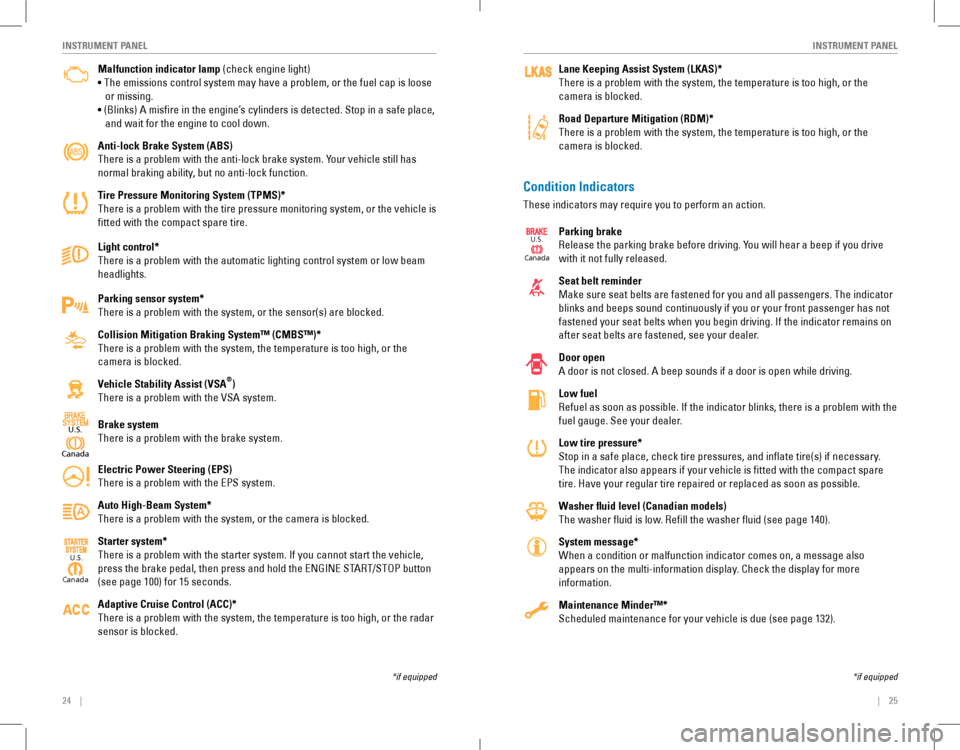
Malfunction indicator lamp (check engine light)
• The emissions control system may have a problem, or the fuel cap is loose
or missing.
• (Blinks) A misfire in the engine’s cylinders is detected. Stop in a safe place,
and wait for the engine to cool down.
Anti-lock Brake System (ABS)
There is a problem with the anti-lock brake system. Your vehicle still has
normal braking ability, but no anti-lock function.
Tire Pressure Monitoring System (TPMS)*
There is a problem with the tire pressure monitoring system, or the vehicle is
fitted with the compact spare tire.
Light control*
There is a problem with the automatic lighting control system or low beam
headlights.
Parking sensor system*
There is a problem with the system, or the sensor(s) are blocked.
Collision Mitigation Braking System™ (CMBS™)*
There is a problem with the system, the temperature is too high, or the
camera is blocked.
Vehicle Stability Assist (VSA®)
There is a problem with the VSA system.
Brake system
There is a problem with the brake system.
Electric Power Steering (EPS)
There is a problem with the EPS system.
Auto High-Beam System*
There is a problem with the system, or the camera is blocked.
Starter system*
There is a problem with the starter system. If you cannot start the vehicle,
press the brake pedal, then press and hold the ENGINE START/STOP button
(see page 100) for 15 seconds.
Adaptive Cruise Control (ACC)*
There is a problem with the system, the temperature is too high, or the radar
sensor is blocked.
Canada
U.S.
*if equipped
Condition Indicators
These indicators may require you to perform an action.
Parking brake
Release the parking brake before driving. You will hear a beep if you drive
with it not fully released.
Seat belt reminder
Make sure seat belts are fastened for you and all passengers. The indicator
blinks and beeps sound continuously if you or your front passenger has not
fastened your seat belts when you begin driving. If the indicator remains on
after seat belts are fastened, see your dealer.
Door open
A door is not closed. A beep sounds if a door is open while driving.
Low fuel
Refuel as soon as possible. If the indicator blinks, there is a problem with the
fuel gauge. See your dealer.
Low tire pressure*
Stop in a safe place, check tire pressures, and inflate tire(s) if n\
ecessary.
The indicator also appears if your vehicle is fitted with the compact \
spare
tire. Have your regular tire repaired or replaced as soon as possible.
Washer fluid level (Canadian models)
The washer fluid is low. refill the washer fluid (see page 140).
System message*
When a condition or malfunction indicator comes on, a message also
appears on the multi-information display. Check the display for more
information.
Maintenance Minder™*
Scheduled maintenance for your vehicle is due (see page 132).
*if equipped
Lane Keeping Assist System (LKAS)*
There is a problem with the system, the temperature is too high, or the
camera is blocked.
Road Departure Mitigation (RDM)*
There is a problem with the system, the temperature is too high, or the
camera is blocked.
Canada
U.S.
Canada
U.S.
Page 17 of 84
26 || 27
INSTRUMENT PANELINSTRUMENT PANEL
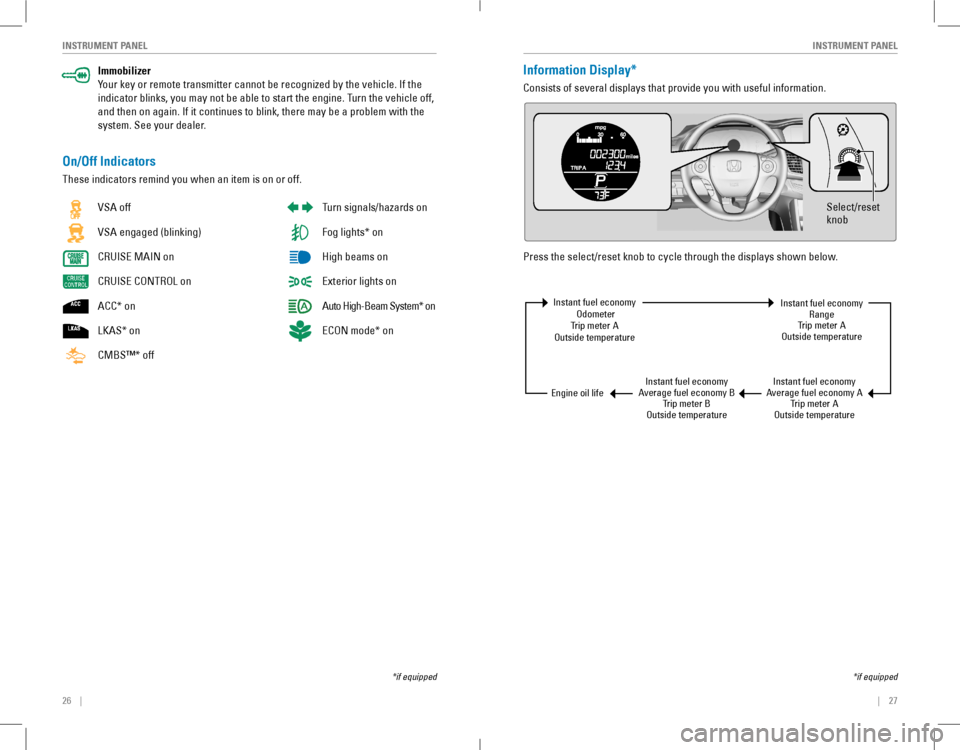
Immobilizer
Your key or remote transmitter cannot be recognized by the vehicle. If the
indicator blinks, you may not be able to start the engine. Turn the vehicle off,
and then on again. If it continues to blink, there may be a problem with the
system. See your dealer.
On/Off Indicators
These indicators remind you when an item is on or off.
*if equipped
vSA off
VSA engaged (blinking)
CRUISE MAIN on
CRUISE CONTROL on
ACC* on
LKAS* on
CMBS™* off
Turn signals/hazards on
Fog lights* on
High beams on
exterior lights on
Auto High-Beam System* on
ECON mode* on
Information Display*
Consists of several displays that provide you with useful information.
Press the select/reset knob to cycle through the displays shown below.
Select/reset
knob
Instant fuel economy odometerTrip meter Aoutside temperature
Instant fuel economyAverage fuel economy BTrip meter Boutside temperature
Instant fuel economyAverage fuel economy ATrip meter Aoutside temperature
Instant fuel economyrangeTrip meter Aoutside temperature
engine oil life
*if equipped
Page 21 of 84
34 || 35
VEHICLE CONTROLSVEHICLE CONTROLS
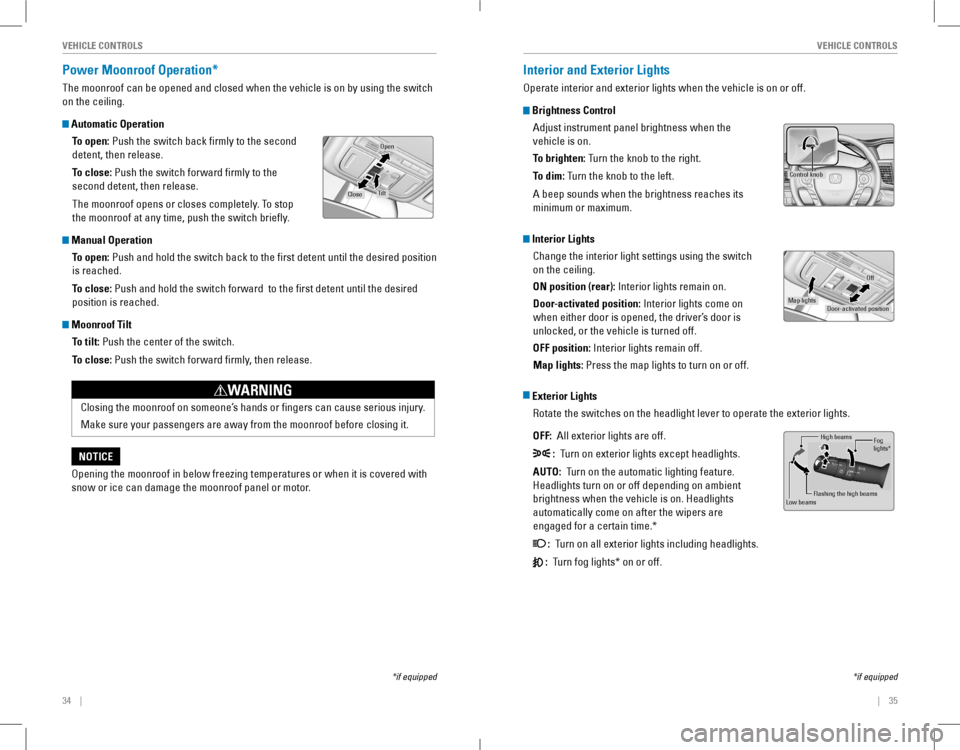
Power Moonroof Operation*
The moonroof can be opened and closed when the vehicle is on by using the switch
on the ceiling.
Automatic Operation
To open: Push the switch back firmly to the second
detent, then release.
To close: Push the switch forward firmly to the
second detent, then release.
The moonroof opens or closes completely. To stop
the moonroof at any time, push the switch briefly.
Manual Operation
To open: Push and hold the switch back to the first detent until the desired position
is reached.
To close: Push and hold the switch forward to the first detent until the desir\
ed
position is reached.
Moonroof Tilt
To tilt: Push the center of the switch.
To close: Push the switch forward firmly, then release.
*if equipped
Open
CloseTilt
Opening the moonroof in below freezing temperatures or when it is covered with
snow or ice can damage the moonroof panel or motor.
NOTICE
Closing the moonroof on someone’s hands or fingers can cause serious injury.
Make sure your passengers are away from the moonroof before closing it.
WARNING
Interior and Exterior Lights
operate interior and exterior lights when the vehicle is on or off.
Brightness Control
Adjust instrument panel brightness when the
vehicle is on.
To brighten: Turn the knob to the right.
To dim: Turn the knob to the left.
A beep sounds when the brightness reaches its
minimum or maximum.
Interior Lights
Change the interior light settings using the switch
on the ceiling.
ON position (rear): Interior lights remain on.
Door-activated position: Interior lights come on
when either door is opened, the driver’s door is
unlocked, or the vehicle is turned off.
OFF position: Interior lights remain off.
Map lights: Press the map lights to turn on or off.
Exterior Lights
rotate the switches on the headlight lever to operate the exterior lights\
.
OFF: All exterior lights are off.
: Turn on exterior lights except headlights.
AUTO: Turn on the automatic lighting feature.
Headlights turn on or off depending on ambient
brightness when the vehicle is on. Headlights
automatically come on after the wipers are
engaged for a certain time.*
: Turn on all exterior lights including headlights.
: Turn fog lights* on or off.
*if equipped
Control knob
Door-activated position
Off
Map lights
High beams
Flashing the high beam s
Low beamsFog
lights *
Page 22 of 84
36 || 37
VEHICLE CONTROLSVEHICLE CONTROLS
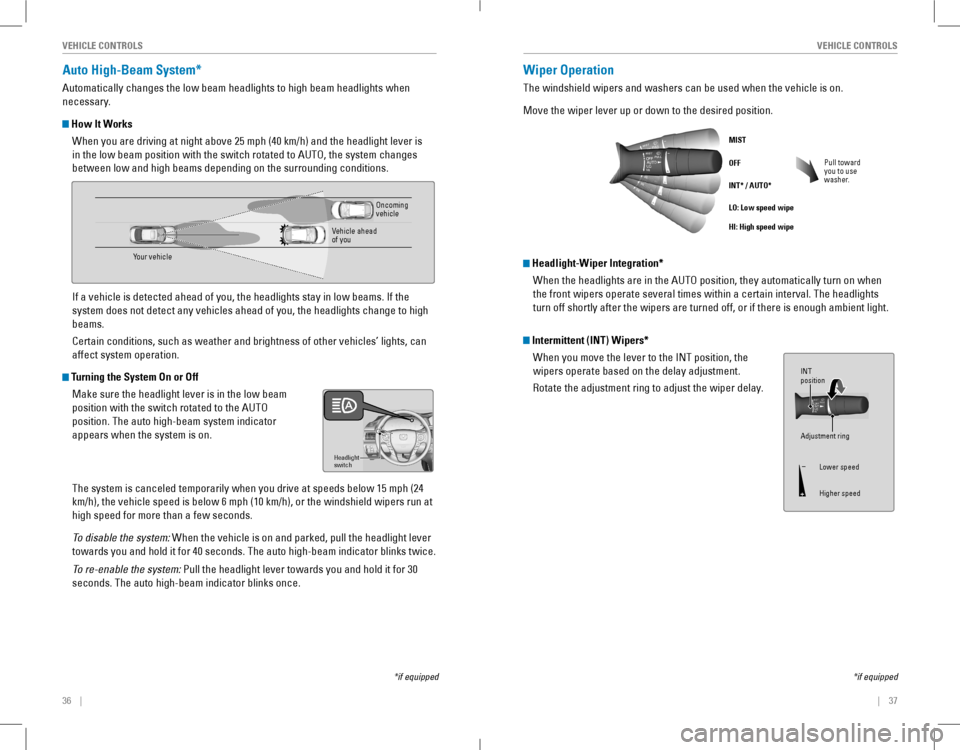
Auto High-Beam System*
Automatically changes the low beam headlights to high beam headlights when
necessary.
How It Works
When you are driving at night above 25 mph (40 km/h) and the headlight lever is
in the low beam position with the switch rotated to AUTO, the system changes
between low and high beams depending on the surrounding conditions.
If a vehicle is detected ahead of you, the headlights stay in low beams. If the
system does not detect any vehicles ahead of you, the headlights change \
to high
beams.
Certain conditions, such as weather and brightness of other vehicles’ lights, can
affect system operation.
Turning the System On or Off
Make sure the headlight lever is in the low beam
position with the switch rotated to the AUTo
position. The auto high-beam system indicator
appears when the system is on.
The system is canceled temporarily when you drive at speeds below 15 mph (24
km/h), the vehicle speed is below 6 mph (10 km/h), or the windshield wipers run at
high speed for more than a few seconds.
To disable the system: When the vehicle is on and parked, pull the headlight lever
towards you and hold it for 40 seconds. The auto high-beam indicator blinks twice.
To re-enable the system: Pull the headlight lever towards you and hold it for 30
seconds. The auto high-beam indicator blinks once.
Headlight
switch
*if equipped
Your vehicle
oncoming vehicle
vehicle ahead of you
Wiper Operation
The windshield wipers and washers can be used when the vehicle is on.
Move the wiper lever up or down to the desired position.
Pull toward you to use washer.
MIST
OFF
INT* / AUTO*
LO: Low speed wipe
HI: High speed wipe
*if equipped
Intermittent (INT) Wipers*
When you move the lever to the INT position, the
wipers operate based on the delay adjustment.
rotate the adjustment ring to adjust the wiper delay.
Headlight-Wiper Integration*
When the headlights are in the AUTO position, they automatically turn on when
the front wipers operate several times within a certain interval. The he\
adlights
turn off shortly after the wipers are turned off, or if there is enough ambient light.
Adjustment ring
INT
position
Lower speed
Higher speed
Page 26 of 84
44 || 45
VEHICLE CONTROLSVEHICLE CONTROLS
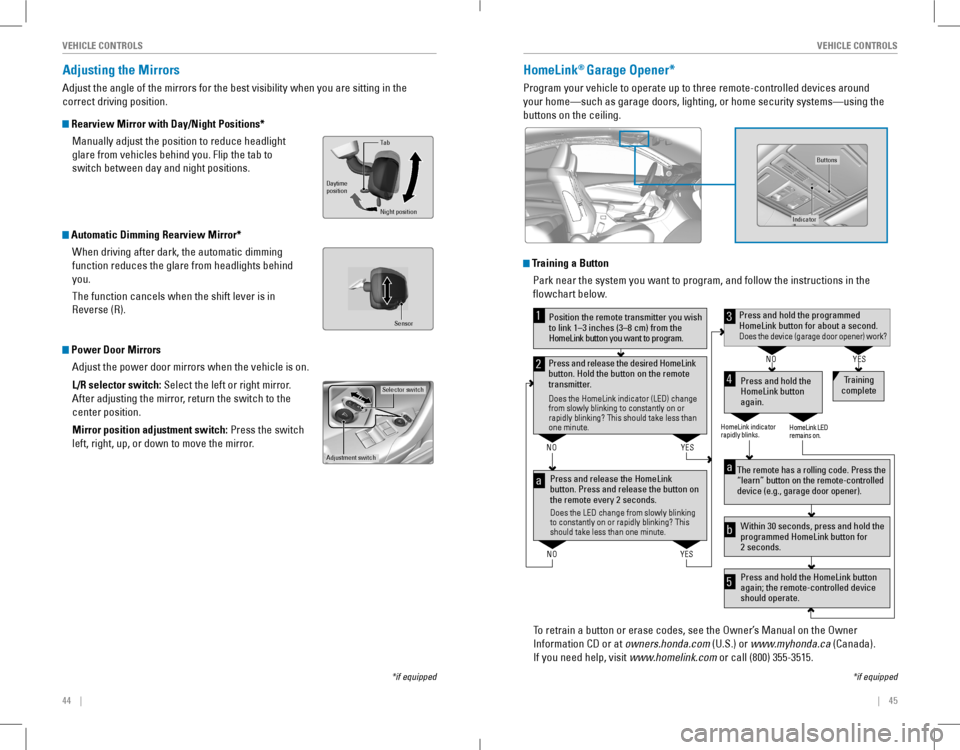
Adjusting the Mirrors
Adjust the angle of the mirrors for the best visibility when you are sitting in the
correct driving position.
Rearview Mirror with Day/Night Positions*
Manually adjust the position to reduce headlight
glare from vehicles behind you. Flip the tab to
switch between day and night positions.
Automatic Dimming Rearview Mirror*
When driving after dark, the automatic dimming
function reduces the glare from headlights behind
you.
The function cancels when the shift lever is in
reverse (r).
Power Door Mirrors
Adjust the power door mirrors when the vehicle is on.
L/R selector switch: Select the left or right mirror.
After adjusting the mirror, return the switch to the
center position.
Mirror position adjustment switch: Press the switch
left, right, up, or down to move the mirror.
Selector switch
Adjustment switch
Tab
Daytime
position
Night position
HomeLink® Garage Opener*
Program your vehicle to operate up to three remote-controlled devices ar\
ound
your home—such as garage doors, lighting, or home security systems—\
using the
buttons on the ceiling.
Training a Button
Park near the system you want to program, and follow the instructions in\
the
flowchart below.
To retrain a button or erase codes, see the Owner’s Manual on the Owner
Information CD or at owners.honda.com (U.S.) or www.myhonda.ca (Canada).
If you need help, visit www.homelink.com or call (800) 355-3515.
Press and release the HomeLink
button. Press and release the button on
the remote every 2 seconds.
Does the LED change from slowly blinking
to constantly on or rapidly blinking? This
should take less than one minute.
Press and hold the
HomeLink button
again. T
raining
complete
YES
NO
HomeLink indicator
rapidly blinks. HomeLink LED
remains on.
YES
NO
YES
NO
Position the remote transmitter you wish
to link 1–3 inches (3–8 cm) from the
HomeLink button you want to program.1
Press and release the desired HomeLink
button. Hold the button on the remote
transmitter .
Does the HomeLink indicator (LED) change
from slowly blinking to constantly on or
rapidly blinking? This should take less than
one minute.
2
aThe remote has a rolling code. Press the
“learn” button on the remote-controlled
device (e.g., garage door opener) .
Press and hold the HomeLink button
again; the remote-controlled device
should operate. Within 30 seconds, press and hold the
programmed HomeLink button for
2 seconds.a
Press and hold the programmed HomeLink button for about a second.Does the device (garage door opener) work?
3
b
4
5
*if equipped
Indicato r
Buttons
Sensor
*if equipped
Page 50 of 84
92 || 93
DRIVINGNAVIGATION
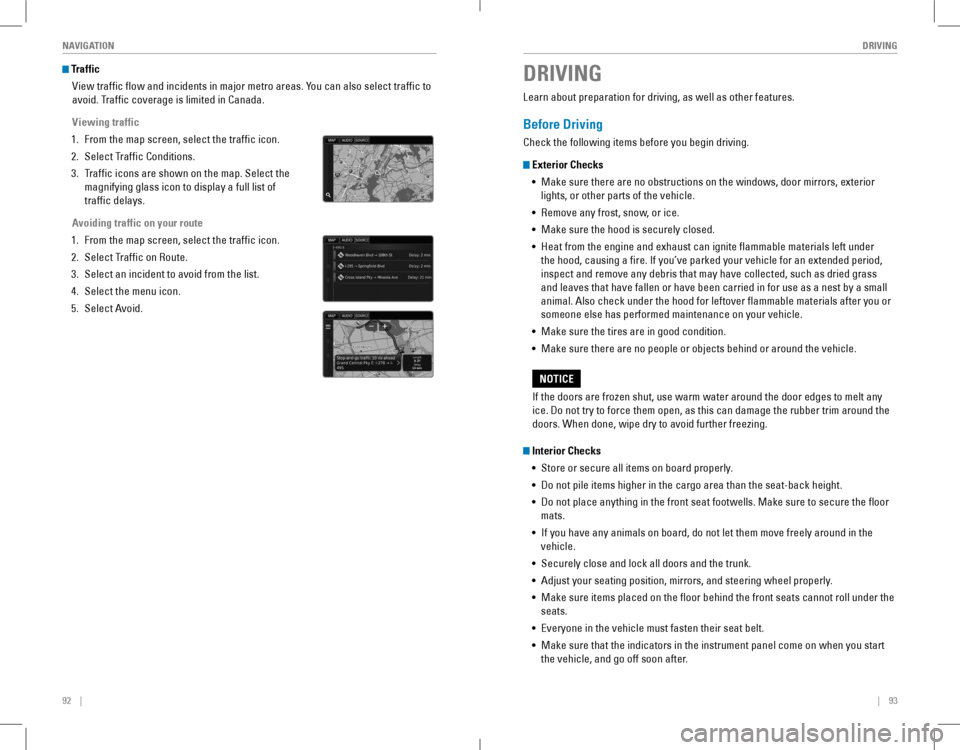
Traffic
view traffic flow and incidents in major metro areas. You can also select traffic to
avoid. Traffic coverage is limited in Canada.
Viewing traffic
1. From the map screen, select the traffic icon.
2. Select Traffic Conditions.
3. Traffic icons are shown on the map. Select the
magnifying glass icon to display a full list of
traffic delays.
Avoiding traffic on your route
1. From the map screen, select the traffic icon.
2. Select Traffic on route.
3. Select an incident to avoid from the list.
4. Select the menu icon.
5. Select Avoid.
DRIVING
Learn about preparation for driving, as well as other features.
Before Driving
Check the following items before you begin driving.
Exterior Checks
• Make sure there are no obstructions on the windows, door mirrors, exterior
lights, or other parts of the vehicle.
• remove any frost, snow, or ice.
• Make sure the hood is securely closed.
• Heat from the engine and exhaust can ignite flammable materials left under
the hood, causing a fire. If you’ve parked your vehicle for an extended period,
inspect and remove any debris that may have collected, such as dried grass
and leaves that have fallen or have been carried in for use as a nest by a small
animal. Also check under the hood for leftover flammable materials after you or
someone else has performed maintenance on your vehicle.
• Make sure the tires are in good condition.
• Make sure there are no people or objects behind or around the vehicle.
Interior Checks
• Store or secure all items on board properly.
• Do not pile items higher in the cargo area than the seat-back height.
• Do not place anything in the front seat footwells. Make sure to secure t\
he floor
mats.
• If you have any animals on board, do not let them move freely around in the
vehicle.
• Securely close and lock all doors and the trunk.
• Adjust your seating position, mirrors, and steering wheel properly.
• Make sure items placed on the floor behind the front seats cannot roll under the
seats.
• Everyone in the vehicle must fasten their seat belt.
• Make sure that the indicators in the instrument panel come on when you s\
tart
the vehicle, and go off soon after.
If the doors are frozen shut, use warm water around the door edges to melt any
ice. Do not try to force them open, as this can damage the rubber trim around the
doors. When done, wipe dry to avoid further freezing.
NOTICE
Page 53 of 84
98 || 99
DRIVINGDRIVING
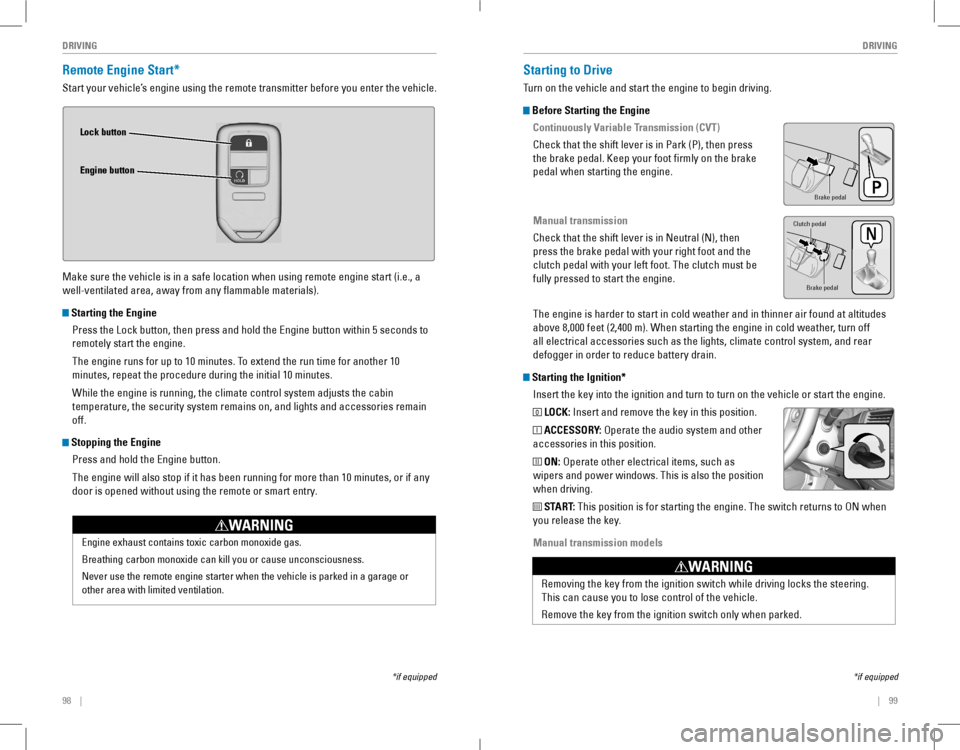
Remote Engine Start*
Start your vehicle’s engine using the remote transmitter before you enter the vehicle.
Make sure the vehicle is in a safe location when using remote engine start (i.e., a
well-ventilated area, away from any flammable materials).
Starting the Engine
Press the Lock button, then press and hold the Engine button within 5 seconds to
remotely start the engine.
The engine runs for up to 10 minutes. To extend the run time for another 10
minutes, repeat the procedure during the initial 10 minutes.
While the engine is running, the climate control system adjusts the cabin
temperature, the security system remains on, and lights and accessories remain
off.
Stopping the Engine
Press and hold the Engine button.
The engine will also stop if it has been running for more than 10 minutes, or if any
door is opened without using the remote or smart entry.
Engine exhaust contains toxic carbon monoxide gas.
Breathing carbon monoxide can kill you or cause unconsciousness.
Never use the remote engine starter when the vehicle is parked in a gara\
ge or
other area with limited ventilation.
WARNING
Lock button
Engine button
*if equipped
Starting to Drive
Turn on the vehicle and start the engine to begin driving.
Before Starting the Engine
Continuously Variable Transmission (CVT)
Check that the shift lever is in Park (P), then press
the brake pedal. Keep your foot firmly on the brake
pedal when starting the engine.
Manual transmission
Check that the shift lever is in Neutral (N), then
press the brake pedal with your right foot and the
clutch pedal with your left foot. The clutch must be
fully pressed to start the engine.
The engine is harder to start in cold weather and in thinner air found a\
t altitudes
above 8,000 feet (2,400 m). When starting the engine in cold weather, turn off
all electrical accessories such as the lights, climate control system, a\
nd rear
defogger in order to reduce battery drain.
Starting the Ignition*
Insert the key into the ignition and turn to turn on the vehicle or start the engine.
0 LOCK: Insert and remove the key in this position.
I ACCESSORY: operate the audio system and other
accessories in this position.
II ON: operate other electrical items, such as
wipers and power windows. This is also the position
when driving.
III START: This position is for starting the engine. The switch returns to oN when
you release the key.
Manual transmission models
*if equipped
Brake peda l
Brake pedal
Clutch pedal
removing the key from the ignition switch while driving locks the steerin\
g.
This can cause you to lose control of the vehicle.
remove the key from the ignition switch only when parked.
WARNING
Page 60 of 84
112 || 113
DRIVINGDRIVING
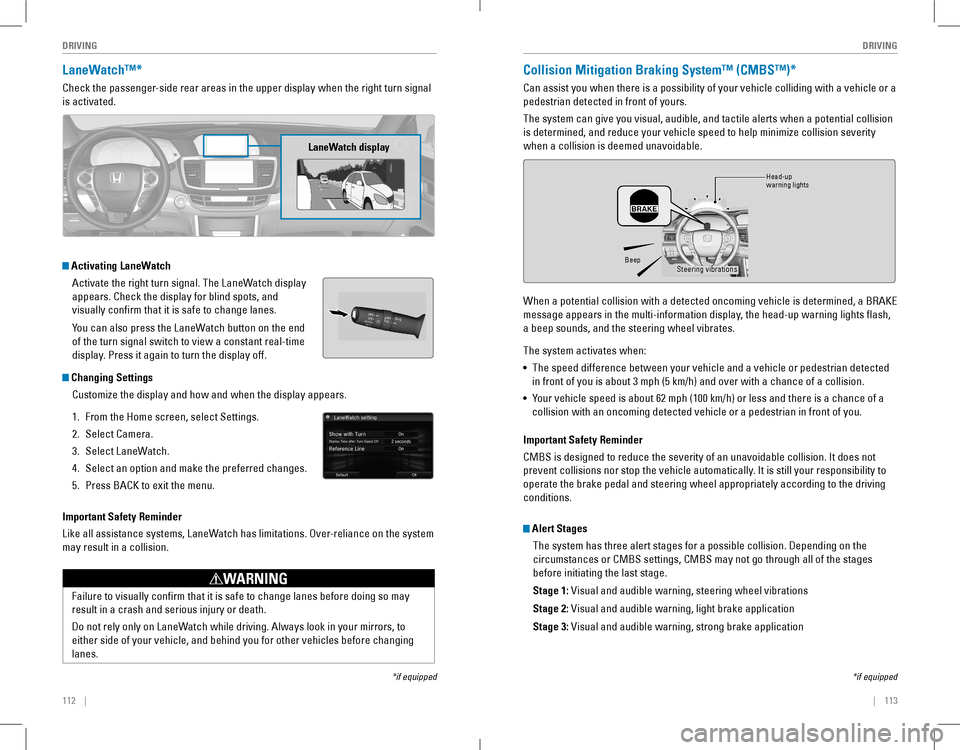
LaneWatch™*
Check the passenger-side rear areas in the upper display when the right turn signal
is activated.
Activating LaneWatch
Activate the right turn signal. The LaneWatch display
appears. Check the display for blind spots, and
visually confirm that it is safe to change lanes.
You can also press the LaneWatch button on the end
of the turn signal switch to view a constant real-time
display. Press it again to turn the display off.
Changing Settings
Customize the display and how and when the display appears.
1. From the Home screen, select Settings.
2. Select Camera.
3. Select LaneWatch.
4. Select an option and make the preferred changes.
5. Press BACK to exit the menu.
Important Safety Reminder
Like all assistance systems, LaneWatch has limitations. Over-reliance on the system
may result in a collision.
*if equipped
LaneWatch display
Failure to visually confirm that it is safe to change lanes before doing so may
result in a crash and serious injury or death.
Do not rely only on LaneWatch while driving. Always look in your mirrors, to
either side of your vehicle, and behind you for other vehicles before changing
lanes.
WARNING
Collision Mitigation Braking System™ (CMBS™)*
Can assist you when there is a possibility of your vehicle colliding with a vehicle or a
pedestrian detected in front of yours.
The system can give you visual, audible, and tactile alerts when a potential collision
is determined, and reduce your vehicle speed to help minimize collision severity
when a collision is deemed unavoidable.
When a potential collision with a detected oncoming vehicle is determined, a BRAKE
message appears in the multi-information display, the head-up warning lights flash,
a beep sounds, and the steering wheel vibrates.
The system activates when:
• The speed difference between your vehicle and a vehicle or pedestrian detected
in front of you is about 3 mph (5 km/h) and over with a chance of a collision.
• Your vehicle speed is about 62 mph (100 km/h) or less and there is a chance of a
collision with an oncoming detected vehicle or a pedestrian in front of \
you.
*if equipped
Alert Stages
The system has three alert stages for a possible collision. Depending on the
circumstances or CMBS settings, CMBS may not go through all of the stage\
s
before initiating the last stage.
Stage 1: Visual and audible warning, steering wheel vibrations
Stage 2: Visual and audible warning, light brake application
Stage 3: Visual and audible warning, strong brake application
BeepHead-up
warning lights Steering vibrations
Important Safety Reminder
CMBS is designed to reduce the severity of an unavoidable collision. It does not
prevent collisions nor stop the vehicle automatically. It is still your responsibility to
operate the brake pedal and steering wheel appropriately according to the driving
conditions.